1
Introduction
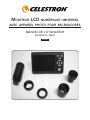
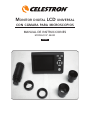
Thank you for purchasing the Celestron universal LCD Monitor
with Digital Camera Accessory (LMDC). This product is a precision
optical instrument, made of the highest quality materials to
ensure durability and long life.
snapshots or short videos with the supplied digital camera. You can
also view your images on a TV monitor.
The final section provides simple care and maintenance tips for
you to follow to ensure that your accessory provides you with years
of quality performance, usage, and enjoyment.
Before attempting to use the LCD Monitor with Digital Camera,
please read through the instructions to familiarize yourself with the
functions and operations to maximize your enjoyment and usage.
Note: The LCD monitor viewing will be full screen size, 3.5” (89
mm), when using an image tube of a microscope (if available) or
a 2” (50 mm) circular image when using an eyepiece tube used
for normal viewing with eyepieces.
The LCD Monitor and Camera does not use eyepieces. You will
view specimens or objects on the LCD screen which are easy
to see and you can enjoy them with others also. You can take
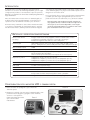
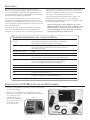
Standard Items and Specifications
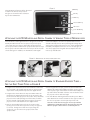
LCD Monitor – 3.5” (89 mm)
2” circular image when using eyepiece tubes and full screen viewing when
using image tubes. High Definition Digital TFT display – 320x240 pixels
Digital Camera
3MP CMOS; 10x magnification in lieu of an eyepiece;
2048x1536 pixel array; JPEG for snapshots;
AVI files for video – 640x380 pixels (30fps)
Flash Memory – Internal 32MB
SD Card Slot Optional SD Card can be used up to 2GB
LCD Positioning 100° vertical range (from even position – 60° up and 40° down;
360° horizontal – positioning on most microscopes)
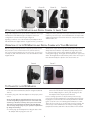
Adapters/Tubes
23.2 mm and 30 mm Tube Adapters;
12.5 mm Joint Adapter/Connector (CS type adapter);
17.5 mm Joint Adapter/Connector (C type adapter)
Projection Mirror Tube
USB Cable 1.1 Mini – length 5’ (1.5m)
Instruction Manual
Power/Current Output – 5-Volt DC / 1A
AC Adapter Input – Universal 100 to 240Volt, 50/60HZ;
Four plugs included – USA/EU/UK/Australia
Weight/Dimensions 10oz (283g) / 5” (127 mm) x 6.5” (165 mm) x 3.5” (89 mm)
Setting Up Your LCD Monitor and Digital Camera
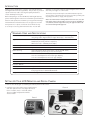
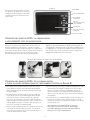
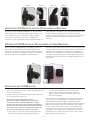
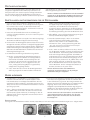
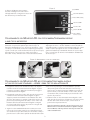
1. Remove the case (Figure 1) containing the various parts from the carton.
2. Carefully remove the LCD monitor, Digital Camera
and other parts from the case (Figure 2) and set
them on a table, desk, or other flat surface.
There are additional parts which will be
discussed later.
Figure 2
LCD Monitor
Figure 1
Projection
Mirror Tube
23.2mm
Tube Adapter
17.5 mm
Joint Adapter
12.5 mm
Joint Adapter
2
30 mm
Tube
Adapter