1
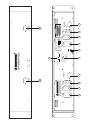
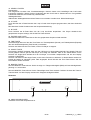
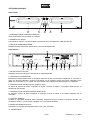
9. REMOTE SELECT
For selecting the respective connection type for the Faderstart-mixer.
10. AC CONNECTION
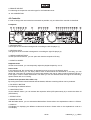
4.3 Controller
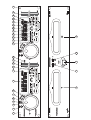
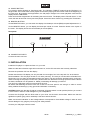
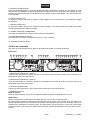
In order to design this user manual as structured as possible, only one side of the controller is described.
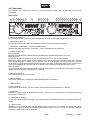
Frontpanel:
1
3
4
5
6
7
8
9
10
11 12 13 14
15 16 17 18 19 20 21 22 23 24 25
2
1. SECTION UNIT 1
The left part of the controller is designed for controlling the left CD-player (1).
2. SECTION UNIT 2
The right part of the controller is designed for controlling the right CD-player (2).
3. OPEN/CLOSE BUTTONS
Via the Open/Close-buttons, you can open and close the respective CD-tray.
4. SCRATCH-WHEEL
Playback-mode:
Via the Scratch-wheel, you can temporarily adjust the playback-speed by ±16 %.
Pause-mode:
In the pause-mode, the current frame is repeated as soon as you turn the Scratch-wheel.
Via the Scratch-wheel, you can slowly search within a title forwards and backwards. In this way, you can
easily find a Cue-point for example.Turn the Scratch-wheel to the right in order to search forwards and turn it
to the right in order to search backwards. The faster you turn the Scratch-wheel the higher the searchingspeed. Please refer to 6.7 Cueing.
Scratch-mode (Scratch effect LED is lit):
By turning the Scratch-wheel forwards and backwards, different scratching-effects can be produced.
5. FX SELECT-BUTTON
For selecting the different effects.
6. ON/OFF-BUTTON
Via the ON/OFF-button, you can activate the respective effect (LED permanently lit) or switch the effect off
(LED flashes).
7. EFFECT-LEDS
8. BRAKE-BUTTON
With the Brake-button, you can activate the Brake-effect. Please refer to the explanations under 6.11 Effects.
9. DISPLAY
LCD-display for displaying the different modes and functions. Please refer to the explanations under 6.3
LCD-display.
23/55
10602320_V_1_0.DOC