1
TemeoTrend P
Art. No. 70-04403
Wetterstation mit Projektor und Dual-Weckfunktion
Weather station with projector and dual alarm function
DE
GB
FR
NL
ES
IT
BEDIENUNGSANLEITUNG .........3
INSTRUCTION MANUAL .........20
MODE D’EMPLOI ...................35
HANDLEIDING .......................52
INSTRUCCIONES DE USO.......68
ISTRUZIONI PER L’USO..........85
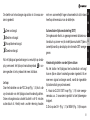
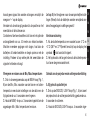
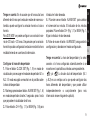
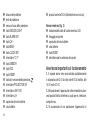
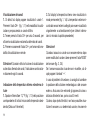
Fig. 1
B
O
b
Of O
c
O
c
O
d
O
a
O
e
O
1*
O
1(
O
g
O
2
Oi
h
O
D
O
I O
F O
J
G O
O
H O
No No
signal
quality
signal
quality
Weak
signal
quality
Weak
signal
quality
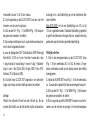
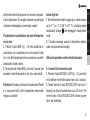
Fig. 2
Acceptable
signal
quality
Excellent
signal
quality
Acceptable
signal
quality
Excellent
signal
quality
1O$
2!
1% O
O
1^
O
1&
O
MADE IN CHINA
MADE IN CHINA
2%
RESET CH 1 2 3
RESET CH 1 2 3
433MHz
433MHz
THERMO SENSOR
THERMO SENSOR
E
O
2)
O
2@
2^
2#
2$
1! O
1@ O
1#
1) O
O
3
Zu dieser Anleitung
Sie Kinder beim Umgang mit dem Gerät nie unbeaufsichtigt! Die Nutzung darf nur, wie in der Anleitung beschrieben, erfolgen, andernfalls besteht GEFAHR eines
STROMSCHLAGS!
Ausgelaufene Batteriesäure kann zu Verätzungen führen!
Vermeiden Sie den Kontakt von Batteriesäure mit Haut,
Augen und Schleimhäuten. Spülen Sie bei Kontakt mit der
Säure die betroffenen Stellen sofort mit reichlich klarem
Wasser und suchen Sie einen Arzt auf.
Allgemeine Sicherheitshinweise
BRAND-/EXPLOSIONSGEFAHR!
Setzen Sie das Gerät keinen hohen Temperaturen aus.
Benutzen Sie nur die empfohlenen Batterien. Gerät und
Batterien nicht kurzschließen oder ins Feuer werfen!
Durch übermäßige Hitze und unsachgemäße Handhabung können Kurzschlüsse, Brände und sogar Explosionen ausgelöst werden!
Lesen Sie vor der Benutzung des Geräts aufmerksam
die Sicherheitshinweise und die Bedienungsanleitung.
Bewahren Sie diese Bedienungsanleitung für die erneute
Verwendung zu einem späteren Zeitpunkt auf. Bei Verkauf
oder Weitergabe des Gerätes ist die Bedienungsanleitung
an jeden nachfolgenden Besitzer/Benutzer des Produkts
weiterzugeben.
Das Gerät ist nur für den Betrieb in Innenräumen bestimmt!
GEFAHR von Körperschäden!
Kinder dürfen das Gerät nur unter Aufsicht benutzen. Verpackungsmaterialien (Plastiktüten, Gummibänder, etc.)
von Kindern fernhalten! Es besteht ERSTICKUNGSGEFAHR! Dieses Gerät beinhaltet Elektronikteile, die über
eine Stromquelle (Batterien) betrieben werden. Lassen
4
HINWEIS!
Bauen Sie das Gerät nicht auseinander! Wenden Sie sich
im Falle eines Defekts an Ihren Fachhändler. Er nimmt mit
dem Service-Center Kontakt auf und kann das Gerät ggf.
zwecks Reparatur einschicken.
Setzen Sie das Gerät keinen Erschütterungen aus!
Benutzen Sie nur die empfohlenen Batterien. Ersetzen
Sie schwache oder verbrauchte Batterien immer durch
einen komplett neuen Satz Batterien mit voller Kapazität.
Verwenden Sie keine Batterien unterschiedlicher Marken,
Typen oder unterschiedlich hoher Kapazität. Entfernen
Sie Batterien aus dem Gerät, wenn es längere Zeit nicht
benutzt wird!
Keinesfalls normale, nicht wieder aufladbare Batterien
aufladen! Sie können in Folge des Ladens explodieren.
Für Spannungsschäden in Folge falsch eingelegter Batterien übernimmt der Hersteller keine Haftung!
Lieferumfang
DE
Wetterstation, Außensensor, Bedienungsanleitung,
Es werden 4 Batterien vom Typ AA benötigt (nicht im Lieferumfang enthalten).
Teileübersicht
GB
FR
NL
Wetterstation (Fig. 1)
B LCD-Display mit folgenden Anzeigewerten:
a. Wetteranzeige
b. Kanalanzeige
c. Außentemperatur
d. Innenraumtemperatur
e. Aktuelle Uhrzeit
f. Außensender-Empfangssignal
g. Funkuhr Empfangssymbol
h. Daten
i. Wochentag
C Projektorarm
ES
IT
5
D
E
F
G
H
I
J
1)
1!
1@
1#
1$
1%
1^
1&
1*
1(
2)
6
Projektionslinse
Projektionsscharfeinstellung
SNOOZE/LIGHT Taste
ALARM SET Taste
CH + Taste
MEM - Taste
CLOCK SET Taste
°C/°F Schalter
SENSOR Taste
RCC Taste
RESET Taste
Projektion-Umkehrtaste
PROJECTION ON Schalter
LIGHT ON Schalter
L/H Schalter
Batteriefachabdeckung
Batteriefach
DC-In Stromanschluss (Netzteil nicht inklusive)
Außensensor (Fig. 2)
2! LED-Betriebsanzeige
2@ Wandhalterung
2# Batteriefachabdeckung
2$ Batteriefach
2% RESET Taste
2^ Schalter für die Kanalwahl
Wichtige Funktionshinweise
1. Das Zeitsignal wird täglich automatisch jeweils um 2:00
(AM), 8:00 (AM), 14:00 (2:00 PM) und 20:00 (8:00 PM)
synchronisiert.
2. Positionieren Sie das Gerät niemals im direkten Umfeld
von möglichen Störquellen wie z.B. Fernseher, Computer,
etc.
3. Vermeiden Sie die Aufstellung in der Nähe von metallischen Gegenständen.
4. In abgeschlossenen Bereichen wie z.B. Flughäfen,
Kellern, Hochhäusern oder Produktionshallen ist eine einwandfreie Funktionalität nicht gewährleistet.
Die Wetterstation kann alternativ auch mit einem externen
Netzteil* betrieben werden (DC 4.5V).
INBETRIEBNAHME
Dieses Gerät kann nicht gleichzeitig mit Batterien
und einem Stromadapter betrieben werden. Die gleichzeitige Verwendung führt zu irreparablen Schäden am Gerät,
für die der Hersteller keine Haftung übernimmt! Für Spannungsschäden durch die Nutzung eines nicht geeigneten
Netzteils übernimmt der Hersteller keine Haftung!
1. Entfernen Sie die Batteriefachabdeckungen der Wetterstation (Fig. 1, 18) und des Außensensors (Fig. 2, 23).
2. Setzen Sie je 2 neue Batterien vom Typ AA in die Batteriefächer der Wetterstation (Fig. 1, 19) und des Außensensors (Fig. 2, 24) ein. Achten Sie beim Einlegen auf
die korrekte polare Ausrichtung der Batterien wie in den
Fächern dargestellt.
Hinweis: Wird die Anzeige der Wetterstation schwächer,
so tauschen Sie die Batterien der Wetterstation aus.
im Display, so ist die LadekapaErscheint das Symbol
zität der Batterien im Außensensor erschöpft. Tauschen
Sie dann die Batterien im Außensender aus.
3. Setzen Sie zunächst nur die Batteriefachabdeckung
der Wetterstation (Fig. 1, 18) wieder auf.
4. Nach dem Einsetzen der Batterien leuchten alle Anzeigeelemente auf.
5. Drücken Sie zuerst die RESET Taste der Wetterstation
(Fig. 1, 13) und anschließend die RESET Taste des Außensensors (Fig. 2, 25).
6. Das Funksignal des Außensensors wird für die Ka7
DE
GB
FR
NL
ES
IT
nalprüfung innerhalb von ca. 8 Sekunden automatisch
übertragen.
7. Nach Abschluss der Kanalprüfung (ca. 5 Minuten) empfängt die Wetterstation nun automatisch das Funksignal
des Außensensors und zeigt die aktuellen Daten an.
8. Mittels Funkübertragung werden die aktuelle Uhrzeit und das Datum automatisch über die Zeitsignale
für Deutschland (DCF77) und das vereinigte Königreich
(MSF) synchronisiert.
9. Setzen Sie nun die Batteriefachabdeckung des Außensensors (Fig. 2, 23) wieder auf.
Beachten Sie: Die Wetterstation kann die Signale von
bis zu 3 Außensensoren empfangen und die Daten anzeigen. Positionieren Sie Wetterstation und Außensensor
innerhalb des maximalen Empfangsbereichs, der unter
normalen Verhältnissen etwa 50 Meter beträgt. In manchen Fällen ist die Übermittlung des Funksignals gestört.
8
Entfernen Sie dann die Batterien aus Wetterstation und
Außensensor und führen Sie die oben beschriebenen
Schritte erneut durch.
FUNKTIONEN
Wetterstation
LCD-Display (Fig. 1, 1)
Zeigt die aktuelle Uhrzeit, Weckzeit/Datum, Innen- und
Außentemperatur sowie die Wetterprognose an.
SNOOZE/LIGHT Taste (Fig. 1, 5)
Taste drücken, um Hintergrundbeleuchtung und Projektion zu aktivieren. Bei Ertönen des Wecksignals Taste drücken, um den Weckalarm zu unterbrechen und Schlummerfunktion zu aktivieren.
CLOCK SET Taste (Fig. 1, 9)
Taste drücken, um zwischen den Modi Alarm1, Alarm2
und Datum zu wechseln. Taste ca. 2 Sekunden gedrückt
halten, um in den Zeit-Einstellungsmodus zu wechseln.
Taste im Zeit-Einstellungsmodus drücken, um zum nächsten Eingabefeld zu springen. Taste im Einstellungsmodus
etwa 2 Sekunden gedrückt halten, um die Einstellungen
zu speichern und den Einstellungsmodus zu verlassen.
ALARM SET Taste (Fig. 1, 6)
Taste im Anzeigemodus drücken, um Alarm 1 und Alarm2
ein- oder auszuschalten. Taste im Modus Alarm 1 drücken, um Alarm1 ein- oder auszuschalten.
Taste im Modus Alarm 2 drücken, um Alarm2 ein- oder
auszuschalten. Taste im Modus Alarm1/Alarm 2 ca. 2 Sekunden gedrückt halten, um in den Alarm-Einstellungsmodus für Alarm 1/Alarm2 zu wechseln. Taste im Alarm-Einstellungsmodus drücken, um zum nächsten Eingabefeld
zu springen. Taste im Einstellungsmodus etwa 2 Sekunden gedrückt halten, um die Einstellungen zu speichern
und den Einstellungsmodus zu verlassen.
CH/+ Taste (Fig. 1, 7)
Taste im Anzeigemodus drücken, um Kanal 1,2 oder 3
eines Außensensors zu wählen. Taste ca. 2 Sekunden
gedrückt halten, um die automatische Kanal-Wechselanzeige zu aktivieren. Taste erneut drücken, um in den
normalen Anzeigemodus zurückzukehren. Taste im Einstellungsmodus drücken, um den Wert eines blinkenden
Feldes zu erhöhen.
MEM/- key (Fig. 1, 8)
Taste drücken, um Max.-/Min.-Werte für Innen- und Außentemperatur ca. 5 Sekunden anzeigen zu lassen.
Taste im Max.-/Min.-Modus ca. 2 Sekunden gedrückt halten, um die Max./Min.-Werte zu löschen.
9
DE
GB
FR
NL
ES
IT
Taste im Einstellungsmodus drücken, um den Wert eines
blinkenden Feldes zu verringern.
RESET Taste (Fig. 1, 13)
Taste im Fall einer Fehlfunktion mit einem dünnen Metallstab drücken, um Geräteeinstellungen zurückzusetzen.
°C/°F Schalter (Fig. 1, 10)
Schalter auf Position °C oder °F bewegen, um zwischen
Temperaturanzeige in °C oder °F zu wechseln.
Umkehrtaste (Fig. 1, 14)
Taste drücken um Projektionsdarstellung umzukehren
SENSOR Taste (Fig. 1, 11)
Taste drücken, um die Kanalprüfung für Wetterstation und
Außensensor durchzuführen.
Projektorarm (Fig. 1, 2)
Projeziert aktuelle Uhrzeit, Temperatur und Wetterprognose an Wand oder Decke. Um max. 180° schwenkbar.
RCC Taste (Fig. 1, 12)
Taste ca. 8 Sekunden gedrückt halten, um den automatischen Empfang des Zeitsignals zu aktivieren oder zu
deaktivieren.
Projektionsscharfeinstellung (Fig. 1, 4)
Scharfeinstellungsrad drehen, um die Abbildungsschärfe
der Projektion einzustellen.
10
PROJECTION ON Schalter (Fig. 1, 15)
Hinweis: Diese Funktion ist nur bei Anschluss der Wetterstation über ein externes Netzteil verfügbar.
Schalter auf Position ON bewegen, um die permanente
Projektion zu aktivieren bzw. auf entgegengesetzte Position bewegen, um Funktion zu deaktivieren.
LIGHT ON Schalter (Fig. 1, 16)
Hinweis: Diese Funktion ist nur bei Anschluss der Wetterstation über ein externes Netzteil verfügbar.
Schalter auf Position ON bewegen, um die permanente
Hintergrundbeleuchtung zu aktivieren bzw. in entgegengesetzte Position bewegen, um Funktion zu deaktivieren.
L/H Schalter (Fig. 1, 17)
Einstellen der Helligkeit der Hintergrundbeleuchtung.
Schalter auf Position L bewegen, um gedimmte Hintergrundbeleuchtung einzustellen.
Schalter auf Position H bewegen, um stärkere Hintergrundbeleuchtung einzustellen.
Außensensor
DE
GB
FR
LED-Betriebsanzeige (Fig. 2, 21)
Blinkt beim Übertragen von Informationen an die Wetterstation.
NL
ES
IT
Schalter für die Kanalwahl (Fig. 2, 26)
Schieben Sie den Schalter auf die Position 1, 2 oder 3.
RESET Taste (Fig. 2, 25)
Taste im Fall einer Fehlfunktion mit einem dünnen Metallstab drücken, um Geräteeinstellungen zurückzusetzen.
Wandhalterung (Fig. 2, 22)
Zur Befestigung des Sensors an einem geeigneten Wandhaken.
11
EINSTELLUNGEN UND ANZEIGEN
Automatisches Einstellen der Uhrzeit und des Datums.
Anzeige der Signalstärke
Die Anzeige der Signalstärke ist in 4 Levels gegliedert.
Blinkt das Symbol , so wird das Zeitsignal empfangen.
Die Stärke des empfangenen Signals lässt sich in 4 Arten
unterteilen:
Kein Empfang
Schlechter Empfang
Akzeptabler Empfang
Guter Empfang
Wurde das Zeitsignal erfolgreich empfangen, erscheint
auf dem Display permanent das Symbol Zeitsynchronisa. Andernfalls wird das Symbol nicht länger angetion
zeigt.
12
Beachten Sie: Durch Drücken der RCC Taste (Fig. 1, 5)
können Sie die Synchronisation des Zeitsignals auch manuell starten. Dieser Empfangsmodus schaltet sich nach
6-15 Minuten automatisch ab. Hierbei ist jedoch mit einem wesentlich höheren Stromverbrauch zu rechnen, der
die Lebensdauer der Batterien beeinträchtigt.
Automatische Zeitumstellung (DST)
Die integrierte Uhr ist so programmiert, dass sie automatisch auf Sommer- bzw. Winterzeit umgestellt wird. Während der Sommerzeit wird im Display die Information DST
angezeigt.
Manuelles Einstellen der Uhrzeit und des Datums
Empfängt die Station das Zeitsignal nicht automatisch,
können Uhrzeit und Datum manuell eingestellt werden.
Wird wieder ein Signal empfangen, wird die eingestellte
Uhrzeit automatisch synchronisiert.
1. Halten Sie die CLOCK SET Taste (Fig. 1, 9) im Anzeigemodus ca. 2 Sekunden gedrückt bis die Stundenanzeige
blinkt.
2. Tasten CH+ (Fig. 1, 7) oder MEM- (Fig. 1, 8) drücken,
um zwischen 12- oder 24-Stunden-Modus zu wechseln.
3. Taste CLOCK SET erneut drücken, um zur Eingabe der
Stunden zu wechseln.
4. Tasten CH+ (Fig. 1, 7) oder MEM- (Fig. 1, 8) drücken,
um den gewünschten Wert einzustellen.
5. Die übrigen Einstellungen wie oben beschrieben in folgender Reihenfolge vornehmen:
a. für die Zeitsignale DCF (Deutschland) und MSF (Vereinigtes Königreich): 12/24 Hr > Stunden > Minuten >
Sekunden > Jahr > Tag/Monat oder Monat/Tag > Monat
> Tag > Zeitabweichung in Stunden > Sprache (deutsch
(DE), englisch (GB), französisch (FR), italienisch (IT) oder
spanisch (ES).
6. Taste CLOCK SET erneut drücken, um die Einstellun-
gen zu speichern und den Einstellungsmodus zu verlassen.
Beachten Sie: Weicht ihre aktuelle Uhrzeit von der Uhrzeit ab, welche die Station automatisch empfängt, können
Sie die Zeitabweichung bzw. abweichende Zeitzone einstellen.
Für DCF/MSF: Es kann eine Zeitabweichung von -23
Stunden bis +23 Stunden eingestellt werden. Nachdem
die Zeitabweichung eingestellt wurde, zeigt die Station
die empfangene Uhrzeit unter Berücksichtigung der eingestellten Zeitabweichung an.
Einstellen der Weckzeit
1. CLOCK SET Taste (Fig. 1, 9) im Anzeigemodus drücken, um Weckmodus AL1 oder AL2 zu wählen. Der
gewählte Weckmodus wird im Display über der Weckzeit
angezeigt.
13
DE
GB
FR
NL
ES
IT
2. Halten Sie die ALARM SET Taste (Fig. 1, 6) im Weckmodus ca. 2 Sekunden gedrückt bis die Stundenanzeige
blinkt.
3. Tasten CH+ (Fig. 1, 7) oder MEM- (Fig. 1, 8) drücken,
um den gewünschten Wert einzustellen.
4. Taste ALARM SET erneut drücken, um zur Eingabe der
Minuten zu wechseln. Die Minutenanzeige blinkt. Tasten
CH+ (Fig. 1, 7) oder MEM- (Fig. 1, 8) drücken, um den
gewünschten Wert einzustellen. 5. Taste ALARM SET erneut drücken, um die Einstellungen zu speichern und den
Einstellungsmodus zu verlassen.
Beachten Sie:
Die Weckzeit ist eingestellt und der Weckruf erfolgt automatisch zur eingestellten Zeit, wenn die entsprechenden
und/oder
im Display angezeigt werden.
Symbole
Die duale Weckfunktion (AL1 und AL2) ist ein Komfort, mit
dem Sie zwei unterschiedliche Weckzeiten einstellen und
14
unabhängig voneinander oder gemeinsam nutzen können
(Lesen Sie mehr im folgenden Kapitel).
Weckruf aktivieren
1. Weckzeit wie zuvor beschrieben einstellen.
2. ALARM SET Taste (Fig. 1, 6) im Anzeigemodus einmal
drücken, um AL1 zu aktivieren. Taste zweimal drücken,
um AL2 zu aktivieren. Taste dreimal drücken, um AL1 und
AL2 zu aktivieren. Die entsprechenden Symbole werden
im Display angezeigt. Durch erneutes Drücken der Taste
werden beide Weckrufe deaktiviert. Die Symbole werden
nicht mehr angezeigt.
Verwendung der Schlummerfunktion (Snooze)
1. Wird beim Ertönen des Weckrufs keine Taste gedrückt,
schaltet sich der Wecker automatisch aus. Drücken
Sie die SNOOZE/LIGHT Taste (Fig. 1, 5) beim Ertönen
des Weckrufs, so wird der Alarm unterbrochen und die
Schlummerfunktion aktiviert. Das Wecksymbol blinkt.
2. Wurde die Schlummerfunktion aktiviert, erfolgt ein vierstufiger Weckruf in einem Zeitabstand von je 5 Minuten.
Die Dauer des Alarms beträgt ca. 120 Sekunden.
3. Die Schlummerfunktion kann nur durch Drücken der
ALARM SET Taste ((Fig. 1, 6) deaktiviert werden.
Wettervorhersage
Das eingebaute Barometer zeichnet den atmosphärischen Luftdruck auf. Basierend auf diesen Werten wird
eine Prognose der Wetterlage für die kommenden 12-24
Stunden erstellt.
Beachten Sie: Die Genauigkeit dieser Wetterprognose
liegt bei ca. 70-75 %. Die Wetterprognose erfolgt immer
für die kommenden 12-24 Stunden und berücksichtigt
nicht unbedingt die aktuelle Wetterlage.
Anzeige der Kanäle
1. Standardmäßig wird im Display der Kanal 1 angezeigt.
CH+ Taste (Fig. 1, 7) im Anzeigemodus drücken, um zwischen den einzelnen Kanälen zu wechseln.
2. CH+ Taste ca. 2 Sekunden gedrückt halten, um automatische Kanal-Wechselanzeige zu aktivieren.
3. CH+ Taste erneut drücken, um in den normalen Anzeigemodus zurückzukehren.
Beachten Sie: Bei der automatischen Kanal-Wechselanzeigen wechselt die Anzeige alle 4 Sekunden automatisch
zwischen den drei Kanälen.
Anzeige der aktuellen Innen- und Außentemperatur
1. Schieben Sie den °C/°F Schalter (Fig. 1, 10) auf die
Position für die gewünschte Temperatureinheit (Celsius
oder Fahrenheit).
2. Die Innentemperatur wird im Display permanent an15
DE
GB
FR
NL
ES
IT
gezeigt (Fig. 1, 1d). Die Außentemperatur kann für die
angeschlossenen Außensensoren einzeln oder automatisch angezeigt werden (Lesen Sie mehr im vorherigen
Kapitel).
Beachten Sie:
Wurde ein Kanal einem Außensensor zugeordnet, muss
nach einer Änderung des Kanals am Sensor die RESET
Taste (Fig. 2, 25) gedrückt werden. Kann für einen Kanal
kein Signal empfangen werden, erscheit im Display die
Anzeige “—-”. Im Fall einer Empfangsstörung verändern
Sie die Position der Wetterstation oder des Außensensors. Stellen Sie sicher, dass sich beide Geräte im optimalen Empfangsbereich von ca. 50 Metern zueinander
befinden. Sollten mehrere Versuche fehlschlagen, entnehmen Sie die Batterien beider Geräte und starten Sie
die Einrichtung erneut. Probieren Sie, an welchem Ort die
Wetterstation die Signale am besten empfängt.
16
Anzeigen und Löschen der Min.-/Max.-Temperaturwerte
1. MEM- Taste (Fig. 1, 8) im Anzeigemodus drücken, um
die Min.-/Max.-Werte für Innen- und Außentemperatur
sowie die Datums-/Zeiteinstellungen für ca. 5 Sekunden
anzuzeigen.
2. MEM/- Taste ca. 3 Sekunden gedrückt halten, um die
gespeicherten Min.-/Max.-Temperaturwerte zu löschen.
Beachten Sie: Beim Zurücksetzen der Einstellungen (Reset) oder Entnahme der Batterien werden alle gespeicherten Einstellungen gelöscht!
Frostwarnung
1. Wird ein Außentemperaturbereich zwischen -2° C und
+3° C (28° F und 37° F) erreicht, erscheint im Display das
und blinkt permanent.
Symbol
2. Das Symbol ist nicht mehr sichtbar, wenn der Außentemperaturbereich oberhalb der Grenzwerte liegt.
Verwendung des Projektors und der Hintergrundbeleuchtung
A. Bei Batteriebetrieb:
1. SNOOZE/ LIGHT Taste (Fig. 1, 5) drücken, um den
Projektor sowie die Hintergrundbeleuchtung für ca. 5 Sekunden zu aktivieren.
2. SNOOZE/LIGHT Taste für ca. 4 Sekunden gedrückt
halten, um den Projektor für ca. 30 Minuten zu aktivieren.
SNOOZE/LIGHT Taste während der Projektion erneut
drücken, um die Projektion zu deaktivieren.
B. Bei Verwendung eines Netzteils*:
3. Schieben Sie den PROJECTION ON Schalter (Fig. 1,
15) auf die Position ON, um die permanente Projektion
zu aktivieren. Schieben Sie den Schalter in die entgegengesetzte Position, um in den Standard-Modus zurückzukehren (wie A).
4. Schieben Sie den LIGHT ON Schalter (Fig. 1, 16)
auf die Position ON, um die permanente Hintergrundbeleuchtung zu aktivieren. Schieben Sie den Schalter in die
entgegengesetzte Position, um in den Standard-Modus
zurückzukehren (wie A).
DE
GB
FR
NL
Hinweis:
1. Drücken Sie während der Projektion die Umkehrtaste
(Fig. 1, 14), um das projezierte Bild umzukehren.
2. Der Schwenkbereich des Projektorarms (Fig. 1, 2) beträgt ca. +/- 90°.
3. Die Schärfe des Projektionsbildes kann durch Drehen
der Projektionsscharfeinstellung (Fig. 1, 4) eingestellt
werden.
*nicht im Lieferumfang enthalten
17
ES
IT
WARTUNG/REINIGUNG
Trennen Sie das Gerät vor der Reinigung von der Stromquelle (Batterien entfernen)!
Reinigen Sie das Gerät nur äußerlich mit einem trockenen Tuch. Benutzen Sie keine Reinigungsflüssigkeit, um
Schäden an der Elektronik zu vermeiden.
Schützen Sie das Gerät vor Staub und Feuchtigkeit! Entfernen Sie Batterien aus dem Gerät, wenn es längere Zeit
nicht benutzt wird!
ENTSORGUNG
Entsorgen Sie die Verpackungsmaterialien sortenrein. Informationen zur ordnungsgemäßen Entsorgung erhalten Sie beim kommunalen Entsorgungsdienstleister oder Umweltamt.
18
Werfen Sie Elektrogeräte nicht in den Hausmüll!
Gemäß der Europäischen Richtlinie 2002/96/EG
über Elektro- und Elektronik-Altgeräte und deren
Umsetzung in nationales Recht müssen verbrauchte Elektrogeräte getrennt gesammelt und einer umweltgerechten
Wiederverwertung zugeführt werden.
Batterien und Akkus dürfen nicht im Hausmüll entsorgt werden. Sie sind zur Rückgabe gebrauchter
Batterien und Akkus gesetzlich verpflichtet und können
die Batterien nach Gebrauch entweder in unserer Verkaufsstelle oder in unmittelbarer Nähe (z.B. im Handel
oder in kommunalen Sammelstellen) unentgeltlich zurückgeben.
Batterien und Akkus sind mit einer durchgekreuzten Mülltonne sowie dem chemischen Symbol des Schadstoffes bezeichnet, „Cd“ steht für Cadmium, „Hg“ steht für
Quecksilber und „Pb“ steht für Blei.
EG-Konformitätserklärung
Eine „Konformitätserklärung“ in Übereinstimmung
mit den anwendbaren Richtlinien und entsprechenden Normen ist von der Bresser GmbH erstellt worden. Diese kann auf Anfrage jederzeit eingesehen werden.
Wichtig:
Achten Sie darauf, dass das Gerät sorgfältig verpackt in
der Original-Verpackung zurückgegeben wird, um Transportschäden zu vermeiden! Bitte den Kassenbon (oder
Kopie) beilegen. Ihre gesetzlichen Rechte werden durch
diese Garantie nicht eingeschränkt.
DE
GB
FR
NL
ES
GARANTIE
Die Garantiezeit beträgt 5 Jahre und beginnt am Tag des
Kaufs. Bitte bewahren Sie den Kassenbon als Nachweis
für den Kauf auf. Während der Garantiezeit werden defekte Geräte von Ihrem Fachhändler vor Ort angenommen
und ggf. eingeschickt. Sie erhalten dann ein neues oder
repariertes Gerät kostenlos zurück. Nach Ablauf der Garantiezeit haben Sie ebenfalls die Möglichkeit, ein defektes Gerät zwecks Reparatur zurückzugeben. Nach Ablauf
der Garantiezeit anfallende Reparaturen sind jedoch kostenpflichtig.
IT
19
Ihr Fachhändler:
Name:.....................................................................
PLZ / Ort:................................................................
Straße:....................................................................
Telefon:....................................................................
Kaufdatum:...............................................................
Unterschrift:.............................................................
Produktbeschreibung:................................................
Seriennr.:.................................................................
Kurze Fehlerbeschreibung:.........................................
..............................................................................
20
About this Instruction Manual
These operating instructions are to be considered a
component of the device.
Please read the safety instructions and the operating instructions carefully before use.
Keep these instructions for renewed use at a later date.
When the device is sold or given to someone else, the
instruction manual must be provided to the new owner/
user of the product.
The device is intended only for indoor use.
General Warnings
RISK of bodily injury!
Children should only use the device under adult supervision. Keep packaging material, like plastic bags and rubber bands, out of the reach of children, as these materials
pose a choking hazard.
This device contains electronic components that operate
via a power source (batteries). Children should only use
the device under adult supervision. Only use the device
as described in the manual; otherwise, you run the risk
of an electric shock.
Leaking battery acid can lead to chemical burns. Avoid
contact of battery acid with skin, eyes and mucous membranes. In the event of contact, rinse the affected region
immediately with a plenty of water and seek medical attention.
RISK OF FIRE/EXPLOSION!
Do not expose the device to high temperatures. Use only
the recommended batteries. Do not short-circuit the device or batteries, or throw them into a fire. Excessive heat
or improper handling could trigger a short-circuit, a fire or
an explosion.
21
DE
GB
FR
NL
ES
IT
NOTE!
Do not disassemble the device. In the event of a defect,
please contact your dealer. The dealer will contact the
Service Centre and can send the device in to be repaired,
if necessary.
Protect the device from severe shocks!
Use only the recommended batteries. Always replace
weak or empty batteries with a new, complete set of batteries at full capacity. Do not use batteries from different
brands or with different capacities. The batteries should
be removed from the unit if it has not been used for a long
time.
Never recharge normal, non-rechargeable batteries. This
could lead to explosion during the charging process.
The manufacturer is not liable for damage related to improperly installed batteries.
22
DELIVERY CONTENTS
Weather station, remote sensor, instruction manual,
4 pieces of AA batteries are required (user supplied).
PARTS OVERVIEW
Weather Station (Fig. 1)
B 1 LC Display, showing:
a. Weather display
b. Channel display
c. Outdoor temperature
d.Indoor temperature
e. Current time
f. Outdoor sensor
g. RC signal strength
h. Date
i. Weekday
C Projector arm
D Projector lens
E
F
G
H
I
J
1)
1!
1@
1#
1$
1%
1^
1&
1*
1(
2)
Projection focussing
SNOOZE/LIGHT button
ALARM SET button
CH + button
MEM - button
CLOCK SET button
°C/°F switch
SENSOR button
RCC button
RESET button
Reverse button
PROJECTION ON switch
LIGHT ON switch
L/H switch
Battery compartment cover
Battery compartment
DC-In power connection thread
(power supply not included)
DE
Remote sensor (Fig. 2)
2! LED operation indicator
2@ Wall mount holder
2# Battery compartment cover
2$ Battery compartment
2% RESET button
2^ Switch for channel selection
GB
FR
NL
ES
Important information for use
1. Everyday the unit will automatically search for the time
signal at 2:00 (AM), 8:00 (AM), 14:00 (2:00 PM) and
20:00 (8:00 PM).
2. Always place the unit away from interfering sources
such as TV sets, computer, etc.
3. Avoid placing the unit on or next to metal plate.
4. Closed areas such as airport, basement, high rises or
factories is not recommended.
23
IT
GETTING STARTED
1. Remove the battery compartment cover of the main unit
(Fig. 1, 18) and the transmitter (Fig. 2, 23).
2. Insert 2 new AA size batteries into each battery
compartment of the main unit (Fig. 1, 19) and transmitter
(Fig. 2, 24) according to the polarity mark in the battery
compartment.
Hinweis: When the LCD becomes dim, replace batteries
of the main unit at once. While the low battery indicator
displays in the outdoor window, it indicates low battery
capacity of the transmitter. Replace batteries of the
transmitter at once. This weather station can also be used
with external power supply* (DC 4.5V).
This device cannot be operated simultaneously
with batteries and a power adapter. This could lead to
irreparable damage to the device; the manufacturer is
24
not liable for this damage. The manufacturer is not liable
for voltage damage due to the use of an improper power
adapter.
3. Replace the battery compartment cover of the main unit
(Fig. 1, 18).
4. After the batteries are inserted, all LCD segment will
be shown.
5. Press the RESET button of main unit (Fig. 1, 13) first,
then press the RESET key of the outdoor sensor (Fig. 2,
25).
6. It will automatically receive RC signal from transmitter
for channel test within 8 seconds.
7. The RC signal will be received by the station after
approximately 5 minutes.
8. The current time & date will be synchronized
automatically via the DCF 77 signal from Germany or MSF
signal from the UK.
9. Now replace the battery compartment of the remote
sensor (Fig. 2, 23).
Note: Main unit can operate with up to 3 connected
remote sensor and show their data on the display.
Position the main unit and the remote sensor within the
effective transmission range, 50 meters under usual
circumstances. In some cases signal transmission may be
disturbed. Then remove batteries from the main unit and
the remote sensor and start procedure again as described
above.
FUNCTIONS
DE
GB
Main unit
LCD display (Fig. 1, 1)
Displaying current time, alarm time/date, indoor and
outdoor temperature as well as weather forecast.
SNOOZE/LIGHT button (Fig. 1, 5)
Press it to turn on the backlight and projector. When the
alarm is sounding, press it to stop the current alarm and
activate snooze.
CLOCK SET button (Fig. 1, 9)
Press it to switch between Alarm1, Alarm2 and Date
mode. Press and hold it for approx. 2 seconds to enter
time setting mode. In time setting mode, press it to move
the setting item. In setting mode press and hold it for
approx. 2 seconds to save and exit the setting.
25
FR
NL
ES
IT
ALARM SET key (Fig. 1, 6)
In normal mode, press it to turn Alarm 1 and Alarm2 on or
off. In Alarm 1 mode, press it to turn Alarm1 on or off.
In Alarm 2 mode, press it to turn Alarm2 on or off.
In Alarm1/Alarm 2 mode, press and hold it for approx. 2
seconds to enter Alarm1/Alarm2 time setting mode.
In Alarm setting mode, press it to move to the setting item.
In setting mode press and hold it for approx. 2 seconds to
save and exit the setting.
CH+ button (Fig. 1, 7)
In normal mode, press to select channel 1, 2 or 3 of an
remote sensor. Press and hold it for approx. 2 seconds
to activate channel auto-change mode. Press it again to
return to normal mode. In setting mode, press it to adjust
the value of flashing digit upward.
26
MEM- button (Fig. 1, 8)
Press to display (for approx. 5 seconds) the max./min.
indoor and outdoor temperature records for approx. 5
seconds. In record mode, press and hold it for approx. 2
seconds to delete the max./min. values.
In setting mode, press it to adjust the value of flashing digit
downward.
°C/°F button (Fig. 1, 10)
Press to select temperature unit between °C or °F.
SENSOR button (Fig. 1, 11)
Press it to start channel test for main unit and remote
sensor.
RCC button (Fig. 1, 12)
Press and hold it for approx. 8 seconds to turn on or off
the RC function.
RESET button (Fig. 1, 13)
In case of malfunction, press by using a metal pin to reset
all the values.
Reverse button (Fig. 1,14)
Press it to reverse the projected data.
Projector arm (Fig. 1, 2)
Projecting the current time, temperature and weather
forecast on walls or ceilings. Rotatable up to 180
degrees.
The focusing Projector (Fig. 1, 4)
Turn the focusing wheel to adjust the sharpness of the
projected data.
PROJECTION ON switch (Fig. 1, 15)
Note: This function is only applicable when powered by
DC adaptor.
Slide to ON position to keep projection activated
continuously or vice versa.
DE
GB
FR
NL
LIGHT ON switch (Fig. 1, 16)
Note: This function is only applicable when powered by
DC adaptor.
Slide to ON position to keep backlight activated
continuously or vice versa.
L/H switch (Fig. 1, 17)
Set backlight brightness.
Slide to L position for dimmer backlight. (low)
Slide to H position for brighter backlight. (high)
27
ES
IT
Remote sensor
LED indicator (Fig. 2, 21)
Flashes when the remote sensor transmitting a signal.
Channel switch (Fig. 2, 26)
Slide to position 1, 2 or 3.
RESET button (Fig. 2, 25)
In case of malfunction, press it by using a metal pin to
reset the remote sensor.
Wall-mount holder (Fig. 2, 22)
Use it to support the remote sensor on the wall with a
suitable hook.
SETTING AND DISPLAY
Automatically setting time and date.
Display of signal strength
The signal indicator displays signal strength in 4 levels.
time signal is being
When the symbol flashes the
received. The signal quality could be classified into 4
types:
No signal
Weak signal
Acceptable signal
Good signal
The time sync symbol will permanently
light up after
the time signal has been received. Otherwise the symbol
will turn off.
28
Note: You may press RCC button (Fig. 1, 5) to receive
the time signal manually. The receive mode will turn off
automatically after 6-16 minutes. Receive mode consumes
more battery power, this may reduce battery life.
Automatic daylight saving time (DST)
The main unit has been programmed to automatically
switch when daylight saving time is in effect. Your clock
will display DST on the LCD during summer.
Manual time and calendar setting
If the main unit does not automatically receive the time
signal, you can manually set the time. As soon as the
signal is received again, the main unit will automatically
synchronize with the received time.
1. In normal mode, press and hold CLOCK SET button
(Fig. 1, 9) for 2 seconds until the hour format digit is
flashing.
2. Press CH+ button (Fig. 1, 7) or MEM- button (Fig. 1, 8)
to select 12 or 24 hour format.
3. Press CLOCK SET button move to the Hour setting with
the Hour digits flashing.
4. Press CH+ (Fig. 1, 7) or MEM- (Fig. 1, 8) to adjust the
value of the flashing digits.
5. Do the above operation in this sequence:
a. for DCF (Germany) and MSF (United Kingdom) time
signal: 12/24 Hr > Hours > Minutes > Seconds > Year >
Day/Month or Month/Day > Month > Day > Time difference
> Language (German (DE), English (GB), French (FR),
Italian (IT) or Spanish (ES)).
6. Press CLOCK SET again to save and exit setting.
Note: If your local time is different from the RC received
time, you can set the desired time difference/time zone.
For DCF/MSF: the available time difference is from
-23 hours to +23 hours. After setting the desired time
29
DE
GB
FR
NL
ES
IT
difference, the clock will show the time that RC received
time plus/minus the time difference.
Alarm time setting
1. In normal mode, press CLOCK SET button (Fig. 1, 9) to
select alarm mode AL1 or AL2. The selected alarm mode
will be displayed over the desired alarm time.
2. In alarm mode, press and hold ALARM SET button
(Fig. 1, 6) for approx. 2 seconds until the Hour digit is
flashing.
3. Press CH+ (Fig. 1, 7) or MEM- (Fig. 1, 8) to set the
desired value.
4. Press ALARM SET button again move to the minute
setting. Minute digits are flashing. Press CH+ (Fig. 1, 7) or
MEM- (Fig. 1, 8) to move the desired value.
5. Press ALARM SET again to save and exit the setting.
30
Note: The alarm will automatically turn on when you set
or
displayed.
the alarm time with the icon
The dual-alarm (AL1 and AL2) design of the main unit will
provide you with more convenience, and you can set twoalarm times if needed.
Activating alarm
1. Set the alarm time as described in the previous
section.
2. In normal mode, press ALARM SET button (Fig. 1, 6)
once to turn on AL1, press it second time to turn on AL2,
press it third time to turn on both ALM1 and ALM2. The
corresponding icons will be displayed on the LCD. Press
the button again to turn off both alarms. The icons will
disappear.
Using the snooze function
1. If no button is pressed during the alarm period, the
alarm will turn off automatically. Press the SNOOZE/
LIGHT button (Fig. 1, 5) during the alarm to stop the
current alarm sound and enter snooze mode. The Bell
icon will continue to flash.
2. Once the snooze function is turned on, the 4-step
crescendo alarm will sound in a 5-minute interval. The
alarm duration is approx. 120 seconds.
3. The snooze function won’t stop unless you press
ALARM SET button (Fig. 1, 6) to turn off the alarm and
snooze.
Weather forecast
The built-in barometer can notice atmospheric pressure
changes. Based on the data collected, it can predict the
weather conditions for the forthcoming 12-24 hours.
Note: The accuracy of a general pressure-based weather
forecast is about 70% to 75%. The weather forecast
is meant for the forthcoming 12-24 hours. It may not
necessarily reflect the current situation.
DE
Displaying channels
1. The defaulted displayed channel is channel 1. In normal
mode, press CH+ button (Fig. 1, 7) to check the outdoor
temperature from the different channels.
2. Press and hold CH+ button for approx. 2 seconds
to turn to channel auto-change mode that the channels
change automatically.
3. Press CH+ button again to return to normal mode.
NL
Note: In channel auto-change mode, channels change
automatically every 4 seconds.
31
GB
FR
ES
IT
Displaying current indoor and outdoor temperature
1. Slide °C/°F switch (Fig. 1, 10) to change the
temperature unit to Celsius or Fahrenheit.
2. Indoor temperature will be displayed permanently (Fig.
1, 1d). Outdoor temperature can be displayed separately
or automatically for the connected remote sensors (read
more in previous chapter).
Note: Once the channel is assigned to one remote
sensor, you can only change it by pressing the RESET
button (Fig. 2, 25) on the remote sensor. If no signals
are received, “—-” will appear on the LCD. In case of any
fault, relocate the main unit or the remote sensor in other
positions. Make sure both items are within the effective
range of approx. 50 meters. After several trials in vain,
remove the batteries of both items and start set-up again.
Try out where your weather station receives the signals
best, keeping possibly interference sources in mind.
32
Displaying and deleting min./max. temperature values
1. Press MEM- button (Fig. 1, 8) in normal mode to check
the min./max. values for indoor and outdoor temperature
as well as the date/time settings for approx. 5 seconds.
2. Press and hold MEM- button for approx. 3 seconds to
delete the min./max. temperature values.
Note: Once you reset or re-install batteries for the main
unit, all the values will be defaulted.
Ice alert
1. When the outdoor temperature is within the range of
will be displayed and is
-2°C~3°C (28°F~37°F),
flashing continuously.
2. The icon will disappear when outdoor temperature out
of above temperature range.
Using the projectror and backlight
A. Battery operation:
1. When the main unit is powered by battery, press
SNOOZE/ LIGHT button (Fig. 1, 5) to turn on the projector
and backlight for approx. 5 seconds.
2. Press and hold SNOOZE/LIGHT button for approx. 4
seconds to turn on the projection for approx. 30 minutes.
During the projection, press the SNOOZE/LIGHT button
again to turn off the projection.
B. Using DC power supply*:
3. Slide the PROJECTION ON switch (Fig. 1, 15) to ON
position, the projection will be on all the time, or slide it to
opposite position to return to normal mode (Like A).
4. Slide the LIGHT ON switch (Fig. 1, 16) to ON position,
the backlight will be on all the time, or slide it to opposite
position to return to normal mode (Like A).
Note:
reverse button
1. During the projection, pressing the
(Fig. 1, 14) will reverse the projected data.
2. The rotate angle of the projector arm (Fig. 1, 2) is
approx. ±90°.
3. Adjust the sharpness of the projected data by turning
the focus wheel (Fig. 1, 4).
*not included with purchase
DE
GB
FR
NL
ES
IT
NOTES on Cleaning
Before cleaning the device, disconnect it from the power
supply (remove batteries)! Only use a dry cloth to clean the
exterior of the device. To avoid damaging the electronics,
do not use any cleaning fluid. Protect the device from dust
and moisture. The batteries should be removed from the
unit if it has not been used for a long time.
33
DISPOSAL
Dispose of the packaging materials properly,
according to their type, such as paper or cardboard.
Contact your local waste-disposal service or environmental
authority for information on the proper disposal.
Do not dispose of electronic devices in the
household garbage!
As per Directive 2002/96/EC of the European
Parliament on waste electrical and electronic equipment
and its adaptation into German law, used electronic
devices must be collected separately and recycled in an
environmentally friendly manner.
In accordance with the regulations concerning
batteries and rechargeable batteries, disposing of
them in the normal household waste is explicitly forbidden.
Please make sure to dispose of your used batteries as
34
required by law — at a local collection point or in the retail
market. Disposal in domestic waste violates the Battery
Directive.
Batteries that contain toxins are marked with a sign and a
chemical symbol. “Cd” = cadmium, “Hg” = mercury, “Pb”
= lead.
EC DECLARATION OF CONFORMITY
Bresser GmbH has issued a “Declaration of
Conformity” in accordance with applicable
guidelines and corresponding standards. This can be
viewed any time upon request.
Warranty
The period of warranty is 5 years, beginning on the day
of purchase. Please keep the cash receipt as evidence
of purchase. Devices which become defective during the
warranty period can be returned to the dealer where the
device was bought. The repaired device or a new one
will then be returned to you. In the case of defects which
occur after the end of the warranty period, the devices
can also be returned. However, repairs which become
necessary after the end of the warranty period will be
subject to a service fee.
Important:
Make sure to return the device carefully packed in the
original packaging in order to prevent transport damage.
Please also enclose the cash receipt (or a copy).
This warranty does not imply any restriction of your
statutory rights.
Your dealer:
DE
GB
FR
NL
ES
Name:.....................................................................
Postcode/City:.........................................................
Street:.....................................................................
Telephone:..............................................................
Date of purchase:......................................................
Signature:................................................................
Product description:...................................................
Serial no.:................................................................
Short description of defect:.........................................
..............................................................................
35
IT
A propos de ce manuel
Consignes générales de sécurité
etc.)! RISQUE D’ETOUFFEMENT! Cet appareil contient
des pièces électroniques raccordées à une source d’alimentation électrique (batteries). Ne jamais laisser les enfants manipuler l’appareil sans surveillance! L’utilisation
de l’appareil doit se faire exclusivement comme décrit
dans ce manuel, faute de quoi un RISQUE d’ELECTROCUTION peut exister! L’écoulement de l‘électrolyte d’une
batterie peut entraîner des blessures par brûlure due à
l’acidité du produit! Evitez tout contact de l’électrolyte avec
la peau, les yeux et les muqueuses. En cas de contact
avec l‘acide, rincez abondamment et immédiatement les
parties du corps concernées en utilisant de l’eau claire et
consultez un médecin dans les meilleurs délais.
RISQUE de dommages corporels!
Les enfants ne doivent utiliser cet appareil que sous surveillance. Maintenez les enfants éloignés des matériaux
d’emballage (sacs plastiques, bandes en caoutchouc,
RISQUE D’EXPLOSION / D’INCENDIE!
Ne pas exposer l’appareil à des températures trop élevées. N’utilisez que les batteries conseillées. L’appareil
et les batteries ne doivent pas être court-circuitées ou
Le présent mode d‘emploi doit être considéré comme faisant partie intégrante de l’appareil.
Avant d’utiliser l’appareil, veuillez lire attentivement les
consignes de sécurité et le mode d’emploi.
Conservez celui-ci afin de pouvoir le réutiliser ultérieurement le cas échéant. En cas de revente ou de cession de
l’appareil, le mode d’emploi doit être remis à tout propriétaire ou utilisateur suivant du produit.
Cet appareil est uniquement destiné à une utilisation en
intérieur.
36
jeter dans le feu! Toute surchauffe ou manipulation inappropriée peut déclencher courts-circuits, incendies voire
conduire à des explosions!
gées. Le fabricant récuse toute responsabilité en cas de
dommage résultant d’une alimentation électrique inappropriée due à des batteries mal insérées!
REMARQUE!
Ne pas démonter l’appareil! En cas de défaut, veuillez
vous adresser à votre revendeur spécialisé. Celui-ci prendra contact avec le service client pour, éventuellement,
envoyer l’appareil en réparation. Ne pas exposer l’appareil aux chocs! N‘utilisez que les batteries conseillées.
Remplacez toujours les batteries trop faibles ou usées par
un jeu complet de nouvelles batteries disposant de toute
sa capacité. N’utilisez pas de batteries de marques, de
types ou de capacités différentes. Les batteries doivent
être enlevées de l’appareil lorsque celui-ci est destiné à
ne pas être utiliser pendant un certain temps! Ne jamais
recharger de piles normales non rechargeables! Les piles
à usage unique peuvent exploser lorsqu’elles sont rechar-
VOLUME DE LIVRAISON
DE
GB
FR
Station météo, capteur extérieur, mode d’emploi
4 piles de type AA sont nécessaires (non incluses à la
livraison).
NL
APERÇU DES PIÈCES
IT
Station météo (fig. 1)
B 1 écran LCD avec les valeurs d’affichage suivantes:
a. Affichage de la météo
b. Affichage du canal
c. Température extérieure
d.Température intérieure
e. Heure actuelle
f. Signal de réception de l’émetteur extérieur
37
ES
C
D
E
F
G
H
I
J
1)
1!
1@
1#
1$
1%
1^
38
g. Symbole de réception de l’horloge radio
h. Données
i. Jour de la semaine
bras de projecteur
lentille de projection
mise au point de la projection
touche SNOOZE/LIGHT
touche ALARM SET
touche CH +
touche MEM touche CLOCK SET
interrupteur °C/°F
touche SENSOR
touche RCC
touche RESET
touche d’inversion de la projection
interrupteur PROJECTION ON
nterrupteur LIGHT ON
1&
1*
1(
2)
interrupteur L/H
couvercle du compartiment à piles
compartiment à piles
raccordement électrique à entrée CC
(bloc d’alimentation non inclus)
Capteur extérieur (fig. 2)
2! témoin de fonctionnement LED
2@ support mural
2# couvercle du compartiment à piles
2$ compartiment à piles
2% touche RESET
2^ interrupteur pour la sélection du canal
Remarques importantes concernant le
fonctionnement
1. Le signal horaire est synchronisé automatiquement
chaque jour à 2 h 00, 8 h 00, 14 h 00 et 20 h 00.
2. N’installez jamais l’appareil à proximité directe de
sources parasites potentielles comme téléviseur,
ordinateur, etc.
3. Évitez de le placer à proximité d’objets métalliques.
4. Dans des zones fermées comme aéroports, caves,
tours ou halls de production, il n’est pas possible de
garantir un fonctionnement parfait.
MISE EN SERVICE
1. Retirez les couvercles des compartiments des piles de
la station météo (fig. 1, 18) et du capteur extérieur (fig.
2, 23).
2. Insérez 2 piles de type AA dans le compartiment à
piles de la station météo (fig. 1, 19) et 2 autres dans celui
du capteur extérieur (fig. 2, 24). Lorsque vous insérez
les piles dans les compartiments à piles, respectez leur
polarité telle qu’elle y est indiquée.
Remarque: Si l’affichage de la station météo faiblit,
apparait à l’écran,
changez-en les piles. Si le symbole
c’est que la capacité de charge des piles du capteur
extérieur est épuisée. Changez alors les piles du capteur
extérieur. Il est possible également d’alimenter la station
météo à l’aide d’un bloc d’alimentation externe (CC 4,5 V).
DE
Cet appareil ne peut pas être utilisé en même
temps avec des batteries et un adaptateur secteur.
Lorsque les deux types d’alimentation sont utilisés en
même temps, l’appareil est endommagé de manière
irréversible provoquant des dommages pour lesquels le
fabricant récuse toute responsabilité! Le fabricant récuse
toute responsabilité en cas de dommage résultant d’une
alimentation électrique inappropriée due à l’utilisation d’un
bloc d’alimentation non adapté!
ES
39
GB
FR
NL
IT
3. Commencez par remettre en place le couvercle du
compartiment à piles (fig. 1, 18).
4. Une fois les piles insérées, tous les éléments d’affichage
s’allument.
5. Appuyez d’abord sur la touche RESET de la station
météo (fig. 1, 13) puis sur la touche RESET du capteur
extérieur (fig. 2, 25).
6. Le signal radio du capteur extérieur est transmis
automatiquement dans un délai de 8 secondes pour le
contrôle du canal.
7. Une fois le contrôle du canal effectué (env. 5 minutes)
la station météo capte maintenant automatiquement le
signal radio du capteur extérieur et affiche les données
actuelles.
8. La date et l’heure actuelle sont automatiquement
synchronisées par transmission radio à l’aide des signaux
horaires pour l’Allemagne (DCF77) et le Royaume Uni
(MSF).
40
9. Remettez maintenant en place le couvercle du
compartiment à piles du capteur extérieur (fig. 2, 23).
Remarque: La station météo peut capter jusqu’à des
signaux de 3 capteurs extérieurs et en afficher les
données. Placez la station météo et le capteur extérieur
à l’intérieur de la zone de réception maximale, c’est-à-dire
50 m environ dans des conditions normales.
Dans certains cas, la transmission du signal radio est
perturbée. Retirez alors les piles de la station météo et
du capteur extérieur, puis effectuez à nouveau les étapes
décrites ci-dessus.
FONCTIONS
Station météo
Écran LCD (fig. 1, 1)
Indique l’heure actuelle, l’heure de réveil ou la date,
la température intérieure et extérieure ainsi que les
prévisions météorologiques.
Touche SNOOZE/LIGHT (fig. 1, 5)
Appuyez sur la touche afin d’activer le rétroéclairage et la
projection. Lorsque le réveil sonne, appuyez sur la touche
afin de l’arrêter et d’activer la fonction rappel d’alarme.
Touche CLOCK SET (fig. 1, 9)
Appuyez sur la touche afin d’alterner entre les modes
Alarme1, Alarme2 et Date. Appuyez pendant env. 2
secondes afin de passer en mode de configuration du
temps. Une fois en mode de configuration du temps,
appuyez sur la touche afin de passer au champ de saisie
suivant. En mode de configuration, appuyez environ
pendant 2 secondes sur la touche afin de sauvegarder les
réglages et de quitter le mode de configuration.
DE
GB
FR
NL
Touche ALARM SET (fig. 1, 6)
Appuyez sur la touche en mode d’affichage afin d’allumer
ou d’éteindre Alarme1 et Alarme2.
Appuyez sur la touche en mode Alarme1 afin d’allumer ou
d’éteindre Alarme1.
Appuyez sur la touche en mode Alarme2 afin d’allumer ou
d’éteindre Alarme2.
Appuyez env. 2 secondes sur la touche en mode Alarme1/
Alarme2 afin de passer en mode de configuration d’alarme
pour Alarme1/Alarme2.
Une fois en mode de configuration de l’alarme, appuyez
sur la touche afin de passer au champ de saisie suivant.
41
ES
IT
En mode de configuration, appuyez environ pendant 2
secondes sur la touche afin de sauvegarder les réglages
et de quitter le mode de configuration.
Touche CH/+ (fig. 1, 7)
En mode d’affichage, appuyez sur la touche afin de
sélectionner le canal 1, 2 ou 3 d’un capteur extérieur.
Appuyez pendant env. 2 secondes afin d’activer l’affichage
à alternance automatique du canal. Appuyez à nouveau sur
la touche afin de retourner en mode d’affichage normal.
En mode de configuration, appuyez sur la touche afin
d’augmenter la valeur d’un champ clignotant.
Touche MEM/- (fig. 1, 8)
Appuyez sur la touche afin d’afficher les valeurs max./
min. de la température intérieure et extérieure pendant
5 secondes environ. Enmode max./min., appuyez sur la
touche pendant env. 2 secondes afin d’effacer les valeurs
42
max./min. En mode de configuration, appuyez sur la
touche afin de diminuer la valeur d’un champ clignotant.
Interrupteur °C/°F (fig. 1, 10)
Poussez l’interrupteur en position °C ou °F afin de changer
l’affichage de la température en °C ou en °F.
Touche SENSOR (fig. 1, 11)
Appuyez sur la touche afin d’effectuer le contrôle du canal
de la station météo et du capteur extérieur.
Touche RCC (fig. 1, 12)
Appuyez env. 8 secondes sur la touche afin d’activer ou
de désactiver la réception automatique du signal horaire.
Touche RESET (fig. 1, 13)
Dans le cas d’un dysfonctionnement, appuyez sur la
touche à l’aide d’une tige fine en métal afin de réinitialiser
la configuration de l’appareil.
Touche d’inversion
(Fig. 1,14)
Appuyez sur la touche afin de retourner à l’affichage de
la projection
Bras de projecteur (fig. 1, 2)
Projette sur le mur ou le plafond l’heure actuelle, la
température ainsi que les prévisions météorologiques.
Pivotable à 180° au maximum.
Mise au point de la projection (fig. 1, 4)
Tournez la molette de mise au point afin de régler la
netteté de la projection.
Interrupteur PROJECTION ON (fig. 1, 15)
Remarque : Cette fonction n’est disponible que si
la station météo est connectée à l’aide d’un bloc
d’alimentation externe.
Poussez l’interrupteur en position ON afin d’activer la
projection permanente, ou bien poussez l’interrupteur
dans l’autre sens afin de désactiver cette fonction.
Interrupteur LIGHT ON (fig. 1, 16)
Remarque : Cette fonction n’est disponible que si
la station météo est connectée à l’aide d’un bloc
d’alimentation externe.
Poussez l’interrupteur en position ON afin d’activer le
rétroéclairage permanent, ou bien poussez l’interrupteur
dans l’autre sens afin de désactiver cette fonction.
Interrupteur L/H (fig. 1, 17)
Mise au point de la luminosité du rétroéclairage.
Placez l’interrupteur en position L afin de régler le
rétroéclairage avec une faible intensité.
Placez l’interrupteur en position H afin de régler le
rétroéclairage avec une intensité plus élevée.
43
DE
GB
FR
NL
ES
IT
Capteur extérieur
Témoin de fonctionnement LED (fig. 2, 21)
Clignote lors de la transmission d’informations à la station
météo.
Interrupteur pour la sélection du canal (fig. 2,26)
Poussez l’interrupteur en position 1, 2 ou 3.
Touche RESET (fig. 2, 25)
Dans le cas d’un dysfonctionnement, appuyez sur la
touche à l’aide d’une tige fine en métal afin de réinitialiser
la configuration de l’appareil.
Support mural (fig. 2, 22)
Pour la fixation du capteur à un crochet mural adapté.
44
RÉGLAGES ET AFFICHAGES
Réglage automatique de la date et de l’heure.
Affichage de l’intensité du signal
L’affichage de l’intensité du signal est ordonné en 4
clignote, c’est que le signal
niveaux. Si le symbole
horaire est capté. L’intensité du signal capté comprend 4
niveaux:
Pas de réception
Mauvaise réception
Réception acceptable
Bonne réception
Si le signal horaire a bien été capté, le symbole de
synchronisation horaire
s’affiche de façon permanente
sur l’écran. En cas contraire, le symbole ne s’affiche
plus.
Remarque: Vous pouvez démarrer la synchronisation
du signal horaire de façon manuelle en appuyant sur la
touche RCC (fig. 1, 5). Ce mode de réception s’éteint
automatiquement après 6-15 minutes. On peut cependant
s’attendre à une consommation de courant bien plus
élevée qui affectera la durée de vie des piles.
Changement d’heure automatique (DST)
La montre intégrée est programmée de façon à passer
automatiquement à l’horaire d’été ou l’horaire d’hiver.
Durant l’horaire d’été, l’écran affiche l’information DST.
Réglage manuel de la date et de l’heure.
Si la station ne capte pas automatiquement le signal
horaire, l’heure et la date peuvent également être réglées
manuellement. Dès que le signal est à nouveau capté,
l’heure réglée est automatiquement synchronisée.
1. En mode d’affichage, appuyez env. 2 secondes sur la
touche CLOCK SET (fig. 1, 9) jusqu’à ce que l’affichage
de l’heure commence à clignoter.
2. Appuyez sur la touche CH+ (fig. 1, 7) ou MEM- (fig. 1,
8) afin de sélectionner le mode 12 heures ou 24 heures.
3. Appuyez à nouveau sur la touche CLOCK SET afin de
passer à l’entrée de l’heure.
4. Appuyez sur la touche CH+ (fig. 1, 7) ou MEM- (fig. 1,
8) afin de régler la valeur souhaitée.
5. Procédez comme décrit ci-dessus pour tous les autres
réglages en respectant l’ordre suivant:
a. pour les signaux horaires DCF (Allemagne) et MSF
(Royaume-Uni) : 12/24 hr > heures > minutes > secondes
> année > jour/mois ou mois/jour > mois > jour > écart de
temps en heures > langue (allemand (DE), anglais (GB),
français (FR), italien (IT) ou espagnol (ES))
45
DE
GB
FR
NL
ES
IT
6. Appuyez à nouveau sur la touche CLOCK SET afin
de sauvegarder les réglages et de quitter le mode de
configuration.
Remarque: Si votre heure actuelle n’est pas celle que la
station capte automatiquement, vous pouvez régler l’écart
de temps ou le fuseau horaire souhaité.
Pour DCF/MSF: Il est possible de régler un écart de
temps de -23 à +23 heures. Une fois l’écart de temps
réglé, la station indique l’heure captée en tenant compte
de l’écart de temps réglé.
touche ALARM SET (fig. 1, 6) jusqu’à ce que l’affichage
de l’heure commence à clignoter.
3. Appuyez sur la touche CH+ (fig. 1, 7) ou MEM- (fig. 1,
8) afin de régler la valeur souhaitée.
4. Appuyez à nouveau sur la touche ALARM SET afin de
passer à l’entrée des minutes. L’affichage des minutes
clignote. Appuyez sur la touche CH+ (fig. 1, 7) ou MEM(fig. 1, 8) afin de régler la valeur souhaitée.
5. Appuyez à nouveau sur la touche ALARM SET afin
de sauvegarder les réglages et de quitter le mode de
configuration.
Réglage de l’heure du réveil
1. En mode d’affichage, appuyez sur la touche CLOCK
SET (fig. 1, 9) afin de sélectionner le mode de réveil AL1
ou AL2. Le mode de réveil sélectionné s’affiche sur l’écran
au-dessus de l’heure de réveil.
2. En mode de réveil, appuyez env. 2 secondes sur la
Remarque: L’heure de réveil est réglée et l’alarme se
déclenche automatiquement à l’heure réglée lorsque les
et/ou
correspondants s’affichent à
symboles
l’écran.
La fonction de réveil double alarme (AL1 et AL2) est une
commodité qui vous permet de régler deux heures de
46
réveil différentes afin de les utiliser soit indépendamment
soit ensemble (pour en savoir plus, lisez le chapitre
suivant).
Activer l’alarme
1. Réglez l’heure de réveil comme décrit ci-dessus.
2. En mode d’affichage, appuyez une fois sur la touche
ALARM SET (fig. 1, 6) afin d’activer AL1. Appuyez deux
fois afin d’activer AL2. Appuyez trois fois afin d’activer AL1
et AL2. Les symboles correspondants s’affichent à l’écran.
Appuyez encore une fois sur la touche afin de désactiver
les deux alarmes. Les symboles ne s’affichent plus.
Utilisation de la fonction rappel d’alarme (Snooze)
1. Si on n’appuie sur aucune touche lors du déclenchement
de l’alarme, le réveil s’éteint automatiquement. Si vous
appuyez sur la touche SNOOZE/LIGHT (fig. 1, 5) lorsque
l’alarme retentit, l’alarme s’interrompt et la fonction rappel
d’alarme s’active. Le symbole de réveil clignote.
2. Si la fonction rappel d’alarme est activée, une alarme à
quatre temps s’active à un intervalle de 5 minutes à chaque
fois. La durée de l’alarme est d’env. 120 secondes.
3. La fonction rappel d’alarme ne peut être désactivée
qu’en appuyant sur la touche ALARM SET (fig. 1, 6).
DE
Prévisions météorologiques
Le baromètre intégré enregistre la pression atmosphérique.
C’est en se fondant sur ces données que le pronostic
météorologique s’effectue pour les 12 ou 24 heures à
venir.
ES
Remarque:
L’exactitude
de
ces
prévisions
météorologiques est d’environ 70 à 75 %. Les prévisions
météorologiques sont toujours effectuées pour les 12
ou 24 heures qui suivront et ne tiennent pas forcément
compte de la situation météorologique actuelle.
47
GB
FR
NL
IT
Affichage des canaux
1. Par défaut, c’est le canal 1 qui s’affiche à l’écran. En
mode d’affichage, appuyez sur la touche CH+ (fig. 1, 7)
afin de passer d’un canal à l’autre.
2. Pour activer le changement automatique de canal
appuyez pendant env. 2 secondes sur la touche CH+.
3. Appuyez à nouveau sur la touche CH+ afin de retourner
en mode d’affichage normal.
Remarque: Lors de l’affichage de changement de canal
automatique, l’affichage alterne toutes les 4 secondes
entre les trois canaux.
48
Affichage des températures intérieure et extérieure
actuelles
1. Poussez l’interrupteur °C/°F (fig. 1, 10) sur la
position de l’unité de température souhaitée (Celsius ou
Fahrenheit).
2. La température intérieure est toujours affichée à l’écran
(fig. 1, 1d). La température extérieure peut être indiquée
pour les capteurs extérieurs connectés, soit chacun
individuellement, soit automatiquement (pour en savoir
plus, lisez le chapitre précédent).
Remarque: Dès qu’un canal a été attribué à un capteur
extérieur, il faut appuyer sur la touche RESET (fig. 2, 25)
du capteur après tout changement de canal.
Si pour un canal aucun signal ne peut être capté, l’écran
affiche “—-”. Si la réception est perturbée, changez la
position de la station météorologique ou bien celle du
capteur extérieur. Assurez-vous que la distance des
deux appareils ne dépasse pas les 50 mètres, ce qui
représente la zone de réception optimale. Si plusieurs
essais de suite devaient ne pas aboutir, retirez les piles
des deux appareils et recommencez l’installation. Faites
des essais pour voir à quel endroit la station météo capte
le mieux les signaux.
Alerte au gel
1. Si on atteint une plage de température extérieure entre
-2° C et +3° C (28° F et 37° F), l’écran affiche le symbole
qui clignote en permanence.
2. Le symbole disparait dès que la plage de température
extérieure dépasse cette valeur limite.
DE
Afficher et effacer les températures min./max.
1. En mode affichage, appuyez sur la touche MEM- (fig.
1, 8) afin d’afficher pendant env. 5 secondes les valeurs
min./max. de la température extérieure et intérieure ainsi
que les réglages de la date et de l’heure.
2. Appuyez pendant env. 3 secondes sur la touche
MEM/- afin d’effacer les valeurs de température min./
max. enregistrées.
Utilisation du projecteur et du rétroéclairage
ES
Remarque: Tous les réglages sauvegardés sont effacés
lors de la réinitialisation des réglages (Reset) ou bien
lorsque les piles sont enlevées!
A.En cas de fonctionnement par pile:
1. Appuyez sur la touche SNOOZE/ LIGHT (fig. 1, 5) afin
d’activer pendant env. 5 secondes le projecteur ainsi que
le rétroéclairage.
2. Appuyez pendant env. 4 secondes sur la touche
SNOOZE/LIGHT afin d’activer le projecteur pendant env.
30 minutes. Appuyez à nouveau sur la touche SNOOZE/
LIGHT lors de la projection afin de la désactiver.
49
GB
FR
NL
IT
B. En cas de fonctionnement par bloc
d’alimentation*:
3. Poussez l’interrupteur PROJECTION ON (fig. 1, 15)
en position ON afin d’activer la projection permanente.
Poussez l’interrupteur dans la position opposée afin de
retourner en mode standard (comme A).
4. Poussez l’interrupteur LIGHT ON (fig. 1, 16) en position
ON afin d’activer le rétroéclairage permanent. Poussez
l’interrupteur dans la position opposée afin de retourner
*non inclus à la livraison
en mode standard (comme A).
REMARQUE concernant le nettoyage
Remarque:
1. Pendant la projection, appuyez sur la touche d’inversion
(fig. 1, 14) afin d’inverser l’image projetée.
2. La plage de pivotement du bras du projecteur (fig. 1, 2)
est d’env. +/- 90°.
3. La netteté de l’image projetée peut être réglée en
tournant la mise au point de la projection (fig. 1, 4).
Eliminez l’emballage en triant les matériaux. Pour
plus d’informations concernant les règles applicables
en matière d’élimination de ce type des produits, veuillez
vous adresser aux services communaux en charge de la
gestion des déchets ou de l’environnement.
50
Avant de nettoyer l’appareil, veuillez le couper de son
alimentation électrique (batteries)! Ne nettoyez l’appareil
que de l’extérieur en utilisant un chiffon sec. Ne pas utiliser
de liquides de nettoyage, afin d’éviter d’endommager les
parties électroniques. Protégez l’appareil de la poussière
et de l’humidité! Les batteries doivent être retirées de
l’appareil lorsque celui-ci est destiné à ne pas être utilisé
un certain temps.
ELIMINATION
Ne jamais éliminer les appareils électriques avec les
ordures ménagères !
Conformément à la directive européenne 2002/96/
CE sur les appareils électriques et électroniques et
ses transpositions aux plans nationaux, les appareils
électriques usés doivent être collectés séparément et être
recyclés dans le respect des réglementations en vigueur
en matière de protection de l’environnement.
En conformité avec les règlements concernant les
piles et les piles rechargeables, jeter ces produits
avec les déchets ménagers normaux est strictement
interdit. Veuillez à bien déposer vos piles usagées dans
des lieux prévus à cet effet par la Loi, comme un point de
collecte locale ou dans un magasin de détail (une
élimination de ces produits avec les déchets domestiques
constituerait une violation des directives sur les piles et
batteries).
Les piles qui contiennent des toxines sont marquées avec
un signe et un symbole chimique. « Cd » = cadmium, « Hg
» = mercure, « Pb » = plomb.
DE
GB
FR
Déclaration de conformité CE
Bresser GmbH a émis une « déclaration de
conformité » conformément aux lignes directrices
applicables et aux normes correspondantes. Celle-ci peut
être consultée à tout moment sur demande.
Garantie
La période de garantie est de 5 ans et débute le jour de
l’achat. Veuillez conserver le ticket de caisse comme
preuve de l’achat. Pendant la période de garantie, les
appareils défectueux sont acceptés sur place par votre
vendeur spécialisé et seront éventuellement envoyés.
Vous obtenez en échange et gratuitement un appareil
nouveau ou réparé. Lorsque la période de garantie a
51
NL
ES
IT
pris fin, vous avez également la possibilité d’apporter un
appareil défectueux pour le faire réparer.
Lorsque la période de garantie s’est écoulée, les
réparations éventuelles sont toutefois payantes.
Important:
Veillez à ce que l’appareil que vous rendez soit emballé
précautionneusement dans son emballage d’origine pour
éviter des dommages au cours du transport ! Veuillez y
ajouter le ticket de caisse (ou une copie). Vos droits légaux ne sont pas restreints par cette garantie.
52
Votre vendeur spécialisé:
Nom:......................................................................
Code postal/ lieu:.....................................................
Rue:.......................................................................
Téléphone:...............................................................
Date d’achat:............................................................
Date, signature:.........................................................
Description du produit:...............................................
N° de série:.............................................................
Brève description de l‘erreur:......................................
..............................................................................
Over deze handleiding
Deze gebruiksaanwijzing maakt deel uit van het apparaat. Lees vóór het eerste gebruik van het apparaat de
veiligheidsinstructies en de gebruiksaanwijzing aandachtig
door. Bewaar deze gebruiksaanwijzing voor later gebruik.
Wanneer het apparaat wordt verkocht of doorgegeven, dient
de gebruiksaanwijzing aan de volgende eigenaar / gebruiker
van het product te worden overgedragen.
Algemene waarschuwingen
GEVAAR voor verwondingen!
Kinderen mogen dit toestel alleen onder toezicht gebruiken. Verpakkingsmaterialen (Plastic zakken, elastiekjes,
etc.) uit de buurt van kinderen houden! Er bestaat VERSTIKKINGSGEVAAR! Dit toestel bevat elektronische
onderdelen die door een elektriciteitsbron (batterijen)
worden gevoed. Houd kinderen bij het gebruiken van dit
toestel altijd onder toezicht! Het toestel mag alleen gebruikt worden zoals in de handleiding wordt beschreven,
anders bestaat er GEVAAR op een STROOMSTOOT!
Uitgelopen batterijzuur kan tot corrosieve brandwonden
leiden! Vermijd contact van het batterijzuur met de huid,
ogen en slijmvliezen. Spoel de getroffen lichaamsdelen bij
contact met het zuur onmiddellijk met ruim helder water af
en raadpleeg een arts.
BRAND-/EXPLOSIEGEVAAR!
Stel het apparaat niet bloot aan hoge temperaturen. Gebruik uitsluitend de aanbevolen batterijen. Sluit het apparaat en de batterijen niet kort en gooi deze niet in het vuur!
Te hoge temperaturen en ondeskundig gebruik kunnen
leiden tot kortsluitingen, branden en zelfs explosies!
53
DE
GB
FR
NL
ES
IT
OPMERKING!
Neem het toestel niet uit elkaar! Neem bij defecten a.u.b.
contact op met de verkoper. Deze zal contact opnemen
met een servicecenter en kan het toestel indien nodig
voor reparatie terugsturen. Stel het apparaat niet bloot
aan schokken of trillingen! Gebruik alleen de aanbevolen batterijen. Vervang zwakke of lege batterijen alleen
door een set nieuwe batterijen met volledige capaciteit.
Gebruik geen batterijen van verschillende merken, types
of capaciteiten samen. Verwijder de batterijen uit het toestel wanneer deze langere tijd niet gebruikt wordt! Laad in
geen geval normale, niet weer oplaadbare batterijen op!
Deze kunnen bij het opladen exploderen. De fabrikant is
niet aansprakelijk voor de gevolgen van spanningsschade
door verkeerd geplaatste batterijen!
54
Inbegrepen:
Weerstation, buitensensor, gebruikshandleiding
4 Batterijen type AA vereist (niet inbegrepen in levering).
Overzicht onderdelen
Weerstation (Fig. 1)
B LCD display waarop het volgende wordt weergegeven:
a. Weergegevens
b. Kanaalgegevens
c. Buitentemperatuur
d. BInnentemperatuur
e. Actuele tijd
f. Ontvangstsignaal buitensensor
g. Ontvangstsymbool radiogestuurde klok
h. Datum
i. Dag van de week
C Projectorarm
D Projectielens
E
F
G
H
I
J
1)
1!
1@
1#
1$
1%
1^
1&
1*
1(
2)
Instelling scherpte projectie
SNOOZE/LIGHT knop
ALARM SET knop
CH + knop
MEM - knop
CLOCK SET knop
°C/°F schakelaar
SENSOR knop
RCC knop
RESET knop
Projectie omdraaiknop
PROJECTION ON schakelaar
LIGHT ON schakelaar
L/H schakelaar
Batterijvak deksel
Batterijvak
DC-In stroomaansluiting (kabel niet inbegrepen)
DE
Buitensensor (Fig. 2)
2! LED “in bedrijf” lampje
2@ Muurbevestiging
2# Batterijvak deksel
2$ Batterijvak
2% RESET knop
2^ Schakelaar voor kanaalkeuze
GB
FR
NL
ES
Belangrijke aanwijzingen voor gebruik
1. Het tijdsignaal wordt dagelijks, steeds om 2:00 (AM),
8:00 (AM), 14:00 (2:00 PM) en 20:00 (8:00 PM), automatisch gesynchroniseerd.
2. Zet het apparaat nooit in de directe omgeving van
mogelijke storingsbronnen zoals een televisie, computer
etc.
3. Vermijd plaatsing in de buurt van metalen voorwerpen.
4. In afgesloten locaties zoals luchthavens, kelders, flats
of productieruimtes is een betrouwbare werking niet gegarandeerd.
55
IT
INBEDRIJFSTELLING
1. Verwijder de deksels van de batterijvakjes van het weerstation (Fig. 1, 18) en de buitensensor(Fig. 2, 23).
2. Plaats nu 2 nieuwe batterijen type AA in het batterijvak
van het weerstation (Fig. 1, 19), en ook twee in de buitensensor (Fig. 2, 24). Let er hierbij op dat de polariteit
(+ en -) van de batterijen overeen komt met de weergave
in de vakjes.
Aanwijzing: Als de weergave van het weerstation zwakker
wordt dient u de batterijen van het weerstation te vervanop de display verschijnt, is de
gen. Als het symbool
laadcapaciteit van de batterijen in de buitensensor uitgeput. Vervang dan de batterijen in de buitensensor. Het
weerstation kan eveneens met een externe kabel* worden
aangesloten (DC 4.5V).
56
Dit apparaat kan niet tegelijk met batterijen en een
stroomadapter worden gebruikt. Een gelijktijdig gebruik
leidt tot onherstelbare schade aan het apparaat, waarvoor
de fabrikant niet aansprakelijk is! De fabrikant is niet aansprakelijk voor de gevolgen van spanningsschade doordat
een ongeschikte netadapter wordt gebruikt!
3. Doet u voorlopig alleen het deksel van het batterijvak
van het weerstation (Fig. 1, 18) weer dicht.
4. Na het plaatsen van de batterijen lichten alle indicatoren op.
5. Druk eerst op de RESET knop van het weerstation (Fig.
1, 13), en daarna de RESET knop van de buitensensor
(Fig. 2, 25).
6. Het radiosignaal van de buitensensor zal de kanaaltest
binnen ong. 8 seconden automatisch doorgeven.
7. Na het uitvoeren van de kanaaltest (ca. 5 minuten) ont-
vangt het weerstation nu automatisch het radiosignaal van
de buitensensor en geeft de actuele gegevens weer.
8. Via het radiosignaal worden de actuele tijd en de datum
automatisch gesynchroniseerd met de tijdsignalen voor
Duitsland (DCF77) en het Verenigd Koninkrijk (MSF).
9. Doe nu het deksel van het batterijvak van de
buitensensor(Fig. 2, 23) weer dicht.
FUNKTIES
Let op: Het weerstation kan de signalen van maximaal 3
buitensensoren ontvangen en de gegevens weergeven.
Plaats het weerstation en de buitensensor binnen het
maximale ontvangstbereik; onder normale omstandigheden zal dit ongeveer 50 meter zijn.
In sommige gevallen wordt de verzending van het radiosignaal gestoord. Verwijder dan de batterijen uit het weerstation en de buitensensor en voer de hierboven beschreven stappen nogmaals uit.
SNOOZE/LIGHT knop (Fig. 1, 5)
Druk de knop in om de achtergrondverlichting en projectie te activeren. Druk op de knop als het weksignaal
klinkt om het alarm te onderbreken en de sluimerfunctie
te activeren.
DE
GB
Weerstation
FR
LCD Display (Fig. 1, 1)
Geeft de actuele tijd, wektijd/datum, binnen- en buitentemperatuur en de weersprognose weer.
CLOCK SET knop (Fig. 1, 9)
Druk op de knop om te wisselen tussen Alarm1, Alarm2
en de datumfunctie. Houd de knop ca. 2 seconden ingedrukt om de tijd instellingsmodus te veranderen.
57
NL
ES
IT
Druk de knop in de tijd instellingsmodus in om naar het
volgende inputscherm te gaan. Houd de knop in de instellingsmodus ongeveer 2 seconden ingedrukt om de instellingen op te slaan en de instellingsmodus te verlaten.
ALARM SET knop (Fig. 1, 6)
Druk op de knop in de weergavemodus om Alarm 1 en
Alarm 2 in of uit te schakelen. Druk de knop in Alarm 1
modus in om Alarm 1 in of uit te schakelen. Druk de knop
in Alarm 2 modus in om Alarm 2 in of uit te schakelen.
Houd de knop in Alarm 1/Alarm 2 modus ca. 2 seconden
ingedrukt om in de alarm instellingsmodus te wisselen tussen Alarm 1/Alarm 2. Druk de knop in de alarm instellingsmodus in om naar het volgende inputscherm te gaan.
Houd de knop in de instellingsmodus ongeveer 2 seconden ingedrukt om de instellingen op te slaan en de instellingsmodus te verlaten
58
CH/+ knop (Fig. 1, 7)
Druk in de weergavemodus op de knop om te kiezen tussen kanaal 1, 2 of 3 van een buitensensor.
Houd de knop ca. 2 seconden ingedrukt om de automatische kanaal-wissel-weergave te activeren. Druk de knop
opnieuw in om naar de normale weergavemodus terug te
keren.
Druk de knop in de instellingsmodus in om de waarde van
een knipperend scherm te verhogen.
MEM/- toets (Fig. 1, 8)
Druk op de knop om gedurende ca. 5 seconden de maximale/minimale waarden voor binnen- en buitentemperatuur weer te laten geven. Houd de knop in de Max.-/
Min.-Modus ca. 2 seconden ingedrukt om de maximale/
minimale waarden te wissen. Druk de knop in de instellingsmodus in om de waarde van een knipperend scherm
te verlagen.
°C/°F schakelaar (Fig. 1, 10)
Zet de schakelaar op positie °C of°F om te wisselen tussen temperatuurweergave in °C of °F.
Omdraaiknop (Fig. 1, 14)
Druk deze knop in om het beeld van de projectie om te
draaien.
SENSOR knop (Fig. 1, 11)
Druk op de knop om de kanaaltest voor het weerstation en
de buitensensor uit te voeren.
Projectorarm (Fig. 1, 2)
Projecteert actuele tijd, temperatuur en weerprognose op
de muur of het plafond. Max. 180° te verstellen.
RCC knop (Fig. 1, 12)
Houd de knop ca. 8 seconden ingedrukt om de automatische ontvangst van het tijdsignaal te activeren of te
deactiveren.
Instelling scherpte projectie (Fig. 1, 4)
Draai aan de instelknop om de scherpte van het beeld van
de projectie in te stellen.
RESET knop (Fig. 1, 13)
Druk als er zich een storing voordoet met een dun metaalstaafje op deze knop om de instellingen van het apparaat
te resetten.
PROJECTION ON schakelaar (Fig. 1, 15)
Let op: deze functie is alleen beschikbaar als het weerstation met een externe kabel aangesloten is.
Zet de schakelaar op de ON positie om de permanente
projectie te activeren; zet hem op de tegenovergestelde
positie om de functie te deactiveren.
DE
GB
FR
59
NL
ES
IT
LIGHT ON schakelaar (Fig. 1, 16)
Let op: deze functie is alleen beschikbaar als het weerstation met een externe kabel aangesloten is.
Zet de schakelaar op de ON positie om de permanente
achtergrondverlichting te activeren; zet hem op de tegenovergestelde positie om de functie te deactiveren.
L/H schakelaar (Fig. 1, 17)
Voor het instellen van de felheid van de achtergrondverlichting. Zet de schakelaar op de L positie voor gedimde
achtergrondverlichting. Zet de schakelaar op de H positie
voor fellere achtergrondverlichting.
Buitensensor
LED lampje in bedrijf (Fig. 2, 21)
Knippert tijdens het verzenden van informatie naar het
weerstation.
60
Schakelaar voor de kanaalkeuze (Fig. 2, 26)
Schuif de schakelaar naar positie 1, 2 of 3.
RESET knop (Fig. 2, 25)
Druk als er zich een storing voordoet met een dun metaalstaafje op deze knop om de instellingen van het apparaat
te resetten.
Wandhouder(Fig. 2, 22)
Om de sensor aan een geschikte wandhaak te bevestigen.
INSTELLINGEN EN WEERGAVE
Automatisch instellen van tijd en datum.
Weergave van de signaalsterkte
De weergave van de signaalsterkte heeft 4 niveaus. Als
knippert wordt het tijdsignaal ontvangen.
het symbool
De sterkte van het ontvangen signaal kan in 4 niveaus worden ingedeeld:
Geen ontvangst
Slechte ontvangst
Acceptabele ontvangst
Goede ontvangst
Als het tijdsignaal goed ontvangen is verschijnt op de disIn anplay permanent het tijd-synchronisatiesymbool
dere gevallen is het symbool niet meer zichtbaar.
Let op:
Door het indrukken van de RCC knop (Fig. 1, 5) kunt u de
synchronisatie van het tijdsignaal ook handmatig starten.
Deze ontvangstmodus schakelt zichzelf na 6-15 minuten
automatisch uit. Hierbij moet u echter rekening houden
met een aanmerkelijk hoger stroomverbruik dat invloed
heeft op de levensduur van de batterijen.
Automatische tijdsomschakeling (DST)
De ingebouwde klok is zo geprogrammeerd dat deze automatisch op zomer- en/of wintertijd omschakelt. Tijdens
zomertijd wordt op de display de informatie DST weergegeven.
Handmatig instellen van de tijd en datum
Als het station het tijdsignaal niet automatisch ontvangt
kunnen tijd en datum handmatig worden ingesteld. Als er
weer een signaal ontvangen wordt, wordt de ingestelde
tijd automatisch gesynchroniseerd.
1. Houd de CLOCK SET knop (Fig. 1, 9) in de weergavemodus ca. 2 seconden ingedrukt tot de tijdweergave
knippert.
2. Druk op de CH+ (Fig. 1, 7) of MEM- (Fig. 1, 8) knop om
61
DE
GB
FR
NL
ES
IT
te wisselen tussen 12 of 24 uur modus.
3. Druk nogmaals op de CLOCK SET knop om naar het
invoeren van de uren te springen.
4. Druk op de CH+ (Fig. 1, 7) of MEM- (Fig. 1, 8) knop om
de gewenste waarde in te stellen.
5. De overige instellingen kunt u zoals hierboven beschreven in deze volgorde uitvoeren:
a. voor de tijdsignalen DCF (Duitsland) en MSF (Verenigd
Koninkrijk): 12/24 uur > uren > minuten > seconden > jaar
> dag/maand of maand/dag > maand > dag > tijdsafwijking in uren > taal (Duits (DE), Engels (GB), Frans (FR),
Italiaans (IT) of Spaans (ES)).
6. Druk de knop CLOCK SET nogmaals in om de instellingen op te slaan en de instellingsmodus te verlaten.
Let op:
Weicht ihre aktuelle Uhrzeit von der Uhrzeit ab, Als de
actuele tijd afwijkt van de tijd die het station automatisch
62
ontvangt kunt u de tijdafwijking en/of de afwijkende tijdzone instellen.
Voor DCF/MSF: er kan een tijdafwijking van -23 uur tot
-23 uur ingesteld worden. Nadat de tijdafwijking ingesteld
is geeft het station de ontvangen tijd aan, waarbij rekening
gehouden wordt met de ingestelde tijdafwijking.
Wektijd instellen
1. Druk in de weergavemodus op de CLOCK SET knop
(Fig. 1, 9) om wekmodus AL1 of AL2 te kiezen. De gekozen wekmodus wordt op de display boven de wektijd
weergegeven.
2. Houd de ALARM SET knop (Fig. 1, 6) in de wekmodus
ca. 2 seconden ingedrukt tot de urenweergave knippert.
3. Druk op de CH+ (Fig. 1, 7) of MEM- (Fig. 1, 8) knop om
de gewenste waarde in te stellen.
4. Druk nogmaals op de ALARM SET knop om naar het invoeren van de minuten te springen. De minutenweergave
knippert. Druk op de CH+ (Fig. 1, 7) of MEM- (Fig. 1, 8)
knop om de gewenste waarde in te stellen.
5. Druk nogmaals op de ALARM SET knop om de instellingen op te slaan en de instellingsmodus te verlaten.
Let op:
De wektijd is ingesteld en de wekker gaat automatisch op
en/
de ingestelde tijd als de bijbehorende symbolen
op de display weergegeven worden. De dubbele
of
wekfunctie (AL1 en AL2) is gemakkelijk omdat u hiermee
twee verschillende wektijden in kunt stellen en deze onafhankelijk van elkaar of juist samen kunt gebruiken (meer
hierover in het volgende hoofdstuk).
Wekker zetten
1. Stel de wektijd in zoals boven beschreven.
2. Druk één keer op de ALARM SET knop (Fig. 1, 6) in de
weergavemodus om AL1 te activeren. Druk twee keer op
de knop om AL2 te activeren. Druk de knop drie keer in
om AL1 en AL2 te activeren. De bijbehorende symbolen
worden weergegeven op de display. Door de knop nogmaals in te drukken worden beide weksignalen gedeactiveerd. De symbolen worden dan niet meer weergegeven.
DE
GB
FR
NL
Gebruik van de sluimerfunctie (snooze)
1. Als er bij het afgaan van de wekker geen knop wordt ingedrukt schakelt de wekker zichzelf automatisch uit. Als u
de SNOOZE/LIGHT knop (Fig. 1, 5) indrukt als de wekker
afgaat wordt het alarm onderbroken en de sluimerfunctie
geactiveerd. Het weksymbool knippert.
2. Als de sluimerfunctie geactiveerd is gaat de wekker nog
vier keer, steeds na 5 minuten. Het alarm duurt ca. 120
seconden.
3. De sluimerfunctie kan alleen gedeactiveerd worden
door de ALARM SET knop(Fig. 1, 6) in te drukken.
63
ES
IT
Weersvoorspelling
De ingebouwde barometer registreert de atmosferische
luchtdruk. Gebaseerd op deze waarden wordt een prognose voor de weersituatie voor de komende 12-24 uur
samengesteld.
Let op: De nauwkeurigheid van deze weersvoorspelling
is ca. 70-75 %. De weerprognose is altijd geldig voor de
komende 12-24 uur en houdt niet per se rekening met de
actuele weersituatie.
Weergave van de kanalen
1. Standaard wordt op de display kanaal 1 weergegeven.
Druk op de CH+ knop (Fig. 1, 7) in de weergavemodus
om tussen de verschillende kanalen te wisselen.
2. Druk de CH+ knop gedurende ca. 2 seconden in om
de automatische kanaalwissel-weergave te activeren.
3. Druk de CH+ knop nogmaals in om naar de normale
weergavemodus terug te keren.
64
Let op: Bij de automatische kanaalwissel-weergave wisselt de weergave automatisch iedere 4 seconden tussen
de drie kanalen.
Weergave van de actuele binnen- en buitentemperatuur
1. Schuif de °C/°F schakelaar (Fig. 1, 10) naar de positie voor de gewenste temperatuureenheid (Celsius of
Fahrenheit).
2. De binnentemperatuur wordt constant weergegeven
op de display(Fig. 1, 1d). De buitentemperatuur kan voor
apart voor ieder van de aangesloten buitensensoren of
automatisch weergegeven worden (meer hierover in het
vorige hoofdstuk).
Let op: Als u een buitensensor een kanaal heeft toegewezen moet na een wijziging van het kanaal de RESET knop
(Fig. 2, 25) van de sensor ingedrukt worden. Als voor een
kanaal geen signaal kan worden ontvangen verschijnt de
weegave “—-” op de display.
Verander als de ontvangst gestoord is de positie van het
weerstation of de buitensensor.
Controleer of de twee toestellen zich binnen het optimale
ontvangstbereik van ca. 50 meter van elkaar bevinden.
Mochten meerdere pogingen niet slagen, haal dan de
batterijen uit beide toestellen en begin opnieuw met de
instelling. Probeer uit op welke plek het weerstation de
signalen het beste ontvangt.
Weergeven en wissen van de Min./Max. temperaturen
1. Druk in de weergavemodus op de MEM- knop (Fig. 1,
8) om de Min./Max. waarden voor de binnen- en buitentemperatuur evenals de instellingen van de datum en de
tijd gedurende ca. 5 seconden weer te geven.
2. Houd de MEM/- knop ca. 3 seconden ingedrukt om de
opgeslagen Min./Max. temperaturen te wissen.
Let op: Bij het terugkeren naar de oorspronkelijke instellingen (Reset) of als de batterijen worden verwijderd worden alle opgeslagen instellingen gewist!
Vorstwaarschuwing
1. Als de buitentemperatuur een waarde tussen -2°C en
+3°C (28°F en 37°F)bereikt verschijnt op de display het
, dat constant knippert.
symbool
2. Het symbool is niet langer te zien als de buitentemperatuur boven de grenswaarde komt.
Gebruik van de projector en de achtergrondverlichting
A. Bij gebruik op batterijen:
1. Druk op de SNOOZE/ LIGHT knop (Fig. 1, 5) om zowel
de projector als de achtergrondverlichting gedurende ca.
5 seconden te activeren.
2. Houd de SNOOZE/LIGHT knop ca. 4 seconden inge65
DE
GB
FR
NL
ES
IT
drukt om de projector voor ca. 30 minuten te activeren.
Druk de SNOOZE/LIGHT knop tijdens de projectie nogmaals in om de projectie te deactiveren.
B. Bij aansluiting met een kabel*:
3. Schuif de PROJECTION ON schakelaar (Fig. 1, 15)
naar de ON positie om de permanente projectie te activeren. Schuif de schakelaar naar de tegenovergestelde
positie om terug te keren naar de standaard modus (zoals
onder A).
4. Schuif de LIGHT ON schakelaar (Fig. 1, 16) naar de ON
positie om de permanente achtergrondverlichting te activeren. Schuif de schakelaar naar de tegenovergestelde
positie om terug te keren naar de standaard modus (zoals
onder A).
66
Tip:
(Fig.
1. Druk tijdens de projectie op de omdraaiknop
1, 14) om het geprojecteerde beeld om te keren.
2. De projectorarm (Fig. 1, 2) kan ca. +/- 90° draaien.
3. De scherpte van het geprojecteerde beeld kan ingesteld worden door te draaien aan de projectiescherpteinstelknop (Fig. 1, 4).
*niet bij levering inbegrepen
TIPS voor reiniging
Koppel het toestel los van de stroomvoorziening (batterijen
verwijderen) voordat u het reinigt! Reinig het toestel alleen
uitwendig met een droge doek. Gebruik geen vloeistoffen,
om schade aan de elektronica te vermeiden. Bescherm
het toestel tegen stof en vocht! Verwijder de batterijen uit
het toestel wanneer deze langere tijd niet gebruikt wordt.
AFVAL
Scheid het verpakkingsmateriaal voordat u het
weggooit. Informatie over het correct scheiden en
weggooien van afval kunt u bij uw gemeentelijke
milieudienst inwinnen.
Batterijen en accu’s zijn gemarkeerd met een
doorgestreepte vuilnisbak en het chemische symbool van
de verontreinigingende stoffen: “Cd” staat voor Cadmium,
“Hg” staat voor Kwik en “Pb” voor Lood.
DE
EG-conformiteitsverklaring
NL
Gooi elektronische apparaten niet bij het huisvuil!
Volgens de Europese richtlijn 2002/96/EG over
elektrische en elektronische apparaten en de
toepassing hiervan in nationale wetten moeten afgedankte
elektrische apparaten gescheiden worden ingezameld en
op milieuvriendelijke wijze worden afgevoerd.
Een “conformiteitsverklaring” in overeenstemming
met de van toepassing zijnde richtlijnen en
overeenkomstige normen is door Bresser GmbH
afgegeven. Deze kan elk moment op aanvraag worden
ingezien.
Batterijen en accu’s mogen niet worden weggegooid
in de vuilnisbak. U bent wettelijk verplicht om
gebruikte batterijen in te leveren. U kunt de gebruikte
batterijen in onze winkel of in de onmiddellijke omgeving,
bijv. bij gemeentelijke Inzamelpunten gratis inleveren.
De garantieperiode bedraagt 5 jaar en gaat in op de dag
van aankoop. Bewaar de kassabon goed, deze dient
als bewijs. Gedurende de garantieperiode neemt de
plaatselijke speciaalzaak defecte apparaten in reparatie
en zal deze indien nodig naar de fabriek doorsturen. U
Garantie
67
GB
FR
ES
IT
krijgt dan gratis een nieuw of gerepareerd apparaat terug.
Ook na afloop van de garantieperiode kunt u het defecte
apparaat ter reparatie aanbieden.
Reparaties die u na afloop van de garantieperiode laat
uitvoeren komen voor uw eigen rekening.
Belangrijk:
Zorg ervoor dat het apparaat zorgvuldig ingepakt in de
originele verpakking geretourneerd wordt, om transportschade te voorkomen! Stuur de kassabon (of een kopie
ervan) mee. Uw wettelijke rechten worden door deze garantie niet beperkt.
68
Uw speciaalzaak:
Naam:.....................................................................
Postcode / Plaats:....................................................
Straat:.....................................................................
Telefoon:..................................................................
Aankoopdatum:.........................................................
Handtekening:..........................................................
Product omschrijving:.................................................
Serienummer:...........................................................
Korte beschrijving van de fout:....................................
..............................................................................
Sobre este manual
El presente manual de instrucciones se debe considerar parte integrante del aparato.
Antes de utilizar el aparato, lea detenidamente las indicaciones de seguridad y el manual de instrucciones.
Guarde el presente manual de instrucciones por si necesita
volver a utilizarlo más tarde. En caso de venta o entrega a
terceros del aparato, se debe entregar el manual de instrucciones al siguiente propietario/usuario del producto.
Advertencias de carácter general
¡PELIGRO de lesiones corporales!
Los niños solo deberían utilizar el aparato bajo supervisión. Mantener los materiales de embalaje (bolsas de
plástico, bandas de goma) alejadas del alcance de los
niños. ¡Existe PELIGRO DE ASFIXIA! Este aparato contiene componentes electrónicos que funcionan mediante
una fuente de electricidad (pilas). No deje nunca que los
niños utilicen el aparato sin supervisión. El uso se deberá
realizar de la forma descrita en el manual; de lo contrario,
existe PELIGRO de DESCARGA ELÉCTRICA. Si se derrama el ácido de las pilas, este puede provocar abrasiones
Evite el contacto del ácido de las baterías con la piel, los
ojos y las mucosas. En caso de contacto con el ácido,
enjuague inmediatamente las zonas afectadas con agua
limpia abundante y visite a un médico.
¡PELIGRO DE INCENDIO/EXPLOSIÓN!
No exponga el aparato a altas temperaturas. Utilice exclusivamente las pilas recomendadas. ¡No cortocircuitar
ni arrojar al fuego el aparato o las pilas! El calor excesivo
y el manejo inadecuado pueden provocar cortocircuitos,
incendios e incluso explosiones.
69
DE
GB
FR
NL
ES
IT
¡NOTA!
No desmonte el aparato. En caso de que exista algún
defecto, le rogamos que se ponga en contacto con su
distribuidor autorizado. Este se pondrá en contacto con el
centro de servicio técnico y, dado el caso, podrá enviarle
el aparato para su reparación. No someta el aparato a sacudidas. Utilice exclusivamente las pilas recomendadas.
Recambie siempre las pilas agotadas o muy usadas por
un juego completo de pilas nuevas con plena capacidad.
No utilice pilas de marcas o modelos distintos ni de distinto nivel de capacidad. ¡Hay que retirar las pilas del aparato
si no se va a usar durante un periodo prolongado! No cargar en ningún caso pilas no recargables. Podrían explotar
como consecuencia de la carga. El fabricante no se hace
responsable de los daños por tensión como consecuencia de pilas mal colocadas.
70
CONTENIDO DE LA ENTREGA
Estación meteorológica, sensor externo, instrucciones de
uso, Se precisan 4 pilas del tipo AA (no incluidas).
Componentes
Estación meteorológica (Fig. 1)
B Pantalla LC donde se pueden visualizar los
siguientes datos:
a. Tiempo
b. Canal
c. Temperatura exterior
d. Temperatura interior
e. Hora actual
f. Estación exterior- señal de recepción
g. Símbolo de recepción del reloj radiocontrolado
h. datos
i. Día de la semana
C
D
E
F
G
H
I
J
1)
1!
1@
1#
1$
1%
1^
1&
1*
Proyector
Lente del proyector
Configuración del enfoque del proyector
Botón SNOOZE/LIGHT
Botón ALARM SET
Botón CH +
Botón MEM Botón CLOCK SET
Interruptor °C/°F
Botón SENSOR
Botón RCC Taste
Botón RESET
para regresar a la función del proyector
Botón
Interruptor PROJECTION ON
Interruptor LIGHT ON
Interruptor L/H
Tapa del compartimento de las pilas
DE
1( Compartimento de las pilas
2) Conexión de corriente DC-In
(fuente de alimentación no incluida)
GB
FR
Sensor externo (Fig. 2)
2! Indicador del funcionamiento mediante LED
2@ Soporte para la pared
2# Tapa del compartimento de las pilas
2$ Compartimento de las pilas
2% Botón RESET
2^ Interruptor para la elección del canal
NL
ES
IT
Advertencias importantes sobre las funciones
1. La señal horaria se sincroniza diariamente y automáticamente a las 2:00 (AM), 8:00 (AM), 14:00 (2:00 PM) y a
las 20:00 (8:00 PM).
2. No posicione nunca el dispositivo en el campo direc71
to de posibles fuentes de interferencia como televisores,
ordenadores, etc.
3. Evite su posicionamiento cerca de objetos metálicos.
4. No se garantiza una funcionalidad correcta en recintos
cerrados como aeropuertos, sótanos, edificios altos o en
naves de producción.
Puesta en funcionamiento
1. Saque la tapa del compartimento de las pilas de la
estación meteorológica (Fig. 1, 18) y del sensor exterior
(Fig. 2, 23).
2. Introduzca las dos pilas nuevas del tipo AA en el compartimento de la estación meteorológica (Fig. 1, 19) y del
sensor exterior (Fig. 2, 24). En el momento de introducir
las pilas fíjese en la polaridad correcta de las mismas tal y
como se muestra en el compartimento.
72
Advertencia: En cuanto el indicador de la estación meteorológica sea tenue cambie las pilas de la estación.
en la pantalla indica que la capacidad de
El símbolo
carga de las pilas del sensor externo está agotada. Cambie entonces las pilas del sensor externo.
La estación meteorológica también funciona con una
fuente de alimentación externa* (DC 4.5V).
Die Wetterstation kann alternativ auch mit einem externen
Netzteil* betrieben werden (DC 4.5V).
Este aparato no se puede hacer funcionar simultáneamente con pilas y un adaptador de corriente. Su uso
simultáneo produciría daños irreparables en el aparato de
los que el fabricante no se hace responsable. El fabricante no se hace responsable de los daños por tensión debidos al uso de una fuente de alimentación inadecuada.
3. Introduzca de nuevo la tapa del compartimento de las
pilas de la estación (Fig. 1, 18).
4. Después de introducir las pilas se iluminan todos los
indicadores.
5. Pulse primero el botón RESET de la estación meteorológica (Fig. 1, 13) y después el botón RESET del sensor
exterior (FIg. 2, 25)
6. La radioseñal del sensor exterior se transmite de manera automática en unos 8 segundos para la verificación
del canal.
7. Tras verificarse el canal (5 minutos aprox.) la estación
meteorológica recibe automáticamente la radioseñal del
sensor exterior y muestra los datos actuales.
8. Con la radiotransmisión se sincroniza la hora actual y la
fecha de manera automática mediante la señal para Alemania (DCF77) y del Reino Unido (MSF).
9. Introduzca de nuevo la tapa del compartimento de las
pilas del sensor exterior (Fig. 2, 23).
Tenga en cuenta: La estación meteorológica puede
recibir la señal de hasta 3 sensores externos y mostrar los
datos. Posicione la estación y el sensor exterior dentro
del campo de recepción máximo que en condiciones
normales es de 50 metros.
En algunos casos la transmisión de la radioseñal puede
interrumpirse. En este caso retire las pilas de la estación
meteorológica y del sensor exterior y realice de nuevo los
pasos descritos anteriormente.
FUNCIONES
Estación meteorológica
Pantalla LED (Fig. 1, 1)
Visualización de la hora actual, despertador/fecha,
temperatura interior/exterior así como el pronóstico del
tiempo.
73
DE
GB
FR
NL
ES
IT
Botón SNOOZE/LIGHT (Fig. 1,5)
Pulse el botón para activar la iluminación de fondo y el
proyector. Cuando suene la señal del despertador apriete
el botón para interrumpir la alarma y activar la función de
repetición.
Botón CLOCK SET (Fig. 1, 9)
Pulse el botón para cambiar entre los modos de alarma
alarma1, alarma2 y la fecha. Mantenga el botón presionado
unos 2 segundos para cambiar el modo de visualización
de las horas. Pulse el botón del cambio de visualización
de la hora para pasar al siguiente campo.
Mantenga el botón pulsado unos 2 segundos para guardar
la configuración y abandonar el modo configuración.
Botón ALARM SET (Fig. 1, 6)
Pulse el botón en modo de visualización para activar o
desactivar entre la alarma1 o alarma2.
74
Pulse el botón en modo alarma 1 para activar o desactivar
la alarma1. Pulse el botón en modo alarma 2 para activar
o desactivar la alarma2. Mantenga el botón presionado
unos 2 segundos para cambiar el modo de configuración
de la alarma entre alarma1 y alarma2.
Pulse el botón en modo de configuración de la alarma
para pasar al siguiente campo.
Mantenga el botón pulsado unos 2 segundos para guardar
la configuración y abandonar el modo configuración.
Botón CH/+ (Fig. 1, 7)
Pulse el botón en modo de visualización para cambiar
entre el canal 1, 2 o 3 del sensor externo.
Mantenga el botón presionado unos 2 segundos para
activar el cambio automático de canal. Vuelva a presionar
el botón para regresar al modo normal de visualización.
Pulse el botón en modo de configuración para aumentar
el valor de un campo que parpadea.
Botón MEM/- (Fig. 1, 8)
Pulse el botón durante unos 5 segundos para mostrar los
valores mín/ máx. de la temperatura interior y exterior.
Mantenga presionado el botón unos 2 segundos en modo
máx./mín, para borrar los valores máximos y mínimos.
Pulse el botón en modo de configuración para disminuir el
valor de un campo que parpadea.
Interruptor °C/°F (Fig. 1, 10)
Desplace el interruptor en la posición °C o °F para cambiar
entre los modos de visualización de °C o °F.
Botón SENSOR (Fig. 1, 11)
Pulse el botón para comprobar el canal de la estación
meteorológica y el sensor externo.
Botón RCC (Fig. 1, 12)
Mantenga el botón presionado unos 8 segundos para
activar o desactivar la recepción automática de la señal
horaria.
DE
Botón RESET (Fig. 1, 13)
En caso de un funcionamiento erróneo pulse el botón con
una barrita fina de metal para reiniciar la configuración del
dispositivo.
NL
(Fig. 1,14)
Botón de regreso
Presione el botón para regresar a la representación del
proyector.
Brazo del proyector (Fig. 1, 2)
Proyecta a la pared o techo de la hora, la temperatura y la
previsión meteorológica orientable hasta máx 180°.
75
GB
FR
ES
IT
Configuración de la nitidez de la proyección (Fig. 1, 4)
Gire la reuda para configurar la nitidez de la proyección.
Interruptor PROJECTION ON (Fig. 1, 15)
Advertencia: este función solo se encuentra disponible
si conecta la estación meteorológica con una fuente de
alimentación externa.
Desplace el interruptor a la posición ON para activar la
proyección de manera permanente o desplácelo a la
posición contraria para desactivar la función.
Interruptor LIGHT ON (Fig. 1, 16)
Advertencia: este función solo se encuentra disponible
si conecta la estación meteorológica con una fuente de
alimentación externa.
Desplace el interruptor a la posición ON para activar
la proyección de la iluminación de fondo de manera
permanente o desplácelo a la posición contraria para
desactivar la función.
76
Interruptor L/H (Fig. 1, 17)
Configurar el brillo de la iluminación de fondo.
Desplace el interruptor a la posición L para que la iluminación de fondo sea atenuada.Desplace el interruptor a
la posición H para que la iluminación de fondo sea más
intensa.
Sensor exterior
Indicador de funcionamiento LED (Fig. 2, 21)
Parpadea cuando transmite las informaciones a la
estación meteorológica.
Interruptor para la elección del canal (Fig. 2, 26)
Desplace el interruptor hasta la posición 1, 2 o 3.
Botón RESET (Fig. 2, 25)
En caso de un funcionamiento erróneo pulse el botón con
una barrita fina de metal para reiniciar la configuración del
dispositivo.
Fijación a la pared (Fig. 2, 22)
Para fijar el sensor a una escarpia adecuada.
CONFIGURACIÓN Y VISUALIZACIÓN
DE
Configuración automática de la fecha y la hora.
GB
Visualización de la intensidad de la señal.
La visualización de la intensidad de la señal está dividida
parpadea quiere decir que
en 4 niveles. Si el símbolo
se recibe la señal horaria. La intensidad de la señal recibida se puede dividir en 4 tipos:
FR
NL
ES
IT
No hay señal
Mala señal
Señal aceptable
Señal buena
Si se recibe de manera satisfactoria la señal horaria aparece en la pantalla el símbolo permanente de la sincro. En caso contrario el símbolo no se
nización horaria
muestra.
77
Tenga en cuenta: Si pulsa el botón RCC (Fig. 1, 5)
pueden iniciar la sincronización de la señal horaria manualmente. Este modo se apaga de manera automática
al cabo de 6-15 minutos. En este caso el consumo de
energía es más elevado y puede mermar la duración de
las pilas.
Configuración horaria automática (DST)
El reloj integrado está programado de tal manera que
cambia de manera automática entre el horario de verano y
el de invierno. Durante el horario de verano se muestra en
la pantalla la información DST.
Configuración manual de la fecha y la hora
En el caso de que la estación meteorológica no reciba de
manera automática la señal horaria, ésta puede configurarse manualmente. Cuando se reciba una señal, la hora
introducida se sincroniza automáticamente.
78
1. Mantenga presionado el botón CLOCK SET (Fig. 1, 9)
durante 2 segundos aprox. hasta que parpadee el visualizador de la hora.
2. Pulse el botón CH+ (Fig. 1, 7) o MEM- (Fig. 1, 8) para
cambiar entre los modos 12 o 24 horas.
3. Pulse de nuevo el botón CLOCK SET para cambiar el
número de las horas.
4. Pulse el botón CH+ (Fig. 1, 7) o MEM- (Fig. 1, 8) para
introducir el valor deseado.
5. El resto de la configuración se realizan de igual manera
siguiendo este orden:
a. para la señal horaria e DCF (Alemania) o MSF (Reino
Unido): 12/24 Hr > horas > minutos > segundos > año >
día/mes o mes/día > mes > día > desviación horaria en
horas > idiomas (alemán (DE), inglés (GB), francés (FR),
italiano (IT) o español (ES)).
6. Pulse de nuevo el botón CLOCK SET para guardar la
configuración y abandonar el modo configuración.
Tenga en cuenta: En el caso de que la hora actual sea
diferente de la hora que la estación recibe de manera automática puede configurar la variación horaria o la zona
horaria.
Para DCF/MSF: se puede configurar una variación horaria de -23 hasta + 23 horas. Después de que la variación
horaria haya sido configurada la estación mostrará la hora
recibida teniendo en cuenta esta información.
Configurar la hora del despertador
1. Pulse el botón CLOCK SET (Fig. 1, 9) en modo de
visualización para escoger el modo de despertador AL1 o
AL2. El modo escogido se mostrará en la pantalla sobre
la hora del despertador.
2. Mantenga presionado el botón ALARM SET (Fig. 1, 6)
en modo despertador durante 2 segundos aprox. hasta
que parpadee el visualizador de la hora.
3. Pulse el botón CH+ (Fig. 1, 7) o MEM- (Fig. 1, 8) para
introducir el valor deseado.
4. Pulse de nuevo el botón ALARM SET para cambiar
el número de los minutos. El indicador de los minutos
parpadea. Pulse el botón CH+ (Fig. 1, 7) o MEM- (Fig. 1,
8) para introducir el valor deseado.
5. Pulse de nuevo el botón ALARM SET para guardar la
configuración y abandonar el modo configuración.
Tenga en cuenta: La hora del despertador y la señal
sonarán a la hora configurada automáticamente si se
muestran en la pantalla los símbolos correspondientes
y/o
. La función dual del despertador (AL1
y AL2) es una ventaja con la que puede configurar dos
horas diferentes del despertador y que puede utilizar
independientemente o conjuntamente (para más
información véase el siguiente capítulo).
79
DE
GB
FR
NL
ES
IT
Activar la alarma
1. Configure la hora del despertador como se ha descrito
anteriormente.
2. Pulse una vez el botón ALARM SET (Fig. 1, 6) en modo
de visualización para activar la alarma AL1. Pulse el botón dos veces para activar AL2. Pulse el botón tres veces
para activar AL1 y AL2. Los símbolos correspondientes
se muestran en la pantalla. Si pulsa el botón de nuevo
desactivará las dos alarmas. Los símbolos no se muestran más.
Uso de la función de repetición (snooze)
1. Si cuando suena la alarma no se aprieta ningún botón,
el despertador se desconecta de manera automática. Si
pulsa el botón SNOOZE/LIGHT (Fig. 1, 5) cuando suena
la alarma, se interrumpe la alarma y se activa la función de
repetición. El símbolo del despertador parpadea.
2. Si se activó la función de repetición la alarma sonará
80
cuatro veces en un intervalo de 5 minutos entre ellos. La
duración de la alarma es de 120 segundos aprox.
3. La función de repetición solo se puede desactivar
pulsando el botón ALARM SET (Fig. 1, 6).
Previsión meteorológica
El barómetro incorporado muestra la presión atmosférica.
Basándose en estos valores se realiza una previsión
meteorológica para las próximas 12-24 horas.
Tenga en cuenta: La exactitud de esta previsión
meteorológica oscila entre el 70% y el 75%.
La previsión meteorológica siempre se efectúa para las
12-24 horas siguientes y no tiene siempre en cuenta la
situación meteorológica actual.
Visualización de los canales
1. De manera estándar en la pantalla se muestra el
canal 1. Presione el botón CH+ (Fig. 1, 7) en modo de
visualización para cambiar entre los canales.
2. Mantenga el botón CH+ presionado unos 2 segundos
para activar el cambio automático del canal.
3. Pulse el botón CH+ de nuevo para regresar al modo
normal de visualización.
Tenga en cuenta: En el modo de cambio de canal
automático, la visualización cambia de manera automática
cada 4 segundos entre los 3 canales.
Visualización de la temperatura interior y exterior
1. Desplace el interruptor °C/°F (Fig. 1, 10) hasta la
posición deseada para la unidad de temperatura (celsius
o fahrenheit).
2. La temperatura interior se muestra de manera
permanente en la pantalla (Fig. 1, 1d). La temperatura
exterior puede mostrarse para lo sensores exteriores
conectados de manera automática o única (para más
información véase el capítulo anterior).
DE
Tenga en cuenta: Si asigna un canal a un sensor exterior
tras el cambio de canal será preciso pulsar el botón
RESET (Fig. 2, 25) en el sensor.
Si no se recibe señal para un determinado canal, aparece
en la pantalla el símbolo “—-”.
En caso de que no reciba bien la señal, cambie la
posición de la estación o del sensor exterior. Asegúrese
que los dos dispositivos se encuentran en la distancia de
recepción óptima que es de máx. 50 metros.
En caso de que varios intentos resulten fallidos extraiga
las pilas de ambos dispositivos y reinícielos. Compruebe
en que lugar la estación meteorológica recibe la mejor
señal.
NL
81
GB
FR
ES
IT
Visualización y borrado de los valores mín/máx de
temperatura
1. Presione el botón MEM- (Fig. 1, 8) en modo
visualización para ver durante 5 segundos los valores
mín/máx de temperatura interior y exterior así como la
configuración de la fecha y la hora.
2. Mantenga el botónMEM/- presionado unos 3
segundos para borrar los valores de temperatura mín/
máx almacenados.
2. El símbolo desaparece cuando la temperatura exterior
se encuentra por encima de estos valores.
Uso del proyector y de la iluminación de fondo
Tenga en cuenta: Cuando reinicie la configuración
(Reset) o saque las pilas se borran todos los datos
almacenados.
A. Con el funcionamiento a pilas:
1. Pulse el botón SNOOZE/ LIGHT (Fig. 1, 5) durante 5
segundos para activar la iluminación de fondo y el proyector.
2. Mantenga pulsado el botón SNOOZE/ LIGHT durante 4 segundos para activar el proyector durante unos 30
minutos. Pulse el botón SNOOZE/LIGHT durante la proyección para desactivarla.
Aviso de heladas
1. Cuando la temperatura exterior oscile entre -2 y +3°
y
C (28° F y 37° F) aparece en la pantalla el símbolo
parpadea permanentemente.
B. Con el funcionamiento con una toma de alimentación*:
3. Desplace el interruptor PROJECTION ON (Fig. 1, 15)
hasta la posición ON para activar la proyección perma-
82
nente. Desplace el interruptor hasta la posición contraria
para regresar al modo estándar.
4. Desplace el interruptor LIGHT ON (Fig. 1, 16) hasta la
posición ON para activar la iluminación de fondo permanente. Desplace el interruptor hasta la posición contraria
para regresar al modo estándar.
Advertencia:
1. Pulse durante la proyección el botón de regreso
(Fig. 1, 14) para girar la imagen proyectada.
2. El eje giratorio del brazo del proyector (Fig. 1, 2) es de
+/- 90° aprox.
3. La nitidez de la imagen del proyector puede ajustarse
si gira la rueda para la configuración de la nitidez en el
proyector (Fig. 1, 4).
INSTRUCCIONES de limpieza
DE
Antes de limpiar el aparato, desconéctelo de la fuente de
electricidad (quite las pilas). Limpie solamente el exterior
del aparato con un paño seco. No utilice productos de
limpieza para evitar daños en el sistema electrónico.
¡Proteja el aparato del polvo y la humedad! Se deben
retirar las pilas del aparato si no se va a usar durante un
periodo prolongado.
GB
FR
NL
ES
IT
ELIMINACIÓN
Elimine los materiales de embalaje separados por
tipos. Obtendrá información sobre la eliminación
reglamentaria en los proveedores de servicios de
eliminación municipales o en la agencia de protección
medioambiental.
*no incluido en la entrega
83
¡No elimine los electrodomésticos junto con la
basura doméstica! Conforme a la directiva europea
2002/96/UE sobre aparatos eléctricos y
electrónicos usados y a su aplicación en la legislación
nacional, los aparatos eléctricos usados se deben recoger
por separado y conducir a un reciclaje que no perjudique
al medio ambiente.
De acuerdo con la normativa en materia de pilas y
baterías recargables, está explicitamente prohibido
depositarlas en la basura normal. Por favor, preste
atención a lo que la normativa obliga cuando usted quiera
deshacerse de estos productos - sobre puntos de
recogida municipal o en el mercado minorista (disposición
sobre violación de la Directiva en materia de los residuos
domésticos- pilas y baterías-). Las pilas y baterías que
contienen productos tóxicos están marcados con un
signo y un símbolo químico. “Cd”= cadmio, “Hg”=
mercurio, “Pb” = plomo
84
Declaración de conformidad de la Unión
Europea (CE)
Bresser GmbH ha emitido una “Declaración de
conformidad” de acuerdo con las directrices y
normas correspondientes. Dicha declaración se puede
consultar en cualquier momento, previa petición.
Garantía
El período de garantía es de 5 años y comienza el día
de adquisición del producto. Así pues, deberá guardar
el ticket de compra como justificante. Durante este
período de garantía su proveedor recogerá in situ el
equipo defectuoso y, en su caso, lo enviará al servicio
de reparación. A continuación, usted recibirá un equipo
nuevo o reparado de forma totalmente gratuita. Una vez
transcurrido el período de garantía seguirá teniendo
la posibilidad de devolver un equipo defectuoso para
proceder a su reparación. La única diferencia es que a
partir de este momento usted será el que deba hacerse
cargo de los gastos que ello implique.
Importante:
Empaquete el equipo con cuidado y en su embalaje
original para evitar que se produzcan desperfectos
durante el transporte. No olvide, asimismo, incluir el ticket
de compra (o una copia del mismo). Sus derechos legales
no se verán limitados por esta garantía.
Su proveedor:
DE
GB
FR
NL
ES
Nombre:..................................................................
C.P./Localidad:.........................................................
Calle:......................................................................
Teléfono:..................................................................
Fecha de compra:.....................................................
Firma:......................................................................
Descripción del producto:...........................................
Nº de serie:..............................................................
Breve descripción de error:.........................................
..............................................................................
85
IT
Informazioni sul presente manuale
Questo manuale d’uso va considerato parte integrante
dell’apparecchio.
Prima di usare l’apparecchio, leggere con attenzione le indicazioni di sicurezza e il manuale d’uso.
Conservare il manuale d’uso per poterlo utilizzare di nuovo in
un secondo momento. Se si vende o si cede l’apparecchio,
consegnare il manuale d’uso ad ogni successivo possessore/utilizzatore del prodotto.
Avvertenze di sicurezza generali
PERICOLO di danni alla persona!
I bambini possono utilizzare l’apparecchio soltanto sotto
la vigilanza di un adulto. Tenere i materiali di imballaggio
(sacchetti di plastica, elastici, ecc.) fuori dalla portata
dei bambini! PERICOLO DI SOFFOCAMENTO! Questo
apparecchio contiene componenti elettronici azionati da
86
una sorgente di corrente (batterie). Non consentire ai
bambini di utilizzare l‘apparecchio senza supervisione!
L’utilizzo deve avvenire soltanto conformemente a quanto
descritto nella guida, in caso contrario esiste il PERICOLO di SCOSSA ELETTRICA! La fuoriuscita dell’acido della
batteria può causare corrosione! Evitare che l’acido della
batteria entri in contatto con pelle, occhi e mucose. In
caso di contatto con l’acido, sciacquare immediatamente
le parti interessate con abbondante acqua pulita e rivolgersi ad un medico.
PERICOLO DI INCENDIO/ESPLOSIONE!
Non esporre l’apparecchio a temperature elevate. Utilizzare esclusivamente le batterie consigliate. Non cortocircuitare o buttare nel fuoco l‘apparecchio e le batterie! Un
surriscaldamento oppure un utilizzo non conforme può
provocare cortocircuiti, incendi e persino esplosioni!
NOTA!
Non smontare l’apparecchio! In caso di guasto, rivolgersi
al proprio rivenditore specializzato. Egli provvederà a contattare il centro di assistenza e se necessario a spedire
l’apparecchio in riparazione. Non esporre l‘apparecchio
a scosse! Utilizzare esclusivamente le batterie consigliate.
Sostituire le batterie scariche o usate sempre con una serie di batterie nuove completamente cariche. Non utilizzare batterie di marche, tipi o livelli di carica diversi. Togliere
le batterie dall’apparecchio nel caso non venga utilizzato
per un periodo prolungato! Non tentare mai di ricaricare
batterie normali non ricaricabili, poiché potrebbero esplodere. Il produttore declina ogni responsabilità per i danni
causati dalla tensione a seguito dell’inserimento erroneo
delle batterie.
ACCESSORI IN DOTAZIONE
DE
Stazione meteorologica, sensore esterno, istruzioni per
l’uso, Sono necessarie 4 pile di tipo AA (non comprese
in dotazione).
COMPONENTI
GB
FR
NL
Stazione meteorologica (fig. 1)
B Display LCD con indicazione dei seguenti valori:
a. Indicazione del tempo meteorologico
b. Indicazione del canale
c. Temperatura esterna
d. Temperatura interna
e. Orario attuale
f. Segnale di ricezione del trasmettitore esterno
g. Simbolo di ricezione dell’orologio radiocontrollato
h. Date
i. Giorno della settimana
87
ES
IT
C
D
E
F
G
H
I
J
1)
1!
1@
1#
1$
1%
1^
1&
1*
1(
88
braccio del proiettore
lente di proiezione
messa a fuoco della proiezione
tasto SNOOZE/LIGHT
tasto ALARM SET
tasto CH +
tasto MEM tasto CLOCK SET
interruttore °C/°F
tasto SENSOR
tasto RCC
tasto RESET
tasto di inversione della proiezione
interruttore PROJECTION ON
interruttore LIGHT ON
interruttore L/H
coperchio del vano batterie
vano batterie
2) presa di corrente DC-In (alimentatore non incluso)
Sensore esterno (fig. 2)
2! indicatore dello stato di funzionamento a LED
2@ fissaggio per parete
2# coperchio del vano batterie
2$ vano batterie
2% tasto RESET
2^ interruttore per la selezione del canale
Avvertenze importanti sul funzionamento
1. Il segnale orario viene sincronizzato quotidianamente
in automatico alle 2.00 di notte, alle 8.00 di mattina, alle
14.00 e alle 20.00.
2. Mai posizionare l’apparecchio nelle immediate vicinanze di possibili fonti di interferenza, quali per es. televisore,
computer ecc.
3. Si raccomanda di non posizionare l’apparecchio in
prossimità di oggetti metallici.
4. Il corretto funzionamento dell’apparecchio non è garantito in aree chiuse, quali per es. aereoporti, cantine,
grattacieli o capannoni di produzione.
significa che la carica
Se sul display appare il simbolo
delle pile del sensore esterno è esaurita. Provvedere quindi a sostituire le pile del trasmettitore esterno.
La stazione meteorologica può funzionare in alternativa
anche con un alimentatore* esterno (DC 4.5 V).
MESSA IN FUNZIONE
1. Rimuovere il coperchio del vano batterie della stazione
meteorologica (fig. 1, 18) e di quello del sensore esterno
(fig. 2, 23).
2. Inserire 2 pile nuove di tipo AA nel vano della stazione
meteorologica (fig. 1, 19) e in quello del sensore esterno
(fig. 2, 24). Assicurarsi di avere inserito le pile rispettandone la polarità, come da illustrazione riportata in ciascun
vano.
Non far funzionare questo apparecchio contemporaneamente con batterie e con un adattatore di corrente.
L’uso contemporaneo causa danni irreparabili all’apparecchio, per i quali il produttore declina ogni responsabilità! Il
produttore declina ogni responsabilità per i danni causati
dalla tensione a seguito dell’uso di un alimentatore non
adatto.
Avvertenza: Se le indicazione visualizzate sul display della stazione meteorologica si indeboliscono, sostituire le
pile della stazione meteorologica.
3. Per prima cosa richiudere solo il vano batterie della stazione meteorologica (fig. 1, 18).
4. Dopo avere inserito le pile tutti gli indicatori si illuminano.
DE
GB
FR
NL
89
ES
IT
5. Premere dapprima il tasto RESET della stazione meteorologica (fig. 1, 13), quindi il tasto RESET del sensore
esterno (fig. 2, 25).
6. Il segnale radio del sensore viene trasmesso automaticamente entro circa 8 secondi per verificare il canale.
7. Terminata la prova del canale (circa 5 minuti) la stazione
meteorologica riceve quindi in automatico il segnale radio
del sensore esterno e visualizza i dati attuali.
8. Per mezzo della trasmissione radio l’orario e la data
vengono sincronizzati automaticamente mediante i segnali
orari per la Germania (DCF77) e il Regno Unito (MSF).
9. A questo richiudere anche il vano batterie del sensore
esterno (fig. 2, 23).
Attenzione: la stazione meteorologica può ricevere fino a
3 segnali di sensori esterni e visualizzare i dati.
Posizionare la stazione meteorologica e il sensore esterno
entro la distanza di ricezione massima che in condizioni
90
normali è pari a 50 metri. In alcuni casi la trasmissione del
segnale radio è disturbata. Rimuovere quindi le pile dalla
stazione meteorologica e dal sensore esterno e ripetere le
operazioni descritte sopra.
FUNZIONI
Stazione meteorologica
Display LCD (fig. 1, 1)
Visualizza l’orario attuale, l’orario della sveglia/la data, la
temperatura interna ed esterna e le previsioni del tempo.
Tasto SNOOZE/LIGHT (fig. 1, 5)
Premere il tasto per attivare la retroilluminazione e la proiezione.
Quando suona la sveglia, premere il tasto per interrompere la suoneria della sveglia e attivare la funzione snooze.
Tasto CLOCK SET (fig. 1, 9)
Premere il tasto per passare da una modalità all’altra tra
“Sveglia1”, “Sveglia2” e “Data”. Tenere premuto il tasto
per circa 2 secondi per passare alla modalità di impostazione dell’orario. Premere il tasto nella modalità di impostazione dell’orario per passare al campo di immissione
successivo. Tenere premuto il tasto nella modalità di impostazione per circa 2 secondi per memorizzare le impostazioni e uscire dalla modalità di impostazione.
Tasto ALARM SET (fig. 1, 6)
Premere il tasto nella modalità di visualizzazione per attivare o disattivare la sveglia 1 e la sveglia 2.
Premere il tasto nella modalità “Sveglia 1” per attivare
o disattivare la sveglia 1. Premere il tasto nella modalità
“Sveglia 2” per attivare o disattivare la sveglia 2.
Tenere premuto il tasto per circa 2 secondi nella modalità
“Sveglia 1”, per passare dalla modalità di impostazione
della sveglia 1 a quella della sveglia 2 e viceversa nella
modalità “Sveglia 2”. Premere il tasto nella modalità di
impostazione della sveglia per passare al campo di immissione successivo. Tenere premuto il tasto nella modalità
di impostazione per circa 2 secondi per memorizzare le
impostazioni e uscire dalla modalità di impostazione.
DE
Tasto CH/+ (fig. 1, 7)
Premere il tasto nella modalità di visualizzazione per selezionare il canale 1,2 o 3 di un sensore esterno.
Tenere premuto il tasto per circa 2 secondi, per attivare
la visualizzazione automatica alternata dei canali. Premere
nuovamente il tasto, per tornare alla modalità di visualizzazione normale.
Premere il tasto nella modalità di impostazione, per aumentare il valore di un campo che lampeggia.
ES
91
GB
FR
NL
IT
Tasto MEM/- (fig. 1, 8)
Premere il tasto per visualizzare i valori max./min. della
temperatura interna e di quella esterna per circa 5 secondi. Tenere premuto il tasto per circa 2 secondi in modalità
max./min. per cancellare i valori max./min.
Premere il tasto nella modalità di impostazione, per diminuire il valore di un campo che lampeggia
Interruttore °C/°F (fig. 1, 10)
Spostare l’interruttore in posizione °C oppure °F, per passare dalla visualizzazione della temperatura in °C a quella
in °F.
Tasto SENSOR (fig. 1, 11)
Premere il tasto, per eseguire la prova del canale per la
stazione meteorologica e il sensore esterno.
92
Tasto RCC (fig. 1, 12)
Tenere premuto il tasto per circa 8 secondi, per attivare o
disattivare la ricezione automatica del segnale orario.
Tasto RESET (fig. 1, 13)
Premere il tasto con una sottile asticella di metallo in caso
di malfunzionamento, per ripristinare allo stato iniziale le
impostazioni dell’apparecchio.
(Fig. 1, 14)
Tasto di inversione
Premere il tasto, per invertire l‘immagine proiettata.
Braccio del proiettore (fig. 2)
Proietta l’orario attuale, la temperatura e le previsioni del
tempo sulla parete o sul soffitto. Orientabile al massimo
di 180°.
DE
Interruttore PROJECTION ON (fig. 1, 15)
Avvertenza: questa funzione è disponibile solo se la stazione meteorologica è collegata mediante un alimentatore esterno.
Spostare l’interruttore su ON, per attivare la proiezione
permanente o in posizione opposta per disattivare la funzione.
Interruttore °L/H (fig. 1, 17)
Regolazione della luminosità della retroilluminazione.
Spostare l’interruttore su L, per attenuare la luminosità della retroilluminazione.
Spostare l’interruttore su H, per aumentare la luminosità
della retroilluminazione.
Sensore esterno
ES
Interruttore LIGHT ON (fig. 1, 16)
Avvertenza: questa funzione è disponibile solo se la stazione meteorologica è collegata mediante un alimentatore esterno.
Spostare l’interruttore su ON, per attivare la retroilluminazione permanente o in posizione opposta per disattivare
la funzione.
Interruttore per la selezione del canale (fig. 2, 26)
Spostare l’interruttore in posizione 1, 2 o 3.
Messa a fuoco della proiezione (fig. 1, 4)
Girare la ghiera di regolazione della messa a fuoco per
mettere a fuoco l‘immagine proietatta.
Indicatore dello stato di funzionamento a LED
(fig. 2, 21)
Lampeggia quando vengono trasmesse delle informazioni
alla stazione meteorologica.
93
GB
FR
NL
IT
Tasto RESET (fig. 2, 25)
Premere il tasto con una sottile asticella di metallo in caso
di malfunzionamento, per ripristinare allo stato iniziale le
impostazioni dell’apparecchio.
Fissaggio per parete (fig. 2, 22)
Per fissare il sensore a un opportuno gancio da parete.
IMPOSTAZIONI E INDICAZIONI
Impostazione automatica dell’orario e della data.
Visualizzazione dell’intensità del segnale
L’indicazione dell’intensità del segnale si articola in 4
lampeggia, l’apparecchio riceve il
livelli. Se il simbolo
segnale orario. L’intensità del segnale ricevuto può essere
di 4 tipi:
Nessuna ricezione
Pessima ricezione
Ricezione discreta
Buona ricezione
Se il segnale orario è stato ricevuto correttamente, sul
display appare visualizzato in modo permanente il simbolo
. In caso contrario il
della sincronizzazione oraria
simbolo non viene visualizzato a lungo.
94
Attenzione! Premendo il tasto RCC (fig. 1, 5) è possibile
avviare manualmente la sincronizzazione del segnale.
Questa modalità di ricezione si disattiva automaticamente
dopo 6-15 minuti. In questo caso si deve tuttavia mettere
in conto un aumento considerevole del consumo di
corrente e quindi una durata minore delle pile.
Cambiamento automatico dell’orario (DST)
L’orologio integrato è programmato in modo tale da
passare automaticamente all’ora legale o all’ora solare.
Quando è in vigore l’ora legale sul display appare
visualizzata l’informazione DST.
Impostazionmanuale dell’orario e della data.
Se la stazione non riceve automaticamente il segnale,
l’orario e la data si possono impostare manualmente.
Quando il segnale verrà nuovamente ricevuto, l’orario
impostato verrà sincronizzato automaticamente.
1. Tenere premuto il tasto CLOCK SET (fig. 1, 9) per
circa 2 secondi nella modalità di visualizzazione finché
l’indicazione delle ore non prende a lampeggiare.
2. Premere il tasto CH+ (fig. 1, 7) oppure MEM- (fig. 1,
8), per passare dalla modalità di visualizzazione a 12 o
a 24 ore.
3. Premere di nuovo il tasto CLOCK SET per passare
all’inserimento delle ore.
4. Premere il tasto CH+ (fig. 1, 7) oppure MEM- (fig. 1, 8),
per passare impostare il valore.
5. Effettuare le restanti impostazioni come descritto sopra
nella seguente sequenza:
a. per i segnali orari DCF (Germania) e MSF (Regno
Unito): 12/24 ore > Ore > Minuti > Secondi > Anno >
Giorno/Mese oppure Mese/Giorno > Mese > Giorno >
Differenza di orario in ore > Lingua (tedesco (DE), inglese
(GB), francese (FR), italiano (IT) o spagnolo (ES))
6. . Premere ancora il tasto CLOCK SET, per salvare le
impostazioni e uscire dalla modalità di impostazione.
95
DE
GB
FR
NL
ES
IT
Attenzione! Se l’orario attuale si discosta da quello
ricevuto in automatico dalla stazione, si può impostare una
differenza di orario o un fuso orario differente.
Per DCF/MSF: si può impostare una differenza di orario
di -23 ore fino a +23 ore. Dopo avere impostato la
differenza di orario, la stazione visualizza l’orario ricevuto
in considerazione della differenza di orario impostata.
per passare impostare il valore.
4. Premere di nuovo il tasto ALARM SET per passare
all’inserimento dei minuti. L’indicazione dei minuti
lampeggia. Premere il tasto CH+ (fig. 1, 7) oppure MEM(fig. 1, 8), per passare impostare il valore.
5. Premere ancora il tasto ALARM SET, per salvare le
impostazioni e uscire dalla modalità di impostazione.
Impostazione della sveglia
1. Premere il tasto CLOCK SET (fig. 1, 9) nella modalità
di visualizzazione, per selezionare la modalità di sveglia
AL1 (sveglia 1) o AL2 (sveglia 2). La modalità di sveglia
selezionata viene visualizzata sul display mediante la
sveglia.
2. Tenere premuto il tasto ALARM SET (Fig. 1, 6) per circa
2 secondi nella modalità di sveglia finché l’indicazione
delle ore non prende a lampeggiare.
3. Premere il tasto CH+ (fig. 1, 7) oppure MEM- (fig. 1, 8),
Attenzione! La sveglia è impostata e suona
automaticamente all’orario impostato, se sul display è
e/o
.
visualizzato il rispettivo simbolo
La funzione di doppia sveglia (AL1 e AL2) è una funzione
comfort che consente di impostare due orari di sveglia
diverso e di utilizzarli separatamente (per ulteriori
informazioni in merito si rimanda al capitolo seguente).
96
Attivazione della sveglia
1. Impostare l’orario della sveglia come descritto in
precedenza.
2. Premere una volta il tasto ALARM SET (fig. 1, 6) in
modalità di visualizzazione, per attivare la prima sveglia AL1.
Premere due volte il tasto, per attivare la seconda sveglia
AL2. Premere tre volte il tasto, per attivare entrambe le
sveglie AL1 e AL2. I rispettivi simboli appaiono visualizzati
sul display. Se si preme ancora una volta il tasto, entrambe
le sveglie vengono disattivate. I simboli non vengono più
visualizzati.
2. Se la funzione snooze è attiva, la sveglia viene ripetuta
per quattro volte a intervalli di 5 minuti. La durata della
suoneria della sveglia è di circa 120 secondi.
3. La funzione snooze può essere disattivata mediante il
tasto ALARM SET (fig. 1, 6).
Utilizzo della funzione snooze
1. Se quando suona la sveglia non si preme alcun tasto,
la sveglia si spegne automaticamente. Se si preme il tasto SNOOZE/LIGHT (fig. 1, 5) quando suona la sveglia,
la suoneria si interrompe e si attiva la funzione snooze. Il
simbolo della sveglia lampeggia.
Attenzione! La precisione della previsione è di circa il
70-75%.
La previsione del tempo si riferisce sempre alle 12-24 ore
successive e non tiene conto necessariamente della situazione meteo attuale.
DE
GB
FR
NL
Previsioni del tempo
Il barometro integrato registra la pressione atmosferica
dell’aria. Sulla base di questi valori viene formulata una
previsione sulle condizioni meteorologiche delle 12-24
ore successive.
97
ES
IT
Visualizzazione dei canali
1. Di default sul display appare visualizzato il canale 1.
Premere il tasto CH+ (fig. 1, 7) nella modalità di visualizzazione, per passare da un canale all’altro.
2. Tenere premuto il tasto CH+ per circa 2 secondi, per
attivare la visualizzazione automatica alternata dei canali.
3. Premere nuovamente il tasto CH+, per tornare alla modalità di visualizzazione normale.
Attenzione! Quando è attiva la funzione di visualizzazione
automatica alternata dei canali, l‘indicazione cambia automaticamente ogni 4 secondi.
Indicazione della temperatura interna ed esterna attuale
1. Spostare l’interruttore °C/°F (fig. 1, 10) nella posizione
corrispondente all’unità di misura della temperatura desiderata (Celsius o Fahrenheit).
98
2. Sul display la temperatura interna viene visualizzata in
modo permanente (fig. 1, 1d). La temperatura esterna misurata dai sensori esterni collegati può essere visualizzata
singolarmente o automaticamente (per ulteriori informazioni si rimanda al capitolo precedente).
Attenzione!
Quando si associa un canale a un sensore esterno, dopo
avere modificato il canale si deve premere il tasto RESET
del sensore (fig. 2, 25).
Se il sensore associato al canale non è ricevibile, sul display appare il simbolo “—-”.
In caso di problemi di ricezione, si consiglia di cambiare
la posizione della stazione meteorologica o del sensore
esterno. Assicurarsi che entrambi gli apparecchi siano a
distanza ottimale tra loro, pari a circa 50 metri.
Qualora, dopo ripetuti tentativi, non fosse possibile visualizzare il sensore su un determinato canale, rimuovere le
batterie da entrambi gli apparecchi e riavviare la procedura di configurazione. Si consiglia di provare in quale luogo
la stazione meteorologica riceve meglio i segnali.
Visualizzazione e cancellazione dei valori di temperatura max./min.
1. Premere il tasto MEM- (fig. 1, 8) nella modalità di visualizzazione, per visualizzare per circa 5 secondo i valori
min./max. della temperatura interna ed esterna nonché le
impostazioni di data e orario.
2. Tenere premuto il tasto MEM/- per circa 3 secondi, per
cancellare i valori di temperatura min./max. memorizzati.
Attenzione! Quando si ripristinano le impostazioni (Reset)
o si rimuovono le pile, tutte le impostazioni memorizzate
vengono cancellate!
Avviso di gelate
1. Se la temperatura esterna raggiunge un valore compreso tra -2° C e +3° C (28° F e 37° F), sul display appare
che lampeggia in modo permavisualizzato il simbolo
nente.
2. Il simbolo scompare quando la temperatura esterna
risale al di sopra del valore soglia.
Utilizzo del proiettore e della retroilluminazione
DE
GB
FR
NL
ES
IT
A. In caso di funzionamento a pile
1. Premere il tasto SNOOZE/ LIGHT (fig. 1, 5), per attivare il proiettore e la retroilluminazione per circa 5 secondi.
2. Tenere premuto il tasto SNOOZE/LIGHT per circa 4
secondi, per attivare il proiettore per circa 30 minuti. Premere di nuovo il tasto SNOOZE/LIGHT durante la proiezione, per disattivarla.
99
B. In caso di utilizzo di un alimentatore*
3. Spostare l’interruttore PROJECTION ON (fig. 1, 15)
su ON, per attivare la proiezione permanente. Spostare
l’interruttore nella posizione opposta, per ripristinare la
modalità standard (come A).
4. Spostare l’interruttore LIGHT ON (fig. 1, 16) su ON, per
attivare la retroilluminazione permanente. Spostare l’interruttore nella posizione opposta, per ripristinare la modalità
standard (come A).
NOTE per la pulizia
Avvertenza:
(Fig. 1, 14) durante
1. Premere il tasto di inversione
la proiezione, per invertire l’imamgine proiettata.
2. Il braccio del proiettore (fig. 1, 2) è ruotabile di circa
+/- 90°.
3. La nitidezza dell’immagine proiettata è regolabile mediante l’apposita ghiera (fig. 1, 4).
Smaltire i materiali di imballaggio in maniera differenziata. Le informazioni su uno smaltimento conforme
sono disponibili presso il servizio di smaltimento comunale o l’Agenzia per l’ambiente locale.
*Non incluso in dotazione
100
Prima di procedere con la pulizia, staccare l’apparecchio
dalla sorgente di corrente (rimuovere le batterie)! Pulire
l’apparecchio soltanto con un panno asciutto. Non utilizzare liquidi detergenti per evitare danni ai componenti elettronici. Proteggere l’apparecchio dalla polvere e
dall’umidità! Togliere le batterie dall’apparecchio nel caso
non venga utilizzato per un periodo prolungato!
SMALTIMENTO
Dichiarazione di conformità CE
DE
Non smaltire gli apparecchi elettronici con i rifiuti
domestici! Secondo la Direttiva Europea 2002/96/
CE riguardante gli apparecchi elettrici ed elettronici
usati e la sua applicazione nel diritto nazionale, gli apparecchi elettronici usati devono essere raccolti in maniera
differenziata e destinati al riciclaggio ecologico.
Bresser GmbH ha redatto una „dichiarazione di
conformità“ in linea con le disposizioni applicabili e
le rispettive norme. Su richiesta, è visionabile in qualsiasi
momento.
Le batterie normali e ricaricabili devono essere correttamente smaltiti come sta previsto dalla legge. È
possibile tornare batterie inutilizzati presso il punto di vendita o cedere in centri di raccolta organizzati dai comuni
per la raccolta gratuitamente.
Le batterie normali e ricaricabili sono contrassegnati con
il simbolo corrispondente disposte per lo smaltimento e il
simbolo chimico della sostanza inquinante. Per Esempio:
„CD“ sta per il cadmio, il „Hg“ sta per mercurio e „Pb“
per il piombo.
La presente garanzia ha durata di 5 anni con decorrenza dalla data di acquisto. Vi preghiamo di conservare lo
scontrino fiscale come prova d’acquisto Per l’intera durata
della garanzia gli apparecchi difettosi potranno essere ritirati dal Vostro rivenditore specializzato consegnandoglieli
personalmente o per spedizione postale. Riceverete gratuitamente un apparecchio nuovo o riparato. Alla scadenza della garanzia potrete comunque restituire un apparecchio difettoso a scopo di riparazione. In tal caso le spese
di riparazione si intenderanno a Vostro carico.
Garanzia
101
GB
FR
NL
ES
IT
Importante:
Restituite l’apparecchio difettoso solo dopo averlo accuratamente confezionato nell’imballaggio originale per evitare
danni durante il trasporto e Vi preghiamo di allegare lo
scontrino fiscale (o una sua copia). La presente garanzia
non limita in alcun modo i diritti legali del cliente sanciti
dalla legislazione vigente.
Il rivenditore:
Nome:.....................................................................
CAP / Località:.........................................................
Via:.........................................................................
Telefono:..................................................................
Data d’acquisto:........................................................
Firma:......................................................................
Descrizione del prodotto:...........................................
Serie no:.................................................................
Breve descrizione dell’errore:......................................
..............................................................................
102
DE
GB
FR
NL
ES
IT
103
www.bresser.de/start/bresser
Bresser GmbH
Irrtümer und technische Änderungen vorbehalten. · Errors and technical changes reserved.
Sous réserve d’erreurs et de modifications techniques. · Vergissingen en technische veranderingen voorbehouden.
Queda reservada la posibilidad de incluir modificaciones o de que el texto contenga errores.
Con riserva di errori e modifiche tecniche.
ANL7004403MSP0114BRESSER
Gutenbergstr. 2 · DE-46414 Rhede
Germany
www.bresser.de · [email protected]