1
OPERATING INSTRUCTIONS
Pedometer with pulse monitor
Item-No. 86 00 32
www.conrad.com
Components
Belt clip
Version 08/07
°
The product meets the requirements of the current European and National guidelines.
Conformity has been established and the relevant statements and documents have
been deposited at the manufacturer.
Intended use
This pedometer shows the number of covered steps (0 to 99,999 steps), the covered
distance (distance measurements 0 to 199.99 km) and the calories burnt (0 to
9999.9) hereby. It additionally has a pulse monitor function (40 to 240 beats per
minute). This makes this pedometer ideally suited for athletes, as well as for students, housewives, etc.
With the practical belt clip (H) you can attach the pedometer to any belt. Attach the
pedometer by means of the belt clip vertically onto the belt, approx. 10 cm to the left
or right of the body centre! Make sure it is attached correctly, to avoid losing the
pedometer while walking or running!
Note:
If you do not carry the pedometer in the right way, the accuracy of the
pedometer can be influenced!
This product is not suitable for commercial, industrial or medical use. Contact with
moisture must be avoided at all times! As power supply, one button cell battery of 3V
each is required.
Setting mode
This product may only be used as described above, otherwise it may incur damage.
Always observe the safety instructions and technical specifications!
Safety instructions
The warranty will lapse in the event of damage caused by failure to
observe these safety instructions. We do not assume any liability for
consequential damage!
We do not accept any liability for damage to property or personal
injury caused by improper handling or non-compliance with the safety instructions! Any claim to warranty will lapse in such cases!
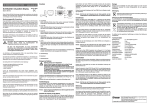
A: LCD display
B
MODE key
Pressing this button repeatedly, displays successively the step counter (STEP),
distance (DIS), calories burnt (CAL) and heart rate (HR).
C: SET key
Setting the step length and weight.
For safety and licensing reasons (CE), unauthorized conversion and/or modification
of the product is not permitted!
D: PULSE key
Recording the heart rate.
The device may only be used with batteries (button cell 3V)! Never attempt to operate the device with a different voltage, with other types of batteries or another energy
supply!
E: RESET key
Simultaneously deleting the recording of steps, distance and calories burnt.
F: Pulse sensor
Keep the unit out of the reach of children. It is not a toy!
G: Battery compartment
Avoid exposure to the following:
• high mechanical loads
• high temperatures
• strong vibrations
Do not carelessly leave packaging material lying around! In the hands of children,
plastic foil and/or bags and polystyrene parts etc. can turn into dangerous toys!
Keep the pedometer dry at all times. Dry it immediately in case it accidentally gets wet!
Use the pedometer with care and take it off carefully! Dropping it on the ground can
damage the circuit board or the display and thus the pedometer.
When you are not using the product, store it at normal room temperatures and remove
the batteries from the battery compartment, as they may leak and destroy the
pedometer!
Press MODE key (B) 1 x, the arrow in the display shows „DIS“!
This will enter the step length setting mode - setting range: 30 cm to 200 cm. Pay
attention that in this setting the step lengths while strolling, walking, jogging, running,
etc. can be different. Therefore it makes sense to measure the different step lengths
beforehand. The more accurately you set up the step length, the more precise the
reading will be. By repeatedly pressing the SET key (C) you can set your step lengths
(30 cm to 200 cm in 5 cm steps) now.
Press MODE key (B) 2 x, the arrow in the display shows „CAL“!
This will enter the body weight setting mode - setting range: 30 kg to 150 kg. By
repeatedly pressing the SET key (C) you can set your body weight (30 kg to 150 kg
in 5 kg steps) now.
After setting the values press the MODE (B) key 2 x to confirm the settings! The arrow
in the display shows „STEP“.
This way you can set step length and body weight, e.g. when changing user!
Note
When you keep the SET key (C) pressed during setting, the fasttrack starts!
Not pressing any of the above mentionned keys for more than 5
seconds will automatically cancel and exit the setting mode.
H: Belt clip
Operation
I:
After the before mentioned settings (arrow in the display should show „STEP“) the
pedometer is ready for use and the recording of the steps, distance and calories burnt
starts.
Battery compartment cover
Installing batteries
Batteries do not belong in the hands of children!
When inserting the batteries make sure to pay attention to the correct polarity!
Remove the batteries when the device is not in use for long periods
of time!
Leaking or damaged batteries may cause alkali burns if they come in
contact with the skin, suitable protective gloves must always be
used in this eventuality!
The batteries may not be short-circuited or thrown into a fire! Never
recharge these batteries! There is a risk of explosion!
To delete the values press the RESET key (E) and the measured values steps, distance and calories burnt are deleted! Counting the values will start again from zero .
Pulse monitor
The pedometer also records the number of heartbeats per minute (measuring range:
40 to 240 beats per minute). Please pay attention to the fact that the heartbeat may
be influenced by various factors, e.g. diets, breathing, smoking, stress, physical exercise. It is also difficult to achieve a correct reading in case of an irregular heartbeat or
heart weakness.
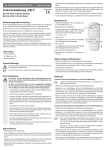
1. Push button MODE (B) 3x, the bolt in the display points to "HR", than push button
SET (C) to start measurement. The heart-icon starts blinking.
You can also enter the mode „heartrate monitoring“ by pressing the PULSE key (D)
to activate the heartrate monitoring in any mode (steps, distance of calories burnt).
Avoid extreme temperatures, as they might shorten the life-time of the components,
damage the batteries or warp the synthetic parts!
Please clean the pedometer on a regular basis, so it always looks new! But never use
harsh chemicals, cleaning solvents or aggressive cleaning agents!
First loosen the cross-head screw at the back of the housing with an appropriate
phillips screw driver and slide the cover (I) of the battery compartment into the direction of the arrow and insert a new 3V button cell (CR 2032) in the right polarity into the
battery compartment (G)! Polarity: Positive pole „+“ pointing up! Close the battery
compartment in the reverse order!
Note:
If the measuring result is not correct in your opinion, repeat the measurement
process again!
To avoid a possible incorrect measurement, pay attention to the following:
1. Stay calm during monitoring
2. Do not move your index finger while monitoring
3. Put your index finger carefully and not too firmly onto the sensor
4. The index finger should not be too cold
5. Keep index finger and sensor clean
6. Make sure the batteries have sufficient capacity left
Cleaning
Clean the pedeometer and the pulse sensor with a slightly damp cloth or with an antistatic cloth! Never use cleaning agents or aggressive solvents!
Disposal
At the end of its serviceable life, dispose of the product according to the
relevant statutory requirements!
Disposal of used batteries/accumulators
You, as the end user, are legally obliged (Ordinance on the Return and Disposal of
Used Batteries) to return all used batteries. Disposal in the household waste is prohibited!
Contaminated batteries/rechargeable batteries are labelled with these
symbols to indicate that disposal in domestic waste is forbidden. The description of dangerous heavy metal constituents are: Cd = Cadmium, Hg =
Mercury, Pb = Lead. You can return your exhausted batteries/rechargeable batteries free of charge to any authorized disposal station in your local
community, to our stores or to any other store where batteries/rechargeble batteries are sold.
You thereby meet the legal obligations and contribute to the protection of the environment!
Technical data
Operating voltage
Power input
Distance meter
Pedometer
Adjustable step length
Adjustable body weight
Calorie consumption
Pulse monitor
Operating temperature
Storage temperature
Dimensions
Weight
:
:
:
:
:
:
:
:
:
:
:
:
3V button cell type CR2032
max. 5.5 mA
0 to 199.99 km
0 to 99,999 steps
30 cm to 200 cm
30 kg to 150 kg
0 to 9999.9 cal.
40 to 240 beats per minute
-10°C to +40°C
-10°C to +60°C
70 x 52.5 x 32.8 mm
43 g
2. Then put your index finger softly onto the pulse sensor (F)! The measuring time
hereby is approx. 30 seconds. After you put your index finger correctly onto the
sensor, the „heart“ symbol blinks. This means the heart rate is recorded. After the
measuring two peeps sound and the heartrate shows in the display. After finishing the heartrate measurement by pressing the MODE key (B) and switching to
STEP, DIS or CAL again, the measuring result is automatically deleted.
These operating instructions are published by Conrad Electronic SE,
Klaus-Conrad-Straße 1, D-92240 Hirschau/Germany.
The operating instructions reflect the current technical specifications at time of
print. We reserve the right to change the technical or physical specifications.
© Copyright 2007 by Conrad Electronic SE. Printed in Germany.