1
Expert
LD 45
10.2 Custom settings
Before you start using your Expert LD 45,
you can use this menu to fully customize
its charging and discharging parameters.
to arrive at the disTo do so, press Enter
Start
play shown on the right. Now, press Mode
Stop
to enter the menu for custom settings.
Mode
Stop
Dec.
Dec.
Inc.
Dec.
Inc.
A0
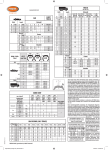
Using the Dec. Inc. buttons, you can now
choose the various parameters according
to the chart on the right.
A1
If you want to modify a parameter, simply
press Enter
again and the menu will start
Start
flashing. Using the Dec. Inc. buttons, you
can alter the factory settings and save
the new ones by pressing Enter
Start once more.
The Expert LD 45 can charge LiPochemistry batteries as well as LiIon and
LiFe-types. Please pay attention to the
appropriate settings shown in table A, as
the battery may otherwise take damage
or explode!
To avoid user error, the Expert LD 45 can
automatically detect the cell number of
the connected battery. (see figure A0 )
This detection may fail to recognize the
correct cell count on deeply charged
batteries, so the LD 45 will perform a
cell check again after charging for 10mins.
This time frame is normally sufficient for
reliable operation, but with batteries
of overly small or large capacities, you
may need to adjust the cell count for
yourself.
Dec.
Inc.
A2
Dec.
Inc.
Dec.
Inc.
Dec.
Inc.
Dec.
Inc.
A3
A4
A5
A6
A7
Dec.
Inc.
Dec.
Inc.
A8
A9
Inc.
7