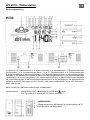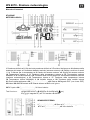
1
Back-up batteries
When the power supply is not in use or interrupted, the weather station will be powered by the back-up
batteries. The LED display is turned off, but all settings remain stored (also in the event of a power
failure). Also the alarm functions work as usual.
OUTDOOR TRANSMITTER SIGNAL
After inserting the batteries the weather station starts to search for the outdoor transmitter signal. The
icon flashes in LCD. When the outdoor transmitter signal is detected, the icon disappears from
LCD.
Note: Searching for outdoor transmitter signal takes around 3 minutes.
DCF-TIME-SIGNAL AND SIGNAL STRENGTH DISPLAY
After the weather station has received the outdoor temperature from outdoor transmitter, it will start to
search for the DCF-time-signal. icon flashes in LCD.
When strong DCF-time-signal is detected, full icon is displayed.
When weak or no DCF-time-signal is detected, the icon disappears from LCD. Replace the weather
station to another area for better reception or unplug the power jack to start reception of DCF-timesignal again.
Note:
• Searching for DCF-time-signal takes around 7 minutes. If the weather station does not receive
DCF-time-signal within this time, it will stop to search for the DCF-time-signal.
• During DCF-reception mode only SNOOZE/LIGHT button works. All other functions are blocked.
• Display will show DST symbol when Daylight Saving Time is activated.
During DCF-reception mode, press and hold
button to stop the reception of DCF-time-signal.
Press and hold
again to return to reception mode and signal strength indication.
Automatic and manual reception
The weather station starts automatic reception everyday at 1:00, 2:00, and 3:00 o’clock. If it fails to
receive the DCF-time-signal until 3:00 o’clock, it will start again reception at 4:00 o’clock. If it fails
again, it will start again reception at 5:00 o’clock. If it fails again, it will start again automatic reception
at 1:00 o’clock at the next day.
To start manually the reception of DCF-time-signal press
will go to radio reception mode .
button once anytime. The time display
MANUAL TIME SETTING
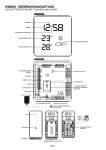
Press and hold MODE button for 3 seconds to enter setting mode. The 12h-display-format flashes.
Press or
to choose between 12h (AM/PM mode)or 24h-display-format. Press MODE button to
confirm the setting and enter next setting.
The setting order is: 12/24h, time zone, hour, minute, year, month, day, language for weekday
For each setting press or
to select and press MODE button to confirm the setting and enter next
setting.
After last setting press MODE button to return to normal time display.
ALARM SETTING
2 alarms can be set:
Press ALARM button once to enter alarm setting mode.
Press and hold ALARM button for 3 seconds to set Alarm Time 1. The hour digits flash. Press or
to select. Press MODE button to confirm the setting and enter next setting. The minute digits flash.
to select. Press MODE button to confirm the setting.
Press or