1
REV.2
1.
2.
3.
4.
5.
6.
7.
8.
9.
10.
11.
12.
13.
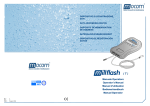
ON/OFF Button
Pads Connector Socket
Scenario Selection/UP
Scenario Selection/Down
Volume Control
Shock Button
DC input
AUDIO out
Pause/Play
Language Selection
Operating Scenario Display(LED)
Metronome (LED)
Speaker
AED Trainer Main Body
1. On/Off button
Turn unit on and initiate voice prompts. Press once to turn unit on.
Press again to turn off.
2. Pads Connector Socket
Insert the training pads connector into the pads connector socket.
The
LED flashes to indicate the socket location. The LED is covered
when
The defibrillator pad connector is properly inserted in the socket.
3. Scenario Selection/Up
Press this button, the display prompts scenario selection from 0 to 9.
4. Scenario Selection/Down
Press this button, the display prompts scenario selection from 9 to 0.
5. Volume Control
Control the voice prompt volume during use.
3