1
2
Inhaltsverzeichnis
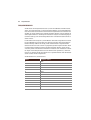
INHALTSVERZEICHNIS
SYMBOLE . . . . . . . . . . . . . . . . . . . . . . . . . . . . . . . . . . . . . 1
HINWEISE . . . . . . . . . . . . . . . . . . . . . . . . . . . . . . . . . . . . . 6
WILLKOMMEN . . . . . . . . . . . . . . . . . . . . . . . . . . . . . . . . . . 7
Was wurde geliefert? . . . . . . . . . . . . . . . . . . . . . . . . . . . . . . . . . . . . . . . . . . . . . . . . . 8
Was benötigt die congstar DSL-Box? . . . . . . . . . . . . . . . . . . . . . . . . . . . . . . . . . . . . 9
Die Leuchtdioden der congstar DSL-Box . . . . . . . . . . . . . . . . . . . . . . . . . . . . . . . . 10
DIE CONGSTAR DSL-BOX IN BETRIEB NEHMEN . . . . . . . . . . 11
congstar DSL-Box aufstellen . . . . . . . . . . . . . . . . . . . . . . . . . . . . . . . . . . . . . . . . . . . 11
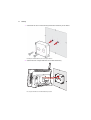
Montage. . . . . . . . . . . . . . . . . . . . . . . . . . . . . . . . . . . . . . . . . . . . . . . . . . . . . . . . . . . . . 11
Die congstar DSL-Box an die Stromversorgung anschließen . . . . . . . . . . . . . . . 13
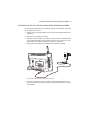
Die congstar DSL-Box am congstar komplett Anschluss oder am DSL mit
Splitter anschließen. . . . . . . . . . . . . . . . . . . . . . . . . . . . . . . . . . . . . . . . . . . . . . . . . . 14
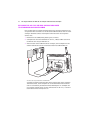
Die congstar DSL-Box am congstar komplett Anschluss oder am DSL ohne
Splitter anschließen. . . . . . . . . . . . . . . . . . . . . . . . . . . . . . . . . . . . . . . . . . . . . . . . . . 15
Die congstar DSL-Box am ISDN oder am analogen Telefonanschluss
anschließen. . . . . . . . . . . . . . . . . . . . . . . . . . . . . . . . . . . . . . . . . . . . . . . . . . . . . . . . . 16
Analoge Endgeräte an der congstar DSL-Box anschließen . . . . . . . . . . . . . . . . 17
Die congstar DSL-Box am Computer anschließen . . . . . . . . . . . . . . . . . . . . . . . . 18
Die congstar DSL-Box am LAN-Anschluss des Computers anschließen . . . . . . 20
Die congstar DSL-Box kabellos über WLAN mit einem Computer verbinden . 21
Die congstar DSL-Box mit dem WLAN-Adapter eines Computers verbinden . 22
Nach dem Anschluss an den Computer . . . . . . . . . . . . . . . . . . . . . . . . . . . . . . . . . 25
Automatisches Firmware-Update . . . . . . . . . . . . . . . . . . . . . . . . . . . . . . . . . . . . . . 26