1
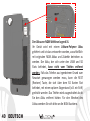
Guida rapida - Italiano............ 5
Quick guide - English............ 21
Kurzanleitung - Deutsch....... 37
Guía rápida - Español............ 53
Guide rapide - Français......... 69
4
ITALIANO
Guida rapida - Italiano
ITALIANO
5
TM
Benvenuti nel mondo di NGM Android . Grazie per aver acquistato NGM
WeMove Legend XL. Con questo dispositivo potrete avere accesso alle molteplici
TM
funzionalità di Android per gestire i vostri contatti, le mail, i social network e
per scoprire le opportunità della rete Internet con un solo tocco! Sarà come
avere un piccolo tablet, un telefono ed un navigatore in un unico, elegante
dispositivo. Rispetto agli Smartphone mono SIM sul mercato, NGM WeMove
Legend XL offre la comodità del DUAL SIM, che da sempre caratterizza l’intera
gamma dei telefoni NGM, ovvero la possibilità di gestire due SIM
contemporaneamente impostando la SIM preferita per chiamate, videochiamate
e connessione dati; un vantaggio esclusivamente NGM! Visitando il sito ufficiale
www.ngm.eu potrete conoscere l’intera gamma di telefoni NGM, provare il
nostro pratico e funzionale servizio di e-commerce per acquistare telefoni ed
accessori, richiedere assistenza, accedere al forum di assistenza tecnica e
scaricare aggiornamenti software.
6
ITALIANO
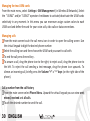
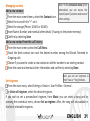
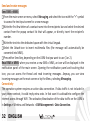
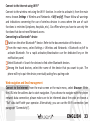
Assemblaggio
Attenzione: eseguire tutte le operazioni di inserimento schede SIM e scheda di
memorie soltanto dopo aver spento il telefono, per evitare di perdere dati.
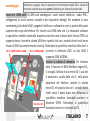
Inserire le USIM card: le USIM card contengono i vostri numeri telefonici, i codici PIN, i
collegamenti ai servizi esterni, contatti e altri importanti dettagli. Per accedere al vano
contenente gli slot delle USIM, spegnere il telefono e sollevare la cover a partire della parte
superiore del corpo del telefono. Per inserire una USIM nello slot 1, è necessario sollevare
lo sportellino metallico facendolo dapprima scorrere come indicato dalla freccia OPEN sul
supporto stesso. Inserite le schede USIM nei rispettivi slot con i contatti dorati rivolti verso
il basso (USIM2 va semplicemente inserita). Richiudere lo sportellino metallico dello slot 1 e
Slot 1: USIM1 (UMTS o GSM)
Slot 2: USIM2 (GSM) scorrerlo in direzione LOCK. Lo slot USIM 1
supporta USIM WCDMA.
Inserire la scheda di memoria: Per sfruttare
tutte le funzioni di NGM WeMove Legend XL,
si consiglia l'utilizzo di una micro-SD: il suo slot
è adiacente a quello dello slot 2, nella parte
posteriore del telefono. Inserite la scheda
micro-SD nel proprio slot con i contatti dorati
rivolti verso il basso dopo aver sbloccato lo
sportellino metallico facendolo scorrere in
direzione OPEN. Richiudere lo sportellino
Slot micro SD
facendolo scorrere in direzione LOCK.
ITALIANO
7
La batteria di WeMove Legend XL
Il vostro apparecchio è fornito con una batteria a
polimeri di litio ed è progettato per l’uso esclusivo di
batterie e accessori originali NGM. La batteria collocata
nell’area sottostante gli slot USIM e micro SD, non può
essere rimossa dal suo alloggiamento. Nel caso in cui
sia necessario un riavvio forzato del telefono, ad
esempio in caso di blocco dello stesso, il dispositivo è
dotato di un tasto REST (Restore), collocato subito al di
sopra dello slot micro SD. Premendo su di esso, con
l’aiuto di una punta fine (es. quella di una penna), è
possibile spegnere il telefono come se fosse stata tolta
la batteria. La sostituzione della batteria è possibile
rivolgendosi al servizio di assistenza NGM.
8
ITALIANO
Caricare la batteria
Caricate la batteria prima di iniziare ad utilizzare l’apparecchio. Utilizzate il cavo USB in
dotazione ed il connettore USB posto sul lato superiore del telefono. Connettete il
caricatore ad una presa della rete elettrica e quindi il dispositivo al cavo USB. Si può
caricare il telefono anche collegandolo con il PC, ma in questo caso la carica sarà più lenta.
Quando la batteria è in carica, un’icona animata sullo schermo mostra lo stato di
avanzamento del processo. Una volta che l’icona della batteria è riempita, la carica è
completata e il telefono può essere disconnesso dalla rete elettrica.
Attenzione: Non collegate il telefono ad un computer che si sta accendendo o spegnendo
per evitare sbalzi di tensione. Per preservare la corretta funzionalità del prodotto e
l'integrità della garanzia si raccomanda l'utilizzo di caricabatterie originali NGM. Procedete
alla ricarica esclusivamente al coperto e in luoghi asciutti. Un leggero riscaldamento del
telefono durante il processo di ricarica è del tutto normale. La batteria raggiungerà la sua
piena efficienza funzionale solo dopo alcuni cicli completi di ricarica.
Accensione, spegnimento e standby
Per accendere il dispositivo, tenete premuto il tasto on/off. Per spegnere il dispositivo,
tenete premuto lo stesso tasto e confermate lo spegnimento selezionando “Spegni”. Una
pressione breve permette invece di passare rapidamente alla modalità di standby (schermo
spento) o di tornare da questa allo schermo di sblocco (vedi sotto).
ITALIANO
9
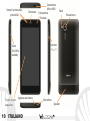
Sensori luminosità e
prossimità
Ricevitore
Tasto
On/Off e
standby
Touch screen
capacitivo
Ingresso auricolare
10 ITALIANO
Connettore
Micro USB
Fotocamera
frontale
Flash
Volume
“+” e “-“
Microfono
Speaker
Fotocamera
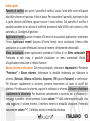
Schermata di Standby
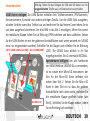
La schermata principale
Usate il touch screen toccando, tenendo premuto o
trascinando un dito sullo schermo. La schermata principale è il
punto di partenza per l'utilizzo di tutte le applicazioni del Tocca e trascina
telefono cellulare. Altre pagine si trovano affiancate rispetto a l’elemento centrale
quella principale, alle quali si accede scorrendo lo schermo verso sinistra per
verso destra e sinistra. Tali pagine sono personalizzabili con i utilizzare la fotocamera
collegamenti delle applicazioni preferite: dal menu principale
Tocca e trascina
tenete premuta l’icona dell’applicazione desiderata,
l’elemento centrale
successivamente rilasciate l’icona in qualsiasi punto sulla
verso destra per
schermata principale. In questo modo è possibile anche
sbloccare
cambiare i collegamenti predefiniti (accanto al tasto menu). Per
eliminare un collegamento dallo schermo principale, tenete
premuta l’icona corrispondente e trascinatela verso il simbolo X
“Rimuovi” in alto sullo schermo. Sovrapponendo due icone è
possibile raggrupparle e creare una cartella sulla pagina
principale.
Il Menu principale
Selezionate un’applicazione dal menu principale o scorrete verso sinistra/destra per
visualizzare altre applicazioni. Premete il tasto indietro per tornare alla schermata
precedente; premere il tasto Home per tornare alla schermata principale.
ITALIANO
11
Schermata Principale
Intensità segnale USIM e livello batteria
Menu Principale
Pannello di notifica
Barra indicatore pagine
Menu messaggi
Internet
Menù contestuale
Menu Chiamata Rubrica Menu Principale
Scorrimento schermate HOME
12 ITALIANO
Indietro
Home
App recenti
Scorrimento menu
Scelte rapide
Pannello di notifica: per aprire il pannello di notifica, toccate l'area delle icone nella parte
alta dello schermo e trascinate il dito in basso. Per nascondere il pannello, trascinate in alto
la parte inferiore dell'elenco oppure toccare il tasto indietro. Dal pannello di notifica è
possibile accedere ad un elenco di notifiche provenienti dalle USIM o dal sistema e, nella
parte alta, ai 12 widgets di gestione.
Applicazioni recenti: quando vi trovate all’interno di una qualsiasi applicazione, selezionare
l’icona Applicazioni recenti (accanto all’icona Home): verrà visualizzato l’elenco delle
applicazioni a cui avete effettuato l'accesso di recente; direttamente selezionabili.
Menu contestuale: alcune applicazioni prevedono l’utilizzo di un Menu contestuale.
Premendo su tale icona, è possibile visualizzare un menu contestuale riferito
all’applicazione stessa con le relative funzioni.
Blocco schermo e vibrazione: Dal menu principale, selezionare Impostazioni > Personale
“Protezione” > Blocco schermo. Selezionare la modalità desiderata per sbloccare lo
schermo (Nessuna, Sblocco col Sorriso, Sequenza, PIN oppure Password) e confermare.
Per bloccare rapidamente lo schermo, premere brevemente sul tasto di on/off del
telefono. Per sbloccare lo schermo, seguire le indicazioni a schermo. Attivare o disattivare
rapidamente la vibrazione: Per disattivare velocemente la suoneria per le chiamate e i
messaggi è possibile tenere premuto il tasto volume “–“ dalla schermata principale. Una
volta raggiunto il volume minimo, il telefono entrerà in modalità vibrazione. Premendo
nuovamente volume “–“, il telefono entrerà in modalità silenzioso.
ITALIANO
13
Gestire le due USIM
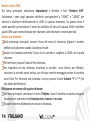
Dal menu principale, selezionare Impostazioni > Wireless e Reti “Gestione SIM”.
Selezionare i nomi degli operatori telefonici corrispondenti a “USIM1” e “USIM2” per
attivare o disattivare selettivamente le USIM in qualsiasi momento. Da questo menu è
anche possibile personalizzare il colore da attribuire all’icona di ciascuna USIM e decidere
quale USIM usare come principale per chiamate, videochiamate e connessione dati.
Gestire una chiamata
Dalla schermata principale, toccare l’icona del menu di chiamata, digitare il numero
telefonico da chiamare usando la tastiera virtuale.
Avviare la chiamata premendo l’icona con la cornetta e scegliere la USIM con la quale
chiamare.
Per terminare, toccare l’icona di fine chiamata.
Per rispondere ad una chiamata, trascinare la cornetta verso destra; per rifiutarla,
trascinare la cornetta verso sinistra, per rifiutare tramite messaggio portare la cornetta
verso l’alto. Per silenziare una chiamata in arrivo, toccare il tasto Volume “+” o “–“ (sul
lato destro del telefono).
Richiamare un numero dal registro chiamate
Dal menu principale, selezionare il menu Telefono. Sopra il tastierino numerico vengono
visualizzate in automatico le chiamate perse, ricevute e in uscita
Toccare il numero desiderato per avviare la chiamata.
14 ITALIANO
Gestire contatti
Note: Nel menu contestuale della
Aggiungere un nuovo contatto:
rubrica si ha accesso alle funzioni di
importazione/esportazione dei contatti
Dal menu principale, selezionare Contatti.
e varie impostazioni utili.
Premere l’icona contrassegnata dal simbolo “+”.
Scegliere dove si intende salvare il nuovo contatto (telefono, USIM1 o USIM2).
Inserire Nome, Numero ed eventuali altri dettagli del contatto (se il contatto viene
salvato sulle USIM non è garantito il salvataggio di eventuali ulteriori dettagli oltre a
nome e numero telefonico) e confermare il salvataggio.
Aggiungere un nuovo contatto dal registro chiamate:
Dal menu Telefono, accedere al Registro Chiamate
Premere sull’immagine di contatto vuota del numero che si intende salvare tra le
chiamate perse, effettuate o ricevute.
Scegliere Aggiungi a contatti e confermare se si vuole aggiungere il numero ad un
contatto esistente o crearne uno nuovo. Dopo aver aggiunto nome ed eventuali altre
informazioni, confermare con Salva.
Note: è possibile utilizzare come suonerie
dei file nei formati *mid,*wav o *mp3.
Impostare le suonerie
Dal menu principale, selezionare Impostazioni > Dispositivo “Profili audio” > Generale.
Selezionare Tono di chiamata voce e scegliere la suoneria desiderata dall’elenco.
Se si desidera impostare una suoneria personalizzata, da Musica selezionare il brano
audio desiderato, quindi Usa come suoneria premendo il menu contestuale. A questo
punto il file audio sarà inserito nell’elenco delle suonerie disponibili.
ITALIANO
15
Inviare e leggere SMS e MMS
Inviare SMS e MMS:
Dalla pagina o dal menu principale, scegliete Messaggi e quindi l’icona con il “+” per
accedere alla schermata di inserimento testo.
Digitate le prime lettere di un nome nel campo destinatario per ricercare un contatto e
selezionate il contatto dall’elenco pop-up, oppure inserite direttamente il numero del
destinatario.
Inserite il testo nell’apposito spazio con la tastiera virtuale.
Selezionate l’icona con la graffetta per includere eventuali allegati multimediali (il
messaggio sarà convertito in MMS) e premete l’icona Invio della USIM card desiderata.
Leggere SMS e MMS: quando rivecete un nuovo SMS o MMS, viene visualizzata una icona
nel pannello di notifica della pagina principale. Aprendo il pannello di notifica e toccando
l’icona visualizzata, è possibile accedere alla conversazione e leggere il messaggio in arrivo.
In ogni caso, è possibile visualizzare i messaggi in arrivo dallo schermo principale o dal
menu, selezionando Messaggi.
Connettività
Il sistema operativo richiede una connessione dati attiva. Se non previsto in abbonamento,
il traffico dati implica dei costi; si consiglia quindi di configurare l’accesso Internet tramite
WiFi. Per abilitare il traffico dati sulla USIM, andare in Impostazioni > Wireless e Reti
“Gestione SIM” > Connessione dati.
16 ITALIANO
Connettersi a Internet con la funzione Wi-Fi®
Potete collegarvi alla rete WLAN utilizzando la funzione Wi-Fi. Per attivarla, dal menu
principale scegliere Impostazioni > Wireless e Reti ” WLAN” on/off. Attenetevi a tutte le
avvertenze e le indicazioni specificate dal personale autorizzato quando vi trovate in aree
in cui l’uso dei dispositivi wireless è limitato (aeroplani, ospedali ecc.). Passate alla Modalità
offline quando dovete utilizzare solo i servizi che non richiedono l’accesso alla rete.
Connettersi a un dispositivo Bluetooth®
Accendere il dispositivo Bluetooth al quale si desidera collegarsi. Riferirsi alla
documentazione del dispositivo.
Dal menu principale, scegliere in Impostazioni > Wireless e Reti ” Bluetooth” on/off per
attivare il Bluetooth.
Scegliere Cerca dispositivi per avviare automaticamente la ricerca di dispositivi Bluetooth
Tra i dispositivi rilevati, selezionare il nome del dispositivo da associare. Il telefono
tenterà di associarsi al dispositivo, eventualmente verrà richiesto un codice di
associazione.
Navigare nel web e gestire le Email
Connettersi a Internet: dal menu principale, scegliete Browser. Digitate l’URL nella barra
degli indirizzi per avviare la navigazione. Se si sceglie di navigare con la connessione dati
della rete telefonica, informarsi sui costi o scegliere un contratto dati “flat” con il proprio
operatore. In alternativa, utilizzate la connessione Wi-Fi (vedi paragrafo “Connettività”)
dove possibile.
ITALIANO
17
Email: configurando un account predefinito è possibile gestire facilmente la posta
elettronica e visualizzarla in automatico sul proprio telefono. Se si desidera utilizzare un
provider di servizi di posta differente da quello suggerito dal telefono come account di
default, si dovrà configurare un account nell’applicazione Email nel Menu principale.
Configurazione account: Per sfruttare al meglio le funzionalità del sistema AndroidTM, è
consigliabile configurare un account predefinito. Alla prima accensione, il telefono vi
guiderà nella configurazione di un account predefinito che permetterà di accedere alle
applicazioni del sistema AndroidTM tra cui ad esempio, la sincronizzazione della posta
elettronica, l’utilizzo di messaggi istantanei e la condivisione della posizione geografica.
Inserire testo con SwiftKey
Il metodo di inserimento impostato per default nel telefono è quello della tastiera
SwiftKey. SwiftKey è un sistema avanzato per l'inserimento predittivo di testo; quando si
scrivono messaggi SMS, MMS o E-mail, tale modalità prevede la parola che si sta digitando,
cambiandola ad ogni pressione dei tasti. Durante il primo utilizzo, il programma suggerirà
con dei pop-up le innovazioni e le peculiarità di questo sistema di scrittura. SwiftKey ha un
Dizionario “intelligente” che trae vocaboli anche dalle varie applicazioni del telefono, quali
la rubrica, i social network, ecc. Per il corretto funzionamento del dizionario, è necessario
installare nel telefono una micro-SD. Per cambiare i parametri di inserimento del testo,
selezionate Impostazioni > Personale “Lingua e input” > SwiftKey for NGM-Mobile.
18 ITALIANO
Sincronizzazione: La sincronizzazione è il modo più efficace per gestire i propri dati utili
perché permette di effettuare un backup di tali dati presenti sul dispositivo con l’account
internet. In caso di cambio, smarrimento o danneggiamento del telefono non si
verificheranno perdite di questi dati. La sincronizzazione può essere automatica o manuale
e può essere attivata in Impostazioni >Personale “Account e Sinc.” L’operazione di
sincronizzazione utilizza una connessione dati attiva, che potrebbe comportare dei costi di
traffico dati. Si consiglia pertanto di utilizzare una connessione WiFi, quando disponibile.
Geolocalizzazione GPS
Il Global Positioning System (GPS) è un sistema di posizionamento su base satellitare, a
copertura globale e continua. Per accedere al GPS, selezionare Impostazioni > Personale
“Servizi posizione” > Satelliti GPS. Quando la funzione GPS viene attivata, il telefono inizia
a raccogliere dati dai satelliti disponibili e quindi stabilisce la sua posizione corrente. I
Tempi di Fix (Rilevamento della posizione) sono variabili e possono essere influenzati da
svariati fattori esterni (nuvolosità, schermatura da edifici ecc). Per rendere più veloce il Fix,
si può attivare la funzione EPO e seguire le istruzioni (richiede connessione dati o WiFi per il
download della previsione delle orbite dei satelliti). Per limitare il consumo di batteria e
memoria, si raccomanda di disattivare il GPS quando non viene usato. Il telefono dispone
del sistema di navigazione NGM NAVIGATION SYSTEM© preinstallato. Per ulteriori dettagli
sul funzionamento del sistema visitate il sito www.ngm.eu.
ITALIANO
19
Avvertenza: La formattazione e la fornitura di questo manuale si basa sui sistemi operativi
AndroidTM; il produttore non assume alcuna responsabilità per qualsiasi inadempienza delle
linee di condotta sopra stabilite o per ogni uso improprio del telefono cellulare. NGM si
riserva il diritto di modificare senza preavviso le informazioni contenute in questa guida. Il
contenuto di questo manuale potrebbe differire dal contenuto effettivamente mostrato nel
telefono cellulare. In tale caso, il secondo prevale.
Copyright © 2012 NGM Italia
Nessuna parte di questo manuale può essere riprodotta, distribuita, tradotta trasmessa
in alcuna forma o tramite alcun mezzo, elettronico o meccanico, compresi fotocopie,
registrazione o salvataggio in qualsiasi archivio di informazioni o sistema di recupero,
senza previa autorizzazione scritta da parte di NGM Italia.
Bluetooth® è un marchio commerciale registrato in tutto il mondo della Bluetooth
SIG, Inc.
Wi-Fi® e il logo Wi-Fi sono marchi commerciali registrati di Wi-Fi Alliance.
20 ITALIANO
Quick Guide - English
ENGLISH
21
TM
Welcome to NGM Android World! Thank you for purchasing NGM WeMove
Legend XL. This device allows you to access several Android features such as
managing your contacts, emails, social networks and to discover the
opportunities of Internet with just a single touch! It will be like having a small
tablet, smartphone and a GPS navigation system all in one stylish device.
Compared to the usual Mono SIM Smartphones available on the market, NGM
WeMove Legend XL offers the convenience of a DUAL SIM, which has always
distinguished the entire spectrum of NGM phones, i.e. the ability to concurrently
manage two SIM cards and by setting the preferred SIM for calls, video calls and
data connection; a benefit only for NGM customers! By visiting the official NGM
website at www.ngm.eu, you can appreciate the whole range of NGM mobile
phones and accessories, ask for after-sales service, access the forum for technical
assistance and download software updates.
22 ENGLISH
Warning: insert USIM and SD Cards only after
shutting down the phone, in order to avoid data loss.
Set up
Installing the USIM cards: The USIM card stores information as your personal phone
number, PIN code, carrier services numbers, contacts and other important details. To
access the USIM slots, turn off the phone, take off the back cover by lifting it up from the
top. In order to insert the USIM1 into the slot 1, lift up the metal harness by first sliding it
into the direction indicated by the OPEN arrow and then lift it up. Insert your USIM cards
with their golden contacts facing downwards (insert USIM2 simply by sliding it in). Then
close slot 1’s harness and slide it back into the LOCK position. Slot 1 supports WCDMA.
Slot 1: USIM1 (UMTS o GSM)
Slot 2: USIM2 (GSM)
SD card slot
Installing the memory card:
In order to use all functions of NGM
WeMove LEGEND XL, it is advisable to install
a micro-SD card: a dedicated slot fort the
memory card is placed right next to slot 2, in
the back side of the phone. Slide in the
memory card so that the gold contacts are
turned downwards after unlocking the metal
harness by sliding it in OPEN direction. Close
and lock the harness pushing it towards
LOCK.
ENGLISH
23
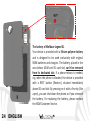
The battery of WeMove Legend XL
Your device is provided with a lithium polymer battery
and is designed to be used exclusively with original
NGM batteries and chargers. The battery, placed in the
area below USIM and SD card slot, can’t be removed
from its dedicated slot. If a phone reboot is needed,
e.g. when the phone is blocked, the device is provided
with a REST button (Restore), situated immediately
above SD card slot. By pressing on it with a fine tip (like
a pen), you can shut down the phone as if you removed
the battery. For replacing the battery, please contact
the NGM Customer Service.
24 ENGLISH
Charging the battery
Please charge the battery completely before starting to use the device. Use the provided
USB cable, connecting one end to the provided wall socket adaptor (placed into a socket)
and the other end to the USB connector placed on the top side of the phone. The phone
can also be charged by connecting it to a PC USB port but in that case it will charge more
slowly. While the battery is charging, an animation on screen will show the charging
progress. Once charge is completed, the icon will be filled and the phone can be
disconnected from the grid.
Warning: Do not connect the phone to a booting-up or running down PC to avoid voltage
jumps. In order to preserve the correct functioning of the device and in order not to
compromise warranty, the sole use of original NGM battery chargers and accessories are
recommended. Please charge the battery indoors, in a dry and favorable environment. It’s
normal for the battery to get slightly warm during the charging process. The battery will
reach its full capacity when cycled several times.
Turn on, turn off and standby
Press and hold the on/off key to turn on the phone. Press and hold the same key and
confirm your intention to turn off the phone. A quick pressure of the on/off key sets the
phone on standby-mode (screen off) or allows you to go back to the standby screen (see
below).
ENGLISH
25
Brightness and
Proximity Sensor
Receiver
Flash
Volume
“+” e “-“
On/Off
and
Standby
Key
Capacitive
Touch screen
Front
Camera
Micro USB
Connector
Earphone Plug
26 ENGLISH
Microphone
Speaker
Camera
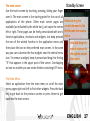
The main screen
Use the touch screen by touching, pressing, sliding your finger
over it. The main screen is the starting point for the use of all
applications of the phone. Other main screen pages are
available (as indicated by the white bar), just swipe the screen
left or right. These pages can be freely personalized with one’s
favorite applications, shortcuts and widgets. Just keep pressed
the icon of the wished function in the application menu and
then place the icon on the preferred main screen. In the same
way you can customize the four widgets near the central menu
icon. To remove a widget, keep it pressed and drag it to the big
“X” that appears in the upper part of the screen. Overlapping
an icon on another you can create folders containing till 9 icons
Standby Screen
Hold and drug the
central element to the
left to open the camera
menu
Hold and drug the
central element to
the right to unlock
the screen
The Main Menu
Select an application from the main menu or scroll the main
menu pages right and left to find other widgets. Press the back
key to get back to the previous screen or press Home to get
back into the main screen.
ENGLISH
27
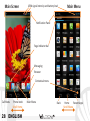
Main Screen
USIM signal intensity and battery level
Main Menu
Notification Panel
Page indicator bar
Messaging
Browser
Contextual menu
Call Menu
Phone book
Scroll Home
28 ENGLISH
Main Menu
Back
Home
Recent Apps
Scroll Menu
Rapid access
Notification panel: Open the notification panel by touching the upper area containing the
battery and signal - intensity icons and drag it downwards. To hide the panel, push it up
again starting from the bottom. In the panel you have rapid access to a list of notifications
from the USIM or the System and to the control panel with 12 management and settings widgets.
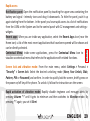
Recent apps: When you are inside any application, select the Recent Apps Icon (near the
Home icon): a list of the most recent applications that have been opened will be shown and
can be directly selected.
Contextual Menu: inside some applications, press the Contextual Menu Icon to
visualize a contextual menu that refers to the application with related functions.
Screen lock and vibration mode: From the main menu, select Settings > Personal >
“Security” > Screen lock. Select the desired unlocking mode (None, Face Unlock, Slide,
Pattern, PIN or Password) and confirm. In order to quickly lock the screen, briefly press on
the power on/off key of the phone. To unlock it, follow the instructions on the screen.
Rapid activation of vibration mode: Rapidly disable ringtones and message alerts by
pressing Volume “-“ until it gets to minimum and then switches to Vibration mode. By
pressing “-“ again, you set it Silent.
ENGLISH
29
Managing the two USIM cards
From the main menu, select Settings > SIM Management ( in Wireless & Networks). Select
the “USIM1” and/or “USIM2” operator checkboxes to activate/deactivate the USIM cards
selectively in any moment. In this menu you can moreover assign custom colors to each
USIM card and define the card for your voice calls, vido calls or data connections.
Managing calls
From the main screen touch the call menu icon in order to open the calling screen. Use
the virtual keypad to digit the desired phone number.
Select the calling icon and then choose the USIM card you want to call with.
To end the call press the end key .
To answer a call, drug the phone icon to the right; to reject a call, drug the phone icon to
the left. To reject the call sending a text message, drug the phone icon upwards. To
silence an incoming call, briefly press the Volume “+” o “–“ keys (on the right side of the
phone).
Call a number from the call history
From the main screen select Phone Menu. Upward the virtual keypad you can view sent,
missed, received and all calls.
Touch the desired number to send the call.
30 ENGLISH
Note: In the contextual menu of the
Managing contacts
phonebook, you can access the
Add a new contact:
import/export functions and several
From the main screen/menu, select the Contacts icon. other settings.
Select the icon with the “+” on it.
Select the storage (Phone, USIM1 or USIM2).
Insert Name, Number and eventual other details (if saving on the phone memory).
Confirm by selecting Save.
Add a new contact from the call history:
From the main screen, select the Call Menu.
Touch the blank contact icon near the desired number among the Missed, Received or
Outgoing calls.
Choose if you want to create a new contact or add the number to an existing contact.
Enter the name and eventual other information and confirm by selecting Done.
Note: you can set ringtones in
*mid,*wav or *mp3 formats.
Set ringtones
From the main menu, select Settings > Device > User Profiles > General .
In Voice call ringtone, select the desired ringtone.
If you wish to set a personalized ringtone, from Music you can select a song and by
pressing the contextual menu, choose Set as ringtone. After, the song will be available in
the list of selectable ringtones.
ENGLISH
31
Send and receive messages
Send SMS e MMS:
From the main screen or menu, select Messaging and select the icon with the “+” symbol
to access the text input screen for a new message.
Write the first few letters of a contact name into the recipients bar and select the desired
contact from the popup contact list that will appear, or directly insert the recipient’s
number.
Write the text into the dedicated space with the virtual keypad.
Select the Attach-icon to insert multimedia files (the message will automatically be
converted into MMS).
Press either Send key, depending on the USIM that you want to use (1 or 2).
Read SMS e MMS: when you receive a new SMS o MMS, an icon will be displayed in the
notification panel of the main screen. Opening the notification panel and touching that
icon, you can access the thread and read incoming messages. Anyway, you can view
incoming messages on the main screen or by the Menu, selecting Messaging.
Connectivity
The operation system requires an active data connection. If data traffic is not included in
your phone contract, it could imply extra costs. In that case it is advisable to configure the
internet access through WiFi. The activation/deactivation of the data traffic on the USIM is
in Settings > Wireless and Networks > SIM Management > Data Connection.
32 ENGLISH
Connect to the Internet using Wi-Fi®
Connect to the wireless net using the Wi-Fi function. In order to activate it, from the main
menu choose Settings > Wireless and Networks > Wifi on/off. Please follow all warnings
and indications concerning the use of wireless devices in areas where the use of such
functions is restricted (airplanes, hospitals, etc.). Go offline when you have to use only the
functions that do not need Network access
Connecting to a Bluetooth® device
Switch on the other Bluetooth™ device. Refer to the documentation of the device.
From the main menu, select Settings > Wireless and Networks > Bluetooth on/off to
activate Bluetooth. For a rapid activation/deactivation use the dedicated key on the
notification panel.
Select Bluetooth > Search for devices to find other Bluetooth devices.
Among the found devices, select the name of the device that you want to pair. The
phone will try to pair the device, eventually asking for a pairing code
Web navigation and Email management
Connect to the Internet: from the main screen or the main menu, select Browser. Write
the URL into the address bar to start navigation. If you choose to navigate with the phone
network data connection, please make sure to be informed about the costs or choose a
“flat” data tariff with your operator. Alternatively, you can use the Wi-Fi connection (see
paragraph “Connectivity”).
ENGLISH
33
Email: configuring a default account it will be easy to manage Email and automatically
receive it on your phone. If you want to use a different Email account from the default one,
you have to configure a new account selecting Email in the Main Menu.
Configuring account: In order to better manage OS AndroidTM functionalities, it is
recommended to configure a default account. When you first power on the phone, it will
guide you in configuring a default account that allows you to access OS AndroidTM
applications like Email sync, Instant Messaging Service and Geo-localization Service.
SwiftKey text input
The default text input method is the SwiftKey keyboard. SwiftKey is an advanced predictive
text input system; when writing SMS, MMS or E-mails, this mode predicts the word while
you are writing it, changing it at every key pressure. During the first use, the program will
suggest with popups the innovations and peculiarities of this writing system. SwiftKey has
an “intelligent” Dictionary that retrieves words also from other applications in the phone,
such as the phonebook or the social networks etc. For the correct use of this function, the
micro-SD contained in the selling package has to be installed into the phone.
To change input methods, select Settings > Personal “Language and Input” > SwiftKey for
NGM-Mobile.
34 ENGLISH
Synchronization: synchronization is the most efficient approach to manage your own data,
cause allows you to backup data on the device with the internet account. In case of phone
loss, change or damage, no data loss will occur. Synchronization can be automatic or
manual and you can turn on it in Settings >Personal “Account and Sync.” Sync operations
may use an active data connection and may therefore cause extra fees. So we recommend
to use WiFi connection, if available.
GPS geolocalization
The Global Positioning System (GPS) is a system based on the satellite-related position
determination, with global and continuous covering. The function is in Settings > Personal
> “Location services” > GPS satellites. When GPS is on, the phone begins to collect data
from the available satellites and determines the current position. Fix (localization) time is
variable and may be affected by several factors (clouds, high buildings, ecc). To accelerate
Fix, you can activate EPO and follow the instructions (data or WiFi network is required to
download predictions of satellite orbits). Limit the use of battery and memory by switching
off this function when you don’t need it.
The phone integrates the NGM NAVIGATION SYSTEM©, that is accessible through the
main menu. For more details please visit www.ngm.eu.
ENGLISH
35
Warning: NGM Italia will not bear responsibility for any incompliance with the above
guidelines or improper use of the mobile phone. NGM reserves the right to modify any of
the content in this user guide without previous public announcement. The content of this
manual may vary from the actual content displayed in the mobile phone. In such case, the
latter shall govern.
Copyright © 2012 NGM Italia
No part of this manual may be reproduced, distributed, translated, or transmitted in any
form or by any means, electronic or mechanical, including photocopying, recording, or
storing in any information storage and retrieval system, without the prior written
permission of NGM Italia.
Bluetooth® is a registered trademark of the Bluetooth SIG, Inc. worldwide.
Wi-Fi® and the Wi-Fi logo are registered trademarks of the Wi-Fi Alliance.
36 ENGLISH
Kurzanleitung - Deutsch
DEUTSCH
37
TM
Herzlich willkommen in der Welt von NGM Android . Danke dass Sie NGM
WeMove Legend XL gekauft haben. Mit diesem Gerät können Sie Zugang zu den
TM
vielfältigen Android Funktionen Zugang haben um Ihre Kontakte, E-Mails,
Sozialnetzwerke und Internetzugang zu verwalten. Erleben Sie ein kleines Tablet,
ein Telefon und ein Navigationsgerät in einem einzigen, eleganten Gerät! Im
Gegensatz zu den gewöhnlichen Mono SIM Smartphones, hat NGM Legend XL
den Vorteil der Dual SIM Technologie, die seit immer die gesamte Linie von NGM
Telefonen charakterisiert: Sie können gleichzeitig zwei SIM Karten verwalten und
je nach Wunsch eine Default SIM für Anrufe, Videoanrufe und Datenverbindung
einstellen. Ein exklusiver NGM Vorteil! Besuchen Sie unsere Webseite
www.ngm.eu um unsere gesamte Telefonkollektion und Zubehöre zu sehen,
zum After-Sales Service Zugang zu haben, Software Aktualisierungen
herunterzuladen und um in das technische Assistenz-Forum einzutreten.
38 DEUTSCH
Inbetriebnahme
Achtung: führen Sie das Einlegen der SIM oder SD Karten nur mit
ausgeschaltetem Telefon aus, um Datenverlust zu vermeiden.
USIM Karten einlegen: Die USIM Karten enthalten Ihre Telefonnummern, PIN-Nummern,
Servicenummern, Kontakte und andere wichtigen Details. Um die USIM Slots zuzugehen,
schalten Sie bitte zuerst das Telefon aus und entfernen Sie das hintere Cover indem Sie es
von oben ausgehend abnehmen. Um die USIM in das Slot 1 einzufügen, öffnen Sie vorerst
die metallische Klappe indem Sie sie Richtung OPEN schieben und dann aufheben. Setzen
Sie die USIM Karten ein mit der goldenen Kontaktflächen nach unten weisend ein (USIM2
muss nur eingeschoben werden). Schließen Sie die Klappe und schieben Sie sie Richtung
Slot 1: USIM1 (UMTS oder GSM) Slot 2: USIM2 (GSM) LOCK. Die USIM2 kann einfach in ihr Slot
eingefügt werden. Slot 1 unterstützt WCDMA.
Speicherkarte einfügen: Um alle Funktionen
von NGM WeMove LEGEND XL zu verwenden,
ist es ratsam eine Micro-SD einzusetzen: der
Slot für die Micro-SD Karte befindet sich
neben dem Slot 2. Setzen Sie die Micro SD
Karte in dem Slot ein so dass die goldene
Kontaktfläche nach unten weist, nachdem Sie
die metallische Klappe geöffnet haben (wie
Slot Micro SD
Slot1). Schließen Sie die Klappe wieder, indem
Sie sie Richtung Lock schieben.
DEUTSCH
39
Der Akku von NGM WeMove Legend XL
Ihr Gerät wird mit einem Lithium-Polymer Akku
geliefert und ist dazu entworfen worden, ausschließlich
mit originalen NGM Akkus und Zubehör betrieben zu
werden. Der Akku, der sich unter den USIM und SD
Slots befindet, kann nicht vom Telefon entfernt
werden. Falls das Telefon aus irgendeinem Grund zum
Neustart gezwungen werden muss, kann die REST
(Restore) Taste, die sich über dem SD Karten Slot
befindet, mit einem spitzem Gegenstand (z.B. ein Stift)
gedrückt werden. Das Telefon wird ausgeschaltet als ob
Sie den Akku entfernt hätten. Für den Wechsel des
Akkus wenden Sie sich bitte an die NGM Assistenz.
40 DEUTSCH
Akku aufladen
Laden Sie den Akku vollständig auf bevor Sie das Gerät benutzen. Verwenden Sie dazu das
mitgelieferte Ladegerät und die USB Buchse auf der oberen Seite des Telefons. Stecken Sie
das Ladegerät vorerst in die Steckdose, anschließend verbinden Sie das USB-Kabel zuerst
mit dem Ladegerät und dann mit dem Telefon. Der Akku kann auch an einem PC
aufgeladen werden, in diesem Fall wird aber der Ladevorgang langsamer sein. Wenn das
Telefon eingeschaltet ist, zeigt während der Ladung das Ladesymbol den Status des
Vorganges an. Sind alle Balken gefüllt, so ist der Akku geladen und das Telefon kann vom
Stromnetz getrennt werden.
Achtung: Verbinden Sie das Telefon nicht mit einem ein-oder ausschaltenden PC, um
Spannungssprünge zu vermeiden. Um die korrekte Funktion und die Produkt-Garantie zu
bewahren verwenden Sie immer originale NGM Ladegeräte. Laden Sie das Gerät immer in
trockenen Innenräumen auf. Eine leichte Erwärmung des Gerätes während der Ladung ist
normal. Der Akku erreicht seinen vollen Leistungsumfang wenn es einige Male vollständig
aufgeladen wurde.
Ein- und ausschalten, Standby
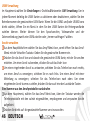
Um das Telefon einzuschalten, drücken Sie einige Sekunden lang die Ein/Aus Taste. Um das
Gerät auszuschalten, halten Sie die Ein-Aus Taste nochmals verlängert gedrückt und
bestätigen Sie auf dem Touch Screen die Ausschaltung. Ein schneller Druck der Ein/Aus
Taste wird das Telefon in Standby stellen und den Bildschirm ausschalten; nochmaliger
leichter Druck wird das Standby aufheben (siehe unten).
DEUTSCH
41
Helligkeit und NäheSensoren
Hörer
Vordere
Kamera
Micro USB
Buchse
Lautstärke
“+” und “-“
Ein/Aus
und
Standby
Taste
Kapazitives
Touch Screen
Flash
Kopfhörer Buchse
42 DEUTSCH
Mikrofon
Lautsprecher
Kamera
Der Hauptbildschirm
Tasten und Icons im Touch Screen können mit dem Finger
gedrück, verschoben und gedrückt gehalten werden. Der
Hauptbildschirm ist der Ausgangspunkt für alle Funktionen im
Telefon. Es hat weitere Seiten, die durch das Verschieben vom
Bildschirm nach rechts und links direkt besichtigt werden
können. Die Hauptbildschirme und die Hauptanwendungen
neben der Menü-Taste können mit verschiedenen Shortcuts
personalisiert werden, indem die gewünschte Anwendung im
Hauptmenü-Bildschirm gedrückt gehalten wird bis sie auf dem
Hauptbildschirtm erscheint und beliebig geordnet werden
kann. Um sie zu verwerfen, halten Sie sie nochmals verlängert
gedrückt und schieben Sie sie auf die große „X“ die oben
erscheint. Wenn Sie ein Icon auf ein anderes schieben, können
Sie im Hauptmenü Ordner erstellen.
Standby Bildschirm
Berühren und verschieben
Sie das zentrale Element
nach links um die Kamera
zu öffnen
Berühren und
verschieben Sie das
zentrale Element nach
rechts um das Telefon
zu entsperren
Das Hauptmenü
Wählen Sie eine Anwendung aus dem Hauptmenü oder
browsen Sie es nach links und rechts. Mit der Zurück-Taste
gelangen Sie in das vorherige Bildschirm zurück, die Home-Taste bringt Sie in den
Hauptbildschirm zurück.
DEUTSCH
43
Hauptbildschirm
USIM Signalstärke und Akku Niveau
Hauptmenü
Hinweistafel
Bildschirmindikator Leiste
Mitteilungen
Internet
Kontextuelles Menü
Anruf Menü
Kontakte Hauptmenü
HOME Bildschirme durchblättern
44 DEUTSCH
Zurück
Home
Kürzliche Apps
Hauptmenü durchblättern
Abkürzungen
Hinweistafel: Um die Hinweistafel zu öffnen, berühren Sie die schwarze Hinweisbarre auf
der oberen Seite des Bildschirmes und ziehen Sie sie nach unten. Wenn nicht mehr nötig,
schieben Sie sie wieder nach oben. Durch diese Hinweistafel haben Sie Zugang zu
Benachrichtigungen von den USIM Karten den 12 Verwaltungs- und Einstellungs-Widgets.
Kürzlich verwendete Anwendungen: Aus jedem Bildschirm können Sie das Icon für kürzlich
verwendeten Apps drücken (neben dem Home Icon); eine Liste der zuletzt verwendeten
Anwendungen wird angezeigt, direkt auswählbar.
Kontextuelles Menü: Innerhalb einiger Anwendung oder Menüs, können Sie durch
berühren des „Kontextuellen Menu“-Icons (rechts abgebildet) ein kontextuelles Menü
hervorrufen, von der offenen Anwendung abhängig.
Displaysperre und Vibration:
Aus dem Hauptmenü, wählen Sie Einstellungen > Persönlich: Sicherheit > Bildschirmsperre.
Wählen Sie die gewünschte Sperre (Keine - Smile – Muster – PIN - Kennwort). Eine schnelle
Aktivierung der Display-Sperre wird durch den schnellen Druck der Ein/Aus Taste auf der
Telefonseite erhalten. Um den Bildschirm wieder zu aktivieren, folgen Sie den Anleitungen.
Schnelle Aktivierung der Vibration: Aus dem Hauptbildschirm aus drücken Sie so lange auf
die Lautstärke „-“ Taste (seitlich auf dem Telefon), bis das Telefon auf das Vibrations-Profil
gestellt wird. Nochmaliges drücken der „-“ Taste wird das Telefon auf Stumm stellen.
DEUTSCH
45
USIM Verwaltung
Im Hauptmenü wählen Sie Einstellungen > Drahtlos&Netzwerke: SIM Verwaltung. Um in
jedem Moment beliebig die USIM Karten zu aktivieren oder deaktivieren, wählen Sie den
Betreibernamen der gewünschten USIM Karte. Wenn Sie die USIM1 und/oder USIM2 Icons
direkt wählen, öffnen Sie ein Menü in dem Sie den USIM Karten die Hintergrundfarbe
zuteilen können. Weiter können Sie den Sprachanrufen, Videoanrufen und der
Datenverbindung jeweils eine USIM zuteilen oder „Immer nachfragen“ wählen.
Anrufe verwalten
Aus dem Hauptbildschirm wählen Sie das Anruf Menü-Icon, somit öffnen Sie das AnrufMenü mit der Virtuellen Tastatur. Geben Sie die gewünschte Nummer ein.
Drücken Sie das Anruf Icon und danach die gewünschte USIM Karte, mit der Sie anrufen
möchten. Um einen Anruf zu beenden, drücken Sie auf das Ende- Icon
Um einen eingehenden Anruf zu antworten, schieben Sie das Telefon-Icon nach rechts,
um einen Anruf zu verweigern, schieben Sie es nach links. Um einen Anruf mit einer
Mitteilung zu verweigern, schieben Sie das Telefon-Icon nach oben. Um einen
eingehenden Anruf stumm zu stellen, drücken Sie kurz auf eine der Lautstärke-Tasten.
Eine Nummer aus den Anrufprotokollen zurückrufen
Aus dem Hauptmenü, wählen Sie das Anruf Menü-Icon, über der Tastatur werden die
Telefonprotokolle mit den zuletzt eingewählten, empfangenen und verpassten Anrufe
aufgelistet.
Drücken Sie direkt auf die gewünschte Nummer um sie anzurufen.
46 DEUTSCH
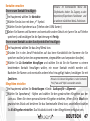
Kontakte verwalten
Hinweis: Im Kontextuellen Menü des
Einen neuen Kontakt hinzufügen:
Telefonbuchs haben Sie Zugang zu den
Importieren/Exportieren-Funktionen und
Im Hauptmenü wählen Sie Kontakte.
zu weiteren nützlichen Menü-Funktionen.
Wählen Sie das Icon mit dem „+“ Symbol.
Wählen Sie den Speicherort aus (Telefon oder USIM Karten)
Geben Sie Namen und Nummer und eventuelle andere Details ein (wenn Sie auf Telefon
speichern) und bestätigen Sie die Speicherung mit Fertig.
Einen neuen Kontakt aus den Anrufprotokollen hinzufügen:
Im Hauptmenü wählen Sie das Anruf Menü Icon.
Drücken Sie in den Anruf-Protokollen auf das leere Kontaktbild der Nummer die Sie
speichern wollen (unter den angenommenen, eingewählten und verpassten Anrufen).
Wählen Sie Zu Kontakten hinzufügen und wählen Sie ob Sie die Nummer zu einem
bestehenden Kontakt hinzufügen wollen, ein neuer Kontakt erstellt werden soll.
Nachdem Sie Namen und eventuelle andere Infos hinzugefügt haben, bestätigen Sie mit
Hinweis: Es können Klingeltöne in den Formaten
Speichern.
*mid,*wav und *Mp3 verwendet werden.
Klingeltöne einstellen
Im Hauptmenü wählen Sie Einstellungen > Gerät: Audioprofile > Allgemein
Wählen Sie Sprachanruf - Rufton und wählen Sie den gewünschten Klingelton aus der
Liste aus. Wenn Sie einen personalisierten Klingelton möchten, öffnen Sie in Musik ein
gewünschtes Stück und berühren Sie das Kontextuelle Menü-Icon; anschließend wählen
Sie Als Klingelton einstellen. Das Musikstück wird in den Klingeltönen verfügbar sein.
DEUTSCH
47
SMS e MMS lesen und schreiben
SMS und MMS versenden:
Aus dem Hauptmenü oder Hauptbildschirm heraus wählen Sie Mitteilungen und dann
das Icon mit dem „+“ Brief-Symbol.
Wählen Sie direkt die Empfängernummer ein oder berühren Sie das Kontakte-Icon um
den Empfänger aus den Kontakten zu wählen.
Geben Sie den Text in das dedizierte Rechteck mit der virtuellen Tastatur ein.
Wenn Sie eine MMS versenden wollen, wählen Sie das Anhängen-Icon und fügen Sie
Multimedia-Dateien ein.
Wählen Sie das 1 oder 2 Sende-Icon, je nachdem mit welcher USIM Sie die Mitteilung
versenden möchten.
SMS und MMS lesen: wenn Sie ein neues SMS oder MMS empfangen, wird ein Icon in der
Hinweisbarre des Hauptbildschirmes erscheinen. Wenn Sie die Hinweistafel öffen und auf
das Icon drücken, haben Sie direkten Zugang zur Mitteilung. In jedem Fall können Sie auch
dur das Mitteilungen-Icon aus Hauptbildschirm-und Menü Ihre Mitteilungen öffnen.
Konnektivität
Das Betriebssystem benötigt eine aktive Datenverbindung. Falls Ihr Telefonvertrag eine
Datenverbindung nicht beinhaltet, könnten zusätzliche Kosten auftreten. Wenn Sie eine
Datenverbindung auf Ihrer USIM Karte erlauben wollen, wählen Sie Einstellungen >
Drahtlos & Netzwerke: SIM Verwaltung > Datenverbindung. Es ist ratsam auch eine WLAN
Verbindung für den Internetanschluss zu konfigurieren.
48 DEUTSCH
Internetverbindung mit WiFi®:
Um WLAN zu aktivieren, wählen Sie Ein/Aus in Einstellungen > Drahtlos & Netzwerke:
WLAN. Wenn Sie WLAN drücken, öffnen Sie die WLAN-Direkt-Einstellungen, wo alle
Parameter festgelegt werden können. Folgen Sie immer allen Hinweisen und Warnungen
wenn Sie sich in solchen Bereichen befinden, in denen der Gebrauch von Wireless Geräten
verboten ist, sowie zum Beispiel auf Flugzeugen oder in Krankenhäusern. Stellen Sie das
WLAN in diesen Bereichen aus.
Sich an ein Bluetooth® Gerät verbinden:
Schalten Sie das andere Bluetoothgerät ein. Folgen Sie eventuell die Anleitungen des
Gerätes.
Aus dem Menü wählen Sie An in Einstellungen > Drahtlos & Netzwerke: Bluetooth.
Wählen Sie Bluetooth dann Nach Geräten Suchen um die Suche nach neuen Bluetooth
Geräten zu starten.
Wählen Sie das Gerät aus und wählen Sie „Koppeln“. Das Telefon wird versuchen, sich zu
verbinden, eventuell wird ein Kopplungscode verlangt.
WEB Zugang
Internet: Aus dem Hauptmenü, wählen Sie Browser. Wählen Sie die URL in die
Adressenbarre ein um die Navigation zu beginnen. Wenn Sie mit dem TelefondatenNetzwerk navigieren, informieren Sie sich über die Kosten bei Ihrem Netzbetreiber oder
wählen Sie eine sogenannte „flat“ Daten-Tarife. Ansonsten können Sie sich wo möglich mit
WLAN ans Internet verbinden (siehe Paragraph „Konnektivität“).
DEUTSCH
49
Email: wenn Sie ein Default Konto konfigurieren, können Sie leicht Ihre E-Mails verwalten
und automatisch auf Ihrem Telefon ansehen. Falls Sie einen verschiedenen Provider
verwenden möchten als das Default Konto, können Sie ein Konto in der E-Mail Anwendung
im Hauptmenü konfigurieren.
Default Konto: Um besser alle Funktionen des AndroidTM Systems auszunutzen, ist es
ratsam, ein Default Konto zu konfigurieren. Bei der Ersten Betriebseinsetzung, wird Sie das
Telefon automatisch zur Erstellung Ihres Default-Kontos führen das Ihnen zu allen
AndroidTM Anwendungen Zugang gibt, wie z.B. die E-Mail Synchronisierung, EchtzeitKurzmitteilungen und die Freigabe von geographischen Standorten.
Mit SwiftKey Text einfügen
Die SwiftKey Tastatur ist ein erweitertes Eingabesystem für Texte und ist im Telefon
Default eingestellt. Beim Schreiben des Textes für eine SMS, MMS oder E-Mail, antizipiert
das System das Wort, das eingetippt werden soll. Beim Ersten Gebrauch wird das System
Hinweise und Vorschläge auf dem Bildschirm anzeigen. SwiftKey hat ein “intelligentes”
Wörterbuch, das Vokabeln auch aus anderen Telefonanwendungen ergreift, wie zum
Beispiel das Telefonbuch oder die Sozialnetzwerke. Um korrekt zu funktionieren, muss eine
Micro-SD Speicherkarte korrekt im Telefon installiert werden.
Um die Parameter zu ändern, wählen Sie Einstellungen > Persönlich: Sprache & Eingabe >
SwiftKey for NGM-Mobile
50 DEUTSCH
Synchronisierung: die Synchronisierung ist die einfachste Art, die eigenen nutzvollen
Dateien zu verwalten weil sie eine Datensicherung auf Ihrem Internet-Konto vollbringt.
Falls Sie das Telefon verlieren sollten, es beschädigt wird oder falls Sie es wechseln, werden
Sie diese Dateien nicht verlieren weil sie direkt aus dem Internet-Konto abgerufen werden
können. Die Synchronisierung kann manuell oder automatisch gestartet werden in
Einstellungen > Persönlich: Konten und Sync. Eine aktive Datenverbindung ist nötig, die
extra Gebühren haben könnte. Es ist daher ratsam, eine WLAN Verbindung zu benutzen,
wo möglich.
GPS Geolokalisierung
Das Global Positioning System (GPS) ist ein weltweit verbreitetes, kontinuierliches
Lokalisierungssystem. Um es einzuschalten, wählen Sie Einstellungen > Persönlich:
Standortdienste > GPS Satelliten. Wenn die GPS Funktion eingeschaltet ist, fängt das
Telefon an, Daten von den Satelliten einzusammeln um die aktuelle Position zu bestimmen.
Die Fix-Zeiten können von verschiedenen Faktoren beeinflusst werden (z.B. Bewölkung,
hohe Gebäude im Umkreis). Um das Fix zu beschleunigen, können Sie die EPO Funktion
verwenden, folgen Sie den Anleitungen auf dem Telefon (benötigt Daten- oder WLAN
Verbindung für das Download der Vorhersagen der Satellitenumlaufbahnen). Um
Ressourcen zu sparen (Akku und Speicher), ist es ratsam, diese Funktion auszuschalten
wenn sie nicht nötig ist. Das Telefon beinhaltet das NGM NAVIGATION SYSTEM© SprachNavigationssystem, im Hauptmenü verfügbar. Für weitere Details sehen Sie bitte
www.ngm.eu.
DEUTSCH
51
Achtung: die Formatierung und Ausgabe dieser Anleitung ist von Android TM
Betriebssystemen abhängig. Der Hersteller übernimmt keine Verantwortung für die NichtEinhaltung der angegebenen Richtlinien oder den nicht ordnungsgemäßen Gebrauch des
Mobiltelefons. NGM behält sich das Recht vor, Änderungen am Inhalt dieser
Bedienungsanleitung auch ohne öffentliche Bekanntgabe vorzunehmen. Der Inhalt dieser
Anleitung kann vom tatsächlichen, im Mobiltelefon angezeigten, Inhalt abweichen. In
diesem Fall gilt das, was im Mobiltelefon angezeigt ist.
Copyright © 2012 NGM Italia
Kein Teil dieser Anleitung darf reproduziert, verbreitet, übersetzt oder übermittelt
werden, in keinerlei Form und mit keinerlei elektronischen oder mechanischen Mitteln
oder durch Fotokopierung, Aufnahme oder Speicherung in Informations-Archiven oder
Wiederherstellungssystemen ohne vorherige schriftliche Genehmigung von NGM Italia
erhalten zu haben.
Bluetooth® ist ein kommerzieller Brand, in der ganzen Welt registriert von
Bluetooth SIG, Inc.
Wi-Fi® und das Wi-Fi Logo sind von Wi-Fi Alliance registrierte kommerzielle
Brands.
52 DEUTSCH
Guía rápida - Español
ESPAÑOL
53
TM
Bienvenido al mundo de NGM Android . Gracias por haber adquirido NGM We
Move Legend XL. Con este dispositivo podréis acceder a las múltiples
TM
funcionalidades de Android para gestionar vuestros contactos, los emails, las
redes sociales y para descubrir las oportunidades de la red Internet con un
simple toque. Es como tener un pequeño tablet, un teléfono y un navegador en
un único y elegante dispositivo. Con respecto a los Smartphones mono SIM que
están en el mercado, NGM WeMove Legend XL ofrece la comodidad del DUAL
SIM, que desde siempre caracteriza le entera gama de los teléfonos NGM, es
decir, la posibilidad de gestionar dos SIMs al mismo tiempo configurando la SIM
preferida para llamadas, llamadas de vídeo y conexión datos; una ventaja
exclusiva de NGM! Visitando el sitio oficial www.ngm.eu podréis conocer la
entera gama de teléfonos NGM, acceder al forum de ayuda técnica y descargar
actualizaciones software.
54 ESPAÑOL
Montaje
Atención:realizar todas las operaciones de introducción tarjetas SIMs y tarjeta de
memoria después de haber apagado el teléfono para no provocar pérdidas de datos
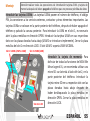
Introducir las tarjetas USIMs: Las tarjetas USIMs poseen el número de teléfono, el código
PIN, las conexiones a los servicios externos, contactos y otros elementos importantes. Las
tarjetas USIMs se colocan en la parte posterior del teléfono, después de haber apagado el
teléfono y quitado la carcasa posterior. Para introducir la USIM en el slot 1, es necesario
abrir la placa metálica en dirección OPEN. Introducir las tarjetas USIMs en sus respectivos
slots con las placas doradas hacia abajo (USIM2 se introduce simplemente). Cerrar la placa
metálica del slot 1 en dirección LOCK. El slot USIM 1 soporta USIM WCDMA.
Slot 1: USIM1 (UMTS o GSM)
Slot 2: USIM2 (GSM)
Slot micro SD
Introducir la tarjeta de memoria: Para
disfrutar de todas las funciones de NGM We
Move Legend XL, se recomienda utilizar una
micro-SD: su slot está al lado del slot 2, en la
parte posterior del teléfono. Introducir la
tarjeta micro-SD en su respectivo slot con las
placas doradas hacia abajo después de
haber desbloqueado la placa metálica en
dirección OPEN. Cerrar la placa metálica en
dirección LOCK.
ESPAÑOL
55
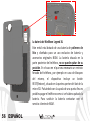
La batería de WeMove Legend XL
Este móvil está dotado de una batería de polímero de
litio y diseñado para un uso exclusivo de batería y
accesorios originales NGM. La batería situada en la
parte posterior del teléfono, no se puede quitar de su
posición. En el caso en el que sea necesario un reinicio
forzado del teléfono, por ejemplo en caso de bloqueo
del mismo, el dispositivo incluye un botón
REST(Restore), situado en la parte superior del slot de la
micro-SD. Pulsándolo con la ayuda de una punta fina es
posible apagar el teléfono como si se hubiera quitado la
batería. Para sustituir la batería contactar con el
servicio cliente de NGM.
56 ESPAÑOL
Cargar la batería
Cargar la batería antes de empezar a utilizar el teléfono. Utilizar el cable USB que se ha
proporcionado y el conector USB situado en la parte superior del teléfono. Conectar el
cargador a una toma de corriente eléctrica y el dispositivo al cable USB. Se puede cargar el
teléfono conectándolo al PC, pero en este caso la carga será más lenta. Cuando la batería
se está cargando, en la pantalla se visualizará un icono animado que muestra el estado de
carga del proceso. Cuando el icono de la batería está lleno, la carga se ha completado y se
puede desconectar el teléfono de la red eléctrica.
Atención: No conectar el teléfono a un ordenador que se está encendiendo o apagando
para evitar cambios de tensión. Se recomienda utilizar el cargador original NGM. Proceder
con la carga exclusivamente en un lugar abierto y seco. Un ligero calentamiento del
teléfono durante el proceso de carga es normal. La batería alcanzará su eficiencia funcional
sólo después de algunos ciclos completos de carga.
Encender, apagar y standby
Para encender el dispositivo, pulsar la tecla On/Off. Para apagar el dispositivo, tener
pulsada la misma tecla y asegurar que se quiere apagar seleccionando “Apagar”. Una breve
presión de la tecla permite pasar rápidamente a la modalidad de standby (pantalla
apagada) o de volver desde esta pantalla a la pantalla de desbloqueo (ver abajo).
ESPAÑOL
57
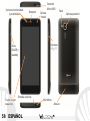
Sensores luminosidad
y proximidad
Receptor
Tecla
On/Off y
standby
Touch screen
capacitivo
Entrada auricular
58 ESPAÑOL
Cámara
frontal
Conector
Micro USB
Flash
Volumen
“+” y “-“
Micrófono
Altavoz
Cámara posterior
Pantalla de Standby
La pantalla principal
Controlar el touch screen tocándolo, teniéndolo pulsado o
arrastrando el dedo por la pantalla. La pantalla principal es el
punto de partida para la utilización de todas las aplicaciones del Toca y desplaza el
teléfono móvil. Las otras páginas se encuentran al lado de la elemento central hacia
principal, para acceder a ellas, desplazar la pantalla hacia la la izquierda para utilizar
derecha e izquierda. Tales páginas son personalizables con las la cámara
conexiones de las aplicaciones preferidas: desde el menú
Toca y desplaza el
principal tener pulsado el icono de la aplicación deseada, a
elemento central
continuación, dejar el icono en cualquier punto de la pantalla
hacia la derecha
principal. Igualmente es posible cambiar las conexiones
para desbloquear
predefinidas (al lado del icono menú principal). Para eliminar
una conexión de la pantalla principal, pulsar el icono
correspondiente y desplazarlo hacia el símbolo X “Eliminar”
situado en la parte superior de la pantalla. Es posible
superponer dos iconos y crear una carpeta en la página
principal.
El Menú principal
Seleccionar una aplicación del menú principal o desplazaros hacia la derecha/izquierda
para visualizar otras aplicaciones. Pulsar la tecla Atrás para volver a la pantalla anterior;
pulsar la tecla Home para volver a la pantalla principal.
ESPAÑOL
59
Pantalla Principal
Intensidad señal USIM y nivel batería
Menú Principal
Panel de notificación
Barra indicador páginas
Menú mensajes
Internet
Menú contextual
Menú Llamada
Agenda Menú principal
Desplazamiento pantalla HOME
60 ESPAÑOL
Atrás
Home
Apli.recientes
Desplazamiento menú
Opciones directas
Panel de notificación: Para abrir el panel de notificación, tocar el área de los iconos
situados en la parte alta de la pantalla y arrastrar el dedo hacia abajo. Para esconder el
panel, arrastrar hacia arriba la parte baja del panel o tocar la tecla Atrás, desde el panel de
notificación se puede acceder a la lista de notificaciones procedentes de las USIMs o del
sistema y, en la parte alta, a los 12 widgets de gestión.
Aplicaciones recientes: Cuando os encontráis en el interior de cualquier aplicación,
seleccionar el icono Aplicaciones recientes (al lado del icono Home): se visualizará la lista
de las aplicaciones que se han utilizado recientemente, las cuales se pueden seleccionar
directamente. Menú contextual: algunas aplicaciones requieren el uso del Menú
contextual. Pulsando este icono es posible visualizar un menú contextual referido a la
misma aplicación con las relativas funciones.
Bloqueo pantalla y vibración: Desde el menú principal, seleccionar Configuraciones >
Personal “Protección” > Bloqueo pantalla. Seleccionar la modalidad deseada para
desbloquear la pantalla (Ninguna, Desbloqueo con sonrisa, Secuencia, PIN o contraseña) y
confirmar. Para bloquear rápidamente la pantalla, pulsar brevemente la tecla On/Off del
teléfono. Para desbloquear la pantalla, seguir las indicaciones de la pantalla.
Activar o desactivar rápidamente la vibración: Para desactivar rápidamente la melodía de
las llamadas y los mensajes pulsar la tecla volumen “–“. Una vez que se ha llegado al
volumen mínimo, el teléfono entrará en modalidad vibración. Pulsando de nuevo el
volumen “–“, el teléfono entrará en modo silencio.
ESPAÑOL
61
Gestionar las dos USIMS
En el menú principal, seleccionar Configuraciones > Wireless y Redes “Adm. tarjeta SIM”.
Seleccionar las teclas on/off al lado de los operadores telefónicos correspondientes a
“USIM1” y “USIM2” para activar o desactivar selectivamente las USIMs en cualquier
momento. Además, se puede configurar el color de ambas USIMs y decidir qué USIM
utilizar como principal para llamadas, llamada vídeo y conexión datos.
Gestionar una llamada
Desde la pantalla principal, tocar el icono del menú de llamadas para abrir la pantalla de
llamada. Digitar el número telefónico a llamar usando el teclado vitual.
Iniciar la llamada pulsando el icono correspondiente y elegir la USIM con la que se quiere
llamar.
Pera terminar, tocar el icono de fin llamada.
Para responder a una llamada, arrastrar el icono del teléfono hacia la derecha; para
rechazarla, arrastrar el mismo icono hacia la izquierda. Existe, además, la posibilidad de
rechazar la llamada con un mensaje, para elllo se debe desplazar el icono telefónico
hacia arriba. Para silenciar una llamada, tocar la tecla Volumen “+” o “–“ (en el lado
derecho del teléfono).
Llamar un número del registro llamadas
Desde el menú principal, seleccionar el menú Teléfono. En la parte superior del teclado
numérico se visualizan en automático las llamadas perdidas, recibidas y realizadas.
Tocar el número deseado para iniciar la llamada.
62 ESPAÑOL
Nota: En el menú contextual de la
Gestionar contactos
agenda se tiene acceso a las funciones de
Añadir un nuevo contacto:
importación/exportación de los
Desde el menú principal, seleccionar Contactos.
contactos y varias configuraciones útiles.
Pulsar el icono con el símbolo “+”.
Elegir dónde se quiere guardar el nuevo contacto (teléfono, USIM1 o USIM2).
Introducir Nombre, Teléfono y otros datos del contacto.
Confirmar que se quiere guardar.
Añadir un nuevo contacto del registro llamadas:
Desde el menú Teléfono, acceder al Registro Llamadas
Pulsar sobre la imagen de contacto vacía del número que se quiere guardar entre las
llamadas perdidas, realizadas o recibidas.
Elegir Añadir a contactos y confirmar si se quiere añadir el número a un contacto
existente o crear uno nuevo. Después de añadir nombre y otras informaciones,
confirmar con Guardar.
Nota: es posible utilizar el archivo de
melodías en formato *mid,*wav o *mp3.
Configurar las melodías
Desde el menú principal, seleccionar Configuraciones> Dispositivo “Perfiles de audio” >
General.
Seleccionar Tono de llamada de voz y elegir la melodía deseada de la lista.
Si se desea configurar una melodía personalizada, desde Música seleccionar la canción
deseada, y por lo tanto, Usar como melodía utilizando el menú contextual. A este punto
el archivo será introducido en la lista de las melodías disponibles.
ESPAÑOL
63
Enviar y leer SMS y MMS
Enviar SMS y MMS:
Desde la página o desde el menú principal, elegir Mensajes y pulsar el icono con el
símbolo “+” para acceder a la pantalla de introducción texto.
Digitar las primeras letras de un nombre, en la sección destinatario, para buscar un
contacto y seleccionar el contacto de la lista a pop-up, o introducir directamente el
número del destinatario.
Introducir el texto en su correspondiente espacio con el teclado virtual.
Clicar el icono Adjuntar para incluir adjuntos multimediales (el mensaje se convertirá en
MMS); pulsar el icono Enviar de la tarjeta USIM deseada (1ó 2).
Leer SMS y MMS: cuando se recibe un nuevo SMS o MMS, se visualiza un icono en el panel
de notificación de l apágina principal. Abriendo el panel de notificación y tocando el icono
visualizado, se puede acceder a la conversación y leer el mensaje recibido. En cada caso, es
posible visualizar los mensajes recibidos desde la pantalla principal o desde el menú,
seleccionando Mensajes.
Conectividad
El sistema operativo requiere una conexión de datos activa. Si no se ha realizado un
contrato, el tráfico datos implicará gastos, se recomienda, en este caso, configurar el
acceso a Internet trámite WiFi. Para activar el tráfico datos en la USIM, ir a Configuración >
Administración de la tarjeta SIM > Conexión de datos.
64 ESPAÑOL
Conectarse a Internet con la función Wi-Fi®
Podéis conectaros a la red wireless utilizando la función Wi-Fi. Para activarla, seleccionar
Configuración > WLAN on/off. Prestar atención a todas las advertencias e indicaciones
específicas del personal autorizado cuando os encontráis en áreas donde el uso de los
dispositivos wireless está limitado, como en los aviones y en los hospitales. Pasar a la
Modalidad offline cuando se utilizan sólo los servicios que no necesitan acceso a la red.
Conectarse a un dispositivo Bluetooth®
Activar el dispositivo Bluetooth™ al que se quiere conectar. Consultar la documentación
del dispositivo.
Desde el menú principal, elegir Configuración > “Bluetooth” on/off para activar el
Bluetooth.
Elegir Buscar dispositivos para activar automáticamente la búsqueda de los dispositivos
Bluetooth.
Entre los dispositivos detectados, seleccionar el nombre del dispositivo con el que se
quiere asociar. El teléfono intentará asociarse con el dispositivo, a continuación se pedirá
un código de asociación.
Navegar por Web y gestionar los Emails
Conectarse a Internet: Desde el menú principal, elegir Navegador. Digitar el URL en la
barra de direcciones. Si se elige navegar con la conexión datos de la red telefónica,
informarse de los gastos o elegir un contrato datos “flat” con el propio operador. Como
alternativa, utilizar la conexión Wi-Fi (ver párrafo “Conectividad”) donde sea posible.
ESPAÑOL
65
Email: configurando una cuenta predefinida es posible gestionar fácilmente el correo
electrónico y visualizarlo automáticamente en el propio teléfono. Si se desea utilizar un
provider de servicios de correos diferente del sugerido por el teléfono como cuenta
predeterminada, debe configurar una cuenta Email en el Menú principal.
Configuración cuenta: Para disfrutar mejor de las funcionalidades del sistema AndroidTM,
se aconseja configurar una cuenta predefinida. La primera vez que se enciende, el teléfono
os guiará en la configuración de una cuenta predefinida que permitirá acceder a las
aplicaciones del sistema AndroidTM entre las cuales por ejemplo, la sincronización del
correo electrónico, el uso de mensajes instantáneos y el poder compartir la ubicación
geográfica.
Introducir texto con SwiftKey
El método de introducción configurado por defecto en el teléfono es el del teclado
SwiftKey. El método de escritura SwiftKey es un sistema avanzado para la introducción
predectiva de texto; cuando se escriben mensajes SMS, MMS o E-mail, esta modalidad
prevé la palabra que se está digitando cambiándola por cada presión de las teclas. Durante
la primera utilización, el programa sugiere con pop-ups las innovaciones y las
peculiaridades de este sistema de escritura. SwiftKey tiene un Diccionario “inteligente” que
extrae palabras, además, de las varias aplicaciones del teléfono, como la agenda, las redes
sociales, etc. Para un correcto funcionamiento del diccionario, es necesario instalar en el
teléfono una micro-SD. Para cambiar los parámetros de introducción del texto, seleccionar,
Configuración > Idioma y entrada > SwiftKey for NGM.
66 ESPAÑOL
Sincronización: La sincronización es el modo más eficaz para gestionar los propios datos
útiles porque permite realizar un backup de tales datos presentes en el dispositivo con la
cuenta Internet. En caso de cambio o deteriodo del teléfono no se verificarán pérdidas de
estos datos. La sincronización puede ser automática o manual y se puede activar en
Configuraciones > Personal “Cuenta y Sinc.” La operación de sincronización utiliza una
conexión datos activa, que podría implicar gastos de tráfico datos. Se aconseja, por lo
tanto, utilizar una conexión WiFi, cuando sea disponible.
Geolocalización GPS
El Global Positioning System (GPS) es un sistema de posicionamiento por satélite, con
cobertura global y contínua. Para acceder a la función GPS, seleccionar Configuración >
Personal “Servicios de ubicación” > Satélites GPS. Cuando la función GPS está activada, el
teléfono comienza a recopilar datos de los satélites disponibles y establece la posición
actual. Los tiempos de Fix (Detección de la ubicación) son variables y pueden ser afectados
por varios factores externos. Para hacer más rápido el Fix, se puede activar la función EPO y
seguir las instrucciones (es necesario la conexión datos o WiFi para la descarga de la
predicción de las órbitas de los satélites). Para limitar el consumo de batería y memoria se
recomienda desactivar esta función cuando no se utiliza. El teléfono incorpora el sistema
satelitario NGM NAVIGATION SYSTEM © preinstalado. Para más información sobre el
funcionamiento del sistema visitar el sitio Web www.ngm.eu.
ESPAÑOL
67
Advertencia: El formato y la entrega de este manual se basa en el sistema operativo
Android ™, el fabricante no asume ninguna responsabilidad por cualquier incumplimiento
de las directrices establecidas anteriormente o cualquier uso inapropiado del teléfono. NGM
se reserva el derecho de modificar sin previo aviso la información contenida en este
manual. El contenido de este manual podría cambiar con respecto al contenido mostrado
por el teléfono. En tal caso, prevalece el contenido mostrado por el teléfono.
Copyright © 2012 NGM Italia
Ninguna parte de esta publicación puede ser extraída, reproducida, traducida o utilizada
de cualquier forma o en cualquier medio, electrónico o mecánico, incluido fotocopias y
microfilm, sin previa autorización escrita por la NGM Italia.
Bluetooth® es una marca comercial registrada en todo el mundo del Bluetooth SIG,
Inc.
Wi-Fi® y el logo Wi-Fi son marcas comerciales registradas de Wi-Fi Alliance.
68 ESPAÑOL
Guide rapide - Français
FRANÇAIS
69
TM
Bienvenue dans le monde de NGM Android . Merci pour avoir acheté NGM
WeMove Legend XL. Avec ce dispositif vous pourrez avoir accès aux multiples
TM
fonctions de Android pour gérer vos contacts, mail, social network et pour
découvrir les opportunités du réseau internet en un seul geste !cela sera comme
avoir un petit tablet, un téléphone et un navigateur en un unique, élégant
dispositif. Par rapport aux Smartphones mono SIM sur le marché, NGM WeMove
Legend XL offre la commodité du DUAL SIM, qui depuis toujours caractérise
l’entière gamme des téléphones NGM, ou la possibilité de gérer deux SIM en
même temps en configurant la SIM prédéfinie pour les appels, appel vidéo et
connexion données, un avantage exclusivement NGM! En visitant le site officiel
www.ngm.eu vous pourrez connaitre l’entière gamme de téléphones NGM,
demander assistance, accéder au forum d’assistance technique et télécharger les
mises à jour de software.
70 FRANÇAIS
Assemblage
Attention: exécuter toutes les opérations d’insertion cartes SIM et carte mémoire
uniquement après avoir éteint le téléphone, pour éviter perte données.
Introduire les USIM cartes: Les USIM cartes contiennent vos numéros téléphoniques, les
codes PIN, les connexions aux services externes, contacts et aux autres détails importants.
Pour accéder à la partie contenant les slots des SIM, éteindre le téléphone et soulever la
cover du coté supérieur du corps du téléphone. Pour introduire une USIM dans la fente 1, il
est nécessaire de soulever le compartiment métallique en le faisant tout d’abord glisser
comme indiqué par la flèche OPEN sur le support. Insérer les cartes USIM dans les
respectives fentes avec les contacts dorés retournés vers le bas. Refermer le compartiment
métallique de la fente 1 et le glisser vers LOCK. La fente USIM 1 supporte USIM WCDMA.
fente1: USIM1 (UMTS ou GSM) fente 2: USIM2 (GSM)
Introduire la carte mémoire: Pour utiliser
toutes les fonctions de NGM WEMOVE
LEGEND XL, il est conseillé l’utilisation d’une
carte micro SD. Sa fente est près de la fente
2, dans la partie postérieure du téléphone.
Introduire la micro-SD dans sa fente avec les
contacts dorés retournés vers le bas après
avoir débloquer le compartiment métallique
en le faisant glisser vers OPEN. Refermer le
compartiment en le faisant glisser vers LOCK.
fente micro SD
FRANÇAIS
71
La batterie de WeMove Legend XL
Votre appareil est fourni avec une batterie à lithium et
est projeté pour l ‘utilisation exclusive de batterie et
accessoires originaux NGM. La batterie est située sous
les fentes USIM e micro SD, ne peut être enlevée de son
compartiment. Dans le cas nécessaire d’un redémarrage
forcé du téléphone, par exemple en cas de blocage du
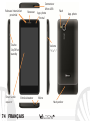
même, le dispositif est doté d’une touche REST
(Rétablir), située au-dessus de la fente micro SD.
Appuyant sur celle-ci, à l’aide d’une pointe fine (ex:
stylo), il est possible d’éteindre le téléphone comme si la
batterie était enlevée. Le remplacement de la batterie
est possible s’adressant au service d’assistance NGM.
72 FRANÇAIS
Charger la batterie
Rechargez la batterie avant de commencer à utiliser l’appareil. Utilisez le câble USB fourni
et le connecteur USB situe sur le côté supérieur du téléphone qui est protégé par un
compartiment qui doit être refermé quand le câble USB n’est pas utilisé. Branchez le
chargeur à une prise de réseau électrique et donc le dispositif au câble USB. Le téléphone
peut être rechargé même s’il est branché au pc, mais dans ce cas le rechargement sera plus
lent. Quand la batterie est en charge, une icône animée sur l’écran montre l’état
d’avancement du chargement si le téléphone est allumé. Une fois que l’icône de la batterie
est remplie, le chargement est complété et le téléphone peut être déconnecté du réseau
électrique. Fermer le compartiment de protection de la prise micro USB.
ATTENTION: Ne branchez pas le téléphone à un ordinateur qui est en train de s’allumer ou
de s’éteindre pour éviter baisses de tension. Pour préserver le bon fonctionnement du
produit et l’ intégrité de la garantie nous recommandons l’utilisation du chargeur originale
NGM. Procédez au rechargement en lieu couvert et sec . Un léger réchauffement du
téléphone pendant le processus de rechargement est normale .La batterie atteindra son
efficacité fonctionnelle uniquement après quelque cycle complet de rechargement
Allumage, éteignement et standby
Pour allumer le dispositif, appuyer sur la touche on/off. Pour éteindre le dispositif ,
appuyer sur la même touche et confirmer l’ éteignement en sélectionnant “éteindre”. Une
pression brève permet de passer rapidement en mode standby (écran éteint) ou de
retourner de cellui-ci à l’écran de blocage (voir ci-dessous).
FRANÇAIS
73
Releveur intensité et
proximité
Receveur
Connecteur
Micro USB
App. photo
frontal
Touche
On/Off et
standby
Ecran tactile
capacitif
Flash
Volume
“+” e “-“
Entrée écouteur
74 FRANÇAIS
Micro
Haut-parleur
App. photo
L’écran principale
Utiliser l’écran tactile touchant, appuyant ou déplaçant le doigt
sur l’écran. L’écran principal est le point de départ pour
l’utilisation de toutes les applications du téléphone portable.
D’autres pages se trouvent sur le côté par rapport à la page
principale ; à celles – ci on peut y accéder en parcourant de
droite à gauche. Ces pages sont personnalisées avec fichiers
des applications préférées, successivement laisser l’icône à
n’importe quel endroit sur l’écran principal. De cette façon
vous pouvez changer les liens prédéfinis (près de la touche
menu). Pour éliminer un lien de l’écran principal, appuyer sur
l’icône correspondante et la trainer vers le symbole X
“Supprimer” en haut de l’écran. Superposant deux icônes il est
possible les regrouper et créer un dossier sur la page principale.
Affichage de Standby
Toucher et trainer
l’élément central vers
gauche pour utiliser
appareil photo
Toucher et trainer
l’élément central
vers droite pour
débloquer
Le menu principale
Sélectionner une application depuis le menu principale ou
parcourir vers gauche/droite pour visualiser d’autres
applications Appuyer la touche retour pour retourner à l’écran précédent; appuyer la
touche Home pour retourner à l’écran principale.
FRANÇAIS
75
Affichage Principale
Intensité signal USIM et niveau batterie
Menu Principale
Panneau notifications
Barre indicateur page
Menu messages
Internet
Menu instantané
Menu Appel
Rubrique Menu Principale
Parcourir affichage HOME
76 FRANÇAIS
Retour
Home
App récentes
Parcourir menu
Choix rapide
Panneau de notifications: Pour ouvrir le panneau de notifications, touchez l’espace des
icônes dans la partie haute de l ‘écran et trainez le doigt vers le bas .Pour cacher le
panneau , trainez le doigt vers le haut la partie inférieure de la liste ou touchez la touche
retour. Du panneau de notifications il est possible d’accéder à une liste de notifications
provenant des SIM ou du système et dans la partie haute aux 12 widgets de gestion.
Applications récentes: Lorsque vous vous trouvez à l’intérieur de quelconque application
sélectionner application récentes (près de l’icône home)la liste des applications sur
lesquelles vous avez effectuée l’accès récemment sera visible et donc directement
sélectionnable. Menu instantané: certaines applications prévoient l’utilisation de
Menu instantané. Appuyant sur telle icône, il est possible de visualiser un menu
instantané référé à l’application même avec les fonctions relatives
Blocage écran et vibration: du menu principale, Configuration> Personnel “Protection” >
Blocage écran. Sélectionner le mode désiré pour débloquer l’écran (aucun, glissement,
motif, pin ou mot de passe) et confirmer. Pour bloquer rapidement l’écran, appuyer
brièvement sur la touche on/off du téléphone. Pour débloquer l’écran, suivre les
indications à l’écran.
Activer ou désactiver rapidement la vibration: Pour désactiver rapidement la sonnerie
pour les appels et les messages, il est possible en tenant appuyer la touche volume”-“ de
l’affichage principale. Une fois atteint le volume minimum, le téléphone entrera en mode
vibration. En appuyant de nouveau volume ”-“, le téléphone entrera en mode silencieux.
FRANÇAIS
77
Gérer les deux USIM
Menu principale , selectionner réglages > sans fils et reseau “gestion SIM”.
Selectioner les noms operateurs tèlèphoniques correspondants a “SIM1” et”SIM2” pour
actionner ou désactionner en selectionnant à n importe quel moment les SIM. De ce menu
il est aussi possible personnaliser la couleur à attribuer à l’icône de chaque USIM et décider
quelle USIM utiliser comme principale pour les appels, appel vidéo et connexion données.
Gérer un appel
Sur l’écran principal, toucher l’icône du menu d’appel, composer le numéro de téléphone
à appeler en utilisant le clavier virtuel
Faire un appel en appuyant sur l icone téléphone et choisir la SIM avec laquelle appeler
Pour terminer, toucher l icone de fin d’appel
Pour répondre aux appels, déplacer la lueur vers droite sur le téléphone vert; pour les
refuser déplacer vers gauche sur le téléphone rouge, pour refuser par message déplacer
le téléphone vers le haut. Pour rendre silencieux un appel en arrivée, toucher la touche
volume “+” ou “_” (sur le côté droit du téléphone).
Rappeler un numéro du registre des appels
Du menu principal, sélectionner le menu téléphone. Au- dessus du clavier numérique
sont visualisées en automatique les appels manqués, reçus et sortants
Toucher le numéro désiré pour commencer l’appel.
78 FRANÇAIS
Note: Dans le menu instantané de la rubrique vous
Gérer les contacts
pouvez accéder aux fonctions d’importation / exportation
Ajouter un nouveau contact:
des contacts et différentes configurations.
Du menu principal, sélectionner icône contacts
Appuyer l’icône indiquée par le symbole “+” sur la barre du bas
Choisir où sauvegarder le nouveau contact (téléphone, SIM1, SIM2)
Enregistrer nom, numéro et éventuels autres détails du contact (si le contact est
sauvegardé sur les SIM, il n’est pas garanti le sauvetage d’éventuels ultérieurs détails
autre au nom et numéro téléphonique. Confirmer le sauvetage.
Ajouter un nouveau contact du registre appels:
Du menu Téléphone, accéder au Registre appels
Appuyer sur l’image du contact vide du numéro que l’on veut sauvegarder parmi les
appels manqués, effectués ou reçus.
Choisir Ajouter à contacts et confirmer si l’on veut ajouter le numéro à un contact
existant ou en créer un nouveau. Après avoir ajouté nom et éventuels aux informations,
confirmer avec Sauvegarder.
Note: possible utiliser comme sonnerie
fichier format*mid,*wav ou *mp3.
Configurer une sonnerie
Du menu principal, sélectionner réglage > appareil ”profil audio” > Générale
Sélectionner Ton d’appel vocale et choisir la sonnerie désirée de la liste que l’on désire
configurer comme sonnerie personnalisée, dans Musique sélectionner le morceau audio
désiré, donc Utilise comme sonnerie appuyant sur menu instantanée. Ainsi le fichier
audio sera introduit dans la liste des sonneries disponibles.
FRANÇAIS
79
Envoyer et lire SMS et MMS
Envoyer SMS et MMS:
De la page ou du menu principal, choisir Messages et donc l’icône avec le “+” pour
accéder à l’écran d’insertion texte.
Composer les premières lettres du nom dans le champ destinataire pour rechercher un
contact et sélectionner le contact de la liste pop-up, ou introduire directement le
numéro du destinataire
Introduire le texte dans l’espace adéquate avec le clavier virtuel
Sélectionner l’icône avec le trombone pour y inclure éventuels fichiers multi médiales (le
message sera converti en MMS). Et appuyer l’icône Envoi de la USIM carte désirée.
Lire SMS et MMS: quand vous recevez un nouveau SMS ou MMS, une icôna sera visualisée
dans le panneau de notifiactions de la page principale. Ouvrant le panneau de notifiactions
et touchant l’icône visualisée, il est possible d’accéder à la conversation et lire le message
entrant. Dans chaque cas, il est possible visualiser les messages entrants sur l’écran
principale ou du menu, sélectionnant les messages.
Connexion
Le système operatif a besoin d une connexion active de donnèes. SI cela n’est pas prévu
sur votre abonnement, le tarif des données implique des frais. Il est conseillé de configurer
l‘accès internet par WIFI. Pour activer le tarif des données sur la SIM, aller sur réglages >
sans fil et reseau “gestion USIM” > connexion des données.
80 FRANÇAIS
Se connecter à Internet avec la fonction Wi-Fi® : vous pouvez vous connectez au réseau
sans fil en utilisant la fonction WI-FI. Pour l’activer, du menu principale choisir réglages >
sans fil et réseau ”WLAN”ON/OFF. Tenir compte de la notice et des indications spécifiées
par le personnel autorisé lorsque vous vous trouvez en avion où l’utilisation des dispositifs
sans fil et Bluetooth est limitée ainsi que dans les hôpitaux. Passer en mode hors ligne
lorsque vous devez utiliser uniquement les services sans accès au réseau.
Se connecter à un dispositif Bluetooth®
Allumer le dispositif Bluetooth auquel vous désirez vous connecter. Se référer à la
documentation du dispositif.
Du menu principale, choisir sur réglages > sans fil et réseau ”Bluetooth” on/off pour
activer le Bluetooth.
Choisir recherche dispositif pour commencer automatiquement la recherche des
dispositifs Bluetooth. Parmi les dispositifs relevés, sélectionner le nom du dispositif à
associer. Le téléphone tentera de s’associer au dispositif, il sera demandé
éventuellement un code d’association.
Naviguer sur le web et gèrer les Email
Se connecter à internet: du menu principal, choisir Browser. Composer l’URL dans la barre
des adresses pour commencer la navigation. Si vous choisissez de naviguer avec la
connexion de données réseau téléphonique, s’informer sur les frais ou choisir un contrat
données “flat” avec le propre opérateur. En alternative, utiliser la connexion Wi-Fi (voir
paragraphe “Connexion ») où il est possible.
FRANÇAIS
81
Email: en configurant un account prédéfini il est possible de gérer facilement la posta
électronique et visualiser en automatique sur le propre téléphone. Si vous désirez utiliser
un provider de service de poste différente de celui suggéré par le téléphone comme
account prédéfini, il faudra configurer un account dans l'appliaction Email dans le menu
principal.
Configurer account: Pour utiliser au mieux les fonctions du système AndroidTM, il est
conseillé de configurer un account prédéfini. Au premier allumage, le téléphone vous
guidera dans la configuration d’un account prédéfini qui permettra d’accéder aux
applications du système AndroidTM par exemple la synchronisation de la poste électronique,
l’utilisation des messages instantanés et le partage de la position géographique.
Introduire un texte avec SwiftKey
La manière d ‘insertion imposée par default du téléphone est celui du clavier Swiftkey.
Swiftkey est un système avancé pour l’insertion anticipée de texte, lorsque l ‘on écrit des
SMS, MMS ou E-MAIL, telle modalité prévoit le mot que l’on est en train de composer, en
le changeant à chaque pression sur les touches. Pendant la première utilisation, le
programme suggèrera avec des pop-up les innovations et les particularités de ce système
d’écriture. Swiftkey a un dictionnaire intelligent qui extrait des mots dans les diverses
applications du téléphone, comme la rubrique, le network, etc. Pour le fonctionnement
correct du dictionnaire, il est nécessaire d’installer une micro-SD. Pour changer les
paramètres d’insertion du texte, sélectionner réglages > Langues et saisie > SwiftKey pour
NGM-Mobile.
82 FRANÇAIS
Synchronisation: La synchronisation est la manière plus efficace pour gérer les propres
données car elle permet d’effectuer un support de telles données présentes sur le
dispositif avec l’account internet. En cas de changement, perte ou endommagement du
téléphone il n’y aura aucune vérification de perte de ces données. La synchronisation peut
être automatique ou manuelle et peut être activée en Réglages>Personnel “Account et
Synchr.” L’opération de synchronisation utilise une connexion données active, qui pourrait
comporter des frais de trafic données. Il est conseillé sinon d’utiliser une connexion WiFi,
quand elle est disponible.
Geolocalisation GPS
LE GLOBAL POSITIONING SYSTEM (GPS) est un système de positionnement sur base
satellitaire, à couverture globale et continue. Pour accéder à la fonction GPS sélectionner
réglage> personnel ”service de positionnement”>satellite GPS. Quand la fonction GPS est
activée, le téléphone commence à prendre les données des satellites disponibles et donc
stabilise sa position actuelle. Les temps di Fix (Releveur de la position) sont variables ety
peuvent être influencés par différents facteurs externes (nuageux, construction de
bâtiment etc). Pour rendre plus rapide Fix, vous pouvez activer la fonction EPO et suivre les
instructions( cela demande une connexion données ou WiFi pour le téléchargement de la
prévision des orbitres des satellites). Pour limiter la consommation de batterie et
mémoire, on conseille de désacctiver le GPS quand il est utilisé. Le téléphone dispose d’un
système de navigation NGM NAVIGATION SYSTEM© prédéfini. Pour plus de détails sur le
fonctionnement visitez le site www.ngm.eu.
FRANÇAIS
83
Avertissement: Le format et la fourniture de ce manuel se base sur les systèmes opératifs
AndroidTM; le producteur ne s'assume aucune responsabilité pour quelconque non suivi des
lignes de comportements ci-dessus indiquées et pour chaque utilisation impropre du
téléphone portable. NGM se réserve le droit de modifier sans préavis les informations
contenues dans ce guide. Le contenu de ce guide manuel pourrait différer du contenu
effectivement illustré dans le téléphone portable. Dans tel cas la seconde indication est
valable.
Copyright © 2012 NGM Italia
Aucune partie de ce manuel peut être reproduite, distribuée, traduite, transmise en
aucune forme ou par aucun moyen, électronique ou mécanique, y compris photocopie,
enregistrement ou sauvetage dans n‘importe quelle archive d’informations ou système
de récupérage, sans autorisation écrite par NGM Italia.
Bluetooth® est une marque commerciale enregistrée dans tout le monde de la
Bluetooth SIG, Inc.
Wi-Fi® est le symbole Wi-Fi sont des marques commerciales enregistrées par Wi-Fi
Alliance.
84 FRANÇAIS
www.ngm.eu