1
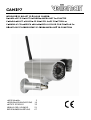
CAMIP7
Use
er manual
1.. Introdu
uction
To
o all reside
ents of the
e European Union
Im
mportant environme
e
ental inforrmation ab
bout this product
p
This symbol on the device
e or the pac
ckage indicates that disposal of tthe device after
a
its
ycle could harm
h
the environment. Do not dispose of th
he unit (or batteries) as unsorted
lifecy
municipal waste
e; it should
d be taken to a specialized company for rec
cycling. This
s device
uld be returrned to you
ur distributo
or or to a lo
ocal recyclin
ng service. Respect th
he local
shou
environmental rules.
If in doubt, contact yo
our local waste
w
disp
posal auth
horities.
Th
hank you for choosing Velleman! Please read
d the manua
al thorough
hly before b
bringing this
s device into
service. If the
e device wa
as damaged
d in transit, do not insttall or use itt and conta
act your dea
aler.
2.. Safety Instruct
I
ions
Kee
ep the deviice away from children
n and unau
uthorised us
sers.
Ris
sk of electtroshock when
w
openin
ng the cove
er. Touchin
ng live wires
s can cause
e lifethrreatening electroshock
ks. Do not open
o
the ho
ousing yourself. Have the device
e repaired by
b
qua
alified personnel.
O NOT disassemble orr open the cover.
c
Therre are no user-service
eable parts inside the
DO
dev
vice. Refer to an authorized dealler for service and/or spare parts
s.
3.. General Guidelines
Re
efer to the Velleman®
V
® Service and
a
Qualitty Warran
nty on the last pages o
of this man
nual.
ay form rain
n, moisture
e, splashing
g and dripping
Indoor use only. Keep this device awa
liquids.
Keep this device aw
way from dust
d
and ex
xtreme heatt.
Protect this device from shocks and abu
use. Avoid brute
b
force when operrating the
device.
•
•
•
Familiaris
se yourself with the fu
unctions of the
t
device before
b
actu
ually using it.
All modifications of the
t
device are forbidden for safetty reasons.
ose. Using the
t
device in an unautthorised way will void the
t
Only use the device for its intended purpo
y.
warranty
Damage caused by disregard of
o certain gu
uidelines in this manua
al is not cov
vered by th
he warranty
y
d
will not
n accept responsibilit
r
ty for any ensuing
e
deffects or problems.
and the dealer
DO NOT
T use this product
p
to violate
v
priv
vacy laws or perform other
o
illega
al activities
s.
•
•
4.. Feature
es
•
•
•
•
•
easy insttallation pro
ocedure
waterpro
oof protectio
on
secured Wi-Fi
W
and wired
w
LAN connection
c
24 IR LEDs for nigh
ht vision (up
p to 20m)
motion detection
d
alert via ema
ail or upload image to FTP
5.. Overvie
ew
Re
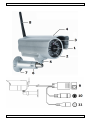
efer to the illustrations
i
s on page 2 of this ma
anual.
1
2
3
4
5
6
lens
IR LEDs (24x)
light sen
nsor
sunshielld
camera bolt
position bolt
13.01.2011
7
8
9
10
11
3
bracket
b
Wifi
W antenna
a
RJ45
R
network jack
5 VDC in
reset
©Velleman
n nv