1
5
SETUP
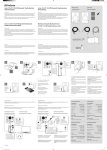
Prior to making connections or changing any existing connections, switch off
all units.
1
Screw on the antenna provided to the antenna input and put it in a
vertical position.
2
Connect a signal source to the transmitter and the set the selector
switch INPUT SELECT accordingly. Use the input LINE IN for an
audio unit with line level (e.g. CD player) or the USB port for a
computer. Once the transmitter has been connected to the computer,
the operating system recognizes it as a USB audio unit for sound
output. Otherwise, the transmitter can be configured with the standard
audio interface controls in the Mac and Windows operating system.
3
Connect the output LINE OUT on the receiver to your stereo or active
speakers.
4
Alternatively, connect passive speakers (min. 4 Ω) to the terminals
SPEAKER OUT of model WS-1RA observing the polarity.
5
Connect the transmitter and receiver each to the mains via their
included power unit (100-240 V~, 50/60 Hz) and switch them on with
the POWER switch (green power indicator lights). If the transmitter is
connected to a computer, it is supplied with power via the USB
connection of the computer.
6
Press the button CONNECT for 3 seconds on the transmitter and
receiver to pair the units. Thus, the wireless network is set up and the
indicator switches to blue. You can now start playing music on your
audio device.
7
8
On the receiver WS-1RA, adjust the volume with the VOLUME control.
After the operation, switch off the units with the POWER switch.
www.omnitronic.de
14