1
MANUAL START AND STOP OF THE ROBOT
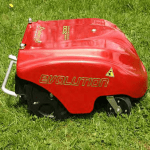
Place the robot inside the working
area at least 1 m far from the perimeter wire and from any other
obstacle.
GB
IDM - 41501603300.tif
Immediate start
1-Press again shortly the "start"
(A) push button or (L).
The leds (E) (green) and (H)
(yellow) turn on.
The robot starts with the
stopped blade, which will start
functioning after the robot has
proceeded for at least 1 m
without meeting obstacles
and/or the perimeter wire.
led (F)
led (E)
led (C)
push button
(A)
batteries
led (D)
push button
(B)
led (G)
led (H)
push button (L)
push button (M)
push button (P)
push
button (N)
Delayed start
2-Press again for an extended time the
"start" (A) push button.
The leds (E) (green), (H) (yellow) turn
on and the led (B) (blue) flashes.
After 30 seconds, the robot enters in
the stand-by mode and will start trimming the lawn after 3 hours.
IDM - 41501603000.tif
The robot and the blade stop almost instantly.
The stop condition is indicated by the
flashing turning on of the led (E)
(green).
Warning - Caution
To stop the robot in safety conditions,
it is not enough to press the "start" (A)
push button or (L), but it is necessary
to then press the "stop" (B) push button as well.
Important
Both for the immediate start and for
the delayed start, if it is necessary to
stop the robot, it is enough to press
the "start" (A) push button or (L).
- 26 -
User's manual
C141501600.fm
1-Press shortly the "start" (A)
push button.
The (green) led (E) flashes to indicate that the robot is on and it is
in the "pause" mode.
The start of the robot can be carried out with two different modes
(immediate or delayed start).