1
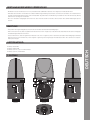
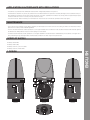
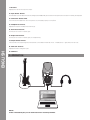
1. Mic Gain:
Adjusts the internal microphone‘s input.
2. Input Select Switch:
Via this button you can determine the recording source. Additionally to the internal microphone there is a 3.5 mm AUX at your disposal.
3. Connection Status LED:
This LED is illuminated when the microphone is connected properly to a PC/Mac.
4. Headphones Volume:
Adjusts the output‘s headphones volume (6).
5. AUX IN Connection:
Connection for a 3.5 mm stereo jack.
6. Output Connection:
Connection for a 3.5 mm stereo jack (i.e. headphones).
7. Output Select Switch:
Via this switch the output signal‘s characteristic can be determined: left mono – middle stereo – right direct monitor out.
ENGLISH
8. AUX Gain Control:
Adjusts the external signal‘s input.
9. USB Port
2. Operation
NOTE!
Under www.audacity.de you can download a free recording software.