1
Description
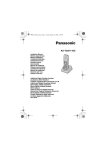
1: Receiver;
2: LCD;
3: Right soft key, the function associated is
written on lcd;
4: Up/Down key, UP: To enter on received call
list and to pass to the previous option on the
menu; Down: To enter on Phone Book/to pass to
the successive option on the menu;
5: Left soft key;
6: Hook off key, long press during conversation
for Hands free, long press on stand by for care
dial;
7:Hook on key; also to turn on/off the handset;
8:Numeric keypad;
9: Star key, also to make intercom calls;
10: Microphone;
11: Pound key, also R/flash key;
12: On-line led
13: In charge led, handset is in recharge
position;
14: Page key;
15: Recharge vain.
Battery charging
Put the handset into the cradle, with the keypad in front view, for at least 10 hours when the battery is
totally discharged. The red led on the base turn on and the
icon is flashing to indicate that
handset is in charging state. When charging is complete the icon continue to flashing.
Coverage range
The coverage area could be affected from manifold situations. The indication 500mt outdoor and
100mt indoor is purely theoretical, that is obtainable only in optimal conditions of propagation of the
signal. However for a better coverage is advisable to install the base set in a place as more central
position of the building within where the cordless must be used.
To turn/off the handset
To turn on press
key; to turn off keep pressing
key.
To make a call
Press
key to take phone line; dial the desired number, to end the call press
key or put the
handset on charge position. At the end of each call, the green light switch off and the LCD will display
the duration time for about 3 seconds.
Pre-dial
Dial directly the number to be called (if an error is occurred, press "Delete" soft- key to delete the last
digit ); press key to send a call. The number will be called automatically.
How to answer the incoming call
When receive an incoming call, base and handset will ring and the EXT icon is flashing, to answer
press
key.
EN