1
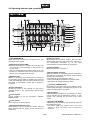
4.2 Operating elements and connections
1 LED REAR MIC IN
Lights blue when connecting a microphone to the rear
microphone input DJ MIC.
2 Microphone input DJ MIC
• Input for connecting a DJ microphone via an XLR plug
or 6.3 mm plug, as an alternative to the connector on
the rear panel.
• With the corresponding input selector switch at the rear
panel the DJ microphone input can be switched to line
input for mono units with line level output.
3 Buttons CUE
Buttons for monitoring the input channels 1-5 ahead of
the respective channel fader via headphones connected
to the jacks PHONES. With the button pressed, the blue
LED lights to immediately indicate that a channel is
monitored.
4 Level LED meter
10-digit LED meter for the channels 1-5; the level is
indicated ahead of the corresponding channel fader
(prefader).
8 Talkover on/off
On/off switch for the talkover function. With the button
pressed (blue LED lights), the levels of the channels 1-5
are automatically attenuated by 15 dB when
announcements are made with the DJ microphone.
9 Channel faders
Level controls for the channels 1-5.
10 Assignment switches
Select the channel for crossfading with the crossfader. If
crossfading is not required, the channel can be switched
directly to the master signal.
• left position A: channel switched to side A
• center position M: channel switched to master signal
• right position B: channel switched to side B
11 Buttons FADER START
On/off switch for the fader start function. With the button
pressed (blue LED lights), compatible CD players can be
remote controlled with the crossfader.
12 Crossfader
3-band equalizer for the DJ microphone: TREBLE,
MIDDLE, BASS.
For crossfading between two of the channels 1-5, which
can be selected with the assignment switches. In midposition, both channels can be heard at the same
volume.
6 Level control
13 Fader CUE MIXING
5 Tone controls
Level control for the DJ microphone.
7 Microphone channel on/off
On/off switch for the DJ microphone channel. With the
button pressed (red LED lights), the DJ microphone is
switched on.
For selecting and crossfading the monitoring signal for
the headphones output:
• left position CUE: The prefader level of the input
channel of which the button CUE is pressed is
monitored.
19/27
00041735.DOC, Version 2.0