1
BEDIENUNGSANLEITUNG
USER'S MANUAL
DVP-36
Digital Voice Processor
Für weiteren Gebrauch aufbewahren!
Keep this manual for future needs!
© Copyright
Nachdruck verboten!
Reproduction prohibited!
DIGITAL SERIES
VOCAL PROCESSOR
DVP-36
11
0
MIC 1
10
0
12
10
230 V
115 V
MIC 2
1
MIC 3
10
3=SIGNAL
2=SIGNAL
1=GND
BALANCED INPUTS
SIGNAL
GND
www.omnitronic.com
0
MIDI IN
13
PRAMETER / PUSH
EDIT A
2
2
LINE
REMOTE
14
1
OUT
BGM
BGM
DVD
AUX
CLIP
L
R
SUB
MIC
VISUAL
15
IN 2
IN 1
SUB OUT
16
OUT R
17
PROFESSIONAL DIGITAL AUDIO SYSTEM
DVP-36 DIGITAL VOCAL PROCESSOR
3
IN 2
IN 1/2
LEVEL
18
IN 1
+3 dB
INPUT R
19
PRAMETER / PUSH
EDIT B
4
BGM
20
OUT L
8
RESET
PROGRAM
MASTER
5
IN 2
BGM IN
LEVEL
+3 dB
IN 1
INPUT L
22
10
9
21
MIDI
STORE
BYPASS
7
LOCK
COMPRESSOR
PEQ
6
BGM
Inhaltsverzeichnis
EINFÜHRUNG................................................................................................................................................... 4
SICHERHEITSHINWEISE................................................................................................................................. 4
BESTIMMUNGSGEMÄSSE VERWENDUNG .................................................................................................. 6
GERÄTEBESCHREIBUNG .............................................................................................................................. 7
Features ......................................................................................................................................................... 7
Frontseite ....................................................................................................................................................... 7
Rückseite ....................................................................................................................................................... 8
INSTALLATION ................................................................................................................................................ 8
Rackeinbau .................................................................................................................................................... 8
Eingänge ........................................................................................................................................................ 9
Ausgänge ....................................................................................................................................................... 9
Anschluss ans Netz ....................................................................................................................................... 9
Einlegen/Wechseln der Batterie..................................................................................................................... 9
BEDIENUNG ................................................................................................................................................... 10
Programm-Sektion ....................................................................................................................................... 10
Master-Sektion ............................................................................................................................................. 10
Equalizer-Sektion ......................................................................................................................................... 11
Bypass-Sektion ............................................................................................................................................ 11
Compressor-Sektion .................................................................................................................................... 11
Lock-Sektion ................................................................................................................................................ 11
Midi-Sektion ................................................................................................................................................. 12
REINIGUNG UND WARTUNG........................................................................................................................ 12
Sicherungswechsel ...................................................................................................................................... 12
TECHNISCHE DATEN .................................................................................................................................... 13
Table of contents
INTRODUCTION ............................................................................................................................................. 14
SAFETY INSTRUCTIONS .............................................................................................................................. 14
OPERATING DETERMINATIONS.................................................................................................................. 16
DESCRIPTION ................................................................................................................................................ 17
Features ....................................................................................................................................................... 17
Frontpanel .................................................................................................................................................... 17
Rearpanel..................................................................................................................................................... 18
INSTALLATION .............................................................................................................................................. 18
Rack mounting ............................................................................................................................................. 18
Inputs ........................................................................................................................................................... 18
Outputs......................................................................................................................................................... 18
Connection with the mains........................................................................................................................... 19
Inserting/Replacing the battery .................................................................................................................... 19
OPERATION ................................................................................................................................................... 19
Program-section........................................................................................................................................... 19
Master-section.............................................................................................................................................. 20
Equalizer-section.......................................................................................................................................... 21
Bypass-section............................................................................................................................................. 21
Compressor-section ..................................................................................................................................... 21
Lock-section ................................................................................................................................................. 21
Midi-section .................................................................................................................................................. 22
CLEANING AND MAINTENANCE ................................................................................................................. 22
Replacing the fuse ....................................................................................................................................... 22
TECHNICAL SPECIFICATIONS..................................................................................................................... 23
Das neueste Update dieser Bedienungsanleitung finden Sie im Internet unter:
You can find the latest update of this user manual in the Internet under:
www.omnitronic.com
BEDIENUNGSANLEITUNG
DVP-36
Digital Voice Processor
Lesen Sie vor der ersten Inbetriebnahme zur eigenen Sicherheit diese
Bedienungsanleitung sorgfältig durch!
Alle Personen, die mit der Aufstellung, Inbetriebnahme, Bedienung, Wartung und Instandhaltung dieses
Gerätes zu tun haben, müssen
- entsprechend qualifiziert sein
- diese Bedienungsanleitung genau beachten
- die Bedienungsanleitung als Teil des Produkts betrachten
- die Bedienungsanleitung während der Lebensdauer des Produkts behalten
- die Bedienungsanleitung an jeden nachfolgenden Besitzer oder Benutzer des Produkts weitergeben
- sich die letzte Version der Anleitung im Internet herunter laden
EINFÜHRUNG
Wir freuen uns, dass Sie sich für einen OMNITRONIC DVP-36 Voice Processor entschieden haben. Sie
haben hiermit ein zuverlässiges und leistungsstarkes Gerät erworben. Wenn Sie nachfolgende Hinweise
beachten, sind wir sicher, dass Sie lange Zeit Freude an Ihrem Kauf haben werden.
Nehmen Sie den Voice Processor aus der Verpackung.
SICHERHEITSHINWEISE
ACHTUNG!
Seien Sie besonders vorsichtig beim Umgang mit gefährlicher Netzspannung. Bei dieser Spannung können Sie einen lebensgefährlichen elektrischen Schlag erhalten!
Dieses Gerät hat das Werk in sicherheitstechnisch einwandfreiem Zustand verlassen. Um diesen Zustand zu
erhalten und einen gefahrlosen Betrieb sicherzustellen, muss der Anwender unbedingt die Sicherheitshinweise und die Warnvermerke beachten, die in dieser Gebrauchsanweisung enthalten sind.
Unbedingt lesen:
Bei Schäden, die durch Nichtbeachtung dieser Bedienungsanleitung verursacht werden, erlischt der
Garantieanspruch. Für daraus resultierende Folgeschäden übernimmt der Hersteller keine Haftung.
4/23
10356610_V_1_0.DOC
Bitte überprüfen Sie vor der ersten Inbetriebnahme, ob kein offensichtlicher Transportschaden vorliegt.
Sollten Sie Schäden an der Netzleitung oder am Gehäuse entdecken, nehmen Sie das Gerät nicht in Betrieb
und setzen sich bitte mit Ihrem Fachhändler in Verbindung.
Der Aufbau entspricht der Schutzklasse I. Der Netzstecker darf nur an eine Schutzkontakt-Steckdose
angeschlossen werden, deren Spannung und Frequenz mit dem Typenschild des Gerätes genau
übereinstimmt. Ungeeignete Spannungen und ungeeignete Steckdosen können zur Zerstörung des Gerätes
und zu tödlichen Stromschlägen führen.
Den Netzstecker immer als letztes einstecken. Der Netzstecker muss dabei gewaltfrei eingesetzt werden.
Achten Sie auf einen festen Sitz des Netzsteckers.
Lassen Sie die Netzleitung nicht mit anderen Kabeln in Kontakt kommen! Seien Sie vorsichtig beim Umgang
mit Netzleitungen und -anschlüssen. Fassen Sie diese Teile nie mit feuchten Händen an! Feuchte Hände
können tödliche Stromschläge zu Folge haben.
Netzleitungen nicht verändern, knicken, mechanisch belasten, durch Druck belasten, ziehen, erhitzen und
nicht in die Nähe von Hitze- oder Kältequellen bringen. Bei Missachtung kann es zu Beschädigungen der
Netzleitung, zu Brand oder zu tödlichen Stromschlägen kommen.
Die Kabeleinführung oder die Kupplung am Gerät dürfen nicht durch Zug belastet werden. Es muss stets
eine ausreichende Kabellänge zum Gerät hin vorhanden sein. Andernfalls kann das Kabel beschädigt
werden, was zu tödlichen Stromschlägen führen kann.
Achten Sie darauf, dass die Netzleitung nicht gequetscht oder durch scharfe Kanten beschädigt werden
kann. Überprüfen Sie das Gerät und die Netzleitung in regelmäßigen Abständen auf Beschädigungen.
Werden Verlängerungsleitungen verwendet muss sichergestellt werden, dass der Adernquerschnitt für die
benötigte Stromzufuhr des Gerätes zugelassen ist. Alle Warnhinweise für die Netzleitung gelten auch für
evtl. Verlängerungsleitungen.
Gerät bei Nichtbenutzung und vor jeder Reinigung vom Netz trennen! Fassen Sie dazu den Netzstecker an
der Griffläche an und ziehen Sie niemals an der Netzleitung! Ansonsten kann das Kabel und der Stecker
beschädigt werden was zu tödlichen Stromschlägen führen kann. Sind Stecker oder Geräteschalter, z. B.
durch Einbau nicht erreichbar, so muss netzseitig eine allpolige Abschaltung vorgenommen werden.
Wenn der Netzstecker oder das Gerät staubig ist, dann muss es außer Betrieb genommen werden, der
Stromkreis muss allpolig unterbrochen werden und das Gerät mit einem trockenen Tuch gereinigt werden.
Staub kann die Isolation reduzieren, was zu tödlichen Stromschlägen führen kann. Stärkere Verschmutzungen im und am Gerät dürfen nur von einem Fachmann beseitigt werden.
Es dürfen unter keinen Umständen Flüssigkeiten aller Art in Steckdosen, Steckverbindungen oder in
irgendwelche Geräteöffnungen oder Geräteritzen eindringen. Besteht der Verdacht, dass - auch nur
minimale - Flüssigkeit in das Gerät eingedrungen sein könnte, muss das Gerät sofort allpolig vom Netz
getrennt werden. Dies gilt auch, wenn das Gerät hoher Luftfeuchtigkeit ausgesetzt war. Auch wenn das
Gerät scheinbar noch funktioniert, muss es von einen Fachmann überprüft werden ob durch den
Flüssigkeitseintritt eventuell Isolationen beeinträchtigt wurden. Reduzierte Isolationen können tödliche
Stromschläge hervorrufen.
In das Gerät dürfen keine fremden Gegenstände gelangen. Dies gilt insbesondere für Metallteile. Sollten
auch nur kleinste Metallteile wie Heft- und Büroklammern oder gröbere Metallspäne in das Gerät gelangen,
so ist das Gerät sofort außer Betrieb zu nehmen und allpolig vom Netz zu trennen. Durch Metallteile
hervorgerufene Fehlfunktionen und Kurzschlüsse können tödliche Verletzungen zur Folge haben.
Bevor das Gerät eingeschaltet wird, müssen alle Fader und Lautstärkeregler auf "0" bzw. auf minimum
gestellt werden.
ACHTUNG: Endstufen immer zuletzt einschalten und zuerst ausschalten!
Kinder und Laien vom Gerät und der Batterie fern halten!
ACHTUNG: Zu hohe Lautstärken können das Gehör schädigen!
5/23
10356610_V_1_0.DOC
Im Geräteinneren befinden sich keine zu wartenden Teile. Eventuelle Servicearbeiten sind ausschließlich
dem autorisierten Fachhandel vorbehalten!
BESTIMMUNGSGEMÄSSE VERWENDUNG
Bei diesem Gerät handelt es sich um einen professionellen Digital Voice Processor, mit dem sich
Sprachsignale anpassen und abspeichern lassen. Dieses Produkt ist für den Anschluss an 115/230 V, 50/60
Hz Wechselspannung zugelassen und wurde ausschließlich zur Verwendung in Innenräumen konzipiert.
Vermeiden Sie Erschütterungen und jegliche Gewaltanwendung bei der Installierung oder Inbetriebnahme
des Gerätes.
Achten Sie bei der Wahl des Installationsortes darauf, dass das Gerät nicht zu großer Hitze, Feuchtigkeit
und Staub ausgesetzt wird. Vergewissern Sie sich, dass keine Kabel frei herumliegen. Sie gefährden Ihre
eigene und die Sicherheit Dritter!
Betreiben Sie das Gerät nicht in extrem heißen (über 35° C) oder extrem kalten (unter 5° C) Umgebungen.
Halten Sie das Gerät von direkter Sonneneinstrahlung (auch beim Transport in geschlossenen Wägen) und
Heizkörpern fern.
Die Umgebungstemperatur muss zwischen -5° C und +45° C liegen.
Die relative Luftfeuchte darf 50 % bei einer Umgebungstemperatur von 45° C nicht überschreiten.
Dieses Gerät darf nur in einer Höhenlage zwischen -20 und 2000 m über NN betrieben werden.
Batterien sind Sondermüll und müssen als solche entsorgt werden. Soll das Gerät entsorgt werden, muss
zuerst die Batterie entnommen werden. Die leeren Batterie können Sie fachgerecht im Elektrofachhandel in
den dafür vorgesehenen Sammelbehältern entsorgen.
Achten Sie beim Einlegen der Batterie auf die richtige Polung.
Lassen Sie Batterien nicht offen herumliegen, es besteht die Gefahr, dass diese von Kindern oder
Haustieren verschluckt werden. Suchen Sie im Falle eines Verschluckens sofort einen Arzt auf!
Ausgelaufene oder beschädigte Batterien können bei Berührung mit der Haut Verätzungen verursachen,
benutzen Sie deshalb in diesem Fall geeignete Schutzhandschuhe.
Achten Sie darauf, dass die Batterien nicht kurzgeschlossen, nicht ins Feuer geworfen und nicht aufgeladen
werden können. Es besteht Explosionsgefahr.
Nehmen Sie das Gerät erst in Betrieb, nachdem Sie sich mit seinen Funktionen vertraut gemacht haben.
Lassen Sie das Gerät nicht von Personen bedienen, die sich nicht mit dem Gerät auskennen. Wenn Geräte
nicht mehr korrekt funktionieren, ist das meist das Ergebnis von unsachgemäßer Bedienung!
Reinigen Sie das Gerät niemals mit Lösungsmitteln oder scharfen Reinigungsmitteln, sondern verwenden
Sie ein weiches und angefeuchtetes Tuch.
Soll das Gerät transportiert werden, verwenden Sie bitte die Originalverpackung, um Transportschäden zu
vermeiden.
Beachten Sie bitte, dass eigenmächtige Veränderungen an dem Gerät aus Sicherheitsgründen verboten
sind.
Wird das Gerät anders verwendet als in dieser Bedienungsanleitung beschrieben, kann dies zu Schäden am
Produkt führen und der Garantieanspruch erlischt. Außerdem ist jede andere Verwendung mit Gefahren, wie
z. B. Kurzschluss, Brand, elektrischem Schlag, etc. verbunden.
6/23
10356610_V_1_0.DOC
GERÄTEBESCHREIBUNG
Features
Die digitale Sprachmaschine
• Sprachprozessor zur Verarbeitung verschiedener Signaleinstellungen
• Anschluss der Signale über 3 unabhängige Mikrofoneingänge
• Gain-Regler je Mikrofonkanal
• Parametrischer 5-band EQ
• Subwoofer Ausgang
• Sechs verschiedene Harmonie-Modi: 3-teilige Harmony, Melody, Relative, Vocoder, Male lead, Female
Lead
• Sieben verschiedene Effektmodi: Hall, Room, Plate, Stereo, Mono, Stereo Echo & Reverb, Mono Echo &
Reverb
• Individuelle Einstellungen können abgespeichert und schnell wieder aufgerufen werde
Der OMNITRONIC Voice Processor ist für den professionellen Anwendungsbereich vorgesehen. Die
Anschlüsse befinden sich auf der Rückseite des Gerätes, die Bedienelemente befinden sich auf der
Frontseite.
Die Ein- und Ausgänge des OMNITRONIC Voice Processors sind mit Klinkenbuchsen und XLREinbaukupplungen und -steckern ausgestattet.
Die Belegung der XLR-Einbaukupplungen und -stecker lautet:
PIN 1 = Masse
PIN 2 = Signal +
PIN 3 = Signal Die Belegung der Klinkenstecker lautet:
TIP = Signal RING = Signal +
SLEEVE = Masse
Frontseite
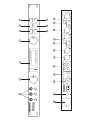
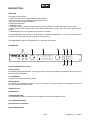
1
2
3
4
DVP-36
0
10
MIC 1
0
10
MIC 2
0
MIC 3
L
R
SUB
MIC
VOCAL PROCESSOR
7
MASTER
PEQ
BYPASS
PROGRAM
COMPRESSOR
STORE
RESET
LOCK
MIDI
9
10
DVP-36 DIGITAL VOCAL PROCESSOR
BGM
DVD
AUX
CLIP
10
6
EDIT B
EDIT A
DIGITAL SERIES
5
PROFESSIONAL DIGITAL AUDIO SYSTEM
PRAMETER / PUSH
PRAMETER / PUSH
8
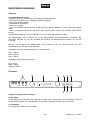
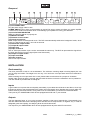
1) Mikrofoneingänge mit Gain-Regler
2) Edit A-Rad
Zur Einstellung des entsprechenden Parameters für MIC. Wenn Sie das Rad nach rechts drehen, erhöhen
Sie den Parameterwert. Der Parameterwert wird verringert, sobald Sie das Rad nach links drehen.
3) LCD-Display
Zur Anzeige der Funktionen und Eingaben.
7/23
10356610_V_1_0.DOC
4) Edit B-Rad
Zur Einstellung des entsprechenden Parameters für MUSIC. Wenn Sie das Rad nach rechts drehen,
erhöhen Sie den Parameterwert. Der Parameterwert wird verringert, sobald Sie das Rad nach links drehen.
5) Mastr-Taste
6) PEQ-Taste
7) BYPASS-Taste Diese Taste erlaubt einen unmittelbaren Vergleich des Sounds mit und ohne Equalizer.
Die LED zeigt „BYP“ wenn der Equalizer aus der Anlage "genommen" wird. Wenn auf dem Display „GEQ“
angezeigt wird, sind die eingestellten Werte aktiv.
8) Program/Reset-Taste
9) Compressor/Lock-Taste
10) Store/Midi-Taste
Rückseite
11
12
15
14
13
BGM
16
IN 1
SUB OUT
17
19
18
IN 1/2
LEVEL
OUT R
BGM
20
21
OUT L
BGM IN
LEVEL
22
BGM
www.omnitronic.com
115 V
+3 dB
BALANCED INPUTS
2=SIGNAL
1=GND
IN 2
IN 2
IN 1
+3 dB
IN 1
SIGNAL
GND
230 V
3=SIGNAL
MIDI IN
2
LINE
REMOTE
1
OUT
VISUAL
IN 2
INPUT R
INPUT L
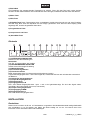
(11) NETZANSCHLUSS-BUCHSE
Stecken Sie hier die Netzleitung ein.
Netschalter
Zum Ein- und Ausschalten des Gerätes.
(12) SPANNUNGSWAHLSCHALTER
Achten Sie auf die richtige Einstellung.
(13) MIDI IN-BUCHSE
(14) Fernsteuerungsbuchse
(15) Visual-Anschlüsse
BGM: Ausgangsbuchsen für Hintergrundmusik (background music).
Liegt an den Eingangsbuchsen 1 und 2 kein Signal an, schaltet der DVP-36 nach 8 Sekunden automatisch
auf BGM um.
(16) Subwoofer Ausgangsbuchse
(17) Output R Ausgangsbuchse
(18) Eingangspegel
(19) Eingangsbuchsen R
XLR- oder Klinken-Eingangsbuchsen. Input 1 und 2 sind gleichberechtigt. Es wird das Signal weiterverarbeitet, das zuerst anliegt (first come, first served).
(20) Output L Ausgangsbuchse
(21) Eingangspegel BGM
(22) Eingangsbuchsen L
XLR- oder Klinken-Eingangsbuchsen.
INSTALLATION
Rackeinbau
Dieser Voice Processor ist für ein 19" Rack/483mm vorgesehen. Die Mindesteinbautiefe beträgt Gerätetiefe
plus mindestens 10 cm für Stecker und Kabel. Die Höhe beträgt nur 44 mm. Sie können den Voice
Processor mit vier Schrauben M6 im Rack befestigen.
8/23
10356610_V_1_0.DOC
Beim Rackeinbau ist darauf zu achten, dass die warme Luft aus dem Rack entweichen kann und genügend
Abstand zu anderen Geräten vorhanden ist. Das Rackgehäuse sollte mit einem Lüfter versehen sein.
Eingänge
Gute Kabelführung verbessert die Klangqualität Ihres PA-Systems enorm. Eingangskabel sollten kurz und
direkt sein, da hohe Frequenzen stark gedämpft werden, wenn die Kabel unnötig lang sind. Außerdem ist die
Gefahr von Brummeinstreuungen und Rauschen bei langen Kabeln erheblich größer. Müssen jedoch lange
Kabelwege zurückgelegt werden, sollten auf jeden Fall symmetrische Kabel verwendet werden.
Die Eingänge Ihres OMNITRONIC Voice Processors sind mit XLR- und Klinkenbuchsen ausgestattet.
Ausgänge
Die Ausgänge Ihres OMNITRONIC Voice Processors sind mit XLR- und Klinkenbuchsen ausgestattet.
Anschluss ans Netz
Schließen Sie das Gerät über die beiliegende Netzanschlussleitung ans Netz an.
Die Belegung der Anschlussleitungen ist wie folgt:
Leitung
Braun
Blau
Gelb/Grün
Pin
Außenleiter
Neutralleiter
Schutzleiter
International
L
N
Der Schutzleiter muss unbedingt angeschlossen werden!
Wenn das Gerät direkt an das örtliche Stromnetz angeschlossen wird, muss eine Trennvorrichtung mit
mindestens 3 mm Kontaktöffnung an jedem Pol in die festverlegte elektrische Installation eingebaut werden.
Einlegen/Wechseln der Batterie
Die mitgelieferte Fernbedienung wird über eine CR2025 Batterie betrieben.
Bitte beachten Sie auch die Hinweise unter Bestimmungsgemäße Verwendung.
Öffnen Sie den Batteriefachdeckel an der Unterseite und entfernen Sie ihn.
Wird eine verbrauchte Batterie ausgetauscht, entfernen Sie zunächst die verbrauchte Batterie aus dem
Batteriefach.
ACHTUNG!
Explosionsgefahr bei unsachgemäßem Auswechseln der Batterie.
Nur durch denselben oder einen entsprechenden, vom Hersteller empfohlenen Typ ersetzen.
Verbrauchte Batterie nach den Anweisungen des Herstellers beseitigen.
Legen Sie die Batterie ein und achten Sie auf die richtige Polung.
Setzen Sie den Batteriefachdeckel wieder auf.
9/23
10356610_V_1_0.DOC
BEDIENUNG
Versichern Sie sich, dass der Voice Processor vor den Verstärkern angeschaltet wird, um den
Einschalt(bass)schlag zu vermeiden. Dadurch wird verhindert, dass Sie Ihr Publikum verärgern und schützt
Ihre Lautsprecher und Endstufen vor Beschädigung.
Schalten Sie das Gerät über den Netzschalter ein.
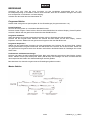
Programm-Sektion
Dieses Gerät verfügt über 8 Speicherplätze für Ihre Einstellungen (Programmnummern 1-8).
Preset Equalizers
Der DVP-36 verfügt über 10 verschiedene Musikstil-Presets.
Drücken Sie die Program-Taste. Drücken Sie einmal das Edit B-Rad, bis auf dem Display „Preset Equalizer“
erscheint. Wählen Sie das gewünschte Preset über das Edit B-Rad aus.
Programm auswählen
Wenn Sie bereits ein Programm abgespeichert haben, können Sie dieses wie folgt auswählen:
Drücken Sie die Program-Taste. Drücken Sie zweimal das Edit B-Rad, bis auf dem Display „Custom
Equalizer“ erscheint. Wählen Sie das gewünschte Programm über das Edit B-Rad aus.
Programm abspeichern
Wählen Sie das gewünschte Programm wie oben beschrieben aus. Drücken Sie die Store-Taste. Wählen
Sie den gewünschten Programm-Platz über das Edit B-Rad aus. Drücken Sie die Store-Taste. Geben Sie
den gewünschten Programmnamen durch Drehen und Drücken des Edit B-Rades ein. Bestätigen Sie mit der
Store-Taste.
Zurücksetzen auf Werkseinstellungen
Drücken und Halten Sie die Program/Reset-Taste. Nach zwei Sekunden erscheint auf dem Display „System
Reset“. Wählen Sie Mic (Edit A-Rad) oder Music (Edit B-Rad) und bestätigen Sie durch erneutes Drücken
des entsprechenden Rades. Die Werkseinstellungen werden geladen.
Bitte beachten Sie, dass alle vorgenommenen Einstellungen gelöscht werden.
Master-Sektion
10/23
10356610_V_1_0.DOC
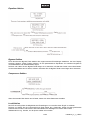
Equalizer-Sektion
Bypass-Sektion
Durch Drücken der Bypass-Taste werden alle vorgenommenen Einstellungen deaktiviert. Auf dem Display
erscheint „Bypass“. Diese Funktion erlaubt z. B. bei parametrischen Equalizern ein schnelles Vergleichen
von bearbeitetem und unbearbeitetem Signal.
Drücken und halten Sie die Bypass-Taste länger als 3 Sekunden, schaltet das Gerät in den Mute-Modus.
Um den Mute-Modus auf zu heben, drücken und halten Sie die Bypass-Taste erneut länger als 3 Sekunden.
Compressor-Sektion
Wenn die Auswahl DRC Switch auf Off steht, lassen sich keine Parameter einstellen.
Lock-Sektion
Der DVP-36 verfügt über die Möglichkeit, die Einstellungen vor unerwünschtem Zugriff zu schützen.
Drücken und halten Sie die Compressor/Lock-Taste länger als 3 Sekunden. Geben Sie das gewünschte
Passwort durch Drehen und Drücken des Edit B-Rades ein. Bestätigen Sie mit der Store-Taste.
Wiederholen Sie o.g. Schritte, um die Sperre wieder auf zu heben.
11/23
10356610_V_1_0.DOC
Bitte beachten Sie: notieren Sie sich bitte unbedingt das von Ihnen gesetzte Passwort. Es gibt keine
Möglichkeit, ein von Ihnen gesetztes Passwort auf zu heben.
Midi-Sektion
Drücken und halten Sie die Store/Midi-Taste länger als 3 Sekunden, schaltet das Gerät in den Midi-Modus.
Um den Midi-Modus auf zu heben, drücken und halten Sie die Store/Midi-Taste erneut länger als 3
Sekunden.
REINIGUNG UND WARTUNG
LEBENSGEFAHR!
Vor Wartungsarbeiten unbedingt allpolig vom Netz trennen!
Das Gerät sollte regelmäßig von Verunreinigungen wie Staub usw. gereinigt werden. Verwenden Sie zur
Reinigung ein fusselfreies, angefeuchtetes Tuch. Auf keinen Fall Alkohol oder irgendwelche Lösungsmittel
zur Reinigung verwenden!
Im Geräteinneren befinden sich außer der Sicherung und der Batterie keine zu wartenden Teile. Wartungsund Servicearbeiten sind ausschließlich dem autorisierten Fachhandel vorbehalten!
Um die Batterie auszutauschen, beachten Sie bitte die Hinweise unter "Einlegen/Wechseln der Batterie".
Sicherungswechsel
Wenn die Feinsicherung des Gerätes defekt ist, darf diese nur durch eine Sicherung gleichen Typs ersetzt
werden.
Bitte beachten Sie: Bitte verwenden Sie eine 125 mA Sicherung für 230 V und 315 mA für 115 V.
Vor dem Sicherungswechsel ist das Gerät allpolig von der Netzspannung zu trennen (Netzstecker
ziehen).
Vorgehensweise:
Schritt 1: Öffnen Sie den Sicherungshalter an der Geräterückseite mit einem passenden Schraubendreher.
Schritt 2: Entfernen Sie die defekte Sicherung aus dem Sicherungshalter.
Schritt 3: Setzen Sie die neue Sicherung in den Sicherungshalter ein.
Schritt 4: Setzen Sie den Sicherungshalter wieder im Gehäuse ein.
Sollten einmal Ersatzteile benötigt werden, verwenden Sie bitte nur Originalersatzteile.
Wenn die Anschlussleitung dieses Gerätes beschädigt wird, muss sie durch eine besondere Anschlussleitung ersetzt werden, die von Ihrem Fachhändler erhältlich ist.
Sollten Sie noch weitere Fragen haben, steht Ihnen Ihr Fachhändler jederzeit gerne zur Verfügung.
12/23
10356610_V_1_0.DOC
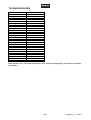
TECHNISCHE DATEN
Spannungsversorgung:
oder
Gesamtanschlusswert:
Musik:
Noise Rate:
Verzerrung:
Frequenzgang:
Ausgangsspannung:
Ausgangsimpedanz:
Regelbereich/Kanal:
Höhen:
Bässe:
Subwoofer:
Verzerrung:
Frequenzgang:
Microfon:
Noise Rate:
Verzerrung:
Frequenzgang:
Ausgangsspannung:
Ausgangsimpedanz:
Regelbereich/Kanal:
Höhen:
Mitten:
Bässe:
Maße (BxTxH):
Gewicht:
Ersatzbatterie:
220-250 V AC, 50 Hz ~
110-120 V AC, 60 Hz ~
10 W
>95 dB
0.01 %, 20 Hz - 20 kHz
20 Hz - 20 kHz, ±1 dB
0.707 V
47 kOhm
±12 dB at 8 KHz
±12 dB at 250 Hz
0.07 %, 20 - 200 Hz
20 - 200 Hz, ±1 dB
>80 dB
0.04 %, 50 Hz - 16 kHz
50 Hz - 16 kHz, ±1 dB
0,1-0,5 V
47 kOhm
±6 dB at 5-10 KHz
±6 dB at 500 Hz - 3 KHz
±6 dB at 60-150 Hz
520 x 250 x 90 mm
3,5 kg
CR2025, 3 V DC
Bitte beachten Sie: Technische Änderungen ohne vorherige Ankündigung und Irrtum vorbehalten.
07.06.2004 ©
13/23
10356610_V_1_0.DOC
OPERATING INSTRUCTIONS
DVP-36
Digital Voice Processor
For your own safety, please read this user manual carefully before you initial start-up.
Every person involved with the installation, operation and maintenance of this device has to
- be qualilfied
- follow the instructions of this manual
- consider this manual to be part of the total product
- keep this manual for the entire service life of the product
- pass this manual on to every further owner or user of the product
- download the latest version of the user manual from the Internet
INTRODUCTION
Thank you for having chosen an OMNITRONIC DVP-36. You have acquired a reliable and powerful device.
If you follow the instructions given in this manual, we can assure you that you will enjoy this device for many
years.
Unpack your OMNITRONIC voice processor.
SAFETY INSTRUCTIONS
CAUTION!
Be careful with your operations. With a dangerous voltage you can suffer a dangerous
electric shock when touching the wires!
This device has left our premises in absolutely perfect condition. In order to maintain this condition and to
ensure a safe operation, it is absolutely necessary for the user to follow the safety instructions and warning
notes written in this user manual.
Important:
Damages caused by the disregard of this user manual are not subject to warranty. The dealer will
not accept liability for any resulting defects or problems.
14/23
10356610_V_1_0.DOC
If the device has been exposed to drastic temperature fluctuation (e.g. after transportation), do not switch it
on immediately. The arising condensation water might damage your device. Leave the device switched off
until it has reached room temperature.
Please make sure that there are no obvious transport damages. Should you notice any damages on the A/C
connection cable or on the casing, do not take the device into operation and immediately consult your local
dealer.
This device falls under protection-class I. The power plug must only be plugged into a protection class I
outlet. The voltage and frequency must exactly be the same as stated on the device. Wrong voltages or
power outlets can lead to the destruction of the device and to mortal electrical shock.
Always plug in the power plug least. The power plug must always be inserted without force. Make sure that
the plug is tightly connected with the outlet.
Never let the power-cord come into contact with other cables! Handle the power-cord and all connections
with the mains with particular caution! Never touch them with wet hands, as this could lead to mortal
electrical shock.
Never modify, bend, strain mechanically, put pressure on, pull or heat up the power cord. Never operate next
to sources of heat or cold. Disregard can lead to power cord damages, fire or mortal electrical shock.
The cable insert or the female part in the device must never be strained. There must always be sufficient
cable to the device. Otherwise, the cable may be damaged which may lead to mortal damage.
Make sure that the power-cord is never crimped or damaged by sharp edges. Check the device and the
power-cord from time to time.
If extension cords are used, make sure that the core diameter is sufficient for the required power
consumption of the device. All warnings concerning the power cords are also valid for possible extension
cords.
Always disconnect from the mains, when the device is not in use or before cleaning it. Only handle the
power-cord by the plug. Never pull out the plug by tugging the power-cord. Otherwise, the cable or plug can
be damaged leading to mortal electrical shock. If the power plug or the power switch is not accessible, the
device must be disconnected via the mains.
If the power plug or the device is dusty, the device must be taken out of operation, disconnected and then be
cleaned with a dry cloth. Dust can reduce the insulation which may lead to mortal electrical shock. More
severe dirt in and at the device should only be removed by a specialist.
There must never enter any liquid into power outlets, extension cords or any holes in the housing of the
device. If you suppose that also a minimal amount of liquid may have entered the device, it must immediately
be disconnected. This is also valid, if the device was exposed to high humidity. Also if the device is still
running, the device must be checked by a specialist if the liquid has reduced any insulation. Reduced
insulation can cause mortal electrical shock.
There must never be any objects entering into the device. This is especially valid for metal parts. If any metal
parts like staples or coarse metal chips enter into the device, the device must be taken out of operation and
disconnected immediately. Malfunction or short-circuits caused by metal parts may cause mortal injuries.
Before the device is switched on all faders and volume controls have to be set to "0" or "min" position.
CAUTION: Turn the amplifier on last and off first!
Please note that damages caused by manual modifications on the device or unauthorized operation by
unqualified persons are not subject to warranty.
Keep away children and amateurs from the device and the battery!
CAUTION: High volumes can cause hearing damage!
15/23
10356610_V_1_0.DOC
There are no serviceable parts inside the device. Maintenance and service operations are only to be carried
out by authorized dealers.
OPERATING DETERMINATIONS
This device is a professional voice processor for editing the incoming audio-signal and store it. This product
is allowed to be operated with an alternating current of 115/230 V, 50/60 Hz and was designed for indoor use
only.
Do not shake the device. Avoid brute force when installing or operating the device.
When choosing the installation-spot, please make sure that the device is not exposed to extreme heat,
moisture or dust. There should not be any cables lying around. You endanger your own and the safety of
others!
The ambient temperature must always be between -5° C and +45° C. Keep away from direct insulation
(particularly in cars) and heaters.
The relative humidity must not exceed 50 % with an ambient temperature of 45° C.
This device must only be operated in an altitude between -20 and 2000 m over NN.
Batteries are hazardous waste which need to be disposed of appropriately. If the device is to be disposed,
the battery has to be removed first.
Make sure that the poles are correct when inserting the battery.
Never let batteries lying around openly as there is the danger that these can be swallowed by children or
domestic animals. Immediately consult a doctor when batteries are swallowed!
Leaking or damaged batteries can cause irritations when getting into contact with the skin. In this case use
appropriate protective gloves.
Make sure that the battery cannot be short-circuited, thrown into the fire and be charged. There is a danger
of explosion.
Do not operate the device in extremely hot (more than 30° C) or extremely cold (less than 5° C)
surroundings. Keep away from direct insulation (particularly in cars) and heaters.
Operate the device only after having familiarized with its functions. Do not permit operation by persons not
qualified for operating the device. Most damages are the result of unprofessional operation!
Never use solvents or aggressive detergents in order to clean the device! Rather use a soft and damp cloth.
Please use the original packaging if the device is to be transported.
Please consider that unauthorized modifications on the device are forbidden due to safety reasons!
If this device will be operated in any way different to the one described in this manual, the product may suffer
damages and the guarantee becomes void. Furthermore, any other operation may lead to dangers like shortcircuit, burns, electric shock, etc.
16/23
10356610_V_1_0.DOC
DESCRIPTION
Features
The digital vocal processor
• Vocal processor for processing different signal settings
• Signal connection via 3 independent microphone inputs
• Gain-control per microphone channel
• Parametric 5-band EQ
• Subwoofer output
• Six different harmony modes: 3-parts Harmony, Melody, Relative, Vocoder, Male lead, Female Lead
• Seven different effect modes: Hall, Room, Plate, Stereo, Mono, Stereo Echo & Reverb, Mono Echo &
Reverb
• Individual settings can be memorized and quickly be called up
The OMNITRONIC Voice processor is designed for professional application. The inputs and outputs are
located on the rear panel, the gain controls on the front panel.
The OMNITRONIC DVP-36 is equipped with ¼“ input and output jacks.
Frontpanel
1
2
3
DVP-36
0
10
MIC 1
0
10
MIC 2
0
10
MIC 3
6
7
MASTER
PEQ
BYPASS
PROGRAM
COMPRESSOR
STORE
RESET
LOCK
MIDI
9
10
DVP-36 DIGITAL VOCAL PROCESSOR
BGM
DVD
AUX
CLIP
L
R
SUB
MIC
VOCAL PROCESSOR
5
EDIT B
EDIT A
DIGITAL SERIES
4
PROFESSIONAL DIGITAL AUDIO SYSTEM
PRAMETER / PUSH
PRAMETER / PUSH
8
1) Mic Inputs with Gain-control
2) Edit A-wheel
For adjusting the parameters MIC. Turning this wheel to the right increases the parameter value and turning
it to the left decreases them.
3) LCD DISPLAY
To display functions and operating status.
4) Edit B-wheel
For adjusting the parameters MUSIC. Turning this wheel to the right increases the parameter value and
turning it to the left decreases them.
5) Master-button
6) PEQ-button
7) BYPASS BUTTON
This switch allows instant comparison of the original sound with the equalized sound.
8) Program/Reset-button
9) Compressor/Lock-button
10) Store/Midi-button
17/23
10356610_V_1_0.DOC
Rearpanel
11
12
15
14
13
BGM
16
IN 1
SUB OUT
17
19
18
IN 1/2
LEVEL
OUT R
BGM
20
21
OUT L
BGM IN
LEVEL
22
BGM
www.omnitronic.com
115 V
+3 dB
BALANCED INPUTS
2=SIGNAL
1=GND
IN 2
IN 2
IN 1
+3 dB
IN 1
SIGNAL
GND
230 V
3=SIGNAL
MIDI IN
2
LINE
REMOTE
1
OUT
VISUAL
IN 2
INPUT R
INPUT L
(11) AC CONNECTION
Plug the power supply cable in here.
POWER SWITCH Turns power to the equalizer on and off. Be sure to power-up before your power amplifier
is turned on to avoid loud transients which could damage your speakers or annoy your audience.
(12) AC VOLTAGE-SELECTOR
Make sure that the selector is properly set.
(13) MIDI IN- SOCKET
(14) Remote Control-socket
(15) Visual-connections
BGM: output sockets for background music. The DVP-36 automatically switched to background music, when
there is no signal input at Input 1 and 2 for 8 seconds.
(16) Subwoofer output socket
(17) Output R output socket
(18) Input level
(19) Input sockets R
XLR or TRS Input-sockets. Input 1 and 2 are treated the same way. The DVP-36 processes the signal from
the input with the first incoming signal (first come first served).
(20) Output L output socket
(21) Input level BGM
(22) Input sockets L
XLR or TRS Input-sockets.
INSTALLATION
Rack mounting
The voice processor is built for 19" racks/483mm. The minimum mounting depth is housing depth plus 100
mm for plugs and cables. The height is 44 mm only. You can fix the voice processor with four screws M6 in
the rack.
When mounting the voice processor into a rack, please make sure that there is a proper air circulation.
Please make sure that there is enough space around the device so that the heated air can be passed on.
The rack should be provided with a cooling fan.
Inputs
A good cable run improves the sound quality remarkably. Input cables should be short and direct, since high
frequencies will be mostly be absorbed if the cables are unnecessarily long. Besides that a longer cable may
lead to humming and noise trouble. If long cable runs are unavoidable, you should use balanced cables.
The inputs of your OMNITRONIC DVP-36 are equipped with XLR and ¼“ jack-sockets.
Outputs
The high damping factor of your voice processor supplies a clear sound reproduction. Unnecessarily long
and thin cables will influence the damping factor and thus the low frequencies in a negative way. In order to
safeguard good sound quality, the damping factor should lie around 50.
The outputs of your OMNITRONIC DVP-36 are equipped with 6.35 jacks and XLR-connectors.
18/23
10356610_V_1_0.DOC
The occupation of the XLR-plugs is as follows:
PIN 1 = Shield
PIN 2 = Signal +
PIN 3 = Signal The occupation of the 6.35 jacks is as follows:
TIP = Signal RING = Signal +
SLEEVE = Shield
Connection with the mains
Connect the device to the mains with the enclosed power supply cable.
The occupation of the connection-cables is as follows:
Cable
Brown
Blue
Yellow/Green
Pin
Live
Neutral
Earth
International
L
N
The earth has to be connected!
If the device will be directly connected with the local power supply network, a disconnection switch with a
minimum opening of 3 mm at every pole has to be included in the permanent electrical installation.
Inserting/Replacing the battery
The enclosed remote control is operated with a CR2025 battery.
Please refer to the explanations under Operating Determinations.
Open the battery cover on the bottom and remove it.
If replacing the battery, remove the old battery from the battery compartment.
Caution!
Danger of explosion when battery is replaced improperly.
Only replace by the same type or similar types recommended by the manufacturer.
Remove empty battery in accordance with the instructions of the manufacturer.
Insert the battery and make sure that the poles are correct.
Replace the battery cover and close it.
OPERATION
Make sure to power-up before your power amplifier is turned in order to avoid loud transients which could
damage your speakers or annoy your audience.
Switch the device on via the power switch.
Program-section
This device features 8 programs for saving your settings (program numbers 1-8).
19/23
10356610_V_1_0.DOC
Preset equalizers
The DVP-36 features 10 different music presets.
Press the Program-button. Press the Edit B-wheel, until the display shows „Preset Equalizer“. Select the
desired preset via the Edit B-wheel.
Select a program
If you have already stored a program, you can select it as follows:
Press the Program-button. Press the Edit B-wheel twice until the display shows „Custom Equalizer“. Select
the desired program via the Edit B-wheel.
Store a program
Select the desired program as described above. Press the Store-button. Select the desired program number
via the Edit B-wheel. Press the Store-button. Enter the desired program name by turning and pressing the
Edit B-wheel. Confirm with the Store-button.
Restoring the original settings
Press and hold the Program/Reset-Taste –button. After two seconds, the display shows „System Reset“.
Select Mic (Edit A-wheel) or Music (Edit B-wheel) and confirm by pressing the respective wheel again. The
original settings are loaded.
Please note that all adjustements will be deleted.
Master-section
20/23
10356610_V_1_0.DOC
Equalizer-section
Bypass-section
By pressing the Bypass-button, all adjustments will be deactivated. The display shows „Bypass“. This
function allows to compare the original signal with the modified parametric equalizer signal.
Press and hold the Bypass-button for 3 seconds and the device enters into Mute-mode. In order to leave the
Mute-mode, press and hold the Bypass-button for 3 seconds.
Compressor-section
If the selection DRC Switch is set to Off, no parameters can be adjusted.
Lock-section
The DVP-36 offers the possibility to protect the programs and adjustments from unauthorized access.
Press and hold the Compressor/Lock-button for 3 seconds. Enter the desired password by name by turning
and pressing the Edit B-wheel. Confirm with the Store-button.
Repeat the steps mentioned above in order to unlock the device.
Please note: please write the new password down and keep it in a safe place. There is no possibility to
override a password you entered.
21/23
10356610_V_1_0.DOC
Midi-section
Press and hold the Store/Midi -button for 3 seconds and the device enters the Midi-mode. In order to leave
the Midi-mode Modus, press and hold the Store/Midi -button for 3 seconds.
CLEANING AND MAINTENANCE
DANGER TO LIFE!
Disconnect from mains before starting maintenance operation!
We recommend a frequent cleaning of the device. Please use a soft lint-free and moistened cloth. Never use
alcohol or solvents!
There are no servicable parts inside the device except for the fuse and the battery. Maintenance and service
operations are only to be carried out by authorized dealers.
In order to replace the battery please refer to "Inserting/exchanging battery".
Replacing the fuse
If the fine-wire fuse of the device fuses, only replace the fuse by a fuse of same type and rating.
Please note: Please use 125 mA fuse for 230 V versions and 315 mA fuse for 115 V.
Before replacing the fuse, unplug mains lead.
Procedure:
Step 1: Open the fuseholder on the rearpanel with a fitting screwdriver.
Step 2: Remove the old fuse from the fuseholder.
Step 3: Install the new fuse in the fuseholder.
Step 4: Replace the fuseholder in the housing.
Should you need any spare parts, please use genuine parts.
If the power supply cable of this device becomes damaged, it has to be replaced by a special power supply
cable available at your dealer.
Should you have further questions, please contact your dealer.
22/23
10356610_V_1_0.DOC
TECHNICAL SPECIFICATIONS
Power supply:
or
Power consumption:
Music:
Noise Rate:
Distortion:
Frequency range:
Output voltage:
Output impedance:
Tone control/channel:
Treble:
Bass:
Subwoofer:
Distortion:
Frequency range:
Microphone:
Noise Rate:
Distortion:
Frequency range:
Output voltage:
Output impedance:
Tone control/channel:
Treble:
Middle:
Bass:
Dimensions (WxDxH):
Weight:
Replacement battery
220-250 V AC, 50 Hz ~
110-120 V AC, 60 Hz ~
10 W
>95 dB
0.01 %, 20 Hz - 20 kHz
20 Hz - 20 kHz, ±1 dB
0.707 V
47 kOhms
±12 dB at 8 KHz
±12 dB at 250 Hz
0.07 %, 20 - 200 Hz
20 - 200 Hz, ±1 dB
>80 dB
0.04 %, 50 Hz - 16 kHz
50 Hz - 16 kHz, ±1 dB
0,1-0,5 V
47 kOhms
±6 dB at 5-10 KHz
±6 dB at 500 Hz - 3 KHz
±6 dB at 60-150 Hz
520 x 250 x 90 mm
3.5 kg
CR2025, 3 V DC
Please note: Every information is subject to change without prior notice. 07.06.2004 ©
23/23
10356610_V_1_0.DOC