1
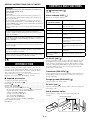
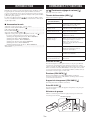
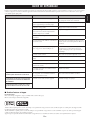
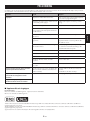
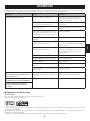
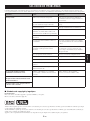
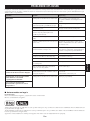
Refer to the table below if the unit does not function properly. If the problem you are experiencing is not listed below, or if the instruction below does not help, turn
off this unit, disconnect the power cable, and contact the nearest authorized Yamaha dealer or service center.
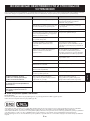
Set both the speaker and transmitter to the same
group.
Distance is too far.
Move the transmitter closer to the speaker.
There is a device (microwave oven, wireless LAN,
etc.) outputting signals in the 2.4 GHz frequency
band nearby.
Move this unit.
The iPhone or iPod is not connected to the
transmitter firmly.
Connect the iPhone or iPod firmly.
The iPhone or iPod software version has not been
updated.
Download the latest iTunes software to update the
iPhone or iPod firmware version to the latest.
The signal from the transmitter is blocked by your
body or metallic objects, etc.
Change the way of holding, the orientation, or the
position of the transmitter to avoid your body or
metallic objects blocking the signal.
The power of the speaker is off.
Connect the AC adaptor correctly.
The battery of the iPhone or iPod is low.
Charge the iPhone or iPod.
The volume is turned down.
Turn up the volume.
The iPhone or iPod is in the process of connecting
with the speaker.
Please wait for a while.
The protection circuitry has been activated by
excessive volume.
Turn down the volume.
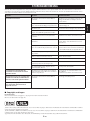
Cannot change the volume by changing
the volume of the iPhone or iPod.
The iPhone or iPod being used is not supported by
this unit, or the iPhone or iPod is not connected
firmly.
Use the supported iPhone or iPod.
Connect the iPhone or iPod firmly.
The power of the speaker does not turn off
after the iPhone or iPod is disconnected
from the transmitter.
The speaker is connected to another unit.
Change the group setting.
Русский
The speaker and transmitter are not connected
since they are set to different groups.
Nederlands
Select a different group by changing the group
selection switch of the speaker and transmitter.
Español
The speaker is connected to another unit.
Italiano
No sound
Svenska
Remedy
Deutsch
Cause
Français
Problem
English
TROUBLESHOOTING
Suddenly the speaker produces sound
even though an iPhone or iPod is not
connected.
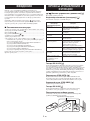
■ Copyright and logo marks
iPod™, iPhone™
iPod is a trademark of Apple Inc., registered in the U.S. and other countries.
iPhone is a trademark of Apple Inc.
“Made for iPod” means that an electronic accessory has been designed to connect specifically to iPod and has been certified by the developer to meet Apple
performance standards.
“Works with iPhone” means that an electronic accessory has been designed to connect specifically to iPhone and has been certified by the developer to meet Apple
performance standards.
Apple is not responsible for the operation of this device or its compliance with safety and regulatory standards.
En