1
PARAMETERS
User manual
21
Boost Mode
Increase of the bass level by 0dB to +6dB at 30Hz, 40Hz or 50Hz. To be used as preference or need on multichannel playback for very dynamic bass.
Subsonic Mode
Low-pass filter, adjustable from 0 (OFF) to 45Hz by 10Hz steps, at a slope of 48dB/octave. This filter can be
very practical when the subwoofer is placed in a small room and-or at an angle in the room, or if the walls of
the room are thin or not very rigid. The room may generate an excessive sound level in the lower bass or even
cause saturation. Vibration and unpleasant resonances can then occur. The subsonic filter can progressively
eliminate this annoyance and maintain a clean and strong bass performance. Adjust the filter value until the
resonances disappear in the listening room.
Note 1 : this filter setting can be used as well during extended listening periods at high levels. It inhibits excessive cone
movement of the diaphragm (bottoming out) and delays the appearance of distortion.
Note 2 : this filter can be used simultaneously with the mode “Boost” activated. The increase in energy (+ 3dB, equal to a
doubling of power) is compensated by the subsonic filter, which suppresses energy in the upper bass.
Phase Mode
Adjustment of the phase from 0° to 180°, with very precise steps of 30°. This adjustment allows to precisely
lock in the phase of the subwoofer with that of the other loudspeakers at the crossover frequency. Navigate
through the phase values with the directional arrows until the bass of the subwoofer perfectly meets that of the
loudspeakers.
Note 1 : this adjustment can be done by ear. However, measuring instruments make for easy work, and are recommended:
discuss this with your reseller.
Note 2 : it is possible, whilst listening, to compare the position 0° and 180° (inverted phase) directly from the menu, without
fine-tuning by steps. This easy phase inversion solution can simplify final adjustment.
Gain Mode
It is possible to assign a different gain (from -6dB to +6dB) according to either a music or cinema program that
would benefit from a higher level. This level can be kept in memory on the buttons Select Hi-fi and Cinema.
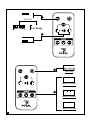
Remote Control Locking System
To avoid that the multiple remote controls of the audio/video equipments interfere with the SW 1000 Be, the
new “Remote Control Locking System” function has been added to the DSP parameters. The menu configuration
ends with the “Remote Lock” line. When you are on the “Lock” mode, the infrared reception is inactive. To
reactivate reception, simply press the Set Up button of your remote control to access the "Remote" menu and
select the "Unlock" mode.
Presets buttons (memory)
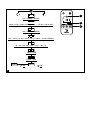
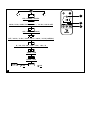
After exiting a menu, you can assign your adjustments to one of the three available memory settings. Press,
and hold one of the three “Preset” buttons 3 for two seconds. When the display flashes, the setting has been
memorized.
Note 1 : the preset buttons correspond to the everyday use of either a stereo or home theatre system. Naturally, according to
the use or nature of the system, these three buttons can be assigned to settings for either stereo or home theatre.
Note 2 : the “User” function is an additional memory setting that can be assigned to another use of the subwoofer, e.g.: multichannel SACD or DVD-Audio, which may require different settings.