1
CONTROL ELEMENTS:
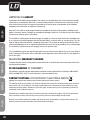
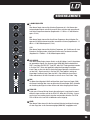
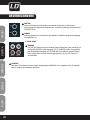
MIC 1
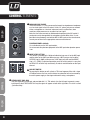
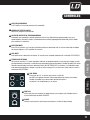
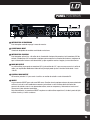
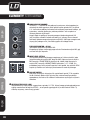
1 MONO MIC/LINE CHANEL
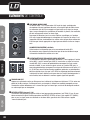
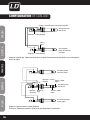
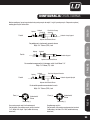
These are channel 1~4. You can connect balanced, low impedance microphones
or a low level signal to the XLR socket. On the 1/4“ phone jack you can connect
either a microphone or a line level instrument such as synthesizers, drum
machines, effect processors or any other line level signal.
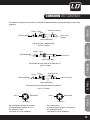
Note: You shall never connect an unbalanced microphone to the XLR socket if
you do not want to damage both the microphone and the Mixer. Also, it is not
possible to simultaneously use both the MIC & LINE inputs on the same channel,
use only one of them for the appropriate source on each channel.
ENGLISH
1
BAL OR
UNBAL
LINE IN 1
PHANTOM POWER +48 Volts
It is available only on the XLR input sockets.
Do not connect non-phantom equipment to the MIC input when phantom power
is on.
DEUTSCH
2
+15dB
0dB
3
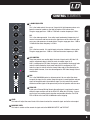
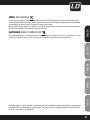
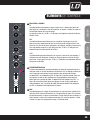
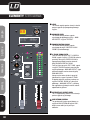
2 INPUT LEVEL SETTING
LOW CUT
75Hz 18dB/Oct
LINE IN 5/6
FRANCAIS
-25dB LINE
40dB MIC
LEFT(MONO)
RIGHT
This control is provided with 2 different indication rings: one is for the MIC input
and the other for the LINE input. When you use a MIC input you shall read the
OUTSIDE ring (0~40dB); when you use a LINE input you shall read the INSIDE
ring (+15~-25dB). For optimum operation you shall set this control in a way that
the PEAK LED will blink only occasionally in order to avoid distortion on the input
channel.
LINE IN 7/8
LEFT(MONO)
RIGHT
4
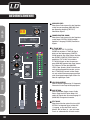
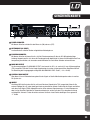
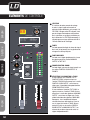
3 LOW CUT SWITCH
FRANCAIS
POLSKI
FRANCAIS
ESPAÑOL
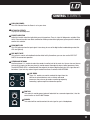
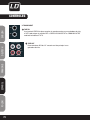
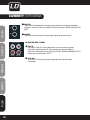
4 STEREO INPUT (CH5~CH8)
8
By pressing this button you will activate a 75Hz low frequency filter with a slope
of 18dB per octave. You can use this feature to reduce the hum noise caused by
the mains power supply, or the stage rumble while using a microphone.
They are organized in stereo pair and provided with 1/4“ TRS sockets. Use the left input to connect a mono
input signal to the STEREO INPUT-this way the signal will appear on both left & right sides. This trick is called
„jack normalling“.