1
BC-558-iron/取説 09.10.21 3:22 PM ページ5
GB
GB
PREPARATIONS BEFORE USE
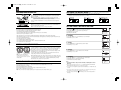
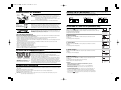
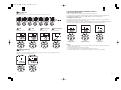
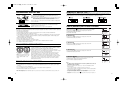
Inserting the Batteries
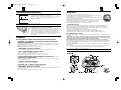
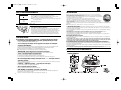
Open the battery cover on the back of the measuring platform. Insert the supplied AAbatteries as indicated.
SWITCHING THE WEIGHT MODE Note: For use only with models containing the weight mode switch
You can switch the unit indication by using the switch on the back of the scale as shown in the figure.
Note: If weight mode is set to pounds or stone-pounds, the height programming mode will be automatically set to feet and inches. Similarly,
if kilograms is selected, height will be automatically set to centimetres.
Note: Be sure that the polarity of the batteries is set properly. If the batteries areincorrectly
positioned the fluid may leak and damage floors. If you do not intend to use this unit for a
long period of time, it is advisable to remove the batteries before storage.
Please note that the included batteries from factory may have decreased energy levels
over time.
Positioning the Monitor
Place the measuring platform on a hard, flat surface where there is minimal vibration to
ensure safe and accurate measurement.
Note: To avoid possible injury, do not step on the edge of the platform.
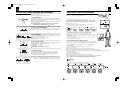
SETTING (RESETTING) DATE AND TIME
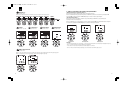
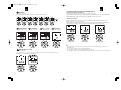
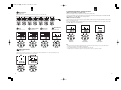
1. Set Year
Handling Tips
This monitor is a precision instrument utilizing state-of-the-art technology.
To keep the unit in the best condition, follow these instructions carefully:
•Do not attempt to disassemble the measuring platform.
•Store the unit horizontally, and place it so that the buttons will not be pressed accidentally.
•Avoid excessive impact or vibration to the unit.
•Place the unit in an area free from direct sunlight, heating equipment, high humidity, or extreme temperature change.
•Never submerge in water. Use alcohol to clean the electrodes and glass cleaner (applied to a cloth first) to keep them shiny; avoid soaps.
•Do not step on the platform when wet.
•Do not drop any objects onto the platform.
•Do not carry the unit by holding the hand-electrodes.
•Do not release the hand-electrodes until the cable is completely retracted into the unit.
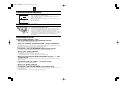
•Do not pull the cable more than red mark.
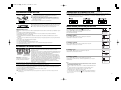
Press and hold the
/Down button for 3 seconds to turn on the unit.
Press the ▲ or ▼ buttons to set year and then press SET button.
The unit will beep once to confirm.
(Applicable year: 2006-2050)
2. Set Month
Press the ▲ or ▼ buttons to set month and then press the SET button.
The unit will beep once to confirm.
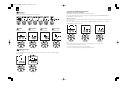
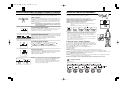
3. Set Day
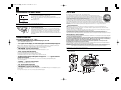
GETTING ACCURATE READINGS
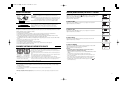
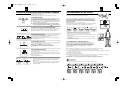
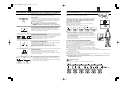
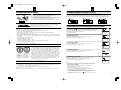
Heels centered on
electrodes
Toes may overhang
measuring platform
Note: An accurate reading will not be
possible if the soles of your feet are not
clean, or if your knees are bent or you are in
a sitting position.
To ensure accuracy, readings should be taken without clothing and under consistent
conditions of hydration. If you do not undress, always remove your socks or stockings,
and be sure the soles of your feet are clean before stepping on the measuring platform.
Be sure that your heels are correctly aligned with the electrodes on the measuring
platform. Don't worry if your feet appear too large for the unit accurate readings can still
be obtained if your toes overhang the platform.
It is best to take readings at the same time of day. Try to wait about three hours after
rising, eating, or hard exercise before taking measurements.
While readings taken under other conditions may not have the same absolute values, they
are accurate for determining the percentage of change as long as the readings are taken in
a consistent manner. To monitor progress, compare weight and body fat percentage
taken under the same conditions over a period of time.
AUTOMATIC SHUT-DOWN FUNCTION
The automatic shut-down function shuts off the power automatically in the following cases:
•If you interrupt the measurement process. The power will shut down automatically within 10 to 20 seconds,
•depending upon the type of operation.
•If an extreme weight is applied to the platform.
•During programming, if you do not touch any of the keys or buttons within 60 seconds.*
•After you have completed the measuring process.
*Note: If the power shuts off automatically, repeat the steps from “Setting and Storing Personal Data in Memory” (p.4).
2
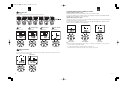
Press the ▲ or ▼ buttons to set day and then press the SET button.
The unit will beep once to confirm.
4. Set Hour
Press the ▲ or ▼ buttons to set hour and then press the SET button.
The unit will beep once to confirm.
5. Set Minute
Press the ▲ or ▼ buttons to set minute and then press the SET button.
The unit will beep twice to confirm the programming.
The unit will then shut down automatically.
Note :
•If you change the date to a date prior to the current date, all tracking data for all users
will be lost.
•After you replace the batteries, repeat step 1 – 5 on “SETTING (RESETTING) DATE AND TIME.
Replacing the batteries will cause the loss of date and time settings.
•60 seconds or more of inactivity will cause automatic shut off during this process. No data will be saved
as a result.
•If you make a mistake or wish to turn the unit off before you complete the programming, press
the OFF button to turn the unit off. No data will be saved as a result.
•If you press (not press and hold) the
/Down button, you can see the current date and time on
the display.
3