1
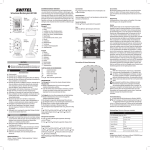
CAUTION! BCF 827 Baby Monitor ENGLISH Operating manual Please read and observe the following in formation and keep the operating manual nearby for future reference! • Risk of fire through power adapter plugs! Power adapter plugs can heat up. Never leave any objects on the power adapter plugs. Ensure access to power adapter plugs is not obstructed by furniture or such. • Risk of tripping due to improperly laid cable! Lay the cables so that nobody can trip over them! • Risks to health and the environment from batteries! Never open, damage or swallow batteries or allow them to pollute the environment. They could contain toxic and ecolo gically harmful heavy metals. Operating elements Receiver unit 1 Display 2 button (switch receiver unit on/off) 3 (menu, zoom) 4 Loudspeaker 5 button (raise volume, change setting) 6 button (lower volume, change setting) 7 Operating indicator 8 Connection quality indicator 9 Power adapter socket 10 Belt clip 11 Battery compartment cover Safety information WARNING! • Risk of fatal injury through cable! Children could become entangled in the cables and strangle themselves. Ensure that the baby monitoring units and power cables are out of reach of babies/children, i.e. they are at least one meter away. • Risk of explosion! Only use the power adapter plugs supplied! Only use batteries supplied or ones of the same type! Always treat batteries with due care and attention and only use batteries as described. Never use standard and rechargeable batteries together. Never use rechargeable batteries or standard batteries with different capacities or charge statuses together. Never use standard or rechargeable batteries which are damaged. • Risk of suffocation through small objects, packaging and protective foil! Keep children away from the product and its packaging! Transmitter unit 12 Night light 13 Light sensor 14 Camera 15 Microphone 16 Operating indicator 17 switch (transmitter unit on/off) 18 Power adapter socket 19 Antenna 20 button (register device) Intended use The baby monitor serves to monitor a baby/child in a room. The transmitter unit, located near the child, transmits noises and images from its immediate vicinity to the receiver unit. Any other use is con sidered unintended use. Unauthorised modification or reconstruction is not permitted. Under no circumstances open the devices or com plete any repair work yourself. The devices are not intended for medical purposes. Warning and signal tones from respiratory or heartbeat monitoring equip ment are not transmitted. Use only in suitable environments Observe all local directives and regulations. Prevent excessive exposure to smoke, dust, vibration, chemicals, moisture, heat and direct sunlight. Starting up the receiver unit The receiver unit is powered by the battery pack. VOX mode (sound activation) Inserting the battery pack in the receiver unit Signals picked up by the transmitter unit are transmitted to the re ceiver unit. You can adjust the sensitivity by which the transmitter unit detects the acoustic signals. Switching VOX mode on-off / Setting the sensitivity Slide the battery compartment cover [11] on the rear downwards and remove it. Plug the connection plug on the battery pack in the power socket and then insert the battery pack in the battery compartment. Close the battery compartment cover. Charging the battery pack Connect the power adapter to the power socket [9] on the trans mitter unit and a properly installed mains power outlet. Switching the receiver unit on/off 2 sec. [2] Receiver unit is switched on, start screen appears in the display. 2 sec. [2] Receiver unit is switched off, the display goes out. Switching the display on/off [2] Display is switched off, only sound is played. Press any button Display is switched on, image and sound are played. The display switches on when signals are received according to the sensitivity of the VOX function setting. When the VOX func tion is deactivated, the display remains switched off until you press any button. Starting up the transmitter unit The transmitter unit operated by power supplied via the power ad apter plug. Switching the transmitter unit on/off The transmitter unit continues to transmit even when the receiv er unit is switched off. The signals can be received by other devices. Set [17] to ON Transmitter unit is switched on, operating indicator [16] lights up red. Registering a transmitter unit The transmitter unit supplied is registered on the receiver unit at the factory. A maximum of 4 transmitter units can be registered on the receiver unit. Proceed as follows to register another transmitter unit: Press [3] until the camera icon appears in the display. [5] / [6], [2] Select transmitter units C1 to C4 and confirm them, connection quality indicator [8] flashes for 10 seconds. Set [17] to ON Transmitter unit is switched on, operating indicator [16] lights up red. [20] Register the transmitter unit on the receiver unit. If the registration process fails, Out of Range appears in the display. Repeat the process. Selecting a transmitter unit If several transmitter units are registered, a transmitter unit can be selected manually. Transmitter unit 1 is selected as standard. Press [3] until the camera icon appears in the display. [5] / [6], [3] Select transmitter units C1 to C4 and confirm them. Individual settings can be defined for each transmitter unit. Package contents - Receiver unit Transmitter unit Battery pack for receiver unit 2 power adapter plugs Operating manual Display and explanation of operations Æ [2] 5 sec. Action to take Result of action Reference in the graphics Press the button Press and hold the button Keep the button pressed for 5 seconds Battery pack discharged. Scan modus If several transmitter units are registered, you can programme the receiver unit to switch between the transmitter units registered at 10-second intervals. The signals from the transmitter units are played in succession. Press [3] until the camera icon appears in the display. [5] / [6], [3] Select SCAN and confirm it. Icons in the display Signal strength The equipment has a range of up to 250 m. The range can be reduced by obstructions, such as walls etc. Electronic equip ment in the vicinity can also cause disturbance. Battery pack fully charged. Press [3] until VOX or OFF appears in the display. [5] / [6] Select one of the 5 levels of sensitivity or OFF. [3] Confirm the setting. If the transmitter unit does not transmit an acoustic signal to the receiver unit for a period of one minute, the receiver unit display goes out. Night vision function If the brightness of the area monitored no longer suffices for normal operation, the equipment automatically switches to night vision. Brightness Press [3] until appears in the display. [5] / [6] Select one of the 5 brightness levels. [3] Confirm the setting. Night light The transmitter unit is equipped with an built-in night light [17]. You can switch the night light on and off via the receiver unit. Press [3] until the moon icon appears in the display. [5] / [6] Select ON or OFF. [3] Confirm the setting. Zoom Guarantee SWITEL equipment is produced and tested according to the latest production methods. The implementation of carefully chosen materi als and highly developed technologies ensure trouble-free function ing and a long service life. The terms of guarantee do not apply to the batteries or power packs used in the products. The period of guarantee is 24 months from the date of purchase. All deficiencies related to material or manufacturing errors within the period of guarantee will be redressed free of charge. Rights to claims under the terms of guarantee are annulled following tamper ing by the purchaser or third parties. Damage caused as the result of improper handling or operation, normal wear and tear, incorrect positioning or storage, improper connection or installation or Acts of God and other external influences are excluded from the terms of guarantee. In the case of complaints, we reserve the right to repair defective parts, replace them or replace the entire device. Replaced parts or devices become our property. Rights to compensation in the case of damage are excluded where there is no evidence of intent or gross negligence by the manufacturer. If your device does show signs of a defect within the period of guar antee, please contact the sales outlet where you purchased the SWITEL device, producing the purchase receipt as evidence. All claims under the terms of guarantee in accordance with this agree ment can only be asserted at the sales outlet. No claims under the terms of guarantee can be asserted after a period of two years from the date of purchase and hand-over of the product. Declaration of Conformity You can switch between two zoom factors in order to enlarge or reduce the image section monitored by the transmitter unit. 2 sec. Packaging materials must be disposed of according to local regula tions. [3] Select x2 or x1. Power adapter plug, receiver unit Using the energy-efficient power adapter plug (input 100-240 VAC, output 6 VDC, 800 mA) the zero load is approx. 0.19 W. The average efficiency is approx. 72.1 %. The maximum power consumption is approx. 2.68 W. Power adapter plug, transmitter unit Using the energy-efficient power adapter plug (input 100-240 VAC, output 6 VDC, 800 mA) the zero load is approx. 0.17 W. The average efficiency is approx. 72.3 %. The maximum power consumption is approx. 1.72 W. Service hotline In the case of technical problems, contact our Service hotline. Switzerland: Tel. 0900 00 1675 (national charges, Swisscom at time of going to print: CHF 2.60/min). In the case of claims under the terms of guarantee, contact your sales outlet. Maintenance Clean the surface of the housing with a soft, fluff-free cloth. Do not use any cleaning agents or solvents. Disposal In order to dispose of your device, take it to a collection point provided by your local public waste authorities (e.g. recycling centre). According to the laws on the disposal of electronic and electrical devices, owners are obliged to dispose of old elec tronic and electrical devices in a separate waste container. The adjacent symbol indicates that the device must not be disposed of in normal domestic waste! You are legally obliged to dispose of power packs and batter ies at the point of sale or in the corresponding containers provided at collection points by local public waste authorities. Disposal is free of charge. The symbols indicate that the batteries must not be disposed of in normal domestic waste and that they must be brought to collection points provided by local public waste authorities. This device fulfils the requirements stipulated in the Directive 1999/5/EC on radio equipment and telecommunications terminal equipment and the mutual recognition of their con formity. Conformity with the above mentioned directive is confirmed by the CE mark on the device. To view the complete Declaration of Conformity, please refer to the free download available on our web site www.switel.com.