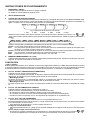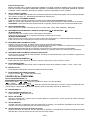
1
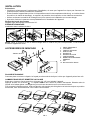
Notes:
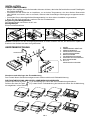
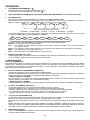
• Do not press the front panel hard against the unit when attaching it. It can be easily attached by pressing it
lightly against the unit.
• When you carry the front panel with you, put it in the supplied front panel case.
• Do not press hard or give excessive pressure to the display window of the front panel when attaching it to
the unit.
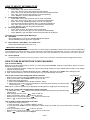
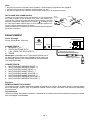
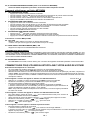
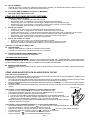
CLEANING THE CONNECTOR
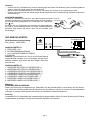
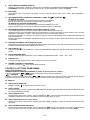
The unit may not function properly if the connectors between the unit
and the front panel are contaminated with dirt. In order to prevent
this from happening, detach the front panel by pressing the
button and clean the connector from time to time.
Clean the connector with a cotton swab together with contact cleaner
as illustrated. Be sure to clean them carefully pin by pin and make
sure not to damage the connecting points.
Rear of
front panel
Main unit
Cotton Swab
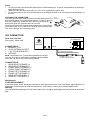
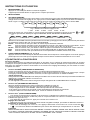
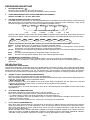
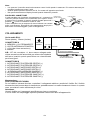
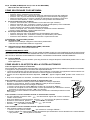
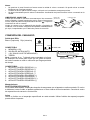
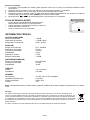
ISO CONNECTOR
RCA Jack Line Out:
Red (right) White (left)
ISO CONNECTOR
B
ANTENNA
CONNECTOR
CONNECTOR A
LINE OUT
4. MEMORY +12V
L(WHITE) R(RED)
5. AUTO ANTENNA OUTPUT
7. +12V (TO IGNITION KEY)
8. GROUND
Note: (connector A no. 7) must be connected by car ignition key in order to avoid that car battery being drained
when the car will be not used for long period.
1
3
5
7
2
4
6
8
5
7
8
A
4
BLUETOOTH ANTENNA
CONNECT TO
EXTERNAL MICROPHONE
TALK
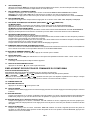
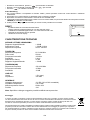
CONNECTOR B
1. REAR RIGHT SPEAKER (+)
2. REAR RIGHT SPEAKER (-)
3. FRONT RIGHT SPEAKER (+)
4. FRONT RIGHT SPEAKER (-)
5. FRONT LEFT SPEAKER (+)
6. FRONT LEFT SPEAKER (-)
7. REAR LEFT SPEAKER (+)
8. REAR LEFT SPEAKER (-)
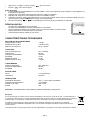
Maintenance
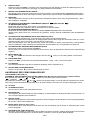
FUSE REPLACEMENT
If the fuse blows, check the power connection and replace the fuse. If the fuse blows again after the replacement, there may be an internal malfunction. In this case, consult your nearest repair center.
Warning
Use the specified amperage fuse for each lead. Use of a higher amperage fuse may cause serious damage.
EN-