1
Operating Instruction
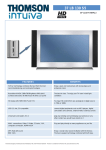
This universal remote control is compatible with the majority of television sets, DVD
players, satellite receivers and infrared controlled cable. This remote control has already
been programmed so that you can use it to control most of the audio/video products
made by the THOMSON group. Before attempting to programme the remote control, try it
out by using one of the methods described in this user manual.The two CR2032 batteries
are already fitted in the remote control. Refer to the diagram on the cover to replace
them when they are worn out. Please keep this guide along with the code list (provided
separately), so that you can programme your remote control for use with other products.
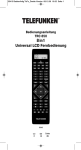
Description of the key functions
1 Indicator lamp: the red indicator lamp
lights up when any key is pressed.
2 Product keys (TV, DVD or SAT): Used
to programme and control different
products (TV, satellite receiver, DVD
player and so on).
3 SHIFT: activates the secondary key
features (indications in blue).
4 VOL-, VOL+ Increases (+) or decreases
(-) the volume of the TV set; SHIFT +
A/B: also allows you to navigate the
menus horizontally.
5 Teletext On/Off in TV mode.
SHIFT + MENU: turns on the menu of
the selected products
6 E (rewind): Goes backward or
advances forward (DVD)*.
7 RECORD: To record, press the
RECORD key twice.
8 Stop the disc (DVD)*.
9 Number keys 0 to 9: these keys have
the same functions as those of your
original remote and are also used to
enter the codes for different products.
10 stop page scrolling (videotext).
11 SETUP: Programmes the remote
control.
4
12 POWER: On/Standby.
13 AV: For selecting an external source
(SCART).
14 PROG+, PROG-: Programmes zapping
button (received by the television set
or the satellite receiver); use to scroll
vertically through menus. SHIFT +
C/D: also allow you to navigate the
menus vertically.
15 MUTE: Switches the TV sound off.
SHIFT + OK: confirms a selection.
16 Teletext Off in TV mode.
SHIFT + EXIT: turns off the menu of the
selected product.
17 B (play): play a DVD disc DVD*.
18 F fast forward (DVD)*.
19 J: Suspends play and stops on an
image*.
20 Videotext inlay on TV picture.
21 Press this key first before you type in
the 2-digit channel number (except for
Thomson group products).
* The coloured buttons can be used
to select categories when teletext is
activated, and specific
functions depending on the make.
Testing the remote control
before you programme it
1. Turn on the product you want to
control.
2. Press the product key (2) that
corresponds to the type of
product you want to control:
TV: television set, DVD: DVD
player, SAT: satellite receiver.
3. Point the remote control towards
the product and try to turn it off
by pressing the POWER (12) key.
If the product doesn’t turn off,
you’ll need to programme the
remote control by one of the
methods described in chapter 3.
Programming the remote control
Method A – Fast programming
with 1-digit subcode
Before you start programming, you
must find the subcode
of the product to be controlled
(television set, satellite
receiver or DVD player).
Refer to the list provided with these
instructions, page I of
the codes.
1. Turn on the product you want to
control.
2. Hold down the SETUP (11) key
until the red indicator lamp (1)
remains lit (the indicator light
remains on for a few seconds to
give you the time to proceed with
the following steps. The indicator
lamp flashes when this time is
almost up, and then goes off).
3. Press the product key (2) that
corresponds to the type of
product you want to control:
TV: television set, DVD: DVD
player, SAT: satellite receiver.
4. While the indicator is lit, type
in the subcode (example: 1 for
THOMSON).
5. Point the remote towards the
product and try to turn it off by
pressing the POWER (12) key.
6. If the product you want to control
turns off, press the MUTE (15) key
to save the subcode.
7. If the product doesn’t turn off,
press the POWER (12) key
repeatedly until the set switches
off. Wait approximately one
second between key presses to
give the red indicator lamp (1)
enough time to go off and light up
again. This will allow you to see
whether the product responds or
not.
8. Immediately after the product
to be controlled turns off, press
the MUTE (15) key to save the
subcode.
Note:
If you want to assign another type
of product than those mentioned
on the remote control (with the
exception of the TV button which
can only be used to control a
television set), begin by entering
the code that corresponds to the
product you want to programme (a
4-digit code that you will find in the
code booklet – see method B).
5