1
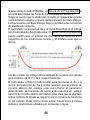
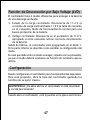
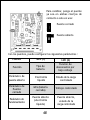
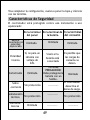
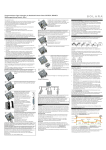
CMLNL
CID:181811001
CONTENTS
1~18
19~36
37~54
55~72
73~90
91~ 105
Phocos CMLNL
Programmierbarer SolarLaderegler mit Nachtlicht-Funktion
Bedienungsanleitung (Deutsch)
Sehr geehrter Kunde,
Wir bedanken uns für den Kauf
eines Phocos Produktes. Vor
Benutzung lesen Sie sich bitte
die Anleitung sorgfältig und
gründlich durch.
1
Mit Ihrem neuen CMLNL Regler steht Ihnen ein nach dem neuesten
Stand der Technik entwickeltes Gerät zur Verfügung, das sich durch
besondere Features auszeichnet, wie beispielsweise:
Eindeutig, leicht lesbares Display des Ladezustandes und
programmierbare Nachtlicht-Funktion.
Tag und Nacht Erkennung mit Hilfe der PV-Anlage
Programmierbare Nachtlicht-Funktion
Tiefentladeschutz ladezustands- oder spannungsgesteuert
Vollständiger elektronischer Schutz
Diese Anleitung gibt Ihnen Hinweise zur Installation, zum Betrieb,
zur Einstellung und zur Fehlerbehebung. Lesen Sie sie im eigenen
Interesse sorgfältig durch. Beachten Sie bitte unbedingt die
Sicherheits- und Verwendungshinweise am Ende dieser Anleitung.
Funktionsbeschreibung
Der Regler dient dem Schutz des Akkumulators vor Überladung
durch den Solargenerator und Tiefentladung durch die
Verbraucher. Die Ladung erfolgt durch eine mehrstufige
Ladecharakteristik, die zusätzlich temperaturkompensiert ist,
um eine optimale Batterieladung zu erzielen.
Der Regler erkennt selbständig die Batteriespannung und stellt
sich automatisch auf 12V oder 24V Betrieb ein.
Die Programmierung der Nachtlicht-Funktion erfolgt per
Drucktaste.
Der Laderegler kann für die Solarlicht-Anwendungen programmiert
werden.
Der Regler besitzt eine Reihe von Schutz- und Anzeigefunktionen.
Montage und Anschluss
Das Gerät ist nur für die Anwendung im Innenbereich geeignet.
Das Gerät muss vor Witterungseinflüssen wie direkter
2
Sonneneinstrahlung oder Nässe geschützt werden. Der Regler darf
nicht in Feuchträumen wie z.B. Bädern montiert werden.
Der Regler misst zur Bestimmung der Ladespannung die Temperatur.
Regler und Batterie müssen im selben Raum untergebracht werden.
Da sich der Regler im Betrieb erwärmen kann, muss er auf einem
nicht brennbaren Untergrund montiert werden.
HINWEIS: Schließen Sie den Regler in jedem Fall in der
nachfolgend angegebenen Reihenfolge an, um Anschlussfehler
zu vermeiden.
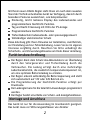
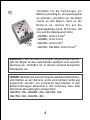
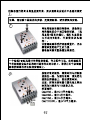
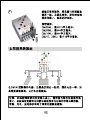
1
Befestigen Sie den Regler mit für den
Untergrund geeigneten Schrauben
(Schaft-Durchmesser 4mm,
Kopfdurchmesser max. 8mm, kein
Senkkopf) an der vorgesehen Stelle.
Beachten Sie, dass die Schrauben auch
die Kräfte der Anschlusskabel
aufnehmen müssen.
Achten Sie darauf, dass die seitlichen
Belüftungsschlitze frei sind.
Alternativ kann der Regler mit einer als Zubehör erhältlichen
Montageplatte (CX-DR2) auf 35 mm DIN Hutschienen montiert
werden.Legen Sie den Regler dazu auf die Montageplatte und
schrauben Sie ihn mit den beiden mit der Montageplatte
mitgelieferten Schrauben fest.
3
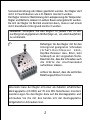
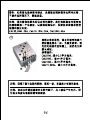
2
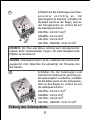
Schließen Sie die Zuleitungen zur
Batterie polrichtig an. Um spannungsfrei
zu arbeiten, schließen Sie die Kabel
zuerst an den Regler, dann an die
Batterie an. Achten Sie auf die
Zuleitungslänge (mind. 30 bis max. 100
cm) und die Kabelquerschnitte:
CML05NL: mind 2.5 mm2
CML08NL: mind 4 mm2
CML10NL: mind 6 mm2
CML15NL, CML20NL: mind 10 mm2
WARNUNG: Falls die Batterie verpolt angeschlossen wurde,
gibt der Regler an den Lastklemmen ebenfalls eine verpolte
Spannung ab. Schließen Sie in diesem Zustand keinesfalls
Verbraucher an!
HINWEIS: Beachten Sie auch die Hinweise des Batterieherstellers.
Unmittelbar an der Batterie sollte eine Schmelz-Sicherung
angebracht werden, um eventuelle Kurzschlüsse in den
Batterieleitungen abzusichern. Die Sicherung muss dem
Nennstrom des Ladereglers entsprechen:
CML05NL: 20A, CML08NL: 20A, CML10NL: 30A,
CML15NL: 30A, CML20NL: 40A
4
3
Schließen Sie die Zuleitungen zum Solargenerator polrichtig an. Um
spannungsfrei zu arbeiten, schließen Sie
die Kabel zuerst an den Regler, dann an
den Solargenerator an. Achten Sie auf
die Kabelquerschnitte:
CML05NL: mind 2.5 mm2
CML08NL: mind 4 mm2
CML10NL: mind 6 mm2
CML15NL, CML20NL: mind 10 mm2
HINWEIS: Die Plus und Minus Leitung zum Solargenerator
müssen dicht nebeneinander liegen, um elektromagnetische
Effekte zu minimieren.
HINWEIS: Solarmodule liefern Strom, sobald sie dem Sonnenlicht
ausgesetzt sind. Beachten Sie unbedingt die Hinweise des
Herstellers.
4
Schließen Sie die Zuleitungen zum
Gleichstrom-Verbraucher polrichtig an.
Um spannungsfrei zu arbeiten, schließen
Sie die Kabel zuerst an den Verbraucher,
dann an den Regler an. Achten Sie auf
die Kabelquerschnitte:
CML05NL: mind 2.5 mm2
CML08NL: mind 4 mm2
CML10NL: mind 6 mm2
CML15NL, CML20NL: mind 10 mm2
Erdung des Solarsystems
5
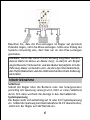
Beachten Sie, dass die Plus-Leitungen im Regler auf gleichem
Potenzial liegen, nicht die Minus-Leitungen. Sollte eine Erdung des
Systems notwendig sein, darf dies nur an den Plus-Leitungen
geschehen.
HINWEIS: Sollte das Gerät in ein Fahrzeug eingebaut werden,
dessen Batterie-Minus an Masse liegt, so dürfen am Regler
angeschlossene Verbraucher und das Modul keinesfalls mit der
Fahrzeug Masse verbunden sein, da dies den Überladeschutz,
den Tiefentladeschutz und die elektronische Überstrom-Sicherung
üerbrückt.
Inbetriebnahme
Selbsttest
Sobald der Regler über die Batterie oder den Solargenerator
polrichtig mit Spannung versorgt wird, führt er einen Selbsttest
durch. Erst dann wechselt die Anzeige in den Normalbetrieb.
Systemspannung
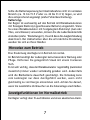
Der Regler stellt sich selbsttätig auf 12 oder 24 V Systemspannung
ein. Sobald die Spannung bei Inbetriebnahme 20.0 V überschreitet,
stellt sich der Regler auf 24V Betrieb ein.
6
Sollte die Batteriespannung bei Inbetriebnahme nicht im normalen
Bereich (ca. 12 bis 15.5 V oder ca. 24 bis 31.0 V) liegen, so wird
dies entsprechend angezeigt (siehe Fehlerbeschreibung).
Batterietyp
Der Regler ist werksseitig auf den Betrieb mit Bleiakkumulatoren
mit flüssigem Elektrolyt (geschlossene Batterie) eingestellt. Wenn
Sie einen Bleiakkumulator mit festgelegtem Elektrolyt (Gel oder
Vlies, verschlossen) verwenden, können Sie die Ladecharakteristik
einstellen (siehe "Einstellungen"). Es wird dann die Ausgleichsladung
deaktiviert. Bei Unklarheiten über die erforderliche Einstellung
wenden Sie sich an Ihren Händler.
Hinweise zum Betrieb
Eine Erwärmung des Reglers im Betrieb ist normal.
Im Betrieb benötigt der Laderegler keine besondere Wartung oder
Pflege. Entfernen Sie gelegentlich Staub mit einem trockenen
Tuch.
Es ist sehr wichtig, dass der Bleiakkumulator regelmäßig (zumindest
monatlich) immer wieder vollständig geladen wird. Andernfalls
wird die Bleibatterie dauerhaft geschädigt. Die Volladung kann
vom Laderegler nur dann durchgeführt werden, wenn nicht
gleichzeitig zu viel Energie entnommen wird. Achten Sie darauf,
wenn Sie zusätzliche Verbraucher an die Solaranlage anschließen.
Anzeigefunktionen im Normalbetrieb
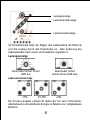
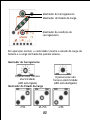
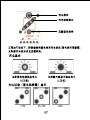
Der Regler verfügt über 5 Leuchtdioden und einen akustischen Alarm.
7
Ladungsanzeige
Ladezustandsanzeige
Lastzustandsanzeige
Im Normalbetrieb zeigt der Regler den Ladezustand der Batterie
und die Ladung durch das Solarmodul an. Jede Änderung des
Ladezustandes nach unten wird akustisch signalisiert.
Ladungsanzeige
Solarmodul liefert Strom
(LED an)
Ladezustandsanzeige
Solarmodul liefert
keinen Strom (LED aus)
>75%
25-75%
<25%
Die Prozent-Angabe entspricht dabei der bis zum TiefentladeAbschaltpunkt entnehmbaren Energie in Relation zur vollgeladenen
Batterie.
8
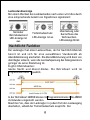
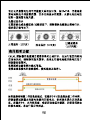
Lastzustandsanzeige
Bei einem Wechsel des Ladezustandes nach unten wird dies durch
eine entsprechende Anzahl von Signaltönen signalisiert:
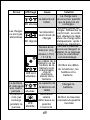
Normaler
Betriebszustand
LED-Anzeige ist
aus
Tiefentladeschutz
LED-Anzeige ist an.
Überlastung oder
Kurzschluss des
Verbrauchers.
LED-Anzeige blinkt
Nachtlicht-Funktion
Der Laderegler hat einen Lastanschluss, der für Nachtlicht-Betrieb
bereit ist und sich für eine auswählbare Stundenzahl ab
Abenddämmerung anschaltet. Die Abenddämmerung wird dann von
dem Regler erkannt, wenn die Leerlaufspannung des Solargenerators
geringer als seine Einstellung ist.
Es gibt 2 Betriebsarten:
Ganze Nacht und Abend Modus. Die Betriebsart wird im
Programmiermenü 1 gewählt.
In der Betriebsart ABEND können im Programmiermenü 2 die ABEND
Zeitstunden eingestellt werden.
Beachten Sie, dass der Laderegler in jedem Fall den Lastausgang
abschaltet, sobald der Tiefentladeschutz anspricht. Der
9
Tiefentladeschutz hat Vorrang gegenüber der Nachtlicht-Funktion.
Der Regler unterscheidet zwischen Tag und Nacht an Hand der
Leerlaufspannung des Solarmoduls. Im Programmiermenü 3 kann
die Tag/Nacht Erkennungsschwelle individuell an die lokale Situation
und das verwendete Solarmodul angepasst werden.
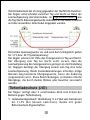
Die beiden Spannungswerte vor und nach dem Schrägstrich gelten
für 12 V bzw. 24 V Systemspannung.
Der Regler erkennt mit Hilfe des Solargenerators Tag und Nacht.
Der Übergang vom Tag zur Nacht setzt voraus, dass die
Leerlaufspannung des Solargenerators geringer als die Einstellung
ist. Dagegen benötigt der Übergang zurück zum Tag eine hohe
Leerlaufspannung. Beide Zustandsänderungen erfordern einige
Minuten lang konstante Übergangswerte, bevor die Änderung
vorgenommen wird. Diese Beschränkungen vermeiden falsche
Übergänge, die durch dunkle Wolken oder Gewitter verursacht
werden.
Tiefentladeschutz (LVD)
Der Regler verfügt über 2 verschiedene Modi zum Schutz der
Batterie gegen Tiefentladung.
1. Ladezustandsgesteuert: Abschaltung 11.4 V (bei Last-Nennstrom)
bis 11.9V (bei keinem Laststrom). Modus mit guten
Batterieschutz-Eigenschaften.
10
2. Spannungsgesteuert: Abschaltung 11.0V fix, geeignet falls
Verbraucher direkt an die Batterie angeschlossen sind (z.B.
Wechselrichter) und der Regler nicht den gesamten Laststrom
erfassen kann.
Werksseitig ist der Modus 1 voreingestellt. Die Einstellung des
Modus ist unten beschrieben.
Bei Unklarheiten über die Wahl des richtigen Modus wenden Sie
sich an Ihren Händler, da dies nur in Zusammenhang mit der
eingesetzten Batterie beurteilt werden kann.
Einstellungen
Der Regler kann auf besondere Betriebsanforderungen eingestellt
werden. Dazu ist der Gehäusedeckel durch Lösen der rückseitigen
Schraube abzunehmen.
WARNUNG: Der Regler darf keinesfalls in angeschlossenem
Zustand geöffnet werden!
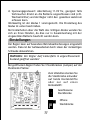
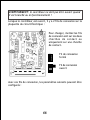
Bei geöffnetem Regler finden Sie 3 Steckbrücken (Jumper) auf der
Elektronik-Platine:
Zum Umstellen stecken Sie
die Steckbrücke entweder
auf beide Kontaktstifte
oder nur auf einen
Kontaktstift:
Geschlossene
Steckbrücke
Offene
Steckbrücke
11
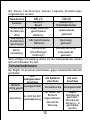
Mit diesen Steckbrücken können folgende Einstellungen
vorgenommen werden:
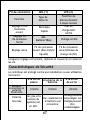
Steckbrücke
Funktion
Einstellung
Steckbrücke
offen
Einstellung
Steckbrücke
geschlossen
GEL (1)
BatterieBauart
Flüssiger Elektrolyt
(geschlossene
Batterie)
GEL (verschlossene
Batterie)
LVD (2)
Funktion des
Tiefentladeschutzes
Ladezustandsgesteuert
Spannungsgesteuert
Steckbrücke
Steckbrücke offen
Ladezustandsoffen(Flüssiger
Elektrolyt)
gesteuert
Nach erfolgter Einstellung setzen Sie den Gehäusedeckel wieder
auf und schrauben ihn fest.
Werkseinstellung
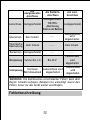
Schutzfunktionen
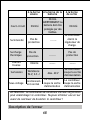
Der Regler ist an seinen Anschlüssen gegen fehlerhaften Betrieb
geschützt:
Am
Am BatterieAm LastSolargeneratorAnschluss
Anschluss
Anschluss
Batterie Uneingeschränkt
Normalbetrieb Uneingeschränkt
richtig gepolt
Gegen
Ja, sofern nur
Überlastung
Batterie
Ja, nicht bei 24V
geschützt.
Verpolung
Systemspannung angeschlossen.
Verbraucher
Akustische
können u. U.
Warnung
geschädigt
werden.
12
Am
SolargeneratorAnschluss
Kurzschluss Uneingeschränkt
Am BatterieAnschluss
Am LastAnschluss
Uneingeschränkt.
WICHTIG:
Uneingeschränkt
Absicherung
direkt an der Batterie.
Überstrom
Kein Schutz
-------
Lastanschluss
wird
abgeschaltet
Thermische
Überlastung
Kein Schutz
-------
Kein Schutz
Rückstrom Uneingeschränkt
-------
Überspannung Varistor 56V, 2.3J
Unterspannung
Bis 40 V
Normaler
Lastanschluss wird
Betriebszustand
abgeschaltet
-------
Lastanschluss
wird
abgeschaltet
Lastanschluss
wird
abgeschaltet
WARNUNG: Die Kombination verschiedener Fehler kann dem
Regler Schaden zufügen. Beheben Sie unbedingt zuerst den
Fehler, bevor sie das Gerät weiter anschließen.
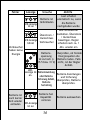
Fehlerbeschreibung
13
Fehler
Anzeige
Ursache
Batterie ist
LED-Anzeige tiefentladen
ist an
Überstrom /
Kurzschluss
LED-Anzeige
Verbraucher
blinkt
Verbraucher
haben keine
Energie
Abhilfe
Last schaltet
automatisch zu, wenn
die Batterie
nachgeladen wurde
Alle Verbraucher
abschalten. Überstrom
/ Kurzschluss
beseitigen. Regler
schaltet nach ca. 1
Min. wieder ein
Überprüfen, ob fremde
BatterieEnergiequellen die
spannung
ist zu hoch (> Batterie laden. Falls
15.5 bzw. 31 V) nicht, ist der Regler
defekt.
LEDAnzeige ist Batteriezuleitung
Batterie-Zuleitungen
an.
oder Batterieund Sicherung
Sicherung defekt,
überprüfen, Batterie
Batterie
überprüfen.
hochohmig
Batterie hat
Batterie ist
Kapazität
nach kurzer
verloren
Zeit wieder
LED-Anzeige
entladen
ist an
14
Batterie austauschen
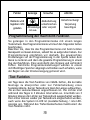
Fehler
Anzeige
Ursache
Modulleitung
Batterie wird
unterbrochen
tagsüber nicht
LED-Anzeige oder verpolt
geladen
ist aus.
Abhilfe
Unterbrechung/
Verpolung
beseitigen
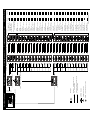
Programmierung der Nachtlicht-Funktion
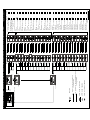
Sie gelangen in den Programmiermodus mit einem langen
Tastendruck. Das Programmiermenü wird auf den folgenden Seiten
beschrieben.
Beachten Sie, dass Sie das Programmiermenü erst beim letzten
Menüpunkt verlassen können, sobald Sie es aufgerufen haben. Zur
Programmierung empfehlen wir deshalb, die gewünschten
Einstellungen vor der Programmierung in der Spalte neben dem
Menü zu notieren und dann die gesamte Programmierung in einem
Zug durchzuführen. Dies vereinfacht den Vorgang und verhindert
Fehler. Sämtliche Programmeinstellungen werden in einem
nichtflüchtigen Speicher abgelegt und bleiben auch erhalten, wenn
der Regler von der Stromversorgung getrennt wird.
Test-Funktion
Am Tage kann die Test-Funktion von CMLNL helfen, die korrekte
Montage zu überprüfen oder zur Fehlerbehebung eines
Systemproblems. Kurzer Tastendruck lässt die Lampe aufleuchten,
die an den Lastanschlüssen angeschlossen ist. Die Lichter sind
während des Tages in 3 Minuten Intervallen an. Innerhalb von 3
Minuten können die Lichter per Tastendruck ausgeschaltet werden.
Die Lichter können wieder per Tastendruck eingeschaltet werden,
auch wenn das System im LVD ist (Lastabschaltung / rote LEDAnzeige an). Während des Tiefentladeschutzes funktioniert die
Test-Funktion nicht.
15
Falls das Drücken der Taste einen Tiefentladeschutz (LVD) verursacht,
wird das Licht ausgeschaltet.
Programmiersperre
Durch Drücken der Taste für 8 Sekunden im Normalbetrieb wird
die Programmiersperre aktiviert, um ungewollte Veränderungen
der Einstellungen zu verhindern. Ein weiterer 8-Sekunden Druck
löst die Sperre wieder.
Allgemeine Sicherheits- und Verwendungshinweise
Bestimmungsgemäße Verwendung
Der Laderegler ist ausschließlich für den Einsatz in photovoltaischen
Anlagen mit 12 oder 24 Volt Nennspannung und nur für den Betrieb
mit geschlossenen oder verschlossenen Bleiakkumulatoren geeignet.
Sicherheitshinweise
Batterien enthalten große Mengen gespeicherter Energie.
Vermeiden Sie unter allen Umständen ein Kurzschließen der
Batterie. Zur Sicherheit empfehlen wir, direkt an der Batterie
eine Schmelzsicherung (träge) anzubringen.
Durch den Betrieb von Batterieanlagen können brennbare Gase
entstehen. Vermeiden Sie unter allen Umständen die Bildung
von Funken oder das Verwenden von offenem Feuer oder Licht.
Sorgen sie für ausreichende Belüftung des Raumes, in dem die
Batterien betrieben werden.
Vermeiden Sie ein Berühren oder Kurzschließen der
stromführenden Leiter und Kontakte. Beachten Sie, dass die
Spannungen an einzelnen Kontakten bis zum doppelten der
Batterienennspannung betragen können. Arbeiten Sie nur mit
isoliertem Werkzeug, auf trockenem Untergrund und mit
trockenen Händen.
16
Halten Sie Kinder von Batterie und Laderegler fern.
Bitte beachten Sie auch die sicherheitstechnischen Hinweise
des Batterieherstellers. Bei Zweifel oder Widersprüchen wenden
Sie sich an Ihren Installateur oder Fachhändler.
Haftungsausschluss
Für Schäden durch nicht bestimmungsgemäßen Gebrauch, durch
nicht Beachtung dieser Anleitung oder der Angaben des
Batterieherstellers kann keinerlei Haftung übernommen werden,
insbesondere nicht für Schäden an der Batterie. Dies gilt auch für
unsachgemäße Wartung, Betrieb, fehlerhafte Installation und
falsche Systemdimensionierung.
17
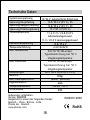
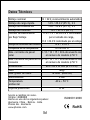
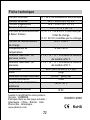
Technische Daten
Systemnennspannung
Spannung Hauptladung
Spannung Ausgleichsladung
Spannung Erhaltungsladung
Tiefentladeschutz
Lastzuschaltspannung
Temperaturführung
Max. Modulstrom
Max. Laststrom
Abmessungen
Gewicht
Max. Kabelquerschnitt
Eigenverbrauch
Temperaturbereich
Schutzklasse
12/24 V, automatische Erkennung
14.5/29.0 V (25°C), 2h
14.8/29.6 V (25°C), 2h
13.7/27.4 V (25°C)
11.4-11.9 / 22.8-23.8 V
ladezustandsgesteuert
11.0 / 22.0 V spannungsgesteuert
12.8/25.6 V
-4 mV/Zelle*K
5/8/10/15/20A entspr.
Typenbezeichnung bei 50°C
Umgebungstemperatur
5/8/10/15/20A entspr.
Typenbezeichnung bei 50°C
Umgebungstemperatur
80 x 100 x 32mm (b x h x t)
180gr
16mm2 (AWG #6)
4mA
-40 bis + 50°C
IP22
Änderungen vorbehalten.
Version: 20080808
Hergestellt in einem der folgenden Länder:
Deutsch - China - Bolivia - India
Phocos AG - Deutsch
www.phocos.com
18
ISO9001:2000
RoHS
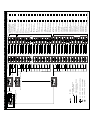
Ladezustand
Hauptmenü
(L5 langsames Blinken)
(Tag
/ Nacht Schwelle)
(Betriebsdauer
nach Sonnenuntergang)
(Nachtlicht Modus)
Anzeigemenü
Programmiermenü
Kunde
Benutzereinstellungein
7.5/15.0V
L5/L4/L2/L1
blinken schnell
6.5/13.0V
L5/L4/L3/L1
blinken schnell
7.0/14.0V
L5/L2/L1
blinken schnell
6.0/12.0V
L5/L3/L1
blinken schnell
5.5/11.0V
L5/L4/L1
blinken schnell
5.0/10.0V
L5/L1
blinken schnell
4.5/9.0V
L5/L4/L3/L2
blinken schnell
4.0/8.0V
L5/L3/L2
blinken schnell
3.5/7.0V
L5/L4/L2
blinken schnell
3.0/6.0V
L5/L2
blinken schnell
2.5/5.0V
L5/L4/L3
blinken schnell
2.0/4.0V
L5/L3
blinken schnell
1.5/3.0V
L5/L4
blinken schnell
12 STD
L5/L4/L2/L1
blinken schnell
11 STD
L5/L2/L1
blinken schnell
10 STD
L5/L4/L3/L1
blinken schnell
9 STD
L5/L3/L1
blinken schnell
8 STD
L5/L4/L1
blinken schnell
7 STD
L5/L1
blinken schnell
6 STD
L5/L4/L3/L2
blinken schnell
5 STD
L5/L3/L2
blinken schnell
4 STD
L5/L4/L2
blinken schnell
3 STD
L5/L2
blinken schnell
2 STD
L5/L4/L3
blinken schnell
1 STD
L5/L3
blinken schnell
0 STD
L5/L4
blinken schnell
LED blinkt
LED leuchtet nicht
Werk
Einstellung
Nachtlichtfuntion AUS
L5/L4
blinken schnell
Abendmodus
L5/L4/L3
blinken schnell
Ganze Nacht
L5/L3
blinken schnell
(L5 blinkt, andere LED's
(LED's blinken schnell)
zeigen Benutzer- oder Werkseinstellungen)
LED leuchtet
Langer Tastendruck
> 1 Sekunde
Kurzer Tastendruck
< 1 Sekunde
Knopf
(Normalzustand)
L1
L4
L3
L2
L5
(LED-Anzeige Systemabhängig)
Phocos CMLNL
Solar Charge Controller with
Programmable Nightlight Function
User Manual (English)
Dear customer,
Thank you very much for buying
this Phocos product. Please read
the instructions carefully and
thoroughly before using the
product.
19
With your new CMLNL controller you own a state-of-the art device
which was developed according to the latest available technical
standards. It comes with a number of outstanding features, such
as:
Clear, readable display of the state of charge and programmable
nightlight function.
Detects day and night using the PV array
Programmable Nightlight Function
Low voltage disconnected regulated by state of charge or voltage
Complete electronic protection
This manual gives important recommendations for installing, using
and programming as well as remedies in case of problems with
the controller. Read it carefully in your own interest and mind the
safety and usage recommendations at the end of this manual.
Description of Functions
The charge controller protects the battery from being overcharged
by the solar array and from being deep discharged by the loads.
The charging characteristics include several stages which include
automatic adaptation to the ambient temperature.
The charge controller adjusts itself automatically to 12V or 24V
system voltage.
The push button allows programming nightlight function.
The charge controller can be programmed for solar lighting
application.
The charge controller has a number of safety and display functions.
Mounting and Connecting
The controller is intended for indoor use only. Protect it from
direct sunlight and place it in a dry environment. Never install it
in humid rooms (like bathrooms).
20
The controller measures the ambient temperature to determine
the charging voltage. Controller and battery must be installed in
the same room.
The controller warms up during operation, and should therefore
be installed on a non flammable surface only.
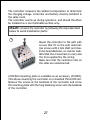
REMARK: Connect the controller by following the steps described
below to avoid installation faults.
1
Mount the controller to the wall with
screws that fit to the wall material.
Use screws with 4 mm shaft and max.
8 mm head diameter, no counter sunk.
Mind that the screws have to carry also
the force applied by the wiring.
Make sure that the ventilator slits on
the sides are unobstructed.
A DIN Rail mounting plate is available as an accessory (CX-DR2).
This allows mounting the controller on a standard 35mm DIN rail.
Remove the screws at the backside of the controller and screw
the mounting plate with the long fastening screw onto the backside
of the controller.
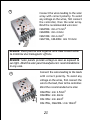
21
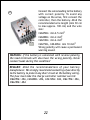
2
Connect the wires leading to the battery
with correct polarity. To avoid any
voltage on the wires, first connect the
controller, then the battery. Mind the
recommended wire length (min 30 cm
to max approx. 100 cm) and the wire
size:
CML05NL: min 2.5 mm2
CML08NL: min 4 mm2
CML10NL: min 6 mm2
CML15NL, CML20NL: min 10 mm2
Wrong polarity will cause a permanent
warning sound.
WARNING: If the battery is connected with reverse polarity,
the load terminals will also have the wrong polarity. Never
connect loads during this condition!
REMARK: Mind the recommendations of your battery
manufacturer. We strongly recommend connecting a fuse directly
to the battery to protect any short circuit at the battery wiring.
The fuse must take the charge controller nominal current:
CML05NL: 20A, CML08NL: 20A, CML10NL: 30A, CML15NL: 30A,
CML20NL: 40A
22
3
Connect the wires leading to the solar
array with correct polarity. To avoid
any voltage on the wires, first connect
the controller, then the solar array.
Mind the recommended wire size:
CML05NL: min 2.5 mm2
CML08NL: min 4 mm2
CML10NL: min 6 mm2
CML15NL, CML20NL: min 10 mm2
REMARK: Place positive and negative wire close to each other
to minimize electromagnetic effects.
REMARK: Solar panels provide voltage as soon as exposed to
sun light. Mind the solar panel manufacturer's recommendations
in any case.
4
Connect the wires leading to the loads
with correct polarity. To avoid any
voltage on the wires, first connect the
wire to the load, then to the controller.
Mind the recommended wire size:
CML05NL:
CML08NL:
CML10NL:
CML15NL,
23
min 2.5mm2
min 4mm2
min 6mm2
CML20NL: min 10mm2
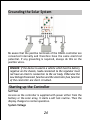
Grounding the Solar System
Be aware that the positive terminals of the CMLNL controller are
connected internally and therefore have the same electrical
potential. If any grounding is required, always do this on the
positive wires.
REMARK: If the device is used in a vehicle which has the battery
negative on the chassis, loads connected to the regulator must
not have an electric connection to the car body. Otherwise the
Low Voltage Disconnect function and the electronic fuse function
of the controller are short circuited.
Starting up the Controller
Self Test
As soon as the controller is supplied with power either from the
battery or the solar array, it starts a self test routine. Then the
display changes to normal operation.
System Voltage
24
The controller adjusts itself automatically to 12V or 24 V system
voltage. As soon as the voltage at the time of start-up exceeds
20.0V, the controller implies a 24V system. If the battery voltage
is not within the normal operation range (ca. 12 to 15.5V or ca.
24 to 31V) at start-up, a status display according to the section
ERROR DESCRIPTION occurs.
Battery Type
The controller is preset to operate with lead acid batteries with
liquid electrolyte. If you intend to use a lead-acid battery with
solid electrolyte ('gel' type or 'fleece' type) you can adjust the
charging characteristics (see "Settings"). The equalization charge
is deactivated then. In case of any doubts consult your dealer.
Recommendations for Use
The controller warms up during normal operation.
The controller does not need any maintenance or service. Remove
dust with a dry tissue.
It is important that the battery gets fully charged frequently (at
least monthly). Otherwise the battery will be permanently damaged.
A battery can only be fully charged if not too much energy is drawn
during charging. Keep that in mind, especially if you install additional
loads.
Display Functions
The controller is equipped with 5 LEDs and an acoustic warning
signal.
25
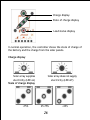
Charge display
State of charge display
Load status display
In normal operation, the controller shows the state of charge of
the battery and the charge from the solar panels.
Charge display
Solar array supplies
electricity (LED on)
State of charge display
>75%
Solar array does not supply
electricity (LED off)
25-75%
26
<25%
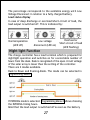
The percentage corresponds to the available energy until Low
Voltage Disconnect in relation to a fully charged battery.
Load status display
In case of deep discharge or overload/short-circuit of load, the
load output is switched off. This is indicated by:
Normal operation
(LED off)
Low voltage
disconnect (LED on)
Overload or
Short-circuit of load
(LED flashing)
Night light Function
The charge controller has a load terminal which is prepared for
nightlight operation and switches on for a selectable number of
hours from the dusk. Dusk is recognized of the open circuit voltage
of the solar array is lower than the setting of the controller.
There are 2 modes available.
Dusk to Dawn and Evening Mode. The mode can be selected in
Programming Menu 1.
If EVENING mode is selected. Programming Menu 2 allows choosing
the EVENING timing hours.
Mind that the load output is switched off as soon as the battery
27
has reached the Low Voltage Disconnect threshold. The Low Voltage
Disconnect has priority above the nightlight function.
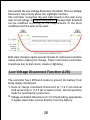
The controller recognizes day and night based on the solar array
open circuit voltage. In Programming Menu 3 this day/night threshold
can be modified according to the requirements of the local
conditions and the solar array used.
Both state changes require several minutes of continuous transition
values before making the change. These restrictions avoid false
transitions due to dark storm clouds or lightning.
Low Voltage Disconnect Function (LVD)
The controller has 2 different modes to protect the battery from
being deeply discharged:
1. State of charge controlled: Disconnect at 11.4 V (at nominal
load current) up to 11.9 V (at no load current). Normal operation
mode for good battery protection.
2. Voltage controlled: Disconnect at 11.0 V fixed setting. Appropriate
if bypass loads draw current directly from the battery.
28
The controller is preset to Mode 1 from the factory. Changing the
mode setting is described below.
In case of doubts which mode to choose, consult your dealer
because this has to be evaluated depending on the battery used.
Settings
The controller can be configured for special operation. For this
purpose, open the cover of the controller by removing the screws
on the back side.
WARNING: The controller should not be opened while connected
and in operation!
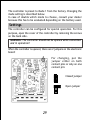
When the controller is opened, there are 2 jumpers on the electronic
board:
For changing, put the
jumper either on both
contact pins or only on one
contact pin:
Closed jumper
Open jumper
29
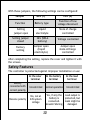
With these jumpers, the following settings can be configured:
Jumper
GEL (1)
LVD (2)
Function
Battery type
Function of low
voltage disconnect
Setting
jumper open
Liquid
electrolyte
State of charge
controlled
Setting jumper
closed
GEL (VRLA
battery)
Voltage controlled
Jumper open
(liquid
electrolyte)
Factory
setting
Jumper open
state-ofcharge
controlled
After completing the setting, replace the cover and tighten it with
the screws.
Safety Features
The controller is protected against improper installation or use:
At the solar
terminal
At the battery
terminal
At the load
terminal
Battery
connected with
correct polarity
Unrestricted
Normal operation
Unrestricted
Reverse polarity
Yes, not at
24V system
voltage
Yes, if only the Load output is
battery is
protected, but
connected.
loads might be
Acoustic Warning
damaged.
30
At the solar
terminal
Short circuit
Unrestricted
Overcurrent
No protection
Thermal
overload
No protection
At the battery
terminal
At the load
terminal
Unrestricted.
CAUTION:
Battery must
be protected
by fuse.
Unrestricted
Reverse current Unrestricted
-------
Controller
switches off load
terminal.
-------
No protection
-------
Overvoltage
Varistor 56 V,
2.3 J
Undervoltage
Normal
operation
Max. 40 V
-------
Controller
switches off load
terminal.
Controller
Controller
switches off switches off load
load terminal.
terminal.
WARNING: The combination of different error conditions may
cause damage to the controller. Always remove the error before
you continue connecting the controller!
31
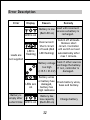
Error Description
Error
Display
LED is on
Loads are
not supplied
LED is
flashing
Remedy
Load will reconnect
Battery is low
as soon as battery is
(Red LED on)
recharged.
Overcurrent/
Short circuit
of loads (Red
LED flashing)
Switch off all loads.
Remove short
circuit. Controller
will switch on load
automatically after
max 1 minute.
Check if other sources
Battery voltage
overcharge the battery.
too high
If not, controller is
(>15.5 / 31.0 V)
damaged.
LEDs are
on
Battery is
empty after
a short time
Reason
LED is on
Battery wires
or battery fuse Check battery wires,
damaged,
fuses and battery.
battery has
high resistance
Battery has
low capacity
(Red LED on)
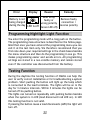
32
Change battery
Error
Display
Reason
Remedy
Solar array
Battery is not
Remove faulty
faulty or
being charged
connection /
wrong polarity
during the day LED is off
(Green LED off) reverse polarity
Programming Nightlight Light Function
You enter the programming mode with a long push on the button.
The programming menu structure is described on the follow page.
Mind that once you have entered the programming menu you can
exit it at the last item only. We therefore recommend that you
first note down your required settings in the check boxes besides
the menu structure and then do the programming in one go. This
makes programming easier and avoids errors. All programming
settings are stored in a non-volatile memory and remain stored
even if the controller was disconnected from the battery.
Testing Function
During the daytime the testing function of CMLNL can help the
user to verify correct installation or for troubleshooting a system
problem. Short pushing the button will light up the lamp which
is connected to the load terminals. The lights will be on in the
day for 3 minutes intervals. Within 3 minutes the lights can be
turned off via pushing button.
The lights can turned on repeatedly with pushing button besides
when the system is in LVD (load disconnect/red LED on). In LVD
this testing function is not valid.
If pressing the button cause a load disconnects (LVD) the light will
turn off.
33
Programming Lock-out
By pushing the button for 8 sec in normal operation mode the
programming lock-out is activated to prevent any accidental settings
change. Another 8 sec push releases the lock-out.
General Safety and Usage Recommendations
Intended Use
The charge controller is intended exclusively for use in photovoltaic
systems with 12 V or 24 V nominal voltage and in conjunction with
vented or sealed (VRLA) lead acid batteries only.
Safety Recommendations
Batteries store a large amount of energy. Never short circuit a
battery under all circumstances. We recommend connecting a fuse
(slow acting type, according to the nominal controller current)
directly to the battery terminal.
Batteries can produce flammable gases. Avoid making sparks, using
fire or any naked flame. Make sure that the battery room is
ventilated.
Avoid touching or short circuiting wires or terminals. Be aware
that the voltages on specific terminals or wires can be up to double
the battery voltage. Use isolated tools, stand on dry ground and
keep your hands dry.
Keep children away from batteries and the charge controller.
Please observe the safety recommendations of the battery
manufacturer. If in doubt, consult your dealer or installer.
34
Liability Exclusion
The manufacturer shall not be liable for damages, especially on
the battery, caused by use other than as intended or as mentioned
in this manual or if the recommendations of the battery manufacturer
are neglected. The manufacturer shall not be liable if there has
been service or repair carried out by any unauthorized person,
unusual use, wrong installation, or bad system design.
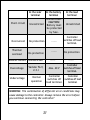
35
Technical Data
12 / 24 V, automatic recognition
14.5 / 29.0 V (25°C),2h
14.8 / 29.6 V (25°C),2h
13.7 / 27.4 V (25°C)
11.4 - 11.9 / 22.8-23.8 V controlled
by state of charge 11.0 / 22.0 V
controlled by voltage
Load reconnect voltage
12.8 / 25.6 V
Temperature compensation
-4 mV/cell*K
Max. solar panel current
5 / 8 / 10 / 15 / 20 A according to
model number @ 50°C
Max. load current
5 / 8 / 10 / 15 / 20 A according to
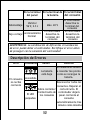
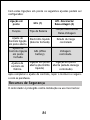
model number @ 50°C
80 x 100 x 32mm (w x h x d)
Dimensions
180gr
Weight
16 mm2 (AWG #6)
Max. wire size
4 mA
Self consumption
-40 to + 50°C
Ambient temperature range
IP 22
Case protection
Nominal voltage
Boost voltage
Equalization voltage
Float voltage
Low Voltage
Disconnect Function
Subject to change without notice.
Version: 20080808
Made in one of the following countries:
Germany - China - Bolivia - India
Phocos AG - Germany
www.phocos.com
36
ISO9001:2000
RoHS
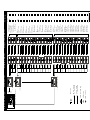
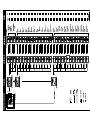
L1
L4
L3
L2
L5
Main Menu
(L5 slowly flash)
(Nightlight Mode
Selection)
LED is off
LED is on
LED is flashing
Long Push
> 1 Second
Short Push
< 1 Second
Button
(Day
/ Night Threshold)
(Evening Timing Hours)
(Normal Operation)
(LEDs display
depend on PV system)
State of Charge
Display Menu
(L5 flash, other LED indicate factory
or customer setting)
Dusk to Dawn
L5/L3
Faster Flash
7.5/15.0V
L5/L4/L2/L1
Faster Flash
7.0/14.0V
L5/L2/L1
Faster Flash
6.5/13.0V
L5/L4/L3/L1
Faster Flash
6.0/12.0V
L5/L3/L1
Faster Flash
5.5/11.0V
L5/L4/L1
Faster Flash
5.0/10.0V
L5/L1
Faster Flash
4.5/9.0V
L5/L4/L3/L2
Faster Flash
4.0/8.0V
L5/L3/L2
Faster Flash
3.5/7.0V
L5/L4/L2
Faster Flash
3.0/6.0V
L5/L2
Faster Flash
2.5/5.0V
L5/L4/L3
Faster Flash
2.0/4.0V
L5/L3
Faster Flash
1.5/3.0V
L5/L4
Faster Flash
12h
L5/L4/L2/L1
Faster Flash
11h
L5/L2/L1
Faster Flash
10h
L5/L4/L3/L1
Faster Flash
9h
L5/L3/L1
Faster Flash
8h
L5/L4/L1
Faster Flash
7h
L5/L1
Faster Flash
6h
L5/L4/L3/L2
Faster Flash
5h
L5/L3/L2
Faster Flash
4h
L5/L4/L2
Faster Flash
3h
L5/L2
Faster Flash
2h
L5/L4/L3
Faster Flash
1h
L5/L3
Faster Flash
0h
L5/L4
Faster Flash
Nightlight Off
L5/L4
Faster Flash
Evening Mode
L5/L4/L3
Faster Flash
(LEDs faster flash)
Programing Menu
Customer
Data of your own setting
Factory
Setting
Phocos CMLNL
Controlador de Carga Solar con Función
Programable de Alumbrado Nocturno
Manual de Instrucciones (Español)
Estimado Usuario,
Muchas gracias por adquirir un
producto de Phocos. Por favor,
antes de utilizar este producto
lea
las
instrucciones
detenidamente y al completo.
37
Con su nuevo controlador CMLNL dispondrá de un dispositivo de
última generación diseñado de acuerdo a los últimos estándares
técnicos disponibles. Incluye una serie de características
sobresalientes, tales como:
Visualización del estado de carga clara, legible, y función
programable de alumbrado nocturno.
Identifica el día y la noche utilizando el módulo PV
Función Programable de Alumbrado Nocturno
La desconexión por bajo voltaje se regula dependiendo del estado
de carga o por el voltaje
Protección electrónica completa
Este manual da recomendaciones importantes para la instalación,
la utilización y la programación del controlador, así como soluciones
en caso que tenga problemas con el mismo. Para su conveniencia,
léalo detenidamente y preste particular atención a las
recomendaciones sobre seguridad y uso en la parte final de este
manual.
Descripción de la Función
El controlador de carga protege a la batería contra posible
sobrecarga por el módulo solar y evita que sea descargada
profundamente por los consumos. Las características de carga
comprenden diversos estadios que incluyen la adaptación
automática a la temperatura ambiente.
El controlador de carga se ajusta automáticamente al sistema
de voltaje de 12V o 24V.
Presionando el botón puede programar la función de alumbrado
nocturno.
Puede programarse el controlador de carga para aplicaciones
de alumbrado solar.
El controlador de carga tiene varias funciones de seguridad y
de visualización.
38
Montaje y Conexión
El controlador de carga tiene varias funciones de seguridad y de
visualización. Protéjalo de la luz directa del sol y colóquelo en
un lugar seco. No lo instale nunca en habitaciones húmedas (como
baños).
El controlador mide la temperatura ambiente para determinar el
voltaje de carga. El controlador y la batería deben instalarse en
la misma habitación.
El controlador se calienta durante su funcionamiento y, por lo
tanto, debe instalarse únicamente sobre una superficie no
inflamable.
OBSERVACIÓN: Para evitar errores de instalación, conecte el
controlador siguiendo los pasos descritos a continuación.
1
Fije el controlador a la pared con
tornillos adecuados al material de la
misma. Use tornillos de 4 mm. de
eje como y 8mm. de diámetro. Tenga
en cuenta que los tornillos deben
soportar la fuerza aplicada en el
cableado.
Asegúrese que las hendeduras
laterales del ventilador no estén
obstruidas.
Como accesorio, dispone de una placa de montaje con carril DIN
(CX-DR2). Permite montar el controlador en un carril DIN estándar
de 35 mm. Atornille la placa de montaje con el tornillo de fijación
(largo) en la parte trasera del controlador.
39
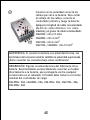
2
Conecte con la polaridad correcta los
cables que van a la batería. Para evitar
el voltaje de los cables, conecte el
controlador primero y luego la batería.
Aplique la longitud de cable recomendada
(de 30 cm. como mínimo a 1 m. como
máximo) y el grosor de cable recomendado:
CML05NL: mín 2.5 mm2
CML08NL: mín 4 mm2
CML10NL: mín 6 mm2
CML15NL, CML20NL: mín 10 mm2
ADVERTENCIA: Si conecta la batería con polaridad inversa, las
terminales del consumo tendrán también la polaridad equivocada.
¡Evite conectar los consumos bajo estas condiciones!
OBSERVACIÓN: Siga las recomendaciones del fabricante de su
batería. Recomendamos encarecidamente conectar un fusible
directamente a la batería, para protegerla contra cualquier
cortocircuito en el cableado. El fusible debe tomar la corriente
nominal del controlador de carga:
CML05NL: 20A, CML08NL: 20A, CML10NL: 30A, CML15NL: 30A,
CML20NL: 40A
40
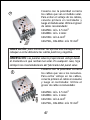
Conecte con la polaridad correcta
los cables que van al módulo solar.
Para evitar el voltaje de los cables,
conecte primero el controlador y
luego el módulo solar. Utilice el grosor
de cable recomendado:
CML05NL: mín. 2.5 mm2
CML08NL: mín. 4 mm2
CML10NL: mín 6 mm2
CML15NL, CML20NL: mín 10 mm2
3
OBSERVACIÓN: para minimizar los efectos electromagnéticos
coloque a corta distancia los cables positivo y negativo.
OBSERVACIÓN: Los paneles solares proporcionan voltaje desde
el momento en que reciban luz solar. En cualquier caso, Siga
siempre las recomendaciones del fabricante del panel solar.
4
Conecte con la polaridad correcta
los cables que van a los consumos.
Para evitar voltaje en los cables,
conecte primero el cable al consumo
y luego al controlador. Utilice el
grosor de cable recomendado:
CML05NL:
CML08NL:
CML10NL:
CML15NL,
41
mín. 2.5 mm2
mín. 4 mm2
mín 6 mm2
CML20NL: mín 10 mm2
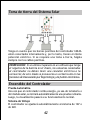
Toma de tierra del Sistema Solar
Tenga en cuenta que los bornes positivos del controlador CMLNL
están conectados internamente y, por lo tanto, tienen el mismo
potencial eléctrico. Si se requiere una toma a tierra, hágala
siempre con los cables positivos.
OBSERVACIÓN: Si se utiliza el aparato en un vehículo que tenga
el negativo de la batería en el chasis, los consumos conectados
al controlador no deben tener una conexión eléctrica a la
carrocería; de otro modo se provocaría un cortocircuito en las
funciones de Desconexión por Bajo Voltaje y de fusible electrónico.
Encendido del Controlador
Prueba Automática
Una vez que el controlador reciba energía, ya sea de la batería o
del módulo solar, se iniciará automáticamente una prueba rutinaria.
Luego, la visualización pasará a su funcionamiento normal.
Sistema de Voltaje
El controlador se ajustará automáticamente al sistema de 12V o
de 24V.
42
Si tras el encendido el voltaje excede de 20.0 V, el controlador
se ajustará a un sistema de 24 V.
Si tras el encendido el voltaje de la batería no corresponde la
escala de funcionamiento normal (ca.12 a 15.5V o ca.24 a 31V),
se visualizará el mensaje ERROR DESCRIPTION
Tipo de Batería
El controlador está predeterminado para funcionar con baterías
de plomo ácido con electrolito líquido. Si utiliza una batería de
plomo con electrolito sólido (tipo 'gel' o tipo 'vellón') puede ajustar
las características de carga (ver "Configuración"). Se desactivará
la carga de ecualización.
En caso que tenga dudas, consulte con su vendedor.
Recomendaciones de uso
El controlador se calienta mientras está en funcionamiento.
El controlador no requiere ningún mantenimiento o revisión.
Límpielo con un trapo seco.
Es importante que la batería se cargue completamente con
frecuencia (al menos una vez por mes). De otro modo, la batería
se dañada prematura y permanentemente.
Una batería solo puede estar completamente cargada si durante
los consumos no se pierde mucha energía. Tenga esto en cuenta,
especialmente si instala consumos adicionales.
Funciones de Visualización
El controlador dispone de 5 LEDs.
43
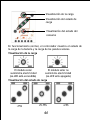
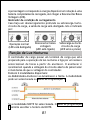
Visualización de la carga
Visualización del estado de
carga
Visualización del estado del
consumo
En funcionamiento normal, el controlador muestra el estado de
la carga de la batería y la carga de los paneles solares.
Visualización de la carga
El módulo solar
El módulo solar no
suministra electricidad
suministra electricidad
(La LED está encendida)
(La LED está apagada)
Visualización del estado de carga
>75%
25-75%
44
<25%
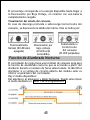
El porcentaje corresponde a la energía disponible hasta llegar a
la Desconexión por Bajo Voltaje, en relación con una batería
completamente cargada
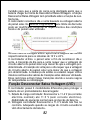
Visualización del estado del consumo
En caso de descarga profunda o sobrecarga/cortocircuito del
consumo, se desconecta la salida del mismo. Esto se indica por:
Funcionamiento
Normal (El LED está
apagado)
Desconexión por
bajo voltaje
(El LED está
encendido)
Sobretensión o
Cortocircuito
del consumo
(El LED parpadea)
Función de Alumbrado Nocturno
El controlador de carga tiene una terminal de consumo apta para
la función de alumbrado nocturno que se enciende a partir del
atardecer durante el número de horas seleccionado. Se identifica
atardecer si el voltaje de circuito abierto del módulo solar es
inferior al parámetro del controlador.
Hay 2 modos disponibles:
Del atardecer al amanecer y Modo Nocturno. Puede seleccionar
el modo mediante el Menú 1 de la Programación.
45
Si selecciona el modo EVENING, el Menú 2 de la Programación le
permite determinar las horas de funcionamiento nocturno.
Tenga en cuenta que la salida del consumo se apagará tan pronto
como la batería alcance el punto de Desconexión por Bajo Voltaje.
La Desconexión por Bajo Voltaje tiene prioridad sobre la función
de alumbrado nocturno.
El controlador reconocerá el día y la noche basándose en el voltaje
del circuito abierto del módulo solar. En Menú 3 de la Programación,
puede modificarse el umbral de día/noche de acuerdo a los
requisitos de las condiciones locales y al módulo solar que se
utilice.
Los dos niveles de voltaje antes/después de la barra son válidos
para sistemas de 12 V y 24 V, respectivamente.
El controlador utiliza el módulo solar para reconocer el día y la
noche. La transición de día a noche requiere que el voltaje de
circuito abierto del módulo solar sea inferior al parámetro
determinado. La transición de noche a día requiere un voltaje
superior de circuito abierto del módulo solar. Para que se efectúen
ambos cambios de estado se requieren varios minutos de transición
en los valores. Estas restricciones evitan transiciones erróneas
debido a condiciones nubladas por tormentas o rayos.
46
Función de Desconexión por Bajo Voltaje (LVD)
El controlador tiene 2 modos diferentes para proteger a la batería
de una descarga profunda:
1. Estado de la carga controlado: Desconecta de 11.4 V (a
corriente de carga nominal) hasta 11.9 V (a falta de corriente
en el consumo). Modo de funcionamiento normal para una
buena protección de la batería.
2. Voltaje controlado: Desconecta en el parámetro de 11.0 V.
Apropiado si otros consumos retiran corriente directamente
de la batería.
Salido de fábrica, el controlador está programado en el Modo 1.
En la parte inferior se describe como cambiar la configuración del
modo.
En caso que dude entre el modo a escoger, consulte con su proveedor,
ya que el modo deberá evaluarse en función de la batería que se
utilice.
Configuración
Puede configurarse el controlador para funcionamientos especiales.
Para este propósito, abra la tapa del controlador quitando los
tornillos de su parte trasera.
ADVERTENCIA: ¡No debe abrirse el controlador si está conectado
y si está funcionando!
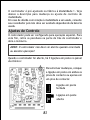
Cuando abra el controlador, verá 2 puentes en la placa electrónica:
47
Para cambiar, ponga el puente
ya sea en ambas clavijas de
contacto o solo en una:
Puente cerrado
Puente abierto
Con los puentes, puede configurar los siguientes parámetros :
Puente
GEL (1)
LVD (2)
Función
Tipo de
batería
Función de
desconexión por
bajo voltaje
Parámetro de
puente abierto
Electrolito
líquido
Estado de la carga
controlado
Parámetro de
Puente
cerrado
GEL (batería
cerrada)
Voltaje controlado
Parámetro de
funcionamiento
Puente abierto
(electrolito
líquido)
Puente abierto,
estado de la
carga controlado
48
Tras completar la configuración, vuelva a poner la tapa y ciérrela
con los tornillos.
Características de Seguridad
El controlador está protegido contra una instalación o uso
equivocado:
En la terminal
del panel
Batería
conectada con
polaridad
equivocada
En la terminal de En la terminal
del consumo
la batería
Ilimitada
Ilimitada
Sí solo si la
batería está
c onectada
Es posible que
las cargas de
consumo se
dañen.
Ilimitada
Polaridad
inversa
Sí, no para un
sistema con
voltaje de
24V.
Cortocircuito
Ilimitada
Ilimitada
PRECAUCIÓN:
Debe protegerse la
batería con un
fusible.
Sobre
-corriente
Sin protección
-----------
Sobretensión
Sin protección
térmica
-----------
Corriente
Inversa
Ilimitada
-----------
49
Ilimitada
El controlador
desactiva el
borne de carga.
Sin protección
-----------
En la terminal
del panel
Sobrevoltaje
En la terminal de En la terminal
del consumo
la batería
Varistor
56 V, 2.3 J
Bajo voltaje Funcionamiento
Normal
Máx. 40 V
El controlador
desactiva la
terminal del
consumo
El controlador
desactiva la
terminal del
consumo
El controlador
desactiva la
terminal del
consumo
ADVERTENCIA: La combinación de diferentes circunstancias
de error puede dañar al controlador. Rectifique el error antes
de proseguir con la conexión del controlador!
Descripción de Errores
Error
El consumo
no recibe
corriente
Visualización
El LED está
encendida.
Razón
La batería
está baja
Solución
El consumo se volverá
a conectar tan pronto
como se recargue la
batería.
Desconectar todos los
consumos. Reparar el
Sobre corriente/
cortocircuito. El
Cortocircuito de controlador dejará
El LED
los consumos
pasar corriente al
parpadea
consumo
automáticamente tras
1 minuto como máximo
50
Error
Visualización
El consumo
no recibe
corriente
Razón
Solución
Compruebe que otras
fuentes no estén
El voltaje de la
sobrecargando la
batería es
batería. En caso
demasiado alto
contrario, el
(>15.5 / 31.0 V) controlador o la bateria
está dañados
Los cables o el
fusible de la
Los LEDs
batería están
están
dañados, la
encendidas batería tiene
una resistencia
alta
La batería se
descarga
después de El LED está
poco tiempo encendida
La batería
tiene poca
capacidad
Comprobar los
cables el fusible y
la batería.
Cambie la batería
Módulo Solar o
La batería no
Corrija la conexión
conexiones
se carga
defectuosa o la
defectuosas o
durante el
polaridad inversa,
polaridad
El LED está
día
revise el modulo solar
apagado.
equivocada
Programación de la Función de Alumbrado Nocturno
Entrará en el modo de programación presionando continuadamente
el botón. La estructura del menú de programación se describe en
la página siguiente.
51
Tenga en cuenta que una vez haya entrado en el menú de
programación solamente podrá salir en el último apartado. Por
lo tanto, le recomendamos que primero anote en los cuadros de
verificación de la estructura del menú los parámetros que requiera,
y luego ejecute la programación de una sola vez. La programación
será mas fácil y se evitarán errores. Todos los parámetros de
programación se almacenan en una memoria fija, permaneciendo
almacenados incluso si se desconectase el controlador de la batería.
Función de Prueba
De día, la función de prueba del CMLNL puede ayudarle a verificar
que la instalación sea correcta o si desea consultar sobre un
problema en el sistema. Si presiona brevemente el botón se
encenderá la luz que está conectada a las terminales del consumo.
Las luces se encenderán durante el día por intervalos de 3 minutos.
Presionando el botón las luces se apagarán a los tres minutos.
Además, las luces pueden encenderse repetidamente presionando
el botón cuando el sistema esté en LVD (desconexión del
consumo/LED roja encendida). En LVD esta función de prueba no
es válida.
Si al presionar el botón se desconecta el consumo (LVD), se apagará
la luz.
Cierre de la programación
En el modo normal de funcionamiento, al presionar el botón durante
8 segundos se activará el cierre de la programación, para prevenir
cualquier cambio accidental de los parámetros. Presionándolo
durante otros 8 segundos se desbloqueará.
Recomendaciones de Seguridad General y de Utilización
Uso Establecido
52
El regulador de carga está hecho para usado en sistemas fotovoltaicos
con 12 V o 24 V de voltaje nominal. Se puede utilizar únicamente
con baterías de ácido de plomo con aberturas o selladas (VRLA).
Recomendaciones de Seguridad
Las baterías almacenan una gran cantidad de energía. Bajo
ninguna circunstancia, ponga una batería en cortocircuito.
Recomendamos conectar un fusible (de acción lenta,
deependiendo de la corriente del regulador nominal)
directamente al borne de la batería.
Las baterías pueden producir gases inflamables Evite que se
produzcan chispas a causa del empleo de fuego o de algún tipo
de llama. Asegúrese de que esté ventilada la habitación de la
batería.
Evite tocar o provocar cortocircuito en los cables o terminales.
Tenga en cuenta que el voltaje en terminales o cables específicos
puede duplicar el voltaje de la batería. Emplee herramientas
aislantes, opere en un lugar seco y mantenga sus manos secas.
Mantenga a los niños alejados de las baterías y del regulador
de carga.
Por favor, cumpla con las recomendaciones de seguridad del
fabricante de la batería. Si tiene alguna duda, consulte con su
proveedor o instalador.
Exclusión de Responsabilidades
El fabricante no se responsabiliza de los daños, especialmente en
la batería, causados por un uso diferente para el que está pensado
y mencionado en este manual o si se ignoran las recomendaciones
del fabricante de la batería. El fabricante no se responsabiliza si
ha habido un servicio o reparación llevado a cabo por una persona
no autorizada, así como de un uso irregular, de una instalación
incorrecta o del mal diseño del sistema.
53
Datos Técnicos
Voltaje nominal
Voltaje de carga rápida
Voltaje de ecualización
Voltaje de flotación
Función de Desconexión
por Bajo Voltaje
12 / 24 V, reconocimiento automático
14.5 / 29.0 V (25°C), 2 h
14.8 / 29.6 V (25°C), 2 h
13.7 / 27.4 V (25°C)
11.4-11.9 / 22.8-23.8 V controlado
por el estado de carga,
11.0 / 22.0 V controlado por el voltaje
12.8 / 25.6 V
Voltaje de reconexión del consumo
Compensación de temperatura
-4 mV/cell*K
Máx. corriente de panel
5 / 8 / 10 / 15 / 20 A de acuerdo con
solar
el número de modelo @ 50°C
Máx. corriente de panel en el 5 / 8 / 10 / 15 / 20 A de acuerdo con
consumo
el número de modelo @ 50°C
Dimensiones
80 x 100 x 32 mm (w x h x d)
180gr
Peso
16 mm2 (AWG #6)
Máx. grosor de cable
4 mA
Autoconsumo
-40 a + 50°C
Temperatura
ambiental
IP 22
Caja de protección
Sujeto a cambios sin aviso.
Versión: 20080808
Hecho en uno de los siguientes países:
Alemania– China – Bolivia – India
Phocos AG – Alemania
www.phocos.com
54
ISO9001:2000
RoHS
(Modo de Alumbrado
Nocturno)
(L5 emite destellos lentos)
Del Atardecer al
Amanecer L5/L3
Destellos Rápidos
Fábrica
Cliente
Datos de sus propios parámetros
7.5/15.0V
L5/L4/L2/L1
Destellos Rápidos
7.0/14.0V
L5/L2/L1
Destellos Rápidos
La LED está apagada.
La LED está encendida
6.0/12.0V
L5/L3/L1
Destellos Rápidos
5.5/11.0V
L5/L4/L1
Destellos Rápidos
5.0/10.0V
L5/L1
Destellos Rápidos
4.5/9.0V
L5/L4/L3/L2
Destellos Rápidos
4.0/8.0V
L5/L3/L2
Destellos Rápidos
3.5/7.0V
L5/L4/L2
Destellos Rápidos
3.0/6.0V
L5/L2
Destellos Rápidos
2.5/5.0V
L5/L4/L3
Destellos Rápidos
2.0/4.0V
L5/L3
Destellos Rápidos
1.5/3.0V
L5/L4
Destellos Rápidos
12h
L5/L4/L2/L1
Destellos Rápidos
11h
L5/L2/L1
Destellos Rápidos
10h
L5/L4/L3/L1
Destellos Rápidos
9h
L5/L3/L1
Destellos Rápidos
8h
L5/L4/L1
Destellos Rápidos
7h
L5/L1
Destellos Rápidos
6h
L5/L4/L3/L2
Destellos Rápidos
5h
L5/L3/L2
Destellos Rápidos
4h
L5/L4/L2
Destellos Rápidos
3h
L5/L2
Destellos Rápidos
2h
L5/L4/L3
Destellos Rápidos
1h
L5/L3
Destellos Rápidos
0h
L5/L4
Destellos Rápidos
Luz Nocturna
Apagada L5/L4
Destellos Rápidos
Modo Nocturno
L5/L4/L3
Destellos Rápidos
(Las LED emiten
destellos rápidos)
6.5/13.0V
L5/L4/L3/L1
Destellos Rápidos
(L5 emite destellos, otras LED
indican si el parámetro es de
fábrica o configurado por el cliente)
La LED emite destellos
Presión Continua
> 1 Segundo
Presión Breve
< 1 Segundo
Botón
(Umbral Día
/ Noche)
(Horas de
Sincronización Nocturna)
(Funcionamiento
normal)
L1
L4
L3
L2
L5
(Las LED se visualizan
dependiendo del sistema PV)
Estado de Carga Menú principal Menú de Visualización Menú de Programación Parámetro
Phocos CMLNL
Contrôleur de Charge Solaire avec
fonction de veille programmable
Guide de l'Utilisateur (Français)
Cher Client,
Merci beaucoup d’avoir acheté
un produit Phocos. Veuillez lire,
avec attention, toutes les
instructions avant d'utiliser le
produit.
55
Avec votre nouveau contrôleur CMLNL, vous avez un système
d'avant-garde, qui a été développé selon les dernières techniques,
aux normes, disponibles. Il est fourni avec un certain nombre de
caractéristiques étonnantes, telles que:
L'affichage clair et lisible du niveau de charge et la fonction
de veille programmable.
La détection du jour et de la nuit grâce au générateur solaire
La fonction de veille programmable
Caleurs de connexion de 16mm2.
La protection électronique totale
Ce manuel contient des recommandations d'installation, d'utilisation
et de programmation importantes, ainsi que des solutions aux
problèmes que vous pourriez rencontrer avec votre contrôleur.
Il est dans votre intérêt de le lire attentivement et de respecter
les recommandations de sécurité et d'utilisation décrites à la fin
du manuel.
Description du fonctionnement
Le contrôleur de charge protège la batterie contre tout risque
de chargement excessif de la part du générateur solaire ainsi
que contre tout risque de surcharge par les appareils qui lui
sont reliés. Les caractéristiques de chargement comportent
plusieurs étapes qui incluent l'adaptation automatique à la
température ambiante.
Le contrôleur de charge s'ajuste automatiquement à la tension
du système en 12V ou 24V.
Le contrôleur de charge est équipé de fonctions de sécurité et
d'affichage.
Le contrôleur de charge peut être programmé pour des
applications d'éclairage au solaire.
Le contrôleur de charge comporte plusieurs fonctions de sécurité
et d'affichage.
56
Montage et Connexion
Le contrôleur est conçu pour une utilisation en intérieur seulement.
Placez-le dans un environnement sec et à l'abri des rayons directs
du soleil. Ne l'installez surtout pas dans une pièce humide (comme
une salle de bain).
Le contrôleur mesure la température ambiante pour déterminer
le voltage du chargement. Le contrôleur et la batterie doivent
être installés dans la même pièce.
Le contrôleur chauffe lors du fonctionnement, et doit donc
impérativement être installé sur une surface non-inflammable.
REMARQUE : Afin d'éviter toute erreur d'installation, connectez
le contrôleur en respectant les étapes décrites ci-dessous.
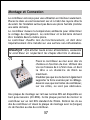
1
Fixez le contrôleur au mur avec des vis
choisies en fonction du mur. Utilisez des
vis non fraisées de 4 à 5mm max. et dont
la tête a un diamètre de 8mm au
maximum.
N'oubliez pas que les vis devront également
supporter la force exercée par le câblage.
Assurez-vous que les fentes du ventilateur,
sur les côtés, ne sont pas obstruées.
Une plaque de montage sur rail aux normes DIN est disponible en
tant qu'accessoire (CX-DR2). Cette plaque permet de monter le
contrôleur sur un rail DIN standard de 35mm. Retirez les vis au
dos du contrôleur et vissez la plaque de montage avec la (longue)
vis de fixation au dos du contrôleur.
57
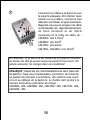
2
Connectez les câbles à la batterie avec
la polarité adéquate. Afin d'éviter toute
tension sur les câbles, connectez tout
d'abord le contrôleur et après la batterie.
Rappelez-vous que la longueur de câble
recommandée est, (approximativement,
de 30cm minimum et de 100cm
maximum) et la taille du câble de :
CML05NL: min 2.5mm2
CML08NL: min 4mm2
CML10NL: min 6mm2
CML15NL, CML20NL: min 10mm2
ATTENTION : Si la batterie est connectée en polarité inversée,
les bornes de charge auront aussi une polarité incorrecte. Ne
jamais connecter les charges dans ces conditions!
REMARQUE : Respectez les recommandations de votre fabricant
de batterie. Nous vous recommandons, fortement, de connecter
un fusible directement à la batterie, afin d'éviter tout courtcircuit au câblage de la batterie. Le fusible doit prendre le
courant nominal du contrôleur de charge :
CML05NL: 20A, CML08NL: 20A, CML10NL: 30A, CML15NL: 30A,
CML20NL: 40A
58
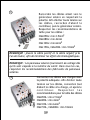
3
Raccordez les câbles allant vers le
générateur solaire en respectant la
polarité. Afin d'éviter toute tension sur
les câbles, raccordez d'abord le
contrôleur, puis le générateur solaire.
Respectez les recommandations de
taille pour les câbles :
CML05NL: min 2.5mm2
CML08NL: min 4mm2
CML10NL: min 6mm2
CML15NL, CML20NL: min 10mm2
REMARQUE : placez le câble positif et le câble négatif près
l'un de l'autre, afin de minimiser les effets électromagnétiques.
REMARQUE : Les panneaux solaires fournissent du voltage dès
qu'ils sont exposés à la lumière du soleil. Dans tous les cas,
respectez les recommandations des fabricants de panneaux
solaires.
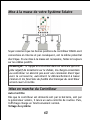
4
Connectez les câbles aux charges avec
la polarité adéquate. Afin d'éviter toute
tension sur les câbles, connectez tout
d'abord le câble à la charge, et après le
c o n t r ô l e u r.
Respectez
les
recommandations pour la taille des câbles
CML05NL: min 2.5mm2
CML08NL: min 4mm2
CML10NL: min 6mm2
CML15NL, CML20NL: min 10mm2
59
Mise à la masse de votre Système Solaire
Soyez conscient que les bornes positives du contrôleur CMLNL sont
connectées en interne et par conséquent, ont le même potential
électrique. Si une mise à la masse est nécessaire, faites le toujours
sur les câbles positifs.
REMARQUE : Si l'appareil est utilisé dans un véhicule qui a le
pôle négatif de la batterie sur le châssis, les charges connectées
au contrôleur ne doivent pas avoir une connexion électrique
avec la carrosserie, autrement le débranchement à basse
tension et les fonctions du fusible électronique du contrôleur
seront court-circuités.
Mise en marche du Contrôleur
Auto-Contrôle
Dès que le contrôleur est alimenté soit par le batterie, soit par
le générateur solaire, il lance un auto-contrôle de routine. Puis,
l'affichage change en fonctionnement normal.
Voltage du système
60
Le contrôleur de charge s'ajuste automatiquement à la tension
du système en 12V ou 24V.
Dès que le voltage dépasse 20.0 V, au démarrage, le contrôleur
applique un système de 24 V.
Si la tension de la batterie n'est pas dans une amplitude normale
de fonctionnement (ca. de 12 à 15.5 V ou ca.de 24 à 31 V) au
démarrage, un affichage du statut, selon la section DESCRIPTION
DES ERREURS, se produit.
Type de batterie
Le contrôleur est préréglé pour fonctionner avec des batteries au
plomb avec un électrolyte liquide. Si vous avez l'intention d'utiliser
une batterie au plomb avec des électrolytes solides (de type 'gel'
ou de type 'fleece'), vous pouvez ajuster les caractéristiques de
chargement (voir "Paramètres"). La charge d'égalisation est alors
désactivée.
En cas de doute, veuillez consulter votre distributeur.
Recommandations d'utilisation
Le régulateur chauffe lors du fonctionnement normal.
Le régulateur ne requiert aucun entretien ou maintenance. Enlevez
la poussière avec un chiffon sec.
Il est important que la batterie soit fréquemment chargée à pleine
capacité (au moins une fois par mois). Sinon elle sera endommagée
de façon irrémédiable.
Une batterie peut être entièrement chargée à condition qu'il n'y
ait pas trop d'énergie utilisée au cours de son chargement. Ceci
est à garder en mémoire, en particulier si vous installez des charges
supplémentaires.
61
Fonctions d'affichage
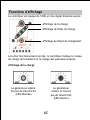
Le contrôleur est équipé de 5 DEL et d'un signal d'alarme sonore.
Affichage de la charge
Affichage de l'Etat de charge
Affichage du Statut de chargement
Lors d'un fonctionnement normal, le contrôleur indique le niveau
de charge de la batterie et la charge des panneaux solaires.
Affichage de la charge
Le générateur solaire
fournit de l'électricité
(LED allumée)
Le générateur
solaire ne fournit
pas de l'électricité
(LED éteinte)
62
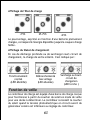
Affichage de l'Etat de charge
>75%
25-75%
<25%
Le pourcentage, exprimé en fonction d'une batterie pleinement
chargée, correspond à l'énergie disponible jusqu'à la coupure charge
faible.
Affichage du Statut de chargement
En cas de décharge profonde ou de surcharge/court-circuit de
chargement, la charge de sortie s'éteint. C'est indiqué par :
Fonctionnement
normal
(LED éteinte)
Débranchementà
bas voltage
(LED allumée)
Fonction de veille
Surcharge ou Courtcircuit de
chargemen
(LED torche )
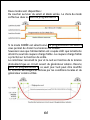
Le contrôleur de charge est équipé d'une borne de charge conçue
pour fonctionner à partir du coucher du soleil en mode de veille
pour une durée à déterminer. Le contrôleur reconnaît le coucher
du soleil quand la tension photoélectrique en circuit ouvert du
générateur solaire est inférieure au réglage du contrôleur.
63
Deux modes sont disponibles :
Du coucher au lever du soleil et Mode soirée. Le choix du mode
s'effectue dans le Menu de programmation 1.
Si le mode SOIRÉE est sélectionné. La programmation du Menu 2
vous permet de choisir les horaires de SOIRÉE.
Souvenez-vous que l'alimentation est coupée sitôt que la batterie
atteint le seuil de coupure charge faible. La coupure charge faible
a priorité sur la fonction de veille.
Le contrôleur reconnaît le jour et la nuit en fonction de la tension
photoélectrique en circuit ouvert du générateur solaire. Dans le
Menu de programmation 3, ce seuil jour/nuit peut être modifié
en fonction des exigences dictées par les conditions locales et du
générateur solaire utilisé.
64
Les deux niveaux de tension qui s'affichent de chaque côté de la
barre oblique correspondent à des systèmes de 12V et 24V,
respectivement.
Le contrôleur se sert du générateur solaire pour différencier le
jour de la nuit. La transition du jour à la nuit requiert une tension
en circuit ouvert du générateur solaire inférieure au réglage. La
transition durant le retour au jour requiert une forte tension en
circuit ouvert du générateur solaire. Les deux changements
nécessitent quelques minutes de transition au niveau des valeurs
avant que le mode soit fixé. Ces conditions permettent d'éviter
les erreurs de transition dues à des nuages sombres ou des éclairs.
Fonction Coupure Charge Faible (CCF)
Le contrôleur a 2 modes différents pour éviter que la batterie soit
déchargée complètement :
1. Niveau de charge vérifié : Coupure à 11,4 V (à intensité de
charge nominale) jusqu'à 11,9 V (à pas d'intensité de charge).
Mode normal de fonctionnement pour une bonne protection de
la batterie.
2. Voltage vérifié : Débranche à 11,0 V - paramètre fixé. Approprié
si des charges dérivées tirent directement du courant de la
batterie.
À sa sortie de l'usine, le contrôleur est préréglé sur le Mode 1.
La façon de changer le mode des paramètres est décrite ci-dessous.
Si vous ne savez pas quel mode choisir, consultez votre revendeur
qui vous conseillera en fonction de la batterie que vous utilisez.
Paramètres
Le contrôleur peut être configuré pour un fonctionnement spécifique.
Dans cet objectif, ouvrir le couvercle du contrôleur en retirant
les vis au dos.
65
AVERTISSEMENT: le contrôleur ne doit pas être ouvert quand
il est branché ou en fonctionnement !
Lorsque le contrôleur est ouvert, il y a 2 fils de connexion sur la
plaquette du circuit Électrique :
Pour changer, mettez les fils
de connexion soit sur les deux
chevilles de contact ou
uniquement sur une cheville
de contact.
Fil de connexion
fermé
Fil de connexion
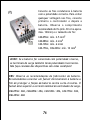
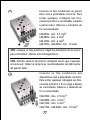
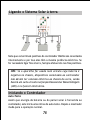
ouvert
Avec ces fils de connexion, les paramètres suivants peuvent être
configurés :
66
Fil de connexion
GEL (1)
LVD (2)
Fonction
Type de
batterie
Fonction de
débranchement
à basse tension
État de
chargement
vérifié
Réglage Fil de
connexion
ouvert
Réglage Fil
de connexion
fermé
Réglage usine
Électrolyte
liquide
GEL
(batterie VRLA)
Voltage vérifié
Fil de connexion
ouvert (Électrolyte
liquide)
Fil de connexion
ouvert(Niveau de
charge vérifié)
Lorsque le réglage est terminé, replacez le couvercle et resserrez
les vis.
Caractéristiques de Sécurité
Le contrôleur est protégé contre une installation ou une utilisation
incorrecte :
À la borne
solaire
Batterie
connectée en
polarité
incorrecte
Polarité
inversée
À la borne de la
batterie
Illimité
Illimité
À la borne
de sortie
Illimité
La charge de sortie
Oui, pas si la
Oui, seulement si est protégée. Les
tension du
la batterie est charges peuvent
système est
être
connectée.
en 24V.
endommagées.
67
À la borne
solaire
Court-circuit
Surintensité
Illimité
À la borne de la
batterie
Illimité.
AVERTISSEMENT: La
batterie doit être
protégée par des
fusibles.
Pas de
protection
-------
Surcharge
thermique
Pas de
protection
-------
Courant
Inverse
Illimité
-------
Surtension
Varistance
56 V, 2.3 J
Sous-voltage
Fonctionnem
ent normal
Max. 40 V
Le contrôleur
coupe la sortie
d'alimentation
À la borne
de sortie
Illimité
Le contrôleur
éteint le
régulateur de
charge.
Pas de
protection
------Le contrôleur
coupe la sortie
d'alimentation
Le contrôleur
coupe la sortie
d'alimentation
ATTENTION : La combinaison de conditions d'erreurs différentes
peut endommager le contrôleur. Toujours éliminer une erreur
avant de continuer de brancher le contrôleur !
Description de l'erreur
68
Erreur
Affichage
Cause
Solution
La charge sera
La batterie est reconnectée aussitôt
que
la batterie est
faible
rechargée.
LED allumée
Eteindre toutes les
charges. Débrancher le
Les charges
Surintensité/ courtcircuit. Le contrne sont pas
courtcircuit de ôleur allumera le régulalimentées
charges
ateur de charge automatiquement, après 1
LED clignote
minute au maximum.
Vérifiez si d'autres
Tension de la
batterie trop sources surchargent la
batterie. Si ce n'est pas
élevée (>15.5 le cas, le contrôleur
/ 31.0 V)
est endommagé.
Les câbles de la
batterie ou les
fusibles de la
Vérifiez les câbles
batterie sont
endommagés, de la batterie, les
fusibles et la
d'où la
LED sont
résistance
batterie.
allumées
élevée de la
batterie
La batterie
est vide après
une courte
LED
période
allumée
La batterie
n'est pas
recharge
LED
pendant la
éteinte
journée.
La capacité de
la batterie est
faible
Changez la
batterie.
Générateur
solaire
défectueux ou
polarité
incorrecte
Retirez la mauvaise
connexion/la polarité
inversée
69
Programmation de la fonction de veille
Pour passer en mode programmation maintenez le bouton appuyé
durant un long moment. La structure du menu de programmation
est décrite sur la page suivante.
Rappelez-vous, qu'une fois entré dans le menu programmation,
vous ne pouvez le quitter qu'au dernier élément. C'est pourquoi
nous vous conseillons de bien noter vos paramètres dans les cases
à cocher près de la structure du menu et de faire la programmation
en une seule fois. La programmation sera ainsi plus facile et vous
éviterez les erreurs. Tous les paramètres de programmation sont
gardés dans une mémoire non volatile et ne sont pas perdus, même
si le contrôleur était débranché de la batterie
Fonction test
Au cours de la journée la fonction test du CMLNL peut permettre
à l'usager de vérifier si l'installation est correcte et s'il n'y a aucun
problème de fonctionnement. En appuyant brièvement sur le
bouton vous allumerez la lampe qui est connectée aux bornes de
charge. Ces lumières s'allumeront durant la journée pendant des
intervalles de 3 minutes. Au cours de ces trois minutes ces voyants
peuvent être éteints en poussant le bouton.
Les voyants peuvent être allumés plusieurs fois en appuyant sur
le bouton quand le système est en LVD (déconnexion de la
charge/DEL rouge allumée). En LVD, cette fonction test est
inopérante.
Si une pression sur le bouton entraîne une déconnexion de la charge
(LVD) le voyant s'éteindra.
Verrouillage de la programmation
En appuyant durant 8 secondes en fonctionnement normal, vous
activez le verrouillage de la programmation et évitez ainsi toute
modification accidentelle des paramètres. En appuyant une nouvelle
fois durant 8 secondes vous déverrouillerez la fonction.
Recommandations Générales de Sécurité et d'Utilisation
70
Type d'usage :
Le régulateur de charge est prévu pour être utilisé dans des
systèmes photovoltaïques avec une tension nominale de 12 V ou
24 V. Il doit être utilisé avec des batteries au plomb ventilées ou
scellées (VRLA).
Recommandations de Sécurité :
Les batteries stockent une importante quantité d'énergie. Ne
jamais court-circuiter une batterie, sous aucun prétexte. Nous
vous recommandons de connecter un fusible (de type lent, selon
le courant nominal du régulateur) directement sur la borne de
la batterie.
Les batteries sont susceptibles de produire des gaz inflammables.
Évitez de produire des étincelles, de faire du feu ou d'approcher
une flamme nue. Assurez-vous que la pièce de la batterie est
bien ventilée.
Évitez de toucher ou de court-circuiter des fils ou des bornes.
Attention : les tensions sur certaines bornes ou câbles peuvent
être jusqu'à deux fois plus élevées que la tension de la batterie.
Utilisez des outils isolés, tenez- vous sur un sol sec et gardez
les mains bien sèches.
Placez les batteries et le régulateur de charge hors de portée
des enfants.
Veuillez suivre les instructions de sécurité du fabricant de la
batterie. En cas de doute, consultez votre revendeur ou
installateur.
Exclusions de responsabilité
Le fabricant ne sera pas tenu responsable pour tout dégât, en
particulier sur la batterie, causé par une utilisation différente de
celle prévue ou celle mentionnée dans ce guide, ou si les
recommandations du fabricant de la batterie ont été négligées.
Le fabricant ne sera pas tenu responsable en cas de maintenance
ou de reparation effectuée par une personne non autorisée, d'usage
inhabituel, d'installation douteuse, ou de mauvaise conception du
système.
71
Fiche technique
Tension nominale
12 / 24 V, reconnaissance automatique
Tension survoltée
14.5 / 29.0 V (25°C), 2 h
Tension d'égalisation
14.8 / 29.6 V (25°C), 2 h
Tension flottante
13.7 / 27.4 V (25°C)
Fonction de Débranchement 11.4-11.9 / 22.8-23.8 V contrôlée par
à Basse Tension
l'état de charge
11.0 / 22.0 V contrôlée par le voltage
Tension de rebranchement
12.8 / 25.6 V
de charge
Compensation de
-4 mV/cell*K
température
Intensité maximale du
5 / 8 / 10 / 15 / 20 A selon le numéro
panneau solaire.
de modèle @50°C
Intensité maximale du
5 / 8 / 10 / 15 / 20 A selon le numéro
panneau
de modèle @50°C
Dimensions
80 x 100 x 32 mm (l x h x p)
Poids
180gr
Dimension du câble maximale
16 mm2 (AWG #6)
Autoconsommation
4 mA
Amplitude de température
-40 à + 50°C
ambiante
Protection du boîtier
IP 22
Soumis à modification sans préavis.
Version : 20080808
Fabriqué dans un des pays suivants :
Allemagne – Chine – Bolivie – Inde
Phocos AG – Allemagne
www.phocos.com
72
ISO9001:2000
RoHS
(L5 clignotement lent)
(Sélection du Mode
Veilleuse)
DEL est éteinte
DEL est allumée
DEL clignote
Poussée longue > 1
seconde
Poussée courte < 1
seconde
Bouton
(Seuil Jour/Nuit)
(Programmation des
heures du Soir)
(Fonctionnement
normal )
L1
L4
L3
L2
L5
(L'affichage DEL dépend du système
photovoltaïque)
(L5 clignotement, les autres
affichages DEL indiquent un réglage
usine ou client)
Usine
Client
Données de votre réglage personnel
7.5/15.0V
L5/L4/L2/L1
Flash plus rapide
7.0/14.0V
L5/L2/L1
Flash plus rapide
6.5/13.0V
L5/L4/L3/L1
Flash plus rapide
6.0/12.0V
L5/L3/L1
Flash plus rapide
5.5/11.0V
L5/L4/L1
Flash plus rapide
5.0/10.0V
L5/L1
Flash plus rapide
4.5/9.0V
L5/L4/L3/L2
Flash plus rapide
4.0/8.0V
L5/L3/L2
Flash plus rapide
3.5/7.0V
L5/L4/L2
Flash plus rapide
3.0/6.0V
L5/L2
Flash plus rapide
2.5/5.0V
L5/L4/L3
Flash plus rapide
2.0/4.0V
L5/L3
Flash plus rapide
1.5/3.0V
L5/L4
Flash plus rapide
12h
L5/L4/L2/L1
Flash plus rapide
11h
L5/L2/L1
Flash plus rapide
10h
L5/L4/L3/L1
Flash plus rapide
9h
L5/L3/L1
Flash plus rapide
8h
L5/L4/L1
Flash plus rapide
7h
L5/L1
Flash plus rapide
6h
L5/L4/L3/L2
Flash plus rapide
5h
L5/L3/L2
Flash plus rapide
4h
L5/L4/L2
Flash plus rapide
3h
L5/L2
Flash plus rapide
2h
L5/L4/L3
Flash plus rapide
1h
L5/L3
Flash plus rapide
0h
L5/L4
Flash plus rapide
(Veilleuse éteinte
L5/L4 Clignotement
rapide)
(Mode Soir L5/L4/L3
Clignotement rapide)
(Du crépuscule à l'aube
L5/L3 Clignotement
rapide)
(Clignotement rapide DEL)
Etat de chargement Menu Principal Menu de Présentation Menu de Programmation Réglage
Phocos CMLNL
Controlador de Carga Solar com
Função de Luz-Nocturna Programável
Manual do Usuário (Português)
Caro Cliente,
Obrigado por comprar um produto
Phocos. Favor ler as instruções
cuidadosamente antes de usar o
produto.
73
Com este novo controlador CMLNL você possuis um aparelho de
tecnologia de ponta desenvolvido conforme os padrões técnicos
mais avançados. Este apresenta vários recursos que se destacam,
como:
Mostrador do estado da carga claro e legível e função de luznocturna programável
Reconhece dia e noite utilizando o painel PV
Função de Luz-Nocturna Programável
Desconectar baixa voltagem regulada pelo estado da carga ou
voltagem
Proteção electrónica completa
Este manual fornece recomendações importantes para instalar,
utilizar e programar como também para remediar possíveis
problemas com o controlador. Em interesse próprio, leia as
informações aqui contidas e considere as recomendações para a
segurança e uso encontradas no fim deste manual.
Descrição das Funções
O controlador de carga protege a bateria de sobrecargas do
painel solar e de descarregamentos profundos pelos dispositivos.
As características do carregamento incluem vários estágios,
dentre eles a adaptação automática à temperatura ambiente.
O controlador de carga se ajusta automaticamente a sistemas
de voltagem de 12V ou 24V.
O interruptor permite programar a função de luz-nocturna.
O controlador de carga pode ser programado para aplicações
de iluminação solar.
O controlador de carga possui um número de funções de segurança
e de mostrador.
Montando e Conectando
O controlador é intencionado apenas para uso interno. Posicione
74
o controlador em ambiente seco e sem ser exposto directamente
à luz do sol. Nunca instale o controlador em cómodos húmidos
(como salas de banho).
O controlador mede a temperatura ambiente para determinar a
voltagem de carregamento. O controlador e a bateria devem ser
instalados no mesmo cómodo.
O controlador aquece durante a operação e por isso deve ser
instalado apenas sobre superfície não inflamável.
OBS: O controlador deve ser conectado conforme os passos
descritos abaixo a fim de evitar problemas de instalação.
Monte o controlador na parede com
parafusos apropriados ao material da
parede. Use parafusos com máx. 4mm
de haste e máx. 8mm de diâmetro de
cabeça, não escariados. Cuidado para
que os parafusos possam aguentar
também a força aplicada pela fiação.
Certifique-se que as aberturas laterais
do ventilador estejam desobstruídas.
Uma grade de suporte DIN para montagem está disponível como
acessório (CX-DR2). Esta permite a montagem do controlador
numa grade padrão DIN de 35mm. Aparafuse o suporte com o
parafuso (longo) na parte de trás do controlador.
75
2
Conecte os fios condutores à bateria
com a polaridade correcta. Para evitar
qualquer voltagem nos fios, conecte
primeiro o controlador e depois a
bateria. Observe o comprimento
recomendado do fio (mín. 30 cm a aprox.
máx. 100cm) e o tamanho do fio:
CML05NL:
CML08NL:
CML10NL:
CML15NL,
mín. 2.5 mm2
mín. 4 mm2
mín. 6 mm2
CML20NL: mín. 10 mm2
AVISO: Se a bateria for conectada com polaridade reversa,
os terminais de carga também terão polaridades incorrectas.
Não faça conexão dos dispositivos sob estas condições!
OBS: Observe as recomendações do fabricante da bateria.
Recomendamos conectar um fusível directamente à bateria a
fim de proteger a fiação da bateria contra curto-circuitos. O
fusível deve suportar a corrente nominal do controlador de carga.
CML05NL: 20A, CML08NL: 20A, CML10NL: 30A, CML15NL: 30A,
CML20NL: 40A
76
3
Conecte os fios condutores ao painel
solar com a polaridade correcta. Para
evitar qualquer voltagem nos fios,
conecte primeiro o controlador e depois
o painel solar. Observe o tamanho do
fio recomendado:
CML05NL:
CML08NL:
CML10NL:
CML15NL,
mín. 2.5 mm2
mín. 4 mm2
mín. 6 mm2
CML20NL: mín. 10 mm2
OBS: coloque os fios positivo e negativo próximos um ao outro
para minimizar efeitos electromagnéticos.
OBS: Painéis solares fornecem voltagem assim que expostos
à luz do sol. Observe sempre as recomendações do fabricante
do painel solar.
4
Conecte os fios condutores aos
dispositivos com a polaridade correcta.
Para evitar qualquer voltagem nos fios,
conecte primeiro o fio à carga e depois
ao controlador. Observe o tamanho do
fio recomendado:
CML05NL:
CML08NL:
CML10NL:
CML15NL,
77
mín. 2.5 mm2
mín. 4 mm2
mín. 6 mm2
CML20NL: mín. 10 mm2
Ligando o Sistema Solar à terra
Note que os terminais positivos do controlador CMLNL são conectados
internamente e por isso eles têm a mesma potência eléctrica. Se
for necessário ligar fios à terra, Sempre efetue isto nos fios positivos.
OBS: Se o aparelho for usado num veículo cuja bateria é
negativa no chassis, dispositivos conectados ao controlador
não devem ter conexão eléctrica ao chassis do carro, senão
haverá um curto-circuito na função Desconectar Baixa Voltagem
(LVD) e no fusível electrónico.
Iniciando o Controlador
Auto-Teste
Assim que energia da bateria ou do painel solar é fornecida ao
controlador, este inicia uma rotina de auto-teste. Depois o mostrador
muda para a operação normal.
78
Voltagem do Sistema
O controlador se ajusta automaticamente ao sistema de voltagem
de 12 V ou 24 V.
Assim que a voltagem no momento da partida exceder 20.0 V o
controlador assume tratar-se de um sistema de 24 V.
Se a voltagem da bateria não estiver dentro do âmbito normal de
operação (aprox. 12 a 15.5 V ou aprox. 24 a 31 V) ao iniciar, o
estado será no mostrador conforme a sessão DESCRIÇÃO DE ERRO.
Tipo de Bateria
O controlador é pré-ajustado para ser operado com baterias ácidas
de chumbo com electrólito líquido. Se o uso de bateria ácida de
chumbo com electrólito sólido (tipo 'gel' ou 'fleece') for intencionado,
as características de carregamento podem ser ajustadas (veja
"Ajustes de Controlo"). A carga de equalização é então desactivada.
Em caso de dúvidas, consulte o revendedor.
Recomendações para Uso
O controlador é aquecido durante a operação normal.
O controlador não necessita de manutenção ou serviço. Retirar a
poeira com um pano seco.
É importante que a bateria seja carregada completamente com
frequência (pelo menos uma vez por mês). Senão a bateria será
permanentemente danificada.
A bateria só pode ser completamente carregada se não houver um
excesso de energia puxada durante o carregamento. Lembre disto,
principalmente se houver dispositivos adicionais instalados.
Funções do Mostrador
O controlador é equipado com 5 LEDs.
79
Mostrador de Carregamento
Mostrador do Estado da Carga
Mostrador da condição do
carregamento
Em operação normal, o controlador mostra o estado da carga da
bateria e a carga derivada dos painéis solares..
Mostrador de Carregamento
O painel solar fornece
electricidade
(LED está ligado)
Mostrador do Estado da Carga
>75%
O painel solar não
fornece electricidade
(LED está desligado)
25-75%
80
<25%
A percentagem corresponde à energia disponível em relação à uma
bateria completamente carregada, até chegar a Desconectar Baixa
Voltagem (LVD).
Mostrador da condição do carregamento
Caso haja um descarregamento profundo ou sobrecarga/curtocircuito da carga, a saída de carga será desligada. Isto é indicado
por:
Operação normal
(LED está desligado)
Desconectar baixa
voltagem
(LED está ligado)
Função de Luz-Nocturna
Sobrecarga ou Curtocircuito da carga
(LED está a piscar)
O controlador de carga possui um terminal de carga que está
preparado para a operação de luz-nocturna e liga por um número
seleccionável de horas a partir do anoitecer. O anoitecer é
reconhecível quando a voltagem do circuito aberto do painel solar
é mais baixa do que a voltagem do controlador.
Existem 2 modalidades disponíveis:
As Modalidades Anoitecer ao Amanhecer e Noite. A modalidade
pode ser seleccionada no Menu de Programação 1.
Se a modalidade NOITE for seleccionada. O Menu de programação
2 permite escolher o horário da NOITE.
81
Cuidado para que a saída de carga seja desligada assim que a
bateria chegar ao limite de Desconectar Baixa Voltagem. A função
Desconectar Baixa Voltagem tem prioridade sobre a função de LuzNocturna.
O controlador reconhece dia e noite baseado na voltagem aberta
do painel solar. No Menu de Programação 3 este limite de dia/noite
pode ser modificado conforme os requerimentos das condições
locais e do painel solar utilizado.
Os dois níveis de voltagem antes/ após a barra diagonal são válidos
respectivamente para os sistemas de 12 V e 24 V.
O controlador utiliza o painel solar a fim de reconhecer dia e
noite. A transição do dia para a noite requer que a voltagem do
circuito aberto do painel solar seja menor do que a voltagem prédeterminada. A transição de volta para o dia requer que a voltagem
do circuito aberto do painel solar seja maior do que a voltagem
pré-determinada. A mudança de ambos os estados requer vários
minutos contínuos dos valores de transição antes desta ser efetuada.
Estas restrições evitam falsas transições devido a nuvens negras
de tempestades ou relâmpagos.
Função Desconectar Baixa Voltagem (LVD)
O controlador possui 2 modalidades diferentes para proteger a
bateria de ser profundamente descarregada:
1. Estado da Carga controlado: Desconectar a 11.4 V (na corrente
eléctrica nominal) até 11.9 V (sem corrente eléctrica).
Modalidade de operação normal para protecção da bateria.
2. Voltagem controlada: Desconectar a 11.0 V sendo isto fixo no
controlo. Adequado quando as cargas do circuito secundário
vêm directamente da bateria.
82
O controlador é pré-ajustado na fábrica à Modalidade 1. Veja
abaixo a descrição para mudança no ajuste de controlo de
modalidade.
Em caso de dúvida com relação à modalidade a ser usada, consulte
seu revendedor pois isto deve ser avaliado dependendo da bateria
usada.
Ajustes de Controlo
O controlador pode ser configurado para operação especial. Para
este fim, retire os parafusos na parte de trás do controlador e
abra o invólucro.
AVISO: O controlador não deve ser aberto quando conectado
ou durante operação!
Quando o controlador for aberto, há 3 ligações em ponte no painel
electrónico:
Para efectuar mudanças, coloque
a ligação em ponte em ambos os
pinos de contacto ou apenas em
um pino de contacto:
Ligação em ponte
fechada
Ligação em ponte
aberta
83
Com estas ligações em ponte os seguintes ajustes podem ser
configurados:
Ligação em
ponte
GEL (1)
LVD - Desconectar
Baixa voltagem (2)
Função
Tipo de Bateria
Função Desconectar
Baixa Voltagem
Ajuste de
Controlo ligação
em ponte aberta
Ajuste de
Controlo ligação
em ponte
fechada
Electrólito líquido
(bateria fechada)
Estado da Carga
controlado
GEL (VRLA
battery)
Voltagem
controlada
Ajustes de
controlo de
fábrica
Ligação em ponte
aberta (electrólito
líquido)
Ligação em ponte
aberta (estado-dacarga
controlado)
Após completar o ajuste de controlo, repor o invólucro e segureo com os parafusos.
Recursos de Segurança
O controlador é protegido contra instalação ou uso incorrectos:
84
No terminal
solar
Bateria
conectada com Sem restrição
polaridade
errada
Polaridade
Reversa
No terminal
da bateria
No terminal
de carga
Sem restrição
Sem restrição
Sim, não no
Saída de carga
sistema de Sim, apenas se está protegida.
voltagem de a bateria estiver A carga pode
conectada.
24V.
estar danificada
Sem restrição.
CUIDADO: A
Curto-circuito Sem restrição bateria deve ser
protegida por
um fusível.
Excesso de Carga
Sem protecção
Eléctrica
Sobrecarga
Térmica
Sem protecção
Corrente
Reversa
Sem restrição
Excesso de
Voltagem
Varistor
56 V, 2.3 J
-------
Controlador
desliga o
terminal de
carga.
-------
Sem protecção
-------
Máx. 40 V
85
Controlador
desliga o
terminal de
carga.
------Controlador
desliga o
terminal de
carga.
Voltagem
Insuficiente
No terminal
solar
No terminal
da bateria
No terminal
de carga
Operação
normal
Controlador
desliga o
terminal de
carga.
Controlador
desliga o
terminal de
carga.
AVISO: A combinação de diferentes condições de erros pode
danificar o controlador. Sempre remova um erro antes de
continuar a conectar o controlador!
Descrição do Erro
Erro
Mostrador
LED está
ligado
O dispositivo
encontra-se
sem
fornecimento
LED está
piscando
Razão
Bateria está
com carga
baixa
Solução
O dispositivo será
reconectado assim
que a bateria for
recarregada.
Desligue todos os
Sobreintensid dispositivos. Remova o
curto-circuito. O
ade/ Curtocontrolador ligará o
circuito dos
dispositivo
dispositivos automaticamente após
no max. 1 minuto
86
Erro
O dispositivo
encontra-se
sem
fornecimento
Mostrador
Razão
Solução
Voltagem da Verifique se outras
fontes sobrecarregam
bateria
demasiada alta a bateria. Se não, o
(>15,5 / 31,0 V) controlador está
danificado
Os fios ou o fusível
da bateria estão
danificados, a
LEDs estão
bateria tem
ligados
resistência alta.
A bateria está
vazia após um
tempo curto LED está
ligado
A bateria está
com baixa
capacidade
A bateria não
está sendo
carregada
LED está
durante o dia desligado
Painel solar
defeituoso ou
polaridade
errada
Verifique a
bateria, os fios e
os fusíveis da
bateria.
Troque a bateria
Remova conexão
defeituosa/ polaridade
reversa
Função de Luz-Nocturna Programável
Aperte o interruptor por um tempo prolongado para entrar na
modalidade de programação. A estrutura do menu de programação
está descrita na seguinte página.
Atenção, pois ao entrar no menu de programação só é possível
sair dele no último item. Por isso recomendamos antes de tudo
anotar os ajustes de controlo necessários nos espaços ao lado da
87
estrutura do menu e depois programar tudo de uma só vez. Isto
facilita a programação e evita erros. Todos os ajustes no controlo
são armazenados em memória permanente e permanecem
armazenados até mesmo quando o controlador é desconectado da
bateria.
Função de Testes
Durante o dia a função de testes do CMLNL pode auxiliar o utilizador
a verificar se a instalação foi feita correctamente ou para solucionar
algum problema com o sistema. Apertando brevemente o interruptor
acenderá a lâmpada que está conectada aos terminais de carga.
As luzes estarão acesas durante o dia em intervalos de 3 minutos.
Dentro de 3 minutos as luzes podem ser desligadas apertando o
interruptor.
As luzes podem se ligadas repetidamente ao apertar o interruptor
exceto quando o sistema está na modalidade de LVD ( desconectar
baixa voltagem/vermelho LED ligada). Em LVD esta função de teste
não é válida.
Se ao apertar o interruptor um dipositivo for desconectado (LVD)
a luz desligará.
Travando a programação
Apertar o interruptor por 8 segundos na modalidade de operação
normal a fim de travar a programação e assim evitar mudanças
acidentais no controlo. Apertando o interruptor por mais 8 segundos
libera a trava de programação.
Segurança Geral e Recomendações de Uso
Uso Intencionado
O regulador de cargas é intencionado para uso com sistemas
fotovoltaicos com voltagem nominal de 12 V ou 24 V. Este deve
ser usado apenas com baterias ácidas de chumbo ventiladas ou
88
seladas (VRLA).
Recomendações de Segurança
As baterias armazenam uma grande quantidade de energia.
Não curto-circuitar a bateria sob circunstância alguma.
Recomendamos conectar um fusível (do tipo lento, conforme
a corrente nominal do regulador) directamente ao terminal
da bateria.
Baterias podem produzir gases inflamáveis. Evite faíscas, uso
de fogo ou qualquer chama desprotegida. Certifique-se que
o cómodo da bateria é ventilado.
Evite tocar os fios ou terminais, ou causá-los curto-circuitos.
Note que as voltagens nos terminais ou fios específicos podem
ser até o dobro da voltagem da bateria. Utilize ferramentas
isoladas, mantenha-se em solo seco e mantenha as mãos secas.
Mantenha as baterias e o regulador de carga fora do alcance
de crianças.
Observe as recomendações de segurança do fabricante da
bateria. Quando em dúvida, consulte o revendedor ou instalador.
Exclusão de Responsabilidade
O fabricante não será responsável por danos, especialmente na
bateria, causados por uso além dos intencionados ou mencionados
neste manual ou se as recomendações do fabricante da bateria
não forem observadas. O fabricante não será responsável caso
algum serviço ou conserto seja executado por pessoas não
autorizadas, por uso impróprio, instalação incorrecta, ou design
malfeito de sistema.
89
Dados técnicos
Voltagem nominal
Voltagem de Reforço
Voltagem de Equalização
Voltagem Flutuante
Função Desconectar Baixa
Voltagem
Voltagem para Reconexço
da carga
Compensação da
temperatura
Máx. carga do painel solar
Máx. carga elétrica
Dimensões
Peso
Máx. tamanho do fio
Consumo próprio
Temperatura ambiente
Invólucro de protecção
12 / 24 V, reconhecimento automático
14.5 / 29.0 V (25°C), 2 h
14.8 / 29.6 V (25°C), 2 h
13.7 / 27.4 V (25°C)
11.4-11.9 / 22.8-23.8 V controlado pelo
Estado da Carga
11.0 / 22.0 V controlado pela voltagem
12.8 / 25.6 V
-4 mV/céula*K
5 / 8 / 10 / 15 / 20 A conforme o
modelo número @50°C
5 / 8 / 10 / 15 / 20 A conforme o
modelo número @50°C
80 x 100 x 32 mm (larg. x alt. x prof.)
180 g
16 mm2(AWG - escala americana
normalizada #6)
4 mA
-40 a + 50°C
IP 22
Sujeito a mudanças sem notificação.
Versão: 20080808
Fabricado em um dos seguintes países:
Alemanha – China – Bolívia – Índia
Phocos AG – Alemanha
www.phocos.com
90
ISO9001:2000
RoHS
L1
L4
L3
L2
L5
(Modalidade de
Luz-Noturna)
(L5 pisca devagar)
LED está desligado
LED está ligado
LED está piscando
Apertar prolongadamente
>1 Segundo
Apertar brevemente
<1 Segundo
Botão
(Limite Dia/Noite)
(Horário Noturno)
(Operação normal)
(mostrador LED
depende do sistema PV)
(L5 pisca, outros LEDs
indicam os ajustes
de fábrica ou do cliente)
Fábrica Cliente
Ajustes do
controle
Dados dos seus próprios ajustes
7.5/15.0V
L5/L4/L2/L1
Piscam Mais Rápido
7.0/14.0V
L5/L2/L1
Piscam Mais Rápido
6.5/13.0V
L5/L4/L3/L1
Piscam Mais Rápido
6.0/12.0V
L5/L3/L1
Piscam Mais Rápido
5.5/11.0V
L5/L4/L1
Piscam Mais Rápido
5.0/10.0V
L5/L1
Piscam Mais Rápido
4.5/9.0V
L5/L4/L3/L2
Piscam Mais Rápido
4.0/8.0V
L5/L3/L2
Piscam Mais Rápido
3.5/7.0V
L5/L4/L2
Piscam Mais Rápido
3.0/6.0V
L5/L2
Piscam Mais Rápido
2.5/5.0V
L5/L4/L3
Piscam Mais Rápido
2.0/4.0V
L5/L3
Piscam Mais Rápido
1.5/3.0V
L5/L4
Piscam Mais Rápido
12h
L5/L4/L2/L1
Piscam Mais Rápido
11h
L5/L2/L1
Piscam Mais Rápido
10h
L5/L4/L3/L1
Piscam Mais Rápido
9h
L5/L3/L1
Piscam Mais Rápido
8h
L5/L4/L1
Piscam Mais Rápido
7h
L5/L1
Piscam Mais Rápido
6h
L5/L4/L3/L2
Piscam Mais Rápido
5h
L5/L3/L2
Piscam Mais Rápido
4h
L5/L4/L2
Piscam Mais Rápido
3h
L5/L2
Piscam Mais Rápido
2h
L5/L4/L3
Piscam Mais Rápido
1h
L5/L3
Piscam Mais Rápido
0h
L5/L4
Piscam Mais Rápido
Luz-Noturna Desligada
L5/L4
Piscam Mais Rápido
Modalidade Noturna
L5/L4/L3
Piscam Mais Rápido
Anoitecer ao Amanhecer
L5/L3
Piscam Mais Rápido
(LEDs pisca mais rápido)
Estado da Carga Menu principal Menu do Mostrador Menu de Programação
Phocos CMLNL
91
92
1
2
93
3
94
4
95
96
>75%
25-75%
97
<25%
98
99
100
101
102
103
104
ISO9001:2000
RoHS
105
L1
L4
L3
L2
L5