1
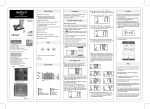
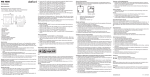
Display
10
11
9
12
13
14
15
20
19
18
17
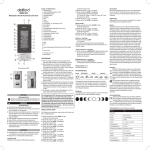
9. Time display
10. Snooze function
11. Summer time
12. Reception indicator
13. Temperature unit
14. Alarm 1 is activated
16
15. Alarm 2 is activated
16. Temperature display
17. Moon phase display
18. Weekday / Year
19. Month
20. Day
Intended use
This radio−controlled clock is designed to be used indoors and for setting and reading the time and date. The clock can
also be used as an alarm clock and displays both the moon phases as well as the temperature. Any other use is
considered unintended use. Unauthorised modification or reconstruction is not permitted. Under no circumstances open
the device or complete any repair work yourself.
Changing the display language
You can change the language for the display of the weekdays. The languages available are German (GE), French (FR),
Italian (IT), Spanish (SP) and English (EN).
5. Press and hold the Down button (5) for 3 seconds when the default display is shown.
The language currently set appears in the display.
6. Press the Down button (5) to select the language required.
7. Press the Mode button (7) to confirm the selection.
Setting the date and time
The radio−controlled clock automatically sets the correct time and date within 3 to 5 minutes.
If the clock does not have a good reception, you can set the time and date manually. The clock attempts to synchronise
with the DCF signal every hour. If synchronisation continues to fail after several hours, move the clock to a different
location.
1. Press the Mode button (7) until the temperature display appears.
2. Press and hold the Mode button (7) for 3 seconds (year digits flash).
3. Use the Up/Down buttons (6/5) to set the required year and confirm your selection by pressing the Mode button (7).
4. Complete exactly the same procedure to set the month, day, hour and minute.
Note!
If you do not complete any input for a setting for 30 seconds, the process is cancelled and the clock returns
to its default display.
14