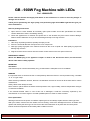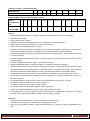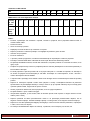
1
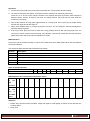
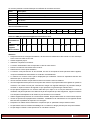
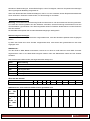
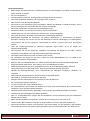
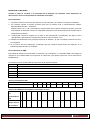
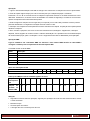
Operation: 1. Connect the power lead to the power socket with earth line. The machine will start heating. 2. You have to wait some time (about 10 minutes) until the machine has sufficiently warmed up. Press the “A” or “B” key on the remote controller. The machine will spray fog and the LEDs will light in different colours. Press it as long as you need. For safety reasons, the pump will only work when the machine is hot enough. 3. Can set the machine at a high place (with bracket) or on the ground. Do not spray fog to people directly 0 and the lean angle should less than 15 . 4. Often check whether there is enough fog liquid in the tank. The unit might be seriously damaged if it operates without fog liquid. 5. If the fog is small, plum has noise or there has no fog, please power off and check fog liquid, fuse, the connector of remote console and power plug. If the problem could not be solved after check these parts, please stop check and send it back to distributor for repair. DMX Operation Connect the unit on a DMX controller or insert it into a DMX chain via a DMX cable and set the start address via the DIP switches. The unit has 5 DMX channels that are allocated as follows : Channel Description CH1 Fog output CH2 Auto colour change mode red-blue-green CH3 Red ON CH4 Green ON CH5 Blue ON Value of the DIP switches DIP 1 2 3 4 5 6 7 8 9 Value 1 2 4 8 16 32 64 128 256 DMX addresses for several units connected in series Position of 1 1+5 1+6 1+5+6 1+7 1+5+7 1+6+7 1+5+6+7 1+8 1+5+8 1+6+8 1+5+6+8 1 2 3 4 5 6 7 8 9 10 11 12 the DIP switches Position of the unit in the DMX chain Attention: Please obey all notices about operation, safety and repair to avoid getting an electric shock and keep the excellent effect. Keep clean ©Copyright Lotronic 2014 Page 3