1
ENGLISH
14
Attaching the cover
Operation
• Push it in between the free space, in front of the saw
blade, between the sawfoot (7) and the case. While
pushing the cover in position, insert the right side of the
cover into the groove (12) on the right side of the jigsaw.
• Place the other side of the cover on the left side groove
(12). Push the cover until it is completely locked in
place.
Note: The cover (21) can only be used when cutting flat,
for angled cuttings the cover (21) must be removed. In
this case please use extreme caution when handling
the jigsaw.
Protective clothing
• If possible, wear designated gloves for protection from
splinters and shavings.
• While working, wear designated protective goggles.
Flying shavings can cause injury.
• Wear hearing protection for protection against
continuous noise in the work place.
• Wear a designated dust mask for protection against
airborne dust.
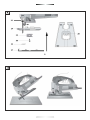
Inserting/changing the saw blade ( ill. B/C)
Danger of accidents!
• Make sure that the On/Off switch (2) is not pressed down
or locked by the setting button (3). Connect the power
plug to a corresponding power outlet.
• Switch the jigsaw on only with an inserted saw blade
(11).
• Use only flawless saw blades. Immediately replace
blunt, twisted, or cracked saw blades.
• Pay attention when working that the air vents are not
covered up or congested.
• After switching the power tool off, do not decelerate the
saw blade by pressing the blade sideways against a
foreign body (i.e. wood, metal etc).
• Danger of backlash! Only put the power tool away after
the saw blade comes to a complete standstill.
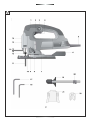
• To replace the saw blade (11), use the small allen key
(18).
• Remove the cover (21).
• Loosen the screw (23) of the saw blade holder (13) until
the saw blade can easily be pulled out from the saw
blade holder (13).
• Push the new saw blade into the saw blade holder (13).
Position the saw blade teeth in the sawing direction!
Make sure that the back of the saw blade is in the middle
groove of the guiding roller (10).
• Tighten the screw (23) of the saw blade holder (13).
Make sure that the saw blade is always firmly attached
to the saw blade holder (13).
Inserting/changing the saw blade JS55BE
(ill. B)
Switching On/Off
• To replace the saw blade (11), use the allen key (18).
• Place the cover against projections (21) in a comfortable
position to insert the allen key (18
• Loosen the screws (23) for holding the saw blade until
the cutting saw can be easily removed from its bracket.
• Push the new saw blade into the saw blade holder (10).
Position the saw blade teeth in the sawing direction!
Make sure that the back of the saw blade is in the middle
groove of the guiding roller (10).
• Tighten the screw (23) of the saw blade holder. Make
sure that the saw blade is always firmly attached to the
saw blade holder.
• Switching the jigsaw On.
Short-time operation:
Keep the On/Off switch pressed Jigsaw starts up
Release the On/Off switch Jigsaw stops
Long-time operation:
Keep the On/Off switch (2) pressed and press the setting
button (3) (I ) Jigsaw runs in long-time operation.
Before the saw blade (11) comes in contact with the
workpiece, allow the saw blade to run until the full speed is
reached. Then guide the saw blade slowly along the sawing
line.
Danger of injury!
• Disconnect the power plug (5) before inserting/changing
saw blade.
• Due to friction, the saw blade can become very hot
during operation! Wait a little while, until the saw blade
has cooled down. Danger of burns!
• The teeth of the saw blade are very sharp!
• Make sure that the saw blade is always firmly attached to
the saw blade holder.
• When storing the jigsaw remove the saw blade from the
saw blade holder.
Danger of accident!
• Should the power tool fall out of your hand during longterm operation, it will not be automatically switched off.
In this case, immediately pull out the power plug (5) from
the power outlet.
• Switching the jigsaw off:
Press the On/Off switch once. The setting button (3) will
automatically be released (0 ). Jigsaw stops
14