1
005 S
GB
Translation of the Original Operation Manual
Übersetzung der Originalbetriebsanleitung
Operation
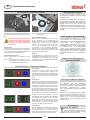
Selecting Speed - 2 Options
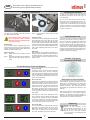
Apply Power
The unit is equipped with a 230v, 50Hz power
supply. Plug adapters may be required. For these units, once the unit has been plugged into a
power source simply toggle the power switch to
the ON position. The unit will automatically adapt
to the input power.
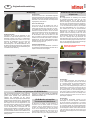
Position Dust Bag
Make certain the dust bag is inserted and properly seated before operation. If a vacuum bag
is not present insert one before powering on the
unit. Place one cardboard end of the vacuum
bag down and behind the two small retaining
stands located below the dust vent tube in the
waste collection bin at the rear of the machine.
Seat the throat of the vacuum bag over the dust
vent tube and close the cover.
Disc Retaining Lid
Place Disc in Unit
Place disc in the unit with label side down. Slide
the center of the disc over the disc retaining
spindle (hub ring up). The hub ring is a raised
section on the disc surface near the center. While
not immediately visible to the eye, the hub ring
can be felt by sliding one’s fingertips across the
surface of the disc. If the disc has no label the
hub ring position is the method used to differentiate the label side from the side of the disc that
data is read from or written to. Data is always on
the side from the raised hub.
Select Mode of Operation
The unit has two modes of operation. See section on Selecting Speed to determine appropriate operational mode.
Introduction:
The basic material of a CD-ROM disc is polycarbonate (plastic). This is overlaid with a reflective
material that can be gold, silver or aluminum.
Over this reflective material is a hard coating similar to varnish paint that minimizes scratching
of the discs. The discs are 1.2mm in thickness
but the variability from manufacturers is significant with as much as 0.15mm thickness differences. Coatings on the discs and artwork on top
of the coatings are also highly variable from one
manufacturer to another. The unit is designed to
work with all these factors in consideration. The
unit grinds the information layer which resides
on the first 38mm of disc area, measured from
the outer edge of the disc and inward towards
the center. Some inkjet and thermal printable
discs have coating beyond this area on the hub
ring. Printable coating that remains on the hub
ring after processing a disc is normal.
Do not attempt to handle the disc
during a destruction phase.
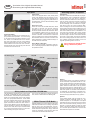
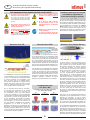
Stop SW
LED Display
Start SW
Waste Colletion Bin
Power SW
Gear Box
Slide Switch
Disc
Slide Switch
Pressure Adjust Ring
Disc Retaining Spindle
Pressure Arm
Cutter
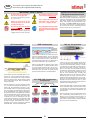
Sticky Labels on Classified CD-ROM disc
The Department of Defense uses a sticky label
to identify a CD-ROM disc that contains classified information. These DoD compliant labels are
similar to an Avery® label used in bulk mailings
that have pre-printed addresses. These labels
have two materials other than the ink: the paper
the ink is printed on, and glue underneath the
paper that holds the label to the disc. When removing sticky labels from the CD-ROM discs, it
may be necessary to slow the unit to Speed 2 in
order for the cutter, which spins at 8,000 RPMs
to cut through the label and then into the information bearing sub-layers of the discs.
The unit is not designed to remove full-face labels, found on after-market CD labeling kits.
White Thermal CD-R Media
Verbatim DataLife Plus and Mitsui ColorTherm
white thermal media have a coating composition
that can clog or gum the cutter teeth. If incomplete cutting of the information layer on these or
similar discs are experienced, simply rotate the
cutter arm assembly to the right and clean the
cutter teeth with the included wire brush.
6
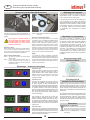
Speed 1
is the fastest speed. This speed is suitable for
CD-R / RW media. It processes the disc in 14 seconds. Actual cutting time of the information bearing sub-layers is 11 seconds. This is the default
speed. Place the slide switch in the up position
and press blue button to activate speed 1. The
three period indicators on the LED will not illuminate when speed 1 is activated. If the results are
not adequate, as measured by complete removal of the printed surface layer so that you can
see the clear polycarbonate, then try speed 2.
Speed 2
is the slowest speed. Use this speed for commercially produced CD-ROM media or if the
results of Speed 1 is not adequate. This speed
processes the disc in 26 seconds. Actual cutting
time of the information bearing sub-layers is 21
seconds. To activate Speed 2 place the slide
switch in the down position and press blue button. The three period indicators on the LED will
illuminate when speed 2 is activated.