1
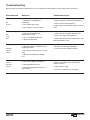
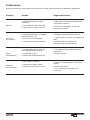
Troubleshooting
Before contacting with the repair person, you should check the problem reason follow the instructions.
PhenomenonReasons
No
sound
No
read
disc
Remote
control
failure
1. Audio line is not properly
connected.
2. Disc deformed or dirty.
Countermeasures
1. Please correctly connect the audio line.
2. Please clean and handle disc.
3. The machine n a mute status.
3. Please press mute button again to cancel
mute.
1. Disc was bad produced,
deformation or dirty.
1. Clean the disc and deal with the disc.
2. Disc is not properly placed.
2. Put in disc again, lable upwards.
3. Optical header dew.
3. Open the power switch, remove disc, and
then hold about 1 hour.
1. Remote control is not point at the
receiving window.
1. Use the remote control properly.
2. The remote control distance is too
long.
2. The same time to replace battery.
3. Remote control battery voltage
less.
Instant
function
failure
1. Disk itself suppressed badness.
2. Mis-operation other key.
3. External leakage electrostatic of
the machine.
1. Wait 5-10 seconds will automatically
return to normal.
2. Operate once again.
3. Turn off 1-2 minutes turn on again.
21
ENGLISH