1
1. Getting Started
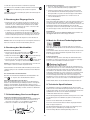
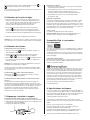
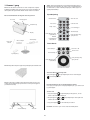
Step 4: Connect the AC power cable to the AC power plug on the
back panel (see picture). Then connect the other end of the AC
power cable to an AC outlet. „12:00“ will blink on the display,
indicating an invalid time setting.
Step 1: Unpack all components from the shipping box. Please save
the original packaging material in case you ever need to return
the system since the Limited Warranty does not cover shipping
damages.
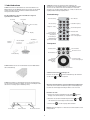
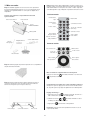
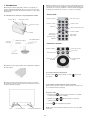
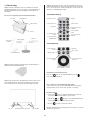
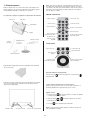
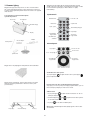
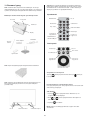
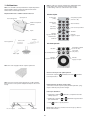
Remote Control:
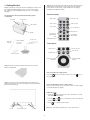
The shipping box should contain the following system
components:
Treble control
Touch panel
iPod dock
Power On / Off
Bass control
Volume control
ON / OFF key
Play / Pause
Clock control keys
Mode selector
Display
Fast reverse/
skip backward
Fast forward/
skip forward
FM/
DAB radio presets
Telescopic
Antenna
iPhone adapter
Power cord
Touch Panel:
Power On / Off
Mode selector
Play / Pause
iPod Menu key
Remote control
Table stand
Fast forward/skip
forward
Fast reverse / skip
backward
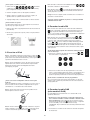
Step 2: Remove the protection paper from the remote control
battery compartment.
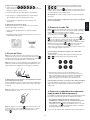
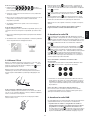
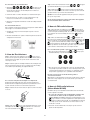
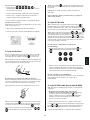
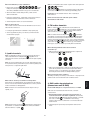
iPod control and volume
Turn on the Geneva Sound System:
Press the
key on the remote control or touch the
the touch panel.
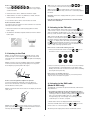
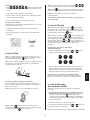
Step 3: Connect the enclosed external telescopic antenna. You
will find the antenna connector in the Geneva Sound System back
panel (see picture below).
key on
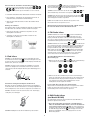
How to verify that the remote control works?
Every time a key is pressed on the remote control, a small red light
on the display lights up quickly.
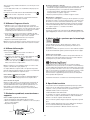
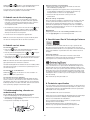
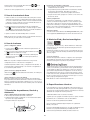
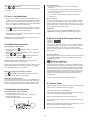
Adjust the clock:
1. Press the
key on the remote control. The letter „C“ should
start blinking on the display.
2. Use the
and
set the correct time.
3. Press
Line In
Antenna connector
keys on the remote control or the wheel to
to complete the procedure.
Note: the clock remains valid for up to 1 hour of power loss.
AC plug
4