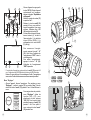
1
16
17
PLAY
14
REC
MODE
18
15
13
12
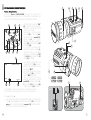
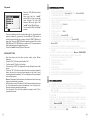
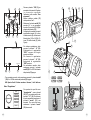
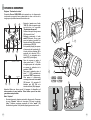
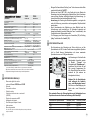
Press the “ON” (2) button to start
the device. Adjust the device
according to the instructions in
Section “OPERATION”.
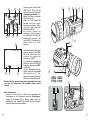
Turn the switch (13) to the “rec”
position.
Press and hold the “on/off”
button (12) for 4-5 sec to start the
video recorder. The blue LED
indicator (14) on the right of the
“on/off” button (12) will light up.
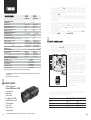
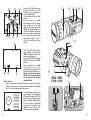
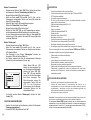
The video viewfinder displays the
following: available recording time
(A), running date and time (B),
video clip resolution (VGA or
QVGA) (C), miniSD icon (D) (see
picture).
1
VGA
D
00:12:03
A
Press the “OK” (10) button to
start recording. The record icon
“REC” is displayed in the top lefthand corner of the screen.
Press the “OK” (10) button to stop
recording. The record icon “REC”
goes out.
Press and hold the “on/off”
button (12) for 4-5 sec to
deactivate the video recorder. The
blue LED indicator (14) goes out.
Please note that if you switch
off the unit, the video recorder
will be stopped. All unsaved
data will be lost!
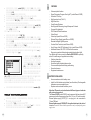
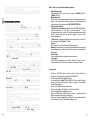
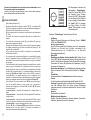
Menu “Set up”
Switch on the device and activate the video recorder. Turn the switch
(13) to the “play” position. Press and hold the “mode” button (15) for
2 sec. The screen displays the following menu:
QUALITY
MOTION
DETECTION
Set Up
DATE/TIME
FORMAT
PHOTO/VIDEO
SD
6
2
5
9
2010/02/12 12:24:03
SD
7
11
4
B
REC
9
10
LANGUAGE
19
6
+
-+
-
-
+ -
+
3
AV out
(жёлтый)
8
AV in
(черный)
To switch between options of the
menu “Set up” use the (16) and
(17) buttons. Press the “OK” (10)
button to select required option.
Press the “mode” button (15) for
a second to return to preceding
menu option. Press and hold the
“mode” button (15) for two
seconds to exit menu “Set up”.
55