1
7
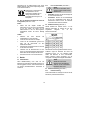
Troubleshooting
Danger
Determining the causes for existing defects and eliminating these always
requires increased attention and caution. Pull the mains plug beforehand!
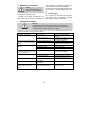
Some of the most frequent defects and their causes are listed in the following chart. In case of other defects, contact your
dealer or the MAFELL customer service.
Defect
Machine cannot be switched on
Cause
No mains voltage
Carbon brushes worn
Machine switches off automatically
during idling or stops during milling
Mains failure
Machine overloaded
Speed decreases during milling
Excessive chip removal
Excessive feed
Blunt milling cutter
Defective electronic system
Excessive speed, soft start missing or
speed control no longer possible
Unclean milling pattern
Burn marks on the milled surfaces
Undervoltage shutdown
After it has been briefly switched off
and on, machine does not start again
Blunt milling cutter
Uneven feed
Milling cutter that is unsuitable for the
operating sequence or blunt
No mains voltage (power interruption)
Caused by electronic system (braking
time)
-21-
Elimination
Check power supply
Take the machine to a MAFELL
customer service shop
Check mains-side pre-fuse
Switch machine off and on again
Reduce feed speed
Reduce chip removal
Reduce feed
Grind or replace milling cutter
Take the machine to a MAFELL
customer service shop
Grind or replace milling cutter
Mill with constant pressure and
reduced infeed
Grind or replace milling cutter
Switch machine off and on again
Switch machine off and on again after
approx. 5 seconds