1
ENGLISH
• Provide that water does not get on the
control panel of the unit.
• If some water gets on the fan heater,
before touching it you should unplug it
in order to avoid risk of getting electric
shock.
• Do not decline the unit while moving it in
order to avoid its turnover and splashing
of water.
• Do not move the appliance by the cord.
• Always unplug the unit before cleaning or
filling the water tank with water.
• Do not touch the plug with wet hands.
• Never wind the cord over the case of
the unit. Use special holders to wind the
cord.
• Do not switch on and do not use the fan
heater if a cord or a plug is damaged or
if the fan heater works irregularly, fell or
is damaged. Apply to service centers for
testing and repair.
• If you are not going to use the unit for
a long time, drain the remaining water
before storage, dry the water tank and
the cell evaporator, and place the unit
for keeping. Keep the unit in a dry cool
place.
• To remove dirt use soft detergents, do
not use abrasives.
• Do not leave the unit operating while
sleeping.
• The climatic station is intended for
household use only.
• Make sure that an electricity supply corresponds to the voltage of current specified on the housing. Switch on the unit
using the power switch (7) by setting it to
the “ON” position, two sound signals will
be heard and the ON indication (40) will
be flashing.
Functions of the buttons on the control
panel
Note: The buttons on the remote control
corresponds to the buttons on the control
panel. Each pressing of the button is accompanied by a sound signal.
The “ВКЛ./СКОРОСТЬ” (ON/SPEED)
button
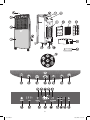
To switch on the unit press the (22) “ВКЛ./
СКОРОСТЬ” button, a sound signal will be
heard. The unit will operate at middle air flow
speed; the following indications will light
up: middle air flow indication (29) “СРЕД”,
ionization mode (27), “ОБЫЧНЫЙ” operating mode (37) ВКЛ indication (40). In 3
seconds the unit will switch to the minimal
air flow speed mode, the “НИЗ” indication
(28) will light up.
Use the (22) “ВКЛ./СКОРОСТЬ” button
to select the air flow speed: high (“ВЫС”),
middle (“СРЕД”) or low (“НИЗ”), the corresponding indication will be displayed (28),
(29) or (30).
The “ВЫКЛ” (OFF) button
While pressing of the (26) “ВЫКЛ” button
the unit will switch to standby mode. The
(40) “ВКЛ” indication will start flashing.
Attention:
If the unite filled with water falls, disconnect it immediately and place the unit vertically. Turn the water tank clamp (16) anti
clockwise and remove the water tank (13).
Remove the drain plug (17) and drain water. Before switching on the unit you should
apply to a service center for testing and repair, if necessary.
Note: While pressing of the (26) “ВЫКЛ”
button in the heating mode the unit will
switch to the standby mode in about 10
seconds.
The “ПОВОРОТ ЖАЛЮЗИ” (JALOUSIE
TURN) button
While pressing of the (24) “ПОВОРОТ
Before first usage
• Unpack the unit.
4
2173.indd 4
17.07.2008 9:55:55