1
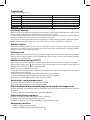
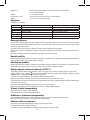
GB S627BS Wireless thermometer The thermometer shows a clock controlled by radio signal and data on indoor and outdoor temperature. It has a memory for minimum / maximum values and alarm clock with snooze function. Please read carefully these instructions before using this product. Specification Radio-controlled clock Indoor / outdoor temperature: -10°C to +50°C; -30°C to +70°C Temperature resolution: 0.1°C Wireless sensor: 433 MHz transmission frequency Range of radio signal: up to 30 m in open space Maximum number of sensors: 1 Power supply: Main station: 4.5V DC (200 mA) network adapter (included) and 3× 1.5 V AAA batteries Sensor: 2× 1.5 V AAA batteries Dimensions and weight: Main station: 88 × 245 × 50 mm; 223 g (without batteries) Sensor: 91 × 55 × 23 mm; 49 g (without batteries) Buttons Main station – back side TIME ALARM UP DOWN MAX / MIN LIGHT / SNZ Press Alarm time display 1 step forward 1 step back Display of maximum / minimum values Alarm snooze / display backlight activation Hold Setting the time / time zone Setting the alarm Finding the sensor signal Finding DCF77 signal Deleting values Installing Batteries Before the first use, insert the batteries (2× AAA) into wireless sensor. Then plug in the network adapter and insert batteries (3× AAA) into the thermometer. Pay attention to polarity signs when inserting the batteries. Incorrect insertion will damage the thermometer or sensor which is not covered by warranty! Use only alcaline batteries of the same type, do not use rechargeable batteries. Low batteries in the station or sensor are indicated by low level of display backlight or by missing outdoor temperature value. Dispose of used batteries in an environmentally friendly manner in accordance with the country legislation. Wireless Sensor We recommend placing the sensor on the northern side of the house. Although the sensor is resistant to dripping water, do not expose it to rain continuously. Its radius may drop rapidly within built-up areas. When locating the sensor on metal objects, its transmission radius will also be reduced. First Operation Place the sensor and thermometer side by side. First insert batteries into the wireless sensor, then into the thermometer. The thermometer should locate the sensor signal within 2 minutes. If the sensor signal is not detected, remove batteries from the sensor and thermometer, then repeat the procedure. Radio-controlled Clock (DCF77) After registration, the weather station will automatically begin searching for DCF77 signal over a period of 7 minutes. During the search, icon is blinking, no display information is being updated and buttons are disabled (except SNOOZE / LIGHT). icon flashes if the signal is poor. If no signal is found, the icon disappears. 2