1
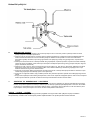
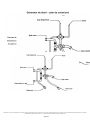
SW01
Montageanleitung – D
Mounting Instruction – E
Uputi za upotrebu – HR
Navodlilo za monta o kadi – SLO
Útmutató a zuhanykabin beszereléséhez – HU
Instructiuni de montaj – RO
Návod k montá I vany – CZ
Návod na montáž – SK
SANOTECHNIK Handelsgesellschaft m.b.H.
Industriestraße 5
A-2752 Wöllersdorf
Tel.: 0043/2622/421 93-0
Fax. 0043/2622/421 93-6
Email: [email protected]
www.sanotechnik.com
Sanotechnik RUMÄNIEN S.R.L
ROMANIA
Tancabesti, DN 1, KM 26,5
Com. Snagov, jud. Ilfov
Tel.: +40 21 350 13 43
Fax: +40 21 350 13 44
[email protected]
www.sanotechnik.com
01_2009
SANOTECHNIK d.o.o
SLOVENIA
Stritarjeva ulica 24
SI-2000 Maribor
Tel.: +386 2/421 33 50
Fax: +386 2/421 33 58
[email protected]
www.sanotechnik.com
SANOTECHNIK Hungária Kft.
HUNGARY
Nagytétényi út 112
H-1222 Budapest
Tel.: +36 1/424 06 70
Fax: +36 1/424 06 79
[email protected]
www.sanotechnik.com
SANOTECHNIK Maurod s.r.o.
SLOWAKIA+CZECHIA
Sládkovièova 69
SK-953 01 Zlaté Moravce
Tel.: +421/376 426 245
Fax : +421/376 426 246
[email protected]
www.sanotechnik.com
FORMATIC Ltd.
BULGARIA
3, Georgi Benev St.
BG-4003 Plovdiv
P.O. BOX 85
Tel.: +359 32/9611 01
Fax: +359 32/9611 02
[email protected]
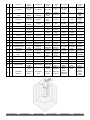
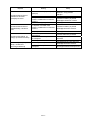
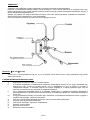
Packliste – Packing list - A csomag tartalma – Seznam ČÁSTÍ BALENÍ - COMPONENTE –
Lista sestavnih delov - Lista sastavnih djelova
Packing1
Packing2
Packing3
Packing4
Deutsch
English
Magyar
Czech
Română
Slovensko
Hrvatski
sprchová
vanička
sprchová
hadice
Cadita
dus
tuš kad
tuš kada
Furtun dus
tuš cev
tuš cijev
Tuš
ručica
24,38,21
6,14,18,19,21,2
7,28,30,37
4,7,13,32,
1,2,3,5,8,9,10,1
1,12,14,15,16,1
7,20,22,23,25,2
6,29,30,31,32,3
3,34,35,36,
Slovensky
Sprchová
vanička
Sprchová
hadica
1
1
Brausetasse
Shower tray
Kád
2
2
Brauseschlauch
Shower
hose
Zuhany
gégecső
3
1
Handbrause
Hand
shower
Kézi zuhany
ruční
sprcha
Dispersor
Tuš ročka
4
1
Rückenwand
rechts
Back wall
right
Hátfal, jobb
Zadní stěna
pravá
Parte
dreapta
spate
5
1
Brausestange
Sliding bar
Zuhanysín
Sprchová
tyč
Suport
dus
6
1
Massagepaneel
Panel
Masszázspanel
Sprchový
panel
Panel
Zadnja
stena
(desna)
Vodilo za
prho
Masažni
panel
7
1
Rückenwand
links
Back wall
left
Hátfal, bal
Zadní stěna
vlevo
Parte
stanga
spate
Zadnja
stena (leva)
8
1
Ablage
Shelf
Piperepolc
polička
Poliţă
Polička
Polica
9
40
10
13
Schrauben
ST3.5*13
Schrauben
ST3.5*11
Screw
ST3.5*13
Screw
ST3.5*11
Csavarok
ST3.5*13
Csavarok
ST3.5*11
šrouby
ST3.5*13
šrouby
ST3.5*11
Şuruburi
ST3.5*13
Şuruburi
ST3.5*11
Vijaki
ST3.5*13
Vijaki
ST3.5*11
Vijci
ST3.5*13
Vijci
ST3.5*11
Odkladací
priestor
Skrutky
ST3.5*13
Skrutky
ST3.5*11
11
1
Kopfbrause
Head
shower
Fejzuhany
sprcha hlavy
Cap
dispersor
dus
naglavni tuš
tuš iznad
glave
Hlava
sprchy
12
1
Dach
Top cover
Tető
střecha
Capac
Streha
stranski
panel
Ručná
sprcha
Pravá
zadná stena
Tyč na
sprchu
Masážny
panel
Ľavá zadná
stena
Strop
13
2
Seitenwand
Side wall
Oldalfal
boční stěna
Perete
lateral
14
4
Innenprofile
Fixed
profiles
(inside)
Belső profil
Venkovní
profil
Profil fix
(interior)
Fiksni profili
(znotraj)
15
16
Schrauben M4*25
Screw
M4*25
Csavarok
M4*25
šrouby
M4*25
Şuruburi
M4*25
Vijaki
M4x25
Vijci
M4x25
Skrutky
M4*25
16
4
T Dichtung
"T" gasket
"T"-tömítés
"T" těsnění
Cheder T
T-tesnilo
T-brtvilo
"T" tesnenie
Felső
vezetősín
Vodící
oblouk
horní
Profil
ghidaj
sus
Vodilo zgoraj
17
2
Führungsschiene
oben
Bend rail
top
panel sa
strane
Bočná stena
Vnútorné
profily
Horná
vodiacia
lišta
18
2
Eckprofile
Corner
profiles
Sarokprofil
Rohový
profil
Profil
colt
19
2
Frontprofile
Front Fixed
profiles
Frontprofil
Čelní profil
20
2
Führungsschiene
unten
Bend rails
bottom
Alsó
vezetősín
Vodící
oblouk
spodní
Szigetelés
plastový
těsnící
pásek
Chedere
Tesnila
Brtvilo
Tesnenie plastový
tesniaci
pásik
Rohové
profily
Kotni profili
Profil fata
fix
Fiksni profili
- sprednji
Profil
ghidaj jos
Vodilo spodaj
Čelné profily
Spodná
vodiaca
lišta
21
2
Dichtungen
Anti-water
plastic strips
22
8
Rollen
Sliding
wheel
Görgők
pojezdy
Role
Koleščki
Kotačići
Kolieska
23
2
Griffe
Handles
Fogantyú
úchytky
Mânere
Ročaji
Rukohvati
Úchytky
24
2
Schiebetüren
Sliding
doors
Tolóajtó
posuvné
dveře
Usi
culisante
Drsna vrata
Klizna
vrata
Posuvné
dvere
25
1
Foβmassage
26
4
Schrauben
ST4*10
foot
massage
Screw
ST4*10
Csavarok
ST4*10
masaz
nohou
šrouby
ST4*10
nasaj
talpi
Şuruburi
ST4*10
Masaza
stopal
Vijaki
ST4*10
Masaza
stopala
Vijci
ST4*10
27
1
Armatur
Faucet
Csaptelep
armatura
Baterie
armatura
miješalica
28
6
Düsen
Jets
Fúvókák
trysky
Duze
Šob
Mlaznica
Trysky
Suport
prosop
Profil
aluminiu
Şuruburi
ST3.8*55
Profile
ghidaj
scurte
Ventilator
Držalo
brisač
Nosač
ručnika
Držiak na
uterák
ALU-profil
ALU-profil
Tesnenie
Vijaki
ST3.8*55
Vodila kratka
Vijci
ST3.8*55
Skrutky
ST3.8*55
Ventilator
Ventilator
Ventilátor
Lábmasszírozó
Masáž nôh
Skrutky
ST4*10
Batéria
29
1
Handtuchhalter
30
2
Aluminium Profil
31
8
Schrauben
ST3.8*55
Aluminium
rail
Screw
ST3.8*55
32
4
Führungsschienen
kurz
Bend rails
short
33
1
Ventilator
Ventilator
Ventillátor
držák
ručníku
ukončovací
profil skla
šrouby
ST3.8*55
Vodící
profil
krátky
ventilátor
34
1
Radio
Radio
Rádió
rádio
Radio
Radio
Radio
Rádio
35
1
Licht
Top light
Világítás
osvětlení
Iluminare
Luč
Svjetlo
Svetlo
36
1
Dampfauslass
Gőzkivezetés
vývod páry
37
1
Kontrollelement
Kezelőpanel
kontrolní
panel
Evacuare
aburi
Panou de
comanda
Parni
izpust
Kontrolni
elem.
Ispust
pare
Kontrolni
elem.
38
2
Glasfixteil
gebogen
Fix üvegfal,
íves
Pevný díl
ohnutý
Parte fixa
de sticla
Fiksni
stekleni del
- upognjen
Výpust
pary
Kontrolný
element
Pevný
sklenený
diel,
zahnutý
Towel rail
Steam
outlet
Control
panel
Fixglaspart
Bend
Törölközőtartó
Alu profil
Csavarok
ST3.8*55
Vezetősín,
rövid
Vodiace
lišty krátke
GERMAN – GERMAN – GERMAN – GERMAN – GERMAN – GERMAN
INHALTSVERZEICHNIS :
MONTAGE UND BEDIENUNGSANLEITUNG
Seite
1) Vorwort
...................................................................... 2
2) Montage
....................................................................... 2
3) Technische Daten
...................................................... 3-6
4) Elektroinstallation
....................................................... 7
5) Wasserinstallation ............................................................ 7
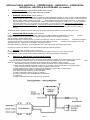
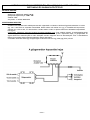
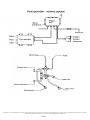
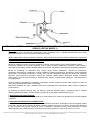
6) Schaltplan Dampfgenerator ............................................ 8
7) Garantiebestimmungen ................................................... 9
8) Bedienelement .............................................................. 10-11
10)Betriebsanleitung zu Bedienelement .........................
11-12
Seite 1
GERMAN – GERMAN – GERMAN – GERMAN – GERMAN – GERMAN
Vorwort
1. Bevor Sie die Duschkabine auspacken überprüfen Sie die Verpackung auf eventuelle Schäden. Spätere
Reklamationen werden nicht anerkannt. Vor der Montage sind auch alle Teile auf Schäden und auf Vollständigkeit zu
überprüfen. Bei Problemen kontaktieren Sie den Verkäufer bzw. uns zeitgerecht und Sie werden eine zufriedenstellende
Antwort bekommen.
2. Für die Montage ist folgendes Werkzeug erforderlich: Bohrmaschine, Kreuzschraubenzieher, Wasserwaage,
Maßband, Stift, Ringgabelschlüssel.
3. Bei geprägtem Glas oder Milchglas ist zu beachten, dass die glatte Seite nach Innen montiert wird.
4. Es wird jede Duschkabine werkseitig zu Testzwecken montiert, angeschlossen, getestet und wieder verpackt.
5. Die Brausetasse aufstellen und mittels verstellbarer Füße, so einstellen, dass kein Wasser in der Brausetasse bleibt.
ACHTUNG: unbedingt testen. Spätere Reklamationen sind ausgeschlossen.
6. Die Montage darf nur durch autoritäre Fachfirmen (z.B. Installateur) durchgeführt werden, ansonsten erlischt die
Garantie. (Siehe auch Hinweis für Anschluss von Wasser und Strom)
7. Es ist die beiliegende Aufbauanleitung einzuhalten, sowie müssen alle Teile zusätzlich gegeneinander mit
Sanitärsilikon abgedichtet werden (Silikon Dichtheitsprobe). Weiters müssen alle Schrauben, Schlauchklemmen, usw.
auf ihre Festigkeit und Dichtheit überprüft werden. Es könnte sich durch den Transport etwas gelockert haben.
Montage
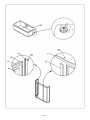
ACHTUNG!!! Bitte beachten Sie, dass die vorgebohrten Löcher nicht unbedingt etwas mit der Montage der Teile zu tun
haben müssen. Die bereits vorhandenen Löcher sind produktionsbedingt eingebracht. Alle Teile sind gemäß nachfolgender
Montageanleitung miteinander zu verschrauben, wobei die Löcher hiefür mittels Stahlbohrer gebohrt werden müssen.
Gegebenfalls können bei Passgenauigkeit die vorhandenen Bohrungen mitbenutzt werden.
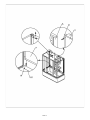
Montage:
1. Richten Sie die Wanne in der Waage aus und montieren Sie das Abflussrohr.
2. Verschrauben Sie die Führungsschienen (17/20, breite Schiene oben, schmale Schiene unten) mit den
Innenprofilen (14), beachten Sie dass die Ausnehmungen in den Innenprofilen (14) oben ist.
3. Verschrauben Sie nun die anderen zwei Innenprofile (14) mit den kurzen Führungsschienen (32, breite
Schiene oben, schmale Schiene unten), achten Sie wieder auf die Ausnehmung (oben).
4. Verbinden Sie den Frontrahmen (17/20/14) mit den seitlichen Rahmen (14/32) mit Hilfe der Eckprofile (18)
und stellen Sie das komplette Gestell auf die Wanne (1).
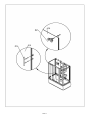
5. Stecken Sie die Seitenwände (13) beidseitig in die Innenprofile (14) und fixieren Sie die Seitenwände mit den
Aluminiumprofilen (30).
6. Stecken Sie die gebogenen Fixglasteile (38) vorne in die Innenprofile (14) und fixieren Sie die Glasteile mit
den Frontprofilen (19).
7. Verbinden Sie die Rückenwände (4/7) mit dem Massagepaneel (6) und verschrauben Sie die drei
Teile (4/6/7) mit der Wanne (1) bzw. mit den Aluminiumprofilen (30).
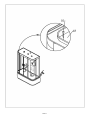
8. Verschrauben Sie nun das Dach (12) mit Paneel (6), Rückenwänden (4/7) und den
Führungsschienen (17/32).
9. Montieren Sie jetzt die Rollen (22) oben in den Schiebetüren (24) und hängen Sie die Türen oben in die
Führungsschiene (17), erst dann montieren Sie die Rollen (22) unten in den Schiebetüren (24).
Stecken Sie die Dichtieisten (21) und montieren Sie die Griffe (23) auf die Schiebetüren (24).
10. Montieren Sie die Ablage (8), den Handtuchhalter (29), die Brausestange (5) und das
Fussmassagegerät (25) auf die jeweiligen Rückenwände.
Stecken Sie die im Montagepacket enthaltene Keildichtung (T-Dichtung), ausen zwischen
Fixglasteile (38) und Profile, bzw. zwischen Seitenwände (13) und Profile.
11. Überprüfen Sie ob alle Schrauben fest angezogen sind und ob die Schiebetüren Schließen. Führen Sie eine
Dichtheitsprobe durch. Sollten Undichtheiten auftreten
(aufgrund von Maßtoleranzen) müssen diese mit Silikon abgedichtet werden.
Seite 2
Seite 3
Seite 4
Seite 5
Seite 6
INSTALLATIONS – WARTUNGS – GARANTIE – SICHERHEITS – UND
NUTZUNGSBESTIMMUNGEN FÜR DAMPFDUSCHEN (ALLE MODELLE)
1.
TECHNISCHE DATEN: Anschluss 220 V / 50 Hz, Dampfgenerator 3 Kw, Steuerung 12 V
Wasserdruck 1 – 3 bar, max. 60° WW, max. 9° DH
2.
ELEKTROINSTALLATION: (Bauseits) Der elektronische Anschluss darf nur von einem behördlich konzessionierten
Elektroinstallationsunternehmen durchgeführt werden. Die Installationsvorschriften der örtlichen
Energieversorgungsunternehmen sowie die Bestimmungen der DIN 57100 bzw.
VDE 0100 Teil 701 sind strengstens zu beachten. Die Zuleitung (Mantelleitung H05VV-f3G2,5 YMM-J 3x2,5mm² bis
3500 Watt) muss über einen Fehlerstromschutzschalter ( mindestens 25 A 230/400 V ~ Auslösenennstrom I = 0.03
A ) geführt werden und mit einem Sicherungsautomaten I N = 16 A oder 25 A U-Type (in Österreich : I N =13 A oder
16 A C-Type) abgesichert werden. Ebenso muss dieser Stromkreis mit einem allpoligen Schalter mit mind. 3 mm
Kontaktöffnungsweite abschaltbar sein. (muss im Schutzbereich 3 liegen) die Potentialausgleichsleitung (mindestens
4 mm² Kupfer) ist an den dafür vorgesehenen Stellen anzuschließen. Schaltplan liegt bei.
Die Ventilatoröffnung ist rückseitig an ein fixes Entlüftungssystem mit Kunststoff(PVC)-Rohren anzuschließen!
3.
WASSERINSTALLATION: (Bauseits) der Anschluss darf nur von einem behördlich konzessionierten
Installationsunternehmen durchgeführt werden. Die Installationsvorschriften der örtlichen
Wasserversorgungsunternehmen sowie die Bestimmungen der DIN 1988 sind strengstens zu beachten. Für den
Abwasseranschluss ist ein Geruchsverschluss vorzusehen.
ACHTUNG: Keine Starren Rohrverbindungen zwischen Dampfdusche und Wasserleitung – Bruchgefahr!!! Diese
Leitung muss durch einen Rohrunterbrecher Bauart A2 nach DIN 1988 gesichert sein. Die Anschlüsse müssen
flexibel sein, sodass eine ungehinderte Wartung oder Service jederzeit möglich ist.
Die Wassertemperatur des Wassers, welches über die Armaturen und Brausen einfließt darf max. 60°C
betragen.
Generell sind für die Elektro-– sowie für die Wasserinstallation alle gesetzlichen Vorschriften einzuhalten.
4.
WASSERABLAUF: (Bauseits) ∅ 40mm (∅ 50mm)
Es muss ein flexibles-ausziehbares Zwischenstück (mit 50 cm) zwischen Siphon und Kanalanschluss verlegt werden,
sodass ein wegschieben bei Wartung oder Service möglich ist.
5.
ANSCHLUSS UND EINSTELLUNG DER STEUERUNG:
a)
Strom abschalten und Deckel des Steuerungsgehäuses abnehmen.
b)
Anschlussleitungen vorbereiten, indem der Kabelmantel in der Länge der jeweiligen
Zugentlastung bis zu den dafür vorgesehenen Klammern entfernt wird. Die Einzelleiter müssen so
ausgeführt werden, dass die Stromführenden Leiter früher Straff werden als der Schutzleiter, falls die Leitung
aus der Zugentlastung gezogen wird. Leiterenden 6 mm abisolieren. Bei Feindrahtigen Leitern die
Leiternenden spitzenverzinnen oder Adernhülsen montieren.
c)
Vorbereitetes Kabel durch die dafür Anbauverschraubung führen. Kabelmantel soll an der Innenseite des
Gehäuses mit der Anbauverschraubung abschließen. Die Anbauverschraubung mit Gabelschlüssel bzw.
Schraubendreher festziehen. Die Dichtheit gemäß Schutzart IP 55 muss gewährleistet sein.
d)
Adern nun an den vorgesehenen Klemmen lt. Plan anschließen (auf guten Kontakt achten – Zugprobe.
e)
Nicht genutzte Kabelverschraubungen verschließen, oder durch eine Blindverschraubung ersetzten.
f)
Nochmalige Überprüfung des richtigen Anschlusses der gesamten Steuerung.
g)
Einstellmaßnahmen durchführen. (wenn erforderlich)
h)
Gehäusedeckel montieren.
i)
Strom einschalten.
j)
Korrekte Funktion der Steuerung prüfen.
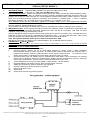
Seite 7
Seite 8
INSTALLATIONS – WARTUNGS – GARANTIE – SICHERHEITS – UND
NUTZUNGSBESTIMMUNGEN FÜR DAMPFDUSCHEN (ALLE MODELLE)
6. GARANTIEBESTIMMUNGEN:
Die Garantiezeit besteht während der gesetzlich vorgeschrieben Zeit ab Kaufdatum. Dieses muss anhand eines
Kassazettel oder eines Zahlungsbeleges – der Name des Händlers und das Verkaufsdatum – aufscheinen.
Kundendienste für das Verkaufsgebiet Österreich: Es werden nur schriftlich gemeldete Kunden-Dienstaufträge, wie z.
B. für Garantiesätze durchgeführt, bzw. angenommen, wenn hierzu eine schriftliche Meldung mit nachweislichem
Kaufbeleg (Kassabeleg, ...) beim Kundendienst vorliegt.
Die Garantie bezieht sich auf Reparaturen und Austausch von Bauteilen des Gerätes, die von der Firma
SANOTECHNIK anerkannt werden müssen. Die Interventionsgebühr geht zu Lasten des Kunden, die direkt an den
Kundendienst zu entrichten ist. Nicht jedoch auf Ein- und Ausbau-, sowie alle weiteren Folgekosten, diese sind
ausgeschlossen. Betriebsgeräusche berechtigen nicht zur Mängelrüge.
Von der Garantie ausgenommen sind defekte Teile, deren Fehler auf Nachlässigkeit, unsachgemäßen Gebrauch,
gebrauchsbedingte Abnutzung, fehlerhafte Installation, Wartung durch unbefugtes Personal, Transportschäden
zurückzuführen sind, wie z. B. Sicherungen, Filter, Pumpen, dekorative Elemente usw. Die Garantie gilt auch nicht,
bei Gründen die nicht als Fabrikationsfehler des Gerätes gelten wie z. B.. bei Spannungsschwankungen, Blitze,
Elektrolyse, Korrosion und im allgemeinen alle Ursachen, die von der Beschaffenheit des Wassers und der
elektrischen und hydraulischen Speisung verursacht werden oder denselben zuzuschreiben sind.
Durch mangelhafte Einhaltung der Bedienungsanleitung lehnt der Hersteller jegliche direkte und indirekte Haftung
auf Personen- oder Sachschäden ab.
Durch indirekte Schäden, w. z. B. Folgeschäden durch mangelnden Gebrauch oder allfällige Entfernung haftet der
Hersteller nicht.
Bei Reparaturen nach Ablauf der Garantiezeit, werden die ausgetauschten Teile, der Arbeitsaufwand und die
Fahrtspesen – nach den geltenden Sätzen – in Rechnung gestellt. Die aktuellen Spesensätze können Sie beim
Kundendienst erfragen.
7.
SICHERHEITSHINWEISE: Bei Herzerkrankungen, Kreislaufproblemen und Diabetes ist vor der ersten Verwendung
des Dampfbades eine Ärztliche Untersuchung durchzuführen.
8.
NUTZUNGSBESTIMMUNGEN und PFLEGE: Die Dampfdusche ist immer sauber zu halten um bakterielle
Verunreinigungen zu vermeiden. Verwenden Sie nur milde, biologische Reinigungsmittel. Reinigen Sie immer mit
einem weichen Tuch nach. Das Bedienelement ist ausschließlich mit klarem Wasser zu reinigen.
Achten Sie darauf, das System immer abzuschalten wenn Sie es nicht in Betrieb haben.
Generell wird das Dampfbad mit deutlich niederen Temperaturen als eine klassische Sauna betrieben. Die
durchschnittliche Dauer des Dampfbades sollte 15 – 20 Minuten bei ca. 45 °C betragen.
ACHTUNG!---ACHTUNG!---ACHTUNG!
Die Dampfduschkabine ist vor fixem Einbau nochmals sorgfältig auf eventuelle sichtbare Schäden zu überprüfen,
inklusive den montierten Komponenten. Das gleiche gilt für die Oberflächenbeschaffenheit der
Dampfduschkabine, weiters muss unbedingt ein Probelauf durchgeführt werden.
Seite 9
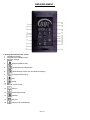
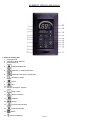
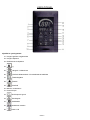
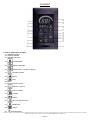
BEDIENELEMENT :
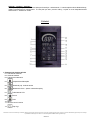
1. Anzeige & Funktionen der Tasten
1. Lautstärken Anzeige
2. Gespeicherter Lautstärkenwert
3. Frequenz Anzeige
4.
Steigerung/Mehr/Lauter
5.
Lautstärken bzw Radiosender
6.
Zeiteinstellung Dampf und Temperatureinstellung
7.
Hintergrundbeleuchtung
8.
Hilfe
9.
Dampf
10. Mikro
11. Remote control receive
12.
Ein/Aus
13.
Deckenbeleuchtung
14.
Gebläse
15.
Speicher
16.
FM oder CD Auswahlknopf
Seite 10
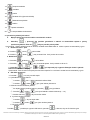
17.
Senkung/Weniger/Leiser
18.
Telefon
19.
20.
Temperatur Anzeige
Dampf Betriebsanzeige
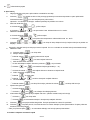
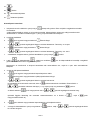
2. Erörterung der Funktionen
1.
Schliessen bzw. stecken Sie die Dampfduschkabine an ihre Stromleitung.
2. Drücken Sie(
)die Arbeitszeit des Dampfgenerators und die momentane Temperatur in der
) um die Stromzufuhr abzubrechen.
Dampfduschkabine wird angezeigt, drücken Sie nochmals(
Hinweis: Alle offenen Funktionen werden beendet, der Ventilator rennt noch ca 1 Minute weiter und dreht sich dann
automatisch ab.
3. Zeiteinstellung Dampf
a. Drücken Sie(
) einmal und(
) beginnt zu blinken
b. Drücken Sie (
) oder (
4. Temperatureinstellung
)um die Zeit zu ändern. Das Limit liegt zwischen 5-----60min.
a. Drücken Sie (
)zweimal und (
b. Drücken Sie(
) oder (
) beginnt zu blinken
) um die Temperatur zu ändern. Das Limit liegt zwischen 25-----60°C.
5. Drücken Sie (
),(
),(
),(
) um die gewünschten Funktionen ein/ bzw. auszuschalten,
die gewünschten Funktionen werden am Display angezeigt.
Hinweis: Die Ozonfunktion startet nach Beenden des Bades.
Ca. nach 5 Minuten schaltet sich die Ozonfunktion automatisch ab.
6. FM radio Einstellung
a. Drücken Sie (
b. Radiosender suchen.
①.Drücken Sie(
) einmal um die Radiofunktion einzuschalten
) einmal und die (MHz) Anzeige beginnt zu blinken
②. Drücken Sie (
) oder (
) umd die gewünschte Frequenz zu wählen.
c. Speichern einer Frequenz/eines Radiosenders
①.Wenn Sie einen gewünschten Radiosender gefunden haben, drücken Sie (
speichern.
②.Drücken Sie (
) oder (
③. Drücken Sie nochmals (
d. Gespeicherte Sender aufrufen
①.Drücken Sie (
②.Drücken Sie (
e. CD audio Funktion
Drücken Sie (
Funktion auszuschalten
) um den Sender zu
) um den gewünschten Speicherplatz (0----19) zu wählen
) um den Sender zu speichern
) um die Radiofunktion einzuschalten
) oder (
) um die gespeicherten Sender audzuwählen
) zweimal um die Cd Funktion einzuschalten, drücken Sie (
Seite 11
) nochmals um die CD
7. Änderung der Lautstärke
) zweimal
①.Drücken Sie (
②.Drücken Sie (
) oder (
) um die Lautstärke zu erhöhen oder zu veringern.
8. Automatischer Sendersuchlauf und Senderspeicher (manche Modelle haben diese Funktion nicht)
) um die Radiofunktion zu öffnen
①.Drücken Sie (
②.Drücken Sie (
) für die atomatische Suche und das Speichern der Radiosender
9. Drücken Sie (
) um ankommende Anrufe entgegen zu nehmen.
Drücken Sie die Taste nochmals um wieder aufzulegen.
) um Hilfe zu holen, wenn Sie sich nicht mehr im Stande fühlen um das Badezimmer ohne
10. Drücken Sie (
fremde Hilfe zu verlassen. Wenn Sie den Knopf zum zweiten Mal drücken wird die Funktion beendet.
* sobald Sie den Knopf (
schalten sich aus!
) gedrückt haben schaltet sich automaitsch der Föhn ein und alle anderen Geräte
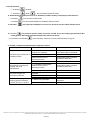
3. Analyse und Behebung einfacher Fehlermeldungen
Fehlermeldungen
Die Kontrollleuchte für die
Stromzufuhr im
Bedienelement leuchtet nicht
Ursache
1. Die Stromzufuhr ist
unterbrochen (ausgesteckt)
Überprüfen ob Stecker (für
Stromzufuhr) richtig angesteckt ist
2. Schutzschalter ausgeschalten
Schutzschalter wieder umschalten
Kontakte überprüfen
gegebenenfalls Kontrollbox
tauschen
Sicherung wechseln
3. Kontaktfehler zwischen
Elektronikbox und Kontrollbox
4. Sicherung ist durchgebrannt
Die Kontrollleuchte für die
Stromzufuhr funktioniert, wird
aber nicht angezeigt
Die Kontrollleuchte
funktioniert aber die
entsprechenden Funktionen
nicht
Press functional key after
opening power but without
relevant indicator in window
Behebung
1. 3. Kontaktfehler zwischen
Elektronikbox und Kontrollbox
2. defekte Kontrollbox
1. elektrische Verbindungen
locker (lose)
2. die entprechenden Leitungen
sind defekt
3. Elektronik is defekt
1. Switch being damaged
2. Electric components damaged
Seite 12
Kontakte überprüfen
gegebenenfalls Kontrollbox
tauschen
Kontrollbox tauschen
Elektrische Verbindungen
überprüfen.
Die entsprechenden Leitungen
tauschen
Elektronikbox tauschen
Use remote control or replace
control box
Replace electric components
ENGLISH – ENGLISH – ENGLISH- ENGLISH – ENGLISH – ENGLISH
DIRECTORY :
MOUNTING AND USING INSTRUCTIONS
1) Introduction
2) Mounting
............................................................
............................................................
Page
2
2
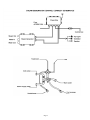
3) Steam Generator Control Connect Schematics
3
4) Remote Control
4-6
Seite 1
ENGLISH – ENGLISH – ENGLISH – ENGLISH – ENGLISH – ENGLISH - EN
Mounting Preparation
1. After opening the case, read this introduction carefully, check all the packed parts, examine the shower cabinet for
shipping damage. If there is any problem, please contact the local seller or our company directly in time. You will get a
satisfactory answer.
2. Necessary tools: drilling machine, stone drill (∅=6mm), crosstip screwdriver, water-level, meter stick, pencil.
3. With structured or imprinted glass make sure that the smooth side of the glass faces the inner side.
4. It is installed each shower cubicle work-page for test purposes, connects, tests and packs again.
5. The douche cup positions and by means of adjustable feet, puts in a way, that no water remains in the douche cup.
RESPECT: necessarily test. Later complaints are impossible.
6. The montage can become implemented only through authoritarian compartment companies (for example plumber),
otherwise the guarantee goes out. see also hint for connection of water and stream,
7. It is the enclosed construction instruction to be paused, as well as all parts must be sealed with sanitary silicone
(silicone denseness test) additionally against each other. All screws, tube clamps, etc. its solidity and denseness is
checked. Something been able to relax through the transportation.
Mounting
1. Set scales-quite geared up the shower tray (1),Install the drain pipe.
2. You connect the fixed left or right function profile (30 ) and the side panel (4 or 7),You use screws (ST3.5×16)
for it .and then you connect the fixed left or right side panel (4 or 7) and middle panel (6),using screws for it.
4,6,7 mounting on the shower tray (1) finally.
3. Screws the bend rail down (20) and bend rail above (17) on one side with the alu profile (18). Mount the fixed
glass in the alu profie (18). Mount the soft plastic strips (16) behind the alu profile (18) and the fixed
glass .Same on the other side.
4. Mount the alu profile (18) and (13) use screws (31 ).Same on the other side.
5. Mount the sliding wheel (22) on the both door and put the door in the guide rail.
6. Mount the handles (23) on the door .the shower stick with the handshower and rosehorse and the steam
outlet
7. Mount the roof (12) on the upper guide rail and the main panel and srew the main panel with the guide rail
and the side back panel.
8. Test if you have fix the srews well and if the door will be close .Make a close control .If it is leaky (based on
the size torerence ) pls give silicone between.
Page 2
Page 3
REMOTE CONTROL
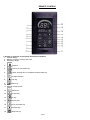
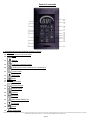
1. Display of computer control panel & functions of buttons
1. Volume display
2. Memory number or volume level card
3. Frequency display
4.
Increase
5.
Volume or tune select key
6.
steam working time or temperature setup select key
7.
background lamp
8.
help key
9.
steam key
10. MIC
11. Remote control receive
12.
power key
13.
top light key
14.
fan key
15.
memory key
16.
FM or CD select key
17.
decrease key
18.
telephone key
Page 4
19.
20.
temperature display
steam working time display
2. operational explanation
2.
put plug into socket and press REST of the electric leakage
protection. Both the indicator lam of the electric leakage
protection and the indictor lamp of power source on operational
control panel will light
2. turn on power key(
)and working time of steam bath and temperature in bath room are shown in display area.
(the lamp is being opened at the same time)Choose some keys you need operating and push power key(
once again to turn off power source.
Note: All functional keys being working will be also turned off except fan starting working automatically meanwhile the
power source is off. After one minute, the fan will turn off automatically and drainage water in steam machine
(about 100 second).
5. steam working time setup
a. Push(
)key once the(
)is flashing
b. Push(
)key or (
)key to change the time. The limit is 5-----60min.
6. the tallest limit of the steam temperature setup
a. Push(
)key twice, the(
b. Push(
)key or (
)is flashing
)key to change the temperature. The limit is 25-----60min.
5. Push (
),(
),(
),(
) to turn on/off
respectively function and itself state will be shown in display area.
Note: The function of ozonizer will be started after finishing bathing.
It will be turned off automatically or by band (It will be turned off automatically and cut off power source after the
ozonizer starts 5 min).
7. FM radio or CD audio Amp
)key once to open the FM radio
a. Push (
b. Looking for the broadcast
)key once The (MHz) is flashing
①.Push(
②. Push(
)key or (
)key to looking for the broadcast
c. Memory frequency of the broadcast
①.When the broadcast was being finded. Push (
)key or (
②.Push (
looking for broadcast
)key to select memorizer (0----19) when the (MHz) is not flash. And redo 4.B to
)key to memory the fraquemcy
③. Push(
d. The fraquemecy of the memorizer select
①.Push (
)key to open the radio
②.Push(
) or (
e. CD audio amp select
Push (
) key to memory
) key to select
) key twice to open and next will be turn off
Page 5
)
7. Change the volume
①.Push (
) key twice
②.Push (
)key or (
)key to increase or decrease the volume
8. Auto find and memory the broadcast (same of the modles have not this function)
①.Push (
②.Push (
)key to open the radio
)key to auto working
9. Press (
) to receive telephone and aim at speaker when talking.
Press it once again to turn off it.
10. Press (
off it.
* when the (
)to ask for help when the user feel too uncomfortable to leave bathroom. Press it once again to turn
)was pushed, the fan is working and turn off others that was working.
3. Analysis and fix simple breakdowns
Breakdown phenomenon
The indicator light of power in
control panel dose not work
The indicator light of power in
control panel works but
without showing
The indicator light working but
corresponding function
doesn’t work
Press functional key after
opening power but without
relevant indicator in window
Reason for breakdown
Breakdown fixed
1. The power source
unconnected or connected
Reconnecting them tightly and
check the circuit carefully
2. Electric stock protection switch
tripping or unopened
3. Unconnected or connected
non-firmly between power box
and control box
4. Fuse blown in power box
Check the reason for tripping and
restart maching
1. 3. Unconnected or connected
non-firmly between power box
and control box
2. Electrical component damaged
1. Relevant junctions
unconnected well
2. Corresponding executive
components damaged
3. Electric components damaged
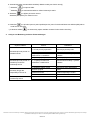
1. Switch being damaged
2. Electric components damaged
Page 6
Reconnecting them tight or
replacing new control box
Replace new a fuse
Reconnecting them tight or
replacing new control box
Replacing new control box
Reconnecting those junctions.
Replace executive components
Replace electric components
Use remote control or replace
control box
Replace electric components
CROATIAN – CROATIAN – CROATIAN – CROATIAN – CROATIAN-CROA
SADRŽAJ:
UPUTE ZA MONTAŽU I UPOTREBU
Strana
1. Predriječ ...........................................................….............3
2. Montaža ................................................................…........ 3
3. Tehnički podaci................................................................. 4
4. Elektro inštalacija ..............................................................4
5. Vodovodni priključak .........................................................4
6. Priključenje parnog generatora ........................................ 5
7. Garancijski uslovi...............................................................6
8. Jedinica za upravljanje ..................................................... 7
9. Rukovanje jedinicom za upravljanje ..................................7
HRVATSKI – HRVATSKI – HRVATSKI – HRVATSKI - HRVATSKI
Predriječ o montaži
1. Prije no što ispakirate kabinu za tuširanje, provjeritte, da nije ambalaža možda oštećena. Kasnije reklamacije neće
biti priznate. Isto je tako potrebno prije montaže provjeriti, dali su svi djelovi na raspolaganju. U suprotnom slučaju
obratite se pravovremeno na našu prodaju i dobit ćete zadovoljavajuč odgovor.
2. Za montažu treba vam sledeća radna oprema: bušilica, svrdlo (Ø = 6 mm) , odvijač, libela, metar, olovka.
3. Kod vućenog i mlječnog stakla potrebno je paziti na to, da je glatka strana montirana sa unutrašnje strane kabine
za tuširanje.
4. Svaka kabina za tuširanje tvorinički je več sastavljena, priključena, testirana te ponovno rastavljena i upakirana
5. Postavite kadu za tuširanje na način i pomoću podešavajućih nogu tako, da u njoj ne ostaje voda. POZOR:
napravite TEST! Kasnije su reklamacije isključene.
6. Montažu može izvesti samo poduzeće SANOTECHNIK odnosno od njega ovlašteno drugo poduzeće, koje je za
montažu strućno usposobljeno (npr. inštalater), jer u suprotnom slučaju garancija otpada. Vidi i uputstva za
priključenje vode i elektrike.
7. Montažu izvodite prema uputstvima za postavljanje, te u nastavku još dodatno zatjesnite sve djelove između sebe
pomoću sanitarnog silikona (silikonski vodotjesni test). Isto tako potrebno je provjeriti sve vijke, spojke te kabelske
konektore na njihovu čvrstost i tjesnost, pošto je moguće, da je u transportu došlo do njihove ohlapnosti.
Montaža
POZOR!!! Molimo, budite pozorni na to, da već izbušene rupe nisu nužno potrebne za montažu djelova. Te su
posledica proizbodne obrade. Sve je djelove potrebnu u skladu sa uputsvom za montažu spojiti, kod ćega je
potrebno izbušiti neke nove rupice za čeličnim svrdlom Po potrebi mogu se svakako i upotrebiti već tvorničko
izbušene rupice.
1.
2.
3.
4.
5.
6.
7.
8.
9.
Stavite tuš kadu (11) vodoravno na pod te inštalirajte cijev za odtok.
Spojite glavni panel pomoću vijka (14) na tuš kadu.
Spojite zadnje staklene stjene sa glavnim panelom (lijevo i desno).
Pričvrstite donje vodeće profile (13) i gornje vodeće profile (13) na jednoj strani sa alu profilom (29). Stavite plastične
letve (27) i (22) na alu profil (26) i spojite iste sa unutrašnje strane. Sada spojite alu profil (26) sa fiksnim staklenim
djelom (25) i montirajte stakleni dio (25) na alu profil (29).
Montirajte brtvila (23) između alu profil (29) i staklenog djela (25) odnosno između alu profila (26) i staklenog djela
(25). Napravite isto sa druge strane.
Stavite pokrov (1) na gornji vodeći profil i na glavni panel te spojite pokrov sa glavnim
panelom, vodećim profilom i stranskim staklenim djelovima.
Sada čvrsto privijte sve vijke.
Montirajte kotaćiče (19) na oba klizna vrata te ih objesite u vodeće profile.
Montirajte rukohvate (18) na vrata, policu za odlaganje (29), nosač rućnika (24), djelove tuša
sa tuš ručicom i tuš cijevi (28) i ispust pare (16).
Provjerite, dali su svi vijci čvrsto pritegnuti i mogu li se klizna vrata zatvoriti. Kako bi osigurali zadovoljavajuću
tjesnost, potrebno je stenke kabine za tuširanje prije prve upotrebe brižljivo zatjesniti silikonom. Jednako je potrebno
učiniti izme|u kabine i kade. Tjesnjenje izvodimo sa vanjske strane. Isto uradimo između stakla i alu profila. Sa
unutrašnje strane tjesni se samo najniže namještenog vijka odnosno malo preko njega. Dolnji dio mora ostati
slobodan.
UPUTSTVA ZA INŠTALACIJU – ODRŽAVANJE – GARANCIJA – SIGURNOSNA
UPUTSTVA – UPUTSTVA ZA UPOTREBU (svi modeli)
1.
TEHNIČKI PODACI: Napon 220 V / 50 Hz, upravljanje 12 V
Pritisak vode 1 – 3 bara, max. 60° topla voda, max. 9° hladna
Elekro i elektronski priključenje može izvesti samo ovlašteno elektroinštalaciono poduzeće. Pri tome je potrebno uvažiti propise
lokalnih poduzeća za opskrbu električno energijom i druge lokalne tehničke standarde (npr. DIN 57100 odn. VDE 0100 dio 701),
koji se mora striktno poštivati. Dovodni kabal (oplašten H05VV-f3G2,5 YMM-J 3
2.
ELEKTRO INŠTALACIJA: (mjesto ugradnje) x2,5mm² do 3500 watta) mora biti sproveden i opremljen predzaštitnim
prekidačem (minimalna 25 A 230/400 V ~ uključna struja I = 0.03 A ) i zaštiten sisurnosnim automatom I N = 16 A ili
25 AU- tip (u Austriji : I N =13 A ili 16 A C- tip). Isto tako mora imati strujni krug mogućnost isključenja višepolnim
prekidaćem sa minimalnom širinom otvaranja kontakta 3 mm. (mora biti zaštitnog obima 3). Na predviđenih mijestima
potrebno je namjestiti izjednačenje potenciala (minimalno 4 mm² bakar). Nacrt za elektro priključenje je u prilogu.
Ventilatorski odvod potrebno je sa zadnje strane vezati na fiksni odzračni system pomoću plastične cijevi (PVC).
Strana 3
3.
VODOVODNI PRIKLJU^AK (mjesto ugradnje)
Priključenje na vodovodnu mriježu može napraviti samo odgovarajuće poduzeće i ovlašten vodoinštalater. Potrebno je
pridržavanje lokalnog vodovodnog poduzeća te propise za zaštitu okoline. Za odvod vode potrebno je upotrebiti sistem
sifona.
POZOR: da sprijecimo mogucnost lomljenja cijevi, ne sme se upotrebiti toga cijev za vezanje kabine za tuširanje
vodovodnom mriježom. Vezanje je potrebno napraviti gipkim cijevima, što osigurava nesmetano održavanje i
servisiranje. Taj vod mora biti osiguran i cijevnim ventilom tipa A2 prema DIN 1988.
Temperatura vode koja izlazi na miješalice ne smije iznositi više od 60°C.
Općenito je potrebno kod elektro i vodovodne inštalacije uvažavati zakonske propise.
4.
ODVOD VODE (mjesto ugradnje) Ø 40 mm (Ø 50 mm)
Vezanje sifona i prikljucnog elementa na kanalizaciju potrebno je napraviti gipkom cijevi (min. 50 cm). To prikljucenje
mora biti izvedeno tako, da se može rastaviti zbog jednostavnijeg održavanja i servisiranja, kod kojeg moramo kabinu
za tuširanje odmaknuti.
5.
PRIKLJUČENJE I PODEŠAVANJE JEDINICE ZA UPRAVLJANJE
a) Isključite struju i skiniti pokrov jedinice za upravljanje.
b) Pripremite dovodni kabal na način, da skinete vanjsku izolaciju u dužini, da se može kabal sa izolacijom montirati u
zateznu klemu, a na vodičima skinite izolaciju tako, da su pripremljeni za priključenje u konektore (ca. 6 mm). Kabal
sa vodičima sprovedite tako, da će strujni vodič u slučaju potezanja kabla iz zatezne kleme biti prvi oslobođen, a
zaštitni vodič zadnji. U slučaju finog kablovnog priključenja, potrebno je konce vodiča zaljepiti kositrom ili na njih
montirati konektorske spojke.
c) Sada sprovedite kabel kroz predviđen otvor kućišta te ga učvrstite u zateznu klemu. Nakon toga učvrstite kabel u
kućište jedinice. Tjesnost je potrebno osigurati u skladnosti za zaštitnim načinom IP 55.
d) Sada priključite konce vodiča u klemice glede na nacrt priključenja. Pazite na dobar kontakt.
e) Neupotrebljene vodiče zatvorite odnosno napravite slijepe kontakte.
f) Još jednom provjerite vodiče na pravilnost priključenja.
g) Izvedite podešavajuće mjere (u koliko su potrebne).
h) Ponovno namjestite pokrov kućišta jedinice za upravljanje.
i) Uključite struju.
j) Sada provjerite pravilnost djelovanja jedinice za upravljanje.
Strana 4
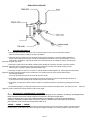
Hidraulički priključci
6.
GARANCIJSKI USLOVI:
1. Garancija važi u zakonski propisanom roku od dana prodaje na osnovu racuna ili potvrde o placanju s datumom dana
prodaje, potpisom i štambiljem prodavaoca.
2. Garancija važi za popravke kvarova i zamjenu djelova uredaja napravljenih zu suglasnost poduzeca SANOTECHNIK. Svi
troškovi interventnih radova idu na racun korisnika i placaju se direktno servisnoj službi. U te nisu uracunati troškovi
demontaže i ugradnje te troškovi, koji bi zbog toga nastali. Zvuk djelujuceg uredaja, zbog princijpa rada, ne spada medu
kvarove.
3. Garancija ne obuhvaca kvarove i oštecenja nastalih zbog nepazljivosti, nepravilne upotrebe, nepravilno izvedene inštalacije,
opravki sa strane neovlaštenih osoba, oštecenja u transportu i izrabljenost djelova zbog samog principa rada (filtri, osiguraci,
pumpe, dekorativni elementi itd).
4. Garancije ne važi i u slucaju, ako kvar nastupa zbog tvornicke greške, npr. pad napona, udara strele, elektrolize, korozije ili
drugih općih uzroka, koji se odnose na posebne sobine vode, sistema elektricnog i hirdraulicnog napajanja, kao i iz njih
izlazecih osobina kao mogucnost nastanka kvara.
5. Proizvodac ne preuzima nikakve neposredne ili posredne odgovornosti u slucaju oštecenja ljudi ili štete na stvarima, koje su
nastale zbog nepažnje ili neuvažavanja uputa o radu i djelovanju.
6. Proizvodac ne odgovara za štetu, koja je nastala posredno kao posledica nepravilne upotrebe ili neuvažavganja sigurnosnih
pravila.
7. Za popravke napravljene nakon isteka garancijske dobi, zaracuna se vrijednost zamjenjanih djelova, radno vreme, transportni
troškovi prema važecem cjenovniku. Podrobne informacije možete dobiti kod vaše servisne službe.
7.
UPUTSTVA ZA ODRAŽAVANJE I UPOTREBU
Redovno održavajte cistocu kabine za tuširanje, jer cete tako spreciti razvoj bakterija. Za cišcenje upotrebljavajte samo blaga,
biološko neoporečiva srijedstva za čiščenje i mekane krpe. Za cišcenje regulacije upotrebljavajte samo cistu vodu. Ako kabine
za tuširanje ne upotrebljavate, dobro je isključit i električni napon. Temperature parne kupke bitno su niže neu klasicnoj savni.
Preporučujemo vreme parne kupke od 15 do 20 minuta kod temperature zraka od 45ºC.
POZOR -- POZOR -- POZOR!
Parnu je tuš kabinu prije fiksnog namještenja potrebno pregledati na moguću vidnu štetu (uključno sa prije montiranim
komponentama). Jednako važi i za obstojnost površine cijele tuš kabine. Isto je tako potrebno izvesti radni test.
.
Strana 5
Jedinica za upravljanje
SLOVENIAN – SLOVENIAN – SLOVENI – SLOVENIAN - SLOVENIAN
VSEBINA:
MONTAŽA IN NAVODILO ZA UPORABO
Stran
1. Predgovor ..........................................................................2
2. Montaža .............................................................................2
3. Tehnični podatki................................................................ 3
4. Elektroinštalacija ...............................................................3
5. Vodovodni priključek .........................................................3
6. Priključitev parnega generatorja........................................ 4
7. Garancijski pogoji...............................................................4
8. Element za upravljanje ..................................................... 5-6
9. Rokovanje z enoto za upravljanje .............................
Stran 1
7
SLOVENSKO – SLOVENSKO – SLOVENSKO – SLOVENSKO
Predgovor k montaži
1.
Preden razpakirate kabino za tuširanje, preverite ali je embalaža mogoce poškodovana.
Kasnejše reklamacije ne bodo priznane. Prav tako je potrebno pred montažo preveriti, ali so
vsi deli na razpolago. V nasprotnem primeru, se pravocasno obrnite na našo prodajo in
dobili boste ustrezen odgovor.
2.
Za montažo potrebujete naslednje orodje: vrtalni stroj, sveder za kamen (Ø = 6 mm) , križni
meter, svincnik.
3.
Pri vlecenem in mlečnem steklu je potrebno paziti, da je gladka stran stekla montirana na
notranji strani kabine za tuširanje.
4.
Vsaka tuš kabina je tovarniško predsestavljena, priključena, testirana in ponovno
zapakirana.
5.
Postavite tuš kad na način in s pomočjo nastavljivih nogic tako, da v njej ne ostaja voda.
Opravite TEST! Kasnejše reklamacije so izkljucene!
6.
Montažo samo lahko opravi le podjetje Sanotechnik oz. od njega pooblašceno strokovno
podjetje (npr. Inštalater), v nasprotnem primeru ni garancije. Glej tudi napotke za priklop
vode in elektrike.
7.
Ob montaži ravnajte po navodilih za postavitev, ter v nadaljevanju še dodatno zatesnite vse
dele drugega z drugim s sanitarnim silikonom. (silikonski vodotesni preiskus). Prav tako je
potrebno preveriti vse vijake, spojke in kabelske spojke na njihovo cvrstost in tesnost, saj je
lahko med transportom prišlo do njihove zrahljanosti
izvijac, libela,
POZOR:
Montaža
POZOR!!! Prosimo, bodite pozorni na to, da že izvrtane luknje niso nujne za montažo delov. Te luknje so
posledica proizvodne obdelave. Vse dele je potrebno v skladu z navodilom za montažo sestaviti in spojiti, pri
čemer je potrebno nekatere luknje izvrtati z jeklenim svedrom. Po potrebi se lahko seveda že tovarniško
izvrtane luknje tudi uporabijo.
1.
2.
3.
4.
Postavite tuš kad (11) vodoravno na tla in inštalirajte cev za odtok.
Privijte glavni panel s pomočjo vijakov (14) na tuš kad.
Prifijte zadnje steklene stene z glavnim panelom (levo in desno).
Pričvrstite spodnje vodilne profile (13) i zgornje vodilne profile (13) na eni strani z alu profilom (29). Vstavite
plastične letvice (27) in (22) na alu profil (26) i spnite iste z nostranje strani. Sedaj spnite alu profil (26) s fiksnim
steklenim delom (25) in montirajte stekleni del (25) na alu profil (29).
Montirajte tesnila (23) med alu profil (29) in stekleni del (25) oziroma med alu profil (26) in stekleni del (25). Enako
naredite na drugi strani.
5. Postavite pokrov (1) na zgornji vodilni profil in na glavni panel ter spnite pokrov z glavnim panelom, vodilnim
profilom in s stranskimi steklenimi deli.
6. Sedaj čvrsto privijte vijake.
7. Montirajte koleščke (19) na oboja drsna vrata ter le-te obesite v vodilne profile.
8. Montirajte ročke (18) na vrata, odložno poličko (29), nosilec brisač (24), dele tuša s tuš ročko in tuš cevjo (28) in
parni izpust (16).
9. Preverite ali so vsi vijaki črvsto priviti in ali se dajo drsna vrata zapirati. Da bi zagotovili ustrezno tesnost, je
potrebno tuš kabino skrbno zatesniti s silikonskim kitom (med steno in tuš steno in med tuš steno in tuš kadjo je
potrebno z zunanje strani zatesniti
v celoti). Zatesniti je potrebno tudi med stekli in alu profili. Med steno in tuš steno z
notranje strani pa je potrebno zatesniti do prvega spodnjega vijaka. Spodnji del mora
ostati prost.
Stran 2
INŠTALACIJSKA NAVODILA – VZDRŽEVANJE – GARANCIJA – VARNOSTNA
NAVODILA– NAVODILA ZA UPORABO (vsi modeli)
1.
TEHNIČNI PODATKI: Napetost 220 V / 50 Hz, upravljanje 12 V
Vodni tlak 1 – 3 bare, max. 60° topla voda, max. 9° hladna
2.
ELEKTRO INŠTALACIJA: (mesto vgradnje)
elekro in elektronski priklop lahko opravi pooblaščeno elektroinštalacijsko podjetje. Pri tem je potrebno upoštevati predpise
lokalnih podjetij za oskrbo z električno energijo in druge lokalne tehnične standarde (npr. DIN 57100 oz. VDE 0100 del 701)
ki jih je potrebno striktno upoštevati. Dovodni
kabel (oplaščen H05VV-f3G2,5 YMM-J 3x2,5mm² do 3500 wattov)
mora biti speljan in opremljen s predzaščitnim stikalom ( minimalni 25 A 230/400 V ~ vklopni tok I = 0.03 A) in zaščiten z
varnostnim avtomatom I N = 16 A ali 25 A U- tip (v Avstriji : I N =13 A ali 16 A C- tip). Prav tako mora imeti tokokrog
možnost izklopa z večpolnim stikalom z minimalno širino odpiranja kontaktov 3 mm. (mora biti zaščitnega območja 3). Na
predvidenih mestih je potrebno namestiti izenačitev potencialov (minimalno 4 mm² baker). Načrt za elektro priklop je
priložen.
Ventilatorski odvod je potrebno na hrbtni strani povezati na fiksni odzračevalni sistem s pomočjo plastične (PVC) cevi.
3.
VODOVODNI PRIKLJUCEK: (mesto vgradnje)
Priklop na vodovodno omrežje lahko izvede samo ustrezno usposobljen pooblašcen vodoinštalater. Pri tem je
potrebno
upoštevati zahteve krajevno pristojnega vodovodnega podjetja in okoljevarstvene predpise. Za odvod
vode je potrebno uporabiti sistem sifona.
POZOR: da preprecimo možnost loma cevi, ne smemo uporabiti toge zveze za povezavo tuš kabine z
vodovodnim omrežjem!
Ta vod mora biti varovan s cevnim ventilom izvedbe A2 po DIN 1988. Povezave je
potrebno izvesti z gibljivimi cevmi, kar
zagotavlja nemoteno vzdrževanje in servisiranje. Temperatura vode, ki
tece preko armature in tuša lahko znaša maksimalno 60°C. Tlak vode v ceveh pa le lahko najvec 4 bare.
Na splošno je potrebno pri elektro in vodovodni inštalaciji upoštevati zakonske predpise.
4.
ODTOK: (mesto vgradnje) ∅ 40 mm (∅ 50 mm)
Povezavo sifona in prikljucka na kanalizacijo je potrebno izvesti z gibljivo cevjo (min. 50 cm). Zveza mora biti
razstavljiva tako, da lahko zaradi enostavnejšega vzdrževanja in servisiranja tuš kabino odmaknemo.
5.
PRIKLOP IN NASTAVITEV UPRAVLJALNE ENOTE:
a) Izklopite tok in snemite pokrov upravljalne enote.
b) Pripravite dovodni kabel na način, da snemete zunanjo izolacijo v dolžini, da se lahko še kabel vpne v zatezni
primež in na vodnikih snemete izolacijo, da so pripravljeni za vpenjanje v konektorje (ca 6 mm). Kable speljite
da bo tokovni vodnik v primeru potega iz zateznega primeža prej prost, kot zaščitni vodnik. V primeru
fine kabelske povezave, je potrebno konce vodnikov pocinati ali nanje montirati kontaktorske spojke.
c) Sedaj sprovedite kabel skozi predvideno odprtino in ga učvrstite v zatezni primež. Nato čvrsto pripnite kabel v
ohišje. Tesnost je potrebno zagotoviti v skladu z zaščitnim načinom IP 55.
d) Sedaj priključite konce vodnikov v kleme glede na priključitveni načrt. Pazite na dober kontakt.
e) Neuporabljene vodnike zaprite oz. namestite slepe kontakte.
f) Še enkrat preverite vodnike na pravilno priključitev.
g) Izvedite nastavitvene ukrepe (v kolikor so potrebni).
h) Ponovno namestite pokrov ohišja elementa za upravljanje.
i) Vklopite tok.
j) Sedaj preverite pravilnost delovanja elementa upravljanja.
Stran 3
tako,
Hidraulični priključki
6.
GARANCIJSKI POGOJI:
1. Garancija velja v zakonsko dolocenem roku od dneva prodaje na osnovi racuna ali potrdila o placilu z
datumom dneva prodaje in podpisom ter žigom prodajalca.
2. Garancija velja za popravila okvar in zamenjavo delov naprave opravljenih z vednostjo podjetja SANOTECH.
Stroški interventnega posega gredo v breme uporabnika placljivo direktno na racun servisne službe. V to niso
zajeti stroški demontaže in vgradnje ter stroški, ki bi zaradi tega nastali. Šum delujoce naprave zaradi principa
delovanja ne spada med okvare.
3. Garancija ne zajema okvar ali poškodb nastalih zaradi nepazljivosti, nepravilne uporabe, nepravilno izvedene
inštalacije, popravila s strani nepooblašcene osebe, poškodb pri transportu in obraba delov zaradi samega principa
delovanja (filtri, varovalke, crpalke, dekorativni elementi ipd).
4. Garancije ne velja tudi v primeru, ko okvara ne nastopi zaradi tovarniške napake, npr. padca napetosti, udara strele,
elektrolize, korozije ali drugih splošnih vzrokov nanašajocih se na posebne lastnosti vode, sistema elektricnega in
hidravlicnega napajanja,
kot tudi iz njih izhajajocih lastnosti kot možnost nastanka okvare.
5. Proizvajalec ne prevzema nobene neposredne ali posredne odgovornosti v primeru poškodbe ljudi ali škode na
stvareh nastale zaradi nepazljivosti ali neupoštevanja navodil o obratovanju.
6. Proizvajalec ne odgovarja za škodo nastalo posredno kot posledica nepravilne uporabe ali neupoštevanja varnostnih
pravil.
7. Za popravila opravljena po izteku garancijske dobe se zaracuna vrednost zamenjanih delov, cas dela in prevozni
veljavnem ceniku. Podrobne informacije dobite pri vaši servisni službi.
stroški po
7.
NAVODILA ZA VZDRŽEVANJE in UPORABO:
Redno vzdržujte cistoco tuš kabine, saj tako preprecite nastajanje in razvoj bakterij. Za čiščenje uporabljajte samo
blaga, biološko neoporečna čistilna sredstva in mehke krpe. Za cišcenje upravljalne
enote uporabljamo samo čisto vodo. Kadar tuš kabine ne uporabljate, je potrebno izklopiti elektricno
napajanje. Temperature parne kopeli so bistveno nižje kot v klasični savni. Priporočljiv čas povprečne
parne kopeli je 15 do 20 minut pri temperaturi zraka 45°C
POZOR -- POZOR -- POZOR!
Kompletno tuš kabino je pred fiksno namestitvijo potrebno pregledati na možno vidno škodo (vključno s predmontiranimi
komponentami). Enako velja za površinsko obstojnost kompletne tuš kabine. Prav tako je potrebno izvesti testni zagon.
.
Stran 4
ELEMENT UPRAVLJANJA-SLO
1. Prikaz & funkcije tipk
1. prikaz glasnosti
2. shranjena višina glasnosti
3. prikaz frekvence
4.
zvišanje/več/glasneje
5.
glasnost oz. Radijska frekvenca
6.
nastavitev časa pare in temperature
7.
osvetlitev v ozadju
8.
pomoč
para
9.
10. mikrofon
11. element upravljanja - sprejem
12.
vklop / izklop
13.
stropna osvetlitev
14.
ventilator
15.
shraniti
16.
FM ali CD izbirna tipka
17.
znižanje/manj/tišje
18.
19.
telefon
prikaz temperature
Stran 5
20.
prikaz delovanja pare
2. Opis funkcij
1.
Najprej priključite vašo parno pršno kabino na električno omrežje.
) in prikaže se delovni čas parnega generatorja in trenutna temperatura v parni pršni kabini.
2.
Pritisnite (
3.
) in s tem izklopite parno pršno kabino.
Pritisnite še enkrat (
Opozorilo: Vse funkcije se izklopijo, ventilator pa deluje še približno eno minuto.
Časovna nastavitev pare
a. Pritisnite enkrat (
) in (
) prične utripat.
b. Pritisnite (
) ali (
Nastavitev temperature
4.
a. Pritisnite dvakrat (
Pritisnite (
displayu.
) in (
) ali (
b. Pritisnite (
5.
) za spremembo časa. Izbirate lahko med 5 - 60min.
),(
) prične utripat
) za spremembo temperature. Izbirate lahko med 25 - 60°C.
),(
),(
) za vklop ali izklop željene funkcije, željena funkcija se prikaže na
Opozorilo: ozonska funkcija se vklopi po končani uporabi. Po cca. 5 minutah se ozonska funkcija avtomatsko izklopi.
Nastavitev radia
6.
) za vklop radia.
a. Pritisnite enkrat (
b. Iskanje radijske postaje.
) in (MHz) prikaz začne utripati
①.Pritisnite enkrat (
②. Pritisnite (
) ali (
) za izbiro željene frekvence.
c. Kako shranite radio frekvenco
①. Ko ste našli željeno radijsko frekvenco pritisnite (
②.Pritisnite (
) ali (
), da jo shranite.
) za nastavitev željenega kanala (0 - 19)
), da radijsko frekvenco shranite na željeni kanal.
③. Pritisnite še enkrat (
d. Priklic shranjenih radijskih postaj
①.Pritisnite (
za vklop radia.
) ali (
①.Pritisnite (
e. CD audio funkcija
7.
) za izbiro shranjenih radijskih frekvenc.
①.Pritisnite dvakrat (
Sprememba glasnosti
) za vklop CD funkcije, pritisnite še enkrat (
①. Pritisnite dvakrat (
)
) za izklop CD funkcije
②. Pritisnite (
) ali (
) za zvišanje ali znižanje glasnosti.
Avtomatsko iskanje in shranjevanje radijskih frekvenc (nekateri modeli nimajo te funkcije)
8.
①. Pritisnite (
②. Pritisnite (
) za vklop radia
) za avtomatsko iskanje in shranjevanje radijskih frekvenc
9.
Pritisnite (
10.
) za priklic pomoči, če mislite da sami ne morete izstopiti iz parne pršne kabine. Če tipko pritisnete
Pritisnite (
še enkrat, se funkcija izklopi.
) za sprejem telefonskega klica. Če tipko pritisnete še enkrat, klic prekinete.
* Takoj, ko pritisnete tipko (
) se avtomatsko izklopijo vse funkcije parne pršne kabine!
3. Analiza in odprava enostavnih napak
Stran 6
Napaka
Razlog
1. Dovod elektrike je prekinjen (ni
priklopa)
Kontrolna lučka za dovod
elektrike na elementu
upravljanja ne sveti.
Kontrolna lučka za dovod
elektrike deluje, vendar ne
sveti.
Kontrolna lučka deluje, ne
delujejo pa ustrezne funkcije
Pritisk funkcijske tipke po
vklopu, vendar brez
ustreznega indikatorja
2. Varnosnto stikalo je izklopljeno
3. Napaka v kontaktih med
omarico z elektroniko in kontrolo
omarico
4. Varovalka je pregorela
1. Napaka v kontaktih med
omarico z elektroniko in kontrolno
omarico
2. Okvarjena kontrolna omarica
1. Električne povezave niso
pričvrščene
2. Ustrezne kabelske povezave
so okvarjene
3. Okvarjena elektronika
1. Stikalo je okvarjeno
2. Električne komponente so
okvarjene
Stran 7
Ukrep
Preverite vtikač za dovod
elektroke – ali je pravilno
vstavljen.
Preklopite varnostno stikalo
Preverite kontakte, po potrebi
zamenjajtee kontrolno omarico
Zamenjajte varovalko
Preverite kontakte, po potrebi
zamenjajte kontrolno omarico.
Zamenjajte kontrolno omarico
Preverite električne povezave
Zamenjajte ustrezne kabelske
povezave
Zamenjajte omarico z elektroniko
Uporabite daljinski upravljalnik ali
zamenjajte kontrolno omarico
Zamenjajte električne komponente
HUNGARIAN -HUNGARIAN–HUNGARIAN– HUNGARIAN– HUNGARIAN
SZERELÉSI ÉS KEZELÉSI ÚTMUTATÓ
TARTALOMJEGYZÉK
Oldal
1. Előkészületek .………………………………………………
2
2. A szerelés lépései ..……………………………………..…
2
3. Műszaki adatok ……………………………………………..
3
4. Elektromos bekötés ………………………………………..
3
5. Vízbekötés ………………………………………………….
4
6. Garancia, biztonság ……………………………………….
5
7. Kezelőpanel részei és használata .………………………
6-8
Oldal 1
ELŐKÉSZÜLETEK
1. Kérjük, hogy a csomag felbontása után, még az összeszerelés előtt győződjön meg arról, hogy valamennyi
rész/alkatrész hiánytalanul és sértetlenül megtalálható a csomagban. (Külön figyelmet szenteljen az üveg részeknek!)
Bárminemű hiány vagy sérülés esetén időben értesítse viszonteladóját vagy a Sanotechnik Kft-t. Utólagos reklamációt
nem fogadunk el. Üvegkárra kizárólag akkor vállalunk garanciát, ha azt a Sanotechnik Kft. által megbízott
szervizpartner okozza!
2. Az összeszerelést csak a Sanotechnik cég munkatársai vagy szakképzett szerelők végezhetik. Szakszerűtlen
beavatkozás és az útmutató be nem tartása a garancia elvesztését vonja maga után.
3. Az összeszereléshez az alábbi szerszámok szükségesek: fúrógép, csillagcsavarhúzó, vízmérték, mérőszalag, ceruza,
gyűrűs villáskulcs
4. Színezett, mintás vagy tejüveg esetén ügyeljen rá, hogy a sima felület kerüljön belülre.
5. A kabin beépítése, körbe burkolása csak a vevő/felhasználó saját felelősségére történhet, ha ezzel a későbbi
karbantartási, javítási munkákat nem akadályozza. A kabint önhordó, nem szükséges a falhoz rögzíteni, és ez az
időszakos karbantartás vagy garanciális javítások miatt nem is javasolt!
ÖSSZESZERELÉS
Figyelem!! Az akril részek deformálódhatnak, így előfordulhat, hogy a furatok nem teljesen stimmelnek. Szükség esetén kellő
körültekintéssel, fémfúró segítségével fúrja után- illetve újra a furatokat.
Az összeszerelés lépései:
Figyelem!!
Előfordulhat, hogy a furatok nem teljesen stimmelnek. Szükség esetén kellő körültekintéssel, fémfúró segítségével fúrja után- illetve újra a
furatokat.
1.
2.
3.
4.
5.
6.
7.
8.
9.
10.
11.
12.
13.
Állítsa be a kádat (1) a későbbi (végleges) helyére, majd az állítható lábak és vízmérték segítségével szintezze ki. Helyes beállítás
esetén a kádban nem maradhat jelentős mennyiségű víz.
FIGYELEM! Mindenképpen PRÓBÁLJA KI! Utólagos reklamációt nem fogadunk el.
Szerelje fel a lefolyót. A csomagban található lefolyócső kizárólag teszt-célokat szolgál!
Csavarozzon össze két belső profilt (14) a vezetősínekkel (17, 20), két másik belső profilt (14) pedig a rövid vezetősínekkel (32).
Mindkét esetben a széles sín kerüljön felülre, a keskeny alulra és ügyeljen rá, hogy
A sarokprofilok segítségével (18) szerelje össze a két keretet, majd az egészet állítsa rá a kádra (1).
Tolja az oldalfalakat (13) a belső profilokba (14) és rögzítse azokat az aluprofilokkal (30).
Tolja az elülső íves fix falakat (38) a belső profilokba (14) és rögzítse azokat a frontprofilokkal (19).
Csavarozza össze a hátfalakat (4, 7) a masszázspanellel (6), majd az összeállított elemeket állítsa a kádra (1) és szerelje össze az alu
profilokkal (30).
Szerelje fel a tetőt (12).
Szerelje fel a felső görgőket (22) a tolóajtókra (24), akassza az ajtókat a felső vezetősínbe (17). Ezután szerelje fel az alsó görgőket (22)
és az ajtókat (24) tegye helyükre az alsó vezetősínbe (20).
Tolja helyükre a szigetelőcsíkokat (21) és szerelje fel a fogantyúkat (23).
Szerelje fel a piperepolcot (8), a törölközőtartót (29), a zuhanysínt (5) és a lábmasszírozót (25) a megfelelő hátfalra (4, 7).
A „T”-tömítést tolja kívülről az íves fix üvegfalak (38) és a profilok, illetve az oldalfalak (13) és a profilok közé.
Flexibilis csövek (nem tartozék!) segítségével kösse be a hideg- és melegvizet.
Ellenőrizze, hogy minden csavart jól meghúzott és az ajtók záródnak, ellenőrizzen továbbá minden csavart, csőbilincset,
kábelcsatlakozót, stb. annak szorosságát és tömítettségét illetően, mert a szállítás során meglazulhat valamelyik darab. A kád és a
kabin csatlakozó éleit a kifogástalan tömítettség érdekében kívülről szaniter szilikonnal fugázza ki. A szilikonozás helyeit felhordás előtt
tisztítsa meg a szennyeződésektől (víz, por, stb.) és zsírtalanítsa. Használatba vétel előtt győződjön meg róla, hogy a tömítőanyag
megszilárdult. A nem megfelelő tömítésből adódó problémák nem képezik reklamáció tárgyát.
Oldal 2
A GŐZ-ZUHANYKABINOK BESZERELÉSI, FELHASZNÁLÁSI, KARBANTARTÁSI,
BIZTONSÁGI ÉS GARANCIAFELTÉTELEI
MŰSZAKI ADATOK:
elektromos csatlakozás: 220 V / 50 Hz
gőzfejlesztő teljesítménye: 3 kW - 14A
vezérlés: 12 V
víznyomás: 1 – 3 bar, max. 60°C
ELEKTROMOS BEKÖTÉS:
Az elektromos bekötést csak szakképzett szerelők végezhetik a mindenkori előírások figyelembevételével. A kabint
egy 16A / 220-240V-os automata biztosítékkal ellátott körbe kell bekötni és egy jól hozzáférhető kapcsolóval,
valamint egy 0.01A-0.03A „FÍ” relével ellátni. Javítás esetén a kabin az épület elektromos hálózatától szeparálható
kell legyen.
A biztonsági, többpólusú kapcsoló érintkező távolsága legalább 3 mm (3-as védelmi fokozat). A feszültségkiegyenlítő
vezetéket (legalább 4 mm² réz) az erre kialakított pontokra kell kötni. (Lásd a kapcsolási rajzot.) A gőzgenerátor és
egyéb elektromos szerelvényeket a kabin belsejébe szerelni szigorúan tilos és életveszélyes! Tilos a vezérlődobozt
felnyitni és az abban elhelyezett kapcsolásokon bármit változtatni!
A ventillátor kimenetet hátul egy fix légkeringető rendszerre kell kötni egy műanyag (PVC) csővel!
Oldal 3
VÍZBEKÖTÉS:
A bekötést csak szakképzett szerelők végezhetik a mindenkori előírások figyelembevételével.
FONTOS: A vízbekötéshez kizárólag flexibilis csövet használjon, a merev csövek eltörhetnek. A vezetéket lássa el egy
átmenő golyóscsappal vagy egyéb csapszerelvénnyel (a kabin az épület vízellátó rendszerétől szeparálható legyen), a
lefolyó-csatlakozást pedig bűzzáróval.
Ajánljuk, hogy építsen be vízszűrőt közvetlenül a bejövő vízóra után. Ezzel megvédheti csaptelepeit és háztartási
gépeit a fizikai szennyeződések és a vízkő lerakódásától.
A víz hőmérséklete a szerelvények miatt nem lehet magasabb 60°C-nál.
LEFOLYÓ: ∅ 40 mm (∅ 50 mm)
A szifont és a csatornacsatlakozót egy kb. 50 cm-es flexibilis csővel kösse össze, amely karbantartás vagy javítás
esetén eltávolítható.
A VEZÉRLÉS BEKÖTÉSE ÉS BEÁLLÍTÁSA:
a)
k)
l)
m)
n)
o)
p)
q)
r)
s)
Kapcsolja le az áramot és vegye le a vezérlés fedelét.
A vezetékek szigetelését a csatlakozóknak megfelelő hosszúságban távolítsa el. Az egyes vezetékeket úgy
készítse elő, hogy a fázis ere rövidebb legyen, mint a védőföldelés ere (arra az esetre, ha a kábelt a
csatlakozóból kirántják). A vezetékek végét 6 mm hosszan szigetelje le. A sodrott vezetékek végét vonja be
vékonyan forrasztó ónnal vagy helyezzen rá megfelelő kábelsarut.
Az így előkészített vezetékeket dugja be a megfelelő csatlakozókba. A megfelelő szigeteltség érdekében a
kábel szigetelésének is be kell érnie a burkolaton belülre! A csatlakozást villáskulcs ill. csavarhúzó segítségével
húzza meg.
Az egyes kábeleket kizárólag a kapcsolási rajzon feltüntetett, arra kialakított csatlakozóhoz kösse. Ügyeljen a
megfelelő rögzítettségre. Végezzen húzópróbát.
A fel nem használt kábelfoglalatokat zárja le újra, vagy vakcsavarokkal helyettesítse.
Végezzen még egyszer teljes ellenőrzést.
Amennyiben szükséges, végezze el a beállításokat.
Helyezze vissza a fedelet.
Kapcsolja be az áramot.
Ellenőrizze a helyes működést.
Oldal 4
BIZTONSÁG:
Amennyiben szívbetegségben, vérkeringési zavarokban vagy diabetesben szenved, a gőzzuhanyzó első használata
előtt kérje orvosa tanácsát.
HASZNÁLATI UTASÍTÁS és GONDOZÁS:
A kabint mindig tartsa tisztán az esetleges bakteriális szennyeződés elkerülése végett. Kizárólag karcmentes, nem
vegyi tisztítószereket és puha kendőt használjon. A kezelőfelületet kizárólag tiszta vízzel tisztítsa!
Amennyiben nem használja a készüléket, figyeljen rá, hogy mindig kapcsolja ki.
Általánosságban véve a gőzkabin alacsonyabb hőfokon használandó, mint egy klasszikus értelemben vett szauna. A
gőzfürdő átlag időtartama lehetőleg ne legyen hosszabb 15-20 percnél – kb. 45 °C mellett.
Háromhavonta célszerű a víztartályt tisztítani és vízkőmentesíteni. (Kemény víz esetén gyakoribb vízkőmentesítés
javasolt.) A vízkőmentesítés ajánlott módja a következő: Higítson fel citromsavat (5-10 grammot) meleg vízzel (1,5 liter),
kösse le a víz bemenő ágának csövét a csaptelepnél található T idomról, öntse be a higított citromsavat a tartályba a
csövön keresztül és csatlakoztassa vissza a csövet. 60 perc után kapcsolja be a rendszert 30 percre, majd kapcsolja ki,
így a rendszer automatikusan leereszti a vizet. Ne használjon a vízkőmentsítéshez ipari vízkőoldót!
GARANCIA:
A garancia a törvényileg előírt időtartam alatt, a vásárlás dátumától kezdve áll fenn. A garancia feltétele a kereskedő
nevével és a vásárlás dátumával ellátott számla vagy fizetési igazolás.
A garancia olyan javításokra, vagy azon részek/alkatrészek cseréjére vonatkozik, amelyek hibáját a SANOTECHNIK
Kft. elismeri. A javítás és csere díjmentes, de az esetleges beépítésből adódó bontási és helyreállítási költségek
minden esetben a vevőt/felhasználót terhelik! Az üzemhangok nem képeznek garanciális alapot! Nem vonatkozik a
garancia azon részekre, amelyek hibája a vevő/felhasználó hanyagságára, nem szakszerű beszerelésre, használatra,
karbantartásra, illetve szállítási sérülésre vezethető vissza. Ilyen elemek pl. a biztosítékok, szűrők, pumpák,
díszítőelemek stb. Nem érvényes a garancia közvetett károk esetén, ha a hiba nem a termék gyártási hibájára
vezethető vissza, pl.: feszültségingadozások, villámcsapás, korrózió, és általában véve minden olyan ok, amely a víz
tulajdonságaiból és az elektromos-hidraulikus bekötések minőségéből adódik.
A kezelési útmutató be nem tartása miatt a gyártó semmilyen közvetett vagy közvetlen felelősséget nem vállal sem
személyi sérülésért, sem vagyoni károkért.
A garanciális idő utáni javítások esetén a kicserélt részek/alkatrészek, az elvégzett munka, valamint a kiszállás
költsége a vevőt/felhasználót terheli. A mindenkori költségekről cégünknél érdeklődhet.
Oldal 5
KEZELŐPANEL
Kijelzők és nyomógombok
21. Hangerő grafikus megjelenítése
22. Hangerő kijelzése
23. Rádiófrekvencia kijelzése
24.
(+)
25.
Hangerő / Hullámhossz
26.
Gőzfürdő időtartamának / hőmérsékletének beállítása
27.
Háttérvilágítása
28.
Riasztó
29.
Gőzfürdő
30. Mikrofon a telefonhoz
31. Kontroll lámpa
32.
Be-/kikapcsoló gomb
33.
Tetővilágítás
34.
Szellőztetés
35.
Beállítások mentése
36.
Rádió / CD
Oldal 6
37.
(-)
38.
Telefon
39.
Hőmérséklet kijelzése
40.
Időtartam kijelzése
A kezelőpanel használata
bekapcsoló gombot. Ekkor a kijelzőn megjelenik az aktuális
1. Helyezze áram alá a kabint és nyomja meg a
hőmérséklet.
A kabin kikapcsolásához szintén a (12) gombot használja. Kikapcsoláskor valamennyi addig használt funkció
deaktiválódik. A ventilátor működik még kb. 1 percig, majd automatikusan kikapcsol.
2. A gőzfürdő beállításai
a.
b.
c.
A
gomb egyszeri megnyomásával az
A
és
A
gomb kétszeri megnyomásával a
A
és
elkezd villogni.
gombok segítségével állítsa be a kívánt időtartamot. Tartomány: 5 -60 perc
elkezd villogni.
gombok segítségével állítsa be a kívánt időtartamot. Tartomány: 25 - 60°C.
A beállítások elvégzése után a gőzfürdő aktiváláshoz nyomja meg a
gombot.
3. A tető- (
) és háttérvilágítás (
), valamint a ventillátor (
gombokat. Az aktivált funkció megjelenik a kijelzőn.
) be- és kikapcsolásához használja a megfelelő
Megjegyzés: az ózonfunkció a whirlpool használata után automatikusan be-, majd kb. 5 perc után automatikusan
kikapcsol.
3. A rádió és CD-lejátszó beállításai
a.
A
gomb egyszeri megnyomásával kapcsolhatja be a rádiót.
A
gomb egyszeri megnyomásával a (MHz) kijelző elkezd villogni.
A
és
gombok segítségével állítsa be a kívánt frekvenciát.
Ha megtalálta az Önnek tetsző csatornát, akkor a
és
gombbal elmentheti a beállítást. Ehhez először a
gombokkal válasszon tárhelyet (1 -19), majd nyomja meg ismételten a
Az eltárolt adókat a
gomb megnyomása után a
és
gombot.
gombok segítségével keresheti meg.
(Kiviteltől függően lehetőség van automata csatornakeresésre: ez a funkció a
megnyomásával érhető el.)
, majd a
gomb
gomb kétszeri megnyomásával kapcsolhatja be a CD-lejátszás módot.
b.
A
c.
A hangerő változtatásához nyomja meg kétszer a
be a kívánt hangerőt.
Oldal 7
gombot, majd a
és
gombok segítségével állítsa
4. Bejövő hívás fogadásához nyomja meg a
gombot. A hívást a gomb ismételt megnyomásával bonthatja.
gombot. A gomb ismételt megnyomásával tudja elhallgattatni a
5. Ha segítséget szeretne hívni, nyomja meg a
riasztót.
A riasztó bekapcsolásával minden más működő funkció automatikusan kikapcsol!
Hibaüzenetek
Tünet
Bekapcsolás után nem világít
a kezelőpanelen a kontroll
lámpa
Ok
Elhárítás
1. A kabin nincs áram alatt
(elfelejtette bedugni)
Ellenőrizze, hogy bedugta-e a
villásdugót a hálózatba
2. Lekapcsolta az automatát
Kapcsolja fel az automatát
Ellenőrizze a csatlakozási
pontokat, szükség esetén
cseréltesse ki a vezérlést
Cserélje ki a biztosítékot
3. Kontakthiba a vezérlés és a
kezelőpanel között
4. Kiégett a biztosíték
Bekapcsolás után világít
ugyan a kezelőpanelen a
kontroll lámpa, a kijelző
mégsem működik
1. Kontakthiba a vezérlés és a
kezelőpanel között
Ellenőrizze a csatlakozási
pontokat, szükség esetén
cseréltesse ki a vezérlést
2. A kezelőpanel meghibásodott
Cseréltesse ki a kezelőpanelt
Bekapcsolás után világít
ugyan a kezelőpanelen a
kontroll lámpa, a funkciók
mégsem működnek
1. Nem megfelelő csatlakozások
Ellenőrizze a csatlakozásokat
2. Hibás vezeték(ek)
Cseréltesse ki a vezetéke(ke)t
3. Az elektronika meghibásodott
Cseréltesse ki az elektronikát
Oldal 8
ROMANIAN- ROMANIAN – ROMANIAN- ROMANIAN – ROMANIAN ROMAN
CUPRINS :
INSTRUCŢIUNI DE MONTAJ ŞI FOLOSIRE
1) Cuvânt înainte
2) Montaj
Pagina
..........................................................2
.........................................................................2
3) Date tehnice
..................................................... 3
4) Instalaţia electrică
......................................................3
5) Alimentarea cu apă .........................................................3
6) Plan de conectare a generatorului cu aburi ....................4
7) Condiţii de garanţie ................................................……..5
8) Panou de operare .........................................................6-8
Pagina 1
ROMANIAN- ROMANIAN – ROMANIAN- ROMANIAN – ROMANIANCuvânt înainte
1. Înainte de a despacheta cabina de duş, vă rugăm să verificaţi ambalajul cu privire la existenţa unor eventuale
defecţiuni. Nu sunt admise reclamaţiile ulterioare. Înainte de efectuarea lucrărilor de montaj este necesară verificarea
caracterului complet şi a integrităţii pieselor. În cazul apariţiei unor probleme, vă rugăm să luaţi din timp legătura cu
vânzătorul, respectiv cu noi şi vă asigurăm că veţi primi un răspuns satisfăcător.
2. Pentru montaj sunt necesare următoarele scule: bormaşină, şurubelniţă în cruce, nivelă cu bulă de aer, ruletă, creion,
cheie fixă inelară.
3. În cazul sticlei imprimate sau al sticlei lăptoase, latura netedă trebuie montată către interior.
4. Din fabricaţie, fiecare cabină de duş este montată în scop de verificare, este conectat, testată şi ambalată din nou.
5. Poziţionaţi cădiţa de duş cu ajutorul picioarelor reglabile astfel încât în cădiţă să nu mai rămână apă. ATENŢIE:
această verificare este obligatorie. Nu este admisă formularea de reclamaţii ulterioare.
6. Lucrările de montaj pot fi efectuate numai de către firme autorizate (de exemplu instalator), în caz contrar încetează
dreptul de garanţie. (A se vedea şi instrucţiunile pentru conectarea alimentării cu apă şi energie electrică)
7. Este necesară respectarea instrucţiunilor de montaj anexate, de asemenea, toate îmbinările pieselor trebuie etanşate
cu silicon sanitar (verificarea etanşeităţii după aplicarea siliconului). În mod suplimentar este necesară verificarea
rezistenţei şi a etanşeităţii tuturor şuruburilor, bridelor de furtun etc. Acestea se pot slăbi pe parcursul transportului.
Montaj
ATENŢIE!!! Vă rugăm să aveţi în vedere faptul că nu este obligatorie respectarea orificiilor realizate din fabricaţie la
procesul de montare a componentelor. Orificiile existente sunt realizate ca urmare a procesului de producţie. Toate
componentele trebuie îmbinate cu şuruburi conform următoarelor instrucţiuni de montaj, orificiile necesare în acest scop fiind
realizate cu ajutorul unui burghiu pentru oţel. Dacă este posibil, în situaţia în care acestea corespund, vor fi utilizate orificiile
existente.
Montajul
9. Reglati picioarele caditei de dus (1),cuplati sifonul la scurgere.
10. Imbinati profilul fix stanga sau dreapta (30 ) cu paneul lateral (4 sau 7),folosind suruburile (ST3.5×16), aceleasi
suruburi le folositi si cand fixati panoul lateral (4 sau 7) de panelul central (6),folositi suruburile 4,6,7 pentru a
fixa ansamblul de cadita (1) .
11. Fixati profilul de ghidaj sus (20) si cel de jos (17) si de profilele laterale (18). Montati partea fixa de sticla in
profilul (18). Montati clemele din plastic (16) pe partea din spate a profilului (18) si partea fixa de
sticla .Procedati la fel si in cealalta parte.
12. Fixati profilul (18) si (13) fololsind suruburile (31 ). Procedati la fel si in cealalta parte.
13. Monati rolele (22) pe ambele usi si asezatile in profilul de ghidaj.
14. Montati manerele (23) pe usi ,suportul de dus si dispersorul de aburi.
15. Montati capacul (12) pe profilul de ghidaj de sus si fixati-l de panelul central si de profilul de ghidaj cu suruburi.
16. Efectuati o verificare finala , daca ati strans suruburile si daca se inchid usile .Verificati etanseitatea cabinei ,
avand in vedere procesul de fabricatie toleranta intre piesele cabinei poate fi mai mare la anumite modele , asa
ca va rugam etansati cu silicon sanitar special pentru mediu umed .
Pagina 2
INSTRUCŢIUNI DE INSTALARE – ÎNTREŢINERE – GARANŢIE – SIGURANŢĂ ŞI FOLOSINŢĂ PENTRU CABINELE
DE DUŞ CU ABURI (TOATE MODELELE)
1.
DATE TEHNICE: conexiune 220 V / 50 Hz, Generator de aburi 3 Kw, comandă 12 V
presiunea apei 1 – 3 bar, max. 60° WW, max. 9° DH
2.
INSTALAŢIA ELECTRICĂ: (la locaţia de montare) Conexiunea electrică poate fi realizată numai de către o firmă de
electricieni autorizată. Este necesară respectarea normelor de instalare adoptate de către societăţile locale de
alimentare cu energie electrică, precum şi reglementările DIN 57100, respectiv VDE (Normele Electrotehnicienilor
Germani) 0100 partea 701.
Cablul de alimentare (cablu izolat H05VV-f3G2,5 YMM-J 3x2,5mm² până la 3500 Watt) trebuie prevăzut cu un
comutator de protecţie contra curenţilor vagabonzi (minim 25 A 230/400 V ~ curent nominal de declanşare I = 0.03
A ), fiind protejat cu ajutorul unui automat de siguranţe I N = 16 A sau 25 A tip U (în Austria : I N =13 A sau 16 A tip C).
De asemenea, acest circuit electric trebuie prevăzut cu un comutator multipolar cu o deschidere minimă de contact de
3 mm care să permită decuplarea. (trebuie să se afle în limita de protecţie 3), cablul de echilibrare a potenţialului
(minim 4 mm² cupru) se va conecta în punctele prevăzute în acest scop. Planul de conexiuni este anexat.
Deschizătura ventilatorului trebuie conectată pe latura posterioară la un sistem fix de aerisire cu tuburi de plastic
(PVC)!
3.
ALIMENTAREA CU APĂ: (la locaţia de montare) Este permisă efectuarea lucrărilor de conectare numai de
către o firmă de instalaţii autorizată. Este necesară respectarea cu stricteţe a normelor de instalare stabilite de
către societăţile locale de alimentare cu apă, precum şi prevederile DIN 1988. Pentru scurgerea de apă este
necesară montarea unui sifon de canalizare.
ATENŢIE: Nu este permisă utilizarea unor îmbinări rigide de ţeavă între cabina de duş şi alimentarea cu apă – pericol
de rupere !!! Această conductă trebuie asigurată cu ajutorul unei vane cu şiber pentru ţevi, execuţie A2 conform
normelor DIN 1988. Racordurile trebuie să fie flexibile, astfel încât să fie posibilă efectuarea în orice moment a
lucrărilor de întreţinere sau service.
Temperatura apei care curge prin armături şi duze nu trebuie să depăşească 60°C.
Cu caracter general, la instalaţia alimentării cu energie electrică şi cu apă este necesară respectarea tuturor
prevederilor legale.
4.
SCURGEREA DE APĂ: (la locaţia de montare) ∅ 40mm (∅ 50mm)
Este necesară montarea unui element intermediar flexibil demontabil (cu 50 cm) între sifon şi racordul de canalizare
astfel încât să fie posibilă deplasarea la efectuarea lucrărilor de întreţinere sau service.
5.
CONECTAREA ŞI REGLAREA MECANISMULUI DE COMANDĂ:
a)
Decuplaţi alimentarea cu energie electrică a capacului mecanismului de comandă.
b)
Pregătiţi cablurile de conectare prin îndepărtarea izolaţiei de cablu pe lungimea descărcării de tracţiune
corespunzătoare până la bornele prevăzute în acest scop. Conductorii individuali trebuie executaţi astfel încât
cablurile care se află sub tensiune să devină rigide înainte de cablul de protecţie, în cazul în care cablul este
tras din descărcarea de tracţiune. Îndepărtaţi izolaţia de la capătul cablurilor 6 mm. În cazul cablurilor cu
sârme fine este necesară zincarea vârfurilor sau montarea de manşoane.
c)
Conduceţi cablul pregătit în mod corespunzător prin îmbinarea cu şuruburi prevăzută în acest scop.
Izolaţia cablului trebuie să se închidă pe latura interioară a carcasei cu îmbinarea cu şuruburi. Strângeţi
şuruburile cu cheia fixă, respectiv cu şurubelniţa. Trebuie să fie garantată etanşeitatea conform tipului de
protecţie IP 55
d)
Conectaţi firele numai la nivelul bornelor prevăzute în acest scop conform planului (verificarea
contactului corespunzător – probă prin tracţiune.
e)
Închideţi îmbinările cu şuruburi pentru cabluri care nu sunt utilizate sau înlocuiţi-le cu ajutorul unor îmbinări cu
şuruburi oarbe.
f)
Verificaţi din nou conexiunea corectă a întregului mecanism de comandă.
g)
Efectuaţi operaţiunile de reglare. (în caz de necesitate)
h)
Montaţi capacul carcasei.
i)
Activaţi alimentarea cu energie electrică.
j)
Verificaţi funcţionarea corectă a mecanismului de comandă.
Druckfehler und technische Änderungen vorbehalten. Misprints and technical changes reserved. Za chyby tisku a prípadné technické zmeny nerucíme. A muszaki változtatások jogát fenntartjuk. Az esetleges
nyomdahibákért felelosséget nem vállalunk. Ne rezervam dreptul la modificări tehnice si greşeli de tipar
Pagina 3
Druckfehler und technische Änderungen vorbehalten. Misprints and technical changes reserved. Za chyby tisku a případné technické změny neručíme. A műszaki változtatások jogát fenntartjuk. Az esetleges
nyomdahibákért felelősséget nem vállalunk. Ne rezervam dreptul la modificari tehnice si greseli de tipar
Pagina 4
INSTRUCŢIUNI DE INSTALARE – ÎNTREŢINERE – GARANŢIE – SIGURANŢĂ ŞI FOLOSINŢĂ PENTRU
CABINELE DE DUŞ CU ABURI (TOATE MODELELE)
6. CONDIŢII DE GARANŢIE:
Termenul de garanţie corespunde perioadei prevăzute de lege, care începe să curgă de la data achiziţionării
produsului. Această dată trebuie menţionată pe un bon de casă sau pe un document de plată – care să indice
denumirea comerciantului şi data vânzării.
Serviciile pentru clienţi pentru zona de comercializare Austria: sunt recunoscute, respectiv acceptate numai
comenzile pentru lucrările de intervenţie formulate în scris de către clienţi, ca de exemplu pentru piesele înlocuite
pe parcursul termenului de garanţie, atunci când la dispoziţia serviciului pentru clienţi se află un document scris
justificativ de cumpărare (bon de casă, ...).
Garanţia se referă la repararea şi înlocuirea de componente ale echipamentului care trebuie recunoscute de către
firma SANOTECHNIK. Taxa pentru efectuarea lucrărilor de intervenţie urmează a fi suportată de către client, fiind
achitată direct către serviciul pentru clienţi. Nu se aplică aceleaşi condiţii cu privire la costurile de montare şi
demontare, precum şi la toate celelalte costuri subsecvente, acestea fiind excluse. Zgomotele produse pe parcursul
funcţionării nu conferă dreptul de a invoca existenţa unor defecţiuni.
Nu fac obiectul obligaţiei de garanţie piesele defectate ca urmare a neglijenţei, a utilizării necorespunzătoare, a
uzurii datorate folosinţei, a instalării improprii, a lucrărilor de întreţinere efectuate de către personal neautorizat, a
defecţiunilor survenite pe parcursul transportului, ca de exemplu siguranţe, filtre, pompe, elemente decorative etc.
Garanţia nu se aplică nici în cazul unor motive care nu se datorează unor erori de fabricaţie a echipamentului, ca
de exemplu variaţii de tensiune, fulgere, electroliză, coroziune şi, în general, toate cauzele care se datorează
compoziţiei apei şi alimentării electrice şi hidraulice sau care sunt explicate prin intermediul acestor fenomene.
În cazul nerespectării instrucţiunilor de utilizare, producătorul este exonerat de orice formă de răspundere directă
sau indirectă ca urmare a prejudiciilor cauzate persoanelor sau bunurilor.
Ca urmare a prejudiciilor indirecte, de exemplu prejudicii subsecvente datorate utilizării necorespunzătoare sau a
eventualelor demontări de componente nu este angajată răspunderea producătorului.
În cazul reparaţiilor efectuate după expirarea termenului de garanţie vor fi facturate piesele înlocuite, manopera şi
cheltuielile de deplasare – în funcţie de tarifele aplicabile. Tarifele actuale aplicabile sunt comunicate de către
serviciul pentru clienţi.
7.
INSTRUCŢIUNI DE SIGURANŢĂ: În cazul persoanelor care suferă de afecţiuni cardiace, de problemele
circulatorii şi de diabet, înainte de prima utilizare a băii de aburi este necesară efectuarea unui control medical.
8.
REGLEMENTĂRI CU PRIVIRE LA UTILIZARE şi ÎNTREŢINERE: Duşul cu abur trebuie să fie permanent curat
pentru a preveni apariţia unor impurităţi cauzate de bacterii. Utilizaţi numai soluţii delicate, biologice de curăţare.
Curăţaţi în toate cazurile cu o cârpă moale. Este necesară curăţarea panoului de operare exclusiv cu apă
curată.
În toate situaţiile se impune decuplarea sistemului atunci când acesta nu se află în funcţiune.
În general, baia de aburi funcţionează cu o temperatură mult mai scăzută decât o saună clasică. Durata
medie a unei băi de aburi trebuie să fie de 15 – 20 minute la o temperatură de aproximativ 45 °C
ATENŢIE!--- ATENŢIE!--- ATENŢIE!
Înainte de fixarea finală ulterior lucrărilor de montaj, cabina de duş cu abur trebuie verificată din nou cu atenţie cu
privire la eventuale defecţiuni vizibile, inclusiv în ceea ce priveşte componentele montate. Aceeaşi prevedere se
aplică şi cu privire la structura suprafeţei cabinei de duş, fiind obligatorie efectuarea unei funcţionări de probă.
Druckfehler und technische Änderungen vorbehalten. Misprints and technical changes reserved. Za chyby tisku a případné technické změny neručíme. A műszaki változtatások jogát fenntartjuk. Az esetleges
nyomdahibákért felelősséget nem vállalunk. Ne rezervam dreptul la modificari tehnice si greseli de tipar
Pagina 5
Panoul de comanda
1. Dysplayul panoului de comanda: butoane si functii
21. Led volum
22. Led numar memorat sau nivel volum
23. Led frecventa
24.
Mareste
25.
Volum sau cautarea postului
26.
Tasta pentru potrivirea timpului sau a temperaturii
27.
Lumina fundal
28.
Tasta ajutor
29.
Sauna
30. MICrofon
31. Senzor telecomanda
32.
Tasta pornit/oprit
33.
Iluminare capac
34.
Ventilator
35.
memorare
36.
tasta selectie FM sau CD
37.
micsoreaza
38.
telefon
39.
led temperatura
Druckfehler und technische Änderungen vorbehalten. Misprints and technical changes reserved. Za chyby tisku a případné technické změny neručíme. A műszaki változtatások jogát fenntartjuk. Az esetleges
nyomdahibákért felelősséget nem vállalunk. Ne rezervam dreptul la modificari tehnice si greseli de tipar
Page 6
40.
led pentru timpul de functionare al saunei
2. Explicarea operatiilor
3.
Conectati la instalatia electrica si apasati butonul REST de pe protectia contra
4.
scurgerilor electrice. Ambele leduri, cel de pe protectia contra
scurgerilor electrice si cel care indica prezenta alimentarii de pe panoul de comanda,se vor aprinde.
)si timpul de functionare al saunei cat si temperatura vor lumina pe display. (lumina se va
2. apasati tasta(
aprinde in acelasi timp) dupa terminarea folosirii
) din nou pentru a opri alimentarea panoului de comanda.
apasati tasta(
Nota: Toate tastele functionalepana in momentul respectiv se vor opri exceptand ventilatorul care va continua sa
functioneze in timp ce panoul de comanda este oprit . Dupa un minut, ventilatorul se va opri automat cat si
purjarea de la generatorul de aburi (dupa aprox. 100 de secunde).
3. Potrivirea timpului pentru sauna
a. Apasati(
)o data si simbolul (
)clipeste
b. Apasati (
)sau (
)pentru a schimba timpul. Limita este intre 5 si 60min.
4. Potrivirea temperaturii pentru sauna
a. Apasati (
b. Apasati (
)de 2 ori si simbolul (
)sau (
)clipeste
) pentru a schimba temperatura. Limita este intre 25 si 60min.
5. Apasati (
),(
),(
),(
) pentru pornit/oprit
La rand vor fi afisatesimbolurile corespunzatoare.
Nota: Functia de ozon va fi pornita dupa terminarea imbaierii.
Se va opri automat sau manual (Se va opri automat dupa 5 minute de functionare).
8. Schimbarea de pe FM radio pe CD
a. Apasati (
)o data pentru a porni radioul
b. Cautarea posturilor de radio
①.Apasati(
)o data si ledul (MHz) clipeste
②. Apasati (
) sau (
c. Memorarea frecventelor
)pentru a schimba frecventa.
①.Cand doriti sa memorati frecventa apasati (
)
②. Apasati (
)sau (
)pentru a schimba locatia postului urmator (0----19) numai atunci cand ledul
(MHz) nu clipeste,dupa care cautati o noua frecventa.
③. Apasati (
)pentru a memora.
d. Schimbarea posturilor memorate
①Apasati (
②. Apasati (
e. Comutarea pe CD
)pentru a porni radioul
) sau (
) pentru a schimba postul
Apasati (
) de doua ori pentru a trece pe CD
7. Modificarea volumului
①. Apasati (
②.Apasati (
) de doua ori
)sau (
)pentru a mari sau micsora volumul
Druckfehler und technische Änderungen vorbehalten. Misprints and technical changes reserved. Za chyby tisku a případné technické změny neručíme. A műszaki változtatások jogát fenntartjuk. Az esetleges
nyomdahibákért felelősséget nem vállalunk. Ne rezervam dreptul la modificari tehnice si greseli de tipar
Page 7
8. Functia de autocautare si automemorare a posturilor de radio
①. Apasati (
②. Apasati (
)pentru a porni radioul
)pentru a porni automemorarea
9. Apasati (
) pentru a reception apelurile telefonice.
Apasati inca o data pentru a opri
)pentru a semnala unei alte persoane ca sunteti in imposibilitatea de a iesi din cabina (in cazul
10. Apasati (
cardiacilor ). Apasati inca o data pentru a opri.
* cand functia (
)este activata, ventilatorul va porni automat iar celelalte functii se vor opri automat.
3. Depistarea si repararea defectiunilor simple
Defectiune
Ledul care indica
functionalitatea cabinei nu
functioneaza
Butonul pornit/ oprit
functioneaza dar fara a se
aprinde
Ledul tastei se aprinde dar
functia corespondenta nu
functioneaza
Motiv
1. Cabina nu este conectata
electric sau nu este pornita
alimentarea cu current electric.
2. Siguranta electrica nu este
activata
3. Lipsa contactului sau contact
imperfect intre panoul de
comanda si panoul electric
4. Siguranta arsa in panoul
electric al cabinei
1. 3. Mufa interconectoare dintre
panoul de comanda si panoul
electric este defecta.
2. Component electric defect
1. Mufe interconectoare cuplate
incorect
2. Componenta corespondenta
defecta
3. Componenta electrica defecta
Apasati una din tastele
functionala dupa pornire dar
nu se intampla nimic
1. Tasta defecta
2. Componenta electrica defecta
Rezolvare
Reconectati mufele si verificati
intregul circuit electric
Reconectati mufele si verificati
intregul circuit electric si siguranta
Reconectati mufele sau inlocuiti
panoul de comanda
Inlocuiti siguranta
Reconectati mufele sau inlocuiti
panoul de comanda
Inlocuiti panoul de comanda
Reconectati mufele.
Inlocuiti componentele
corespondente
Inlocuiti componenta electrica
defecta
Folositi telecomanda sau inlocuiti
panoul de comanda
Inlocuiti componenta electrica
defecta
Druckfehler und technische Änderungen vorbehalten. Misprints and technical changes reserved. Za chyby tisku a případné technické změny neručíme. A műszaki változtatások jogát fenntartjuk. Az esetleges
nyomdahibákért felelősséget nem vállalunk. Ne rezervam dreptul la modificari tehnice si greseli de tipar
Page 8
CZECH-CZECH – CZECH –CZECH -CZECH -CZECH -CZECH -CZECH
OBSAH
Návod k montáži a obsluze
strana
1) Obsah balení ......................................................................2
2) Obecné pokyny .................................................................. 3
3) Návod k montáži .................................................................3
4) Technické údaje ................................................………...... 4
5) Elektroinstalace .................................................…………....4
6) Vodoinstalace ........................................………...................4
7) Parní generátor ....................................…………………...... 5
8) Záruční podmínky .............................................………….....5
9) Ovládací panel ................................................……............. 6
10)Použití ovládacího panelu ...........……………………........... 6
Druckfehler und technische Änderungen vorbehalten. Misprints and technical changes reserved. Za chyby tisku a případné technické změny neručíme. A műszaki változtatások jogát fenntartjuk. Az esetleges
nyomdahibákért felelősséget nem vállalunk. Ne rezervam dreptul la modificari tehnice si greseli de tipar
Pagina 1
OBECNÉ POKYNY: (parní sprchová kabina)
1)
Před montáží ještě jednou pečlivě zkontrolovat, zda nebyly nějaké díly při přepravě poškozeny apod. Pozdější
reklamace jsou vyloučeny (platí také pro prasklé sklo)
2)
Nainstalovat sprchovou vaničku a pomocí přestavitelných patek ji nastavit tak, aby ve sprchové vaničce nezůstávalo
velké množství vody. POZOR: bezpodmínečně VYZKOUŠET! Pozdější reklamace jsou vyloučeny!
3)
Montáž samotnou může provádět jen firma Sanotechnik nebo autorizované odborné firmy (např. instalatér), jinak
zaniká záruka. Viz také pokyny k připojení vody a el. proudu.
4)
Dodržovat přiložený návod k instalaci, všechny díly musí být dodatečně vzájemně utěsněny sanitárním silikonem
(zkouška utěsnění silikonem). Poté zkontrolovat pevnost a utěsnění všech šroubů, hadicových spon, kabelových spojek, atd.
Mohly se při přepravě uvolnit.
Montáž
POZOR!!! V některých případech nemusí předvrtané otvory jednotlivých dílů odpovídat správnému sešroubování a
proto je nutné tento nedostatek upravit před montáží přesným provrtáním.
Montáž:
12. Upravte vanu do roviny a namontujte odotkovou trubku.
13. Sešroubujte vodící oblouky (17/20, široké nahoru, úzké dolu) s venkovním profilem (14),
Pozor aby výřezy ve venkovních profilech byly nahoře.
14. Sešroubujte druhé dva venkovní profily (14) s krátkými vodícími lištami (32, široké nahoru, úzké dolu), opět
dejte pozor na výřezy v profilech nahoře.
15. Spojte čelní rám (17/20/14) s bočními rámy (14/32) pomocí rohových profilů (18) a postavte kompletní
konstrukci na vanu (1).
16. Zasuňte boční stěny (13) nabok do vnějších profilů (14) a zafixujte boční stěny pomocí hliníkových profilů (30).
17. Zasuňte boční pevné díly (38) dopředu do vnějších profilů (14) a zafixujte skleněné díly s čelními profily (19).
18. Spojte zadní stěny (4/7) s masážním panelem (6) a sešroubujte díly (4/6/7) s vanou a hliníkovými profily.
19. Sešroubujte střechu (12) s panelem (6) zadními stěnami (4/7) a vodícími lištami (17/32).
20. Namontujte kolečka (22) do dveří (24) a zavěste dveře do vodících oblouků (17), teprve potom namontujte
kolečka (22) dolů do dveří (24).Zasuňte těsnění (21) a namontujte madla (23) do dveří (24).
21. Namontujte poličky (8), držák ručníku (29), sprchovou tyč (5) a systém pro masáž nohou (25) na patřičná
místa v zadních stěnách.Zasuňte těsnění ( T těsnění) mezi fixní skla (38) a profily a také mezi boční stěny (13)
a profily.
22. Přezkoušejte jestli sjou všechny šrouby řádně utažené.Proveďte zkoušku těsnosti.Případné netěsnosti mezi
jednotlívými díly utěsněte silikonem.
Druckfehler und technische Änderungen vorbehalten. Misprints and technical changes reserved. Za chyby tisku a případné technické změny neručíme. A műszaki változtatások jogát fenntartjuk. Az esetleges
nyomdahibákért felelősséget nem vállalunk. Ne rezervam dreptul la modificari tehnice si greseli de tipar
Strana 2
INSTALAČNÍ, ZÁRUČNÍ, BEZPEČNOSTNÍ PODMÍNKY A PODMÍNKY ÚDRŽBY A POUŽÍVÁNÍ PRO PARNÍ SPRCHY
(VŠECHNY MODELY)
1.
TECHNICKÉ PARAMETRY: Přípojka 220 V / 50 Hz, parní generátor 3 Kw, ovládání 12 V
tlak vody 1 – 3 bar
2.
ELEKTROINSTALACE: (ze strany investora) Elektronické připojení může provést jen úředně schválený
elektroinstalační podnik. Přesně dodržovat instalační předpisy místního podniku zásobování el. proudem rovněž i ustanovení
DIN 57100 popř. VDE 0100, část 701. Přívodní vedení (plášťové vedení H05VV-f3G2,5 YMM-J 3 x 2,5 mm² do 3500 wattů)
musí být vedeno přes ochranný vypínač proti chybnému proudu (minimálně 25 A 230/400 V ~ vybavovací jmenovitý proud I
= 0,03 A) a zajištěno samočinnou pojistkou I N = 16 A nebo 25 A typu U (v Rakousku: I N =13 A nebo 16 A typu C). Právě
tak musí být tento proudový obvod odpojitelný pomocí spínače pro všechny póly se vzdáleností otevření kontaktů min. 3 mm.
(Musí ležet v ochranné oblasti 3). Vedení vyrovnání napětí (minimálně měď 4 mm²) připojit na k tomu určená místa. Schéma
zapojení přiloženo.
Otvor ventilátoru je nutno umělohmotnými trubkami (PVC) na zadní straně připojit ke stabilnímu odvzdušňovacímu systému!
3.
INSTALACE VODY: (ze strany investora) Připojení smí provádět jen úředně schválený instalační podnik. Přesně
dodržovat instalační předpisy místního podniku zásobování vodou rovněž i ustanovení DIN 1988. Pro přípojku odpadní vody
opatřit protizápachový uzávěr.
POZOR: Mezi parní sprchou a vodním potrubím nepoužívat tuhé trubkové spoje – nebezpečí zlomu!!! Toto vedení musí být
zabezpečeno přerušovačem vedení, provedení A2 podle DIN 1988. Přípojky musí být ohebné, takže je kdykoliv možná
bezpřekážková údržba nebo servis.
Teplota vody, která vtéká přes armatury a sprchy, může činit max. 60 °C.
Obecně dodržovat všechny zákonné předpisy k instalaci el. proudu rovněž i vody.
4.
ODTOK VODY: (ze strany investora) ∅ 40 mm (∅ 50 mm)
Mezi sifon a kanálovou přípojku položit ohebný vytahovatelný mezikus (50 cm) tak, aby bylo možno jej při údržbě nebo
servisu odstranit.
5.
a)
b)
PŘIPOJENÍ A NASTAVENÍ OVLÁDÁNÍ:
Vypnout proud a sejmout kryt ovládací jednotky.
Připravit přívodní vedení tím, že je odstraněn kabelový plášť v délce příslušného odlehčení od tahu až ke
stanoveným zdířkám. Jednotlivé vodiče položit tak, aby byly vodiče pod proudem více napnuté než
ochranný
vodič, je-li vedení taženo z odlehčení od tahu. Konce vodičů odizolovat v délce 6 mm. U jemných vodičů konce na špici
pocínovat nebo namontovat dutinky na žíly.
c)
Připravený kabel protáhnout skrze montážní šroubení. Kabelový plášť má být na vnitřní straně krytu
uzavřen
montážním šroubením. Montážní šroubení utáhnout rozvidleným klíčem popř. šroubovákem.
Musí být zajištěna izolace
podle druhu krytí IP 55.
d)
Žíly nyní podle schématu připojit ke stanoveným svorkám (dbát na dobrý kontakt – zk. tahem).
e)
Uzavřít nepoužitá kabelová šroubení, nebo nasadit zaslepovací zátku.
f)
Ještě jednou zkontrolovat správné připojení celého ovládání.
g)
Provést nastavení (v případě potřeby)
h)
Namontovat kryt.
i)
Zapnout proud.
j)
Zkontrolovat správnou funkci ovládání.
Druckfehler und technische Änderungen vorbehalten. Misprints and technical changes reserved. Za chyby tisku a případné technické změny neručíme. A műszaki változtatások jogát fenntartjuk. Az esetleges
nyomdahibákért felelősséget nem vállalunk. Ne rezervam dreptul la modificari tehnice si greseli de tipar
Strana 3
Druckfehler und technische Änderungen vorbehalten. Misprints and technical changes reserved. Za chyby tisku a případné technické změny neručíme. A műszaki változtatások jogát fenntartjuk. Az esetleges
nyomdahibákért felelősséget nem vállalunk. Ne rezervam dreptul la modificari tehnice si greseli de tipar
Strana 4
INSTALAČNÍ, ZÁRUČNÍ, BEZPEČNOSTNÍ PODMÍNKY A PODMÍNKY ÚDRŽBY A POUŽÍVÁNÍ PRO PARNÍ SPRCHY
(VŠECHNY MODELY)
6.
ZÁRUČNÍ PODMÍNKY:
Záruční doba je stanovena v rámci zákonem předepsané lhůty od data nákupu. Toto musí být doloženo pokladním blokem
nebo dokladem o zaplacení – jméno obchodníka a datum prodeje.
Zákaznické servisy pro oblast prodeje Rakousko: Zákaznickým servisem budou realizovány popř. přijaty jen písemně
nahlášené objednávky, jako např. záruční sazby, je-li zákaznickému servisu předloženo písemné hlášení s prokazatelným
dokladem o koupi (účtenka, ...).
Záruka se vztahuje na opravy a výměnu konstrukčních částí přístroje, které musí být uznány firmou SANOTECHNIK.
Poplatek za zprostředkování jde k tíži zákazníka, který jej uhradí přímo zákaznickému servisu. Jsou vyloučeny jak náklady
na montáž a demontáž, tak i všechny další následné náklady. Hlučnost chodu neopravňuje k reklamaci závady.
Ze záruky jsou vyňaty vadné díly, jejichž závadu lze odvodit z nedbalosti, neodborného používání, opotřebení podmíněného
používáním, chybné instalace, údržby nekompetentním personálem, poškození při přepravě, jako např. pojistky, filtry,
čerpadla, dekorační prvky atd. Záruka neplatí i v tom případě, kdy důvody nelze pokládat za výrobní chybu přístroje jako
např. při kolísání napětí, blesku, elektrolýze, korozi a obecně ze všech příčin, jenž jsou zaviněny vlastnostmi vody,
elektrickým a hydraulickým napájením nebo je lze odvodit z podobných příčin.
Při nedodržování návodu k používání výrobce odmítá jakékoliv přímé a nepřímé ručení za poranění osob a věcné škody.
Za nepřímé škody, jako např. následné škody při nesprávném používání nebo eventuálním odstranění výrobce neručí.
U oprav po uplynutí záruční doby jsou vyměňované díly, pracovní náklady a cestovní výlohy vyúčtovány podle platných
sazeb. Aktuální sazby cestovních výloh můžete požadovat u svého zákaznického servisu.
7.
BEZPEČNOSTNÍ POKYNY: V případě srdečních chorob, oběhových problémů a diabetu se nechte před prvním
použitím parní koupele vyšetřit u lékaře.
8.
POKYNY K POUŽÍVÁNÍ a ÚDRŽBĚ: Parní sprchu vždy udržovat v čistotě, aby bylo zabráněno bakteriálnímu
znečištění. Používejte jen mírné, biologické čisticí prostředky. Čištění vždy provádějte měkkou utěrkou. Ovládací jednotku
čistěte výhradně jen čistou vodou.
Dbejte, aby byl systém vždy vypnut, nechcete-li ho právě používat.
Obecně je parní sprcha provozována za výrazně nižších teplot než klasická sauna. Průměrná doba parní koupele by měla
činit 15 – 20 minut při teplotě cca 45 °C.
POZOR!—POZOR!—POZOR!
U parní sprchové kabiny před konečnou montáží pečlivě zkontrolovat eventuální viditelné škody, včetně namontovaných
komponentů. To stejné platí pro jakost povrchu parní sprchové kabiny, dále musí být bezpodmínečně proveden zkušební
běh.
Druckfehler und technische Änderungen vorbehalten. Misprints and technical changes reserved. Za chyby tisku a případné technické změny neručíme. A műszaki változtatások jogát fenntartjuk. Az esetleges
nyomdahibákért felelősséget nem vállalunk. Ne rezervam dreptul la modificari tehnice si greseli de tipar
Pagina 5
OVLADAČ
1. Funkce dotekového ovladače
41. Ukazatel hlasitosti
42. Uložená hlasitost
43. Ukazatel frekvence
44.
Zesílení/přidat
45.
Zesílit / ladit rádio
46.
Časovač páry a nastavení teploty
47.
Osvětelní pozadí
48.
Pomoc
49.
Pára
50. Mikro
51. Remote control receive
52.
Zapnout / vypnout
53.
Hlavní osvětlení
54.
Vetilátor
55.
Paměť
56.
FM / CD přepínání fukcí
57.
Méně/ubrat
58.
Telefon
59.
Ukazatel teploty
Druckfehler und technische Änderungen vorbehalten. Misprints and technical changes reserved. Za chyby tisku a případné technické změny neručíme. A műszaki változtatások jogát fenntartjuk. Az esetleges
nyomdahibákért felelősséget nem vállalunk. Ne rezervam dreptul la modificari tehnice si greseli de tipar
Pagina 6
60.
Ukazatel páry
2.Výklad funkcí
1.
Zapojte vaši parní kabinu do elektrické sítě.
2. Stisknětě
jednou
je zobrazena pracovní doba parního generátoru a momentální teplota v parní kabině, stiskněte ještě
k ukončení přívodu elekttrické energie.
Poznámka: všechny fukce jsou ukončeny, ventilátor běží ještě cca 1 mynutu a automaticky se vypne.
3. Nastavení páry
a. stiskněte
jednou a
b. stiskněte
nebo
začne blikat
pro nastavení času.Od 5-60 minut.
4. Nastavení teploty
a. stiskněte
dvakrát
b. stiskněte
začne blikat
nebo
pro nastavení teploty. Od 25 – 60°C.
5. Stiskněte
,
,
,
vybranou funkci,
vybraná funkce bude zobrazena na display.
Poznámka: Funkce ozón začne po ukončení kouele cca po pěti minutách se funkce ozón automaticky vypne.
a) FM rádio nastavení
a. Stiskněte
jednou pro zapnutí funkce rádio.
b. Vyhledávání stanic
①.Stiskněte
jednou a začne blikat ukazatel MHz
②. Stiskněte
nebo
c. Uložení požadované frekvence
a nalaďte poažadovanou frekvenci.
①.Po nalezení požadované frekvence stiskněte
②.Stiskněte
nebo
③. Stiskněte jesšte jednou
d. Zvolení uležené stanice.
①.Stiskněte
a zvolte požadovanou pozici (0----19)
pro uložení.
pro zapnutí rádia.
nebo
②.Stiskněte
e. CD audio funkce
Stiskněte
k uložení.
a zvolte požadovanou uloženou frekvenci.
dvakrát pro zapnutí CD.Pro vypnutí CD stiskněte
ješte jednou
7. Zesílení - zeslabení
①.Stiskněte
dvakrát
②.Stiskněte
nebo
pro zesílení nebo zeslabení reproduktoru.
Druckfehler und technische Änderungen vorbehalten. Misprints and technical changes reserved. Za chyby tisku a případné technické změny neručíme. A műszaki változtatások jogát fenntartjuk. Az esetleges
nyomdahibákért felelősséget nem vállalunk. Ne rezervam dreptul la modificari tehnice si greseli de tipar
Pagina 7
8. Automatické ladění a automatické ukládání( některé modely tuto funkci nemají)
pro zapnutí rádia.
①.Stiskněte
②.Stiskněte
pro automatické ladění a uložení nalezených stanic.
9. Stiskněte
pro příjem příchozích hovorů.
Stiskněte ještě jednou pro uložení hovoru.
pro přivolání pomoci pokud potřebujete cizí pomoc.Pokud zmáčknete toto tlačítko ještě jednou
10. Stiskněte
bude funkce ukončena.
* při stisknutí tlačítka
se automaticky zapne ventilátor a ostatní funkce budou ukončeny.
4. Analyse und Behebung einfacher Fehlermeldungen
Chybové hlášení
Příčina
Odstranění
1. Přívod proude je přerušen
Zkontrolujte přívod proudu
Kontrolka přívodu proudu na
ovladači nesvítí
2.Vypnutý ochranný spínač
3. Špatný kontakt mezi
elektronikou a ovladačem
4. Spálené pojistky
Zapnout ochranný spínač
Překontrolovat kontakty / Výměna
ovladače
Vyměnit pojistky
Kontrolka přívodu proudu na
ovladači je funkčí ale
neukazuje funkce
1. 3. Špatný kontakt mezi
ovladačem a elektronikou
Překontrolovat kontakty / Výměna
ovladače
2. Vadný ovladač
1. Elektrická vedení nejsou
správně spojené
2. Odpovídající vedení jsou
poškozené/vadné.
3. Vadná elektronika
Výměna ovladače
Zkontrolujte spoje elektrického
vedení.
Vyměnit elektroniku
1.Vadné tlačítko
Vyměnit ovladač
2. Vadná elektronika
Vyměnit elektroniku
Kontrolky fungují ale
odpovídsající funkce ne.
Tlačítka po stisknutí
nezobrazují funkce
Vyměnit odpovídající vedení
Druckfehler und technische Änderungen vorbehalten. Misprints and technical changes reserved. Za chyby tisku a případné technické změny neručíme. A műszaki változtatások jogát fenntartjuk. Az esetleges
nyomdahibákért felelősséget nem vállalunk. Ne rezervam dreptul la modificari tehnice si greseli de tipar
Strana 8
Slovensky – Slovensky– Slovensky– Slovensky– Slovensky– Slovensky–
OBSAH :
MONTÁŽ A NÁVOD NA OBSLUHU
1. Predslov
2. Montáž
Strana
.................................................................... 2
.......................................................................
2
3. Technické údaje
.........................................................
3
4. Elektroinštalácia
.........................................................
3
5. Vodoinštalácia .................................................................. 3
6. Schéma na zapojenie parného generátora............................ 4
7. Záruka
................................................................... 4
8. Ovládač ............................................................................ 5-6
9. Návod na obsluhu ovládača ....................................... .
Strana 1
7
Strana 6
Druckfehler und technische Änderungen vorbehalten. Misprints and technical changes reserved. Za chyby tisku a případné technické změny neručíme. A műszaki változtatások jogát fenntartjuk. Az esetleges
nyomdahibákért felelősséget nem vállalunk. Ne rezervam dreptul la modificari tehnice si greseli de tipar
Slovensky – Slovensky– Slovensky– Slovensky– Slovensky– Slovensky– Slovensky
Predslov
1. Pred rozbalením sprchovacieho kúta skontrolujte balenie, či nie sú diely poškodené. Neskoršie reklamácie
nebudú uznané. Pred montážou je potrebné skontrolovať všetky diely, či nie sú poškodené a sú kompletné. Pri
problémoch kontaktujte predajcu príp. včas nás a obdržte uspkojivú odpoveď.
2. K montáži je potrebné nasledujúce náradie: vŕtačka, krížový skrutkovač, vodováha, meracie pásmo, ceruzka,
vidlicový kľúč.
3. Pri gravírovanom alebo mliečnom skle, je potrebné namontovať hladkú stenu skla do vnútra.
4. Každá sprchovacia kabína je zmontovaná, zapojená, testovaná a znovu zabalená výrobcom kvôli splneniu
testovacích účelov.
5. Sprchovú vaničku umiestniť a pomocou nastavovateľných nožičiek nastaviť tak, aby nezostávala vo vaničke žiadna
voda. POZOR: bezpodmienečne vyskúšat. Neskoršia reklamácia je vylúčená.
6. Montáž smú vykonávať iba autorizované odborné firmy (napr. inštalatér), inak záruka zaniká. (pozri tiež upozornenie
na pripojenie vody a prúdu).
7. Je potrebné dodržať priložený návod na výstavbu, taktiež sa musia všetky diely dodatočne zatesniť so sanitárnym
silikónom (silikón - kontrola tesnosti). Ďalej treba skontrolovať všetky skrutky, hadicové spojky, či sú namontované na
pevno a či sú tesné. Transportom by sa mohlo niečo uvoľniť.
POZOR!!! Nezabudnite prosím, že predvŕtané otvory nemusia mať bezpodmienečne priamy súvis s montážou dielov,
niektoré boli použité (navŕtané) iba pre výrobný proces. Všetky diely sa majú spojiť skrutkami podľa nasledujúceho
montážneho návodu, pričom sa otvory musia prevŕtať oceľovým vrtákom. Ak pasujú, môžu sa použiť existujúce otvory.
Montáž:
1. Vycentrujte vaničku do roviny a namontujte odtokovú rúru.
2. Zoskrutkujte vodiace lišty (17/20, široká lišta hore, úzka lišta dole)s vnútornými profilmi (14), dbajte na to, aby
sa vybratie vo vnútorných profiloch(14) nachádzalo hore.
3. Zoskrutkujte zvyšné dva vnútorné profily (14) s krátkymi vodiacimi lištami(32, širkoká lišta hore, úzka lišta
dolu ), opakovanie nezabudnite na vybratie (hore).
4. Spojte čelné rámy (17/20/14) s bočnými rámami (14/32) za pomoci rohových profilov (18) a postavte
kompletnú konštrukciu na vaničku (1).
5. Zasuňte bočné steny (13) obojstranne do vnútorných profilov (14) a bočné steny zafixujte hliníkovými profilmi
(30).
6. Zasuňte zahnuté pevné sklenené diely (38) vpredu do vnútorných profilov (14) a sklenené diely zafixujte s
čelnými profilmi (19).
7. Spojte zadné steny (4/7) s masážnym panelom (6) a zoskrutkujte tieto tri časti (4/6/7) s vaňou (1) prip. s
hliníkovými profilmi (30).
8. Priskrutkujte strop (12) o panel (6), zadné steny (4/7) a vodiace lišty (17/32).
9. Namontujte kolieska (22) hore do posuvných dverí (24) a dvere zaveste hore do vodiacej lišty (17), až potom
namontujte kolieska (22) dolu na posuvné dvere (24).
Zasuňte tesnenia (21) a namontujte úchytky (23) na zasúvacie dvere (24).
10. Namontuje odkladací priestor (8), držiak na uteráky (29), tyč na sprchu (5) a prístroj na masáž nôh (25) na
zadné steny.
Namontujte klinové tesnenie (T-tesnenie),ktoré ste obdržali v montážnom balíku zvonka medzi pevné
sklenené diely (38) a profily, príp. medzi bočné steny (13) a profily.
11. Presvedčte sa, či sú všetky skrutky dotiahnuté pevné a či sa posuvné dvere zasúvajú správne. Vykonajte
tesniacu skúšku. Ak sa vyskytnú nejaké netesnosti (kvôli rozmerovým toleranciám) musíte na utesnenie
použiť silikón.
Strana 2
Druckfehler und technische Änderungen vorbehalten. Misprints and technical changes reserved. Za chyby tisku a případné technické změny neručíme. A műszaki változtatások jogát fenntartjuk. Az esetleges
nyomdahibákért felelősséget nem vállalunk. Ne rezervam dreptul la modificari tehnice si greseli de tipar
INŠTALÁCIA– ÚDRŽBA – ZÁRUKA – BEZPEČNOSTNÉ A UŽÍVATEĽSKÉ PREDPISY PRE PARNÉ
SPRCHY (VŠETKY MODELY)
1.
TECHNICKĚ ÚDAJE:
Pripojenie 220 V / 50 Hz, Parný generátor 3 Kw, Rozvod 12 V
Vodný tlak 1 – 3 bar, max. 60° WW, max. 9° DH
2.
ELEKTROINŠTALÁCIA : Elektronické pripojenie môže vykonať iba úradný koncesovaný elektroinštalačný podnik.
Je potrebné čo najprísnejšie dbať na inštalačné predpisy miestneho dodávateľa elektrickej energie tak ako aj na
predpisy DIN 57100 príp. VDE 0100 časť 701. Prívod (plášťové vedenie H05VV-f3G2,5 YMM-J 3x2,5mm² do 3500
Watt) musí byť vedený prúdovým chráničom ( minimálne 25 A 230/400 V ~ uvoľnený prúd I = 0.03 A ) a zaistený
automatom na poistky I N = 16 A oder 25 A U-Typ (v Rakúsku : I N =13 A oder 16 A C-Typ).
Tento elektrický obvod musí byť vypínateľný vypínačom vo všetkých póloch s min. 3 mm vzdialenosťou kontaktov
(musí sa nachádzať v ochrannej vzdialenosti 3). Vyrovnávací výkon (minimálne 4 mm² meď) by sa mal zapojiť na
určených miestach. Schéma zapojenia je v prílohe.
Otvor ventilátora sa má pripojiť na zadnej strane na pevný odvzdušňovací systém s plastovými (PVC) rúrkami!
3. INŠTALÁCIA VODY: Prívod vykonať iba úradný koncesovaný inštalačný podnik. Je potrebné čo najprísnejšie dbať
na inštalačné predpisy miestneho dodávateľa zásobovania vodou tak ako aj na predpisy DIN 1988. Na odtok
odpadovej vody je potrebný protizápachový uzáver.
POZOR: Nepoužívať žiadne neohybné trubkové spoje medzi parnou sprchou a prívodom vody – nebezpečenstvo ich
prasknutia !!! Tento prívod musí byť zabezpečený prerušovačom rúrky – typu A2 podľa DIN 1988. Tieto prívody
musia byť flexibilné, aby údržba alebo servis boli stále možné, bez akýchkoľvek zábran.
Voda, ktorá preteká batériami alebo sprchou môže mať teplotu max. 60°C.
Všeobecne je potrebné na inštaláciu vody a elektroinštaláciu, aby sa dodržali zákonné predpisy.
4.
ODTOK VODY: ∅ 40mm (∅ 50mm)
Medzi sifón a kanálový prípoj sa musí osadiť pružný vyťahovací medzičlánok (s 50 cm), aby sa dal odsunúť pri údržbe
alebo servise.
5.
PRIPOJENIE A NASTAVENIE REGULÁCIE:
a)
Odpojiť prúd a odňať dekel z krytu regulácie.
t)
Pripraviť prípojné vedenie, tak že sa plášť kábla odstráni po určené svorky v dĺžke odľahčenia
ťahu.Jednotlivé vodiče sa musia vyviesť tak , že elektrovodné vodiče sa napnú skôr ako ochranný vodič, v
prípade že sa vedenie vytiahne z odľahčenia ťahu. Konce vodičov odizolovať 6mm. Pri vodičoch s holým
drôtom konce vodičov na špičkách pocínovať alebo namontovať cievky na vodiče.
u)
Pripravený kábel viesť cez zapájací spoj na zoskrutkovanie. Plášť kábla má byť zakončený na vnútornej
strane krytu so zapájacím spojom na zoskrutkovanie. Zapájací spoj na zoskrutkovane upevniť s vidlicovým
kľúčom príp. skrutkovačom. Tesnosť musí byť zaručená podľa druhu krytia IP 55.
v)
Vodiče zapájať iba do určených svoriek (dbajte na dobrý kontakt – ťahová skúška).
w)
Nepoužité káblové priechodky uzavrieť, alebo nahradiť slepým uzáverom.
x)
Opakovane skontrolovať správne pripojenie celej regulácie.
y)
Previesť nastavovacie opatrenia (ak je to potrebné).
z)
Namontovať dekel z krytu.
aa)
Zapnúť prúd.
bb)
Skontrolovať správne fungovanie regulácie.
Druckfehler und technische Änderungen vorbehalten. Misprints and technical changes reserved. Za chyby tisku a případné technické změny neručíme. A műszaki változtatások jogát fenntartjuk. Az esetleges
nyomdahibákért felelősséget nem vállalunk. Ne rezervam dreptul la modificari tehnice si greseli de tipar
Strana 3
INŠTALÁCIA– ÚDRŽBA – ZÁRUKA – BEZPEČNOSTNÉ A UŽÍVATEĽSKÉ PREDPISY PRE PARNÉ
SPRCHY (VŠETKY MODELY)
6. ZÁRUKA:
Záručná doba začína od zákonom predpísaného času, od dátumu kúpy na základe pokladničného bloku alebo
platobného dokladu s menom kupujúceho a dátumom predaja.
Služby zákazníkom predajnnej oblasti v Rakúsku: realizované sú iba písomne hlásené zákaznícke- objednávky
na služby, ako napr. záručné sadzby, ak sa ku nim v zákazníckom servise predloží písomné hlásenie s
doloženým dokladom o kúpe (pokladničný doklad).
Záruka sa vzťahuje na opravy a výmenu súčiastok z prístroja, ktoré musia byť firmou SANOTECHNIK uznané.
Intervenčný poplatok ide na ťarchu zákazníka, ktorý je potom uhradený zákazníckym servisom. Avšak montáž a
demontáž nie, ale všetky ostatné následné náklady sú vylúčené. Prevádzkový hluk neoprávňuje podanie reklamácie.
Záruka sa nevzťahuje na poškodené diely, ktorých chyba vzinkla nedbalosťou, nesprávnym upotrebením,
užívateľsky podmieneným opotrebením, chybnou inštaláciou, údržbou neopráveným personálom, škody spôsobené
transportom – sa vzťahujú na reklamáciu : poistky, filtre, čerpadlá, dekoratívne elementy atď. Záruka tiež neplatí pri
dôvodoch, ktoré nesúvisia s výrobnými chybami ako: kolísanie napätia, blesky, elektrolýza, korózia a všobecne
všetky príčiny, ktoré sa týkajú povahových vlastností vody, elektriny a hydraulického napojenia - nimi zapríčinené a
im aj pripisované.
Výrobca odopiera nedostatočným dodržaním oblslužného návodu akékoľvek priame alebo nepriame ručenie na
osoby, ktoré spôsobili škodu alebo vecné škody.
Nepriamymi škodami ako napr. následné škody kvôli nedostatočnému upotrebeniu alebo možným oddialením
výrobca neručí.
Pri opravách po uplynutí záručnej doby, sa fakturujú vymenené súčiastky (diely), vynaložená práca a cestovné
náklady podľa platnej sadzby. Aktuálne sadzby výdavkov je možné získať v zákazníckom servise.
7. BEZPEČNOSTNÉ UPOZORNENIA:
Pred prvým použitím parného kúpeľa je potrebné pri ochoreniach srdca, obehových problémoch a cukrovke lekárske
vyšetrenie..
8. UŽÍVATEĽSKÉ PREDPISY A STAROSTLIVOSŤ:
Parná sprcha sa má vždy udržovať v čistote kvôli bakteriálnemu znečisteniu. Používajte iba jemné biologické čistiace
prostriedky. Utierajte vždy s jemnou handričkou. Obslužný element sa má umývať výlučne s čistou vodou.Dbajte na
to, aby sa systém vždy vypínal, keď nie je sprcha v prevádzke. Všeobecne je parný kúpeľ poháňaný so značne
nižšími teplotami ako v klasickej saune. Priemerný čas parného kúpeľa by mal byť 15-20 min pri cca. 45 °C.
Druckfehler und technische Änderungen vorbehalten. Misprints and technical changes reserved. Za chyby tisku a případné technické změny neručíme. A műszaki változtatások jogát fenntartjuk. Az esetleges
nyomdahibákért felelősséget nem vállalunk. Ne rezervam dreptul la modificari tehnice si greseli de tipar
Strana 4
POZOR!--- POZOR!--- POZOR!--Kabínu parnej sprchy treba skontrolovať ešte pred konečným zabudovaním, či nemá nejaké možné viditeľné škody,
vrátane namontovaných komponentov. To isté platí pre stav povrchu kabíny, zvyšok sa musí bezpodmienečne
skontrolovať v skúšobnom chode.
Ovládač
1. Zobrazenie & funkcie tlačidiel
61. Zobrazenie hlasitosti
62. Uložená hlasitosť
63. Frekvencia zobrazenie
64.
Stúpanie/viac/hlasnejšie
65.
Hlasitosti príp. rádiová stanica
66.
Nastavenie času – para a nastavenie teploty
67.
Podsvietenie LCD
68.
Pomoc
69.
Para
70. Mikro
71. Remote control receive
72.
Zap./Vyp,
Druckfehler und technische Änderungen vorbehalten. Misprints and technical changes reserved. Za chyby tisku a případné technické změny neručíme. A műszaki változtatások jogát fenntartjuk. Az esetleges
nyomdahibákért felelősséget nem vállalunk. Ne rezervam dreptul la modificari tehnice si greseli de tipar
Strana 5
73.
Stropné osvetlenie
74.
Ventilátor
75.
Pamäť
76.
FM alebo CD (výberové tlačidlo)
77.
Klesanie/menej/tichšie
78.
Telefón
79.
Teplota zobrazenie
80.
Para prevádzkové zobrazenie
2. Vysvetlenie jednotlivých funkcií
5.
Napojte parnú sprchovaciu kabínu na elektrické vedenie.
6.
Potvrďte(
) pracovný čas parného generátora a zobrazí sa momentálna teplota v parnej
), aby sa prerušil prívod prúdu.
sprchovacej kabíne. Ešte raz (
Upozornenie: Všetky začaté funkcie sa ukončia, ventilátor bude bežať ešte ca. minútu a potom sa automaticky vypne..
3. Nastavenie času - para
a. Potvrďte (
) raz a (
b. Potvrďte (
) alebo (
4. Nastavenie teploty
a. Potvrďte (
)dvakrát a (
b. Potvrďte (
) alebo (
) začne blikať
), aby sa zmenil čas. Limit je od 5 do 60 minút.
) začne blikať
), aby sa zmenila teplota. Limit je medzi 25 až 60 °C.
5. Potvrďte (
),(
),(
),(
) pre zapnutie príp. vypnutie želaných funkcií. Vybrané
funkcie sa zobrazia na displeji.
Upozornenie: Funkcia ozónu sa spustí pre ukončením kúpeľa. Po 5 minútach sa táto funkcia automaticky vypne.
9. FM rádio nastavenie
a. Potvrďte (
) raz, aby sa rádio zaplo.
b. Vyhľadávanie rádiovej stanice.
①. Potvrďte (
) raz a (MHz) zobrazenie začne blikať.
) alebo (
) pre výber želanej frekvencie.
②. Potvrďte (
c. Uloženie frekvencie/rádiovej stanice
①.Po nájdení želanej rádiovej stanice, potvrďte (
) alebo (
②. Potvrďte (
) pre jej zloženie.
) pre výber želaného miesta uloženia (0----19)
), aby sa stanica uložila.
③. Potvrďte ešte raz(
d. Vyvolanie uložených staníc
①. Potvrďte (
), aby sa zaplo rádio.
) alebo (
②. Potvrďte (
e. CD audio funkcia
Potvrďte (
) pre výber uloženej stanice.
) dvakrát pre vypnutie CD funkcie, potvrďte (
) ešte raz, aby sa CD funkcia vypla.
Druckfehler und technische Änderungen vorbehalten. Misprints and technical changes reserved. Za chyby tisku a případné technické změny neručíme. A műszaki változtatások jogát fenntartjuk. Az esetleges
nyomdahibákért felelősséget nem vállalunk. Ne rezervam dreptul la modificari tehnice si greseli de tipar
Strana 6
7. Zmena hlasitosti
) dvakrát
①. Potvrďte (
②. Potvrďte (
) alebo (
), aby sa hlasitosť zvýšila či znížila.
8. Automatické vyhľadávanie staníc a ich ukladanie (niektoré modely nedisponujú touto funkciou)
①. Potvrďte (
②. Potvrďte (
9. Potvrďte (
) na otvorenie funkcie rádia
) pre automatické hľadanie a ukladanie rádiových staníc
) pre prijatie prichádzajúcich hovorov. Po ukončení hovoru stlačte tlačidlo znovu.
10. Potvrďte (
) na privolanie pomoci, ak by ste sa mali cítiť tak, že nie ste schopný opustiť kabínu bez
cudzej pomoci. Ak tlačidlo potvrdíte dvakrát, táto funkcia sa ukončí.
* po potvrdení tohto tlačidla (
) sa automaticky zapne fén a všetky ostatné prístroje sa vypnú!
3. Analýza a odstránenie jednoduchých chybových hlásení
Chybové hlásenie
Kontrolka pre prívod prúdu na
ovládači nesvieti
Kontrolka pre prívod prúdu
funguje, ale nie je
zobrazovaná
Kontrolka funguje, ale
príslušná funkcia nie.
Press functional key after
opening power but without
relevant indicator in window
Príčina
Odstránenie
1. Prívod prúdu je prerušený
(odpojený zo zásuvky)
Skontrulujte, či je zástrčka na
prívod prúdu správne zasunutá.
2. Je vypnutý ochranný vypínač
3. Kontaktná chyba medzi
elektronickým boxom a
kontrolným boxom
4. Prepálená poistka
Prepnite ochranný vypínač
1. 3. Kontaktná chyba medzi
elektronickým boxom a
kontrolným boxom
2. Poškodený kontrolný box
1. Elektrické prepojenia sú
povolené
2. Poškodené sú príslušné vodiče
3. Elektronika je poškodená
1. Switch being damaged
2. Electric components damaged
Skontrolujte konakty, prípadne
vymeňte kontrolný box
Vymeňte poistku
Skontrolujte konakty, prípadne
vymeňte kontrolný box
Vymeniť kontrolný box
Skontrolujte elektrické prepojenia
Vymeňte príslušné vodiče
Vymeniť elektronický box
Use remote control or replace
control box
Replace electric components
Druckfehler und technische Änderungen vorbehalten. Misprints and technical changes reserved. Za chyby tisku a případné technické změny neručíme. A műszaki változtatások jogát fenntartjuk. Az esetleges
nyomdahibákért felelősséget nem vállalunk. Ne rezervam dreptul la modificari tehnice si greseli de tipar
Strana 7