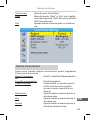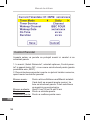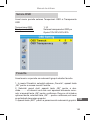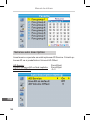
1
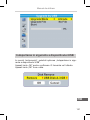
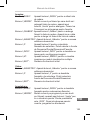
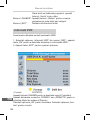
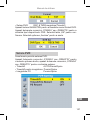
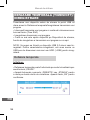
URZ0194
SET TOP BOX
Digital receiver
Bedienungsanleitung DE
Owner’s manual EN
Instrukcja obsługi PL
Manual de utilizare RO
Bedienungsanleitung
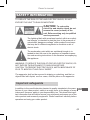
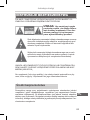
SICHERHEITSINFORMATIONEN
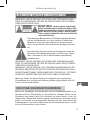
WARNUNG: UM DIE GEFAHR VON FEUER UND STROMSCHLAGGEFAHR ZU VERRINGERN, SETZEN SIE DIESES GERÄT NICHT REGEN
ODER FEUCHTIGKEIT AUS.
ACHTUNG: UM DAS RISIKO VON BRAND-
VERLETZUNGEN UND STROMSCHLÄGEN ZU VERRINGERN ENTFERNEN SIE NICHT DIE ABDECKUNG
(ODER RÜCKSEITE) DES GERÄTS. ÜBERLASSEN
SIE ALLE WARTUNGSARBEITEN QUALIFIZIERTEM
SERVICEPERSONAL.
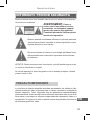
Das dreieckige Blitzsymbol mit Pfeilkopf weist den Benutzer
auf das Vorhandensein von nicht isolierter „Gefährlicher
Spannung“ im Inneren des Gerätes hin, die ausreichen
kann, um die Gefahr eines elektrischen Schlags darzustellen.
Das dreieckige Symbol mit dem Ausrufezeichen weist den
Benutzer auf wichtige Bedienungs- und Wartungs- (Reparatur-) hinweise hin, die in dieser Bedienungsanleitung
enthalten sind.
WARNUNG: UM DIE GEFAHR VON FEUER UND STROMSCHLAGGEFAHR ZU VERRINGERN, SETZEN SIE DIESES GERÄT NICHT REGEN
ODER FEUCHTIGKEIT AUS.
WARNUNG: UM DIE GEFAHR VON STROMSCHLAGGEFAHR ZU VERRINGERN, BEACHTEN SIE DIE POSITION DES STECKERS BEI POLARISIERTEM NETZKABEL GEGENÜBER DER STECKDOSE, - STECKER
KOMPLETT EINSTECKEN UND NICHT MIT GEWALT EINFÜGEN.
Warnung: setzen sie dieses Gerät nicht tropfenden oder spritzenden
Flüssigkeiten aus, und keine mit Wasser gefüllten Gegenstände, wie z.B.
Vasen, auf das Gerät stellen!
DE
WICHTIGE SICHERHEITSHINWEISE
Neben der sorgfältigen Aufmerksamkeit auf die Qualitätsstandards in der
Herstellung Ihres Video-Geräts, ist Sicherheit ein wichtiger Faktor bei der
Gestaltung von jedem Gerät. Die Sicherheit ist jedoch auch in Ihrer Verantwortung. Dieses Blatt enthält wichtige Informationen, die Ihnen helfen
sollen, Ihre Freude und sachgerechter Umgang mit dem Video-Gerät und
Zusatzgeräten zu versichern. Bitte lesen Sie sie aufmerksam durch, vor Betrieb und Nutzung Ihres Video-Geräts.
3
Bedienungsanleitung
Installation
1. Lesen Sie und befolgen Sie die Hinweise - Alle Sicherheits- und Bedienungshinweise sollten gelesen werden bevor Sie das Video-Gerät bedienen.
Befolgen Sie alle Hinweise.
2. Bedienungsanleitung aufbewahren – Die Sicherheits- und Bedienungshinweise sollten aufbewahrt werden zum späteren nachschlagen.
3. Lesen Sie alle Warnungen - Befolgen Sie alle Warnhinweise auf dem
Video-Gerät und in der Betriebsanleitung.
4. Polarisation – Einige Video-Geräte sind mit polarisiertem Wechselstromstecker ausgestattet. Dieser Stecker passt nur in eine polarisierte Steckdose. Wenn der Stecker nicht in die Steckdose passt, versuchen Sie den
Stecker umzudrehen. Wenn der Stecker noch immer nicht passt, wenden
Sie sich an einen Elektriker um Ihre Steckdose auszutauschen. Um Elektroschock zu vermeiden, verwenden Sie den polarisierten Stecker nicht mit
einem Verlängerungskabel oder Steckdose, es sei denn die Steckerkontakte können ganz eingesteckt werden, so dass keine blanken Teile zu sehen
sind. Wenn Sie ein Verlängerungskabel benötigen, benutzen Sie ein polarisiertes Kabel.
5. Spannungsversorgung - Das Video-Gerät wird mit einer Spannung versorgt, deren Wert auf der Rückseite des Gerätes angegeben ist. Wenn Sie
nicht sicher sind über die Spannung in Ihrem Heim, wenden Sie sich an
Ihren Händler oder lokalen Netzbetreiber. Die Netzspannung überprüfen,
bevor Sie das Gerät anschließen. Wenn Sie Batteriebetriebene Geräte benutzen, befolgen Sie die Bedienungsanleitung.
DE
6. Überladung. - Schließen Sie nicht zu viele Geräte an die Steckdose oder
Verlängerungskabel an, da dies zu Bränden oder elektrischen Schlag führen kann, durch eine Überlastung des Netzes. Überschreiten Sie nicht die
maximal zulässige Leistung der Steckdose. Überlastete Steckdosen, Verlängerungskabel, abgenutzte Netzkabel, beschädigte oder rissige Isolation
und zerbrochene Stecker sind gefährlich und können zu einem Schlag oder
Brände führen. Überprüfen Sie regelmäßig die Kabel, und wenn ihr Aussehen Beschädigung oder Verschlechterung der Isolierung aufweist, lassen
Sie es von Ihrem Service-Techniker ersetzen.
7.Netzkabelschutz - Stromkabel müssen so verlegt werden, dass sie wahrscheinlich nicht getreten oder Gegenstände darauf abgestellte werden, wobei
4
Bedienungsanleitung
besonderes Augenmerk gerichtet wird auf Kabeln an Steckern, Steckdosen
und dem Punkt, wo sie aus dem Video-Gerät austreten.
Wo der Netzstecker oder ein Gerät als Trennvorrichtung verwendet wird,
muss die Trennvorrichtung frei zugänglich bleiben.
8. Ventilation - Schlitze und Öffnungen im Gehäuse dienen zur Belüftung,
um zuverlässigen Betrieb des Video-Geräts zu gewährleisten und es vor
Überhitzung zu schützen. Diese Öffnungen dürfen nicht blockiert oder verdeckt werden. Die Öffnungen sollten niemals durch Aufstellen des VideoGeräts auf ein Bett, Sofa, Teppich oder Heizkörper gesperrt werden. Dieses Video-Gerät sollte nicht in einer eingebauten Installation wie in einem
Bücherregal oder Gestell platziert werden, wenn für keine ausreichende
Belüftung gesorgt wird oder die den Anweisungen des Video-Gerät Herstellers wurden befolgt.
9. Zubehör - Verwenden Sie kein Zubehör dass nicht vom Video-Gerät Hersteller empfohlen wurde, da Sie zu Gefahren führen könnten.
10. Setzen sie dieses Gerät nicht tropfenden oder spritzenden Flüssigkeiten
aus, und keine mit Wasser gefüllten Gegenstände, wie z.B. Vasen, auf das
Gerät stellen!
Achtung: Pflegen Sie elektrische Sicherheit. Stromkabel betriebene Geräte
oder Zubehör an dieses Gerät angeschlossen sollte Sicherheits-Prüfzeichen
auf dem Zubehörteil tragen und sollte nicht geändert werden, um Sicherheitsfunktionen zu beseitigen. So vermeiden Sie jede mögliche Gefahr von
Stromschlägen oder Feuer. Wenn Sie Zweifel haben, wenden Sie sich qualifiziertes Service-Personal.
11. Zubehör - Stellen Sie das Video-Gerät nicht auf einen instabilen Wagen,
Ständer, Stativ, Halter oder Tisch. Das Video-Gerät könnte herunterfallen
und dabei schwere Verletzungen an einem Kind oder Erwachsenen hervorrufen, oder das Video-Gerät kann beschädigt werden. Verwenden Sie dieses Video-Gerät nur mit einem Wagen, Ständer, Stativ, Halter oder Tische,
die vom Hersteller empfohlene oder mit dem Video-Gerät verkauft werden.
Beim Aufstellen des Geräts darf nur nach den Anweisungen des Herstellers
vorgegangen werden sowie die Verwendung eines Montagezubehörs, das
vom Hersteller empfohlen wurde.
DE
12. Eine Kombination von Video-Gerät und Wagen sollte mit Vorsicht bewegt werden. Schnelle Bewegungen, übermäßige Kraftanwendung und
unebene Oberflächen führen zum umkippen von Video-Gerät und Wagen.
Hinweis an den Kabel TV-System Installateur
Diese Erinnerung ist vorgesehen, um das Kabel TV-System Installateur
5
Bedienungsanleitung
darauf aufmerksam zu machen auf Abschnitt 820-40 der NEC, die Richtlinien für die ordnungsgemäße Erdung enthält und insbesondere festlegt,
dass das Erdungskabel mit dem Erdungssystem des Gebäudes verbunden
werden soll so nah wie möglich an der Kabeleinführung.
13. Erdung der Außenantenne -Wenn eine Außenantenne oder ein Kabelsystem an das Video-Gerät angeschlossen ist, stellen Sie sicher dass die
Antenne oder das Kabelsystem geerdet ist, um einen gewissen Schutz
gegen Spannungsspitzen und statische Aufladungen zu bieten. Abschnitt
810 des Nationalen Elektrischen Kode, ANSI / NFPA Nr.70-1984 (§ 54 des
kanadischen Elektrischen Kode, Teil 1) enthält Angaben in Bezug auf die
ordnungsgemäße Erdung des Masts und der Tragkonstruktion, Erdung des
Zuleitungsdraht zu einer Antennen-Entladungseinrichtung, dem Anschluss
an Erdungselektroden und Anforderungen für die Erdungselektroden.
13a. Stromleitungen -Eine Außenantenne sollte nicht in der Nähe von Freileitungen, anderen elektrischen Licht- oder Stromkreisen oder wo sie in
eine solche Stromleitungen oder Stromkreise fallen kann, lokalisiert sein.
Wenn Sie eine Außenantenne aufstellen, achten Sie besonders darauf, das
Berühren oder Annähern an solche Stromleitungen oder Stromkreise zu
vermeiden, da der Kontakt mit ihnen tödlich sein kann. Installieren einer
Außenantenne kann gefährlich sein und sollte einem professionellen Antennen-Installateur überlassen werden.
Benutzung
14. Reinigung - Ziehen Sie dieses Video-Gerät aus der Steckdose, bevor
Sie es reinigen. Verwenden Sie keine flüssigen Reiniger oder Sprays. Verwenden Sie ein feuchtes Tuch zur Reinigung.
DE
15. Objekte, die gefährlichen Spannungen oder herausragende Teile berühren kann, können zu einen Brand oder Stromschlag führen. Schütten Sie
niemals Flüssigkeiten jeglicher Art auf das Video-Gerät.
16. Blitzschlag - Für zusätzlichen Schutz dieses Video-Gerät während eines
Gewitters, oder wenn es unbeaufsichtigt über längere Zeit ist, den Stecker
aus der Steckdose ziehen und trennen Sie die Antenne oder das Kabelsystem vom Gerät. So vermeiden Sie Schäden am Video-Geräte durch
Blitzschlag und Überspannung.
6
Bedienungsanleitung
Reparatur
17. Reparatur - Versuchen Sie nicht, selbst die Reparatur dieses VideoGerätes durchzuführen, da das Öffnen oder Entfernen der Abdeckungen
Sie Teilen mit gefährlicher Spannung oder anderen Gefahren ausgesetzt.
Überlassen Sie die Reparatur qualifiziertem Fachpersonal.
18. Reparaturbedingungen - Trennen Sie das Video-Gerät von der Steckdose und überlassen Sie die Reparatur einem qualifizierten Fachmann unter
den folgenden Bedingungen:
A. Wenn das Netzkabel oder der Stecker beschädigt ist.
B. Wenn Flüssigkeit verschüttet wurde oder Gegenstände in das VideoGerät gefallen sind.
C. Wenn das Video-Gerät Regen oder Wasser ausgesetzt war.
D. Wenn das Video-Gerät nicht einwandfrei funktioniert, bei Befolgung der
Bedienungsanleitung.
Regeln Sie nur die Bedienelemente, die in der Bedienungsanleitung beschrieben sind. Eine falsche Einstellung anderer Bedienelemente kann zu
Schäden führen und erfordert häufig umfangreiche Arbeiten durch einen
qualifizierten Techniker, um den normalen Betrieb des Video-Geräts wieder
herzustellen.
E. Wenn das Video-Gerät fallengelassen wurde oder das Gehäuse beschädigt wurde.
F. Wenn das Video-Gerät eine deutliche Änderung in der Leistung aufweist
- dies deutet darauf dass eine Reparatur notwendig ist.
19. Ersatzteile - Wenn Ersatzteile benötigt werden, haben die ServiceTechniker zu überprüfen, ob die verwendeten Ersatzteile die gleichen Sicherheitsmerkmale wie die Originalteile haben. Benutzung von Ersatzteilen
vom Video-Gerät Hersteller angegebenen, können Brand, Stromschlag oder
andere Gefahren verhindern.
20. Sicherheitsprüfung - Nach Beendigung einer Wartung oder Reparatur
dieses Video-Gerätes, bitten Sie den Techniker die Sicherheitsprüfungen die
vom Hersteller empfohlen wurden durchzuführen, um festzustellen, ob das
Video-Gerät in sicheren Betriebszustand ist.
DE
21. Wand- oder Deckenmontage - Das Gerät sollte an einer Wand oder
Decke montiert werden, wie vom Hersteller empfohlen wurde.
22. Wärme - Das Gerät sollte ferngehalten werden von Wärmequellen wie
Heizkörpern, Wärmespeichern, Öfen oder anderen Geräten (einschließlich
Verstärker), die Hitze erzeugen.
7
Bedienungsanleitung
INHALTSVERZEICHNIS
SICHERHEITSINFORMATIONEN3
1. EINLEITUNG 1.1 Frontplatte
1.2 Rückseite
1.3 Fernbedienung
2. SYSTEMANSCHLUSS
2.1 Allgemeinheiten
2.2 Anschluss des TV-Gerätes
2.3 Anschluss an ein HiFi System
12
12
12
12
13
3.1 Willkommen
3.2 Installation
13
13
4.1 Sender auswählen
4.2 Aufruf des Elektronischen Programmführers (EPG)
5. SENDERLISTE BEARBEITEN
5.1 Menü Senderliste bearbeiten
5.2 TV Senderliste
5.3 Radio Senderliste
5.4 Alles löschen
6. SYSTEMEINSTELLUNG
6.1 Menü Systemeinstellung
6.2 Spracheinstellung
6.3 TV System
6.4 Lokalzeit einstellen
6.5 Timereinstellung
8
10
10
11
3. ERSTE SCHRITTE
4. BEDIENUNG
DE
10
16
16
16
17
17
18
19
20
20
20
21
22
22
23
Bedienungsanleitung
6.6 Kindersicherung
6.7 Bildschirmeinstellung
6.8 Favorit 6.9 Audiodeskription Einstellen
6.10 Andere
7. WERKZEUGE
7.1 Hauptmenü Werkzeuge
7.2 Information
7.3 Werkseinstellung
7.4 Software aktualisieren
7.5 USB-Gerät sicher entfernen
8. SPIELE
24
25
25
26
27
28
28
28
29
30
31
32
8.1 Spiele
32
9. REKORDER
33
9.1 Hauptmenü Rekorder
9.2 Media Player
9.3 PVR Speicherinformation
9.4 PVR Einstellungen
33
33
36
37
10. ZEITVERSETZTES FERNSEHEN/DIREKTE AUFNAHME38
10.1 Zeitversetztes Fernsehen
10.2 Aufnehmen
38
39
STÖRUNGSBEHEBUNG39
TECHNISCHE DATEN
DE
41
9
Bedienungsanleitung
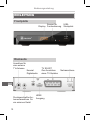
EINLEITUNG
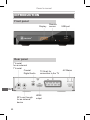
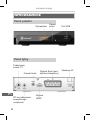
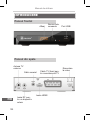
Frontplatte
Sensor für
Display Fernbedienung
USBSteckplatz
Rückseite
Anschluss für
eine externe
TV-Antenne
Koaxial
Digitalaudio
TV SCART
Zum Anschluss
eines TV-Gerätes
DE
Durchgeschleifter Antennenanschluss für
ein externes Gerät
10
HDMI
Ausgang
Netzanschluss
Bedienungsanleitung
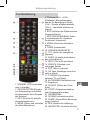
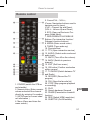
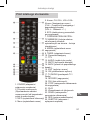
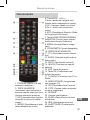
Fernbedienung
5. Pfeiltasten/CH+, -/VOL+,(Pfeiltasten: Navigationstasten,
benutzt für Bewegung im Menü)
(CH+/-: Sender aufwärts/abwärts)
(VOL+/-: Lautstärke erhöhen/verringern)
6. EPG (Aufrufen des Elektronischen
Programmführers)
7. ROT/GRÜN/GELB/BLAU Tasten
(Funktionstasten für interaktive
Funktionen/ Untermenü)
8. MEDIA (Aufruf des Aufnahmemenü)
9. TIMER (Aufwachzeit)
10. VORHERIGE/NÄCHSTE
11. TTX (Aufruf des interaktiven
Dienstes)
12. AUDIO (Auswahl des Audiomodus und Audiospur)
13. MUTE (Ton ein/Ausschalten)
14. ZURÜCK (Rückkehr zum
vorherigen Sender
15. EXIT (Menü verlassen)
16. OK Taste (Bestätigen einer Auswahl im Menü)
17. TV/RADIO (Umschalten
zwischen TV und Radio)
18. AUFNEHMEN (Aufnehmen des
TV Programm)
1. STANDBY (STB einschalten 19. FAVORIT (Öffnen der Favoroder in Standby)
itliste)
2. ZIFFERNTASTEN (Eingabe
20. STOPP (Programmaufnahme
von Zahlenwerten und direkte
oder Wiedergabe beenden)
Senderauswahl durch Eingabe 21. WIEDERGABE
der Nummer)
22. SUCHEN rückwärts/vorwärts
3. INFO (Drücken für aktuelle
23. PAUSE (Pause/Aktive ZeitversetSenderinformationen )
zungs-Funktion)
4. MENÜ (Öffnen und schließen 24. RES (Ändern der Auflösung)
des Menübildschirms)
25. UNTERTITEL (Untertitel Ein/Aus)
DE
11
Bedienungsanleitung
SYSTEMANSCHLUSS
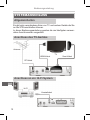
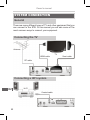
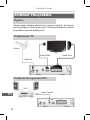
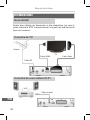
Allgemeinheiten
Es gibt viele verschiedene Arten von TV und andere Geräte die Sie
an die STB anschließen können.
In dieser Bedienungsanleitung werden die am häufigsten verwendeten Anschlussarten vorgestellt.
Anschluss des TV-Gerätes
Antenne
TV
HDMI Kabel
RF Kabel
Anschluss an ein Hi-Fi System
DE
Hi-Fi
Koaxialkabel
12
Scart Kabel
Bedienungsanleitung
ERSTE SCHRITTE
Willkommen
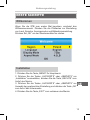
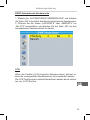
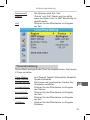
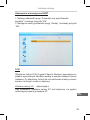
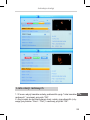
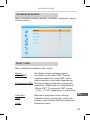
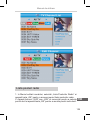
Wenn Sie die STB zum ersten Mal benutzen, erscheint das
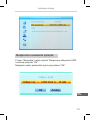
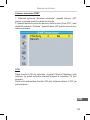
Willkommensmenü. Drücken Sie die Pfeiltasten zur Einstellung
von Land, Sprache, Anzeigemodus und Bildschirmeinstellung
Drücken Sie „OK“ um den Sendersuchlauf zu starten.
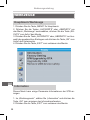
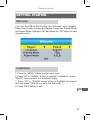
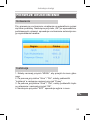
Installation
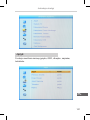
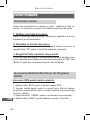
1. Drücken Sie die Taste „MENÜ“ für Hauptmenü.
2. Drücken Sie die Tasten „AUFWÄRTS“ oder „ABWÄRTS“ um
„Installation“ auszuwählen, drücken Sie die Taste „RECHTS“ zum
Aufruf des Menüs.
3. Drücken Sie die Tasten „AUFWÄRTS“ oder „ABWÄRTS“ zur
Auswahl der gewünschten Einstellung und drücken die Taste „OK“
zum Aufruf des Untermenüs.
4. Drücken Sie die Taste „EXIT“ zum verlassen des Menüs.
DE
13
Bedienungsanleitung
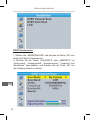
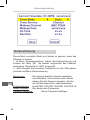
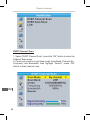
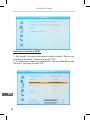
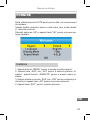
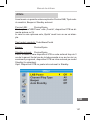
DVBT Sendersuche
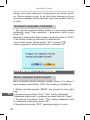
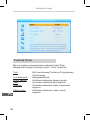
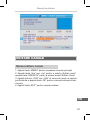
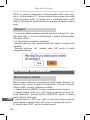
1. Wählen Sie „SENDERSUCHE“ und drücken die Taste „OK“ zum
Aufruf des Menüs Sendersuche.
2. Drücken Sie die Tasten „AUFWÄRTS“ oder „ABWÄRTS“ um
„Suchmodus“, „Frequenzband“, „Sendernummer“, „Frequenz“ und
„Bandbreite“ auszuwählen, und drücken Sie die Taste „OK“ um
den Sendersuchlauf zu starten.
DE
14
Bedienungsanleitung
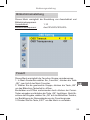
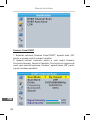
DVBT Automatische Sendersuche
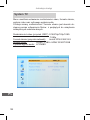
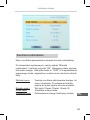
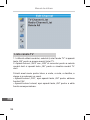
1. Wählen Sie „AUTOMATISCHE SENDERSUCHE“ und drücken
die Taste „OK“ zum Aufruf des Menüs Automatische Sendersuche.
2. Drücken Sie die Tasten „AUFWÄRTS“ oder „ABWÄRTS“ um
„Nur FTA“ auszuwählen, und drücken Sie die Taste „OK“ um den
automatischen Sendersuchlauf zu starten.
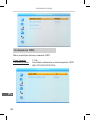
LCN
Wenn die Funktion LCN (Logische Sendernummer) aktiviert ist,
kann die voreingestellte Sendernummer nicht verändert werden.
Die LCN Funktion kann aktiviert/desaktiviert werden durch einstellen von „LCN“ Ein/Aus.
DE
15
Bedienungsanleitung
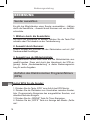
BEDIENUNG
Sender auswählen
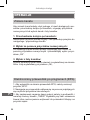
Es gibt drei Möglichkeiten einen Sender auszuwählen – blättern
durch die Senderliste, - Auswahl durch Nummer und von der Bildschirmliste.
1. Blättern durch die Senderliste:
Um durch die Senderliste zu blättern, drücken Sie die Taste Pfeil
aufwärts oder Pfeil abwärts an der Fernbedienung.
2. Auswahl durch Nummer:
Direkte Eingabe der Nummer mit den Zahlentasten und mit „OK“
Senderauswahl bestätigen
3. Auswahl aus der Bildschirmliste:
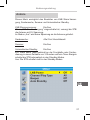
Der gewünschte Sender kann auch aus der Bildschirmliste ausgewählt werden. Diese wird durch das Hauptmenü der STB angezeigt. Siehe „Senderbearbeitung“ in dieser Bedienungsanleitung für weitre Angaben.
Aufrufen des Elektronischen Programmführers
(EPG)
DE
Aufruf EPG für alle Sender:
1. Drücken Sie die Taste „EPG“ zum Aufruf des EPG Menüs.
2. Drücken Sie die Pfeiltasten zum Umschalten zwischen Senderliste, Programmierte Ereignisse des ausgewählten Senders, und
aktuelles/nächstes Ereignis.
3. Drücken Sie die „GRÜNE“ Taste für Timer Ereignisse.
4. Drücken Sie die „ROTE“ Taste zur Anzeige des Menüs „Zeitleiste“.
16
Bedienungsanleitung
SENDERLISTE BEARBEITEN
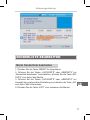
Menü Senderliste bearbeiten
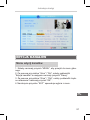
1. Drücken Sie die Taste „MENÜ“ für Hauptmenü.
2. Drücken Sie die Tasten „AUFWÄRTS“ oder „ABWÄRTS“ um
„Senderliste bearbeiten“ auszuwählen, drücken Sie die Taste „RECHTS“ zum Aufruf des Menüs.
3. Drücken Sie die Tasten „AUFWÄRTS“ oder „ABWÄRTS“ zur
Auswahl der gewünschten Einstellung und drücken die Taste „OK“
zum Aufruf des Untermenüs.
4. Drücken Sie die Taste „EXIT“ zum verlassen des Menüs.
DE
17
Bedienungsanleitung
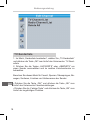
TV-Senderliste
1. Im Menü „Senderliste bearbeiten“, wählen Sie „TV-Senderliste“
und drücken die Taste „OK“ zum Aufruf des Untermenüs. TV-Senderliste
2. Drücken Sie die Tasten „AUFWÄRTS“ oder „ABWÄRTS“ um
einen Sender auszuwählen und im rechten Vorschaufenster zu
betrachten.
Benutzen Sie dieses Menü für Favorit, Sperren, Überspringen, Bewegen, Sortieren, Löschen und Umbenennen der Sender.
DE
18
• Drücken Sie die Taste „FAV“ und drücken die Taste „OK“ zum
Aufruf des Untermenüs Favoriteinstellungen.
• Drücken Sie die „Farbige Taste“ und drücken die Taste „OK“ zum
Aufruf der zugehörigen Funktion.
Bedienungsanleitung
DE
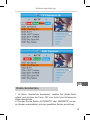
Radio-Senderliste
1. Im Menü „Senderliste bearbeiten“, wählen Sie „Radio-Senderliste“ und drücken die Taste „OK“ zum Aufruf des Untermenüs.
Radio-Senderliste
2. Drücken Sie die Tasten „AUFWÄRTS“ oder „ABWÄRTS“ um einen Sender auszuwählen und den gewählten Sender anzuhören. .
19
Bedienungsanleitung
HINWEIS :Im Grunde ist die Optionen für die Senderliste die gleiche wie beim TV, mit dem Unterschied da es bei den Radio-Senderlisten keine Videoinformation gibt, wird im rechten Vorschaufenster das Logo des jeweiligen Senders angezeigt
Alles löschen
1. Im Menü „Senderliste bearbeiten“, wählen Sie „Alles löschen“
und drücken die Taste „OK“. Sie werden aufgefordert das Passwort einzugeben (Werkseitig ist „0000“ eingestellt)
2. Ein Warnfenster wird angezeigt.
Wählen Sie „Ja“ und drücken die Taste „OK“ um alle Sender zu
löschen.
Wählen Sie „Nein“ und drücken die Taste „OK“ um den Vorgang
abzubrechen.
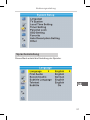
SYSTEMEINSTELLUNGEN
Menü Systemeinstellung
DE
20
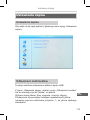
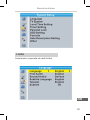
Das Menü Systemeinstellungen ermöglicht die Einstellung von
Sprache, TV-System, Lokalzeit, Timer, Kindersicherung, Bildschirmtext, Favoriten, Automatische Beschreibung und Andere.
1. Drücken Sie die Taste „MENÜ“ für Hauptmenü.
2. Drücken Sie die Tasten „AUFWÄRTS“ oder „ABWÄRTS“ um das
Menü „Systemeinstellungen“ auszuwählen, drücken Sie die Taste
„RECHTS“ zum Aufruf des Menüs.
3. Drücken Sie die Taste „AUFWÄRTS“ oder „ABWÄRTS“ zur Auswahl des gewünschten Eintrages und drücken die Taste „OK“ zum
Aufruf des Untermenüs.
4. Drücken Sie die Taste „EXIT“ zum verlassen des Menüs.
Bedienungsanleitung
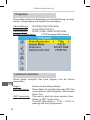
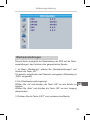
Spracheinstellung
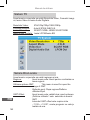
Dieses Menü erlaubt die Einstallung der Sprache.
DE
21
Bedienungsanleitung
TV-System
Dieses Menü erlaubt die Einstellung von Videoauflösung, Anzeigemodus, Videoausgang und Digitaler Audioausgang.
Videoauflösung: 576i/576p/720p/1080i/1080p
Anzeigemodus: Auto/4:3PS/4:3LB/16:9
Videoausgang: SCART CVBS+ HDMI/ SCART RGB
Digitaler Audioausgang: LPCM Ausgang/ BS Ausgang
Lokalzeit einstellen
DE
22
Dieses Menü ermöglicht das Land (Region) und die Uhrzeit
einzustellen.
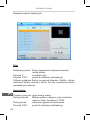
Region:
GMT Benutzung:
GMT Versetzung: Ändern der Einstellung Region.
Dieses Menü ist zum Einstellen der GMT. Nut
zung Optionen: Nach Regionen / Benutzerde
finiert / Aus
This menu is valid only when selected „User Define” in GMT Usage menu .
The GMT offset range is „-11:30 ~ +12:00”, in
creasing half hour progressively.
Bedienungsanleitung
Sommerzeit:
Die Optionen sind: Ein / Aus.
Datum: „Datum” und „Zeit“ Menüs sind nur gültig, wenn die Option „Aus“ in GMT Benutzung ein
gestellt wurde.
Zeit:
Drücken Sie die Zifferntasten zur Eingabe der Zeit.
Timereinstellung
Dieses Menü ermöglicht den Timer zu programmieren. Sie können
8 Timer einstellen.
Timer Modus:
Aus/ Einmal/ Täglich/ Wöchentlich/ Monatlich
Timer Service:Sender/Aufnahme
Aufwachsender:
Sie können den gewünschten Sender zum Aufwachen einstellen.
Aufwachdatum:
Drücken Sie die Zifferntasten zur Eingabe des Datums.
Einschaltzeit:
Drücken Sie die Zifferntasten zur Eingabe der Zeit.
Ausschaltzeit:
Drücken Sie die Zifferntasten zur Eingabe der Zeit.
Zeitdauer:
Drücken Sie die Zifferntasten zur Eingabe Zeitdauer.
DE
23
Bedienungsanleitung
Kindersicherung
Dieses Menü ermöglicht Menü und Sender zu sperren, sowie das
Passwort zu ändern.
1. Im Menü „Systemeinstellung“, wählen Sie Kindersicherung und
drücken die Taste „OK“, Sie werden aufgefordert das Passwort
einzugeben (Werkseitig ist „0000“ eingestellt).
2. Nach Eingabe des korrekten Passwortes mit den Zifferntasten
erscheint das Menü Kindersicherung.
DE
24
Menüsperre:
Zum sperren des Menü Sender bearbeiten und Installation. Zum aufrufen dieser Menüs müssen Sie das Passwort eingeben. Sie kön
nen die Menüsperre Ein- oder Ausschalten.
Kindersicherung: Aus/ALTER 10/ALTER 12/ALTER 16/ALTER 18
Neues Passwort: Zum ändern des Passwortes.
Passwort bestätigen:
Neues Passwort bestätigen.
Bedienungsanleitung
Bildschirmeinstellung
Dieses Menü ermöglicht die Einstellung von Ausschaltzeit und
Bildschirmtransparenz.
Ausschaltzeit: 1-10
Bildschirmtransparenz:Aus/10%/20%/30%/40%.
Favorit
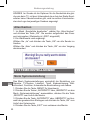
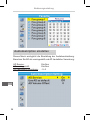
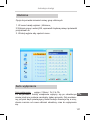
Dieses Menü ermöglicht die Favoriten-Gruppe umzubenennen.
1. In Menü Senderliste wählen Sie „Favoriten“, drücken die Taste
„OK“, zum Aufruf des Menü Favoriten.
2. Wählen Sie die gewünschte Gruppe, drücken die Taste „OK“,
um das Bildschirm Tastenfeld zu öffnen.
Buchstaben und Ziffern nacheinander durch drücken der CursorTasten eingeben und drücken die Taste „OK“, bestätigen. Nach Abschluss der Eingabe, wählen Sie „OK“ auf der Bildschirm-Tastatur,
zur Bestätigung der Namensänderung der Favoritengruppe.
3. Drücken Sie die Taste „EXIT“ um das Menü zu verlassen.
DE
25
Bedienungsanleitung
Audiodeskription einstellen
Dieses Menü ermöglicht die Einstellung der Audiobeschreibung.
Benutzen Sie AD als voreingestellt und AD Lautstärke-Versetzung:
AD Service: Ein/Aus
AD voreingestellt:
Ein/Aus
AD Lautstärke-Versetzung:-3~3
DE
26
Bedienungsanleitung
Andere
Dieses Menü ermöglicht das Einstellen von LNB Strom-Versorgung, Sendersuche, Summer und Automatischer Standby.
LNB Stromversorgung: Ein/Aus
Wenn „LNB Stromversorgung“ eingeschaltet ist, versorgt die STB
die Antenne mit 5V Spannung.
Im Modus „Aus“ wird keine Spannung an die Antenne geliefert.
Sendersuche:
Alle/ Frei/ Verschlüsselt
Summer:Ein/Aus
Automatischer Standby:Ein/Aus
Ein: Wenn keine Taste gedrückt an der Frontplatte oder Fernbedienung in einem Zeitraum von 3 Stunden und kein Timer-Ereignis
schaltet die STB automatisch in den Standby-Modus.
Aus: Die STB schaltet nicht in den Standby-Modus.
DE
27
Bedienungsanleitung
WERKZEUGE
Hauptmenü Werkzeuge
1. Drücken Sie die Taste „MENÜ“ für Hauptmenü.
2. Drücken Sie die Tasten „AUFWÄRTS“ oder „ABWÄRTS“ um
das Menü „Werkzeuge“ auszuwählen, drücken Sie die Taste „RECHTS“ zum Aufruf des Menüs.
3. Drücken Sie die Taste „AUFWÄRTS“ oder „ABWÄRTS“ zur Auswahl des gewünschten Eintrages und drücken die Taste „OK“ zum
Aufruf des Untermenüs.
4. Drücken Sie die Taste „EXIT“ zum verlassen des Menüs.
DE
Information
Dieses Menü kann einige Parameter-Informationen der STB anzeigen.
1. Im „Werkzeugmenü“, wählen Sie „Information“ und drücken die
Taste „OK“ zum anzeigen des Informationsfensters.
2. Drücken Sie die Taste „EXIT“ zum verlassen des Menüs.
28
Bedienungsanleitung
Werkseinstellungen
Dieses Menü ermöglicht die Rückstellung der STB auf die Werkseinstellungen, das Löschen aller gespeicherten Sender.
1. Im Menü „Werkzeuge“, wählen Sie „Werkseinstellungen“ und
drücken die Taste „OK“.
Sie werden aufgefordert das Passwort einzugeben (Werkseitig ist
„0000“ eingestellt)
2. Ein Warnfenster wird angezeigt.
Wählen Sie „Ja“ und drücken die Taste „OK“ um alle Sender zu
löschen.
Wählen Sie „Nein“ und drücken die Taste „OK“ um den Vorgang
abzubrechen.
DE
3. Drücken Sie die Taste „EXIT“ zum verlassen des Menüs.
29
Bedienungsanleitung
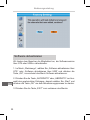
Software aktualisieren
Wir bieten dem Benutzer die Möglichkeit an, die Softwareversion
über OTA oder USB zu aktualisieren.
1. Im Menü „Werkzeuge“, wählen Sie „Software aktualisieren über
OTA“ oder „Software aktualisieren über USB“ und drücken die
Taste „OK“, es erscheint das Menü Software aktualisieren.
DE
2. Drücken Sie die Taste „AUFWÄRTS“ oder „ABWÄRTS“ zur Auswahl des gewünschten Eintrages, danach wählen Sie „Start“ und
drücken die Taste „OK“ um den Aktualisierungsprozess zu starten.
3. Drücken Sie die Taste „EXIT“ zum verlassen des Menüs.
30
Bedienungsanleitung
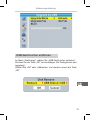
USB-Gerät sicher entfernen
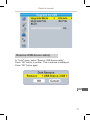
Im Menü „Werkzeuge“, wählen Sie „USB-Gerät sicher entfernen“.
Drücken Sie die Taste „OK“ zum bestätigen. Ein Dialogfenster wird
angezeigt.
Wählen Sie „OK“ oder „Abbrechen“ und drucken erneut die Taste
„OK“.
DE
31
Bedienungsanleitung
SPIELE
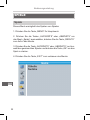
Spiele
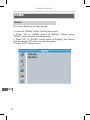
Dieses Menü ermöglicht das Spielen von Spielen
1. Drücken Sie die Taste „MENÜ“ für Hauptmenü.
2. Drücken Sie die Tasten „AUFWÄRTS“ oder „ABWÄRTS“ um
das Menü „Spiele“ auszuwählen, drücken Sie die Taste „RECHTS“
zum Aufruf des Menüs.
3. Drücken Sie die Taste „AUFWÄRTS“ oder „ABWÄRTS“ zur Auswahl des gewünschten Spieles und drücken die Taste „OK“ um das
Spiel zu starten.
4. Drücken Sie die Taste „EXIT“ zum verlassen des Menüs.
DE
32
Bedienungsanleitung
REKORDER
Hauptmenü Rekorder
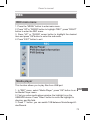
1. Drücken Sie die Taste „MENÜ“ für Hauptmenü.
2. Drücken Sie die Tasten „AUFWÄRTS“ oder „ABWÄRTS“ um das
Menü „Rekorder“ auszuwählen, drücken Sie die Taste „RECHTS“
zum Aufruf des Menüs.
3. Drücken Sie die Taste „AUFWÄRTS“ oder „ABWÄRTS“ zur Auswahl des gewünschten Eintrages und drücken die Taste „OK“ zum
Aufruf des Untermenüs.
4. Drücken Sie die Taste „EXIT“ zum verlassen des Menüs.
Media-Player
Diese Funktion ermöglicht das Abspielen der Dateien vom USBSpeicher.
1. Im Menü „Rekorder“, wählen Sie „Media-Player“ und drücken
die Taste „OK“. Zum Aufruf des Untermenüs.
2. Im Fenster Media-Player wählen Sie das Gerät USB/HDD aus.
Drücken Sie die Taste „ABWÄRTS“ zur Auswahl des Ordners und
des Dateifeldes.
3. Drücken der Taste „1“ zur Auswahl von Musik/ Bilder/ Video/
Aufnahme.
DE
33
Bedienungsanleitung
4. Drücken Sie die Taste „AUFWÄRTS“ oder „ABWÄRTS“ zur Auswahl des gewünschten Eintrages und drücken die Taste „OK“ zur
Wiedergabe der gewünschten Datei.
5. Drücken Sie die Taste „EXIT“ zum verlassen des Menüs.
DE
34
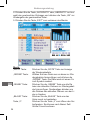
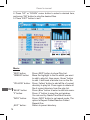
Musik:
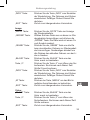
„ROTE“ Taste:
Drücken Sie die „ROTE“ Taste zur Anzeige der Wiedergabeliste.
„GRÜNE“ Taste:
Wählen Sie eine Datei aus um diese zur Wie
dergabeliste hinzuzufügen und drücken die „GRÜNE“ Taste. Die Datei wird mit einem Fa
vorit-Symbol markiert.
„GELBE“ Taste:
Drücken Sie die „GELBE“ Taste um alle Da
teien des aktuellen Ordners zur Wiedergabeli
ste hinzuzufügen. Nochmaliges drücken um alle Dateien des aktuellen Ordners von der Li
ste zu löschen.
„BLAUE“ Taste:
Drücken Sie die „BLAUE“ Taste um das Unter menü zu bearbeiten.
Taste „2“:
Drücken Sie die Taste „2“ zum öffnen des Sor
tierfensters. Sie können nach Name/ Zeit/ Größe/ Favorit sortieren.
Bedienungsanleitung
„INFO“ Taste:
Drücken Sie die Taste „INFO“ zum Einstellen der Wiederholung. Die Optionen sind Ordner wiederholen/ Zufälliger Ordner/ Einmal Wie
derholen.
„EXIT“ Taste:
Zurück zum übergeordneten Verzeichnis.
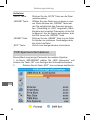
Image:
„ROTE“ Taste:
Drücken Sie die „ROTE“ Taste zur Anzeige der Wiedergabeliste.
„GRÜNE“ Taste:
Wählen Sie eine Datei aus um diese zur Wie
dergabeliste hinzuzufügen und drücken die „GRÜNE“ Taste. Die Datei wird mit einem Fa
vorit-Symbol markiert.
„GELBE“ Taste:
Drücken Sie die „GELBE“ Taste um alle Da
teien des aktuellen Ordners zur Wiedergabeli
ste hinzuzufügen. Nochmaliges drücken um alle Dateien des aktuellen Ordners von der Li
ste zu löschen.
„BLAUE“ Taste:
Drücken Sie die „BLAUE“ Taste um das Unter menü zu bearbeiten.
Taste „2“:
Drücken Sie die Taste „2“ zum öffnen des Sor
tierfensters. Sie können nach Name/ Zeit/ Größe/ Favorit sortieren.
„INFO“ Taste:
Drücken Sie die Taste „INFO“ zum Einstellen der Wiederholung. Die Optionen sind Ordner wiederholen/ Zufälliger Ordner/ Einmal Wie
derholen.
„M” Taste:
Drücken der Taste „MEDIA“ um das Bild in multiplen Ansichtsmodus zu betrachten
DE
„EXIT“ Taste:
Zurück zum übergeordneten Verzeichnis.
Video:
„BLAUE“ Taste:
Drücken Sie die „BLAUE“ Taste um das Unter menü zu bearbeiten.
Taste „2“:
Drücken Sie die Taste „2“ zum öffnen des
Sortierfensters. Sie können nach Name/ Zeit/ Größe sortieren.
„EXIT“ Taste:
Zurück zum übergeordneten Verzeichnis.
35
Bedienungsanleitung
Aufnahme:
„ROTE“ Taste:
Drücken Sie die „ROTE“ Taste um die Datei umzubenennen.
„GRÜNE“ Taste:
Wählen Sie eine Datei aus um diese zu sper
ren. Beim drücken der „GRÜNE“ Taste wer
den Sie aufgefordert das Passwort einzuge
ben. (Werkseitig ist „0000“ eingestellt). Nach Eingabe des korrekten Passwortes ist die Da
tei gesperrt. Um die Sperre aufzuheben, drüc
ken Sie erneut die „GRÜNE“ Taste.
„GELBE“ Taste:
Drücken Sie die „GELBE“ Taste um die Datei für löschen zu markieren. Nochmaliges drüc
ken löscht die Datei.
„EXIT“ Taste:
Zurück zum übergeordneten Verzeichnis.
PVR Speicherinformationen
Dieses Menü zeigt einige Parameter der mobilen Speicher.
1. Im Menü „REKORDER“ wählen Sie „HDD Information“ und
drücken die Taste „OK“ zum Anzeigen des Informationsfensters.
2.
Drücken Sie die Taste „EXIT“ zum verlassen des Menüs.
DE
36
Bedienungsanleitung
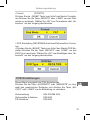
• Format FAT/NTFS
Drücken Sie die „GELBE“ Taste zum Aufruf des Menüs Formatieren Drücken Sie die Taste „RECHTS“ oder „LINKS“ um den Diskmodus zu wechseln. Wählen Sie „OK“ zum Formatieren oder „Abbrechen“ um den Vorgang abzubrechen.
• DVR Einstellung REC&TMS/Aufnehmen/Zeitversetztes Fernsehen
• Drücken Sie die „BLAUE“ Taste zum Aufruf des Menüs DVR Einstellen Drücken Sie die Taste „RECHTS“ oder „LINKS“ um den
DVR Typ zu wechseln. Wählen Sie „OK“ zum Bestätigen oder „Abbrechen“ um den Vorgang abzubrechen.
PVR Einstellungen
Dieses Menü ermöglicht die PVR Einstellungen.
Drücken Sie die Taste „AUFWÄRTS“ oder „ABWÄRTS“ zur Auswahl des gewünschten Eintrages und drücken die Taste „RECHTS“ oder „LINKS“ um die Einstellung zu verändern.
Zeitversetzung Zeitversetzte Aufnahme:
PS Aufnahme:
DE
EIN /PAUSE AUS
EIN/AUS
EIN/AUS
37
Bedienungsanleitung
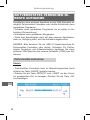
ZEITVERSETZTES FERNSEHEN /DIREKTE AUFNAHME
Anschließen eines externen Speichers an den USB-Steckplatz ermöglicht Zeitversetztes Fernsehen oder direkte Aufnahmen eines
gesendeten Programms.
• Anhalten eines gesendeten Programms um es später zu betrachten (Zeitversetzung).
• Aufnehmen eines gesendeten Programms.
• Wenn kein Speicherplatz mehr auf dem externen Speichermedium zur Verfügung steht, wird die Aufnahme abgebrochen.
HINWEIS: Bitte benutzen Sie ein USB 2.0 Speichermedium für
Zeitversetztes Fernsehen oder direkte. Aufnahme Für Zeitversetztes Fernsehen und Aufnahmefunktion benötigen Sie einen
größeren USB Speicher oder externe Festplatte (>2GB) zum Aufnehmen.
Zeitversetzte Aufnahme
Starten
• Zeitversetztes Fernsehen kann im Betrachtungsmodus durch
drücken der Taste „PAUSE“ gestartet werden.
• Drücken Sie die Taste „RECHTS“ oder „LINKS“ um den Cursor
zur gewünschten Zeit zu bewegen. Drücken Sie die Taste „OK“
zum bestätigen.
DE
38
Bedienungsanleitung
Trickmodus
Während der Wiedergebe können Sie folgende Aktionen durchführen:
• Drücken der Taste „PAUSE“ um die Wiedergabe anzuhalten
• Drücken Sie die Taste „VORLAUF“ für schnellen Vorlauf der Wiedergabe
• Drücken Sie die Taste „RÜCKLAUF“ für schnellen Rücklauf der
Wiedergabe
Beenden der Zeitversetzten Betrachtung
• Drücken Sie die Taste „STOPP“ um die Funktion Zeitversetztes
Fernsehen zu beenden.
Aufnehmen
Direkte Aufnahme
Im Betrachtungsmodus drücken Sie die Taste „AUFNEHMEN“ um
die direkte Aufnahme des aktuellen Programms zu beginnen.
• Erneutes drücken der Taste „AUFNEHMEN“ zur Eingabe der Aufnahmedauer.
• Drücken der Taste „STOPP“ beendet die Aufnahme, es erscheint
ein Bestätigungsfenster.
• Wählen Sie „JA“ um die Aufnahme zu beenden. Wählen Sie
„NEIN“ um die Aufnahme fortzusetzen.
HINWEIS:
Bitte benutzen Sie zum Aufnehmen und Zeitversetztes Fernsehen USB 2.0 Speicher oder Festplatten nominierter Hersteller wie
z.B. SAMSUNG, HITACHI und SONY. Einige USB Geräte werden
möglicherweise nicht unterstützt wegen schwacher Qualität.
DE
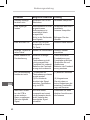
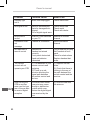
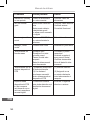
STÖRUNGSBEHEBUNG
In einigen Regionen kann das digitale terrestrische Signal
schwach sein. Es ist deshalb ratsam eine Antenne mit eingebautem Verstärker zu benutzen um die Sender mit schwachem
Signal zu betrachten.
39
Bedienungsanleitung
Problem
Mögliche Ursachen
Lösung
Standby-Anzeige
leuchtet nicht
Netzkabel nicht in der
Steckdose
Netzkabel überprüfen
Kein Signal gefunden
Außenantenne ist nicht
angeschlossen
Außenantenne ist
beschädigt/ falsch
ausgerichtet
Nicht in der Reichweite
des Signals
Überprüfen des Antennenkabels
Antenne überprüfen
Kein Bild oder Ton
SCART/AV ist nicht
ausgewählt an Ihrem
TV Gerät
Anderen Kanal wählen
Anzeige „Verschlüsselter Kanal“
Sender ist verschlüsselt
Anderen Sender
auswählen
Keine Reaktion zur
Fernbedienung
Receiver ist ausgeschaltet
Fernbedienung nicht
richtig ausgerichtet
Frontplatte ist verdeckt
Batterien der Fernbedienung sind verbraucht
Gerät einschalten
Fernbedienung zur
Frontplatte ausrichten
Überprüfen Sie auf
Hindernisse
Batterien der Fernbedienung ersetzen
Die Fernbedienung
funktioniert nicht
(1) Batterien der
Fernbedienung müssen
ersetzt werden
(2) Ein Hindernis
blockiert das Signal
zwischen Fernbedienung und STB
(1) Batterien ersetzen
Der neue Antennenanschluss kommt
möglicherweise durch
einen Verteiler der
das digitale Signal
schwächt
Versuchen Sie einen
direkten Anschluss an
die Antenne
DE
Nach dem umstellen der STB in
einen anderen
Raum, empfangen
Sie kein digitales
Signal
40
Befragen Sie den
Händler
(2) Vergewissern
Sie sich dass es
keine Hindernisse gibt
zwischen Fernbedienung und Receiver
Bedienungsanleitung
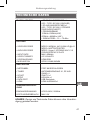
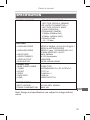
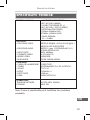
TECHNISCHE DATEN
TUNER & SENDER
• RF EINGANGSSTECKER x1
(IEC - TYPE, IEC169-2, BUCHSE)
• RF AUSGANGSSTECKER x1
(IEC - TYPE, IEC169-2, STECKER
(DURCHGESCHLEIFT)
• FREQUENZBAND
174MHz~230MHz(VHF)
470MHz ~862MHz (UHF)
• SIGNALPEGEL: -15 ~ -70 dBm
DECODER
• VIDEO DECODER
• AUDIO DECODER
• INPUT RATE
• VIDEO FORMATS
• VIDEOAUSGANG
• MODULATION
MPEG-2 MP@HL, AVC/H.264 HP @L4.1
MPEG-4 ASP SUPPORTED
MPEG-1 Layer 1,2/PCM/HE-AAC V1.0
ICE958 SPDIF/AC3/ E-AC3
MAX. 48Mbit/s
4:3/16:9/AUTO
HDMI,RGB
QPSK,16QAM,64QAM
ANSCHLÜSSE
• NETZKABEL
• TUNER
• SCART
• SPDIF
• DATA PORT
• HDMI
FEST ANGESCHLOSSEN
ANTENNENEINGANG X1, RF AUSGANG x1
ZUM TV x1
KOAXIAL x1
USB Steckplatz
HDMI AUSGANG x1
SPANNUNGSVERSORGUNG
EINGANGSSPANNUNG
LEISTUNGSVERBRAUCH
DE
AC220~240V, 50/60Hz
MAX. 6W
HINWEIS: Design und Technische Daten können ohne Vorankündigung geändert werden.
41
Bedienungsanleitung
DE
42
Owner’s manual
SAFETY INFORMATION
TO REDUCE THE RISK OF FIRE AND ELECTRIC SHOCK, DO NOT
EXPOSE THIS UNIT TO RAIN OR MOISTURE.
CAUTION: To reduce the
risk of fire and electric shock, do not
remove the cover (or back) of the
unit. Refer servicing only to qualified
service personnel.
The lightning flash with arrowhead symbol, within an equilateral triangle, is intended to alert the user to the presence of
uninsulated „dangerous voltage” within product’s enclosure
that may be of sufficient magnitude to constitute a risk of
electric shock.
The exclamation point within an equilateral triangle is intended to alert the user to the presence of important operation and servicing instructions in the literature accompanying
the appliance.
WARNING: TO REDUCE THE RISK OF FIRE OR ELECTRIC SHOCK, DO
NOT EXPOSE THIS APPLIANCE TO RAIN OR MOISTURE.
CAUTION: TO PREVENT ELECTRIC SHOCK, MATCH WIDE BLADE OF
PLUG TO WIDE SLOT AND FULLY INSERT.
The apparatus shall not be exposed to dripping or splashing, and that no
objects filled with liquids, such as vases, shall be place on the apparatus.
Important safeguards
In addition to the careful attention devoted to quality standards in the manufacture of your video product, safety is a major factor in the design of every
instrument. However, safety is your responsibility, too. This sheet lists important information that will help to assure your enjoyment and proper use of the
video product and accessory equipment. Please read them carefully before
operation and using your video product.
EN
43
Owner’s manual
Installation
1. All the safety and operation instructions should be read before the video
product is operated. Follow all operating instructions.
2. Retain Instructions- The safety and operating instructions should be retained for future reference.
3. Heed all Warnings-Comply with all warnings on the video product and in
the operating instructions.
4. Polarization- Some video products are equipped with a polarized alternating -current line plug. This plug will fit into the power outlet, try reversing
the plug. If the plug still fails to fit, contact your electrician to replace your
obsolete outlet. To prevent electric shock, do not use this polarized plug
with an extension cord, receptacle, or other outlet unless the blades can be
fully inserted without blade exposure. If you need an extension cord, use a
polarized cord.
5. Power Sources- This video product should be operated only from the type
of power source indicated on the marking label. If you are not sure of the
type of power supply to your home, consult your video dealer or local power
company. For video products intended to operate from battery power, or
other sources, refer to the operating instructions.
6. Overloading- Do not overload wall outlets or extension cords as this can
result in a risk of fire or electric shock. Overloaded AC outlets, extension
cords, frayed power cords, damaged or cracked wire insulation, and broken
plugs are dangerous, They may result in a shock or fire hazard. Periodically
examine the cord, and if its appearance indicated damage or deteriorated
insulation, have it replaced by your service technician.
EN
7. Power-Cord Protection- Power-supply cords should be routed so that they
are not likely to be walked on or pinched by items placed upon or against
them, paying particular attention to cords at plugs, convenience receptacles,
and the point where they exit from the video product. Where the MAIN plug
or an appliance coupler is used as the disconnect device,the disconnect
device shall remain readily operable.
8. Ventilation- Slots and openings in the case are provided for ventilation to
ensure reliable operation of the video product and to protect it from overheating. These openings must not the blocked or covered. The openings
should never be blocked by placing the video product on a bed, sofa, rug, or
44
Owner’s manual
heat register. This video product should not be placed in a built-in installation such as a book case or rack, unless proper ventilation is provided or the
video product manufacturer’s instructions have been followed.
9. Attachments- Do not use attachments unless recommended by the video
product manufacturer as they may cause hazards.
10. The apparatus shall not be exposed to dripping or splashing and that no
objects filled with liquids ,such as vases shall be placed on the apparatus.
Caution: Maintain electrical safety. Powerline operated equipment or accessories connected to this unit should bear safety certification mark on the accessory itself and should not be modified so as to defeat the safety features.
This will help avoid any and should not be modified so as to defeat the safety
features. This will help avoid any potential hazard from electrical shock or
fire. If in doubt, contact qualified service personnel.
11. Accessories- Do not place this video product on an unstable cart, stand,
tripod, bracket, or table. The video product may fall, causing serious injury
to a child or adult as well as serious damage to the video product. Use this
video product only with a cart, stand, tripod, bracket, or table recommended
by the manufacturer’s or sold with the video product. Any mounting of the
product should follow the manufacturer’s instructions and use of a mounting
accessory recommended by the manufacturer.
12. A video product and cart combination should be moved with care. Quick
stops, excessive force, and uneven surfaces may cause the video product
and cart combination to overturn. Note to CATV system installer This reminder is provided to call the CATV system installer’s attention to Section
820-40 of the NEC which provides guidelines for proper grounding and, in
particular, specifies that the cable ground shall be connected to the grounding system of the building, as close to the point of cable entry as practical.
13. Outdoor Antenna Grounding- If an outside antenna or cable system is
connected to the video product, be sure the antenna or cable system is
grounded so as to provide some protection against voltage surges and builtup static charges. Section 810 of the National Electrical Code, ANSI/NFPA
No.70-1984 (Section 54 of Canadian Electrical Code, Part1) provides information with respect to proper grounding of the mast and supporting structure, grounding of the lead-in wire to an antenna discharge unit, connection
to grounding electrodes, and requirements for the grounding electrode.
EN
13a. Power Lines-An outside antenna system should not be located in the
vicinity of overhead power lines, other electric light or power circuits, or
where it can fall into such power lines or circuits. When installing an outside
45
Owner’s manual
antenna system, extreme care should be taken to keep from touching or
approaching such power lines or circuits, as contact with them might be
fatal. Installing an outdoor antenna can be hazardous and should be left to a
professional antenna installer.
Use
14. Cleaning- Unplug this video product from the wall outlet before cleaning. Do not use liquid cleaners or aerosol cleaners. Use a damp cloth for
cleaning.
15. Objects that may touch dangerous voltage points or „short-out” parts
could result in a fire or electric shock. Never spill liquid of any kind on the
video product.
16. Lightning - For added protection for this video product during a lightning
storm, or when it is left unattended and unused for long periods of time,
unplug it from the wall outlet and disconnect the antenna or cable system.
This will prevent damage to the video product due to lightning and power
line surges.
Service
17. Servicing-Do not attempt to service this video product yourself, as opening or removing covers may expose you to dangerous voltage or other hazards. Refer all servicing to qualified service personnel.
EN
18. Conditions Requiring Service-Unplug this video product from the wall
outlet and refer servicing to qualified service personnel under the following
conditions:
A. When the power-supply cord or plug is damaged.
B. If liquid has been spilled, or objects have fallen into the video product.
C. If the video product has been exposed to rain or water.
D. If the video does not operate normally by following the operating instructions.
Adjust only those controls that are covered by operating instructions. Improper adjustment of other controls may result in damage and will
often require extensive work by a qualified technician to restore the video
product to its normal operation.
E. If the video product has been dropped or cabinet has been damaged.
F. When the video product exhibits a distinct change in performance-this
indicates a need for service.
19. Replacement Parts - When replacement parts are required, have the
service technician verify that the replacements he uses have the same
46
Owner’s manual
safety characteristics as the original parts. Use of replacements specified
by the video product manufacturer can prevent fire, electric shock, or other
hazards.
20. Safety Check - Upon completion of any service or repairs to this video
product, ask the service technician to perform safety checks recommended
by the manufacturer to determine that the video product is in safe operating
condition.
21. Wall or Ceiling Mounting - The product should be mounted to a wall or
ceiling only as recommended by the manufacturer.
22. Heat - The product should be situated away from heat sources such as
radiators, heat registers, stoves, or other products (including amplifiers) that
products heat.
EN
47
Owner’s manual
CONTENTS
SAFETY INFORMATION
43
1. INTRODUCTION 50
1.1 Front panel
1.2 Rear panel
1.3 Remote control
50
50
51
2. SYSTEM CONNECTION
2.1 General
2.2 Connecting the TV
2.3 Connecting a HiFi System
3. GETTING STARTED
3.1 Easy Install
4. OPERATION
4.1 Changing channels
4.2 Access the Electronic Programme Guide(EPG)
5. EDIT CHANNEL
5.1 Edit Channel menu
5.2 TV Channel list
5.3 Radio Channel list
5.4 Delete all
EN
48
52
52
52
52
53
53
56
56
56
57
57
58
59
60
6. SETUP AND MORE
60
6.1 Setup system
6.2 Language
6.3 TV system
6.4 Local time setting
6.5 Timer setting
6.6 Parental lock
60
61
62
62
63
64
Owner’s manual
6.7 OSD Setting
6.8 Favorite 6.9 Audio description setting
6.10 Other
7. TOOLS
7.1 Tools main menu
7.2 Information
7.3 Factory setting
7.4 Software upgrade
7.5 Remove USB device safely
8. GAMES
8.1 Game
9. REC
65
65
66
67
68
68
68
69
70
70
72
72
73
9.1 REC main menu
9.2 Media Player
9.3 PVR Information
9.4 PVR Setting
73
73
76
77
10. TIMESHIFT/RECORD
78
10.1 Timeshift
10.2 Record
78
79
TROUBLESHOOTING79
SPECIFICATIONS80
EN
49
Owner’s manual
INTRODUCTION
Front panel
Display
Remote
sensor
USB port
Rear panel
TV aerial
for an external
TV aerial
Coaxial
Digital Audio
TV Scart for
connection to the TV
EN
RF Loop through
for an external
device
50
HDMI
output
AC Mains
Owner’s manual
Remote control
5. Cursor/CH+, -/VOL+,(Cursor: Navigation buttons used to
navigate menu’s items)
(CH+/-: Channel Up and Down)
(VOL+/-: Volume Up and Down)
6. EPG (Open up Electronic Program Guide Menu)
7. RED/GREEN/YELLOW/BLUE
Buttons (For interactive function/
Submenu function buttons)
8. MEDIA (Enter record menu)
9. TIMER (Timer wake-up)
10. Previous/Next
11. TTX (Open interactive service)
12. AUDIO (Select audio mode and
audio track)
13. MUTE (Turn off/on the volume)
14. BACK (Switch to previous
channel)
15. EXIT (Exit from menu)
16. OK button (Confirm a selection
within a menu)
17. TV/RADIO (Switch between TV
and Radio)
18. RECORD (Record the TV
program)
19. FAV (Open the favorite list)
20. STOP (Stop program playback
1. POWER (switch the STB on or recording)
and standby)
21. PLAY
2. Numeric entry (Enter numeric 22. Search backward /forward
values and select the channel
23. PAUSE(Pause/active timeshift
directly by entering it’s number) function)
3. INFO(Press for current chan- 24. RES (Switch HDMI resolution)
nel information )
25. SUBTITLE (On/Off subtitle)
4. Menu (Open and close the
menu screen)
EN
51
Owner’s manual
SYSTEM CONNECTION
General
There are many different types of TV and other equipment that you
can connect to the STB. In this manual you will see some of the
most common ways to connect your equipment.
Connecting the TV
Antenna
TV
HDMI cable
RF cable
Connecting a HiFi system
EN
Hi-Fi
Coaxial cable
52
Scart cable
Owner’s manual
GETTING STARTED
Welcome
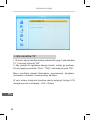
If you use the STB for the first time, the „Welcome” menu appears.
Press cursor button to setup the Region, Language, Display Mode
and Aspect Mode. Highlight „OK” and press the „OK” button to start
channel search.
Installation
1. Press the “MENU” button to enter main menu.
2. Press “UP”or “ DOWN “ button to highlight “Installation”, press
“RIGHT” button to enter the Installation menu.
3. Press “UP” or “DOWN” cursor button to highlight the desired
item and press “OK”button to enter the sub-menu .
4. Press “EXIT” button to exit.
EN
53
Owner’s manual
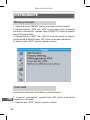
DVBT Channel Scan
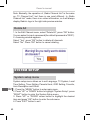
1. Select “DVBT Channel Scan”, press the “OK” button to enter the
Channel Scan menu.
2. Press cursor button to set Scan mode, Scan Band ,Channel No.,
Frequency and Bandwidth, then highlight “Search”, press “OK”
button to start channel scan.
EN
54
Owner’s manual
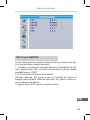
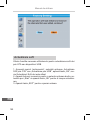
DVBT Auto Scan
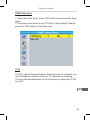
1. Select the “Auto Scan”, press “OK” button to enter the Auto Scan
menu.
2. Press the cursor button to set “FTA Only”, then highlight “Search”,
press the “OK” button to start auto scan.
LCN
If LCN( Logical Channel Number) Select function is activated, you
can’t change the original number of TV channels by scanning .
You can activate/disactivate the LCN function by setting the “LCN”
to on/off.
EN
55
Owner’s manual
OPERATION
Changing channels
There are three ways of channel selection - stepping through the
channel list, selection by number and from the on-screen channel
list.
1. Stepping through the channel list:
To move through the channel list, press the upward arrow or downward arrow key on the remote control.
2. Selected by number:
Enter the channel number directly by pressing numeric buttons
,and press the “OK” button to select desired channel.
3. Selected by on-screen channels list:
You can also select the required channel directly from on-screen
channel list. This is displayed using the STB’s main menu. See
„Edit Channel” in this manual for operation detail.
Accessing the Electronic Program Guide (EPG)
Accessing the EPG of all channels:
EN
56
1. Press „EPG” button to enter EPG menu.
2. Press cursor button to switch between channel list, events
schedule of the selected channel and now/next events.
3. Press „Green” button to Timer the events.
4. Press „Red” button to display „Time Bar” menu.
Owner’s manual
EDIT CHANNEL
Edit channel menu
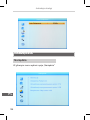
1. Press the „MENU” button to enter main menu.
2. Press “UP” or “DOWN“ button to highlight “Edit Channel”, press
“RIGHT” button to enter the Edit Channel menu.
3. Press “UP” or “DOWN” cursor button to highlight the desired
item and press “OK” button to enter the sub-menu.
4. Press “EXIT” button to exit.
EN
57
Owner’s manual
TV channel list
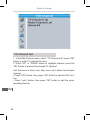
1. In the Edit Channel menu, select “TV Channel List”, press “OK”
button to enter TV channel list menu.
2. Press “UP” or “DOWN” button to highlight channel, press the
“OK” button to preview the desired TV channel.
Use this menu to favor, lock, skip, move, sort, delete and rename
channel.
• Press “FAV” button, then press “OK” button to edit the FAV function.
• Press “color” button, then press “OK” button to edit the corresponding function.
EN
58
Owner’s manual
Radio channel list
EN
1. In the Edit Channel menu, select “Radio Channel List”, press
“OK” button to enter the Radio Channel list menu.
2. Press “UP” or “DOWN” button to highlight channel press the
“OK” button to listen the desired Radio channel.
59
Owner’s manual
Note: Basically, the operation of „Radio Channel List” is the same
as „TV Channel List”, but there is one point different: In „Radio
Channel List” mode, there is no video information, so it will always
display Radio’s logo in the right side preview window.
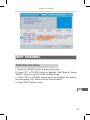
Delete All
1. In the Edit Channel menu, select “Delete All”, press “OK” button.
You are asked to input a password(the default password is”0000”).
2. A warning window appears.
Select “Yes”, press “OK” button to delete all channels.
Select “No”, Press “OK” button to cancel deleting.
SYSTEM SETUP
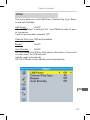
System setup menu
EN
60
System setup menu allows us to set Language, TV System, Local
Time Setting, Timer Setting, Parental Lock, OSD Setting, Favorite,
Auto Description and Other.
1. Press the “MENU” button to enter main menu.
2. Press “UP” or “DOWN” button to highlight “System Setup”, press
“RIGHT” button to enter the System Setup menu.
3. Press “UP” or “DOWN” cursor button to highlight the desired
item and press “OK” button to enter the sub-menu.
4. Press “EXIT” button to exit.
Owner’s manual
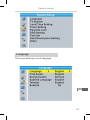
Language
This menu allows you to set Language.
EN
61
Owner’s manual
TV system
This menu allows us to set Video Resolution, Aspect Mode, Video
Out and Digital Audio Out.
Video Resolution: 576i/576p/720p/1080i/1080p
Aspect Mode: Auto/4:3PS/4:3LB/16:9
Video Out: SCART CVBS+ HDMI/ SCART RGB
Digital Audio Out: LPCM Out/ BS Out
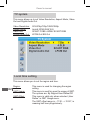
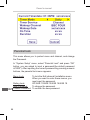
Local time setting
This menu allows you to set the region and time.
EN
62
Region:
This menu is used for changing the region setting.
GMT Usage:
This menu is used for open the usage of GMT.
The options are: By Region/User Define/Off.
GMT Offset: This menu is valid only when selected „User Define” in GMT Usage menu .
The GMT offset range is „-11:30 ~ +12:00”, in
creasing half hour progressively.
Owner’s manual
Summer Time:
Date: Time:
The options are: On/Off.
„Date” and „Time” menus are valid only when selected „Off” in GMT Usage menu.
Press numeric button to input the time.
Timer setting
This menu allows us to set the program timer. You can set 8 timers.
Timer Mode:Off/Once/Daily/Weekly/Monthly
Timer Service:Channel/Record
Wakeup Channel: You can select a desired channel as the wakeup channel.
Wakeup Date:
Press numeric button to input date.
On Time:
Press numeric button to input the time.
Duration:
Press numeric button to input the duration time.
EN
63
Owner’s manual
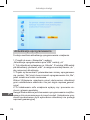
Parental lock
This menu allows you to protect menu and channel, and change
the Password.
In “System Setup” menu, select “Parental Lock” and press “OK”
button, you are asked to input a password(the default password
is”0000”). After inputting the correct password by pressing numeric
buttons, the parental lock menu appears.
EN
64
Menu Lock:
To lock the Edit channel/ Installation menu. When you want to enter these menus, you must input the password.
Rating Lock:
Off/ AGE 10/AGE 12/AGE 16/AGE 18
New Password:
To change the password.
Confirm Password: To confirm the new password.
Owner’s manual
OSD setting
This menu allows you to set OSD Timeout and OSD Transparency.
OSD Timeout: 1-10
OSD Transparency:
To set the OSD transparency to Off/10%/20%/30%/40%.
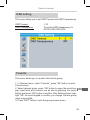
Favorite
This menu allows you to rename the favorite group.
1. In Channel menu, select “Favorite”, press “OK” button to enter
Favorite menu.
2. Select desired group, press “OK” button to open the mock keypad. Input letter and numeric one by one by pressing the cursor
button and press “OK” button to confirm. After finishing input, highlight “OK” on mock keypad to confirm, you change Favorite group
name successfully.
3. Press “EXIT” button to quit the group rename menu.
EN
65
Owner’s manual
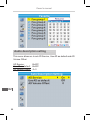
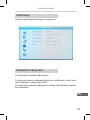
Audio description setting
This menu allows us to set AD Service, Use AD as default and AD
Volume Offset:
AD Service: On/Off
Use AD as default:On/Off
AD Volume Offset:-3~3
EN
66
Owner’s manual
Other
This menu allows us to set LNB Power, Channel Play Type, Beeper and Auto Standby.
LNB Power: On/Off
When “LNB Power” is selected “On”, the STB will provide 5V power to antenna.
It will not provide when selected “Off”.
Channel Play Type:All/Free/Scrambled
Beeper:
On/Off
Auto Standby:On/Off
On: No command to STB on front panel or Remoter in 3 hours and
no timer event, the STB will enter
standby mode automatically.
Off: The STB can’t enter standby mode automatically.
EN
67
Owner’s manual
TOOLS
Tools main menu
1. Press the “MENU” button to enter main menu.
2. Press “UP” or “ DOWN “ button to highlight “Tools”, press
“RIGHT” button to enter the Tools menu.
3. Press “UP” or “DOWN” cursor button to highlight the desired
item and press “OK” button to enter the sub-menu.
4. Press “EXIT” button to exit.
Information
EN
68
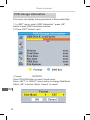
This menu can display some parameters information in this STB.
1. In “Tools” menu, select “Information”, press “OK” button to open
information window.
2. Press “EXIT” button to exit.
Owner’s manual
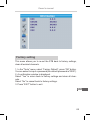
Factory setting
This menu allows you to re-set the STB back to factory settings,
clear all existed channels.
1. In the “Tools” menu, select “Factory Default”, press “OK” button.
You are asked to input a password(the default password is”0000”).
2. A confirmation window is displayed.
Select “Yes” to return back to factory settings and clear all channels.
Select “No” to cancel back to factory settings.
3. Press “EXIT” button to exit.
EN
69
Owner’s manual
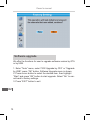
Software upgrade
We offer the functions for user to upgrade software version by OTA
or by USB.
1. Enter “Tools” menu, select “S/W Upgrade by OTA” or “Upgrade
by USB”, press “OK” button, Software Upgrade menu is shown.
2. Press cursor button to select the desired item, then highlight
“Start” and press “OK” button to start upgrade. Select “No” to cancel back to factory settings.
3. Press “EXIT” button to exit.
EN
70
Owner’s manual
Remove USB device safely
In “Tools” menu, select “Remove USB device safely”.
Press “OK” button to confirm. Then a window is displayed.
Press “OK” button again.
EN
71
Owner’s manual
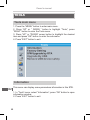
GAME
Game
This menu allows you to play games.
1. Press the “MENU” button to enter main menu.
2. Press “UP” or “DOWN” button to highlight “Game”, press
“RIGHT” button to enter the Game menu.
3. Press “UP” or “DOWN” cursor button to highlight the desired
item and press “OK” button to enter the game.
4. Press “EXIT” button to exit.
EN
72
Owner’s manual
REC
REC main menu
1. Press the “MENU” button to enter main menu.
2. Press “UP”or “DOWN” button to highlight “REC”, press “RIGHT”
button to enter the REC menu.
3. Press “UP” or “DOWN” cursor button to highlight the desired
item and press “OK”button to enter the sub-menu.
4. Press “EXIT” button to exit.
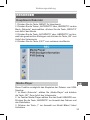
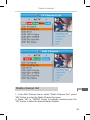
Media player
This function allows you to play files from USB port.
1. In “REC” menu, select “Media Player”, press “OK” button to enter Media Player menu.
2. First you enter media player window, the highlight is on the
USB/HDD device. Press “Down” button to move the highlight to
directory and file field.
3. Press “1” button ,you can switch TAB between Music/Image/Video/Record.
EN
73
Owner’s manual
4. Press “UP” or “DOWN” cursor button to select a desired item,
and press “OK” button to play the desired files.
5. Press “EXIT” button to exit.
Music:
EN
74
“RED” button:
Press „RED” button to show Play List.
“GREEN” button: Move the highlight to the file which you want to add to play list, then press „Green” button to add. It will mark a favorite icon on the file.
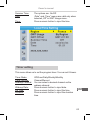
“YELLOW” button: Press „Yellow” button to add all file of current directory to play list. Press again to delete all file of current directory from the play list.
“BLUE” button:
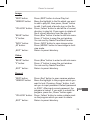
Press „Blue” button to enter to edit sub-menu.
“2” button:
Press „2” button to open the sort window.
You can sort by Name/Time/Size/Favorite.
“INFO” button:
Press „INFO” button to set repeat mode. The option is Repeat Folder/Random Folder/
Repeat One.
„EXIT” button:
Return to parent directory.
Owner’s manual
Image:
“RED” button:
Press „RED” button to show Play List.
“GREEN” button: Move the highlight to the file which you want to add to play list, then press „Green” button to add. It will mark a favorite icon on the file.
“YELLOW” button: Press „Yellow” button to add all file of current directory to play list. Press again to delete all file of current directory from the play list.
“BLUE” button:
Press „Blue” button to enter to edit sub-menu.
“2” button:
Press „2” button to open the sort window.
You can sort by Name/Time/Size/Favorite.
“INFO” button:
Press „INFO” button to open image setup.
„M” button:
Press „MEDIA” button to view image in multi view mode.
„EXIT” button:
Return to parent directory.
Video:
“BLUE” button:
“2” button:
„EXIT” button:
Press „Blue” button to enter to edit sub-menu.
Press „2” button to open the sort window.
You can sort by Name/Time/Size.
Return to parent directory.
Record:
“RED” button:
“GREEN” button:
“YELLOW” button:
„EXIT” button:
Press „Red” button to open rename window.
Move the highlight to the program which you want to lock. Pressing „Green” button, it will ask you to input password. Default password is „0000”. After input correct password, the EN
program is locked. If you want to unlock the
program, press the „Green” button again.
Press „Yellow” button to make a delete mark on the program which you want to delete.
Return to parent directory.
75
Owner’s manual
PVR storage information
This menu can display some parameters of Removable Disk.
1. In „REC” menu, select „HDD Information”, press „OK”
button to open HDD information window.
2. Press „EXIT” button to exit.
• Format FAT/NTFS
Press YELLOW button to open Format menu.
Press „LEFT” or „RIGHT” cursor button to change Disk Mode.
Select „OK” to format. Select „Cancel” to cancel.
EN
76
Owner’s manual
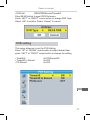
• DVR Set
REC&TMS/Record/Timeshift
Press BLUE button to open DVR Set menu.
Press „LEFT” or „RIGHT” cursor button to change DVR Type.
Select „OK” to confirm. Select „Cancel” to cancel.
PVR setting
This menu allows us to set the PVR Setting.
Press “UP” or “DOWN” cursor button to select desired item,
press “LEFT” or “RIGHT” cursor button to change the setting.
• TimeShift • Timeshift to Record • PS Record AUTO/Pause/Off
On/Off
On/Off
EN
77
Owner’s manual
TIMESHIFT/RECORD
Plugging an external Mass Storage Device on the USB port gives
you access to Time Shift/Record a broadcast programme.
• Pause a broadcast programme and continue watching it later
(Time Shift )
• Record a broadcast programme.
• When the space available on the Mass Storage Device runs out,
recording operation of broadcast will stop.
Note: Please use USB 2.0 disk when recording or timeshift. For
timeshift and recording feature, you need take bigger size USB
pen driver or HDD (>2GB) for recording.
Timeshift
Initiate
• Time Shift can be done in viewing mode by pressing the „PAUSE” button.
• Press „RIGHT” or „LEFT” button to move the cursor to the time
you desired to view. Press „OK” button to confirm.
EN
78
Owner’s manual
Trickmodes
During the playback, it is possible to perform the following actions:
• Press „PAUSE” button to pause the playback.
• Press „FORWARD” button to fast forward the playback.
• Press „BACKWARD” button to rewind the playback.
Stop the Time Shift
Press „STOP” button to stop TimeShift.
Record
Instant record
• In viewing mode, press „RECORD” button to instantaneously
start a record on the current channel.
• Press „RECORD” button again can input duration.
Press „STOP” button to stop recording, then a confirmation window appears.
• Select „Yes” to stop recording. Select „No” to continue recording.
Note: Please select famous brand USB 2.0 USB HDD or USB stick
for Recording and Timeshift, such as SAMSUNG, HITACHI and
SONY. Some USB devices maybe can’t be supported due to its
quality.
TROUBLESHOOTING
EN
In some region, the digital terrestrial signal may be weak. So you’d
better use the antenna in which the booster was built, for watching
the weak signal channels.
79
Owner’s manual
EN
80
Problem
Possible cause
What to do
Standby light
not lit
Mains lead unplugged
Check mains lead
No signal found
Aerial is disconnected
Aerial is damaged/misaligned
Out of digital signal area
Check aerial lead
Check aerial
Check with dealer
No picture or
sound
Scart/AV is not selected
on your TV
Reduce to another
channel
Scrambled channel
message
Channel is scrambled
Select alternative
channel
No response to
remote control
Receiver off
Handset not aimed
correctly
Front panel obstructed
Hand set batteries
exhausted
Plug in and turn on plug
Aim handset at front
panel
Check for obstructions
Replace handset batteries
The remote
control will not
operate your STB
(1) The batteries in your
remote control need
replacing
(2) There is an obstruction blocking the
signal path between
the remote control and
the box
(1) Replace the batteries
(2) Check that there is
nothing in the way of
the path between the
remote control and the
receiver
After moving the
STB to another
room you find you
are no longer able
to receive digital
reception
The aerial feed former
new point may come
through a distribution
system which may
reduce the digital signal
now received by the
box.
Try a direct feed from
the antenna
Owner’s manual
SPECIFICATION
TUNER & CHANNEL
DECODER
• VIDEO DECODER
• RF INPUT CONNECTOR x1
(IEC-TYPE, IEC169-2, FEMALE)
• RF OUTPUT CONNECTOR x1
(IEC-TYPE, IEC169-2, MALE
(LOOP THROUGH))
• FREQUENCY RANGE:
174MHz~230MHz(VHF)
470MHz ~862MHz (UHF)
• SIGNAL LEVEL:
-15 ~ -70 dbm
• INPUT RATE
• VIDEO FORMATS
• VIDEO OUTPUT
• MODULATION
MPEG-2 MP@HL, AVC/H.264 HP @L4.1
MPEG-4 ASP SUPPORTED
MPEG-1 Layer 1,2/PCM/HE-AAC V1.0
ICE958 SPDIF/AC3 / E-AC3
MAX. 48Mbit/s
4:3/16:9 switchable
HDMI,RGB
QPSK,16QAM,64QAM
CONNECTION
• MAIN POWER CABLE
• TUNER
• SCART
• SPDIF
• DATA PORT
• HDMI
FIXED TYPE
ANTENNA INPUTx1, RF OUTPUTx1
TO TV x1
COAXIAL x1
USB slot
HDMI OUTPUT x1
POWER SUPPLY
INPUT VOLTAGE
POWER CONSUMPTION
AC220~240V, 50/60Hz
MAX. 6W
• AUDIO DECODER
Note: Design and specifications are subject to change without
notice.
EN
81
Owner’s manual
EN
82
Instrukcja obsługi
INSTRUKCJE BEZPIECZEŃSTWA
ZALANIE / ZAMOCZENIE URZĄDZENIA MOŻE DOPROWADZIĆ DO
ZWARCIA I PORAŻENIA PRĄDEM ELEKTRYCZNYM.
UWAGA: Aby zmniejszyć ryzyko
porażenia prądem, nie należy zdejmować obudowy urządzenia. Prace serwisowe powinny być wykonywane
przez wykwalifikowany personel.
Znak błyskawicy wewnątrz trójkąta równobocznego oznacza
obecność niebezpiecznego napięcia, znajdującego się pod
obudową urządzenia. Może ono stanowić zagrożenie dla
zdrowia i życia użytkownika.
Wykrzyknik wewnątrz trójkąta równobocznego ma na celu
zwrócenie uwagi użytkownika na ważne operacje i instrukcje zawarte w dołączonej do urządzenia dokumentacji.
UWAGA: ABY ZMNIEJSZYĆ RYZYKO POŻARU LUB PORAŻENIA PRĄDEM, NALEŻY CHRONIĆ URZĄDZENIE PRZED ZALANIEM LUB NADMIERNĄ WILGOCIĄ.
Na urządzeniu (lub w jego pobliżu), nie należy stawiać pojemników z płynami, które mogły by doprowadzić do jego zalania/zamoczenia.
Środki bezpieczeństwa
Szczególną uwagę przy projektowaniu poświęcono standardom jakości
urządzenia, gdzie najważniejszym czynnikiem jest zapewnienie bezpieczeństwa użytkowania. Za bezpieczeństwo jest jednak również odpowiedzialny sam użytkownik. Niniejsza instrukcja obsługi zawiera zbiór ważnych
informacji, dlatego należy dokładnie ją przeczytać przed podłączeniem i uruchomieniem urządzenia.
PL
83
Instrukcja obsługi
Instalacja
1. Należy dokładnie przeczytać niniejszą instrukcję obsługi i stosować się do
zaleceń w niej zawartych.
2. Instrukcja obsługi powinna być zachowana do późniejszego wykorzystania.
3. Należy przestrzegać wszystkich ostrzeżeń zawartych w instrukcji obsługi
oraz obudowie urządzenia.
4. Aby zmniejszyć ryzyko pożaru/porażenia prądem, nie należy podłączać
tunera do gniazdka/przedłużacza uszkodzonego lub kiepskiej jakości. Należy okresowo sprawdzać stan przewodów i jeżeli ich wygląd wskazuje na
uszkodzenie to trzeba wymienić je na nowe. Jeżeli zachodzi konieczność
użycia przedłużacza, należy użyć przedłużacza z uziemieniem.
5. Przed podłączeniem urządzenia do zasilania, należy sprawdzić, czy napięcie w gniazdku zasilającym odpowiada specyfikacji urządzenia. W razie
wątpliwości należy skontaktować się z elektrykiem.
6. Przeciążenie gniazda sieciowego lub przedłużacza poprzez podłączenie
do niego zbyt wielu urządzeń może doprowadzić do pożaru lub porażenia
prądem.
7. Przewody zasilające powinny być poprowadzone w ten sposób, aby nie
były narażone na zgniecenia, nadepnięcia lub inne uszkodzenia. Szczególną uwagę należy zwrócić na wtyki, gniazda i miejsca wyjścia przewodów z
urządzenia.
PL
84
8. Otwory znajdujące się w obudowie urządzenia służą do jego wentylacji.
Chronią one tuner przed przegrzaniem zapewniając jego prawidłowe działanie. Nie należy zakrywać lub blokować tych otworów innymi przedmiotami.
Umieszczenie urządzenia w miejscu, gdzie nie będzie ono miało zapewnionej wystarczającej wentylacji (w zabudowanym regale lub w pobliżu źródła
ciepła) może doprowadzić do jego przegrzania i uszkodzenia.
9. Używanie akcesoriów i dodatków nie dołączonych do urządzenia (lub nie
zalecanych przez producenta), może doprowadzić do jego uszkodzenia lub
innych zniszczeń.
Instrukcja obsługi
10. Nie należy używać urządzenia w miejscach, gdzie może być ono narażone na zalanie (kuchnia, łazienka lub w pobliżu zbiorników z wodą) oraz
miejscach o dużej wilgotności powietrza. Wszystkie podłączone urządzenia
i akcesoria powinny posiadać certyfikat bezpieczeństwa. W przypadku jakichkolwiek wątpliwości, należy skontaktować się z wykwalifikowanym serwisem.
11. Nie należy umieszczać tunera na niestabilnym podłożu, urządzenie
może spaść i się uszkodzić. Należy używać stojaków, uchwytów itp. przeznaczonych specjalnie do tego celu. Podczas montażu uchwytu/stojaka, należy postępować zgodnie z dołączoną do niego instrukcją.
12. Wszelkie zmiany położenia urządzenia, należy wykonywać z dużą
ostrożnością. Upadek tunera może doprowadzić do jego uszkodzenia.
Przed dokonaniem, jakichkolwiek zmian w okablowaniu lub podłączeniem/
odłączeniem jakiegoś przewodu, należy odłączyć urządzenie od źródła zasilania.
13. Jeżeli urządzenie jest podłączone do anteny zewnętrznej lub telewizji
kablowej, należy się upewnić, że antena/telewizja kablowa są prawidłowo
uziemione (zapobiega to przepięciom oraz negatywnym skutkom wyładowań atmosferycznych).
14. Zewnętrzny system antenowy nie powinien być zlokalizowany w sąsiedztwie napowietrznych linii energetycznych lub innych przewodów zasilających. Podczas instalacji zewnętrznego systemu antenowego, należy zachować szczególną ostrożność, aby nie spowodować zwarcia z linią energetyczną. Kontakt z taką linią może doprowadzić do porażenia instalatora
i być śmiertelny. Instalacja anteny zewnętrznej powinna być wykonywana
przez wykwalifikowanego instalatora.
PL
85
Instrukcja obsługi
Użytkowanie
15. Przez rozpoczęciem czyszczenia urządzenia, należy odłączyć je od źródła zasilania. Do czyszczenia należy użyć wilgotnej ściereczki (nie należy
używać chemicznych środków czyszczących).
16. Nie należy wkładać żadnych obiektów do gniazd lub poprzez otwory
wentylacyjne. Może to doprowadzić do porażenia prądem i uszkodzenia
urządzenia.
17. Podczas burz lub w okresie, gdy urządzenie nie będzie używane przez
dłuższy okres czasu, należy je odłączyć od źródła zasilania i anteny zewnętrznej. Pozwoli to na zabezpieczenie tunera przed przepięciami i skutkami wyładowań atmosferycznych.
Serwis
18. W razie awarii nie należy próbować samodzielnie naprawiać urządzenia. Wszelkie prace serwisowe powinny być wykonywane przez wykwalifikowanego serwisanta.
19. Urządzenie wymaga naprawy gdy:
A. Wtyczka lub przewód zasilający są uszkodzone.
B. Jakiś element dostał się do urządzenia (np. poprzez otwory wentylacyjne).
C. Urządzenie zostało zalane / zamoczone.
D. Urządzenie nie działa poprawnie.
Jeżeli urządzenie nie działa prawidłowo, należy zmienić tylko te ustawienia,
które są określone w instrukcji obsługi. Niewłaściwa zmiana innych ustawień może spowodować uszkodzenie i często wymaga dużego nakładu pracy wykwalifikowanego technika, aby przywrócić urządzenie do normalnego trybu pracy.
E. Jeżeli produkt został upuszczony lub obudowa została uszkodzona.
F. Gdy produkt wykazuje wyraźne zmiany w działaniu, co wskazuje na konieczność naprawy.
20. Jeżeli do naprawy urządzenia potrzebne są części zamienne, to należy
upewnić, że są one zgodne ze specyfikacją oryginału. Użycie niekompaPL się
tybilnych części zamiennych może doprowadzić do uszkodzenia urządzenia, pożaru lub porażenia prądem elektrycznym.
21. Po zakończeniu naprawy należy poprosić serwisanta o uruchomienie
urządzenia i sprawdzenie jego działania.
86
Instrukcja obsługi
22. Jeżeli produkt ma być zamontowany na ścianie/suficie, to należy to wykonać zgodnie z zaleceniami producenta.
23. Tuner nie powinien być umieszczony w pobliżu źródeł ciepła oraz miejscach gdzie będzie narażony na bezpośrednie działanie promieni słonecznych.
PL
87
Instrukcja obsługi
SPIS TREŚCI
INSTRUKCJE BEZPIECZEŃSTWA83
1. WPROWADZENIE 90
1.1 Panel przedni90
1.2 Panel tylny90
1.3 Pilot zdalnego sterowania91
2. SCHEMAT POŁĄCZENIA92
2.1 Ogólne92
2.2 Podłączenie TV92
2.3 Podłączenie systemu HiFi92
3. PIERWSZE URUCHOMIENIE93
3.1 Ustawienia93
3.2 Instalacja93
4. OPERACJE96
4.1 Zmiana kanału96
4.2 Elektroniczny przewodnik po programach (EPG)96
5. EDYCJA KANAŁÓW
5.1 Menu edycji kanałów
5.2 Lista kanałów
5.3 Lista stacji radiowych
5.4 Usunięcie wszystkich kanałów
PL
88
6. USTAWIENIA SYSTEMOWE
6.1 Menu ustawień systemowych
6.2 Język
6.3 System TV
6.4 Ustawienia ekranu 6.5 Data i czas
97
97
98
99
100
100
100
101
102
103
103
Instrukcja obsługi
6.6 Funkcja Timer
6.7 Kontrola rodzicielska
6.8 Ustawienia OSD
6.9 Ulubione 6.10 Auto wyłączanie
7. NARZĘDZIA
7.1 Narzędzia
7.2 Informacje
7.3 Ustawienia fabryczne
7.4 Aktualizacja oprogramowania
7.5 Bezpieczne usuwanie sprzętu
8. GRY
8.1 Gry
9. USTAWIENIA ZAPISU 9.1 Ustawienia zapisu
9.2 Odtwarzacz multimediów
9.3 Informacje o HDD
9.4 Ustawienia PVR
104
105
106
107
108
108
108
109
109
110
111
112
112
113
113
113
116
117
10. TIMESHIFT/RECORD
118
10.1 Zatrzymanie audycji
10.2 Nagrywanie
118
119
ROZWIĄZYWANIE PROBLEMÓW
120
SPECYFIKACJA121
PL
89
Instrukcja obsługi
WPROWADZENIE
Panel przedni
Wyświetlacz
Sensor
pilota
Port USB
Panel tylny
Podłączenie
anteny TV
Coaxial Audio
PL
90
RF do podłączenia
zewnętrznego
urządzenia
Wyjście Scart (podłączenie telewizora)
Wyjście
HDMI
Zasilanie AC
Instrukcja obsługi
Pilot zdalnego sterowania
5. Kursor, CH-/CH+, VOL+/VOL(Kursor: Nawigacja po menu)
(CH+/-: Przejście do następnego /
poprzedniego kanału)
(VOL+/-: Głośność + / -)
6. EPG (elektroniczny przewodnik
po programach)
7. CZERWONY/ZIELONY/ŻÓŁTY/NIEBIESKI (funkcja zależna
od informacji aktualnie
wyświetlanych na ekranie - funkcje
interaktywne)
8. MEDIA (wyświetlenie menu
nagrywania)
9. TIMER (ustawienia timera)
10. Poprzedni/Następny
11. TTX
12. AUDIO (wybór trybu audio)
13. MUTE (wyciszenie dźwięku)
14. BACK (powrót do poprzedniego
kanału)
15. EXIT (wyjście z menu)
16. OK (potwierdzenie wyboru)
17. TV/RADIO (przełącznik TV /
Radio)
18. RECORD (nagrywanie)
19. FAV (lista ulubionych)
20. STOP (zatrzymanie odtwarzania
1. POWER (włączenie /
lub nagrywania)
wyłączenie urządzenia)
21. PLAY
2. Przyciski numeryczne
22. Wyszukiwanie do tyłu/przodu
(Wprowadzenie wartości
23. PAUZA (zatrzymanie /
numerycznych lub bezpośredni wznowienie odtwarzania)
wybór numeru kanału)
24. RES (zmiana rozdzielczości)
3. INFO (wyświetlenie informacji) 25. SUBTITLE (włączenie /
4. Menu (wyświetlenie menu)
wyłączenie napisów)
PL
91
Instrukcja obsługi
SCHEMAT POŁĄCZENIA
Ogólne
Istnieje wiele rodzajów telewizorów i innych urządzeń, do których
można podłączyć tuner telewizyjny. Poniżej przedstawiony został
przykładowy sposób podłączenia.
Podłączenie TV
Antena
TV
Kabel HDMI
Kabel RF
Podłączenie systemu HiFi
Hi-Fi
PL
92
Kabel Coaxial
Kabel Scart
Instrukcja obsługi
PIERWSZE URUCHOMIENIE
Ustawienia
Przy pierwszym uruchomieniu urządzenia na wyświetlaczu pojawi
się ekran powitalny. Naciśnięcie przycisku „OK” po wprowadzeniu
podstawowych ustawień, spowoduje uruchomienie automatycznego wyszukiwania kanałów.
Instalacja
1. Należy nacisnąć przycisk “MENU”, aby przejść do menu głównego.
2. Za pomocą przycisków “Góra” / “Dół“, należy podświetlić
“Instalacja” a następnie nacisnąć przycisk “Prawy”.
3. Za pomocą przycisków “Góra” / “Dół“, należy podświetlić żądane ustawienie i nacisnąć przycisk “OK” .
4. Naciśnięcie przycisku “EXIT” spowoduje wyjście z menu.
PL
93
Instrukcja obsługi
Skanowanie kanałów DVBT
1. Aby przejść do menu skanowania, należy wybrać “Ręczne wyszukiwanie kanałów” i nacisnąć przycisk “OK”.
2. Po ustawieniu żądanych parametrów, należy podświetlić opcję
“Szukaj” i nacisnąć przycisk “OK”.
PL
94
Instrukcja obsługi
Skanowanie automatyczne DVBT
1. Należy podświetlić opcję “Automatyczne wyszukiwanie
kanałów” i nacisnąć przycisk “OK”.
2. Następnie należy podświetlić opcję “Szukaj” i nacisnąć przycisk
“OK”.
LCN
Włączenie funkcji LCN (Logical Channel Number) spowoduje zapisanie wyszukanych kanałów według numerów nadanych przez
nadawcę. Po włączeniu funkcji nie ma możliwości zmiany numeru
kanału, na którym został on zapisany.
Zasilanie anteny 5V: włącz/wyłącz
Gdy ustawienie “Zasilanie anteny 5V” jest włączone, na wyjściu
antenowym pojawi się napięcie 5V.
PL
95
Instrukcja obsługi
OPERACJE
Zmiana kanału
Aby zmienić kanał należy użyć jednego z trzech dostępnych sposobów: przechodząc kolejno po kanałach, używając przycisków
numerycznych lub wybrać kanał z listy kanałów.
1. Przechodzenie kolejno po kanałach:
Naciśnięcie na pilocie strzałki w górę / dół spowoduje przejście do
następnego / poprzedniego kanału.
2. Wybór za pomocą przycisków numerycznych:
Do żądanego kanału można przejść wybierając jego numer za
pomocą przycisków numerycznych i potwierdzając wybór przyciskiem „OK”.
3. Wybór z listy kanałów:
Wybrać konkretny kanał można również z wyświetlanej na ekranie
liście. Listę wyświetlamy przyciskiem „OK„
Elektroniczny przewodnik po programach (EPG)
PL
96
1. Aby wyświetlić na ekranie przewodnik EPG, należy nacisnąć
przycisk „EPG”.
2. Nawigacja po przewodniku odbywa się za pomocą znajdujących
się na pilocie przycisków kierunkowych.
3. Aby zaplanować nagranie danej audycji należy ją podświetlić i
nacisnąć zielony klawisz „TIMER” Wyświetlą się nam ustawienia
timera które można jeszcze edytować lub potwierdzić klikając na
przycisk zapisz.
Instrukcja obsługi
EDYCJA KANAŁÓW
Menu edycji kanałów
1. Należy nacisnąć przycisk “MENU”, aby przejść do menu głównego.
2. Za pomocą przycisków “Góra” / “Dół“, należy podświetlić
“Edycja kanałów” a następnie nacisnąć przycisk “Prawy”.
3. Za pomocą przycisków “Góra” / “Dół“, należy podświetlić żądane ustawienie i nacisnąć przycisk “OK” .
4. Naciśnięcie przycisku “EXIT” spowoduje wyjście z menu.
PL
97
Instrukcja obsługi
Lista kanałów TV
1. W menu edycji kanałów należy podświetlić opcję “Lista kanałów
TV” i nacisnąć przycisk “OK”.
2. Aby przejść do oglądania danego kanału, należy go podświetlić (używając przycisków “Góra” / “Dół“) i nacisnąć przycisk “OK”.
Menu umożliwia również blokowanie, przenoszenie, pomijanie,
sortowanie, usuwanie i zmianę nazwy kanałów.
W celu zmiany kolejności kanałów należy wyłączyć funkcję LCN
dostępną w menu Instalacja - LCN - Wyłącz
PL
98
Instrukcja obsługi
Lista stacji radiowych
1. W menu edycji kanałów należy podświetlić opcję “Lista kanałów
radiowych” i nacisnąć przycisk “OK”.
2. Aby przejść do słuchania danej stacji, należy ją podświetlić (używając przycisków “Góra” / “Dół“) i nacisnąć przycisk “OK”.
PL
99
Instrukcja obsługi
Uwaga: Lista stacji radiowych i telewizyjnych jest bardzo podobna. Różnica polega na tym, że na liście stacji radiowych w bocznym oknie podglądu będzie widoczne logo radia zamiast informacji video.
Usunięcie wszystkich kanałów
1. Aby usunąć wszystkie kanały, należy w menu edycji kanałów
podświetlić opcję “Usuń wszystkie” i potwierdzić wybór przyciskiem “OK”.
Następnie należy podać hasło dostępu (domyślne hasło to ”0000”).
2. Na ekranie ukaże się komunikat z ostrzeżeniem.
- aby usunąć kanały, należy wybrać “Tak” i nacisnąć “OK”
- aby zrezygnować, należy wybrać “Nie” i nacisnąć “OK”
USTAWIENIA SYSTEMOWE
Menu ustawień systemowych
Menu umożliwia zmianę ustawień: języka, systemu TV, czasu, timera, blokady rodzicielskiej, OSD, listy ulubionych kanałów itp.
PL
100
1. Należy nacisnąć przycisk “MENU”, aby przejść do menu głównego.
2. Za pomocą przycisków “Góra” / “Dół“, należy podświetlić
“Ustawienia systemowe” a następnie nacisnąć przycisk “Prawy”.
3. Za pomocą przycisków “Góra” / “Dół“, należy podświetlić żądane ustawienie i nacisnąć przycisk “OK” .
4. Naciśnięcie przycisku “EXIT” spowoduje wyjście z menu.
Instrukcja obsługi
Język
Funkcja umożliwia zmianę języka, OSD, dźwięku, napisów,
teletekstu.
PL
101
Instrukcja obsługi
System TV
Menu umożliwia ustawienie rozdzielczości video, formatu obrazu,
wyjścia video oraz cyfrowego wyjścia audio.
Funkcja zmiany rozdzielczości i formatu obrazu jest również dostępna poczas odtwarzania filmów z podpiętych do urządzenia
zewnętrznych nośników danych.
Rozdzielczość video (przycisk „RES”): 576i/576p/720p/1080i
/1080p
Format obrazu (przycisk niebieski):
Auto/4:3PS/4:3LB/16:9
Wyjście video: SCART CVBS+ HDMI/ SCART RGB
Cyfrowe wyjście audio: LPCM/BS
PL
102
Instrukcja obsługi
Ustawienia ekranu
Menu umożliwia zmianę jasności, kontrastu, nasycenia, barwy i
ostrości obrazu.
Data i czas
Menu umożliwia ustawienie daty i czasu.
Region:
Użycie GMT:
Przesunięcie GMT:
Umożliwia zmianę ustawień regionu.
Umożliwia użycie czasu GMT. Funkcja
umożliwia wyłącznie czasu GMT, użycie
zdefiniowanego czasu badź regionalnego.
Funkcja dostępna wyłącznie w przypadku ustawienia „Zdefiniowane” w ustawieniach „Użycie GMT”. Przesunięcie GMT wynosi
„-11:30 ~ +12:00” zwiększany co pół godziny.
Czas letni:
Data: Czas:
Włączenie wyłączenie czasu letniego.
Ustawienie daty (zmiana daty i czasu jest
możliwa, jeżeli funkcja GMT jest wyłączona.
Ustawienie czasu.
PL
103
Instrukcja obsługi
Funkcja Timer
Menu pozwala na wprowadzenie ustawień funkcji Timer.
Bezpośredni dostęp do funkcji przycisk „Timer” na pilocie.
PL
104
Tryb:
Wył./Jendorazowy/Codzienny/Cotygodniowy/
Comiesięczny
Tryb włączenia:
Nagrywanie/Kanał
Wybór kanału:
Umożliwia ustawienie danego kanału.
Data:
Umożliwia ustawienie daty nagrania.
Godzina:
Umożliwia ustawienie czasu rozpoczęcia
nagrania.
Okres czasu:
Umożliwia ustawienie czasu trwania
nagrania.
Instrukcja obsługi
Kontrola rodzicielska
Menu umożliwia wprowadzenie ustawień kontroli rodzicielskiej.
W ustawieniach systemowych, należy wybrać “Blokada
rodzicielska” i nacisnąć przycisk “OK”. Następnie należy wprowadzić hasło dostępu (domyślne hasło to: ”0000”). Po wprowadzeniu
poprawnego hasła, wyświetlone zostanie menu kontroli rodzicielskiej.
Zablokuj menu:
Blokada wieku:
Nowe hasło:
Potwierdź hasło: Funkcja umożliwia zablokowanie dostępu do
menu urządzenia. Po ustawieniu blokady,
wejście do menu będzie chronione hasłem.
Wył./wiek 10/wiek 12/wiek 16/wiek 18
Umożliwia zmianę hasła.
Potwierdzenie nowego hasła przy zmianie.
PL
105
Instrukcja obsługi
Ustawienia OSD
Menu umożliwia zmianę ustawień OSD.
Czas trwania: Przezroczystość:
PL
106
1-10s
Umożliwia ustawienie przezroczystości OSD:
Wył./10%/20%/30%/40%.
Instrukcja obsługi
Ulubione
Opcja ta pozwala zmieniać nazwy grup ulubionych
1. W menu kanały wybierz „Ulubione„
2 Wybierz grupę i wciśnij OK, wprowadź żądaną nazwę i potwierdź
przyciskiem ok.
3. Wciśnij wyjście aby opuścić menu.
Auto wyłączanie
Auto wyłączenie: wyłącz / 30min / 1h /2 h /3h.
Po aktywowaniu funkcji urządzenie wyłączy się po określonym
czasie jeżeli nie zostanie naciśnięty żaden przycisk. Gdy naciśniemy przycisk bądź przełączymy kanał funkcja zresetuje się a urządzenie zacznie od nowa odliczać określony czas do wyłączenia
się.
PL
107
Instrukcja obsługi
NARZĘDZIA
Narzędzia
W głównym menu wybierz opcje „Narzędzia”
PL
108
Instrukcja obsługi
Informacje
Opcja ta wyświetla informacje o urządzeniu
Ustawienia fabryczne
Przywrócenie ustawień fabrycznych
Funkcja przywraca ustawienia fabryczne urządzenia, jeżeli urządzenie zapyta o hasło wpisz 0000.
Przywrócenie ustawień fabrycznych kasuje listę kanałów i wszystkie ustawienia.
PL
109
Instrukcja obsługi
Aktualizacja oprogramowania
Funkcja umożliwia aktualizację oprogramowania urządzenia.
PL
110
1. Przejdź do menu „Narzędzia” i wybierz:
„Aktualizacja oprogramowania prze USB” naciśnij „ok”
2. Tryb aktualizacji ustawiamy na „Allcode”. Z nośnika USB wskaż
plik aktualizacji, podświetl „start”, a następnie naciśnij klawisz „ok.”,
aby rozpocząć aktualizację.
3. Pojawi się komunikat z potwierdzeniem zmiany oprogramowania, naciśnij „Tak” jeżeli chcesz zmienić oprogramowanie lub „Nie”,
jeżeli zmiana ma zostać anulowana
Ważne! Wyłączenie urządzenia przed ukończeniem aktualizacji
grozi uszkodzeniem odbiornika i nie jest objęte naprawą gwarancyjną!
4. Po załadowaniu softu urządzenie wyłączy się i ponownie uruchomi z planszą powitalną.
Uwaga! Niedozwolone jest stosowanie oprogramowania modyfikowanego lub przeznaczonego do innych modeli. Uszkodzenie urządzenia spowodowane złym wykonaniem aktualizacji nie podlega
naprawie gwarancyjnej!
Instrukcja obsługi
Bezpieczne usuwanie sprzętu
Z menu “Narzędzia” należy wybrać “Bezpieczne odłączenie USB”
i nacisnąć przycisk “OK”.
Następnie należy potwierdzić wybór przyciskiem “OK”.
PL
111
Instrukcja obsługi
GRY
Gry
Urządzenie posiada wbudowane gry, wybierz żądaną grę i wciśnij
ok aby potwierdzić.
PL
112
Instrukcja obsługi
Ustawienia zapisu
Ustawienia zapisu
Aby wejść do tej opcji wybierz z głównego menu opcję „Ustawienia
zapisu„.
Odtwarzacz multimediów
Funkcja umożliwia odtwarzanie plików z dysku USB
Z menu „Ustawienia zapisu„ wybierz opcję „Odtwarzacz mediów”
lub też naciśnij przycisk „Media„ na pilocie.
Wybierz rodzaj plików: filmy, nagrania, muzyka, zdjęcia.
Przełączanie się pomiędzy rodzajami wyświetlanych plików
następuje poprzez naciśniecie przycisku „1„ na pilocie zdalnego
sterowania.
PL
113
Instrukcja obsługi
Następnie wybierz żądany plik
Film:
Niebieski przycisk: Edycja (kasowania, kopiowanie,zmiana
nazwy plików).
Przycisk 2:
sortowanie listy.
Przycisk EXIT:
powrót do katalogu nadrzędnego
Podczas oglądania filmów za pomocą klawisza „Subtitle„ istnieje
możliwość zmiany wielkości, koloru, tła oraz wysokości poziomu
wyświetlanych napisów.
Nagrywanie:
PL Czerwony przycisk: opcja zmiany nazwy
Zielony przycisk:
Żółty przycisk:
Przycisk EXIT:
114
Blokuje wybrane nagranie, gdy urządzenie zapyta o hasło: domyślne to: 0000.
zaznacza nagrania do skasowania
powrót do katalogu nadrzędnego
Instrukcja obsługi
Muzyka:
Czerwony przycisk: lista
Zielony przycisk: dodaj wybrany utwór do ulubionych
Żółty przycisk:
dodaj wszystkie utwory do ulubionych
Niebieski przycisk: Edycja.
Przycisk 2:
sortowanie listy.
Przycisk INFO:
funkcja powtórz, folder, losowo, jeden raz
Przycisk EXIT:
powrót do katalogu nadrzędnego
Zdjęcia:
Czerwony przycisk: lista
Zielony przycisk: dodaj wybrane zdjęcia do ulubionych
Żółty przycisk:
dodaj wszystkie zdjęcia do ulubionych
Niebieski przycisk: Edycja.
Przycisk 2:
sortowanie listy.
Przycisk INFO:
ustawienie wyświetlania zdjęcia
Przycisk M:
zmiana trybu przeglądania
Przycisk EXIT:
powrót do katalogu nadrzędnego
PL
115
Instrukcja obsługi
Informacje o HDD
Opcja wyświetla informacje o aktualnie używanym nośniku USB
W menu „Ustawienia zapisu„ wybierz „Informacje o HDD”.
Wciśnij żółty przycisk aby formatować nośnik. Nośnik można sformatować na system FAT lub NTFS
Wciśnij niebieski przycisk aby zmienić ustawienia DVR
PL
REC & TMS - włączone nagrywanie i Timeshift
Record - włączone tylko nagrywanie
Timeshift - wlączony tylko Timeshift
116
Instrukcja obsługi
Ustawienia PVR
To menu pozwala na zmianę konfiguracji PVR.
Za pomocą przycisków „Góra” lub „Dół” wybierz żądaną opcję a
następnie przyciskami „Prawy” / „Lewy” dostosuj ustawienie.
• TimeShift • Nagrywanie Timeshift • Nagrywanie w PS AUTO/Pauza/Wyłącz
Wyłącz/Włącz
Wyłącz/Włącz
PS: Nagrywanie do pliku z rozszerzeniem *.MPEG.
Uwaga Funkcja PS działa prawidłowo wyłącznie dla kanałów
nadawanych w standardzie mpeg-2.
Przy obowiązującym w Polsce standardzie mpeg-4 nagrane zostaną pełne informacje w formacie TS.
PL
117
Instrukcja obsługi
TIMESHIFT/RECORD
Aby korzystać z tych funkcji podłącz pamięć USB.
Urządzenie umożliwia
• Zatrzymanie audycji i obejrzenie jej później
• Nagranie audycji
• Gdy skończy się miejsce na nośniku, nagrywanie zostanie zatrzymane.
Używaj pamięci w standardzie USB 2.0, zalecana pojemność >
2Gb.
Zatrzymanie audycji
Zatrzymanie
- Aby zatrzymać oglądanie programu należy nacisnąć przycisk
„Pauza”.
- Za pomocą przycisków „Lewy”/”Prawy” wybierz moment, od którego chcesz rozpocząć oglądanie i potwierdź wybór przyciskiem
„OK”
PL
Odtwarzanie
Podczas odtwarzania wideo można wykonać następujące czynności:
- Naciśnij przycisk „Pauza” aby zatrzymać odtwarzanie.
- Naciśnij przycisk „Do przodu” aby przewinąć odtwarzanie do
przodu.
- Naciśnij przycisk „Do tyłu” aby przewinąć odtwazanie do tyłu.
Zatrzymanie odtwarzania
Naciśnij przycisk „STOP” aby zatrzymać odtwarzanie.
118
Instrukcja obsługi
Nagrywanie
Nagrywanie
- W Trybie nagrywania naciśnij przycisk „REC” na pilocie aby rozpocząć nagrywanie oglądanego programu.
- Aby zmienić domyślny czas trwania nagrywania naciśnij 2x klawisz „REC” i wpisz czas po którym nagrywanie ma zostać zakończone
- Aby zatrzymać nagrywanie naciśnij przycisk „Stop” wyświetlone
zostanie okno potwierdzenia. Naciśnij „Tak” aby zatrzymać nagrywanie lub „Nie” aby kontunuować
Możliwe jest zaprogramowanie nagrań przez opcję „Timer” lub wybór audycji przez EPG (patrz odpowiedni rozdział instrukcji)
Pamięci USB o słabych parametrach mogą nie współpracować poprawnie z urządzeniem
PL
119
Instrukcja obsługi
ROZWIĄZYWANIE PROBLEMÓW
W niektórych regionach sygnał telewizji cyfrowej może być słaby. W takim przypadku zaleca się użycie anteny z wbudowanym
wzmacniaczem antenowym.
PL
120
Problem
Przyczyna
Rozwiązanie
Dioda zasilania się
nie świeci
Odłączony przewód
zasilający.
Należy sprawdzić
przewód zasilający
Brak sygnału
Przewód antenowy
odłączony
Antena uszkodzona/
niewłaściwie ustawiona
Brak nadawanego sygnału
Należy sprawdzić podłączenie anteny
Należy sprawdzić antenę
Brak obrazu lub
dźwięku
Nie został wybrany odpowiedni tryb na telewizorze
Należy wybrać odpowiedni tryb na telewizorze
Informacja, że kanał jest zakodowany / niedostępny
Kanał zakodowany /
niedostępny
Należy wybrać inny
kanał
Nie działa pilot
zdalnego sterowania
Wyłączone urządzenie
Pilot nie skierowany w
kierunku urządzenia
Przeszkoda pomiędzy
pilotem a urządzeniem
Wyczerpane baterie
pilota
Należy włączyć tuner
Należy skierować pilot
w stronę tunera
Należy usunąć przeszkodę
Należy wymienić baterie pilota na nowe
Po przeniesieniu
urządzenia do innego pomieszczenia,
urządzenie przestało odbierać kanały
Podłączenie anteny w
nowym miejscu może
być inne (mieć mniejszą siłę sygnału, co powoduje słabszy odbiór
kanałów lub jego brak)
Należy sprawdzić podłączenie anteny lub
spróbować podłączyć
do niej wzmacniacz
Instrukcja obsługi
SPECYFIKACJA
TUNER
DEKODER
• DEKODER VIDEO
• WEJŚCIE RF x1
(IEC-TYPE, IEC169-2, ŻEŃSKIE)
• WYJŚCIE RF x1
(IEC-TYPE, IEC169-2, MĘSKIE
(PRZELOTOWE))
• ZAKRES CZĘSTOTLIWOŚCI:
174MHz~230MHz(VHF)
470MHz ~862MHz (UHF)
• POZIOM SYGNAŁU:
-15 ~ -70 dbm
• WEJŚCIE
• FORMAT VIDEO
• WYJŚCIE VIDEO
• MODULACJA
MPEG-2 MP@HL, AVC/H.264 HP @L4.1
MPEG-4 ASP SUPPORTED
MPEG-1 Layer 1,2/PCM/HE-AAC V1.0
ICE958 SPDIF/AC3 / E-AC3
MAX. 48Mbit/s
4:3/16:9/AUTO
HDMI,RGB
QPSK,16QAM,64QAM
POŁĄCZENIA
• KABEL ZASILAJĄCY
• TUNER
• SCART
• SPDIF
• PORT DANYCH
• HDMI
PODŁĄCZONY NA STAŁE
WEJŚCIE ANTENY x1, WYJŚCIE RF x1
DO TV x1
COAXIAL x1
PORT USB
WYJŚCIE HDMI x1
ZASILANIE
NAPIĘCIE WEJŚCIOWE
POBÓR MOCY
AC220~240V, 50/60Hz
MAX. 6W
• DEKODER AUDIO
UWAGA: Specyfikacja i wygląd urządzenia mogą ulec zmianie
bez powiadomienia.
PL
121
Instrukcja obsługi
PL
122
Manual de utilizare
INFORMATII PRIVIND SIGURANTA
Pentru a reduce riscul unui incendiu sau al unui soc electric, feriti aparatul
de ploaie sau umezeala.
AVERTISMENT: Pentru a
reduce riscul incendiilor si al electrocutarilor, nu indepartati capacul
(partea din spate) a dispozitivului.
Consultati personalul calificat pentru
intretinerea aparatului.
Simbolul alaturat avertizeaza utilizatorul in privinta prezentei
„tensiunii periculoase” neizolate in interiorul produsului care
ar putea provoca un soc electric.
Semnul exclamarii in interiorul unui triunghi echilateral, semnifica existenta unor instructiuni importante de functionare
si intretinere.
ATENTIE: Pentru prevenirea unui soc electric, potriviti lamela larga a prizei
cu soclul si introduceti-o complet.
Nu stropiti aparatul cu apa si asigurati-va ca nu asezati pe aparat, obiecte
precum vaze cu flori.
PRECAUTII IMPORTANTE
In plus fata de atentia deosebita acordata standardelor de calitate in fabricarea produsului video, siguranta este un factor important in proiectarea
fiecarui dispozitiv. Totusi, siguranta este de asemenea responsabilitatea
dumneavoastra. Acest manual contine informatii importante care va vor fi de
folos pentru a va asigura o utilizare corespunzatoare a aparatului video si a
accesoriilor. Va rugam sa le cititi cu atentie inainte de punerea in functiune si
de utilizarea produsului video.
RO
123
Manual de utilizare
Instalare
1. Cititi si urmati instructiunile – toate instructiunile de siguranta si functionare trebuie citite inainte de punerea in functiune a produsului video.
2. Pastrati instructiunile - toate instructiunile de siguranta si functionare trebuie pastrate pentru referinte ulterioare.
3. Cititi cu atentie toate avertismentele – Respectati toate avertismentele ce
apar inscrise pa aparat si cele din instructiunile de functionare.
4. Polarizare – unele produse video sunt echipate cu o mufa pentru curent
alternativ polarizat. Aceasta mufa se va potrivi prizei de perete, incercati sa
inversati mufa. Daca mufa nu se potriveste, contactati electricianul pentru a
va inlocui priza uzata. Pentru a evita socul electric, utilizati priza polarizata
cu un prelungitor sau la priza cu exceptia cazului in care fisa de contact
poate fi conectata la toate, astfel incat lamelele sa poata fi introduse complet. In cazul in care aveti nevoie de un prelungitor, folositi un cablu polarizat.
5. Surse de alimentare – Acest aparat video ar trebui sa functioneze doar
de la tipul de sursa ce apare inscrisa pe eticheta. In cazul in care nu sunteti
siguri in privinta tipului sursei de alimentare, consultati furnizorul sau compania de energie electrica locala. Pentru aparatele video care functioneaza pe
baterie, sau alte surse, consultati instructiunile de functionare.
6. Suprasarcina – Nu supraincarcati prizele de perete sau prelungitoarele
intrucat pot provoca un incendiu sau electrocutare. Prizele de perete cu suprasarcina, prelungitoarele, cablurile de alimentare uzate, cabluri de izolare
deteriorate si prizele stricate sunt periculoase. Acestea pot provoca electrocutare sau pericol de incendiu.
7. Protectie cablu de alimentare – cablurile de alimentare ar trebui sa fie distribuite astfel incat sa nu se calce pe ele sau sa nu fie strangulate in dreptul
prizei si in punctul de iesire din aparat.
Acolo unde priza principala sau un dispozitiv de cuplare sunt folosite ca si
dispozitiv de deconectare, acesta trebuie sa ramana usor accesibil.
RO
124
8. Fantele de ventilatie si orificiile sunt prevazute pentru a asigura o functionare fiabila a aparatului video si pentru a-l proteja de supraincalzire. Aceste
orificii nu trebuie blocate sau acoperite. Orificiile nu trebuie blocate prin plasarea aparatului pe pat, canapea, covor sau in apropierea unui radiator.
Acest aparat nu trebuie asezat intr-o biblioteca sau raft, cu exceptia cazului
Manual de utilizare
in care este asigurata ventilatie corespunzatoare sau instructiunile din fabricatie ale aparatului au fost urmate.
9. Accesorii– nu folositi accesorii numai in cazul in care acest lucru este
recomandat de producatorul aparatului.
10. Aparatul trebuie ferit de stropirea cu apa si obiecte,precum vazele nu
trebuie asezate pe aparat.
Atentie: Mentineti siguranta electrica. Echipamentele sau accesoriile conectate la acest aparat ar trebui sa poarte marca de certificare a sigurantei
pe accesoriu in sine si nu ar trebui sa fie modificat, astfel incat sa anuleze
elementele de siguranta. Acest lucru va ajuta la evitarea oricarui potential
pericol de soc electric sau incendiu. Daca aveti indoieli, contactati personalul calificat.
11. Accesorii – Nu asezati aparatul pe un carucior instabil, suport, trepied,
consola sau masa. Aparatul ar putea cadea,ranind copiii sau adultii sau cauzand deteriorari serioase aparatului. Folositi dispozitivul doar asezat in suport, stativ, trepied, consola sau pe masa. Orice montare a aparatului trebuie
efectuata urmand intocmai instructiunile si folosind accesoriile recomandate
de catre producator.
11a. Transportarea aparatului pe carucior trebuie efectuata cu grija. Opririle
rapide,forta excesiva
si suprafetele neregulate pot cauza rasturnarea
aparatului.
Nota asupra instalarii sistemului TV prin cablu
Acest memento este prevazut pentru a atrage atentia instalarii sistemului
CATV la sectiunea 820-40 din NEC, care prevede instructiuni pentru pamantare corespunzatoare si, in special, precizeaza faptul ca, cablul trebuie sa fie
conectat la sistemul de impamantare al cladirii, cat mai aproape de punctul
de intrare al cablului.
12. Pamantarea antenei exterioare – daca o antena externa sau un sistem
de cabluri este conectat la aparat, asigurati-va ca antena sau sistemul este
conectat la masa astfel incat sa asigure protectie la supratensiune si sa
acumuleze sarcini statice. Sectiunea 810 din Codul Electric National, ANSI/
NFPA Nr. 70-1984 (Sectiunea 54 din Codul Electric Canadian, Partea 1)
ofera informatii cu privire la pamantarea corespunzatoare a stalpilor de linie
electrica si a structurilor de sustinere, pamantarea racordului la un dispozitiv
de descarcare,conectarea la electrozii de pamantare si cerinte pentru fundamentarea electrodului de pamantare.
RO
125
Manual de utilizare
13. Linii de inalta tensiune – Sistemul antenei exterioare nu trebuie sa se
afle in apropierea liniilor de inalta tensiune, altor surse de lumina sau circuite de putere.La instalarea antenei exterioare, trebuie sa fiti precauti sa nu
atingeti sau sa nu va apropiati de liniile de inalta tensiune sau de circuite,
intrucat acest lucru ar putea fi fatal.Instalarea unei antene exterioare poate fi
periculoasa si ar trebui efectuata de catre un instalator profesionist.
14. Utilizare
Curatarea – Deconectati aparatul de la priza de perete inainte de curatare.
Nu folositi substante lichide de curatare sau aerosoli. Folositi un material
umed pentru curatare.
15. Obiectele care pot atinge punctele de inalta tensiune sau partile „proeminente” vor provoca incendii sau electrocutare. Nu varsati lichid de niciun
fel pe aparat.
16. Fulger – pentru protectie suplimentara in timpul unei furtuni sau atunci
cand aparatul este lasat nesupravegheat sau nu este folosit pentru perioade
lungi de timp, deconectati-l de la priza de perete si deconectati antena sau
sistemul de cabluri. Acest lucru va preveni deteriorarea produsului cauzata
de fulgere si caderi de tensiune.
17. Intretinere – nu incercati sa efectuati dumneavoastra intretinerea
aparatului, deoarece deschiderea sau indepartarea capacului ar putea sa
va expuna la tensiuni periculoase sau alte pericole. Consultati personalul
calificat in privinta intretinerii aparatului.
RO
126
18. Conditii la efectuarea intretinerii – deconectati aparatul de la priza de
perete si consultati personal calificat in legatura cu efectuarea intretinerii in
urmatoarele conditii:
A. In cazul in care cablul de alimentare sau priza s-au deteteriorat.\
B. Daca s-a varsat lichid in interiorul aparatului sau daca au cazut obiecte.
C. Daca aparatul a fost expus conditiilor de ploaie sau apa.
D. Daca aparatul nu functioneaza corespunzator.
Reglati doar acele comenzi care sunt cuprinse in instructiunile de functionare. O reglare necorespunzatoare a altor comenzi poate deteriora aparatul
si poate necesita perioade mai lungi de lucru efectuate de tehnicieni calificati pentru ca aparatul sa revina la starea normala de functionare.
E. Daca aparatul a fost scapat sau cutia a fost deteriorata.
F. Cand aparatul indica schimbari distincte in performanta – acest lucru indica faptul ca trebuie efectuata intretinerea aparatului.
Manual de utilizare
19. Piese de schimb – Atunci cand piesele de schimb sunt necesare, cereti
tehnicianului sa verifice ca piesele pe care le foloseste au aceleasi caracteristici de siguranta ca si cele originale.Folosirea de piese de schimb specificate de catre producator pot preveni riscul de incendii electrocutari sau
alte pericole.
20. Verificare de siguranta – La finalizarea oricarei intretineri sau reparatii
ale aparatului, cereti tehnicianului sa efectueze verificari recomandate de
producator pentru a determina daca aparatul functioneaza in conditii de
siguranta.
21. Montare pe perete sau plafon – Aparatul trebuie montat pe perete sau
plafon doar la recomandarea producatorului.
22. Surse de caldura – Aparatul trebuie amplasat departe de sursele generatoare de caldura, cum ar fi radiatoare, contoare de incalzire, sobe sau
alte aparate (inclusiv amplificatoare) care produc caldura.
RO
127
Manual de utilizare
CUPRINS
INSTRUCTIUNI PRIVIND FUNCTIONAREA IN SIGURANTA123
1. INTRODUCERE 1.1 Panoul frontal
1.2 Panoul din spate
1.3 Telecomanda
2. CONEXIUNI
2.1 Generalitati
2.2 Conectarea la TV
2.3 Conectarea la sistemul HiFi
3. PORNIRE
132
132
132
132
133
133
4. FUNCTIONARE
136
5. EDITARE CANALE
5.1 Meniu Editare Canale
5.2 Lista canale TV
5.3 Lista posturi Radio
5.4 Stergere
6. SETARE SISTEM
128
130
130
131
3.1 Instalare
4.1 Schimbare canale
4.2 Acces la Ghidul de Programe Electronic (EPG)
RO
130
6.1 Meniu setare sistem
6.2 Limba
6.3 Sistem TV
6.4 Setare ora locala
6.5 Setare cronometru
136
136
137
137
138
139
140
140
140
141
142
142
143
Manual de utilizare
6.6 Control parental
6.7 Setare sistem OSD
6.8 Favorite 6.9 Setare Auto Description
6.10 Altele
7. INSTRUMENTE
7.1 Meniu principal
7.2 Informatii
7.3 Setare prestabilita
7.4 Actualizare soft
7.5 Indepartarea in siguranta a dispozitivului USB
8. JOCURI
8.1 Jocuri
9. INREGISTRARE
9.1 Meniul principal
9.2 Media player
9.3 Informatii PVR
9.4 Setare PVR
10. DEFAZARE TEMPORALA/INREGISTRARE
10.1 Defazare temporala
10.2 Inregistrare
144
145
145
146
147
148
148
148
149
150
151
152
152
152
152
153
156
157
158
158
159
DEPANARE159
SPECIFICATII TEHNICE
160
RO
129
Manual de utilizare
INTRODUCERE
Panoul frontal
Afisaj
Senzor telecomanda
Port USB
Panoul din spate
Antena TV
externa
Cablu coaxial
RO
130
Iesire RF pentru un dispozitiv
extern
Cablu TV Scart pentru conectarea la TV
Iesire HDMI
Racordare
la retea
Manual de utilizare
Telecomanda
5. Cursor/CH+, -/VOL+,(Cursor: tastele de navigare sunt
folosite pentru deplasarea in meniu)
(CH+/-: navigare canale in sus/jos)
(VOL+/-: marire volum/reducere
volum)
6. EPG (Deschiderea Meniului Ghidului Programului Electronic)
7. Tasta ROSIE/VERDE/GALBENA/
ALBASTRA (Pentru functia interactiva/butoane functie Submeniu)
8. MEDIA (Accesati Meniul inregistrarii)
9. CRONOMETRU (ceas desteptator)
10. PRECEDENT/URMATOR
11. TTX (Deschidere servicii interactive)
12. AUDIO (Selectati modul audio si
piesa audio)
13. MUTE (Opriti/porniti volumul)
14. INAPOI (Comutare pe canalul
anterior)
15. EXIT (iesire din meniu)
16. Tasta OK (Confirmarea unei
selectii din meniu)
17. TV/RADIO (Comutare intre TV si
Radio)
18. INREGISTRARE (Inregistrarea
1. PORNIRE (porniti STB sau
unui program TV)
setarea in asteptare)
19. FAV (Deschidere lista Favorite)
2. TASTE NUMERICE
20. STOP (Oprirea redarii programu(Introduceti valori numerice si
lui sau a inregistrarii)
selectati canalul direct prin intro- 21. REDARE
ducerea numarului acestuia)
22. Cautare inapoi/inainte
3. INFO (apasati butonul pentru 23. PAUZA (Pauza/functia de timeinformatii cu privire la canalul
shift activa)
curent )
24. RES (Schimbarea rezolutiei)
4. MENIU (Deschiderea si inchi- 25. SUBTITRARE (Pornire/oprire
derea afisajului de meniu)
subtitrare)
RO
131
Manual de utilizare
CONEXIUNI
Generalitati
Exista tipuri diferite de televizoare si alte dispozitive, pe care le
puteti conecta la STB. In acest manual, veti gasi cele mai frecvente
tipuri de conexiuni.
Conectarea TV
Antena
TV
Cablu HDMI
Cablu RF
Conectarea unui sistem Hi-Fi
Hi-Fi
Cablu coaxial
RO
132
Cablu Scart
Manual de utilizare
PORNIRE
Daca utilizati dispozitivul STB pentru prima data, veti vedea meniul
de instalare.
Apasati tastele cursorului pentru a seta limba, tara ,modul afisarii
si rezolutia ecranului.
Selectati optiunea „OK” si apasati tasta “OK” pentru a incepe cautarea canalelor.
Instalare
1. Apasati butonul „MENIU“ pentru a accesa meniul principal.
2. Apasati tasta „SUS“ sau „JOS“ pentru a selecta optiunea „Instalare“, apasati butonul „DREAPTA“ pentru a accesa meniul instalarii.
3. Apasati tastele cursorului „SUS“ sau „JOS“ pentru a selecta pozitia dorita si apasati tasta „OK“ pentru a accesa submeniul.
4. Apasati tasta „EXIT“ pentru a parasi optiunea.
RO
133
Manual de utilizare
Scanare Canal DVBT
1. Selectati optiunea „Scanare Canal DVBT“, apasati tasta „OK“
pentru a accesa meniul scanarii canalului.
2. Apasati butonul cursorului pentru a seta modul Scanarii,
Frecventa Scanarii, Numarul Canalului, Frecventa si Lungimea de
unda, apoi selectati optiunea „Cautare“, apasati tasta „OK“ pentru
a porni cautarea canalului.
RO
134
Manual de utilizare
Scanare automata DVBT
1. Selectati optiunea „Scanare automata“, apasati butonul „OK“
pentru a accesa meniul scanarii automate.
2. Apasati butonul cursorului pentru a seta functia „Doar FTA“, apoi
selectati optiunea „Cautare“, apasati tasta „OK“ pentru a porni scanarea automata.
LCN
Daca functia LCN de selectare (Logical Channel Number) este
activata, nu puteti schimba numarul original al canalelor TV prin
scanare.
Puteti activa/dezactiva functia LCN prin setarea optiunii „LCN“ pe
pornire/oprire.
RO
135
Manual de utilizare
FUNCTIONARE
Schimbare canale
Exista trei modalitati de a selecta un post - defilati prin lista de
posturi - in functie de numarul si din lista de canale de pe ecran.
1. Defilare prin lista de posturi:
Pentru a parcurge lista de canale, apasati pe sageata in sus sau
sageata in jos a telecomenzii.
2. Selectare in functie de numar:
Introduceti direct numarul canalului folosind tastele numerice si
apasati tasta “OK” pentru a confirma selectarea canalului.
3. Alegeti din lista canalelor de pe ecran:
Postul de radio dorit poate fi, de asemenea, selectat din lista de pe
ecran. Aceasta este afisata de catre meniul principal al STB. Vezi
“Editare Canal” din acest manual pentru alte informatii.
Accesarea Ghidului Electronic de Programe
(EPG)
Accesare EPG pentru toate canalele:
RO
136
1. Apasati tasta „EPG“ pentru a accesa meniul EPG.
2. Apasati tastele sageti pentru a comuta intre lista de canale,
programul evenimentelor pentru canalul selectat si evenimentele
curente / viitoare.
3. Apasati butonul „VERDE“ pentru a cronometra evenimentele.
4. Apasati tasta „ROSU“ pentru afisarea meniului „Time Bar“.
Manual de utilizare
EDITARE CANALE
Meniul editare canale
1. Apasati tasta „MENIU“ pentru accesarea meniului principal.
2. Apasati tasta „Sus“ sau „Jos“ pentru a selecta „Editare canal“,
apasati tasta „DREAPTA“ pentru a accesa meniul Editare Canal.
3. Apasati butonul „SUS“ sau „JOS“ al cursorului pentru a selecta
pozitia dorita si apasati tasta „OK“ pentru a accesa submeniul televizorului.
4. Apasati tasta „EXIT“ pentru a parasi setarea.
RO
137
Manual de utilizare
Lista canale TV
1. In Meniul editarii canalului, selectati „Lista Canale TV“ si apasati
tasta „OK“ pentru a accesa meniul Listei TV.
2. Apasati butonul „SUS“ sau „JOS“ al cursorului pentru a selecta
canalul dorit si apasati tasta „OK“ pentru a vizualiza canalul TV
dorit.
Folositi acest meniu pentru bloca, a omite, a muta, a clasifica, a
sterge si a redenumi un canal.
• Apasati butonul „FAV“, apoi apasati tasta „OK“ pentru editarea
functiei FAV.
• Apasati butonul colorat, apoi apasati tasta „OK“ pentru a edita
functia corespunzatoare.
RO
138
Manual de utilizare
Lista posturi radio
1. In Meniul editarii canalului, selectati „Lista Posturilor Radio“ si
apasati tasta „OK“ pentru a accesa meniul listei posturilor radio.
2. Apasati butonul „SUS“ sau „JOS“ al cursorului pentru a selecta
postul dorit si apasati tasta „OK“ pentru a asculta postul radio dorit.
RO
139
Manual de utilizare
NOTA: In esenta, functionarea „Listei de posturi radio” este aceeasi cu „Lista canalelor TV”, singura diferenta este aceea ca modul
„Listei de posturi radio” nu listeaza nici o informatie video, astfel
incat in fereastra de previzualizare din dreapta va aparea logo-ul
radio.
Stergere
1. In meniul editarii canalelor, selectati optiunea „Stergeti tot“, apasati tasta „OK“, vi se cere sa introduceti o parola (parola prestabilita este „0000“).
2. O fereastra de avertizare va aparea:
Selectati optiunea „Da“, apasati tasta „OK“ pentru a sterge toate
canalele.
Selectati optiunea „Nu“, apasati tasta „OK“ pentru a anula
stergerea canalelor.
SETAREA SISTEMULUI
Meniul setare sistem
RO
140
Meniul setarii sistemului va permite sa setati Limba, Sistemul TV,
Setarea Orei Locale, Setarea Cronometrului, Controlul parental,
Setarea OSD, Favorite, Descriere si Altele.
1. Apasati butonul „MENIU“ pentru a accesa meniul principal.
2. Apasati tastele „SUS“ sau „JOS“ pentru a selecta optiunea „Setarea Sistemului“, apasati butonul „DREAPTA“ pentru a accesa
meniul Setarii Sistemului.
3. Apasati butonul „SUS“ sau „JOS“ al cursorului pentru a selecta
pozitia dorita si apasati tasta „OK“ pentru a accesa sub-meniul.
4. Apasati tasta „EXIT“ pentru a parasi meniul.
Manual de utilizare
Limba
Acest meniu va permite sa setati Limba.
RO
141
Manual de utilizare
Sistem TV
Acest meniu va permite sa setati Rezolutia Video, Formatul imaginii, Iesire Video si Iesire Audio Digitala.
Rezolutie Video:
Formatul imaginii: Iesire Video: Iesire Audio Digitala:
576i/576p/720p/1080i/1080p
Auto/4:3PS/4:3LB/16:9
SCART CVBS+ HDMI/ SCART RGB
Iesire LPCM/Iesire BS
Setare Ora Locala
RO
142
Acest meniu va permite sa setati regiunea si ora.
Regiune:
Acest meniu este folosit pentru a schimba se
tarea regiunii.
Utilizare optiune GMT:
This menu is used for open the usage of GMT.
Optiunile sunt: Dupa regiune/Definire utilizator/Oprit
GMT Offset: Acest meniu este valabil doar cand optiunea „Definire utilizator“ este selectata in meniul GMT.
Intervalul GMT offset este cuprins intre „-11:30~ + 12:00“, creste progresiv cu cate ju
matate de ora.
Manual de utilizare
Ora de vara:
Optiunile sunt: Pornit/Oprit
Data: Meniurile pentru „Data“ si „Ora“ sunt valabile doar cand optiunea “Oprit“ din meniul utilizarii GMT este selectata.
Ora:
Apasati tastele numerice pentru a introduce ora.
Setare Cronometru
Acest meniu permite setarea cronometrului pentru programare.
Puteti seta 8 cronometre.
Modul Cronometru:
Oprit/O data/Zilnic/Saptamanal/Lunar
Functiile cronometrului: Canal/Inregistrare
Canal de trezire: Puteti selecta un anumit canal ca sa fie canal de trezire (canalul pe care va porni aparatul la ora aleasa).
Data trezirii: Apasati tastele numerice pentru a introduce data.
Ora: Apasati tastele numerice pentru a introduce ora.
Durata: Apasati tastele numerice pentru a introduce durata de timp.
RO
143
Manual de utilizare
Control Parental
Aceasta setare va permite sa protejati meniul si canalul si sa
schimbati parola.
1. In meniul „Setarii Sistemului“, selectati optiunea „Control parental“ si apasati tasta „OK“, vi se va cere sa introduceti parola (parola
predefinita este „0000“).
2. Dupa introducerea parolei corecte cu ajutorul tastelor numerice,
apare meniul controlului parental.
Blocare meniu:
Blocare audienta:
Parola noua:
Confirmare parola:
RO
144
Pentru a bloca Editare canal/Meniul instalarii. Cand doriti sa accesati aceste meniuri, tre
buie sa introduceti parola. Puteti seta blocar
ea meniului pe pornire/oprire.
Oprit/10 ani/12 ani/16 ani/18 ani
Pentru a schimba parola.
Pentru a confirma parola noua.
Manual de utilizare
Setare OSD
Acest meniu permite setarea Temporizarii OSD si Transparenta
OSD
Temporizare OSD: 1-10
Transparenta OSD:
Setarea transparentei OSD pe Oprire/10%/20%/30%/40%.
Favorite
Acest meniu va permite sa redenumiti grupul setarilor favorite.
1. In meniul Canalului, selectati optiunea „Favorite“, apasati tasta
„OK“ pentru a accesa meniul Favorite.
2. Selectati grupul dorit, apasati tasta „OK“ pentru a deschide............si numarul unul cate unul apasand butoanele cursorului si apasati tasta „OK“ pentru confirmare. Dupa ce ati introdus
optiunea dorita, selectati tasta „OK“.....pentru confirmare,veti reusi
sa schimbati denumirea grupului.
3. Apasati tasta „EXIT“ pentru a parasi meniul redenumirii grupului.
RO
145
Manual de utilizare
Setarea auto description
Acest meniu va permite sa setati optiunea AD Service. Folositi optiunea AD ca si predefinita si Volumul AD Offset:
AD Service: Pornit/Oprit
Folositi optiunea AD ca fiind implicita:Pornit/Oprit
AD Volume Offset:-3~3
RO
146
Manual de utilizare
Altele
Acest meniu va permite setarea optiunilor Pornire LNB, Tipul redarii canalului, Beeper si Standby automat.
Pornire LNB: Pornire/Oprire
Cand optiunea“LNB Power“ este „Pornita“, dispozitivul STB va alimenta antena cu 5V.
In cazul in care optiunea este „Oprita“ acest lucru nu se va intampla.
Tipul redarii canalului: Toate/libere/Codat
Beeper:
Pornire/Oprire
Standby automat:Pornire/Oprire
Pornit: In cazul in care dispozitivul STB nu este actionat timp de 3
ore de la panoul frontal sau de la telecomanda si nu are loc nici un
eveniment programat, dispozitivul STB va intra automat pe modul
Standby (In asteptare).
Oprit: Dispozitivul STB nu poate intra automat in Standby.
RO
147
Manual de utilizare
INSTRUMENTE
Meniul principal
1. Apasati butonul „MENIU“ pentru a accesa meniul principal.
2. Apasati butonul „SUS“ sau „JOS“ al cursorului pentru a selecta
optiunea „Instrumente“, apasati tasta „DREAPTA“ pentru a accesa
meniul Instrumentelor.
3. Apasati butonul „SUS“ sau „JOS“ al cursorului pentru a selecta
pozitia dorita si apasati tasta „OK“ pentru a accesa submeniul.
4. Apasati tasta „EXIT“ pentru a parasi setarea.
Informatii
Acest meniu afiseaza informatiile privind parametrii.
RO
148
1. In meniul „Instrumente“, apasati tasta „OK“ pentru a deschide
fereastra cu informatii.
2. Apasati tasta „EXIT“ pentru a parasi setarea.
Manual de utilizare
Setari prestabilite
Acest meniu permite resetarea dispozitivului pe setarile din fabrica, stergeti toate canalele existente.
1. In meniul „Instrumente“, selectati optiunea „Prestabilire din fabrica“, apasati tasta „OK“. Va trebui sa introduceti o parola (parola
prestabilita este „0000“)
2. O fereastra de confirmare este afisata.
Selectati optiunea „Da“ pentru a reveni la setarile din fabrica si
stergeti toate canalele. Selectati optiunea „Nu“ pentru a anula inapoi la setarile din fabrica.
3. Apasati tasta „EXIT“ pentru a parasi setarea.
RO
149
Manual de utilizare
Actualizare soft
Oferim functiile necesare utilizatorului pentru actualizarea soft-ului
prin OTA sau dispozitivul USB.
1. Accesati meniul „Instrumente“, selectati optiunea „Actualizare
S/W prin OTA“ sau „Actualizare prin USB“, apasati tasta „OK“, meniul Actualizarii Soft-ului este afisat.
2. Apasati butonul cursorului pentru a selecta optiunea dorita, selectati apoi „Start“ si apasati tasta „OK“ pentru a incepe actualizarea.
3. Apasati tasta „EXIT“ pentru a parasi setarea.
RO
150
Manual de utilizare
Indepartarea in siguranta a dispozitivului USB
In meniul „Instrumente“, selectati optiunea „Indepartarea in siguranta a dispozitivului USB“.
Apasati tasta „OK“ pentru confirmare. O fereastra va fi afisata.
Apasati tasta „OK“ inca o data.
RO
151
Manual de utilizare
JOCURI
Jocuri
Acest meniu va permite sa jucati anumite jocuri.
1. Apasati butonul „MENIU“ pentru a accesa meniul principal.
2. Apasati butonul „SUS“ sau „JOS“ al cursorului pentru a selecta
optiunea „Jocuri“, apasati tasta „DREAPTA“ pentru a accesa meniul jocului.
3. Apasati butonul „SUS“ sau „JOS“ al cursorului pentru a selecta
optiunea dorita si apasati tasta „OK“ pentru a accesa jocul.
4. Apasati tasta „EXIT“ pentru a parasi setarea.
INREGISTRARE
Meniul principal
RO
152
1. Apasati butonul „MENIU“ pentru a accesa meniul principal.
2. Apasati butonul „SUS“ sau „JOS“ al cursorului pentru a selecta
optiunea „REC“, apasati tasta „DREAPTA“ pentru a accesa meniul
Inregistrarii.
3. Apasati butonul „SUS“ sau „JOS“ al cursorului pentru a selecta
optiunea dorita si apasati tasta „OK“ pentru a accesa submeniul.
4. Apasati tasta „EXIT“ pentru a parasi setarea.
Manual de utilizare
Media player
Aceasta functie permite redarea de fisiere de pe portul USB.
1. Din meniul „REC“, selectati optiunea „MediaPlayer“, apasati
tasta „OK“ pentru a accesa meniul MediaPlayer.
2. Accesati intai fereastra media player, optiunea selectata este
dispozitivul USB/HDD. Apasati butonul pentru derulare „Jos“ pentru a selecta directorul si campul fisierului.
3. Apasati butonul „1“, veti putea comuta intre optiunile Muzica/
Imagine/Video/Inregistrare.
4. Apasati butonul „SUS“ sau „JOS“ al cursorului pentru a selecta
optiunea dorita si apasati tasta „OK“ pentru a reda fisierele dorite.
5. Apasati tasta „EXIT“ pentru a parasi setarea.
RO
153
Manual de utilizare
RO
154
Muzica:
Butonul „ROSU“: Apasati butonul „ROSU“ pentru a afisa Lista de redare.
Butonul „VERDE“: Mutati cursorul pe fisierul pe care doriti sa-l adaugati listei de redare, apasati apoi buto
nul „Verde“ pentru adaugare. Fisierul va fi in
semnat cu pictograma pentru favorite.
Butonul „GALBEN“: Apasati butonul „Galben“ pentru a adauga fi
sierul la lista de redare. Apasati inca o data pentru a sterge tot fisierul din lista de redare.
Butonul „ALBASTRU“: Apasati butonul „Albastru“ pentru a accesa editarea subemniului.
Butonul „2“: Apasati butonul „2“ pentru a deschide fere
astra de selectare. Puteti selecta in functie
de Denumire/Durata/Dimensiuni/Favorite.
Butonul „INFO“: Apasati butonul „INFO“ pentru modul repetare. Optiunile sunt Repetare Director/
Repetare Aleatorie/Repetare o piesa.
Butonul „EXIT“: Revenire la directorul initial.
Manual de utilizare
Imagine:
Butonul „ROSU“: Apasati butonul „ROSU“ pentru a afisa Lista de redare.
Butonul „VERDE“: Mutati cursorul pe fisierul pe care doriti sa-l adaugati listei de redare, apasati apoi butonul „Verde“ pentru adaugare. Fisierul va fi insemnat cu pictograma pentru favorite.
Butonul „GALBEN“: Apasati butonul „Galben“ pentru a adauga fisierul la lista de redare. Apasati inca o data pentru a sterge tot fisierul din lista de redare.
Butonul „ALBASTRU“: Apasati butonul „Albastru“ pentru a accesa editarea subemniului.
Butonul „2“: Apasati butonul 2 pentru a deschide
fereastra de selectare. Puteti selecta in functie de Denumire/Durata/Dimensiuni/Favorite.
Butonul „INFO“: Apasati butonul „INFO“ pentru a deschide se
tarea pentru configurarea imaginii.
Butonul „M“: Apasati butonul „MEDIA“ pentru a vizualiza imaginea pe modul vizualizarilor multiple.
Butonul „EXIT“: Revenire la directorul initial.
Video:
Butonul „ALBASTRU“: Apasati butonul „Albastru“ pentru a accesa editarea subemniului.
Butonul „2“: Apasati butonul „2“ pentru a deschide fereastra de selectare. Puteti selecta in functie de
Denumire/Durata/Dimensiuni.
Butonul „EXIT“: Revenire la directorul initial.
Inregistrare:
Butonul „ROSU“: Butonul „VERDE“: Apasati butonul „ROSU“ pentru a deschide fereastra pentru redenumirea fisierului.
Mutati cursorul pe programul pe care doriti sa-l blocati, apasati apoi butonul „Verde“ pen
tru a introduce parola. Parola prestabilita este „0000“. Dupa introducerea parolei
corecte, programul se blocheaza.
RO
155
Manual de utilizare
Daca doriti sa deblocati programul, apasati butonul „Verde“ inca o data.
Butonul „GALBEN“:Apasati butonul „Galben“ pentru a marca
programul pe care doriti sa-l stergeti.
Butonul „EXIT“: Revenire la directorul initial.
Informatii PVR
Acest meniu afiseaza anumiti parametrii HDD.
1. Selectati optiunea „Informatii HDD“ din meniul „REC“, apasati
tasta „OK“ pentru a deschide fereastra cu informatiile HDD.
2. Apasati tasta „EXIT“ pentru a parasi optiunea.
RO
156
• Format
FAT/NTFS
Apasati butonul GALBEN pentru a deschide meniul Formatarii.
Apasati butoanele cursorului „STANGA“ sau „DREAPTA“ pentru a
schimba Modul de redare al Discului.
Selectati optiunea „OK“ pentru formatare. Selectati optiunea „Anulare“ pentru a anula.
Manual de utilizare
• Setare DVR
REC & TMS/Inregistrare/Timeshift
Apasati butonul ALBASTRU pentru a deschide meniul Setarii DVR.
Apasati butoanele cursorului „STANGA“ sau „DREAPTA“ pentru a
schimba tipul dispozitivului DVR. Selectati tasta „OK“ pentru confirmare. Selectati optiunea „Anulare“ pentru a anula.
Setare PVR
Acest meniu permite setarea PVR.
Apasati butoanele cursorului „STANGA“ sau „DREAPTA“ pentru
a selecta optiunea dorita, apasati butoanele cursorului „STANGA“
sau „DREAPTA“ pentru a schimba setarea.
• Timeshift
AUTO/Pauza/Oprire
• Timeshift pentru inregistrare Pornire/Oprire
• Inregistrare PS Pornire/Oprire
RO
157
Manual de utilizare
DEFAZARE TEMPORALA (TIMESHIFT)/
INREGISTRARE
Conectarea unui dispozitiv extern de stocare la portul USB va
ofera acces la Defazarea temporala/Inregistrarea transmisiei unui
program
• Intrerupeti transmisia unui program si continuati vizionarea acestuia mai tarziu (Time Shift)
• Inregistrarea transmisiei unui program
• Cand nu mai este spatiu disponibil pe Dispozitivul de stocare,
functia de inregistrare a transmisiei unui program se va opri.
NOTA: Va rugam sa folositi un dispozitiv USB 2.0 atunci cand inregistrati. Pentru caracteristica inregistrarii, veti avea nevoie un
USB pen de dimensiuni mai mari sau HDD (>2GB) pentru inregistrare.
Defazare temporala
Initializare
• Defazarea temporala poate fi efectuata pe modul vizualizarii apasand butonul „PAUZA“.
• Apasati butoanele cursorului „DREAPTA“ sau „STANGA“ pentru
a muta pe durata dorita de vizualizare. Apasati tasta „OK“ pentru
confirmare.
RO
158
Manual de utilizare
Trickmode
In timpul redarii, puteti efectua urmatoarele:
• Apasati butonul „PAUZA“ pentru a intrerupe redarea.
• Apasati butonul „DERULARE INAINTE“ pentru a derula redarea
inainte.
• Apasati butonul „DERULARE INAPOI“ pentru a derula redarea
inapoi.
Oprire Defazare temporala
Apasati tasta „STOP“ pentru a opri Defazarea temporala.
Inregistrare
Inregistrare instant
• Pe modul vizualizarii, apasati butonul „INREGISTRARE“ pentru
a porni imediat inregistrarea unei emisiuni de pe canalul curent.
• Apasati tasta ‚INREGISTRARE“ inca o data pentru a introduce
durata.
Apasati tasta „STOP“ pentru a opri inregistrarea, va aparea apoi o
fereastra de confirmare.
• Selectati optiunea „Da“ pentru a opri inregistrarea. Selecttai
optiunea „Nu“ pentru a continua inregistrarea.
NOTA: Anumite dispozitive USB nu vor fi suportate datorita calitatii lor slabe. Alegeti dispozitive USB de calitate.
DEPANARE
In unele regiuni, semnalul digital terestru poate fi slab. Prin urmare,
este recomandabil sa utilizati o antena cu amplificator incorporat,
pentru a putea viziona canalele cu semnal slab.
RO
159
Manual de utilizare
RO
160
Probleme
Cauze posibile
Solutii
Indicatorul Standby
nu se aprinde
Cablul de alimentare
nu este conectat
Verificati cablul de
alimentare
Nici un semnal
gasit
Antena este deconectata
Antena este deteriorata/aliniata gresit
In afara zonei semnalului digital
Verificati cablul antenei
Verificati antena
Consultati furnizorul
Fara imagine si fara
sunet
Optiunea SCART/AV
nu este selectata la
televizor
Selectati un alt canal
Mesajul „Canal
codat“
Canalul este codat
Selectati un post diferit
Telecomanda nu
functioneaza
Receptor oprit
Receptorul nu este
orientat corect
Panoul frontal este
acoperit
Bateriile telecomenzii
sunt descarcate
Conectati si porniti
receptorul
Orientati receptorul
spre panoul frontal
Verifictai obstacolele
Inlocuiti bateriile telecomenzii
Telecomanda nu va
actiona dispozitivul
STB
(1) Bateriile telecomenzii trebuie inlocuite
(2) Un obstacol
blocheaza semnalul
dintre telecomanda si
dispozitivul STB
(1) Inlocuiti bateriile
Dupa mutarea
dispozitivului STB
in alta incapere
veti observa ca nu
veti mai receptiona
semnal digital
Conexiunea antenei
este slaba datorita unui
distribuitor de semnal
digital
Incercati o legatura
directa cu antena
(2) Asigurati-va ca
nu exista obstacole
intre telecomanda si
receptor
Manual de utilizare
SPECIFICATII TEHNICE
TUNER & CANALE
DECODOR
• DECODOR VIDEO
• CONECTOR INTRARE RF x1
(IEC, IEC169-2, MAMA)
• CONECTOR IESIRE RF x1
(IEC, IEC169-2, TATA (CURBAT)
• INTERVAL FRECVENTA
174MHz~230MHz(VHF)
470MHz ~862MHz (UHF)
• NIVEL SEMNAL:
-15 ~ -70 dBm
• INPUT RATE
• FORMATE VIDEO
• IESIRE VIDEO
• MODULATIE
MPEG-2 MP@HL, AVC/H.264 HP @L4.1
MPEG-4 ASP SUPPORTED
MPEG-1 Layer 1,2/PCM/HE-AAC V1.0
ICE958 SPDIF/E-AC3
MAX. 48Mbit/s
4:3/16:9/AUTO
HDMI,RGB
QPSK,16QAM,64QAM
CONEXIUNI
• CABLU DE ALIMENTARE
• TUNER
• SCART
• SPDIF
• PORT DATE
• HDMI
FIXED TYPE
ANTENNA INPUTx1, RF OUTPUTx1
TO TV x1
COAXIAL x1
USB slot
HDMI OUTPUT x1
ALIMENTARE
TENSIUNE INTRARE
CONSUM
AC220~240V, 50/60Hz
MAX. 6W
• DECODOR AUDIO
Nota: Forma si specificatiile pot fi modificate fara instiintare
prealabila.
RO
161
Manual de utilizare
RO
162
www.cabletech.pl