1
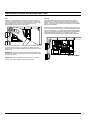
PROGRAMMING INSTRUCTIONS
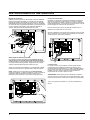
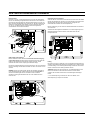
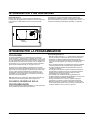
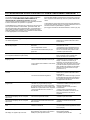
The manual cycle will start five seconds after pressing the last button.
If you push any other programming button before the five second
period is complete, the manual mode will not run.
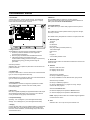
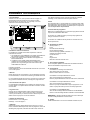
OPERATION FUNCTIONS
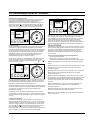
• change the operating mode of the controller
• change programs
• operate the controller manually
If you wish to stop a manually started zone, press the Zone On/Off key again.
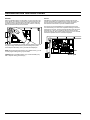
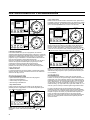
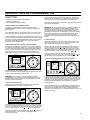
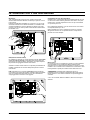
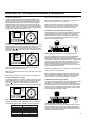
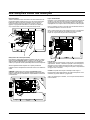
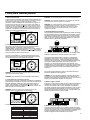
1. Controller Off/On or Sensor Override Modes:
To turn the controller On, press the Off/On/Sensor Override button
until the arrow appears next to On.
A controller left in the Off mode will still countdown (as if it is running),
but no electrical output will be sent to the valves.
The Sensor Override option allows operation when a sensor has
caused the controller to suspend watering. Again, simply press the
Off/On/Sensor Override button until the arrow is next to Sensor
Override for manual and/or automatic operation to be allowed.
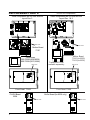
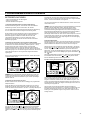
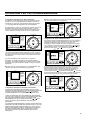
2. Program Manual On/Off (Semi-Automatic)
To manually run an entire program, be sure you are in the On or
Sensor Override mode (see item 1 above), then press the Program
On/Off key. The displayed program letter will blink. If you want to run
this program, wait five seconds and the programmed watering will
begin. If you want to run a different program, press the Next Program
key until the desired program letter is displayed.
PROGRAMMING:
OPERATION:
TIME
OFF
ON
SENSOR
OVERRIDE
TIME
START TIME
ZONE/
RUN TIME
START
TIMES
CURRENT
DAY
%WATER BUDGET
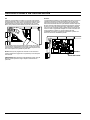
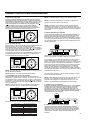
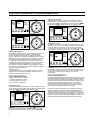
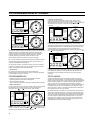
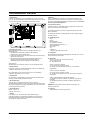
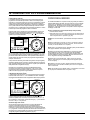
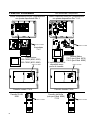
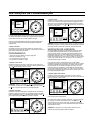
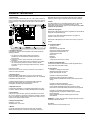
4. Manual Advance
This feature allows you to change which zone is running manually
with one step. By pressing one button you can stop the zone running
and start a different zone.
With a zone running manually (see item 3 above) press the zone
or
button. When the zone you wish to run next is displayed, the
zone running will stop, and the new zone displayed will begin its
manual run time. You can change the run time with the gray triangle
or
keys.
Manual advance only operates when a manually started zone is
running. The zone
or
button must be pressed before a zone's
run time is complete.
5. Change Program Letter (Next Program)
INTERVAL
PROGRAM
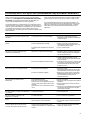
NOTE: If the controller is running a programmed run time, a Manual
start will not function, nor stack. If a programmed run time is stopped
by turning the controller off, the rest of the zones in that start time are
cancelled. When the controller is returned to On mode, it will begin
irrigation at the next scheduled start time. If you are in manual
operation when a programmed start time is scheduled to run, the
programmed start is stacked and will run at the completion of the
manual operation.
DATE
PROGRAMMING:
OPERATION:
TIME
%
WATER
BUDGET
S M T W TH F S ODD/EVEN
OFF
ON
SENSOR
OVERRIDE
TIME
DAILY
START TIME
ZONE/
RUN TIME
OFF/ON
SENSOR
OVERRIDE
PROGRAM
ON/OFF
ZONE
ON/OFF
NEXT PROGRAM
(HOLD FOR REVIEW)
RUN
TIME
ZONE NUMBER
DATE
NOTE: To stop an automatic program, turn the controller to Off mode.
When the controller is returned to On, the next scheduled start time
will resume automatic operation.
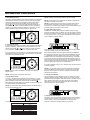
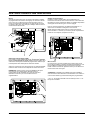
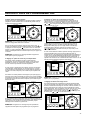
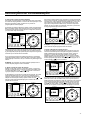
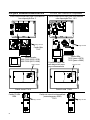
3. Zone Manual On/Off
This feature allows you to operate a zone regardless of the
programmed irrigation schedule.
Be sure you are in the On or Sensor Override mode, then press the
Zone On/Off button. The time of day, zone 1, M (for Manual), and a
PROGRAMMING:
TIME
OFF
ON
SENSOR
OVERRIDE
TIME
START TIME
ZONE/
RUN TIME
INTERVAL
INTERVAL
If you wish to stop a manually started program, Press the Program
On/Off key again.
OPERATION:
CURRENT
DAY
%WATER BUDGET
PROGRAM
ODD / EVEN
START
TIMES
%
WATER
BUDGET
S M T W TH F S ODD/EVEN
OFF/ON
SENSOR
OVERRIDE
PROGRAM
ON/OFF
ZONE
ON/OFF
NEXT PROGRAM
(HOLD FOR REVIEW)
ZONE NUMBER
DAILY
RUN
TIME
ODD / EVEN
INTERVAL
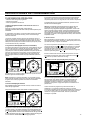
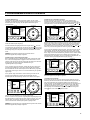
The displayed program letter is important. All programming changes
made are relevant to that program. To make changes to a different
program, press the Next Program key. The program letter will shift
one letter to the right. Any changes made are specific to the program
that is highlighted on the LCD.
When a program letter has been selected, the SmartZone™ will not
return to the status display (show next start time) until after a 1-2
minute delay. This delay is to allow all changes to be made to the
selected program, before the display changes.
START
TIMES
CURRENT
DAY
%WATER BUDGET
INTERVAL
PROGRAM
DATE
%
WATER
BUDGET
S M T W TH F S ODD/EVEN
OFF/ON
SENSOR
OVERRIDE
PROGRAM
ON/OFF
ZONE
ON/OFF
NEXT PROGRAM
(HOLD FOR REVIEW)
ZONE NUMBER
DAILY
RUN
TIME
ODD / EVEN
INTERVAL
10 minute run time will be displayed. To change which zone you wish
to run, use the Zone
or
keys. To change the run time, use the
gray triangle
or
keys. Changing the run time for a manual
cycle will not change the programmed run time.
5