1
USER MANUAL
ENGLISH
CONTROLS AND FUNCTIONS
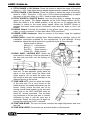
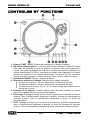
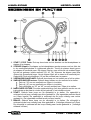
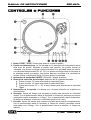
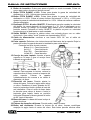
1. START / STOP Button: Press this button to start or stop the platter.
2. STROBE DOTS: The dots around the edge of the platter are used in conjunction
with the light located inside the power switch. While the platter rotates, the dots
help to indicate the speed. The dots flow to the right when the platter speed is
lower than the selected (33, 45, 78. When the dots flow to the left, the platter
speed is higher. When the dots seem to be stationary, the platter is rotating at the
exact speed. Use the Pitch slider (12) to adjust the speed.
3. POWER ON/OFF SWITCH: Used to turn the turntable on an off.
4. SPEED SELECT Buttons: Used to select the desired speed.
• Press the “33” button to select the 33rpm speed.
• Press the “45” button to select the 45rpm speed.
• Press “33” and “45” buttons simultaneously to select the 78rpm speed.
5. TARGET LIGHT: White led target light used to locate the exact place on your
record when used in a dark place.
6. STARTUP TIME: Used to adjust the time it takes to reach the proper platter speed.
Startup time is minimal when the potentiometer is completely turned to the left.
(proper speed attained after 0.2sec) Startup time is maximum when the
potentiometer is completely turned to the right. (proper speed attained after 6sec)
7. BRAKE TIME: Used to adjust the time it takes to completely stop the platter. Break
time is minimal when the potentiometer is completely turned to the left. (complete
stop after 0.2sec) Break time is maximum when the potentiometer is completely
turned to the right. (complete stop after 6sec)
8. REVERSE Button: Press this button to reverse the platter rotation, press this
button again to end the reverse mode.
3/28
X-TRM 1
TURNTABLE