1
Colour Varifocal Dome Camera
Caution
Retighten the locking screws to prevent loss of adjustment.
Package contents
•
•
•
•
•
•
•
Dome camera
1 BNC connection cable
1 service monitor cable
2 fixing screws
2 wall plugs
Fixing template
Installation and operating instructions (this document)
7.
Optional settings
•
Safety
•
To avoid electrical shock, do not open the cabinet. Refer
servicing to qualified personnel only.
The CAUTION label shown above is attached to the dome.
CAUTION: To reduce the risk of electric shock, do not
remove cover (or back). No user-serviceable parts inside.
Servicing should only be carried out by qualified service
personnel.
Intended for indoor use only!
•
Ordering Data
Type
CFVC1317-LP
Item Number
S54561-C61-A1
Description
Colour Varifocal
Dome Camera
Accessories
CFFA-CD
2GF1086-8AG
Clear Lower Dome
Installing the camera
Step 1: Connecting the cables
1.
2.
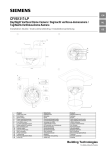
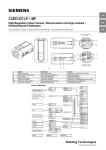
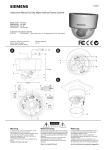
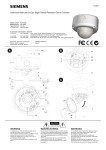
Connect the BNC cable to the BNC connector (11).
Connect the power supply cable to the power connector
(12).
Use a 24 V AC or 12 V DC power supply.
3. To reduce radiation sufficiently, please wind one turn
around the core, see figure below.
Location
Core spec
Core illustration
Power
KCF-65-B
cable
Hold the lens and tighten the locking ring (13) and
panning adjustment wheel (14).
Adjust the brightness of the picture using the LEVEL
screw (6):
L = low, makes the picture darker
H =high, makes the picture brighter
Adjust the phase difference between cameras (use V
Phase adjustment screw (7).
Set DIP switches (8) to activate or deactivate the
following features:
• Backlight compensation (BLC)
• Automatic gain control (AGC).
Automatically adjusts the picture to suit ambient
brightness
• Line Lock (LL).
Sets camera synchronisation to internal (OFF) or line
lock (ON). Line lock is only available with 24 V AC.
The DC/AES DIP switch is not in use.
Step 5: Attaching the dome to the unit
Note
Use a soft lint-free cloth to wipe the dome cover clean and
remove fingerprints.
1.
2.
3.
Clean the joint surfaces of the unit.
Place the dome on the unit (see figure C).
Turn the dome clockwise and lock the cover in place.
General guidelines
Operation and storage
•
•
Avoid filming very bright objects (such as light fittings) for
an extended period.
Do not operate or store the unit in the following locations:
• Extremely hot or cold places.
• Close to sources of strong magnetism.
• Close to sources of powerful electromagnetic
radiation, such as radios or TV transmitters.
• In humid or excessively dusty places.
• Where exposed to mechanical vibrations.
• Close to fluorescent lamps or objects reflecting light.
• Under unstable or flickering light sources.
Caution
If using a DC supply, make sure the polarity is correct.
Incorrect connection may cause malfunction and/or damage
to the video camera.
Cleaning
4.
•
Guide the cables through the cable entry holes (1).
Step 2: Mounting the camera
1.
2.
3.
4.
Place the template on the mounting surface and mark the
holes.
Drill two holes as marked.
Insert the wall plugs into the holes.
Fasten the unit with the screws provided.
Step 3: Adjusting the camera position
1.
2.
Hold the lens so that it does not rotate.
Loosen the locking ring (13) and panning adjustment
wheel (14).
Caution
Do not loosen the locking ring without holding the lens in
place; otherwise, the lens may rotate with the locking ring and
the cable may twist.
3.
Turn the lens and the axial ring (15) in the desired
direction.
Note
If the camera does not rotate smoothly, loosen the locking
ring completely. The locking ring has an internal stop and will
not come off.
Caution
Do not turn the lens more than 360° as this may cause
internal cables to disconnect or break.
4.
•
Use a soft, dry cloth to remove fingerprints or dust from
the dome.
If the dome is very dirty, use a small amount of mild
detergent on a damp cloth for cleaning. Ensure the dome
is dry before attaching the dome to the unit.
Specifications
General
Power requirement
Power consumption
Operating temperature
Storage temperature
External dimensions
Weight
Unit material
Dome material
Imaging system
Imaging device
Effective picture
elements
TV system
EN
12 V DC or 24 V AC (min. 5 W )
3.5 W (max.)
-10 to +50 °C, 90 % RH max.
-20 to +60 °C, 70 % RH max.
112 x 97.5 mm
Approx. 0.29 kg
ABS (30%) and
polycarbonate (70%)
Polycarbonate
Super HAD 1/3 inch CCD
PAL: 752 (H) * 582 (V)
PAL: 2:1 Interlace,
15.625 kHz (H),
50 Hz (V)
Optical system and other specifications
Focal length
3.7 – 12 mm
Max. relative aperture
F1.4 – 2.8
Horizontal angle of view
22.7 – 76.9
Minimum object distance
0.5 m
Synchronization system
Internal or Line lock
(24 V AC only)
Horizontal resolution
540 TV lines
Minimum illumination
Clear bubble
0.24 lx
Smoked bubble
0.46 lx
Video output
1.0 Vpp, 75 Ohm
Video S/N ratio
> 50 dB (AGC OFF, weighted)
White balance
Automatic (2500°K – 10000°K)
AGC
ON/OFF switchable
BLC
ON (center measured)/OFF
switchable
Information
This equipment has been tested and found to comply with
the limits for a Class A digital device, pursuant to Part 15 of
the FCC Rules. These limits are designed to provide
reasonable protection against harmful interference when
the equipment is operated in a commercial environment.
This equipment generates, uses, and can radiate radio
frequency energy and, if not installed and used in
accordance with the instruction manual, may cause harmful
interference to radio communications. Operation of this
equipment in a residential area may cause harmful
interference in which case the user will be required to
correct the interference at his own expense.
Caution
Do not use volatile solvents such as alcohol, benzene or
thinners. These solvents may damage the surface.
Transportation
Use the original packing material or materials of equal
quality.
CCD characteristics
The following condition may be observed when using a CCD
camera. This are inherent to the design and do not stem from
any fault in the camera itself.
• Vertical smear: This phenomenon occurs when viewing a
very bright object
• Patterned noise: This is a fixed pattern which may appear
over the entire monitor screen when the camera is
operated at a high temperature.
• Jagged picture: When viewing stripes, straight lines, or
similar patterns, the image on the screen may appear
jagged.
Lightly tighten the locking ring (13) and panning
adjustment wheel (14).
Step 4: Adjusting zoom and focus
1.
2.
3.
4.
5.
6.
Loosen the zoom lever/locking screw (4) by turning it
counter-clockwise.
Rotate the zoom ring to achieve the desired picture.
Loosen the focus lever/locking screw (5) by turning it
counter-clockwise.
Rotate the focus ring to adjust the focus.
If readjustment is necessary, repeat the steps above.
Retighten the zoom lever/locking screw (4) and the focus
lever/locking screw (5).
2
Siemens Building Technologies
Fire Safety & Security Products
06.2008