1
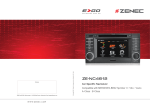
ZE-NC4612 FRONT PANEL BUTTONS FRONT PANEL BUTTONS Front Panel 1. INTERNAL MICROPHONE 2. IR RECEIVER 14. SMART DIAL Rotate to move a cursor up and down Press to confirm a selection 3. POWER ON/OFF Press to power on/off device 15. BT Press to mute/unmute audio output Press to switch to BT source . 3 $ / / 4 1 4. DISC INDICATOR 5. DISC SLOT 6. EJECT Eject disc 2 + * ( , ) " ' 0 & 7. HOME Press to open Main Menu, hold to open EQ page 8. FM/AM Press to switch to FM/AM source Press and hold to de- and activate TA function 16. NEXT Press to choose next Track|Chapter|Station Press and hold to fast forward 17. PREVIOUS Press to choose previous Track|Chapter|Station Press and hold to fast rewind 18. ALT Function can be set in Setup Press and hold to open the Video setup 9. DVD Press to switch to DVD source 10. NAV Press to switch between Navigation and playback page Press and hold to fade in/out the infobars manually # % 11. 12. VOL Rotate to increase/decrease volume Press to mute/unmute audio output RESET Press to initiate a hardware reset 13. SD CARD SLOT 4 5