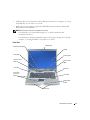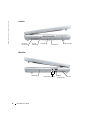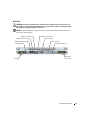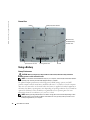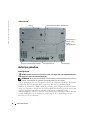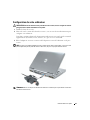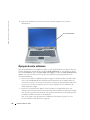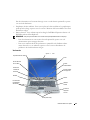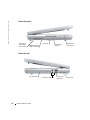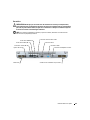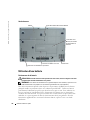
1
Dell™ Latitude™ D810 Quick Reference Guide Model PP15L w w w. d e l l . c o m | s u p p o r t . d e l l . c o m Notes, Notices, and Cautions NOTE: A NOTE indicates important information that helps you make better use of your computer. NOTICE: A NOTICE indicates either potential damage to hardware or loss of data and tells you how to avoid the problem. CAUTION: A CAUTION indicates a potential for property damage, personal injury, or death. Abbreviations and Acronyms For a complete list of abbreviations and acronyms, see the User’s Guide (depending on your operating system, double-click the User’s Guide icon on your desktop, or click the Start button, click Help and Support Center, and then click User and system guides). If you purchased a Dell™ n Series computer, any references in this document to Microsoft® Windows® operating systems are not applicable. The Drivers and Utilities CD and the Operating System CD are optional and may not ship with all computers. _________________ Information in this document is subject to change without notice. © 2005 Dell Inc. All rights reserved. Reproduction in any manner whatsoever without the written permission of Dell Inc. is strictly forbidden. Trademarks used in this text: Dell, the DELL logo, and Latitude are trademarks of Dell Inc.; Microsoft and Windows are registered trademarks of Microsoft Corporation; Intel and Pentium are registered trademarks of Intel Corporation. Other trademarks and trade names may be used in this document to refer to either the entities claiming the marks and names or their products. Dell Inc. disclaims any proprietary interest in trademarks and trade names other than its own. Model PP15L February 2005 P/N C5278 Rev. A01 Contents Finding Information for Your Computer Setting Up Your Computer 5 . . . . . . . . . . . . . . . . . . . . . . . . . . . . . 9 . . . . . . . . . . . . . . . . . . . . . . . . . . . . . . 10 . . . . . . . . . . . . . . . . . . . . . . . . . . . . . . . . . . . . . . . . . . . . . . . . . . . . . . . . . . . . . . . . 11 12 12 13 14 . . . . . . . . . . . . . . . . . . . . . . . . . . . . . . . . . 14 About Your Computer. Front View . . Left View . . Right View . . Back View . . Bottom View Using a Battery . . . . . . . . . . . . . . . . . . . . . . . . . . . . . . . . . . . . . . . . . . . . . . . . . . . . . . . . . . . . . . . . . . . . . . . . . . . . . . . . . . . . . . . . . . . . . . . . . . . . . . . . . . . . . . . . . . . . . . . . . . . . . . . . . . . . . . . . . . . . . . 14 15 17 17 . . . . . . . . . . . . . . . . . . . . . . . . . . . . . . . 18 Storing a Battery . . . . . . . . . . . . . . . . . . . . . . . . . . . . . . . . . 18 Solving Problems . . . . . . . . . . . . . . . . . . . . . . . . . . . . . . . . 18 Battery Performance . . . . . Checking the Battery Charge . Charging the Battery . . . . . Removing a Battery . . . . . . Installing a Battery . . . . . . . . . . . . . . . . . . . . . . . . . . . . . . . . . . . . . . . . . . . . . . . . . . . . . . . . . . . . . . . . . . . . . . . . . . . . . . . 18 19 21 . . . . . . . . . 22 . . . . . . . . . . . . . . . . . . . . . . . . . . . . . . . . . . . . . . . . 25 Notebook System Software (NSS) . . . . . . . . . . . . Lockups and Software Problems . . . . . . . . . . . . . Running the Dell Diagnostics . . . . . . . . . . . . . . . Starting the Dell Diagnostics From the Optional Drivers and Utilities CD . . . . . . . . . . . . . . . . . . . . . . Index . . . . . . . . . . . . . . . . . . . Contents 3 4 Contents Finding Information for Your Computer NOTE: Some features may not be available for your computer or in certain countries. NOTE: Additional information may ship with your computer. What Are You Looking For? Find It Here • • • • • Drivers and Utilities CD (also known as the ResourceCD) A diagnostic program for my computer Drivers for my computer My computer documentation My device documentation Notebook System Software (NSS) Documentation and drivers are already installed on your computer when shipped from Dell. You can use the CD to reinstall drivers, run the Dell Diagnostics, or access your documentation. Readme files may be included on your CD to provide last-minute updates about technical changes to your computer or advanced technical-reference material for experienced users or technicians. NOTE: The Drivers and Utilities CD is optional and may not ship with all computers. NOTE: The latest drivers and documentation updates can be found at support.dell.com. • • • • • • Warranty information Terms and Conditions (U.S. Only) Safety instructions Regulatory information Ergonomics information End User License Agreement • Service Tag and Express Service Code • Microsoft® Windows® License Label Dell™ Product Information Guide Service Tag and Microsoft Windows License These labels are located on the bottom of your computer. • Use the Service Tag to identify your computer when you use support.dell.com or contact technical support • Enter the Express Service Code to direct your call when contacting technical support. The Express Service Code is not available in all countries. Quick Reference Guide 5 www.dell.com | support.dell.com What Are You Looking For? Find It Here • • • • Latitude™ User’s Guide How to remove and replace parts Specifications How to configure system settings How to troubleshoot and solve problems 6 Quick Reference Guide Microsoft® Windows® XP Help and Support Center 1 Click the Start button and click Help and Support. 2 Click User and System Guides and click User Guides. What Are You Looking For? Find It Here • Solutions — Troubleshooting hints and tips, articles from technicians, online courses, frequently asked questions • Community — Online discussion with other Dell customers • Upgrades — Upgrade information for components, such as memory, the hard drive, and the operating system • Customer Care — Contact information, service call and order status, warranty, and repair information • Service and support — Service call status and support history, service contract, online discussions with technical support • Reference — Computer documentation, details on my computer configuration, product specifications, and white papers • Downloads — Certified drivers, patches, and software updates • Notebook System Software (NSS)— If you reinstall the operating system for your computer, you should also reinstall the NSS utility. NSS provides critical updates for your operating system and support for Dell™ 3.5-inch USB floppy drives, Intel® Pentium® M processors, optical drives, and USB devices. NSS is necessary for correct operation of your Dell computer. The software automatically detects your computer and operating system and installs the updates appropriate for your configuration. Dell Support Website — support.dell.com NOTE: Select your region to view the appropriate support site. NOTE: Corporate, government, and education customers can also use the customized Dell Premier Support website at premier.support.dell.com. The website may not be available in all regions. To download Notebook System Software: 1 Go to support.dell.com and click Downloads. 2 Enter your Service Tag or product model. 3 In the Download Category drop-down menu, click All. 4 Select the operating system and operating system language for your computer, and click Submit. 5 Under Select a Device, scroll to System and Configuration Utilities, and click Dell Notebook System Software. Quick Reference Guide 7 www.dell.com | support.dell.com What Are You Looking For? Find It Here • How to use Windows XP • Documentation for my computer • Documentation for devices (such as a modem) Windows Help and Support Center 1 Click the Start button and click Help and Support. 2 Type a word or phrase that describes your problem and click the arrow icon. 3 Click the topic that describes your problem. 4 Follow the instructions on the screen. • How to reinstall my operating system Operating System CD The operating system is already installed on your computer. To reinstall your operating system, use the Operating System CD. See your Latitude User’s Guide for instructions. After you reinstall your operating system, use the Drivers and Utilities CD to reinstall drivers for the devices that came with your computer. The operating system product key is located on your computer. NOTE: The color of your CD varies based on the operating system you ordered. NOTE: The Operating System CD is optional and may not ship with all computers. 8 Quick Reference Guide Setting Up Your Computer CAUTION: Before you begin any of the procedures in this section, follow the safety instructions located in the Product Information Guide. 1 Unpack the accessories box. 2 Set aside the contents of the accessories box, which you will need to complete your computer setup. The accessories box also contains user documentation and any software or additional hardware (such as PC Cards, drives, or batteries) that you have ordered. 3 Connect the AC adapter to the AC adapter connector on the computer and to the electrical outlet. NOTICE: When using the AC adapter, secure the cable so that the cable is not pulled, tangled, stepped on, or crushed by objects such as chair legs or desk supports. NOTE: Do not connect the computer to the docking device until the computer has been turned on and shut down at least once. Quick Reference Guide 9 www.dell.com | support.dell.com 4 Open the computer display and press the power button to turn on the computer. power button About Your Computer See your online User’s Guide for detailed information about your computer. Depending on your operating system, double-click the User’s Guide icon on your desktop, or click the Start button, click Help and Support Center, and then click User and system guides. The following items address some of the more commonly asked questions about the computer. • Modem and network adapter: The computer may include both a v.90 56K modem and a 10/100/1000 Ethernet LOM network adapter. For connector locations, see "Back View" on page 13. For more information on ports and connectors, see "About Your Computer" in your online User’s Guide. • Battery life and usage: Various batteries are available for use with your computer. Operating time from a single fully charged battery with average usage varies. Performing certain types of operations, such as extended wireless operation, can significantly reduce battery life. For more information about battery performance and usage, see "Using a Battery" on page 14. For more information about conserving power and an optional second battery, see your User’s Guide. 10 Quick Reference Guide • Module bay devices: For information on the module bay and the devices it supports, see "Using the Module Bay" in your online User’s Guide. • Docking devices: Your computer supports the Dell D/Dock Expansion Station and the Dell D/Port Advanced Port Replicator. NOTE: Docking devices may not be available in all countries. – For information on your optional docking device, see the documentation that accompanied the device. – For information on obtaining optimal performance when using a docking device with this computer, see "Solving Problems" in your online User’s Guide. Front View keyboard status lights display latch display mute button power button volume control buttons device status lights track stick keyboard track stick/ touch pad buttons touch pad display latch button speakers (2) Quick Reference Guide 11 www.dell.com | support.dell.com Left View processorfan air vent security cable slot hard drive PC Card slot smart card slot Right View module bay 12 Quick Reference Guide audio connectors (2) USB 2.0 connectors (2) air vent Back View CAUTION: Do not block, push objects into, or allow dust to accumulate in the air vents. Do not store your computer in a low-airflow environment, such as a closed briefcase, while it is running. Restricting the airflow can damage the computer or cause a fire. NOTICE: To avoid damaging the computer, wait 5 seconds after you turn off the computer before you disconnect an external device. USB 2.0 connectors (2) modem connector (RJ-11) network connector (RJ-45) infrared sensor air vent S-video TV-out connector serial connector video connector AC adapter connector processorfan air vent Quick Reference Guide 13 www.dell.com | support.dell.com Bottom View battery battery-bay latch release Mini PCI card/ modem/memory module cover processor-fan air vent docking device slot air vent Using a Battery Battery Performance CAUTION: Before you begin any of the procedures in this section, follow the safety instructions located in the Product Information Guide. NOTE: For information about the Dell warranty for your computer, see the Product Information Guide or separate paper warranty document that shipped with your computer. For optimal computer performance and to help preserve BIOS settings, operate your Dell™ portable computer with the main battery installed at all times. Use a battery to run the computer when it is not connected to an electrical outlet. One battery is supplied as standard equipment in the battery bay. Battery operating time varies depending on operating conditions. You can install an optional second battery in the module bay to significantly increase operating time. For more information about the second battery, see your User’s Guide. NOTE: Battery operating time (the time it can hold a charge) decreases over time. Depending on how often the battery is used and the conditions under which it is used, you may need to purchase a new battery during the life of your computer. 14 Quick Reference Guide Operating time is significantly reduced when you perform operations including, but not limited to, the following: • Using optical drives, such as DVD or CD drives • Using wireless communications devices, PC Cards, or USB devices • Using high-brightness display settings, 3D screen savers, or other power-intensive programs such as 3D games • Running the computer in maximum performance mode NOTE: It is recommended that you connect your computer to an electrical outlet when writing to a CD or DVD. You can check the battery charge before you insert the battery into the computer. You can also set power management options to alert you when the battery charge is low. CAUTION: Using an incompatible battery may increase the risk of fire or explosion. Replace the battery only with a compatible battery purchased from Dell. The lithium-ion battery is designed to work with your Dell computer. Do not use a battery from other computers with your computer. CAUTION: Do not dispose of batteries with household waste. When your battery no longer holds a charge, call your local waste disposal or environmental agency for advice on disposing of a lithium-ion battery. See "Battery Disposal" in the Product Information Guide. CAUTION: Misuse of the battery may increase the risk of fire or chemical burn. Do not puncture, incinerate, disassemble, or expose the battery to temperatures above 65°C (149°F). Keep the battery away from children. Handle damaged or leaking batteries with extreme care. Damaged batteries may leak and cause personal injury or equipment damage. Checking the Battery Charge The Dell QuickSet Battery Meter, the Microsoft® Windows® Power Meter window and icon, the battery charge gauge and health gauge, and the low-battery warning provide information on the battery charge. For information about checking the charge on the optional second battery, see your User’s Guide. Dell QuickSet Battery Meter If Dell QuickSet is installed, press <Fn><F3> to display the QuickSet Battery Meter. The Battery Meter window displays status, charge level, and charge completion time for the battery in your computer. NOTE: You can use your docking device to charge a computer battery. However, a battery in a docking device does not power the docking device or computer. In addition, when your computer is connected to a docking device (docked), the Battery Meter window includes a Dock Battery tab, which displays the charge level and current status of the docking device battery. Quick Reference Guide 15 www.dell.com | support.dell.com The following icons appear in the Battery Meter window: The computer or docking device is running on battery power. The computer is connected to AC power and the battery is charging. The computer is connected to AC power and the battery is fully charged. For more information about QuickSet, right-click the icon in the taskbar, and click Help. Microsoft Windows Power Meter The Windows Power Meter indicates the remaining battery charge. To check the Power Meter, double-click the icon on the taskbar. For more information about the Power Meter tab, see your User’s Guide. If the computer is connected to an electrical outlet, a icon appears. Charge Gauge Before you install a battery, press the status button on the battery charge gauge to illuminate the charge-level lights. Each light represents approximately 20 percent of the total battery charge. For example, if the battery has 80 percent of its charge remaining, four of the lights are on. If no lights appear, the battery has no charge. Health Gauge The battery operating time is largely determined by the number of times it is charged. After hundreds of charge and discharge cycles, batteries lose some charge capacity, or battery health. To check the battery health, press and hold the status button on the battery charge gauge for at least 3 seconds. If no lights appear, the battery is in good condition, and more than 80 percent of its original charge capacity remains. Each light represents incremental degradation. If five lights appear, less than 60 percent of the charge capacity remains, and you should consider replacing the battery. NOTE: When you press and hold the status button on the battery charge gauge for at least 3 seconds, the charge-level lights will first light to display the current charge status. Then they switch to Health status, where they represent incremental degradation when lit. 16 Quick Reference Guide Low-Battery Warning NOTICE: To avoid losing or corrupting data, save your work immediately after a low-battery warning. Then connect the computer to an electrical outlet. You can also turn the computer off and install a second battery in the module bay. If the battery runs completely out of power, hibernate mode begins automatically. A low-battery warning occurs when the battery charge is approximately 90 percent depleted. The computer beeps once, indicating that minimal battery operating time remains. During that time, the speaker beeps periodically. If two batteries are installed, the low-battery warning means that the combined charge of both batteries is approximately 90 percent depleted. The computer enters hibernate mode when the battery charge is at a critically low level. Charging the Battery NOTE: The AC adapter charges a completely discharged battery in approximately 2 hours with the computer turned off. Charge time is longer with the computer turned on. You can leave the battery in the computer as long as you like. The battery’s internal circuitry prevents the battery from overcharging. When you connect the computer to an electrical outlet or install a battery while the computer is connected to an electrical outlet, the computer checks the battery charge and temperature. If necessary, the AC adapter then charges the battery and maintains the battery charge. If the battery is hot from being used in your computer or being in a hot environment, the battery may not charge when you connect the computer to an electrical outlet. The battery is too hot to start charging if the light flashes alternately green and orange. Disconnect the computer from the electrical outlet and allow the computer and the battery to cool to room temperature. Then connect the computer to an electrical outlet to continue charging the battery. Removing a Battery CAUTION: Before performing these procedures, disconnect the modem from the telephone wall jack. NOTE: For information about removing the optional second battery, see your User’s Guide. 1 Ensure that the computer is turned off and disconnected from the electrical outlet. 2 If the computer is connected to a docking device (docked), undock it. See the documentation that came with your docking device for instructions. Quick Reference Guide 17 www.dell.com | support.dell.com 3 Slide and hold the battery-bay latch release on the bottom of the computer, and then remove the battery from the bay. Installing a Battery Ensure that the computer is turned off. Slide the battery into the bay until the latch release clicks. For information about installing the optional second battery, see your User’s Guide. Storing a Battery Remove the battery when you store your computer for an extended period of time. A battery discharges during prolonged storage. After a long storage period, recharge the battery fully before you use it. Solving Problems Notebook System Software (NSS) If you reinstall the operating system for your computer, you should also reinstall the NSS utility. This utility is available on the optional Drivers and Utilities CD and on the Dell Support Website. To download the utility from the Dell Support Website, go to the Downloads section of the website and select your computer model from the pull-down menu. Select the Download Category "System and Configuration Utilities," select your operating system and language, and then follow the posted instructions. 18 Quick Reference Guide NSS provides critical updates for your operating system and support for Dell™ 3.5-inch USB floppy drives, Intel® Pentium® M processors, optical drives, and USB devices. NSS is necessary for correct operation of your Dell computer. The software automatically detects your computer and operating system and installs the updates appropriate for your configuration. NOTE: NSS is critical for the correct operation of USB devices, including the Dell D/Bay, D/Dock, D/Port, and D/View devices. Lockups and Software Problems CAUTION: Before you begin any of the procedures in this section, follow the safety instructions in the Product Information Guide. The computer does not start up ENSURE THAT THE AC ADAPTER IS FIRMLY CONNECTED TO THE COMPUTER AND TO THE ELECTRICAL OUTLET The computer stops responding NOTICE: You might lose data if you are unable to perform an operating system shutdown. TU R N T H E C O M P U T E R O F F — If you are unable to get a response by pressing a key on your keyboard or moving your mouse, press and hold the power button for at least 8 to 10 seconds until the computer turns off. Then restart your computer. A program stops responding END THE PROGRAM — 1 Press <Ctrl><Shift><Esc> simultaneously. 2 Click Applications. 3 Click the program that is no longer responding. 4 Click End Task. A program crashes repeatedly NOTE: Software usually includes installation instructions in its documentation or on a floppy disk or CD. C H E C K T H E S O F T W A R E D O C U M E N T A T I O N — If necessary, uninstall and then reinstall the program. Quick Reference Guide 19 www.dell.com | support.dell.com A program is designed for an earlier Windows operating system I F Y O U A R E U S I N G W I N D O W S X P, R U N T H E P R O G R A M C O M P A T I B I L I T Y W I Z A R D — The Program Compatibility Wizard configures a program so it runs in an environment similar to nonWindows XP operating system environments. 1 Click the Start button, point to All Programs→ Accessories, and then click Program Compatibility Wizard. 2 In the welcome screen, click Next. 3 Follow the instructions on the screen. A solid blue screen appears TU R N T H E C O M P U T E R O F F — If you are unable to get a response by pressing a key on your keyboard or moving your mouse, press and hold the power button for at least 8 to 10 seconds until the computer turns off. Then restart your computer. Other software problems CHECK THE SOFTWARE DOCUMENTATION OR CONTACT THE SOFTWARE MANUFACTURER FOR TROUBLESHOOTING INFORMATION — • Ensure that the program is compatible with the operating system installed on your computer. • Ensure that your computer meets the minimum hardware requirements needed to run the software. See the software documentation for information. • Ensure that the program is installed and configured properly. • Verify that the device drivers do not conflict with the program. • If necessary, uninstall and then reinstall the program. BACK UP YOUR FILES IMMEDIATELY USE A VIRUS-SCANNING PROGRAM TO CHECK THE HARD DRIVE, FLOPPY DISKS, OR CDS SAVE AND CLOSE ANY OPEN FILES OR PROGRAMS AND SHUT DOWN YOUR COMPUTER THROUGH THE Start M E N U 20 Quick Reference Guide S C A N T H E C O M P U T E R F O R S P Y W A R E — If you are experiencing slow computer performance, you frequently receive pop-up advertisements, or you are having problems connecting to the Internet, your computer might be infected with spyware. Use an anti-virus program that includes anti-spyware protection (your program may require an upgrade) to scan the computer and remove spyware. For more information, go to support.dell.com and search for the keyword spyware. R U N T H E D E L L D I A G N O S T I C S — If all tests run successfully, the error condition is related to a software problem. Running the Dell Diagnostics CAUTION: Before you begin any of the procedures in this section, follow the safety instructions located in the Product Information Guide. When to Use the Dell Diagnostics If you experience a problem with your computer, perform the checks in "Solving Problems" (see your online User’s Guide) and run the Dell Diagnostics before you contact Dell for technical assistance. NOTICE: The Dell Diagnostics works only on Dell™ computers. Start the Dell Diagnostics from either your hard drive or from the optional Drivers and Utilities CD (also known as the ResourceCD). Starting the Dell Diagnostics From Your Hard Drive The Dell Diagnostics is located on a hidden diagnostic utility partition on your hard drive. NOTE: If your computer cannot display a screen image, contact Dell. 1 Shut down the computer. 2 If the computer is connected to a docking device (docked), undock it. See the documentation that came with your docking device for instructions. 3 Connect the computer to an electrical outlet. 4 Turn on the computer. When the DELL™ logo appears, press <F12> immediately. NOTE: If you see a message stating that no diagnostics utility partition has been found, run the Dell Diagnostics from your Drivers and Utilities CD. However, the Drivers and Utilities CD is optional and may not have shipped with your computer. If you wait too long and the operating system logo appears, continue to wait until you see the Microsoft® Windows® desktop. Then shut down your computer and try again. The one-time boot menu displays with a list of bootable devices. Quick Reference Guide 21 www.dell.com | support.dell.com 5 Use the down-arrow key to select Diagnostics and press <Enter> to start the Dell Diagnostics from the diagnostics utility partition on your hard drive. NOTE: If the boot device list does not display and the screen is blank, press the <End> key. Then press the <Enter> key to begin the Dell Diagnostics. The computer runs the Pre-boot System Assessment, a series of initial tests of your system board, keyboard, hard drive, and display. • During the assessment, answer any questions that appear. • If a failure is detected, the computer stops and beeps. To stop the assessment and restart the computer, press <n>; to continue to the next test, press <y>; to retest the component that failed, press <r>. • If failures are detected during the Pre-boot System Assessment, write down the error code(s) and contact Dell before continuing on to the Dell Diagnostics. If the Pre-boot System Assessment completes successfully, you receive the message Booting Dell Diagnostic Utility Partition. Press any key to continue. 6 Press any key to start the Dell Diagnostics from the diagnostics utility partition on your hard drive. Starting the Dell Diagnostics From the Optional Drivers and Utilities CD 1 Insert the Drivers and Utilities CD. NOTE: The Drivers and Utilities CD is optional and may not ship with all computers. 2 Shut down and restart the computer. When the DELL logo appears, press <F12> immediately. If you wait too long and the Windows logo appears, continue to wait until you see the Windows desktop. Then shut down your computer and try again. NOTE: The next steps change the boot sequence for one time only. On the next start-up, the computer boots according to the devices specified in system setup. 3 When the boot device list appears, highlight CD/DVD/CD-RW Drive and press <Enter>. 4 Select the CD/DVD/CD-RW Drive option from the CD boot menu. 5 Select the Boot from CD-ROM option from the menu that appears. 6 Type 1 to start the ResourceCD menu. 7 Type 2 to start the Dell Diagnostics. 8 Select Run the 32 Bit Dell Diagnostics from the numbered list. If multiple versions are listed, select the version appropriate for your computer. 9 When the Dell Diagnostics Main Menu appears, select the test you want to run. 22 Quick Reference Guide Dell Diagnostics Main Menu 1 After the Dell Diagnostics loads and the Main Menu screen appears, click the button for the option you want. Option Function Express Test Performs a quick test of devices. This test typically takes 10 to 20 minutes and requires no interaction on your part. Run Express Test first to increase the possibility of tracing the problem quickly. Extended Test Performs a thorough check of devices. This test typically takes 1 hour or more and requires you to answer questions periodically. Custom Test Tests a specific device. You can customize the tests you want to run. Symptom Tree Lists the most common symptoms encountered and allows you to select a test based on the symptom of the problem you are having. 2 If a problem is encountered during a test, a message appears with an error code and a description of the problem. Write down the error code and problem description and follow the instructions on the screen. If you cannot resolve the error condition, contact Dell. NOTE: The Service Tag for your computer is located at the top of each test screen. If you contact Dell, technical support will ask for your Service Tag. 3 If you run a test from the Custom Test or Symptom Tree option, click the applicable tab described in the following table for more information. Tab Function Results Displays the results of the test and any error conditions encountered. Errors Displays error conditions encountered, error codes, and the problem description. Help Describes the test and may indicate requirements for running the test. Configuration Displays your hardware configuration for the selected device. The Dell Diagnostics obtains configuration information for all devices from system setup, memory, and various internal tests, and it displays the information in the device list in the left pane of the screen. The device list may not display the names of all the components installed on your computer or all devices attached to your computer. Parameters Allows you to customize the test by changing the test settings. Quick Reference Guide 23 www.dell.com | support.dell.com 4 When the tests are completed, if you are running the Dell Diagnostics from the Drivers and Utilities CD, remove the CD. 5 When the tests are complete, close the test screen to return to the Main Menu screen. To exit the Dell Diagnostics and restart the computer, close the Main Menu screen. 24 Quick Reference Guide Index A C O about your computer, 10 back view, 13 bottom view, 14 front view, 11 left side view, 12 right side view, 12 CD operating system, 8 Operating System CD, 8 Installation Guide, 8 computer crashes, 19-20 slow performance, 21 stops responding, 19 P air vents location, 12 audio connectors location, 12 B battery charge gauge, 16 charging, 17 checking the charge, 15 health gauge, 16 installing, 18 low-battery warning, 17 performance, 14 power meter, 16 removing, 17 storing, 18 Operating System CD, 8 D Dell Premier Support website, 7 support site, 7 Diagnostics Dell, 21 documentation device, 5 online, 7 ResourceCD, 5 drivers, 5 H Help and Support Center, 8 problems blue screen, 20 computer crashes, 19-20 computer does not start up, 19 computer stops responding, 19 lockups, 19 program crashes, 19 program stops responding, 19 programs and Windows compatibility, 20 slow computer performance, 21 software, 19-20 solving, 18 spyware, 21 Program Compatibility Wizard, 20 Index 25 26 Index S software problems, 20 spyware, 21 T troubleshooting Help and Support Center, 8 W Windows XP Help and Support Center, 8 Program Compatibility Wizard, 20 wizards Program Compatibility Wizard, 20 26 Index Dell™ Latitude™ D810 Snelle Referentiegids Model PP15L w w w. d e l l . c o m | s u p p o r t . d e l l . c o m Opmerkingen, Kennisgevingen en Waarschuwingen OPMERKING: Een OPMERKING duidt belangrijke informatie aan voor een beter gebruik van de computer. KENNISGEVING: Een KENNISGEVING duidt mogelijke beschadiging van de hardware of gegevensverlies aan en geeft aan hoe u dergelijke problemen kunt voorkomen. LET OP: Een LET OP duidt het risico van schade aan eigendommen, lichamelijk letsel of overlijden aan. Afkortingen en Acroniemen Raadpleeg de Users Guide (Gebruikershandleiding) voor een volledige lijst van afkortingen en acroniemen (afhankelijk van het besturingssysteem dubbelklikt u hiervoor op het pictogram Users Guide (Gebruikershandleiding) op het bureaublad of klikt u op de knop Start, op Help and Support Center (Help en ondersteuning) en vervolgens op User and system guides (Gebruikers- en systeemhandleidingen)). Als u een Dell™ computer uit de n-serie hebt aangeschaft, zijn de verwijzingen naar de Microsoft® Windows® besturingssystemen in dit document niet van toepassingen. De cd Drivers and Utilities (Stuur- en hulpprogramma's) en de cd Operating System (Besturingssysteem) zijn optioneel en worden mogelijk niet met alle computers meeverzonden. _________________ De informatie in dit document kan zonder voorafgaande kennisgeving worden gewijzigd. © 2005 Dell Inc. Alle rechten voorbehouden. Verviervoudiging van dit materiaal, op welke wijze dan ook, is alleen toegestaan na uitdrukkelijke, schriftelijke toestemming van Dell Inc. Merken in dit document: Dell, het DELL-logo en Latitude zijn merken van Dell Inc.; Microsoft en Windows zijn gedeponeerde merken van Microsoft Corporation; Intel en Pentium zijn gedeponeerde merken van Intel Corporation. Andere merken en handelsnamen die mogelijk in dit document worden gebruikt, dienen ter aanduiding van de rechthebbenden met betrekking tot de merken en namen of ter aanduiding van hun producten. Dell Inc. claimt op geen enkele wijze enig eigendomsrecht ten aanzien van andere merken of handelsnamen dan haar eigen merken en handelsnamen. Model PP15L Februari 2005 O/N C5278 Rev. A01 Inhoud Informatie over uw computer vinden De computer instellen . . . . . . . . . . . . . . . . . . . . . . 31 . . . . . . . . . . . . . . . . . . . . . . . . . . . . . . 35 Meer over uw computer . . . . . . . . . . . . . . . . . . . . . . . . . . . . . Batterijen gebruiken . . . . . . . . . . . . . . . . . . . . . . . . . . . . . . . . . . . . . . . . . . . . . . . . . . . . . . . . . . 40 . . . . . . . . . . . . . . . . . . . . . . . . . . . . . . . . . . . . . . . . . . . . . . . . . . . . . . . . . . . . . . . . . . . . . . . . . . . . . . . . . . . . . . . . . . . . . . . . . . . . . . . . . . . . . . . . . . . . . . . . . . . . . . . 40 41 43 43 . . . . . . . . . . . . . . . . . . . . . . . . . . . . . 44 . . . . . . . . . . . . . . . . . . . . . . . . . . . . . . . 44 Batterijprestatie . . . . . . . . . . . . De lading van de batterij controlerenDe batterij opladen . . . . . . . . . . Een batterij verwijderen . . . . . . . Een batterij installeren. Een batterij opslaan Problemen oplossen . . . . . . . . . . . . . . . . . . . . . . . . . . . . . . . . . . . . . . . . . . . . . . . . . . . . . . . . . . . . . . . . . . . . . . . . . . . . . . . . . . . . . . . . 44 . . . . . . . . 44 45 47 . . . . . . . . 48 . . . . . . . . . . . . . . . . . . . . . . . . . . . . . . . . . . . . . . 51 Notebook System Software (NSS) . . . . . . . . . . . . . Vastlopen en softwareproblemen . . . . . . . . . . . . . De Dell-diagnostiek uitvoeren . . . . . . . . . . . . . . . Dell-diagnostiek starten met de optionele cd Drivers and Utilities (stuur- en hulpprogramma's) . . . . . . . . . . . . Register . 36 37 38 38 39 40 Vooraanzicht . . . . . Aanzicht links . . . . . Aanzicht rechterzijde . Achteraanzicht . . . . Onderaanzicht . . . . . . . . . . . . . . . . . . . . Inhoud 29 30 Inhoud Informatie over uw computer vinden OPMERKING: Sommige functies zijn mogelijk niet beschikbaar op uw computer of in bepaalde landen. OPMERKING: Mogelijk is werd er bij uw computer additionele informatie meegeleverd. Waar bent u naar op zoek? Hier vindt u het • Een diagnostisch programma voor mijn computer • Stuurprogramma's voor mijn computer • Mijn computerdocumentatie • Documentatie over mijn apparaat • Notebook System Software (NSS) Cd met stuurprogramma's en hulpmiddelen (ook bekend als de ResourceCD) Documentatie en stuurprogramma's zijn al op de computer geïnstalleerd als deze door Dell is geleverd. U kunt deze cd gebruiken voor het opnieuw installeren van stuurprogramma's, het uitvoeren van het Delldiagnoseprogramma en het lezen van de documentatie. De cd kan readme-bestanden (leesmijbestanden) bevatten met de meest recente updates over technische wijzigingen aan de computer, of geavanceerd technisch referentiemateriaal voor ervaren gebruikers of technici. OPMERKING: De cd Drivers and Utilities (stuur- en hulpprogramma's) is optioneel en wordt mogelijk niet bij alle computer geleverd. OPMERKING: U vindt de laatste stuurprogramma's en documentatie op support.dell.com. • • • • • • Garantie-informatie Algemene voorwaarden (alleen V.S.) Veiligheidsinstructies Informatie over regelgeving Ergonomische informatie Licentieovereenkomst voor eindgebruikers Productinformatiegids Dell™ Snelle Referentiegids 31 www.dell.com | support.dell.com Waar bent u naar op zoek? Hier vindt u het • Servicelabel en expresse-servicecode • Microsoft® Windows®-licentielabel Serviceplaatje en Microsoft Windows-licentie • • • • Latitude™ handleiding Onderdelen verwijderen en vervangen Specificaties Systeeminstellingen configureren Probleemoplossing 32 Snelle Referentiegids U vindt deze labels op de onderkant van de computer. • Gebruik het serviceplaatje om uw computer te identificeren wanneer u support.dell.com gebruikt of wanneer u contact opneemt met de technische ondersteuning • Voer de expresse-servicecode in zodat uw telefonische verzoek naar de juiste medewerker van de technische ondersteuning wordt doorgeleid. De code voor expresseservice is niet in alle landen beschikbaar. Microsoft® Windows® XP Help en ondersteuning 1 Klik op de knop Start en klik vervolgens op Help and Support (Help en ondersteuning) 2 Klik op User and System Guides (Gebruiks- en systeemhandleidingen) en klik vervolgens op handleiding. Waar bent u naar op zoek? Hier vindt u het • Oplossingen — Hints en tips voor probleemoplossing, artikelen van technici, on line cursussen, vaak gestelde vragen • Community — on line discussies met andere gebruikers van Dell-producten • Upgrades — Upgrade-informatie over onderdelen als het geheugen, de harde schijf en het besturingssysteem • Klantendienst — Contactgegevens, de status van reparatieverzoeken en bestellingen, informatie over garantie en reparatie • Service en ondersteuning — De status van reparatieverzoeken, ondersteuningshistorie, het servicecontract, on line discussies met medewerkers van de technische ondersteuning • Referentiemateriaal — Computerdocumentatie, details over mijn computerinstellingen, productspecificaties en white papers • Downloads — Geautoriseerde stuurprogramma's, patches en software -updates • Notebook System Software (NSS)— Als u het besturingssysteem voor uw computer opnieuw installeert, moet u ook het hulpprogramma voor NSS opnieuw installeren. NSS biedt essentiële updates voor uw besturingssysteem en ondersteuning voor Dell™ 3.5-inch USBdiskettestations, Intel® Pentium® M processors, optische schijven en USB-apparaten. NSS is nodig om uw Dell-computer correct te laten werken. De software detecteert automatisch de computer en het besturingssysteem en installeert de updates die voor uw configuratie van belang zijn. Dell Support-website — support.dell.com OPMERKING: Selecteer uw regio om de juiste support-website weer te geven. OPMERKING: Bedrijven, overheden en scholen kunnen ook gebruikmaken van de aangepaste Dell Premier Support-website op premier.support.dell.com. De website is mogelijk niet in alle regio's beschikbaar. Downloaden van Notebook Systeemsoftware: 1 Ga naar support.dell.com en klik op Downloads. 2 Geef uw servicelabel of productmodel op. 3 Klik op All (Alles) in het vervolgkeuzemenu Download Category (Downloadcategorie). 4 Selecteer het besturingssysteem en de taal van dat besturingssysteem voor uw computer en klik op Submit. 5 Onder Select a Device (Apparaat selecteren) gaat u naar System and Configuration Utilities (Systeem- en configuratieprogramma's) en klikt u op Dell Notebook Systeemsoftware. Snelle Referentiegids 33 www.dell.com | support.dell.com Waar bent u naar op zoek? Hier vindt u het • Werken met Windows XP • Documentatie voor de computer • Documentatie voor apparaten (zoals een modem) Help en ondersteuning van Windows 1 Klik op de knop Start en klik vervolgens op Help and Support (Help en ondersteuning). 2 Voer een woord of zin in die uw probleem beschrijft en klik op het pijlpictogram. 3 Klik op het onderwerp dat uw probleem beschrijft. 4 Volg de aanwijzingen op het scherm. • Het besturingssysteem opnieuw installeren cd met besturingsysteem Het besturingssysteem is reeds op de computer geïnstalleerd. Gebruik als u het besturingssysteem opnieuw gaat installeren de Besturingssysteem-cd. Zie uw Latitude -handleiding voor instructies. Nadat u het besturingssysteem opnieuw hebt geïnstalleerd, gebruikt u de cd Drivers and Utilities (Stuur- en hulpprogramma's) om de stuurprogramma's voor de met de computer meegeleverde apparaten opnieuw te installeren. De productsleutel voor uw besturingssysteem bevindt zich op uw computer.. OPMERKING: De kleur van de cd is afhankelijk van het besturingssysteem dat u hebt besteld. OPMERKING: De cd met het besturingssysteem is optioneel en wordt mogelijk niet bij alle computers meegestuurd. 34 Snelle Referentiegids De computer instellen LET OP: Voordat u met een van de procedures in deze sectie begint, dient u de veiligheidsinstructies te volgen die u vindt in de Productinformatiegids. 1 Open de verpakking van de doos met accessoires. 2 Zet de inhoud van de doos met toebehoren apart. U zult deze nodig hebben om de installatie van de computer te voltooien. De doos met accessoires bevat tevens gebruikersdocumentatie, software of door u bestelde additionele hardware (zoals PC-kaarten, stuurprogramma's of batterijen). 3 Sluit de netadapter aan op de connector van de computer en de netspanning. KENNISGEVING: Wanneer u de wisselstroomadapter gebruikt, dient u de kabel zo te beveiligen dat deze niet kan worden losgetrokken, niet in de knoop kan raken, dat er niet op kan worden gestapt en dat kapot wordt gedrukt door objecten als stoelpoten of bureausteunen. OPMERKING: Sluit de computer niet aan op het dockingstation voordat u de computer ten minste eenmaal heeft aan- en uitgezet. Snelle Referentiegids 35 www.dell.com | support.dell.com 4 Open het computerdisplay en druk op de aan/uit-knop om de computer aan te zetten. aan/uit-knop Meer over uw computer Zie de on line handleiding voor gedetailleerde informatie over de computer. Afhankelijk van het besturingssysteem dient u op het pictogram User's Guide (handleiding) op het bureaublad van de computer of op de knop Start, Help and Support Center (Help en ondersteuning) en User and system guides (Gebruiks- en systeemhandleidingen) te klikken. Hieronder wordt een aantal van de veelgestelde vragen over de computer behandeld. • Modem en netwerkadapter: De computer kan zowel een v.90 56K-modem als een 10/100/1000 Ethernet LOM-netwerkadapter bevatten. Voor informatie over de locatie van connectoren, zie "Achteraanzicht" op pagina 39. Raadpleeg voor meer informatie over poorten en connectoren "About Your Computer" (Over de computer) in de online User's Guide (handleiding). • Levensduur en gebruik van de batterij: Er zijn verschillende batterijen beschikbaar voor gebruik met de computer. De bedrijfsduur met een enkele, volledig opgeladen batterij varieert bij gemiddeld gebruik. De levensduur van de batterij wordt aanzienlijk verkort als bepaalde handelingen, als langdurig draadloos werken, worden uitgevoerd. Voor meer informatie over de prestatie en het gebruik van batterijen, raadpleegt u "Batterijen gebruiken" op pagina 40. 36 Snelle Referentiegids Voor meer informatie over het besparen van stroom en een optionele tweede batterij, raadpleegt u de handleiding. • Apparaten voor de modulehouder: Voor informatie over de modulehouder en de apparaten die deze ondersteunt, zie "Using the Module Bay" (Modulehouder gebruiken) in de on line User's Guide (handleiding). • Dockingstations: De computer ondersteunt het Dell D/Dock uitbreidingsstation en de Dell D/Port Advanced Port Replicator (geavanceerde poortreplicator). OPMERKING: Dockingstations zijn mogelijk niet in alle landen verkrijgbaar. - Raadpleeg voor informatie over het optionele dockingstation de met het station meegeleverde documentatie. - Voor informatie over het verkrijgen van een optimale prestatie tijdens het gebruik van een dockingstation in combinatie met deze computer, zie "Problemen met de computer oplossen" in uw on line User's Guide (handleiding). Vooraanzicht statuslampjes toetsenbord schuifje van beeldscherm beeldscherm knop voor geluid uit/aan aan/uit-knop statuslampjes apparaat volumeregelknoppen trackstick toetsenbord touchpad knoppen voor touchpad/trackstick weergave vergrendelknop speakers (2) Snelle Referentiegids 37 www.dell.com | support.dell.com Aanzicht links vaste schijf pc-kaartsleuf smart card-sleuf sleuf voor beveiligingskabel processor- ventilatiespleet ventilator Aanzicht rechterzijde luchtopeningen modulaire media-bay 38 Snelle Referentiegids audioconnectors (2) USB 2.0-aansluitingen (2) Achteraanzicht LET OP: Blokkeer de luchtopeningen niet, duw er geen voorwerpen in en zorg dat er zich geen stof in ophoopt. Plaats de computer niet in een omgeving waar weinig lucht beschikbaar is, zoals een gesloten koffer, als de computer is ingeschakeld. Als u dat toch doet, kan de computer beschadigd raken of brand veroorzaken. KENNISGEVING: Om beschadiging van de computer te voorkomen, dient u 5 seconden te wachten nadat u de computer hebt uitgeschakeld voordat u een extern apparaat loskoppelt. USB 2.0-aansluitingen (2) modemconnector (RJ-11) netwerk-connector (RJ-45) infraroodsensor S-video TV-out-connector seriële aansluiting aansluiting video connector voor netadapter luchtopeningen processor-ventilatiespleten ventilator Snelle Referentiegids 39 www.dell.com | support.dell.com Onderaanzicht batterij ontgrendelingsschuifje van batterijhouder Afdekplaatje voor mini PCI -kaart / modem / geheugenmodule processor-ventilatiespleten ventilator sleuf koppelapparaat luchtopeningen Batterijen gebruiken Batterijprestatie LET OP: Voordat u met een van de procedures in deze sectie begint, dient u de veiligheidsinstructies te volgen die u vindt in de Productinformatiegids. OPMERKING: Zie de productinformatiegids of het afzonderlijke papieren garantiedocument dat met uw computer is meegeleverd voor informatie over de Dell-garantie voor uw computer. Voor een optimale prestatie van de computer en tevens om te helpen de instellingen van de BIOS te behouden, dient u de draagbare Dell™-computer te allen tijde te gebruiken terwijl de hoofdbatterij geïnstalleerd is. Maak gebruik van een batterij om de computer te bedienen als deze niet op een stopcontact is aangesloten. Er wordt standaard één batterij meegeleverd; deze bevindt zich in het batterijcompartiment. De werkduur van de batterij is afhankelijk van de werkomstandigheden. U kunt een optionele tweede batterij in het modulevak installeren. Hierdoor wordt de werkingsduur van de computer aanzienlijk vergroot. Zie de handleiding voor meer informatie over de tweede batterij. 40 Snelle Referentiegids OPMERKING: De werkingsduur van de batterij (de hoeveelheid tijd dat deze elektrische lading kan vasthouden) neemt na verloop van tijd af. Afhankelijk van de frequentie waarmee de batterij wordt gebruikt en de gebruiksomstandigheden kan het zijn dat u tijdens de levensduur van de computer een nieuwe batterij moet aanschaffen. De werkduur wordt aanzienlijk verminderd door onder andere: • Het gebruik van optische stations, zoals dvd- of cd-stations • Het gebruik van draadloze communicatieapparaten, pc-kaarten of USB-apparaten • Het gebruik van zeer heldere weergaveinstellingen, driedimensionale screensavers of andere programma's die veel energie verbruiken, zoals driedimensionale spelletjes • De computer gebruiken in de maximale prestatiemodus OPMERKING: Het wordt aanbevolen dat u de computer op een stopcontact aansluit wanneer u naar een cd of DVD schrijft. U kunt de lading van de batterij controleren voordat u deze in de computer plaatst. U kunt ook stroombeheeropties instellen om u erop te attenderen wanneer de lading van de batterij bijna is uitgeput. LET OP: Het gebruik van een incompatibele batterij kan de kans op brand of een explosie vergroten. Vervang de batterij uitsluitend met een compatibele batterij die u bij Dell hebt aangeschaft. De lithiumionbatterij is ontwikkeld voor gebruik met uw Dell-computer. Gebruik geen batterij van een andere computer voor uw Dell-computer. LET OP: Gooi batterijen niet met het huisafval weg. Als de batterij geen energie meer bevat, moet u contact opnemen met de plaatselijke vuilophaal- of milieudienst voor advies over het verwijderen van een lithium-ionbatterij. Zie "Batterijen weggooien" in de Productinformatiegids. LET OP: Misbruik van de batterij kan de kans op brand of chemische brandwonden verhogen. Maak geen gaten in batterijen, gooi geen batterijen in het vuur, maak geen batterijen open en stel geen batterijen bloot aan een temperatuur hoger dan 65°C. Bewaar batterijen uit het bereik van kinderen. Ga uiterst voorzichtig met beschadigde of lekkende batterijen om. Beschadigde batterijen kunnen lekken en lichamelijke schade of schade aan uw apparatuur opleveren. De lading van de batterij controlerenDe Dell QuickSet-batterijmeter, het venster en het pictogram van Microsoft® Windows® Energiemeter, de batterijopladingsmeter, de gezondheidscontrole, en de waarschuwing als de batterij bijna leeg is bieden informatie over de batterijlading. Zie de handleiding voor informatie over het controleren van de lading op de optionele tweede batterij. Dell QuickSet-batterijmeter Als Dell QuickSet is geïnstalleerd, drukt u op <Fn> <F3> om de QuickSet-batterijmeter weer te geven. In het venster Batterijmeter worden status, ladingspercentage en tijd tot het opladen is voltooid weergegeven voor de batterij die zich in uw computer bevindt. Snelle Referentiegids 41 www.dell.com | support.dell.com OPMERKING: U kunt uw dokapparaat gebruiken om een computerbatterij op te laten. Een batterij in een dokapparaat heeft geen invloed op de stroomvoorziening voor dat dokapparaat of de computer. Daarnaast is wanneer een computer op een dokapparaat is aangesloten (gedokt is) een tabblad Dock Battery (gedokte batterij) te zien in het venster Batterijmeter. Hierop kunt u het ladingsniveau en de huidige status van de batterij in het dokapparaat zien. U kunt in het venster Batterijmeter de volgende pictogrammen aantreffen: De computer of het dockingstation draait op batterijstroom. De computer is verbonden met de netspanning en de batterij wordt opgeladen. De computer is verbonden met de netspanning en de batterij is volledig opgeladen. Voor meer informatie over QuickSet klikt u met de rechtermuisknop op het pictogram taakbalk. Klik vervolgens op Help. in de Microsoft Windows Energiemeter De Windows Energiemeter geeft de resterende batterijlading weer. U kunt de energiemeter controleren door te dubbelklikken op het pictogram in de taakbalk. Zie de handleiding voor meer informatie over het tabblad Energiemeter. Als de computer op een stopcontact is aangesloten, wordt een -pictogram weergegeven. Controle batterijlading Voordat u een batterij installeer, dient u op de statusknop te drukken die zich op de ladingmeter van de batterij bevindt, zodat de lampjes voor het ladingniveau gaan branden. Elk lampje vertegenwoordigt ongeveer 10 procent van de totale batterijlading. Als bijvoorbeeld tachtig procent van de lading resteert, zullen er vier lampjes branden. Als er geen lampjes branden, is de batterij leeg. Gezondheidscontrole De werkingsduur van de batterij wordt grotendeels bepaald door het aantal keren dat deze is opgeladen. Na honderden laadcycli verliezen batterijen iets van hun oplaadbaarheidsvermogen, ofwel de gezondheid van de batterij. Om de gezondheid van de batterij te controleren, drukt u op de statusknop op de batterijladingcontrole en houdt u deze ten minste 3 seconden ingedrukt. Als er geen lampjes gaan branden, verkeerd de batterij in goede toestand, en heeft deze nog meer dan 80 procent van zijn oorspronkelijke oplaadcapaciteit. Elk lampje vertegenwoordigd toenemende degradatie. Als er vijf lampjes worden weergegeven, is er minder dan 60% van het oorspronkelijk oplaadbare vermogen over, en kunt u de batterij het beste vervangen. 42 Snelle Referentiegids OPMERKING: Wanneer u de statusknop op de batterijladingmeter minstens 3 seconden ingedrukt houdt, branden de lampjes eerst om het ladingniveau van de batterij weer te geven. Vervolgens wordt overgeschakeld naar Batterijstatus, waar de lampjes een stapsgewijs teruglopende conditie aangeven. Waarschuwing bijna lege batterij KENNISGEVING: Om te voorkomen dat gegevens beschadigd raken of verloren gaan, moet u uw werk direct opslaan als u een waarschuwing ontvangt dat de batterij bijna leeg is. Sluit de computer vervolgens op een stopcontact aan. U kunt de computer ook uitzetten en een tweede batterij in het modulevak installeren. Als de batterij volledig zonder stroom komt te staan, wordt automatisch de diepe slaapmodus geactiveerd. Er wordt een waarschuwing weergegeven dat de batterij bijna leeg is als de batterij voor ongeveer 90 procent is verbruikt. De computer geeft eenmaal een geluidssignaal af om aan te geven dat de minimale werkduur van de batterij overblijft. Gedurende deze periode zal de speaker van tijd tot tijd een geluidssignaal afgeven. Als er twee batterijen zijn geïnstalleerd, houdt de waarschuwing voor lage batterijspanning in dat de gecombineerde lading voor beide batterijen voor ongeveer 90% is opgebruikt. Zodra een kritiek laag niveau wordt bereikt, gaat de computer automatisch in diepe slaapstand. De batterij opladen OPMERKING: De AC-adapter laadt een volledig ontladen batterij in ongeveer 2 uur volledig op als de computer uitstaat. De oplaadtijd is langer als de computer aan staat. U kunt de batterij net zolang in de computer laten zitten als u wilt. De interne circuits van de batterij voorkomen dat de batterij wordt overladen. Als u de computer aansluit op een stopcontact of een batterij aanbrengt terwijl de computer op een stopcontact is aangesloten, zal de computer de lading en temperatuur van de batterij controleren. Indien nodig zal de wisselstroomadapter de batterij opladen en de batterijlading op peil houden. Als de batterij verhit is geraakt door gebruik in de computer of in een warme omgeving verkeert, is het mogelijk dat de batterij niet oplaadt als u de computer op een stopcontact aansluit. De batterij is te warm om te beginnen met opladen als het lampje afwisselend groen en oranje knippert. Koppel de computer los van het stopcontact en laat de computer en batterij afkoelen tot kamertemperatuur. Sluit de computer vervolgens aan op een stopcontact om de batterij te blijven opladen. Een batterij verwijderen LET OP: Voordat u deze procedures uitvoert, moet u de modem loskoppelen van de telefoonaansluiting. OPMERKING: Zie de handleiding voor informatie over het verwijderen van de optionele tweede batterij. 1 Zorg ervoor dat de computer uit staat en dat deze niet op het stopcontact is aangesloten. Snelle Referentiegids 43 www.dell.com | support.dell.com 2 Als de computer is verbonden met een dockingstation, moet u deze verbinding verbreken. Raadpleeg voor meer informatie de documentatie die met het dockingstation werd meegeleverd. 3 Open het vergrendelingsschuifje van de batterijhouder aan de onderkant van de computer en verwijder de batterij uit de houder. Een batterij installeren Zorg ervoor dat de computer uitstaat. Schuif de nieuwe batterij in de batterijhouder tot het vergrendelingsschuifje vastklikt. Zie de handleiding voor informatie over het installeren van de optionele tweede batterij. Een batterij opslaan Verwijder de batterij als u de computer voor langere tijd opslaat. Een batterij verliest zijn lading als deze gedurende een lange periode wordt opgeslagen. Na een lange opslagperiode, dient u de batterij volledig opnieuw te laden voordat u deze gebruikt Problemen oplossen Notebook System Software (NSS) Als u het besturingssysteem voor uw computer opnieuw installeert, moet u ook het hulpprogramma voor NSS opnieuw installeren. Dit hulpprogramma is beschikbaar op de optionele cd Drivers and Utilities (Stuur- en hulpprogramma's) of op de Dell Support-website. 44 Snelle Referentiegids Als u het hulpprogramma wilt downloaden van de support-website van Dell, gaat u naar de sectie Downloads van de website. Selecteer hier uw model computer uit de vervolgkeuzelijst. Selecteer de Downloadcategorie "System and Configuration Utilities" (systeem- en configuratiehulpprogramma's), kies uw besturingsysteem en taal en volg dan de instructies. NSS biedt essentiële updates voor uw besturingssysteem en ondersteuning voor Dell™ 3.5-inch USB-diskettestations, Intel® Pentium® M -processors, optische schijven en USB-apparaten. NSS is nodig om uw Dell-computer correct te laten werken. De software detecteert automatisch de computer en het besturingssysteem en installeert de updates die voor uw configuratie van belang zijn. OPMERKING: NSS is essentieel voor een juiste werking van USB-apparaten, inclusief Dell D/Bay-, D/Dock-, D/Port- en D/View-apparaten. Vastlopen en softwareproblemen LET OP: Voordat u aan een van de procedures in deze sectie begint, dient u de veiligheidsinstructies te volgen die u vindt in de Productinformatiegids. De computer start niet op ZORG ERVOOR DAT DE AC-ADAPTER STEVIG IS BEVESTIGD AAN ZOWEL COMPUTER ALS STOPCONTACT De computer reageert niet meer KENNISGEVING: Als u het besturingssysteem niet normaal kunt afsluiten, bestaat de kans dat u gegevens kwijtraakt. Z E T D E C O M P U T E R U I T — Als u niet in staat best een reactie te krijgen door op een toets op het toetsenbord te drukken of de muis te bewegen, dient u de aan/uit-knop in te drukken en deze minstens 8-10 seconden ingedrukt te houden tot de computer uit gaat. Start de computer vervolgens opnieuw. Een programma reageert niet meer BEËINDIG HET PROGRAMMA — 1 Druk gelijktijdig op <Ctrl><Shift><Esc>. 2 Klik op Toepassingen. 3 Klik op het programma dat niet meer reageert. 4 Klik op Taak beëindigen. Snelle Referentiegids 45 www.dell.com | support.dell.com Een programma crasht herhaaldelijk OPMERKING: Bij software worden meestal installatie-instucties meegeleverd in de documentatie bij de software of op een diskette of CD. C O N T R O L E E R D E S O F T W A R E D O C U M E N T A T I E — Zo nodig dient u het programma te verwijderen en opnieuw te installeren. Een programma is ontworpen voor een eerder Windows-besturingssysteem A L S U W I N D O W S X P G E B R U I K T , VO E R D E W I Z A R D P R O G R A M M A C O M P A T I B I L I T E I T U I T — Met de wizard Programmacompatibiliteit configureert u een programma zodanig dat het in een omgeving werkt in een omgeving die lijkt op non-Windows XP-omgevingen. 1 Klik op Start en wijs achtereenvolgens Alle programma's en Accessoires aan en klik dan op Wizard Programmacompatibiliteit. 2 Klik in het welkomstscherm op Volgende. 3 Volg de aanwijzingen op het scherm. Er wordt een blauw scherm weergegeven Z E T D E C O M P U T E R U I T — Als u niet in staat best een reactie te krijgen door op een toets op het toetsenbord te drukken of de muis te bewegen, dient u de aan/uit-knop in te drukken en deze minstens 8-10 seconden ingedrukt te houden tot de computer uit gaat. Start de computer vervolgens opnieuw. Overige softwareproblemen CONTROLEER DE SOFTWAREDOCUMENTATIE OF NEEM CONTACT OP MET DE SOFTWAREFABRIKANT VOOR PROBLEEMOPLOSSINGSINFORMATIE — • Ga na of het programma compatibel is met het besturingssysteem dat op de computer is geïnstalleerd. • Controleer of de computer voldoet aan de minimale hardwarevereisten voor de software. Raadpleeg de softwarehandleiding voor informatie. • Controleer of het programma op juiste wijze is geïnstalleerd en geconfigureerd. • Controleer of de stuurprogramma's voor het apparaat niet met het programma conflicteren. • Indien nodig maakt u de installatie van het programma ongedaan en installeer u het opnieuw. MAAK DIRECT EEN RESERVEKOPIE VAN UW BESTANDEN GEBRUIK EEN ANTIVIRUSPROGRAMMA OM DE VASTE SCHIJF, DE DISKETTESTATIONS OF DE CD'S TE SCANNEN 46 Snelle Referentiegids BEWAAR EN SLUIT ALLE OPEN BESTANDEN OF PROGRAMMA'S EN SLUIT DE COMPUTER AF VIA HET M E N U Start S C A N D E C O M P U T E R O P S P Y W A R E — Als uw computer zeer traag is, vaak last heeft van popupadvertenties of problemen met het opzetten van een internetverbinding, is uw computer mogelijk geïnfecteerd met spyware. Gebruik een virusscanner met bescherming tegen spyware (mogelijk is voor uw programma een upgrade nodig) om de computer te scannen en eventuele spyware te verwijderen. Ga voor meer informatie naar support.dell.com en zoek naar het trefwoord spyware. V O E R D E D E L L - D I A G N O S T I E K U I T — Als alle tests met succes zijn afgewerkt, ligt de foutmelding aan een softwareprobleem. De Dell-diagnostiek uitvoeren LET OP: Voordat u met een van de procedures in deze sectie begint, dient u de veiligheidsinstructies te volgen die u vindt in de Productinformatiegids. Wanneer het Dell-diagnoseprogramma te gebruiken Als u problemen hebt met uw computer, dient u de controles uit te voeren die worden beschreven in de sectie "Problemen oplossen" van de on line handleiding en dient u het programma Delldiagnostiek uit te voeren voordat u Dell benadert voor technische assistentie. KENNISGEVING: Dell Diagnostics (Dell-diagnostiek) werkt alleen op Dell™-computers. Start Dell Diagnostics vanaf de vaste schijf of vanaf de optionele de cd Drivers and Utilities (Stuuren hulpprogramma's), ook wel de ResourceCD of bron-cd genoemd. Dell Diagnostics (Dell-diagnostiek) starten vanaf de vaste schijf Het Dell-diagnoseprogramma bevindt zich op een verborgen partitie op de harde schijf. OPMERKING: Als op uw computer geen schermafbeelding kan worden weergegeven, dient u contact op te nemen met Dell. 1 Zet de computer uit. 2 Als de computer is verbonden met een dockingstation, moet u deze verbinding verbreken. Raadpleeg voor meer informatie de documentatie die met het dockingstation werd meegeleverd. 3 Sluit de computer op een stopcontact aan. 4 Zet de computer aan. Als het DELL™-logo verschijnt, drukt u direct op <F12>. OPMERKING: Als er een bericht verschijnt waarin wordt gemeld dat er geen partitie voor een diagnostisch hulpprogramma is gevonden, moet u Dell Diagnostics (Dell-diagnostiek) uitvoeren vanaf uw cd Drivers and Utilities (Stuur- en hulpprogramma's). De cd Drivers and Utilities (Stuur- en hulpprogramma's) is echter optioneel en is mogelijk niet bij uw computer meegeleverd. Snelle Referentiegids 47 www.dell.com | support.dell.com Als u te lang wacht en het logo van het besturingssysteem wordt weergegeven, moet u blijven wachten tot u het bureaublad van Microsoft® Windows® wordt weergegeven. Vervolgens sluit u de computer af en probeert u het opnieuw. Het eenmalige opstartmenu wordt weergegeven met een lijst met opstartapparaten. 5 Gebruik PIJL-OMLAAG om te selecteren Diagnostics (diagnostiek) en druk op <Enter> om de Dell Diagnostics (Dell-diagnostiek) te starten vanaf de partitie met het diagnostisch hulpprogramma op de vaste schijf. OPMERKING: Als de lijst met opstartapparaten niet wordt weergegeven en het scherm leeg is, drukt u op <End> (Einde). -Vervolgens drukt u op <Enter> om de Dell Diagnostics (Dell-diagnostiek) te starten. De Pre-boot System Assessment (systeembeoordeling), een reeks initiële testen van systeemkaart, toetsenbord, vaste schijf en beeldscherm, wordt uitgevoerd. • Geef tijdens de analyse antwoord op alle vragen die op het scherm worden weergegeven. • Als er een fout wordt gedetecteerd, stopt de computer en klinkt een geluidssignaal afgeven. Om met de analyse te stoppen en de computer opnieuw te starten, drukt u op <n>; om met de volgende test verder te gaan, drukt u op <y>; om het onderdeel waar een fout optrad opnieuw te testen, drukt u op <r>. • Als tijdens de Pre-boot System Assessment fouten worden aangetroffen, schrijft u de foutcode(s) op en neemt u contact op met Dell voordat u doorgaat met het Delldiagnoseprogramma. Als de Pre-boot System Assistent (Systeemanalyse) succesvol wordt voltooid, ziet u de melding Booting Dell Diagnostic Utility Partition. Press any key to continue. (Opstarten vanaf partitie met Dell-diagnoseprogramma. Druk op een willekeurige toets om door te gaan.) 6 Druk op een toets om de Dell Diagnostics (Dell-diagnostiek) te starten vanaf de partitie met het diagnostische hulpprogramma op de vaste schijf. Dell-diagnostiek starten met de optionele cd Drivers and Utilities (stuur- en hulpprogramma's) 1 Voer de cd Drivers and Utilities (Stuur- en hulpprogramma's). OPMERKING: De cd Drivers and Utilities (stuur- en hulpprogramma's) is optioneel en wordt mogelijk niet bij alle computer geleverd. 2 Zet de computer uit en start deze opnieuw. Zodra het DELL-logo verschijnt, drukt u meteen op <F12>. Als u te lang wacht en het logo van Windows verschijnt, moet u wachten totdat u het bureaublad van Windows ziet. Zet vervolgens de computer uit en probeer het opnieuw. 48 Snelle Referentiegids OPMERKING: Met de volgende stappen wordt de opstartvolgorde slechts voor eenmaal gewijzigd. Tijdens een volgende opstartprocedure, zal de computer opstarten volgens de volgorde van apparaten die in de systeeminstellingen is aangegeven. 3 Als de opstartbronlijst wordt weergegeven, markeert u CD/DVD/CD-RW-station en drukt u op <Enter>. 4 Selecteer de CD/DVD/CD-RW-station in het opstartmenu van de cd. 5 Selecteer de optie Start de computer op via de cd-rom in het menu dat verschijnt. 6 Typ 1 om het menu van de bron-cd te starten. 7 Typ 2 om het hulpprogramma Dell-diagnostiek te starten. 8 Selecteer De Dell-diagnostiek uitvoeren uit de genummerde lijst. Als er meerdere versies worden aangegeven, moet u de versie selecteren die op uw computer van toepassing is. 9 Als het Hoofdmenu van het Dell Diagnostics (Dell-diagnostiek) wordt weergegeven, selecteert u de test die u wilt uitvoeren. Hoofdmenu Dell Diagnostics 1 Nadat het Dell-diagnoseprogramma is geladen en het scherm met het hoofdmenu wordt weergegeven, klikt u op de knop voor de gewenste optie. Optie Functie Expresse-test Voert een snelle test van de apparaten uit. Deze test neemt normaliter 10 tot 20 minuten in beslag en vereist geen interactie van uw kant. Als u de snelle test eerst uitvoert, vergroot u de kans om het probleem snel op te sporen. Uitgebreide Test Voert een grondige controle van de apparaten uit. Deze test neemt normaliter 1 uur of meer in beslag. Zo nu en dan zult u vragen moeten beantwoorden. Aangepaste Test Test een specifiek apparaat. U kunt de tests die u wilt uitvoeren, zelf aanpassen. Symptomenstructuur Geeft een overzicht van de problemen die het vaakst optreden en stelt u in staat om een test te selecteren op basis van de symptomen van het probleem dat u ondervindt. 2 Als er tijdens een test een probleem wordt gedetecteerd, wordt er een bericht weergegeven met de foutcode en een beschrijving van het probleem. Schrijf de foutcode en de beschrijving van het probleem op en volg de aanwijzingen op het scherm. Neem contact op met Dell, als u de foutconditie niet kunt herstellen. OPMERKING: Het servicelabel voor de computer bevindt zich bovenaan elk testvenster. Als u contact opneemt met Dell, zullen de medewerkers van de technische ondersteuning naar het servicelabel vragen. Snelle Referentiegids 49 www.dell.com | support.dell.com 3 Wanneer u een test uitvoert van de optie Custom Test (Aangepaste test) of Symptom Tree (Symptomenstructuur), kunt u voor meer informatie over de test op een van de tabbladen klikken die in de volgende tabel worden beschreven. Tabblad Functie Resultaat Geeft de testresultaten weer en eventueel aangetroffen foutcondities. Fouten Geeft de aangetroffen foutcondities weer en een beschrijving van het probleem. Help Geeft een beschrijving van de test en mogelijke vereisten voor het uitvoeren van de test. Configuration Geeft de hardwareinstellingen voor het geselecteerde apparaat weer. Het Dell-diagnoseprogramma haalt configuratiegegevens op voor alle apparaten uit de systeeminstellingen, het geheugen, verschillende interne tests en geeft de informatie weer in de lijst met apparaten in het linkervenster van het scherm. De lijst met apparaten geeft mogelijk niet alle namen weer van apparaten die op de computer zijn geïnstalleerd of alle apparaten die met de computer zijn verbonden. Parameters Hiermee kunt u de test aanpassen door de instellingen van de test te wijzigen. 4 Wanneer de tests zijn voltooid, als u Dell Diagnostics (Dell-diagnostiek) uitvoert vanaf de cd Drivers and Utilities (Stuur- en hulpprogramma's), verwijder de cd. 5 Als alle tests zijn voltooid, sluit u het testvenster om terug te keren naar het Hoofd venster. Om het Dell-diagnoseprogramma te verlaten en de computer opnieuw te starten, sluit u het venster Hoofdmenu. 50 Snelle Referentiegids Register A D audioconnectors locatie, 38 Dell Premier Support-website, 33 support-website, 33 B Diagnostiek Dell, 47 batterij controle batterijlading, 42 de lading controleren, 41 energiemeter, 42 gezondheidscontrole, 42 installeren, 44 opladen, 43 opslaan, 44 prestatie, 40 verwijderen, 43 waarschuwing bijna lege batterij, 43 documentatie apparaat, 31 on line, 33 ResourceCD, 31 besturingsysteem cd, 34 Installatiehandleiding, 34 meer over uw computer, 36 aanzicht links, 38 aanzicht rechts, 38 achteraanzicht, 39 onderaanzicht, 40 vooraanzicht, 37 C cd besturingsysteem, 34 cd met besturingsysteem, 34 computer crasht, 45-46 stopt met reageren, 45 trage prestatie, 47 computer reageert niet meer, 45 computer start niet op, 45 oplossen, 44 programma crasht, 46 programma reageert niet meer, 45 programma's en Windowscompatibiliteit, 46 software, 45-46 spyware, 47 trage computerprestatie, 47 vastlopen, 45 H help en ondersteuning, 34 M problemen oplossen help en ondersteuning, 34 S software problemen, 46 spyware, 47 stuurprogramma's, 31 V P ventilatiespleten locatie, 38 problemen blauw scherm, 46 computer crasht, 45-46 Register 51 52 Register W Windows XP help en ondersteuning, 34 Wizard Programmacompatibiliteit, 46 Wizard Programmacompatibiliteit, 46 wizards Wizard Programmacompatibiliteit, 46 52 Register Dell™ Latitude™ D810 Guide de référence rapide Modèle PP15L w w w. d e l l . c o m | s u p p o r t . d e l l . c o m Remarques, avis et précautions REMARQUE : Une REMARQUE fournit des informations importantes qui vous aident à mieux utiliser votre ordinateur. AVIS : Un AVIS vous avertit d’un risque de dommage matériel ou de perte de données et vous indique comment éviter le problème. PRÉCAUTION : Une PRÉCAUTION indique un danger d'endommagement du matériel, de blessure personnelle, ou de mort. Abréviations et sigles Pour obtenir la liste complète des abréviations et sigles, reportez-vous au Guide d'utilisation (selon votre système d'exploitation, double-cliquez sur l'icône Guide d'utilisation du bureau ou sur le bouton Démarrer, cliquez sur Centre d'aide et de support, puis sur Guides d'utilisation du système). Si vous avez acheté un ordinateur Dell™ Série n, les références du présent document concernant les systèmes d'application Microsoft® Windows® ne sont pas applicables. Les CD Drivers and Utilities et Operating System sont en option et peuvent ne pas être expédiés avec tous les ordinateurs. _________________ Les informations contenues dans ce document sont sujettes à modification sans préavis. © 2005 Dell Inc. Tous droits réservés. La reproduction de ce document, de quelque manière que ce soit, sans l'autorisation écrite de Dell Inc. est strictement interdite. Marques utilisées dans ce document : Dell, le logo DELL et Latitude sont des marques de Dell Inc. ; Microsoft et Windows sont des marques déposées de Microsoft Corporation ; Intel et Pentium sont des marques déposées d'Intel Corporation. D'autres marques et noms commerciaux peuvent être utilisés dans ce document pour faire référence aux entités se réclamant de ces marques et de ces noms ou à leurs produits. Dell Inc. rejette tout intérêt propriétaire dans les marques et les noms commerciaux autres que les siens. Modèle PP15L Février 2005 Réf. C5278 Rév. A01 Table des matières Recherche d'informations concernant votre ordinateur . . . . . . . . . . . . 57 . . . . . . . . . . . . . . . . . . . . . . . 61 . . . . . . . . . . . . . . . . . . . . . . . . . . 62 . . . . . . . . . . . . . . . . . . . . . . . . . . . . . . . . . . . . . . . . . . . . . . . . . . . . . . . . 63 64 64 65 66 . . . . . . . . . . . . . . . . . . . . . . . . . . . . 66 Configuration de votre ordinateur . À propos de votre ordinateur Vue frontale . . . . . Vue du côté gauche . Vue du côté droit . . Vue arrière . . . . . Vue de dessous . . . Utilisation d'une batterie . . . . . . . . . . . . . . . . . . . . . . . . . . . . . . . . . . . . . . . . . . . . . . . . . . . . . . . . . . . . . . . . . . . . . . . . . . . . . . . . . . . . . . . . . . . . . . . . . . . . . . 66 67 69 69 . . . . . . . . . . . . . . . . . . . . . . . . . . . 70 . . . . . . . . . . . . . . . . . . . . . . . . . . . . . 70 Performances de la batterie . . . . . . Vérification de la charge de la batterie. Chargement de la batterie . . . . . . . Retrait de la batterie . . . . . . . . . . Installation d'une batterie . Stockage de la batterie Résolution des problèmes . . . . . . . . . . . . . . . . . . . . . . . . . . . . . . . . . . . . . . . . . . . . . . . . . . . . . . . . . . . . . . . . . . . . . . . . . . . . . . . . . . Index . 70 . . . 70 71 73 . . . 74 . . . . . . . . . . . . . . . . . . . . . . . . . . . . . . . . . . . . . . . . 77 NSS (Notebook System Software) . . . . . . . . . . . . . . . . . . Problèmes de blocage et problèmes logiciels . . . . . . . . . . . . Exécution de Dell Diagnostics . . . . . . . . . . . . . . . . . . . . Démarrage de Dell Diagnostics à partir du CD Drivers and Utilities en option . . . . . . . . . . . . . . . . . . . . . . . . . . . . . . . . . . . . . Table des matières 55 56 Table des matières Recherche d'informations concernant votre ordinateur REMARQUE : Certaines fonctions ne sont pas nécessairement disponibles sur votre ordinateur ou dans tous les pays. REMARQUE : Il est possible que des informations supplémentaires soient livrées avec votre ordinateur. Que recherchez-vous ? Cherchez ici. • • • • • CD Drivers and Utilities (Pilotes et utilitaires) (également appelé CD ResourceCD) Un programme de diagnostic pour mon ordinateur Pilotes pour mon ordinateur Doccumentation concernant mon ordinateur Documentation concernant mon périphérique NSS (Notebook System Software) La documentation et les pilotes sont déjà installés sur votre ordinateur lorsqu'il est livré par Dell. Vous pouvez utiliser ce CD pour réinstaller les pilotes, exécuter Dell Diagnostics, ou accéder à la documentation. Des fichiers readme (lisez-moi) peuvent être inclus sur votre CD-ROM afin de fournir des mises à jour de dernière minute concernant des modifications techniques apportées à votre système ou des informations de référence destinées aux utilisateurs expérimentés ou aux techniciens. REMARQUE : Le CD Drivers and Utilities est en option et n'est pas obligatoirement expédié avec tous les ordinateurs. REMARQUE : Les pilotes et mises à jour de documentation les plus récents se trouvent à l'adresse support.dell.com. • • • • • • Informations sur les garanties Termes et Conditions (États-Unis uniquement) Consignes de sécurité Informations sur les réglementations Informations relatives à l'ergonomie Contrat de licence pour utilisateur final Guide d'information sur le produit Dell™ Guide de référence rapide 57 www.dell.com | support.dell.com Que recherchez-vous ? Cherchez ici. • Numéro de service et code de service express • Étiquette de licence Microsoft® Windows® Numéro de service et licence Microsoft Windows • • • • Guide d'utilisation Latitude™ Comment retirer des pièces et les remettre en place Caractéristiques Comment configurer les paramètres du système Comment déterminer et résoudre des problèmes 58 Guide de référence rapide Ces étiquettes sont situées sur le dessous de votre ordinateur. • Utilisez le numéro de service pour identifier votre ordinateur lorsque vous accédez au site Web support.dell.com ou lorsque vous appelez le service de support technique. • Entrez le code de service express pour orienter votre appel lorsque vous contactez le service de support technique. Le code de service express n'est pas disponible dans certains pays. Centre d'aide et de support Microsoft® Windows® XP 1 Cliquez sur le bouton Démarrer, puis sur Aide et support. 2 Cliquez sur Guides d'utilisation du système, puis sur Guides d'utilisation. Que recherchez-vous ? Cherchez ici. • Solutions — Astuces de dépannage, articles de techniciens, cours en ligne, questions fréquemment posées • Communauté — Discussion en ligne avec d'autres clients Dell • Mises à niveau — Informations sur les mises à niveau des composants, comme la mémoire, le disque dur et le système d'exploitation • Service clientèle — Personnes-ressources, appels de service et état des commandes, garanties et informations sur les réparations • Service et support — Historique de l'état des appels de service et du support, contrat de service, discussions en ligne avec le support technique • Référence — Documentation de l'ordinateur, détails sur la configuration de l'ordinateur, caractéristiques de produit et livres blancs • Téléchargements — Pilotes, correctifs et mises à jour logicielles agréés • NSS (Notebook System Software) — Si vous réinstallez le système d'exploitation de votre ordinateur, vous devez également réinstaller l' utilitaire NSS. NSS fournit des mises à jour essentielles pour le système d'exploitation et la prise en charge des lecteurs de disquette USB Dell™ de 3,5 pouces, des processeurs Intel® Pentium® M, des lecteurs optiques et des périphériques USB. NSS est requis pour le bon fonctionnement de votre ordinateur Dell. Ce logiciel détecte automatiquement votre ordinateur et son système d'exploitation, et installe les mises à jour appropriées à votre configuration. Site Web de support de Dell — support.dell.com REMARQUE : Sélectionnez votre région pour afficher le site de support approprié. REMARQUE : Les représentants des grandes entreprises, du gouvernement et du domaine de l'éducation peuvent également utiliser le site Web Premier Support de Dell à l'adresse premier.support.dell.com. Ce site Web peut ne pas être disponible dans toutes les régions. Pour télécharger NSS : 1 Allez à l'adresse support.dell.com et cliquez sur Téléchargements. 2 Saisissez votre numéro de service ou le modèle de l'appareil. 3 Dans le menu déroulant Télécharger une catégorie, cliquez sur All (Toutes). 4 Sélectionnez le système d'exploitation et la langue du système d'exploitation de votre ordinateur, puis cliquez sur Soumettre. 5 Sous Select a Device (Sélectionner un périphérique), rendez-vous à System and Configuration Utilities (Utilitaires de système et de configuration), puis cliquez sur Dell Notebook System Software (Dell NSS). Guide de référence rapide 59 www.dell.com | support.dell.com Que recherchez-vous ? Cherchez ici. • Comment utiliser Windows XP • Documentation sur mon ordinateur • Documentation pour les périphériques (pour un modem, par exemple) Centre d'aide et de support de Windows. 1 Cliquez sur le bouton Démarrer, puis sur Aide et support. 2 Tapez un mot ou une expression qui décrit votre problème, puis cliquez sur l'icône en forme de flèche. 3 Cliquez sur la rubrique qui décrit votre problème. 4 Suivez les instructions qui s'affichent à l'écran. • Comment réinstaller mon système d'exploitation CD Operating System (système d'exploitation) Le système d'exploitation est déjà installé sur votre ordinateur. Pour réinstaller le système d'exploitation, utilisez le CD Operating System (Système d'exploitation). Reportezvous à votre Guide d'utilisation Latitude pour obtenir des instructions. Une fois le système d'exploitation réinstallé, utilisez le CD Drivers and Utilities pour réinstaller les pilotes des périphériques accompagnant votre ordinateur. La product key (clé de produit) de votre système d'exploitation se trouve sur l'ordinateur. REMARQUE : La couleur du CD varie selon le système d'exploitation que vous avez commandé. REMARQUE : Le CD Operating System est en option et n'est pas obligatoirement expédié avec tous les ordinateurs. 60 Guide de référence rapide Configuration de votre ordinateur PRÉCAUTION : Avant de commencer toute procédure de cette section, lisez les consignes de sécurité qui figurent dans le Guide d'information sur le produit. 1 Déballez la boîte d'accessoires. 2 Mettez de côté le contenu de la boîte d'accessoires ; vous en aurez besoin ultérieurement pour configurer votre ordinateur. Cette boîte contient également la documentation utilisateur et tout autre logiciel ou matériel supplémentaire (PC Cards, lecteurs, batteries, etc.) que vous avez commandé. 3 Reliez l'adaptateur secteur au connecteur de l'adaptateur secteur de l'ordinateur et à la prise secteur. AVIS : Lorsque vous utilisez l'adaptateur secteur, vérifiez que le câble n'est pas étiré, coincé ou écrasé par des objets tels que des pieds de chaise ou de bureau, et qu'on ne peut pas marcher dessus. REMARQUE : Ne raccordez pas l'ordinateur à la station d'accueil tant qu'il n'a pas été mis sous tension et arrêté au moins une fois. Guide de référence rapide 61 www.dell.com | support.dell.com 4 Pour mettre l'ordinateur sous tension, ouvrez le moniteur et appuyez sur le bouton d'alimentation. bouton d'alimentation À propos de votre ordinateur Pour plus d'informations sur l'ordinateur, reportez-vous au Guide d'utilisation en ligne. Selon votre système d'exploitation, double-cliquez sur l'icône Guide d'utilisation sur votre bureau ou cliquez sur le bouton Démarrer, puis sur Centre d'Aide et de support, et enfin sur Guides d'utilisation du système. Vous trouverez ci-dessous des réponses aux questions les plus fréquemment posées concernant l'ordinateur. • Carte réseau et modem : L'ordinateur peut être équipé à la fois d'un modem v.90 56K et d'une carte réseau 10/100/1000 Ethernet LOM. Pour des informations sur les emplacements des connecteurs, reportez-vous à la section «Vue arrière» à la page 65. Pour plus d'informations sur les ports et les connecteurs, reportez-vous à la section «À propos de votre ordinateur» du Guide d'utilisation en ligne. • Durée de vie et utilisation de la batterie : Diverses batteries sont disponibles pour votre ordinateur. En fonctionnement normal, l'autonomie d'une seule batterie entièrement chargée varie. Certains types de fonctionnement, tels que le fonctionnement sans fil étendu peuvent sensiblement réduire la durée de vie de la batterie. Pour en savoir plus sur les performances et l'utilisation de la batterie, reportez-vous à la section «Utilisation d'une batterie» à la page 66. 62 Guide de référence rapide Pour des informations sur l'économie d'énergie et une seconde batterie optionnelle, reportezvous au Guide d'utilisation. • Périphériques de baie modulaire : Pour en savoir plus sur la baie modulaire et les périphériques qu'elle prend en charge, reportez-vous à la section «Utilisation de la baie modulaire» du Guide d'utilisation en ligne. • Stations d'accueil : Votre ordinateur prend en charge la Dell D/Dock Expansion Station et le Dell D/Port Advanced Port Replicator. REMARQUE : Il se peut que les stations d'accueil ne soient pas disponibles dans tous les pays. – Pour des informations sur votre station d'accueil optionnelle, reportez-vous à la documentation qui accompagne la station. – Pour savoir comment obtenir des performances optimales lors de l'utilisation d'une station d'accueil avec cet ordinateur, reportez-vous à la section «Résolutions des problèmes» du Guide d'utilisation en ligne. Vue frontale voyants d'état du clavier loquet de l'écran écran bouton de mise en sourdine bouton d'alimentation boutons de contrôle du volume voyants d'état de l'appareil manette clavier touches de la manette/tabl ette tactile tablette tactile bouton du loquet de l'écran hauts-parleurs (2) Guide de référence rapide 63 www.dell.com | support.dell.com Vue du côté gauche entrées d'air du ventilateur du processeur disque dur emplacement pour câble de sécurité logement de PC Card logement de carte à puce Vue du côté droit baie modulaire 64 Guide de référence rapide connecteurs audio (2) connecteurs USB 2.0 (2) entrée d'air Vue arrière PRÉCAUTION : Ne bloquez pas les entrées d'air de l'ordinateur et n'insérez pas d'objets dedans ; évitez également toute accumulation de poussière. Ne placez pas l'ordinateur dans un environnement peu aéré, tel qu'une mallette fermée, lorsque celui-ci fonctionne. Le manque de ventilation risquerait de causer un incendie ou d'endommager l'ordinateur. AVIS : Pour éviter d'endommager l'ordinateur, après l'avoir éteint, attendez 5 secondes avant de déconnecter tout périphérique externe. connecteurs USB 2.0 (2) connecteur modem (RJ-11) connecteur réseau (RJ-45) capteur infrarouge entrée d'air connecteur de sortie TV S-vidéo connecteur série connecteur vidéo connecteur d'adaptateur secteur entrée d'air du ventilateur du processeur Guide de référence rapide 65 www.dell.com | support.dell.com Vue de dessous batterie loquet de fermeture de la baie de batterie cache de la carte Mini PCI, du modem et des modules de mémoire connecteur de station d'accueil entrée d'air entrée d'air du ventilateur du processeur Utilisation d'une batterie Performances de la batterie PRÉCAUTION : Avant de commencer toute procédure de cette section, lisez les consignes de sécurité qui figurent dans le Guide d'information sur le produit. REMARQUE : Pour obtenir des informations sur la garantie Dell pour votre ordinateur, reportez-vous au Guide d'information sur le produit ou au document de garantie livré avec votre ordinateur. Pour un fonctionnement optimal et afin de préserver les paramètres du BIOS, laissez la batterie principale installée en permanence dans votre ordinateur portable Dell™. Utilisez une batterie pour alimenter l'ordinateur lorsqu'il n'est pas branché sur une prise secteur. Votre ordinateur est livré avec une batterie, installée dans la baie. L'autonomie de la batterie varie en fonction des conditions de fonctionnement. Vous pouvez installer une seconde batterie en option dans la baie modulaire, et ce pour augmenter la durée de fonctionnement de façon significative. Pour des informations supplémentaires concernant la deuxième batterie, reportez-vous à votre Guide d'utilisation. 66 Guide de référence rapide REMARQUE : L'autonomie de la batterie (la période durant laquelle la batterie reste chargée) diminue avec le temps. Selon la fréquence d'utilisation et les conditions de fonctionnement de la batterie, il est possible que vous deviez en acheter une autre au cours de la durée de vie de votre ordinateur. Cette durée est considérablement réduite par l'exécution de certaines opérations, notamment, sans que cela soit limitatif : • Utilisation de lecteurs optiques, tels que des lecteurs de DVD et CD • Utilisation de périphériques de communication sans fil, PC Cards ou périphériques USB • Utilisation de paramètres élevés d'affichage et de luminosité, d'économiseurs d'écran en 3D ou d'autres programmes gourmands en ressources, tels que des jeux en 3D • Utilisation de l'ordinateur en mode Performances maximales REMARQUE : Il est recommandé de connecter l'ordinateur à une prise secteur lorsque vous gravez un CD ou DVD. Vous pouvez vérifier le niveau de charge de la batterie avant de l'insérer dans l'ordinateur. Vous pouvez également définir des options de gestion de l'alimentation afin que l'ordinateur vous alerte lorsque le niveau de charge de la batterie est bas. PRÉCAUTION : L'utilisation d'une batterie non compatible peut accroître le risque d'incendie ou d'explosion. Ne remplacez la batterie que par une batterie compatible achetée auprès de Dell. La batterie au lithium-ion est conçue pour fonctionner avec votre ordinateur Dell. N'utilisez pas de batterie provenant d'un autre ordinateur. PRÉCAUTION : Ne jetez pas les batteries avec les ordures ménagères. Lorsque votre batterie ne tient plus sa charge, contactez votre service municipal de traitement des déchets pour savoir comment vous en débarrasser. Consultez la section «Mise au rebut de la batterie» du Guide d'information sur le produit. PRÉCAUTION : Une utilisation inadéquate de la batterie peut augmenter le risque d'incendie ou de brûlure chimique. Prenez soin de ne pas la percer, l'incinérer, la démonter ou l'exposer à une température supérieure à 65° C (149° F). Rangez la batterie hors de portée des enfants. Manipulez les batteries endommagées ou percées avec d'extrêmes précautions. Les batteries endommagées peuvent fuir et causer des dommages personnels ou matériels. Vérification de la charge de la batterie La jauge de batterie Dell QuickSet, la fenêtre et l'icône de la jauge d'alimentation Microsoft® ®, l'indicateur de charge de la batterie, la jauge d'état et l'alerte en cas de niveau de Windows batterie faible fournissent des informations sur le niveau de charge de la batterie. Pour plus d'informations sur la vérification de la charge de la seconde batterie optionnelle, reportez-vous à votre Guide d'utilisation. Jauge de batterie Dell QuickSet Si Dell QuickSet est installé, appuyez sur <Fn><F3> pour afficher la jauge de batterie QuickSet. La fenêtre Jauge de batterie affiche l'état, le niveau de charge et le temps de chargement de la batterie de votre ordinateur. Guide de référence rapide 67 www.dell.com | support.dell.com REMARQUE : Vous pouvez utiliser votre station d'accueil pour charger la batterie d'un ordinateur. Cependant, une batterie située dans une station d'accueil n'alimente pas la station d'accueil ou l'ordinateur. De plus, lorsque votre ordinateur est connecté à une station d'accueil (amarré), la fenêtre Jauge de batterie affiche l'onglet Dock Battery (Batterie de station d'accueil), qui indique le niveau de charge et l'état actuel de la batterie de la station d'accueil. Les icônes suivantes s'affichent dans la fenêtre Jauge de batterie : L'ordinateur ou la station d'accueil fonctionne sur batterie. L'ordinateur est connecté à la prise secteur et la batterie est en cours de chargement. L'ordinateur est connecté à la prise secteur et la batterie est entièrement chargée. Pour plus d'informations sur QuickSet, cliquez avec le bouton droit de la souris sur l'icône la barre des tâches, puis cliquez sur Aide. dans Jauge d'alimentation Microsoft Windows La jauge d’alimentation de Windows indique la charge de batterie restante. Pour consulter la jauge, double-cliquez sur l'icône de la barre des tâches. Pour des informations supplémentaires concernant l'onglet Jauge d'alimentation, reportez-vous à votre Guide d'utilisation. Si l'ordinateur est branché sur le secteur, l'icône apparaît. Indicateur de charge Avant d'installer une seconde batterie, appuyez sur le bouton d'état situé sur la jauge de charge de la batterie afin d'allumer les voyants de niveau de charge. Chaque voyant représente environ 20 pour cent de la charge totale de la batterie. S'il reste, par exemple, 80 pour cent de la charge de la batterie, quatre des voyants sont allumés. Si aucun voyant n'est allumé, la batterie est complètement déchargée. Jauge d'état L'autonomie de la batterie est déterminée en grande partie par le nombre de charges qu'elle reçoit. Après des centaines de cycles de charge et de décharge, la capacité de charge des batteries diminue et l'état des batteries se dégrade. Pour vérifier l'état de la batterie, appuyez sur le bouton d'état, situé sur l'indicateur de charge de la batterie, et maintenez-le enfoncé pendant au moins 3 secondes. Si aucun voyant ne s'allume, la batterie est en bon état et elle dispose encore de plus de 80 pour cent de sa capacité de charge d'origine. Chaque voyant représente une dégradation incrémentielle. Si cinq voyants s'allument, la batterie dispose de moins de 60 pour cent de sa capacité de charge et vous devez envisager son remplacement. 68 Guide de référence rapide REMARQUE : Lorsque vous maintenez appuyé le bouton d'état de l'indicateur de charge de la batterie pendant au moins trois secondes, les voyants de niveau de charge s'allument pour indiquer l'état actuel de charge. Ils indiquent ensuite l'état de santé quand ils sont allumés, pour signaler l'état de dégradation de la batterie. Alerte de batterie faible AVIS : Pour éviter la perte ou la corruption de vos données, enregistrez votre travail immédiatement après avoir reçu une alerte de niveau de batterie faible. Connectez ensuite l'ordinateur à une prise secteur. Il est également possible d'éteindre l'ordinateur puis d'installer une seconde batterie dans la baie modulaire. Si la batterie est complètement déchargée, l'ordinateur passe automatiquement en mode Mise en veille prolongée. Une alerte de batterie déchargée a lieu lorsque la batterie est déchargée à environ 90 pour cent. L'ordinateur émet un signal sonore pour indiquer que la limite de durée minimale de fonctionnement est atteinte. Pendant ce délai, le haut-parleur émet régulièrement des bips. Si deux batteries sont installées, l'alerte de batterie faible indique que les deux batteries sont déchargées à environ 90 pour cent. L'ordinateur passe en mode Mise en veille prolongée lorsque la charge de la batterie est extrêmement faible. Chargement de la batterie REMARQUE : L'adaptateur secteur charge une batterie complètement déchargée en 2 heures environ, si l'ordinateur est éteint. La durée de chargement est plus longue lorsque l'ordinateur est sous tension. Vous pouvez laisser la batterie dans l'ordinateur aussi longtemps que vous le souhaitez. Les circuits internes de la batterie préviennent toute surcharge. Lorsque vous branchez l'ordinateur sur une prise secteur ou installez une batterie pendant que l'ordinateur est branché sur une prise secteur, l'ordinateur vérifie le niveau de charge et la température de la batterie. Au besoin, l'adaptateur secteur charge alors la batterie et maintient le niveau de charge. Si la batterie est chaude parce qu'elle se trouvait dans l'ordinateur ou en raison de la température extérieure, il est probable qu'elle ne se charge pas lorsque vous branchez l'ordinateur sur une prise secteur. La batterie est trop chaude pour démarrer le processus de recharge si le voyant clignote affichant alternativement les couleurs vert et orange. Débranchez l'ordinateur de la prise secteur et laissez refroidir l'ordinateur et la batterie jusqu'à ce qu'ils atteignent la température ambiante. Branchez alors l'ordinateur sur une prise secteur et continuez à charger la batterie. Retrait de la batterie PRÉCAUTION : Avant d'effectuer ces procédures, déconnectez le modem de la prise téléphonique murale. REMARQUE : Pour des informations supplémentaires sur le retrait de la seconde batterie, reportez-vous à votre Guide d'utilisation. 1 Assurez-vous que l'ordinateur est éteint et qu'il n'est pas branché à une prise électrique. Guide de référence rapide 69 www.dell.com | support.dell.com 2 Si l'ordinateur est connecté à une station d'accueil (amarré), déconnectez-le. Pour obtenir des instructions, consultez la documentation qui accompagne la station d'accueil. 3 Faites glisser et maintenez le loquet de fermeture de la baie de batterie, situé sur le dessous de l'ordinateur, puis retirez la batterie. Installation d'une batterie Assurez-vous que l'ordinateur est éteint. Faites glisser la batterie dans la baie jusqu'à ce que le loquet s'enclenche. Pour des informations sur l'installation de la seconde batterie optionnelle, reportez-vous à votre Guide d'utilisation. Stockage de la batterie Retirez la batterie de l'ordinateur lorsque vous rangez ce dernier pendant une période prolongée. Sinon, la batterie finira par se décharger. Après une longue période de stockage, rechargez complètement la batterie avant de l'utiliser. Résolution des problèmes NSS (Notebook System Software) Si vous réinstallez le système d'exploitation de votre ordinateur, vous devez également réinstaller l' utilitaire NSS. Cet utilitaire est disponible sur le CD Drivers and Utilities en option et sur le site Web de support de Dell. 70 Guide de référence rapide Pour télécharger l'utilitaire à partir du site Web de support de Dell, allez à la section Téléchargements du site Web et sélectionnez le modèle de votre ordinateur dans le menu déroulant. Sélectionnez la Catégorie de téléchargement «Utilitaires Système et de configuration», le système d'exploitation et la langue, puis suivez les instructions qui s'affichent. NSS fournit des mises à jour essentielles pour le système d'exploitation et la prise en charge des lecteurs de disquette USB Dell™ de 3,5 pouces, des processeurs Intel® Pentium® M, des lecteurs optiques et des périphériques USB. NSS est requis pour le bon fonctionnement de votre ordinateur Dell. Ce logiciel détecte automatiquement votre ordinateur et son système d'exploitation, et installe les mises à jour appropriées à votre configuration. REMARQUE : NSS est indispensable pour le bon fonctionnement des périphériques USB, qui comprennent les périphériques D/Bay, D/Dock, D/Port et D/View de Dell. Problèmes de blocage et problèmes logiciels PRÉCAUTION : Avant de commencer toute procédure de cette section, suivez les consignes de sécurité du Guide d'information sur le produit. L'ordinateur ne démarre pas ASSUREZ-VOUS QUE L'ADAPTATEUR SECTEUR EST SOLIDEMENT BRANCHÉ SUR L'ORDINATEUR ET SUR LA PRISE SECTEUR L'ordinateur ne répond plus AVIS : Vous risquez de perdre des données si vous ne parvenez pas à arrêter le système d'exploitation. É T E I G N E Z L ' O R D I N A T E U R — Si vous n'obtenez aucune réponse lorsque vous appuyez sur une touche du clavier ou lorsque vous déplacez la souris, appuyez sur le bouton d'alimentation et maintenez-le enfoncé pendant au moins 8 à 10 secondes jusqu'à ce que l'ordinateur s'éteigne. Redémarrez l'ordinateur. Un programme ne répond plus QUITTEZ LE PROGRAMME — 1 Appuyez simultanément sur <Ctrl><Maj><Échap>. 2 Cliquez sur Applications. 3 Cliquez sur le programme qui ne répond plus. 4 Cliquez sur Terminer la tâche. Guide de référence rapide 71 www.dell.com | support.dell.com Un programme se bloque fréquemment REMARQUE : Le logiciel contient habituellement les instructions d'installation dans la documentation qui l'accompagne ou sur une disquette ou un CD. V É R I F I E Z L A D O C U M E N T A T I O N D U L O G I C I E L — Si nécessaire, supprimez, puis réinstallez le programme. Un programme est conçu pour une version antérieure du système d'exploitation Windows S I V O U S U T I L I S E Z W I N D O W S X P, E X É C U T E Z L ' A S S I S T A N T C O M P A T I B I L I T É D E S P R O G R A M M E S — L'Assistant Compatibilité des programmes configure un programme pour qu'il fonctionne dans un environnement proche des environnements des systèmes d'exploitation non Windows XP. 1 Cliquez sur le bouton Démarrer, pointez sur Tous les programmes→ Accessoires, puis cliquez sur Assistant Compatibilité des programmes. 2 Dans l'écran d'accueil, cliquez sur Suivant. 3 Suivez les instructions qui s'affichent à l'écran. Un écran bleu uni apparaît É T E I G N E Z L ' O R D I N A T E U R — Si vous n'obtenez aucune réponse lorsque vous appuyez sur une touche du clavier ou lorsque vous déplacez la souris, appuyez sur le bouton d'alimentation et maintenez-le enfoncé pendant au moins 8 à 10 secondes jusqu'à ce que l'ordinateur s'éteigne. Redémarrez l'ordinateur. Autres problèmes logiciels VÉRIFIEZ LA DOCUMENTATION DU LOGICIEL OU CONTACTEZ LE FABRICANT POUR OBTENIR DES INFORMATIONS DE DÉPANNAGE — • Assurez-vous que le programme est compatible avec le système d'exploitation installé sur votre ordinateur. • Assurez-vous que l'ordinateur est conforme aux exigences matérielles requises pour que le logiciel fonctionne. Reportez-vous à la documentation du logiciel pour plus d'informations. • Assurez-vous que le programme est correctement installé et configuré. • Assurez-vous que les pilotes de périphérique n'entrent pas en conflit avec le programme. • Le cas échéant, supprimez, puis réinstallez le programme. SAUVEGARDEZ IMMÉDIATEMENT VOS FICHIERS 72 Guide de référence rapide U T I L I S E Z U N P R O G R A M M E D E R E C H E R C H E D E S V I R U S P O U R V É R I F I E R L E D I S Q U E D U R, L E S DISQUETTES OU LES CD ENREGISTREZ LES FICHIERS OUVERTS ET QUITTEZ TOUS LES PROGRAMMES, PUIS ÉTEIGNEZ L ' O R D I N A T E U R V I A L E M E N U Démarrer A N A L YS E Z V O T R E O R D I N A T E U R P O U R V O I R S ' I L C O N T I E N T D E S L O G I C I E L S E S P I O N S — Si vous observez un ralentissement des performances de votre ordinateur, si des fenêtres publicitaires s'affichent fréquemment sur votre écran ou si vous avez des problèmes pour vous connecter sur Internet, votre ordinateur est peut-être infecté par un logiciel espion. Utilisez un programme anti-virus qui inclut une protection contre les logiciels espions (une mise à niveau de votre programme sera peut-être nécessaire) afin d'analyser votre ordinateur et de supprimer les logiciels espions. Pour plus d'informations, allez sur le site support.dell.com et lancez une recherche avec le mot-clé espion. E X É C U T E Z D E L L D I A G N O S T I C S — Si tous les tests s'exécutent correctement, la condition d'erreur est liée à un problème logiciel. Exécution de Dell Diagnostics PRÉCAUTION : Avant de commencer toute procédure de cette section, lisez les consignes de sécurité qui figurent dans le Guide d'information sur le produit. Quand utiliser Dell Diagnostics Si vous rencontrez un problème avec l'ordinateur, effectuez les vérifications indiquées dans la section «Résolution des problèmes» (reportez-vous au Guide d'utilisation en ligne) et exécutez Dell Diagnostics avant de contacter Dell pour obtenir une assistance technique. AVIS : Dell Diagnostics ne fonctionne qu'avec les ordinateurs Dell™. Démarrez Dell Diagnostics à partir du disque dur ou du CD Drivers and Utilities (Pilotes et Utilitaires) (également appelé CD ResourceCD) en option. Démarrage de Dell Diagnostics à partir de votre disque dur Dell Diagnostics se trouve dans une partition cachée (utilitaire de diagnostics) de votre disque dur. REMARQUE : Si aucune image ne s'affiche, contactez Dell. 1 Éteignez l'ordinateur. 2 Si l'ordinateur est connecté à une station d'accueil (amarré), déconnectez-le. Pour obtenir des instructions, consultez la documentation qui accompagne la station d'accueil. 3 Connectez l'ordinateur à une prise secteur. 4 Allumez l'ordinateur. Lorsque le logo DELL™ apparaît, appuyez immédiatement sur <F12>. Guide de référence rapide 73 www.dell.com | support.dell.com REMARQUE : Si un message indique qu'aucune partition d'utilitaire de diagnostics n'a été détectée, exécutez Dell Diagnostics depuis votre CD Drivers and Utilities. Cependant, le CD Drivers and Utilities est en option et n'est pas obligatoirement expédié avec tous les ordinateurs. Si vous attendez trop longtemps et que le logo du système d'exploitation apparaît, patientez jusqu'à ce que vous voyiez le bureau de Microsoft® Windows®. Éteignez alors l'ordinateur et faites une nouvelle tentative. Le menu de la séquence d'amorçage ponctuelle affiche une liste de périphériques amorçables. 5 Utilisez la flèche bas pour sélectionner Diagnostics et appuyez sur <Entrée> pour lancer Dell Diagnostics depuis la partition de l'utilitaire de diagnostics sur votre disque dur. REMARQUE : Si la liste du périphérique d'amorçage ne s'affiche pas et que l'écran est vide, appuyez sur la touche <Fin>. Appuyez ensuite sur la touche <Enter> pour démarrer Dell Diagnostics. L'ordinateur lance l'évaluation du système de préamorçage avec une série de diagnostics intégrés qui effectue un test préalable de la carte système, du clavier, du disque dur et de l'écran. • Répondez à toutes les questions qui s'affichent pendant l'évaluation. • Si une défaillance de composant est détectée, l'ordinateur s'arrête et émet un signal sonore. Pour arrêter l'évaluation et redémarrer l'ordinateur, appuyez sur <n> ; pour passer au test suivant, appuyez sur <y> ; pour retester le composant défectueux, appuyez sur <r>. • Si des défaillances sont détectées pendant l'évaluation du système de préamorçage, prenez en note le ou les codes d'erreur et contactez Dell avant de continuer. Si l'évaluation de préamorçage du système se déroule sans problème, vous recevez le message Booting Dell Diagnostic Utility Partition. Press any key to continue. (Amorçage de la partition d'utilitaires de diagnostics. Appuyez sur une touche pour continuer.) 6 Appuyez sur une touche pour démarrer Dell Diagnostics à partir de la partition de l'utilitaire de diagnostics de votre disque dur. Démarrage de Dell Diagnostics à partir du CD Drivers and Utilities en option 1 Insérez le CD Drivers and Utilities. REMARQUE : Le CD Drivers and Utilities est en option et n'est pas obligatoirement expédié avec tous les ordinateurs. 2 Éteignez et redémarrez l'ordinateur. Lorsque le logo DELL apparaît, appuyez immédiatement sur <F12>. Si vous attendez trop longtemps et que le logo Windows apparaît, attendez encore jusqu'à ce que le bureau Windows s'affiche. Éteignez alors votre ordinateur et faites une nouvelle tentative. 74 Guide de référence rapide REMARQUE : Les étapes suivantes ne modifient la séquence d'amorçage qu'une seule fois. Au démarrage suivant, l'ordinateur démarre en fonction des périphériques définis dans le programme de configuration du système. 3 Lorsque la liste des périphériques d'amorçage apparaît, sélectionnez Lecteur de CD/DVD/CD-RW et appuyez sur <Entrée>. 4 Sélectionnez l'option Lecteur de CD/DVD/CD-RW dans le menu d'amorçage du CD. 5 Sélectionnez l'option Amorcer à partir du CD-ROM dans le menu qui s'affiche. 6 Saisissez 1 pour ouvrir le menu du CD ResourceCD. 7 Saisissez 2 pour démarrer Dell Diagnostics. 8 Sélectionnez Exécuter Dell Diagnostics 32 bits dans la liste numérotée. Si plusieurs versions sont répertoriées, sélectionnez la version appropriée à votre ordinateur. 9 Lorsque le menu principal de Dell Diagnostics s'affiche, sélectionnez le test à effectuer. Menu principal de Dell Diagnostics 1 Une fois Dell Diagnostics chargé et l'écran du menu principal affiché, cliquez sur le bouton correspondant à l'option souhaitée. Option Fonction Express Test (Test rapide) Exécute un test rapide des périphériques. Ce test dure généralement entre 10 et 20 minutes et n'exige pas d'action de votre part. Exécutez un Test rapide pour améliorer la capacité de suivi du problème. Extended Test (Test approfondi) Exécute un test approfondi des périphériques. En règle générale, ce test prend une heure ou plus et nécessite que vous répondiez régulièrement à des questions. Custom Test Teste un périphérique spécifique. Vous pouvez personnaliser les tests à exécuter. (Test personnalisé) Symptom Tree (Arborescence des symptômes) Répertorie les symptômes couramment rencontrés et permet de sélectionner un test en fonction du symptôme du problème. 2 Si un problème survient pendant un test, un message indiquant le code d'erreur et une description du problème s'affiche. Notez le code d'erreur et la description du problème et suivez les instructions. Si vous ne pouvez pas résoudre le problème, contactez Dell. REMARQUE : Le numéro de service de votre ordinateur s'affiche dans la partie supérieure de chaque écran de test. Lorsque vous contacterez avec le support technique de Dell, ce numéro de service vous sera demandé. 3 Si vous exécutez un test à partir de l'option Test personnalisé ou Arborescence des symptômes, cliquez sur l'onglet approprié décrit dans le tableau suivant pour en savoir plus. Guide de référence rapide 75 www.dell.com | support.dell.com Onglet Fonction Résultats Affiche les résultats du test et les conditions d'erreur rencontrées. Erreurs Affiche les conditions d'erreur rencontrées, les codes d'erreur et la description du problème. Aide Décrit le test et peut indiquer les conditions requises pour exécuter le test. Configuration Affiche la configuration matérielle du périphérique sélectionné. Dell Diagnostics obtient vos informations de configuration de tous les périphériques à partir du programme de configuration du système, de la mémoire et de divers tests internes, et les affiche dans la liste des périphériques située dans le volet gauche de l'écran. La liste des périphériques risque de ne pas afficher les noms de tous les composants installés sur votre ordinateur ou de tous les périphériques reliés à celui-ci. Paramètres Vous permet de personnaliser le test en modifiant ses paramètres. 4 Une fois les tests terminés, si vous exécutez Dell Diagnostics à partir du CD Drivers and Utilities, retirez le CD. 5 Une fois les tests terminés, fermez l'écran de test pour revenir à l'écran du menu principal. Pour quitter Dell Diagnostics et redémarrer l'ordinateur, fermez l'écran du menu principal. 76 Guide de référence rapide Index A C L à propos de votre ordinateur, 62 vue arrière, 65 vue de dessous, 66 vue du côté droit, 64 vue du côté gauche, 64 vue frontale, 63 CD système d'exploitation, 60 logiciel problèmes, 72 Assistant Compatibilité des programmes, 72 assistants Assistant Compatibilité des programmes, 72 B batterie alerte de batterie faible, 69 chargement, 69 indicateur de charge, 68 installation, 70 jauge d'alimentation, 68 jauge d'état, 68 performances, 66 retrait, 69 stockage, 70 vérification de la charge, 67 CD Operating System, 60 Centre d'aide et de support, 60 O connecteurs audio emplacement, 64 ordinateur blocages, 71-72 ne répond plus, 71 D Dell site de support, 59 dépannage Centre d'aide et de support, 60 Diagnostics Dell, 73 documentation en ligne, 59 périphérique, 57 ResourceCD, 57 E entrées d'air emplacement, 64 P Pilotes, 57 problèmes blocage d'ordinateur, 71-72 blocages, 71 blocages programme, 72 compatibilité des programmes et de Windows problèmes logiciel, 72 écran bleu, 72 l'ordinateur ne démarre pas, 71 l'ordinateur ne répond plus, 71 le programme ne répond plus, 71 logiciel, 71 logiciels, 72 résolution, 70 Index 77 78 Index S Site Web Premier Support de Dell, 59 système d'exploitation CD, 60 Guide d'installation, 60 W Windows XP Assistant Compatibilité des programmes, 72 Centre d'aide et de support, 60 78 Index Dell™ Latitude™ D810 Schnellreferenzhandbuch Modell PP15L w w w. d e l l . c o m | s u p p o r t . d e l l . c o m Anmerkungen, Hinweise und Vorsichtshinweise ANMERKUNG: Eine ANMERKUNG macht auf wichtige Informationen aufmerksam, die Ihnen die Arbeit mit dem Computer erleichtern. HINWEIS: Ein HINWEIS warnt vor möglichen Beschädigungen der Hardware oder vor Datenverlust und erläutert, wie das vermieden werden kann. VORSICHT: VORSICHT weist auf Gefahren hin, die zu Sachschäden, Personenschäden oder zum Tod führen können. Abkürzungen und Akronyme Eine vollständige Liste der Abkürzungen und Akronyme finden Sie im Benutzerhandbuch (doppelklicken Sie je nach Betriebssystem auf das Symbol Benutzerhandbuch auf dem Desktop oder klicken Sie auf die Schaltfläche Start, dann auf Hilfe- und Supportcenter und anschließend auf Benutzer- und Systemhandbücher). Wenn Sie einen Dell™-Computer der Serie n erworben haben, gelten die Bezüge auf Microsoft® Windows®Betriebssysteme in diesem Dokument nicht. Die Drivers and Utilities CD sowie die Betriebssystem -CD sind optional und möglicherweise nicht bei allen Computern im Lieferumfang enthalten. _________________ Die in diesem Dokument enthaltenen Informationen können sich ohne vorherige Ankündigungen ändern. © 2005 Dell Inc. Alle Rechte vorbehalten. Die Vervielfältigung oder Wiedergabe in jeglicher Weise ist ohne schriftliche Genehmigung von Dell Inc. strengstens untersagt. In diesem Text verwendete Marken: Dell, das DELL Logo und Latitude sind Marken von Dell Inc.; Microsoft und Windows sind eingetragene Marken von Microsoft Corporation; Intel und Pentium sind eingetragene Marken von Intel Corporation. Alle anderen in dieser Dokumentation genannten Marken- und Handelsbezeichnungen sind Eigentum der entsprechenden Hersteller und Firmen. Dell Inc. verzichtet auf alle Besitzrechte an Marken und Handelsbezeichnungen, die nicht Eigentum von Dell sind. Modell PP15L Februar 2005 Teilenr. C5278 Rev. A01 Inhalt Informationsquellen für Ihren Computer Einrichten des Computers . . . . . . . . . . . . . . . . . . . . 83 . . . . . . . . . . . . . . . . . . . . . . . . . . . . 87 . . . . . . . . . . . . . . . . . . . . . . 88 . . . . . . . . . . . . . . . . . . . . . . . . . . . . . . . . . . . . . . . . . . . . . . . . . . . . . . 89 90 90 90 91 . . . . . . . . . . . . . . . . . . . . . . . . . . . . 92 Wissenswertes über Ihren Computer Vorderansicht . . . . . Linke Seitenansicht . . Rechte Seitenansicht . Rückansicht . . . . . . Unterseite . . . . . . . Verwenden eines Akkus . . . . . . . . . . . . . . . . . . . . . . . . . . . . . . . . . . . . . . . . . . . . . . . . . . . . . . . . . . . . . . . . . . . . . . . . . . . . . . . . . . . . . . . . . . . . . . . . . . . . . . . . . 92 93 95 95 . . . . . . . . . . . . . . . . . . . . . . . . . . . . . 96 . . . . . . . . . . . . . . . . . . . . . . . . . . . . . . . . 96 Akkuleistung . . . . . . . . . Prüfen des Akkuladezustands Aufladen des Akkus . . . . . . Entfernen des Akkus . . . . . Einsetzen eines Akkus . Lagern des Akkus Beheben von Störungen . . . . . . . . . . . . . . . . . . . . . . . . . . . . . . . . . . . . . . . . . . . . . . . . . . . . . . . . . . . . . . . . . . . . . . . . . . . . . . . . . . . . . . . . . . . . . . . . . . Notebook-Systemsoftware (NSS) . . . . . . . . . . . . . . Probleme mit Absturz und Software . . . . . . . . . . . . . Dell Diagnostics durchführen. . . . . . . . . . . . . . . . . Starten von Dell Diagnostics von der optionalen Drivers and Utilities CD . . . . . . . . . . . . . . . . . . . . . . . . . . Index . . . . . . . . . . . . . . . . . . . . . . 96 96 97 99 . . . . . . 100 . . . . . . . . . . . . . . . . . . . . . . . . . . . . . . . . . . . . . . . 103 Inhalt 81 82 Inhalt Informationsquellen für Ihren Computer ANMERKUNG: Einige Funktionen stehen möglicherweise für Ihren Computer oder in bestimmten Ländern nicht zur Verfügung. ANMERKUNG: Weiteres Informationsmaterial ist möglicherweise im Lieferumfang des Computers enthalten. Wonach suchen Sie? Hier finden Sie das Gesuchte: • • • • • Drivers and Utilities CD (diese wird auch als ResourceCD bezeichnet) Ein Diagnoseprogramm für den Computer. Treiber für meinen Computer Meine Computer-Dokumentation Die Dokumentation für das Gerät Notebook-Systemsoftware (NSS) Dokumentation und Treiber wurden von Dell vor der Auslieferung bereits auf dem Computer vorinstalliert. Mit Hilfe der CD können Sie Treiber neu installieren, das Programm Dell Diagnostics ausführen oder auf die Dokumentation zugreifen. Möglicherweise finden Sie auf der CD Readme-Dateien. Diese Dateien enthalten Angaben zu den neuesten technischen Änderungen oder Detailinformationen zu technischen Fragen für erfahrene Benutzer oder Techniker. ANMERKUNG: Die Drivers and Utilities CD ist optional und möglicherweise nicht im Lieferumfang aller Computer enthalten. ANMERKUNG: Die neuesten Treiber und Dokumentationsaktualisierungen finden Sie auf der Webseite support.dell.com. • • • • • • Garantieinformationen Verkaufs- und Lieferbedingungen (nur USA) Sicherheitshinweise Zulassungsbestimmungen Informationen zur Ergonomie Endbenutzer-Lizenzvertrag Dell™ Produktinformationshandbuch Schnellreferenzhandbuch 83 www.dell.com | support.dell.com Wonach suchen Sie? Hier finden Sie das Gesuchte: • Service-Tag-Nummer und Express-Servicecode • Microsoft® Windows®-Lizenzetikett Service-Tag-Nummer und Microsoft Windows-Etikett Diese Etiketten befinden sich auf der Unterseite Ihres Computers. • Geben Sie die ServiceTag-Nummer auf der Website support.dell.com oder beim Anruf beim Technischen Support an, um den Computer zu identifizieren. • Geben Sie beim Anruf beim Technischen Support die Express-Servicecode an, um zum geeigneten Ansprechpartner weitergeleitet zu werden. Das Express-Servicecode ist möglicherweise nicht in allen Ländern verfügbar. • Informationen zum Entfernen und Austauschen von Latitude™ Benutzerhandbuch Teilen Microsoft® Windows® XP Hilfe- und Supportcenter • Technische Daten 1 Auf die Schaltfläche Start und anschließend auf Hilfe und • Wie Systemeinstellungen konfiguriert werden Support klicken. • Informationen zur Fehlerbeseitigung und Problemlösung 2 Auf User and System Guides (Benutzer- und Systemhandbücher) und User Guides (Benutzerhandbücher) klicken. 84 Schnellreferenzhandbuch Wonach suchen Sie? Hier finden Sie das Gesuchte: • Solutions (Lösungen) – Hinweise zum Beheben von Störungen, Veröffentlichungen von Technikern, OnlineSchulungen, häufig gestellte Fragen (FAQs) • Community – Online-Diskussionen mit anderen DellKunden • Upgrades (Aktualisierungen) – Informationen zu Aktualisierungen von Komponenten, wie z. B. Speicher, Festplatten und Betriebssysteme • Customer Care (Kundenbetreuung) – Kontaktinformationen, Serviceanfrage und Bestellstatus, Garantie und Reparaturinformationen • Service and support (Service und Support) – Status von Serviceanfragen und Supporthistorie, Servicekontakt, Online-Diskussionen mit dem technischen Support • Reference (Referenz) – Computer-Dokumentation, Einzelheiten über die Computerkonfiguration, Produktangaben und Whitepapers • Downloads – Zugelassene Treiber, Patches und SoftwareAktualisierungen • Notebook-Systemsoftware (NSS)– Wenn Sie das Betriebssystem auf Ihrem Computer neu installieren, sollten Sie auch das NSS-Dienstprogramm neu installieren. NSS bietet wichtige Aktualisierungen für Ihr Betriebssystem und Unterstützung für Dell™ 3,5-Zoll USB-Diskettenlaufwerke, Intel® Pentium® M-Prozessoren, optische Laufwerke und USB-Geräte. NSS ist für den ordnungsgemäßen Betrieb Ihres Dell-Computers erforderlich. Die Software erkennt Ihren Computer und das installierte Betriebssystem und installiert die für die Konfiguration Ihres Computers erforderlichen Aktualisierungen. Dell Support-Website – support.dell.com ANMERKUNG: Wählen Sie Ihre Region aus, um zur entsprechenden Support-Website zu gelangen. ANMERKUNG: Unternehmen, Regierungseinrichtungen und Kunden im Bildungssektor können ebenfalls die kundenspezifisch angepasste Dell Premier Support-Website unter premier.support.dell.com nutzen. Diese Website ist möglicherweise nicht in allen Ländern verfügbar. So laden Sie die Systemsoftware für Ihr Notebook herunter: 1 Gehen Sie auf die Website support.dell.com und klicken Sie auf Downloads. 2 Geben Sie die Service-Tag-Nummer oder das Produktmodell ein. 3 Klicken Sie im Drop-Down-Menü Download Category (Download-Kategorie) auf All (Alle). 4 Wählen Sie das Betriebssystem und die Sprache des Betriebssystems Ihres Computers aus und klicken Sie auf Submit (Senden). 5 Scollen Sie unter Select a Device (Gerät auswählen) nach System and Configuration Utilities (System- und Konfigurationsdienstprogramme) und klicken Sie auf Dell Notebook System Software (Dell Notebook-Systemsoftware). Schnellreferenzhandbuch 85 www.dell.com | support.dell.com Wonach suchen Sie? Hier finden Sie das Gesuchte: • Anleitung zum Arbeiten mit Windows XP • Dokumentation für meinen Computer • Dokumentation für Geräte (z. B. Modems) Windows Hilfe- und Supportcenter 1 Auf die Schaltfläche Start und anschließend auf Hilfe und Support klicken. 2 Ein Wort oder einen Ausdruck eingeben, das bzw. der Ihr Problem beschreibt, und anschließend auf das Pfeilsymbol klicken. 3 Auf das Thema klicken, das Ihr Problem beschreibt. 4 Folgen Sie den Anweisungen auf dem Display. • Wie das Betriebssystem neu installiert wird Betriebssystem-CD Das Betriebssystem ist bereits auf dem Computer installiert. Sie können die Betriebssystem-CD verwenden, um das Betriebssystem neu zu installieren. Weitere Informationen finden Sie in Ihrem Latitude -Benutzerhandbuch. Nach der Neuinstallation Ihres Betriebssystems können Sie die Drivers and Utilities CD verwenden, um Treiber für die Geräte zu installieren, die im Lieferumfang Ihres Computers enthalten sind Der Product Key für Ihr Betriebssystem befindet sich auf Ihrem Computer. ANMERKUNG: Die Farbe der CD hängt davon ab, welches Betriebssystem Sie bestellt haben. ANMERKUNG: Die Betriebssystem-CD ist optional und möglicherweise nicht im Lieferumfang aller Computer enthalten. 86 Schnellreferenzhandbuch Einrichten des Computers VORSICHT: Bevor Sie die in diesem Abschnitt beschriebenen Arbeiten ausführen, befolgen Sie zunächst die Sicherheitshinweise im Produktinformationshandbuch. 1 Das Zubehör auspacken. 2 Die für das Einrichten des Computers erforderlichen Zubehörteile bereitlegen. Der Lieferumfang des Zubehörs umfasst ferner die Benutzerdokumentation sowie die Software oder zusätzliche Hardware (z. B. PC Cards, Laufwerke oder Akkus), die Sie bestellt haben. 3 Den Netzadapter an den Netzadapteranschluss des Computers und an die Steckdose anschließen. HINWEIS: Wenn Sie einen Netzadapter verwenden, das Kabel so verlegen, dass es weder unter Spannung steht noch verknotet ist, dass es nicht im Weg liegt und dass es nicht durch Stuhl- oder Tischbeine gequetscht werden kann. ANMERKUNG: Verbinden Sie den Computer erst mit dem Docking-Gerät, wenn er mindestens einmal gestartet und heruntergefahren wurde. Schnellreferenzhandbuch 87 www.dell.com | support.dell.com 4 Öffnen Sie den integrierten Bildschirm, und drücken Sie den Netzschalter, um den Computer einzuschalten. Betriebsschalter Wissenswertes über Ihren Computer Nähere Informationen über Ihren Computer finden in Ihrem Online-Benutzerhandbuch. Doppelklicken Sie je nach Betriebssystem auf dem Desktop auf das Symbol User’s Guide (Benutzerhandbuch), oder klicken Sie auf die Schaltfläche Start, wählen Sie Help and Support Center (Hilfeund Supportcenter) und klicken Sie anschließend auf User and system guides (Benutzer- und Systemhandbücher). Im Folgenden finden Sie Antworten auf häufig gestellte Fragen zum Computer. • Modem und Netzwerkadapter: Der Computer ist sowohl mit einem v.90 56K-Modem als auch einem 10/100 Ethernet LOM-Netzwerkadapter ausgestattet. Weitere Informationen über die Anschlüsse finden Sie unter „Rückansicht” auf Seite 90 . Weitere Informationen zu Anschlüssen und Steckern finden Sie im Abschnitt „Wissenswertes über Ihren Computer” in Ihrem Online-Benutzerhandbuch. • Lebensdauer und Verwendung des Akkus: Für den Computer können verschiedene Akkus verwendet werden: Die Betriebszeit eines einzelnen vollständig geladenen Akkus bei durchschnittlicher Gerätenutzung hängt von verschiedenen Faktoren ab. Bestimmte Vorgänge, z. B. ein längerer Betrieb über Funk, kann die Lebensdauer des Akkus deutlich reduzieren. Weitere Informationen über die Akkuleistung und -nutzung finden Sie unter „Verwenden eines Akkus” auf Seite 92 . 88 Schnellreferenzhandbuch Weitere Informationen über mögliche Stromeinsparungen und den optional verfügbaren zweiten Akku finden Sie in Ihrem Benutzerhandbuch. • Geräte im Modulschacht: Informationen zum Modulschacht und zu unterstützten Geräten finden Sie im Abschnitt „Verwenden des Modulschachts” in Ihrem Online-Benutzerhandbuch. • Docking-Geräte: Der Computer unterstützt die Dell D/Dock-Erweiterungsstation und den Dell D/Port Advanced Port Replicator. ANMERKUNG: Docking-Geräte sind in bestimmten Ländern möglicherweise nicht verfügbar. – Informationen zum optionalen Docking-Gerät finden Sie in der mitgelieferten Dokumentation des Gerätes. – Nähere Informationen zur optimalen Leistung bei Verwendung eines Docking-Gerätes mit dem Computer finden Sie unter „Problemlösung” in Ihrem Online-Benutzerhandbuch. Vorderansicht Tastaturstatusanzeigen Bildschirmverriegelung Bildschirm Taste zum Deaktivieren der Lautsprecher Betriebsschalter Tasten für die Lautstärkeregelung Gerätestatusanzeigen Trackstick Tastatur Touchpad Trackstick/Touchpad-Tasten Taste für die Bildschirmentriegelung Lautsprecher (2) Schnellreferenzhandbuch 89 www.dell.com | support.dell.com Linke Seitenansicht Lüftungsschlitze für Prozessor-Lüfter Sicherungskabeleinschub PC Card-Steckplatz Steckplatz für Smart Card Festplattenlaufwerk Rechte Seitenansicht Modulschacht Audioanschlüsse (2) USB 2.0Anschlüsse (2) Lüftungsschlitze Rückansicht VORSICHT: Achten Sie darauf, die Lüftungsschlitze nicht zu blockieren, schieben Sie keine Gegenstände hinein, und halten Sie die Lüftungsschlitze staubfrei. Bewahren Sie den Computer während des Betriebs nicht in schlecht durchlüfteten Behältnissen wie einer geschlossenen Tragetasche auf. Durch schlechte Belüftung können Schäden am Computer oder sogar ein Brand verursacht werden. HINWEIS: Um Schäden am Computer zu vermeiden, sollten Sie nach dem Ausschalten des Computers fünf Sekunden warten, bevor Sie ein externes Gerät davon trennen. 90 Schnellreferenzhandbuch USB 2.0-Anschlüsse (2) Modemanschluss (RJ-11) Netzwerkanschluss (RJ-45) S-Video-Fernsehausgangsanschluss Serieller Anschluss Bildschirmanschluss Infrarotsensor Netzadapteranschluss Lüftungsschlitze Lüftungsschlitze für Prozessor-Lüfter Unterseite Akku Akkufachfreigabeklinke Mini-PCI-Karte/ Modem/Speichermodulabdeckung Lüftungsschlitze Lüftungsschlitze für Prozessor-Lüfter Einschub für Docking-Gerät Schnellreferenzhandbuch 91 www.dell.com | support.dell.com Verwenden eines Akkus Akkuleistung VORSICHT: Bevor Sie die in diesem Abschnitt beschriebenen Arbeiten ausführen, befolgen Sie zunächst die Sicherheitshinweise im Produktinformationshandbuch. ANMERKUNG: Informationen über die Dell-Garantie für Ihren Computer finden Sie in Ihrem Produktinformationshandbuch oder in der gedruckten Garantiebescheinigung, die im Lieferumfang Ihres Computers enthalten ist. Für eine optimale Leistung des Computers und zur Beibehaltung der BIOS-Einstellungen müssen Sie für Ihren tragbaren Computer von Dell™ immer den Hauptakku verwenden. Verwenden Sie einen Akku, um den Computer mit Strom zu versorgen, wenn kein Netzstrom zur Verfügung steht. Bei Auslieferung ist standardmäßig bereits ein Akku im Akkufach installiert. Die Akkubetriebsdauer hängt von den Betriebsbedingungen ab. Sie können einen optionalen zweiten Akku im Modulschacht installieren, um die Betriebsdauer deutlich zu erhöhen. Weitere Informationen über den zweiten Akku finden Sie in Ihrem Benutzerhandbuch. ANMERKUNG: Die Akkubetriebsdauer (die Dauer, die eine Akkuladung vorhält) nimmt mit zunehmender Lebensdauer ab. Je nachdem, wie häufig Sie den Akku aufgeladen haben und in Abhängigkeit von den Bedingungen, unter denen der Akku betrieben wird, müssen Sie möglicherweise innerhalb der Lebensdauer Ihres Computers Ihren alten Akku durch einen neu gekauften Akku ersetzen. Die Betriebsdauer wird stark beeinträchtigt, wenn Sie bestimmte Vorgänge durchführen. Dazu gehören u. a.: • Verwenden von optischen Laufwerke, wie z. B. DVD- oder CD-Laufwerke • Verwenden von kabellosen Kommunikationsgeräten, PC Cards oder USB-Geräten • Verwenden von sehr hellen Bildschirmeinstellungen, von 3D-Bildschirmschonern oder anderen Programmen, die viel Energie benötigen, z. B. 3D-Spielen • Betrieb des Computers mit maximaler Leistung ANMERKUNG: Es wird empfohlen, bei Vorgängen, die viel Systemleistung beanspruchen (z. B. das Beschreiben von CDs oder DVDs), den Computer an das Stromnetz anzuschließen. Sie können den Akkuladezustand überprüfen, bevor Sie den Akku in den Computer einsetzen. Außerdem können Sie die Energieverwaltungsoptionen so konfigurieren, dass eine Warnmeldung ausgegeben wird, wenn der Ladezustand des Akkus niedrig ist. VORSICHT: Bei Verwendung eines ungeeigneten Akkus besteht Brand- oder Explosionsgefahr. Tauschen Sie den Akku nur gegen einen geeigneten Akku von Dell aus. Der Lithium-Ionen-Akku ist für den Einsatz in dem Dell-Computer vorgesehen. Setzen Sie keine Batterien von anderen Computern in Ihrem Computer ein. VORSICHT: Entsorgen Sie die Batterien nicht im Hausmüll. Wenn der Akku die Ladung nicht mehr hält, wenden Sie sich an Ihren örtlichen Abfallentsorgungsbetrieb oder an eine Umweltbehörde und informieren sich über eine umweltgerechte Entsorgung des Lithium-Ionen-Akkus. Weitere Informationen finden Sie unter dem Abschnitt „Entsorgung von Akkus” in Ihrem Produktinformationshandbuch. 92 Schnellreferenzhandbuch VORSICHT: Bei unsachgemäßer Verwendung des Akkus besteht Brand- oder Verätzungsgefahr. Sie dürfen die Batterie nicht aufstechen, verbrennen, auseinander nehmen oder Temperaturen über 65 °C aussetzen. Bewahren Sie Akkus und Batterien außerhalb der Reichweite von Kindern auf. Behandeln Sie beschädigte oder auslaufende Akkus mit äußerster Vorsicht. Beschädigte Akkus können auslaufen und Verletzungen oder Schäden am Gerät verursachen. Prüfen des Akkuladezustands Die Akkuanzeige von Dell QuickSet, das Microsoft® Windows® Energieanzeige-Fenster und das -Symbol, die Akku-Ladestandanzeige und die Zustandsanzeige, und die Warnung „Akku niedrig” liefern Ihnen Informationen über den Ladezustand des Akkus. Weitere Informationen über das Prüfen des Ladezustands des optionalen zusätzlichen Akkus finden Sie in Ihrem Benutzerhandbuch. Dell QuickSet-Akkuanzeige Ist Dell QuickSet installiert, drücken Sie <Fn><F3>, um die Akkuanzeige von QuickSet anzuzeigen. Im Fenster Battery Meter (Akkuanzeige) werden Status, Ladezustand und Ladedauer des Akkus im Computer angezeigt. ANMERKUNG: Sie können Computerakkus mit Hilfe des Docking-Gerätes laden. Ein Akku in einem Docking-Gerät versorgt das Docking-Gerät oder den Computer jedoch nicht mit Strom. Wenn der Computer an ein Docking-Gerät angeschlossen ist, wird im Fenster Battery Meter (Akkuanzeige) außerdem eine Registerkarte Dock Battery (Docking-Akku) angezeigt. Diese gibt den Ladezustand und aktuellen Status des Akkus im Docking-Gerät wieder. Folgende Symbole sind im Fenster Akkuanzeige zu sehen: Der Computer oder das Docking-Gerät wird mit Akkustrom betrieben. Der Computer wird mit Netzstrom betrieben, und der Akku wird geladen. Der Computer wird mit Netzstrom betrieben, und der Akku ist vollständig geladen. Weitere Informationen über QuickSet finden Sie, wenn Sie mit der rechten Maustaste in der Taskleiste auf das Symbol und dann auf Help (Hilfe) klicken. Schnellreferenzhandbuch 93 www.dell.com | support.dell.com Energieanzeige von Microsoft Windows Die Energie- bzw. Batterieanzeige von Windows zeigt die verbleibende Akkuladung an. Um die Ladung zu überprüfen, doppelklicken Sie auf das entsprechende Symbol in der Taskleiste. Weitere Informationen über die Registerkarte „Energieanzeige” finden Sie in Ihrem Benutzerhandbuch. Wenn der Computer an eine Steckdose angeschlossen ist, wird das Symbol angezeigt. Ladestandanzeige Bevor Sie einen Akku einsetzen, drücken Sie die Statustaste der Akkuladeanzeige, damit die Akkustandanzeigen aufleuchten. Jede Anzeige repräsentiert etwa 20 Prozent der Gesamtladekapazität des Akkus. Wenn der Akku also beispielsweise noch zu 80 Prozent geladen ist, leuchten vier der fünf Anzeigen auf. Wenn keine der Anzeigen aufleuchtet, ist der Akku vollständig entladen. Zustandsanzeige Die Betriebsdauer des Akkus hängt weitgehend von der Anzahl der Aufladungen ab. Durch Hunderte Auf- und Entladungen verlieren Akkus an Ladekapazität, d. h. der Akkuzustand verschlechtert sich. Um den Akkuzustand zu überprüfen, halten Sie die Statustaste der Akkuladeanzeige mindestens drei Sekunden lang gedrückt. Wenn keine der Anzeigen aufleuchtet, ist der Akku in gutem Zustand, und mehr als 80 Prozent der ursprünglichen Ladekapazität verbleiben. Jede Anzeige stellt eine prozentuelle Verschlechterung dar. Wenn fünf Anzeigen leuchten, verbleiben weniger als 60 Prozent der Ladekapazität. In diesem Fall sollten Sie den Akku austauschen. ANMERKUNG: Wenn Sie die Statustaste auf der Akku-Ladestandanzeige für mindestens 3 Sekunden drücken und gedrückt halten, zeigen die Ladezustandsanzeigen zunächst den aktuellen Ladestatus an. Anschließend wechselt die Anzeige in den Zustandsstatus, in dem die schrittweise Verringerung des Ladezustands angezeigt wird. Warnung „Akku niedrig” HINWEIS: Um Datenverlust oder eine Beschädigung der Daten zu vermeiden, sollten Sie Ihre Arbeit sofort nach einer solchen Warnung speichern. Schließen Sie den Computer dann an eine Steckdose an. Alternativ können Sie den Computer herunterfahren und einen zweiten Akku in den Modulschacht einsetzen. Ist der Akku vollständig entladen, wird automatisch der Ruhezustand aktiviert. Die Warnung Akku niedrig wird ausgegeben, wenn der Akku zu etwa 90 Prozent erschöpft ist. Es wird ein Signalton ausgegeben, der darauf hinweist, dass nur noch die Mindestbetriebsdauer verbleibt. Während dieser Zeit gibt der Lautsprecher in regelmäßigen Abständen Signaltöne aus. Falls zwei Akkus installiert sind, bedeutet die Warnung Akkuladung niedrig, dass die Gesamtkapazität der beiden Akkus zu etwa 90 Prozent erschöpft ist. Der Computer geht in den Ruhezustand über, wenn die Akkuladung ein kritisch niedriges Niveau erreicht hat. 94 Schnellreferenzhandbuch Aufladen des Akkus ANMERKUNG: Bei abgeschaltetem Computer wird ein vollständig entleerter Akku mit dem Netzteil in etwa drei Stunden wieder aufgeladen. Bei eingeschaltetem Computer verlängert sich die Ladezeit entsprechend. Der Akku kann beliebig lange im Computer verbleiben. Ein in die Batterie integrierter Schaltkreis verhindert das Überladen der Batterie. Wenn der Computer an das Stromnetz angeschlossen oder ein Akku in einen daran angeschlossenen Computer eingesetzt wird, prüft der Computer den Ladezustand und die Temperatur des Akkus. Der Netzadapter lädt gegebenenfalls den Akku auf und erhält die Akkuladung. Wenn der Akku durch den Betrieb im Computer oder durch eine hohe Umgebungstemperatur heiß geworden ist, wird er beim Anschließen des Computers an das Stromnetz möglicherweise nicht aufgeladen. Bei abwechselnd grün und gelb blinkender Anzeige ist die Akkutemperatur zu hoch, und der Ladevorgang kann nicht erfolgen. Trennen Sie den Computer von der Netzsteckdose, und lassen Sie den Computer sowie den Akku auf Zimmertemperatur abkühlen. Schließen Sie den Computer dann an eine Steckdose an, und fahren Sie mit dem Laden des Akkus fort. Entfernen des Akkus VORSICHT: Trennen Sie die Verbindung von Modem und Telefonleitung, bevor Sie die folgenden Schritte ausführen. ANMERKUNG: Weitere Informationen über das Entfernen des zweiten optionalen Akkus finden Sie in Ihrem Benutzerhandbuch. 1 Stellen Sie sicher, dass der Computer ausgeschaltet und von der Stromversorgung getrennt ist. 2 Wenn der Computer an ein Docking-Gerät angeschlossen ist, die Verbindung trennen. Weitere Anweisungen hierzu finden Sie in der Dokumentation zum Docking-Gerät. 3 Die Freigabeklinke des Akkufachs an der Unterseite des Computers zur Seite schieben und in dieser Position festhalten, während Sie den Akku aus dem Akkufach herausnehmen. Schnellreferenzhandbuch 95 www.dell.com | support.dell.com Einsetzen eines Akkus Sicherstellen, dass der Computer ausgeschaltet ist. Den Akku in den Schacht einschieben, bis die Freigabeklinke hörbar einrastet. Weitere Informationen über das Installieren des zweiten optionalen Akkus finden Sie in Ihrem Benutzerhandbuch. Lagern des Akkus Entfernen Sie den Akku, wenn Sie den Computer für längere Zeit lagern möchten. Akkus entladen sich während einer längeren Lagerzeit. Nach längerer Lagerung sollten Sie den Akku wieder vollständig aufladen, bevor Sie ihn verwenden. Beheben von Störungen Notebook-Systemsoftware (NSS) Wenn Sie das Betriebssystem auf Ihrem Computer neu installieren, sollten Sie auch das NSSDienstprogramm neu installieren. Dieses Dienstprogramm steht auf der optionalen Drivers and Utilities CD und auf der Dell Support-Website für Sie zur Verfügung. Um das Dienstprogramm von der Dell Support-Website herunterzuladen, gehen Sie auf der Website zum Abschnitt Downloads und wählen Sie Ihr Computermodell aus dem Pull-Down-Menü aus. Gehen Sie zur Download Category (Download-Kategorie) „System and Configuration Utilities” (System- und Konfigurationsdienstprogramme) und wählen Sie Ihr Betriebssystem und die Sprache Ihres Betriebssystems aus. Folgen Sie daraufhin den angezeigten Anweisungen. 96 Schnellreferenzhandbuch NSS bietet wichtige Aktualisierungen für Ihr Betriebssystem und Unterstützung für Dell™ 3,5-Zoll USB-Diskettenlaufwerke, Intel® Pentium® M-Prozessoren, optische Laufwerke und USB-Geräte. NSS ist für den ordnungsgemäßen Betrieb Ihres Dell-Computers erforderlich. Die Software erkennt Ihren Computer und das installierte Betriebssystem und installiert die für die Konfiguration Ihres Computers erforderlichen Aktualisierungen. ANMERKUNG: NSS ist dringend erforderlich für den ordnungsgemäßen Betrieb von USB-Geräten wie z. B. D/Bay, D/Dock, D/Port und D/View von Dell. Probleme mit Absturz und Software VORSICHT: Bevor Sie die in diesem Abschnitt beschriebenen Arbeiten ausführen, befolgen Sie zunächst die Sicherheitshinweise im Produktinformationshandbuch. Der Computer startet nicht S T E L L E N S I E S I C H E R, D A S S D E R N E T Z A D A P T E R F E S T M I T D E M C O M P U T E R U N D D E R S T E C K D O S E VERBUNDEN IST. Der Computer reagiert nicht mehr HINWEIS: Wenn Sie das Betriebssystem nicht ordnungsgemäß herunterfahren, können Daten verloren gehen. C O M P U T E R A U S S C H A L T E N – Wenn der Computer nicht mehr durch Drücken einer Taste auf der Tastatur bzw. Bewegen der Maus aktiviert werden kann, halten Sie den Netzschalter mindestens acht bis zehn Sekunden lang gedrückt, bis der Computer ausgeschaltet wird. Starten Sie anschließend den Computer neu. Ein Programm reagiert nicht mehr PROGRAMM BEENDEN – 1 Die Tastenkombination <Ctrl><Shift><Esc> drücken. 2 Klicken Sie auf Anwendungen. 3 Das Programm auswählen, das nicht mehr reagiert. 4 Auf Task beenden klicken. Schnellreferenzhandbuch 97 www.dell.com | support.dell.com Ein Programm stürzt wiederholt ab ANMERKUNG: Installationsanweisungen für Software finden Sie im Allgemeinen in der jeweiligen Dokumentation oder auf einer mitgelieferten Diskette oder CD. S O F T W A R E D O K U M E N T A T I O N L E S E N – Deinstallieren Sie gegebenenfalls das Programm, und installieren Sie es neu. Ein Programm wurde für ein früheres Windows-Betriebssystem entwickelt W E N N S I E M I T D E M B E T R I E B S S YS T E M W I N D O W S X P A R B E I T E N , P R O G R A M M K O M P A T I B I L I T Ä T S ASSISTENTEN AUSFÜHREN – Windows XP bietet einen Programmkompatibilitäts-Assistenten, mit dem sich die Umgebung für das Programm so anpassen lässt, dass es anderen Betriebssystemumgebungen als Windows XP ähnlicher wird. 1 Klicken Sie auf die Schaltfläche Start, zeigen Sie auf All Programs (Alle Programme)→ Accessories (Zubehör) und klicken Sie dann auf Program Compatibility Wizard (ProgrammkompatibilitätsAssistent). 2 Klicken Sie im Begrüßungsbildschirm auf Weiter. 3 Folgen Sie den Anweisungen auf dem Display. Ein blauer Bildschirm wird angezeigt C O M P U T E R A U S S C H A L T E N – Wenn der Computer nicht mehr durch Drücken einer Taste auf der Tastatur bzw. Bewegen der Maus aktiviert werden kann, halten Sie den Netzschalter mindestens acht bis zehn Sekunden lang gedrückt, bis der Computer ausgeschaltet wird. Starten Sie anschließend den Computer neu. Andere Probleme mit der Software SOFTWAREDOKUMENTATION LESEN ODER VOM SOFTWAREHERSTELLER INFORMATIONEN ZUR FEHLERBEHEBUNG ANFORDERN – • Sicherstellen, dass das Programm mit dem auf Ihrem Computer installierten Betriebssystem kompatibel ist • Sicherstellen, dass Ihr Computer die Mindesthardwareanforderungen erfüllt, um die Software auszuführen Weitere Informationen finden Sie in der Softwaredokumentation. • Sicherstellen, dass das Programm ordnungsgemäß installiert und konfiguriert wurde • Sicherstellen, dass kein Konflikt zwischen den Gerätetreibern und dem Programm vorliegt • Gegebenenfalls müssen Sie das Programm deinstallieren und dann neu installieren. 98 Schnellreferenzhandbuch SICHERN SIE SOFORT IHRE DATEIEN. V E R W E N D E N S I E E I N V I R U S A B T A S T P R O G R A M M , U M D I E F E S T P L A T T E , D I S K E T T E N - U N D CD-L A U F WERKE AUF VIREN ZU ÜBERPRÜFEN. SPEICHERN UND SCHLIESSEN SIE ALLE OFFENEN DATEIEN UND PROGRAMME UND FAHREN SIE DEN C O M P U T E R Ü B E R D A S M E N Ü Start H E R U N T E R . D E N C O M P U T E R A U F S P Y W A R E Ü B E R P R Ü F E N – Wenn die Leistung Ihres Computers gering ist, Ihr Computer regelmäßig Pop-Up-Meldungen anzeigt oder Sie Probleme haben, sich mit dem Internet zu verbinden, könnte Ihr Computer von Spyware befallen sein. Verwenden Sie ein Antivirusprogramm, das mit Anti-Spyware-Schutz ausgestattet ist (Sie müssen Ihr aktuelles Programm gegebenenfalls aktualisieren), um Ihren Computer auf Spyware zu überprüfen. Weitere Informationen finden Sie auf der Website support.dell.com, indem Sie nach dem Stichwort Spyware suchen. D E L L D I A G N O S T I C S A U S F Ü H R E N – Wenn alle Tests erfolgreich ausgeführt wurden, liegt der Fehler in der Software begründet. Dell Diagnostics durchführen VORSICHT: Bevor Sie die in diesem Abschnitt beschriebenen Arbeiten ausführen, befolgen Sie zunächst die Sicherheitshinweise im Produktinformationshandbuch. Wann wird das Programm Dell Diagnostics eingesetzt? Wenn Probleme mit dem Computer auftreten, führen Sie die unter „Problemlösung” im OnlineBenutzerhandbuch aufgeführten Maßnahmen durch, und führen Sie Dell Diagnostics aus, bevor Sie technische Unterstützung von Dell anfordern. HINWEIS: Das Diagnoseprogramm von Dell läuft nur auf Dell™-Computern. Starten Sie Dell Diagnostics entweder von Ihrer Festplatte oder von der optionalen Drivers and Utilities CD (diese wird auch als ResourceCD bezeichnet). Starten des Programms „Dell Diagnostics” auf der Festplatte Das Programm „Dell Diagnostics” befindet sich auf der Festplatte auf einer verborgenen Partition. ANMERKUNG: Wenn auf dem Bildschirm nichts angezeigt werden kann, wenden Sie sich an Dell. 1 Den Computer herunterfahren. 2 Wenn der Computer an ein Docking-Gerät angeschlossen ist, die Verbindung trennen. Weitere Anweisungen hierzu finden Sie in der Dokumentation zum Docking-Gerät. 3 Den Computer an eine Steckdose anschließen. 4 Den Computer einschalten. Wenn das DELL™-Logo angezeigt wird, sofort <F12> drücken. Schnellreferenzhandbuch 99 www.dell.com | support.dell.com ANMERKUNG: Wenn eine Meldung angezeigt wird, dass keine Partition mit dem Diagnoseprogramm vorhanden ist, führen Sie Dell Diagnostics von Ihrer Drivers and Utilities CD aus. Beachten Sie jedoch, dass die Drivers and Utilities CD optional ist und daher möglicherweise nicht im Lieferumfang Ihres Computers enthalten ist. Falls so lange gewartet wurde, bis das Betriebssystem-Logo erscheint, noch warten, bis der Microsoft® Windows®-Desktop angezeigt wird. Danach den Computer herunterfahren und erneut starten. Daraufhin wird das einmalige Startmenü mit einer Liste von startfähigen Geräten angezeigt. 5 Wählen Sie mit der Nach-unten-Taste das Programm Diagnostics und drücken Sie auf <Enter>, um Dell Diagnostics von der entsprechenden Partition auf der Festplatte zu starten. ANMERKUNG: Drücken Sie die <Ende>-Taste, wenn das Startgerät nicht in der Liste aufgeführt ist und ein leerer Bildschirm angezeigt wird. Drücken Sie anschließend die <Enter>-Taste, um Dell Diagnostics auszuführen. Der Computer führt die Überprüfung vor dem Systemstart durch, d. h. eine Reihe von Tests der Platine, Tastatur, Festplatte und dem Bildschirm. • Beantworten Sie alle Fragen, die während der Überprüfung angezeigt werden. • Wird bei einer Komponente eine Fehlfunktion festgestellt, unterbricht der Computer die Überprüfung und gibt einen Signalton aus. Um die Überprüfung zu unterbrechen und den Computer neu zu starten, drücken Sie <N>. Um mit dem nächsten Test fortzufahren, drücken Sie <Y>. Um die Komponente, bei der eine Fehlfunktion aufgetreten ist, erneut zu testen, drücken Sie auf <R>. • Werden bei der Überprüfung vor dem Systemstart Fehlfunktionen festgestellt, notieren Sie sich die Fehlercodes, und wenden Sie sich an Dell, bevor Sie mit Dell Diagnostics fortfahren. Wurde die Systemüberprüfung vor dem Starten erfolgreich durchgeführt, erscheint folgende Meldung: Booting Dell Diagnostic Utility Partition. Press any key to continue. (Die Partition des Programms Dell Diagnostics wird gestartet. Drücken Sie eine beliebige Taste, um fortzufahren.) 6 Drücken Sie eine beliebige Taste, um Dell Diagnostics von der entsprechenden Partition auf der Festplatte zu starten. Starten von Dell Diagnostics von der optionalen Drivers and Utilities CD 1 Die CD Drivers and Utilities CD. ANMERKUNG: Die Drivers and Utilities CD ist optional und möglicherweise nicht im Lieferumfang aller Computer enthalten. 2 Computer herunterfahren und erneut starten. Wenn das DELL-Logo angezeigt wird, sofort <F12> drücken. 100 Schnellreferenzhandbuch Falls so lange gewartet wurde, bis das Windows-Logo erscheint, noch warten, bis der Windows-Desktop angezeigt wird. Danach den Computer herunterfahren und erneut starten. ANMERKUNG: Durch die nächsten Schritte wird die Startsequenz einmalig geändert. Beim nächsten Start wird der Computer gemäß den im System-Setup festgelegten Geräten gestartet. 3 In der Liste der Startgeräte CD-/DVD-/CD-RW-Laufwerk markieren und auf <Enter> drücken. 4 Die Option CD-/DVD-/CD-RW-Laufwerk aus dem CD-Startmenü wählen. 5 Im anschließend erscheinenden Menü die Option Boot from CD-ROM (Von CD-ROM starten) auswählen. 6 1 eingeben, um das ResourceCD-Menü aufzurufen. 7 2 eingeben, um Dell Diagnostics aufzurufen. 8 Run Dell 32-bit Diagnostics (Dell 32-Bit-Diagnose ausführen) aus der nummerierten Liste auswählen. Wenn mehrere Versionen aufgelistet sind, die für Ihren Computer geeignete Version auswählen. 9 Wenn das Hauptmenü des Programms „Dell Diagnostics” erscheint, den gewünschten Test auswählen. Hauptmenü des Programms Dell Diagnostics 1 Wenn Dell Diagnostics geladen wurde und das Hauptmenü erscheint, auf die Schaltfläche für die gewünschte Option klicken. Option Funktion Express Test (Schnelltest) Es wird ein Schnelltest der Geräte durchgeführt. Dieser Test dauert normalerweise etwa 10 bis 20 Minuten. Es ist keine Benutzeraktion erforderlich. Führen Sie zuerst den Schnelltest durch, um die Ursache des Problems möglicherweise schnell zu erkennen. Extended Test (Erweiterter Test) Es wird ein ausführlicher Test der Geräte durchgeführt. Dieser Test nimmt normalerweise mindestens eine Stunde in Anspruch. Dabei muss der Benutzer in regelmäßigen Abständen Informationen eingeben. Custom Test (Benutzer- Es wird ein bestimmtes Gerät geprüft. Die auszuführenden Tests können definierter Test) vom Benutzer angepasst werden. Symptom Tree (Problemübersicht) Es werden die am häufigsten auftretenden Probleme aufgeführt. Vom Benutzer kann der entsprechende Test für das jeweils aufgetretene Problem ausgewählt werden. 2 Tritt während eines Tests ein Problem auf, werden in einer Meldung der Fehlercode und eine Beschreibung des Problems angezeigt. Den Fehlercode und die Problembeschreibung notieren und den Anweisungen auf dem Bildschirm folgen. Kann das Problem nicht gelöst werden, an Dell wenden. Schnellreferenzhandbuch 101 www.dell.com | support.dell.com ANMERKUNG: Die Service-Tag-Nummer des Computers finden Sie im oberen Bereich der einzelnen Testanzeigen. Wenn Sie bei Dell anrufen, fragt Sie der Technische Support nach der Service-TagNummer. 3 Wird ein Test der Kategorie Custom Test (Benutzerdefinierter Test) oder Symptom Tree (Problemübersicht) ausgeführt, auf die entsprechende, im Folgenden beschriebene Registerkarte klicken, um weitere Informationen zu erhalten. Registerkarte Funktion Ergebnis Es werden die Testergebnisse und möglicherweise gefundene Probleme angezeigt. Errors (Fehler) Es werden die gefundenen Fehler, die Fehlercodes und eine Beschreibung des Problems angezeigt. Help (Hilfe) Beschreibt den Test und verweist auf mögliche Voraussetzungen für die Durchführung des Tests. Configuration (Konfiguration) Die Hardware-Konfiguration der ausgewählten Geräte wird angezeigt. Parameters (Parameter) Das Programm „Dell Diagnostics” sammelt über das System-Setup-Programm, den Speicher und verschiedene interne Tests Konfigurationsinformationen für alle Geräte. Diese werden in der Geräteliste auf der linken Seite angezeigt. In der Geräteliste werden möglicherweise nicht alle Namen von Geräten angezeigt, die im Computer installiert oder daran angeschlossen sind. Der Test kann durch Änderungen an den Einstellungen an Ihre Bedürfnisse angepasst werden. 4 Wenn die Tests abgeschlossen sind, wenn Sie Dell Diagnostics von der Drivers and Utilities CD ausführen, die CD aus dem Laufwerk entfernen. 5 Wenn die Tests abgeschlossen sind, den Test-Bildschirm schließen und in das Main Menu (Hauptmenü) zurückkehren. Um das Programm Dell Diagnostics zu verlassen und den Computer neu zu starten, das Fenster des Hauptmenüs schließen. 102 Schnellreferenzhandbuch Index A C P Akku Energieanzeige, 94 Entfernen, 95 Installieren, 96 Laden, 95 Ladestandanzeige, 94 Lagern, 96 Leistung, 92 Prüfen des Ladezustands, 93 Warnung „Akku niedrig“, 94 Zustandsanzeige, 94 CD Betriebssystem, 86 Probleme Abstürze, 97 blauer Bildschirm, 98 Computer reagiert nicht mehr, 97 Computer stürzt ab, 97-98 Der Computer startet nicht, 97 geringe Computerleistung, 99 Programm reagiert nicht mehr, 97 Programm stürzt ab, 98 Programme und WindowsKompatibilität, 98 Software, 97-98 Spyware, 99 Assistenten ProgrammkompatibilitätsAssistent, 98 Audioanschlüsse Anordnung, 90 B Beheben von Störungen Hilfe- und Supportcenter, 86 Betriebssystem CD, 86 Installationshandbuch, 86 Betriebssystem-CD, 86 Computer geringe Leistung, 99 reagiert nicht mehr, 97 stürzt ab, 97-98 D Dell Premier Support-Website, 85 Unterstützung Standort, 85 Diagnose Dell, 99 Dokumentation Gerät, 83 Online, 85 ResourceCD, 83 ProgrammkompatibilitätsAssistent, 98 S H Hilfe- und Supportcenter, 86 L Software Probleme, 98 Spyware, 99 Störungen Beheben, 96 Lüfter Anordnung, 90 Index 103 104 Index T Treiber, 83 W Windows XP Hilfe- und Supportcenter, 86 ProgrammkompatibilitätsAssistent, 98 Wissenswertes über Ihren Computer, 88 Ansicht von der linken Seite, 90 Ansicht von der rechten Seite, 90 Rückansicht, 90 Unterseite, 91 Vorderansicht, 89 104 Index Dell™ Latitude™ D810 Guida di consultazione rapida Modello PP15L w w w. d e l l . c o m | s u p p o r t . d e l l . c o m N.B., avvisi e attenzione N.B. Un N.B. indica informazioni importanti che contribuiscono a migliorare l'utilizzo del computer. AVVISO: Un AVVISO indica un danno potenziale all'hardware o perdita di dati e spiega come evitare il problema. ATTENZIONE: Un messaggio di ATTENZIONE indica una possibilità di danno a beni materiali, a persone o addirittura pericolo di morte. Abbreviazioni ed acronimi Per un elenco completo delle abbreviazioni e degli acronimi, consultare la Guida dell'utente (a seconda del sistema operativo, fare doppio clic sull'icona Guida dell'utente sul desktop, oppure fare clic sul pulsante Start, fare clic su Guida in linea e supporto tecnico, quindi fare clic su Guide dell'utente e di sistema). Se si è acquistato un computer Dell™ Serie n, qualsiasi riferimento in questo documento ai sistemi operativi Microsoft® Windows® non è applicabile. I CD Drivers and Utilities e Operating System sono opzionali e potrebbero non essere spediti con tutti i computer. _________________ Le informazioni contenute nel presente documento sono soggette a modifiche senza preavviso. © 2005 Dell Inc. Tutti i diritti riservati. È severamente vietata la riproduzione, con qualsiasi strumento, senza l'autorizzazione scritta di Dell Inc. Marchi di fabbrica utilizzati nel presente documento: Dell, il logo DELL e Latitude sono marchi commerciali di Dell Inc.; Microsoft e Windows sono marchi depositati di Microsoft Corporation; Intel e Pentium sono marchi depositati di Intel Corporation. Altri marchi di fabbrica e nomi commerciali possono essere utilizzati in questo documento sia in riferimento alle aziende che rivendicano il marchio e i nomi che ai prodotti stessi. Dell Inc. nega qualsiasi partecipazione di proprietà relativa a marchi e nomi commerciali diversi da quelli di sua proprietà. Modello PP15L Febbraio 2005 N/P C5278 Rev. A01 Sommario Come trovare informazioni per il computer . . . . . . . . . . . . . . . . . . 109 Installazione del computer . . . . . . . . . . . . . . . . . . . . . . . . . . 113 Informazioni sul computer . . . . . . . . . . . . . . . . . . . . . . . . . . . 114 . . . . . . . . . . . . . . . . . . . . . . . . . . . . . . . . . . . . . . . . . . . . . . . . . . . . . . . . . . 116 116 117 117 118 . . . . . . . . . . . . . . . . . . . . . . . . . . . . . . . 118 Vista frontale . . Vista sinistra . . Vista destra . . . Vista posteriore . Vista inferiore . . Uso della batteria . . . . . . . . . . . . . . . . . . . . . . . . . . . . . . . . . . . . . . . . . . . . . . . . . . . . . . . . . . . . . . . . . . . . . . . . . . . . . . . . . . . . . . . . . . . . . . . . . . . . . . . . . . 118 119 121 122 . . . . . . . . . . . . . . . . . . . . . . . . . . 122 Rendimento della batteria . . . . . Controllo della carica della batteria Ricarica della batteria . . . . . . . Rimozione della batteria . . . . . . Installazione della batteria . . . . . . . . . . . . . . . . . . . . . . . . . . . . . . . . . . . . . . . . . . . . 122 . . . . . . . . . . . . . . . . . . . . . . . . . . . . 123 Conservazione della batteria Soluzione dei problemi . . . . . . . . . . . . . . . . . . . . . . . . . . . . . . . . . . . . . . . . . . 123 123 125 . . . . 127 . . . . . . . . . . . . . . . . . . . . . . . . . . . . . . . . 129 Notebook System Software (NSS) . . . . . . . . . . . . . . . . Blocchi e problemi del software . . . . . . . . . . . . . . . . . Esecuzione del programma Dell Diagnostics. . . . . . . . . . . Avvio del programma Dell Diagnostics dal CD opzionale Drivers and Utilities . . . . . . . . . . . . . . . . . . . . . . . . . . . . Indice analitico . . . . . . . . Sommario 107 108 Sommario Come trovare informazioni per il computer N.B. Alcune funzioni potrebbero non essere disponibili per alcuni computer o in alcuni Paesi. N.B. Informazioni supplementari potrebbero essere fornite assieme al computer. Cosa si ricerca? Si trova qui • • • • • CD Drivers and Utilities (noto anche come il ResourceCD) Un programma diagnostico per il computer Driver per il computer Documentazione del computer Documentazione delle periferiche Notebook System Software (NSS) La documentazione e i driver sono preinstallati sul computer consegnato dalla Dell. È possibile utilizzare il CD per reinstallare driver, eseguire il programma Dell Diagnostics o accedere alla documentazione. I file Leggimi possono essere compresi nel CD per fornire gli ultimi aggiornamenti su modifiche tecniche operate sul computer o materiale di riferimento tecnico avanzato per utenti esperti o assistenti tecnici. N.B. Il CD Drivers and Utilities è opzionale e potrebbe non essere spedito con tutti i computer. N.B. Gli aggiornamenti più recenti dei driver e della documentazione si trovano nel sito support.dell.com. • • • • • • Informazioni sulla garanzia Guida alle informazioni sul prodotto Dell™ Clausole e condizioni (solo per gli Stati Uniti) Istruzioni di sicurezza Avvisi normativi Informazioni sull'ergonomia Contratto di licenza Microsoft con l'utente finale • Numero di servizio e codice del servizio espresso • Etichetta di licenza di Microsoft® Windows® Numero di servizio e licenza di Microsoft Windows Tali etichette sono situate sulla parte inferiore del computer. • Usare il Numero di servizio per identificare il computer quando si utilizza support.dell.com o ci si rivolge al supporto tecnico. • Immettere il codice del servizio espresso per smistare la telefonata quando si contatta il supporto tecnico. Il codice del servizio espresso non è disponibile in tutti i Paesi. Guida di consultazione rapida 109 www.dell.com | support.dell.com Cosa si ricerca? Si trova qui • • • • Guida dell’utente di Latitude™ Come rimuovere e sostituire i componenti Specifiche Come configurare le impostazioni del sistema Come individuare e risolvere i problemi 110 Guida di consultazione rapida Guida in linea e supporto tecnico di Microsoft® Windows® XP 1 Fare clic sul pulsante Start, quindi scegliere Guida in linea e supporto tecnico. 2 Fare clic su Guide dell'utente e di sistema, quindi scegliere Guide dell'utente. Cosa si ricerca? Si trova qui • Soluzioni — suggerimenti per la risoluzione dei problemi, articoli di tecnici, corsi in linea, domande frequenti • Forum clienti — discussione in linea con altri clienti Dell • Aggiornamenti — informazioni di aggiornamento per componenti, quali ad esempio la memoria, il disco rigido e il sistema operativo • Servizio clienti — informazioni di contatto, sullo stato dell'ordine e della richiesta di servizio, sulla garanzia e sulle riparazioni • Servizio e supporto — stato della richiesta di servizio, contratto di assistenza, discussioni in linea con il supporto tecnico • Riferimenti — documentazione per il computer, dettagli sulla configurazione del computer, specifiche dei prodotti e documenti • Download — aggiornamenti di driver, patch e software certificati • Notebook System Software (NSS)— Se si reinstalla il sistema operativo per il computer, va anche reinstallata l'utilità NSS. L'utilità NSS fornisce aggiornamenti critici per il sistema operativo e supporto per unità disco floppy Dell™ USB da 3,5 pollici, i processori Intel® Pentium® M, le unità ottiche e le periferiche USB. L'utilità NSS è necessaria per il corretto funzionamento del computer Dell. Il software rileva automaticamente il computer ed il sistema operativo e installa gli aggiornamenti appropriati per la propria configurazione. Sito Web del supporto tecnico della Dell — support.dell.com N.B. Selezionare la regione per visualizzare il sito appropriato di supporto. N.B. Aziende, entità governative e istituzioni scolastiche possono anche utilizzare il sito Web personalizzato Dell Premier Support all'indirizzo premier.support.dell.com. Questo sito Web potrebbe non essere disponibile in tutti i Paesi. Per scaricare Notebook System Software: 1 Visitare l'indirizzo support.dell.com e fare clic su Downloads. 2 Immettere il Numero di servizio o il modello del prodotto. 3 Nel menu a discesa Download Category (Categoria di download), fare clic su All (Tutti). 4 Scegliere il sistema operativo e la lingua del sistema operativo per il computer e fare clic su Submit (Invia). 5 Sotto Select a Device (Seleziona un computer), scorrere fino a System and Configuration Utilities (Utilità di configurazione e di sistema) e fare clic su Dell Notebook System Software (Software di sistema per portatili Dell). Guida di consultazione rapida 111 www.dell.com | support.dell.com Cosa si ricerca? Si trova qui • Come usare Windows XP Guida in linea e supporto tecnico di Windows 1 Fare clic sul pulsante Start, quindi scegliere Guida in linea e • Documentazione per il computer supporto tecnico. • Documentazione per periferiche (per esempio un 2 Digitare una parola o una frase che descriva il problema e fare clic modem) sull'icona della freccia. 3 Fare clic sull'argomento che descrive il problema. 4 Seguire le istruzioni visualizzate. • Come reinstallare il sistema operativo CD Operating System Il sistema operativo è già installato nel computer. Utilizzare il CD Operating System per reinstallare il sistema operativo. Consultare la Guida dell'utente di Latitude per istruzioni. Dopo aver reinstallato il sistema operativo, utilizzare il CD Drivers and Utilities per reinstallare i driver per le periferiche fornite assieme al computer. La product key del sistema operativo è situata sul computer. N.B. Il colore del CD varia in base al sistema operativo ordinato. N.B. Il CD Operating System è opzionale e potrebbe non essere spedito con tutti i computer. 112 Guida di consultazione rapida Installazione del computer ATTENZIONE: Prima di eseguire le procedure descritte in questa sezione, seguire le istruzioni di sicurezza riportate nella Guida alle informazioni sul prodotto. 1 Disimballare la scatola degli accessori. 2 Mettere da parte il contenuto della scatola degli accessori, che sarà necessario per completare l'installazione del computer. La scatola degli accessori contiene anche la documentazione per l'utente ed eventuali software o hardware aggiuntivi (quali ad esempio schede PC, unità o batterie) ordinati. 3 Collegare l'adattatore c.a. al relativo connettore sul computer e alla presa elettrica. AVVISO: Quando si utilizza l'adattatore c.a., fissare il cavo in modo che non possa essere tirato, aggrovigliato, calpestato o schiacciato da oggetti come le gambe di una sedia o i supporti per scrivania. N.B. Non collegare il computer alla periferica di inserimento nell'alloggiamento di espansione fino a quando il computer non sia stato acceso e arrestato almeno una volta. Guida di consultazione rapida 113 www.dell.com | support.dell.com 4 Aprire lo schermo del computer e premere il pulsante di alimentazione per accendere il computer. pulsante di alimentazione Informazioni sul computer Consultare la Guida dell'utente in linea per informazioni dettagliate sul computer. A seconda del sistema operativo, fare doppio clic sull'icona Guida dell'utente sul desktop, oppure fare clic sul pulsante Start, fare clic su Guida in linea e supporto tecnico, quindi fare clic su Guide dell'utente e di sistema. I seguenti elementi rispondono ad alcune delle domande più frequenti sul computer. • Adattatore modem e di rete: Il computer potrebbe includere sia un modem v.90 da 56 K, sia un adattatore di rete LOM Ethernet 10/100/1000. Per le ubicazioni dei connettori, consultare "Vista posteriore" a pagina 117.Per maggiori informazioni sulle porte e sui connettori, consultare "Informazioni sul computer" nella Guida dell'utente in linea. • Durata e utilizzo della batteria: Sono disponibili varie batterie che possono essere utilizzate col computer. L'autonomia di una batteria unica completamente carica con un utilizzo medio varia. L'esecuzione di alcuni tipi di operazioni, quali ad esempio il funzionamento senza fili prolungato, può ridurre significativamente la durata della batteria. Per maggiori informazioni sul rendimento e l'utilizzo della batteria, consultare "Uso della batteria" a pagina 118. 114 Guida di consultazione rapida Per maggiori informazioni sul risparmio di energia e su una batteria secondaria opzionale, consultare la Guida dell'utente. • Periferiche per alloggiamento per moduli: Per informazioni sull'alloggiamento per moduli e le periferiche supportate, consultare "Uso dell'alloggiamento per moduli" nella Guida dell'utente in linea. • Periferiche di inserimento nell'alloggiamento di espansione: Il computer supporta la stazione d'espansione Dell D/Dock e l'Advanced Port Replicator (Replicatore di porta avanzato) Dell D/Port. N.B. Le periferiche di inserimento nell'alloggiamento di espansione potrebbero non essere disponibili in tutti i Paesi. – Per informazioni sulla periferica opzionale di inserimento nell'alloggiamento di espansione, consultare la documentazione di accompagnamento della periferica. – Per informazioni su come ottenere prestazioni ottimali quando si utilizza una periferica di inserimento nell'alloggiamento di espansione con questo computer, consultare "Soluzione dei problemi" nella Guida dell'utente in linea. Guida di consultazione rapida 115 www.dell.com | support.dell.com Vista frontale dispositivo di chiusura dello schermo indicatori di stato della tastiera schermo pulsante di disattivazione del volume pulsante di alimentazione indicatori di stato della periferica pulsanti di controllo volume track stick tastiera pulsanti del track stick e del touchpad touchpad pulsante del dispositivo di chiusura dello schermo altoparlanti (2) Vista sinistra presa d'aria della ventola del processore 116 slot per cavo di sicurezza Guida di consultazione rapida disco rigido slot per schede PC slot per schede smart Vista destra alloggiamento per moduli connettori audio (2) connettori USB 2.0 (2) presa d'aria Vista posteriore ATTENZIONE: Non ostruire le prese d'aria, non introdurvi oggetti ed evitare l'accumulo di polvere. Non riporre il computer in un ambiente con insufficiente aerazione, ad esempio una valigetta chiusa, durante il funzionamento, in quanto ciò potrebbe provocare incendi o il danneggiamento del computer. AVVISO: Per evitare danni al computer, attendere 5 secondi dallo spegnimento del computer prima di scollegare una periferica esterna. connettori USB 2.0 (2) connettore del modem (RJ-11) connettore di rete (RJ-45) sensore infrarossi presa d'aria connettore S-Video di uscita TV connettore della porta seriale connettore video connettore dell'adattatore c.a. presa d'aria della ventola del processore Guida di consultazione rapida 117 www.dell.com | support.dell.com Vista inferiore batteria chiusura a scatto dell'alloggiamento della batteria scheda Mini PCI/ modem/coperchio dei moduli di memoria presa d'aria presa d'aria della ventola del processore slot della periferica di inserimento nell'alloggiamento di espansione Uso della batteria Rendimento della batteria ATTENZIONE: Prima di eseguire le procedure descritte in questa sezione, seguire le istruzioni di sicurezza riportate nella Guida alle informazioni sul prodotto. N.B. Per informazioni relative alla garanzia Dell per il proprio computer, consultare la Guida alle informazioni sul prodotto o i vari documenti di garanzia separati forniti con il computer. Per mantenere prestazioni ottimali e le impostazioni del BIOS, usare sempre il computer portatile Dell™ con la batteria principale installata. Usare la batteria per alimentare il computer quando non è collegato a una presa elettrica. Come dotazione standard viene fornita una batteria nell'apposito alloggiamento. L'autonomia della batteria varia a seconda delle condizioni di funzionamento. Per prolungare significativamente l'autonomia di funzionamento a batteria si può installare una seconda batteria opzionale nell'alloggiamento per moduli. Per maggiori informazioni sulla batteria secondaria, consultare la Guida dell'utente. 118 Guida di consultazione rapida N.B. L'autonomia della batteria (il tempo per cui può conservare una carica) diminuisce col tempo. A seconda della frequenza di utilizzo della batteria e delle condizioni in cui viene utilizzata, può essere necessario acquistare una nuova batteria nel corso della durata del computer. L'autonomia della batteria risulta notevolmente ridotta se si eseguono operazioni che comportano un alto consumo di energia. A titolo esemplificativo, di seguito sono elencate alcune di queste operazioni: • Uso di unità ottiche, quali unità DVD o CD • Uso di periferiche di comunicazione senza fili, schede PC o periferiche USB • Uso di impostazioni di valori elevati di luminosità dello schermo, screen saver con grafica 3D o altri programmi che usano intensivamente le risorse del computer quali i giochi 3D • Utilizzo del computer in modalità massime prestazioni N.B. Si consiglia di collegare il computer a una presa elettrica quando si eseguono operazioni di scrittura su CD o DVD. È possibile controllare il livello di carica della batteria prima di inserirla nel computer. È inoltre possibile impostare le opzioni di risparmio energia in modo da ricevere un avviso quando il livello di carica della batteria è basso. ATTENZIONE: L'uso di un tipo di batteria incompatibile potrebbe provocare incendi o esplosioni. Sostituire la batteria esclusivamente con una compatibile acquistata da Dell. La batteria agli ioni di litio è progettata per l'uso con computer Dell. Non utilizzare una batteria proveniente da altri computer. ATTENZIONE: Non smaltire le batterie insieme ai rifiuti domestici. Quando la batteria non è più in grado di mantenere il livello di carica, contattare l'autorità locale preposta allo smaltimento dei rifiuti o l'ente per la protezione dell'ambiente per ottenere suggerimenti su come smaltire la batteria agli ioni di litio. Consultare "Smaltimento della batteria" nella Guida alle informazioni sul prodotto. ATTENZIONE: L'uso improprio della batteria potrebbe provocare incendi o ustioni da sostanze chimiche. Non perforare, incenerire o disassemblare la batteria, né esporla a temperature superiori a 65 °C. Tenere la batteria lontano dalla portata dei bambini. Maneggiare con molta attenzione una batteria danneggiata o dalla quale si è verificata una perdita. Nelle batterie danneggiate può verificarsi una perdita di elettroliti con conseguenti possibili lesioni personali o danni all'apparecchiatura. Controllo della carica della batteria Il Misuratore di alimentazione Dell QuickSet, la finestra e l'icona Misuratore di alimentazione di Microsoft® Windows®, l'indicatore di carica e di capacità di carica della batteria, e l'avviso di batteria scarica, forniscono informazioni sulla carica della batteria. Per maggiori informazioni sul controllo della carica della batteria secondaria opzionale, consultare la Guida dell'utente. Misuratore di alimentazione Dell QuickSet Se Dell QuickSet è installato, premere <Fn><F3> per visualizzare il Misuratore di alimentazione di QuickSet. Guida di consultazione rapida 119 www.dell.com | support.dell.com Nella finestra Battery Meter (Misuratore di alimentazione) sono visualizzati lo stato, il livello di carica e il tempo di completamento della carica per la batteria installata nel computer. N.B. È possibile usare la periferica di inserimento nell'alloggiamento di espansione per caricare la batteria di un computer. Si tenga presente, però, che una batteria inserita nella periferica di inserimento nell'alloggiamento di espansione non è in grado di alimentare la periferica di inserimento nell'alloggiamento di espansione o il computer. Inoltre, quando il computer è collegato ad una periferica di inserimento nell'alloggiamento di espansione (inserito), la finestra Battery Meter (Misuratore di alimentazione) include una scheda Dock Battery (Batteria di alloggiamento), che visualizza il livello di carica e lo stato attuale della batteria della periferica di inserimento nell'alloggiamento di espansione. Nella finestra Battery Meter (Misuratore di alimentazione) sono visualizzate le seguenti icone: Il computer o la periferica di inserimento nell'alloggiamento di espansione è alimentata a batteria. Il computer è collegato all'alimentazione c.a. e la batteria si sta ricaricando. Il computer è collegato all'alimentazione c.a. e la batteria è completamente carica. Per ulteriori informazioni su QuickSet, fare clic con il pulsante destro del mouse sull'icona sulla barra delle applicazioni e fare clic su Guida in linea. Misuratore di alimentazione di Microsoft Windows Il Misuratore di alimentazione di Windows indica il livello di carica residua della batteria. Per accedere al Misuratore di alimentazione, fare doppio clic sull'icona sulla barra delle applicazioni. Per maggiori informazioni sulla scheda Power Meter (Misuratore alimentazione), consultare la Guida dell'utente. Se il computer è collegato a una presa elettrica, apparirà un'icona . Indicatore di carica Prima di installare una batteria nel computer, premere il pulsante di stato sull'indicatore del livello di carica della batteria per illuminare i relativi indicatori. Ciascun indicatore rappresenta circa il 20% della carica totale della batteria. Se, ad esempio, il livello di carica della batteria è pari all'80%, vi sono quattro indicatori accesi. Se non si accende alcun indicatore, significa che la batteria è scarica. 120 Guida di consultazione rapida Indicatore della capacità di carica L'autonomia della batteria dipende principalmente dal numero di volte che viene caricata. Dopo centinaia di cicli di carica e scarica, le batterie perdono parte della capacità di carica. Per verificare la capacità di carica della batteria, tenere premuto il pulsante di stato sull'indicatore del livello di carica della batteria per almeno 3 secondi. Se non si accende alcun indicatore, la batteria è in buone condizioni e possiede ancora oltre l'80% della capacità di carica originale. Ogni indicatore rappresenta una degradazione incrementale. Se si accendono cinque indicatori, significa che rimane meno del 60% della capacità di carica ed è consigliabile sostituire la batteria. N.B. Quando si preme e si tiene premuto il pulsante di stato sull'indicatore del livello di carica della batteria per almeno 3 secondi, gli indicatori del livello di carica si illuminano per primi per visualizzare lo stato di carica corrente. Quindi passano allo stato Condizione, dove indicano il degrado incrementale quando sono accesi. Avviso di batteria scarica AVVISO: Per evitare che i dati vengano persi o danneggiati, salvare il lavoro immediatamente non appena si riceve un messaggio che avvisa che la batteria è scarica. Collegare quindi il computer a una presa elettrica. È anche possibile spegnere il computer e installare una seconda batteria nell'alloggiamento per moduli. Se la batteria si scarica completamente, la modalità di sospensione viene avviata automaticamente. L'avviso del livello di carica batteria basso viene emesso quando la batteria è scarica al 90% circa. Viene emesso un segnale acustico per indicare che l'autonomia residua della batteria è minima. Durante tale intervallo di tempo l'altoparlante emetterà periodicamente ulteriori segnali acustici. Se sono installate due batterie, l'avviso di batteria scarica indica che il livello di carica delle due batterie combinate è inferiore al 10%. Quando la batteria è quasi scarica, il computer entrerà in modalità di sospensione. Ricarica della batteria N.B. L'adattatore c.a. consente di caricare una batteria completamente scarica in circa 2 ore con il computer spento. Il tempo di carica risulta più lungo se il computer è acceso. La batteria può essere lasciata nel computer per tutto il tempo desiderato. I circuiti interni della batteria ne impediscono il sovraccarico. Quando si collega il computer a una presa elettrica oppure si installa una batteria in un computer collegato a una presa elettrica, viene automaticamente eseguito il controllo del livello di carica e della temperatura della batteria. Se necessario, l'adattatore c.a. carica la batteria e la mantiene carica. Se la temperatura della batteria è elevata a causa dell'utilizzo o perché si trova in un ambiente caldo, la ricarica potrebbe non avere luogo quando si collega il computer ad una presa elettrica. La batteria è troppo calda per essere caricata se l'indicatore lampeggia alternativamente in verde e arancione. Scollegare il computer dalla presa elettrica, quindi lasciare raffreddare il computer e la batteria finché non raggiungono la temperatura ambiente. Collegare quindi il computer a una presa elettrica per continuare a caricare la batteria. Guida di consultazione rapida 121 www.dell.com | support.dell.com Rimozione della batteria ATTENZIONE: Prima di eseguire queste procedure, scollegare il modem dalla presa a muro della linea telefonica. N.B. Per informazioni sulla rimozione della batteria secondaria opzionale, consultare la Guida dell'utente. 1 Verificare che il computer sia spento o scollegato dalla presa elettrica. 2 Se il computer è collegato a una periferica di inserimento nell'alloggiamento di espansione (inserito), scollegarlo. Per istruzioni, consultare la documentazione fornita con la periferica di inserimento nell'alloggiamento di espansione. 3 Fare scorrere il dispositivo di chiusura dell'alloggiamento della batteria situato sul fondo del computer, quindi estrarre la batteria dall'alloggiamento. Installazione della batteria Accertarsi che il sistema sia spento. Fare scorrere la batteria nell'alloggiamento fino a quando la chiusura a scatto scatta in posizione. Per informazioni sull'installazione della batteria secondaria opzionale, consultare la Guida dell'utente. Conservazione della batteria Se non si intende usare il computer per un certo periodo di tempo, rimuovere la batteria. Una batteria si scarica se non la si usa per un periodo prolungato, sarà pertanto necessario ricaricare completamente la batteria prima di utilizzarla. 122 Guida di consultazione rapida Soluzione dei problemi Notebook System Software (NSS) Se si reinstalla il sistema operativo per il computer, va anche reinstallata l'utilità NSS. Questa utilità è disponibile nel CD opzionale Drivers and Utilities e sul sito Web del supporto tecnico della Dell. Per scaricare l'utilità dal sito Web del supporto tecnico della Dell, passare alla sezione Downloads del Sito Web e scegliere il modello del computer dal menu a discesa. Scegliere in Download Category (Categoria di download) "System and Configuration Utilities" (Utilità di sistema e di configurazione), scegliere il sistema operativo e la lingua, quindi seguire le istruzioni visualizzate. L'utilità NSS fornisce aggiornamenti critici per il sistema operativo e supporto per unità disco floppy USB Dell™ da 3,5 pollici, processori Intel® Pentium® M, unità ottiche e periferiche USB. L'utilità NSS è necessaria per il corretto funzionamento del computer Dell. Il software rileva automaticamente il computer ed il sistema operativo e installa gli aggiornamenti appropriati per la propria configurazione. N.B. L'utilità NSS è importante per il funzionamento corretto delle periferiche USB, tra le quali le periferiche Dell D/Bay, D/Dock, D/Port e D/View. Blocchi e problemi del software ATTENZIONE: Prima di cominciare le procedure descritte in questa sezione, seguire le istruzioni di sicurezza situate nella Guida alle informazioni sul prodotto. Il computer non si avvia ACCERTARSI CHE L'ADATTATORE C.A. SIA SALDAMENTE COLLEGATO AL COMPUTER E ALLA PRESA ELETTRICA Il computer smette di rispondere AVVISO: Per evitare una possibile perdita di dati, chiudere la sessione di lavoro del sistema operativo per arrestare il sistema. S P E G N E R E I L C O M P U T E R — Se il computer non risponde alla pressione di un tasto o al movimento del mouse, premere il pulsante di alimentazione e tenerlo premuto per almeno 8-10 secondi fino a quando il computer si spegne. Riavviare il computer. Guida di consultazione rapida 123 www.dell.com | support.dell.com Un programma smette di rispondere CHIUDERE IL PROGRAMMA — 1 Premere simultaneamente <Ctrl><MAIUSC><Esc>. 2 Fare clic su Applicazioni. 3 Fare clic sul programma che non risponde più. 4 Fare clic su Termina operazione. Un programma si interrompe ripetutamente N.B. Il software di solito comprende istruzioni per l'installazione nella relativa documentazione su un disco floppy o su un CD. C O N T R O L L A R E L A D O C U M E N T A Z I O N E F O R N I T A C O N I L S O F T W A R E — Se necessario, disinstallare e quindi reinstallare il programma. Un programma è stato progettato per una versione precedente del sistema operativo Windows S E S I U T I L I Z Z A W I N D O W S X P, E S E G U I R E V E R I F I C A G U I D A T A C O M P A T I B I L I T À P R O G R A M M I — La Verifica guidata compatibilità programmi consente di configurare un programma in modo che venga eseguito in un ambiente simile a versioni del sistema operativo Windows diverse da XP. 1 Fare clic sul pulsante Start, scegliere Tutti i programmi → Accessori, quindi fare clic su Verifica guidata compatibilità programmi. 2 Nella schermata di benvenuto fare clic su Avanti. 3 Seguire le istruzioni visualizzate. Appare una schermata completamente blu S P E G N E R E I L C O M P U T E R — Se il computer non risponde alla pressione di un tasto o al movimento del mouse, premere il pulsante di alimentazione e tenerlo premuto per almeno 8-10 secondi fino a quando il computer si spegne. Riavviare il computer. 124 Guida di consultazione rapida Altri problemi relativi al software CONTROLLARE LA DOCUMENTAZIONE DEL SOFTWARE O RIVOLGERSI AL COSTRUTTORE DEL SOFTWARE PER INFORMAZIONI SULLA RISOLUZIONE DEI PROBLEMI — • Accertarsi che il programma sia compatibile col sistema operativo installato sul computer. • Accertarsi che il computer soddisfi i requisiti hardware minimi necessari per eseguire il software. Per informazioni, consultare la documentazione fornita con il software. • Accertarsi di avere installato e configurato correttamente il programma. • Verificare che i driver della periferica non siano in conflitto col programma. • Se necessario, disinstallare e quindi reinstallare il programma. ESEGUIRE IMMEDIATAMENTE UNA COPIA DI BACKUP DEI FILE UTILIZZARE UN PROGRAMMA DI RICERCA VIRUS PER CONTROLLARE IL DISCO RIGIDO, I DISCHI FLOPPY O I CD SALVARE E CHIUDERE EVENTUALI FILE O PROGRAMMI APERTI E ARRESTARE IL SISTEMA TRAMITE IL M E N U Avvio E S E G U I R E U N A S C A N S I O N E D E L C O M P U T E R P E R C E R C A R E S O F T W A R E S P I A — Se si sta sperimentando un'esecuzione lenta del computer, o se si ricevono continuamente annunci pubblicitari, o se si hanno problemi di connessione a Internet, il computer potrebbe contenere software spia. Utilizzare un programma anti-virus che include protezione anti-software spia (il programma può richiedere un aggiornamento) per eseguire una scansione del computer e rimuovere i software spia. Per maggiori informazioni, visitare l'indirizzo support.dell.com e ricercare la parola spyware. E S E G U I R E I L P R O G R A M M A D E L L D I A G N O S T I C S — Se tutte le prove vengono completate correttamente, probabilmente l'errore è di origine software. Esecuzione del programma Dell Diagnostics ATTENZIONE: Prima di eseguire le procedure descritte in questa sezione, seguire le istruzioni di sicurezza riportate nella Guida alle informazioni sul prodotto. Quando utilizzare il programma Dell Diagnostics Se si sperimenta un problema relativo al computer, eseguire i controlli in "Soluzione di problemi" (consultare la Guida dell'utente in linea) ed eseguire il programma Dell Diagnostics prima di contattare la Dell per assistenza tecnica. AVVISO: Dell Diagnostics funziona solo su computer Dell™. Guida di consultazione rapida 125 www.dell.com | support.dell.com Avviare Dell Diagnostics dal disco rigido o dal CD opzionale Drivers and Utilities (noto anche come ResourceCD). Avvio del programma Dell Diagnostics dal disco rigido Il programma Dell Diagnostics è ubicato in una partizione dell'utilità diagnostica nascosta del disco rigido. N.B. Se sullo schermo del computer non viene visualizzata alcuna immagine, contattare la Dell. 1 Arrestare il sistema. 2 Se il computer è collegato a una periferica di inserimento nell'alloggiamento di espansione (inserito), scollegarlo. Per istruzioni, consultare la documentazione fornita con la periferica di inserimento nell'alloggiamento di espansione. 3 Collegare il computer a una presa elettrica. 4 Accendere il computer. Quando viene visualizzato il logo DELL™, premere immediatamente <F12>. N.B. Se viene visualizzato un messaggio che indica che la partizione dell'utilità di diagnostica non è stata trovata, eseguire il programma Dell Diagnostics dal CD Drivers and Utilities. Tuttavia, il CD Drivers and Utilities è opzionale e potrebbe non essere stato spedito assieme al computer. Se si attende troppo a lungo e viene visualizzato il logo del sistema operativo, attendere la visualizzazione del desktop di Microsoft® Windows®. Arrestare quindi il sistema e riprovare. È visualizzato il menu della sequenza di avvio temporanea con un elenco di unità di avvio. 5 Utilizzare il tasto freccia GIÙ per scegliere Diagnostica e premere <Invio> per avviare il programma Dell Diagnostics dalla partizione dell'utilità di diagnostica sul disco rigido. N.B. Se l'elenco delle unità d'avvio non è visualizzato e lo schermo è vuoto, premere il tasto <Fine>. Quindi premere il tasto <Invio> per avviare il programma Dell Diagnostics. Verrà eseguito il ciclo di verifica del sistema pre-avvio, ovvero una serie di verifiche iniziali della scheda di sistema, della tastiera, del disco rigido e dello schermo. • Durante il ciclo di verifica, rispondere alle domande visualizzate. • Se viene rilevato un errore, il computer si arresta e viene emesso un segnale acustico. Per interrompere il ciclo di verifica e riavviare il computer, premere <n>; per passare alla verifica successiva, premere <y>; per ripetere il controllo del componente che non ha superato la verifica, premere <r>. • Se durante il ciclo di verifica del sistema pre-avvio vengono rilevati errori, annotare i codici di errore e contattare la Dell prima di procedere all'esecuzione del programma Dell Diagnostics. Se il ciclo di verifica del sistema pre-avvio è completato con successo, si riceve il messaggio Booting Dell Diagnostic Utility Partition. Press any key to continue (Avvio della partizione dell'utilità Dell Diagnostics. Premere un tasto per continuare). 126 Guida di consultazione rapida 6 Premere un tasto per avviare il programma Dell Diagnostics dalla partizione dell'utilità di diagnostica sul disco rigido. Avvio del programma Dell Diagnostics dal CD opzionale Drivers and Utilities 1 Inserire il CD Drivers and Utilities. N.B. Il CD Drivers and Utilities è opzionale e potrebbe non essere spedito con tutti i computer. 2 Arrestare e riavviare il computer. Quando viene visualizzato il logo DELL™, premere immediatamente <F12>. Se si attende troppo a lungo e viene visualizzato il logo di Windows, attendere la visualizzazione del desktop di Windows. Arrestare quindi il sistema e riprovare. N.B. I passi successivi cambiano la sequenza d'avvio una sola volta. All'avvio successivo, il computer si avvia in base alle periferiche specificate nell'installazione del sistema. 3 Quando appare l'elenco delle unità d'avvio, evidenziare Unità CD/DVD/CD-RW e premere <Invio>. 4 Selezionare l'opzione Unità CD/DVD/CD-RW dal menu di avvio del CD. 5 Selezionare l'opzione Boot from CD-ROM (Avvia da CD-ROM) dal menu che appare. 6 Digitare 1 per avviare il menu ResourceCD. 7 Digitare 2 per avviare Dell Diagnostics. 8 Selezionare Run the 32 Bit Dell Diagnostics (Esegui il programma Dell Diagnostics a 32 bit) dall'elenco numerato. Se sono elencate più versioni, selezionare la versione appropriata per il computer utilizzato. 9 Quando viene visualizzato il Main Menu (Menu principale) di Dell Diagnostics, scegliere il tipo di prova da eseguire. Menu principale di Dell Diagnostics 1 Dopo il caricamento di Dell Diagnostics e la comparsa della schermata Main Menu (Menu principale), fare clic sul pulsante relativo all'opzione desiderata. Opzione Funzione Express Test Esegue una verifica veloce delle periferiche. L'esecuzione di questa prova richiede in genere da 10 a 20 minuti e non richiede interazione da parte dell'utente. Eseguire Express Test (Prova veloce) prima per aumentare la possibilità di scoprire il problema rapidamente. Extended Test Esegue una verifica approfondita delle periferiche. L'esecuzione di questa prova richiede in genere almeno 1 ora e l'utente dovrà rispondere periodicamente a delle domande. Guida di consultazione rapida 127 www.dell.com | support.dell.com Opzione Funzione (segue) Custom Test Esegue la verifica di una periferica specifica. È possibile personalizzare le prove che si desidera eseguire. Symptom Tree Elenca i sintomi più comuni riscontrati e consente di selezionare una verifica in base al sintomo del problema che si sperimenta. 2 Se si riscontra un problema durante una verifica, appare un messaggio che visualizza il codice di errore e la descrizione del problema. Annotare il codice di errore e la descrizione del problema e seguire le istruzioni visualizzate. Se non è possibile risolvere la condizione di errore, contattare la Dell. N.B. Il Numero di servizio per il computer si trova nella parte superiore di ciascuna schermata di verifica. Se si contatta la Dell, il personale del supporto tecnico richiederà all'utente il Numero di servizio. 3 Se si esegue una prova dalle opzioni Custom Test (Prova personalizzata) o Symptom Tree (Albero dei sintomi), fare clic sulla scheda pertinente descritta nella tabella seguente per maggiori informazioni. Scheda Funzione Results Visualizza i risultati della prova e le eventuali condizioni di errore riscontrate. Errors Visualizza le condizioni di errore riscontrate, i codici di errore e la descrizione del problema. Help Descrive la prova e può contenere informazioni sui requisiti per l'esecuzione della prova. Configuration Visualizza la configurazione hardware della periferica selezionata. Le informazioni di configurazione di tutte le periferiche visualizzate in Dell Diagnostics sono derivate dalla configurazione del sistema, dalla memoria e da varie prove interne e vengono visualizzate nell'elenco delle periferiche disponibile nel riquadro sinistro dello schermo. Nell'elenco delle periferiche potrebbero non essere elencati i nomi di tutti i componenti installati sul computer o di tutte le periferiche collegate al computer. Parameters Consente di personalizzare la verifica modificandone le impostazioni. 4 Quando le prove sono completate, se si sta eseguendo il programma Dell Diagnostics dal CD Drivers and Utilities, rimuovere il CD. 5 Al completamento delle prove, chiudere la schermata di prova per ritornare alla schermata Main Menu (Menu principale). Per uscire da Dell Diagnostics e riavviare il computer, chiudere la schermata Main Menu (Menu principale). 128 Guida di consultazione rapida Indice analitico B D P batteria avviso di batteria scarica, 121 conservazione, 122 controllo della carica, 119 indicatore della capacità di carica, 121 indicatore di carica, 120 installazione, 122 misuratore di alimentazione, 120 rendimento, 118 ricarica, 121 rimozione, 122 Dell sito di supporto, 111 sito Web Premier Support, 111 prese d'aria ubicazione, 116 C CD sistema operativo, 112 CD Operating System, 112 computer esecuzione lenta del computer, 125 interruzioni, 123-124 smette di rispondere, 123 connettori audio ubicazione, 117 Diagnostica Dell, 125 documentazione in linea, 111 periferica, 109 ResourceCD, 109 driver, 109 G Guida in linea e supporto tecnico, 112 I informazioni sul computer, 114 vista frontale, 116 vista inferiore, 118 vista laterale destra, 117 vista laterale sinistra, 116 vista posteriore, 117 problemi blocchi, 123 esecuzione lenta del computer, 125 il computer non si avvia, 123 il computer smette di rispondere, 123 il programma smette di rispondere, 124 interruzioni del computer, 123-124 interruzioni del programma, 124 programmi e compatibilità con Windows, 124 schermata blu, 124 software, 123-125 software spia, 125 soluzione, 123 procedure guidate Verifica guidata compatibilità programmi, 124 R risoluzione dei problemi Guida in linea e supporto tecnico, 112 Indice analitico 129 130 Indice analitico S Sistema operativo CD, 112 Guida di installazione, 112 software problemi, 124-125 software spia, 125 V Verifica guidata compatibilità programmi, 124 W Windows XP Guida in linea e supporto tecnico, 112 Verifica guidata compatibilità programmi, 124 130 Indice analitico Dell™ Latitude™ D810 Guía de instalación y de referencia rápida Modelo PP15L w w w. d e l l . c o m | s u p p o r t . d e l l . c o m Notas, Avisos y Precauciones NOTA: Una NOTA proporciona información importante que le ayuda a utilizar su equipo de la mejor manera posible. AVISO: Un AVISO indica la posibilidad de daños en el hardware o pérdida de datos, y le explica cómo evitar el problema. PRECAUCIÓN: Una PRECAUCIÓN indica la posibilidad de sufrir daños materiales o personales, e incluso peligro de muerte. Abreviaturas y acrónimos Para obtener una lista completa de abreviaturas y acrónimos, consulte la Guía del usuario (según su sistema operativo, haga doble clic en el icono Guía del usuario del escritorio o bien haga clic en el botón Inicio, en Centro de ayuda y soporte técnico y, a continuación, haga clic en Guías del usuario y del sistema). Si ha adquirido un equipo Dell™ Serie n, todas las referencias que aparecen en este documento relativas a los sistemas operativos de Microsoft® Windows® no son aplicables. El CD Drivers and Utilities (Controladores y utilidades) y el CD del sistema operativo son opcionales y es posible que no se entreguen con todos los equipos. _________________ La información contenida en este documento puede modificarse sin aviso previo. © 2005 Dell Inc. Todos los derechos reservados. Queda prohibida su reproducción en cualquier medio sin la autorización por escrito de Dell Inc. Marcas comerciales utilizadas en este texto: Dell, el logotipo de DELL y Latitude son marcas comerciales de Dell Inc.; Microsoft y Windows son marcas comerciales registradas de Microsoft Corporation; Intel y Pentium son marcas comerciales registradas de Intel Corporation. Este documento puede incluir otras marcas y nombres comerciales para referirse a las entidades que son propietarias de los mismos o a sus productos. Dell Inc. renuncia a cualquier interés sobre la propiedad de marcas y nombres comerciales que no sean los suyos. Modelo PP15L Febrero 2005 N/P C5278 Rev. A01 Contenido Localización de información de su equipo . . . . . . . . . . . . . . . . . . 135 . . . . . . . . . . . . . . . . . . . . . . . . . . . 139 . . . . . . . . . . . . . . . . . . . . . . . . . . . . . 140 . . . . . . . . . . . . . . . . . . . . . . . . . . . . . . . . . . . . . . . . . . . . . . . . . . . . . . . . . . . . 141 142 142 143 144 . . . . . . . . . . . . . . . . . . . . . . . . . . . . . . . 144 Configuración del equipo Acerca de su equipo . Vista anterior . Vista izquierda Vista derecha . Vista posterior. Vista inferior . Uso de la batería . . . . . . . . . . . . . . . . . . . . . . . . . . . . . . . . . . . . . . . . . . . . . . . . . . . . . . . . . . . . . . . . . . . . . . . . . . . . . . . . . . . . . . . . . . . . . . . . . . . . . . . . . . . . 144 145 147 147 . . . . . . . . . . . . . . . . . . . . . . . . . . 148 Rendimiento de la batería. . . . . . . . Comprobación de la carga de la batería Carga de la batería . . . . . . . . . . . Extracción de una batería . . . . . . . Instalación de una batería . . . . . . . . . . . . . . . . . . . . . . . . . . . . . . . . . . . . . . . . . . . . . . . . . . . . . . . . . . 148 . . . . . . . . . . . . . . . . . . . . . . . . . . . . 148 Almacenamiento de una batería. Solución de problemas . . . . . . . . . . . . . . . . . . . . . . 148 149 151 . . . . . 152 . . . . . . . . . . . . . . . . . . . . . . . . . . . . . . . . . . . . . . . 155 Notebook System Software (NSS) . . . . . . . . . . . . . . . Bloqueos y problemas con el software . . . . . . . . . . . . . Ejecución de los Dell Diagnostics . . . . . . . . . . . . . . . Inicio de los Dell Diagnostics desde el CD Drivers and Utilities opcional . . . . . . . . . . . . . . . . . . . . . . . . . . . . . Índice . . . . . . . . . . Contenido 133 134 Contenido Localización de información de su equipo NOTA: Es posible que algunas funciones no estén disponibles para su equipo o en determinados países. NOTA: Su equipo puede incluir información adicional. ¿Qué busca? Aquí lo encontrará • • • • • CD Drivers and Utilities (también conocido como ResourceCD) Un programa de diagnóstico para mi equipo Controladores para mi equipo La documentaciónde mi equipo La documentación de mi dispositivo Notebook System Software (NSS) Dell ya ha instalado la documentación y los controladores en el equipo. Puede utilizar el CD para volver a instalar los controladores, ejecutar los Dell Diagnostics o acceder a la documentación. Los archivos "readme" (léame) pueden estar incluidos en su CD para disponer de actualizaciones de última hora sobre los cambios técnicos del equipo o material de consulta destinado a los técnicos o usuarios avanzados. NOTA: El CD denominado Drivers and Utilities (Controladores y utilidades) es opcional y es posible que no se entregue con todos los equipos. NOTA: Los últimos controladores y actualizaciones de la documentación se pueden encontrar en support.dell.com. • • • • • • Información sobre la garantía Términos y condiciones (sólo en EE.UU.) Instrucciones de seguridad Información reglamentaria Información ergonómica End User License Agreement (Contrato de licencia de usuario final) Guía de información del producto Dell™ Guía de instalación y de referencia rápida 135 www.dell.com | support.dell.com ¿Qué busca? Aquí lo encontrará • Etiqueta de servicio y código de servicio rápido • Etiqueta de licencia de Microsoft® Windows® Etiqueta de servicio y licencia de Microsoft Windows • • • • Guía del usuario de Latitude™ Cómo extraer y cambiar piezas Especificaciones Cómo configurar los parámetros del sistema Cómo detectar y solucionar problemas 136 Guía de instalación y de referencia rápida Estas etiquetas están situadas en el panel inferior de su equipo. • Utilice la etiqueta de servicio para identificar el equipo cuando utilice support.dell.com o se ponga en contacto con el servicio de asistencia técnica. • Escriba el código de servicio urgente para dirigir su llamada cuando se ponga en contacto con el servicio de asistencia técnica. El código de servicio urgente no está disponible en todos los países. Centro de ayuda y soporte técnico de Microsoft® Windows® XP 1 Haga clic en el botón Inicio y, a continuación, haga clic en Ayuda y soporte técnico. 2 Haga clic en Guías del usuario y del sistema y en Guías de usuario. ¿Qué busca? Aquí lo encontrará • Soluciones — Consejos y sugerencias para la solución de problemas, artículos de técnicos, cursos en línea y preguntas más frecuentes • Comunidad — Debates en línea con otros clientes de Dell • Actualizaciones — Información de actualización para componentes como, por ejemplo, la memoria, la unidad de disco duro y el sistema operativo • Atención al cliente — Información de contacto, llamada de servicio y estado de los pedidos, garantía e información de reparación • Servicio y asistencia — Historial de asistencia y estado de las llamadas de servicio, contrato de servicio, debates en línea con el personal de asistencia técnica • Referencia — Documentación del equipo, detalles en la configuración de mi equipo, especificaciones del producto y documentación técnica • Descargas — Controladores certificados, revisiones y actualizaciones de software • Notebook System Software (NSS) — Si vuelve a instalar el sistema operativo del equipo, también debe volver a instalar la utilidad NSS. NSS proporciona actualizaciones importantes del sistema operativo y asistencia para las unidades de disquete de 3,5 pulgadas de Dell™, procesadores Intel® Pentium® M, unidades ópticas y dispositivos USB. NSS es necesaria para el correcto funcionamiento de su equipo Dell. El software detecta automáticamente su equipo y sistema operativo e instala las actualizaciones apropiadas a su configuración. Sitio web Dell Support — support.dell.com NOTA: Seleccione su región para ver el sitio web de asistencia adecuado. NOTA: Los clientes de empresas, instituciones gubernamentales y educativas también pueden utilizar el sitio web personalizado Dell Premier Support que se encuentra en premier.support.dell.com. Es posible que este sitio web no esté disponible en todas las regiones. Para descargar Notebook Software del sistema: 1 Vaya a support.dell.com y haga clic en Downloads (Descargas). 2 Especifique la etiqueta de servicio o el modelo del producto. 3 En el menú descendente Download Category (Descargar categoría), haga clic en All (Todas). 4 Seleccione el sistema operativo y el idioma del sistema operativo de su equipo y haga clic en Submit (Enviar). 5 En Select a Device (Seleccionar un dispositivo), desplácese a System and Configuration Utilities (Utilidades del sistema y la configuración), y haga clic en Dell Notebook (Portátil Dell) Software del sistema. Guía de instalación y de referencia rápida 137 www.dell.com | support.dell.com ¿Qué busca? Aquí lo encontrará • Cómo utilizar Windows XP Centro de ayuda y soporte técnico de Windows 1 Haga clic en el botón Inicio y en Ayuda y soporte técnico. • Documentación de mi equipo • Documentación para los dispositivos (como, por ejemplo, 2 Escriba una palabra o frase que describa el problema y, a continuación, haga clic en el icono de flecha. un módem) 3 Haga clic en el tema que describa el problema. 4 Siga las instrucciones que aparecen en pantalla. • Cómo volver a instalar mi sistema operativo CD del sistema operativo El sistema operativo ya está instalado en el equipo. Para volver a instalar el sistema operativo, utilice el CD del sistema operativo. Consulte la Guía del usario de Latitude para obtener instrucciones. Después de volver a instalar el sistema operativo, utilice el CD Drivers and Utilities para volver a instalar los controladores de los dispositivos suministrados con el equipo. La clave del producto del sistema operativo se encuentra en el equipo. NOTA: El color de su CD varía según el sistema operativo que haya solicitado. NOTA: El CD del sistema operativo es opcional, por lo que es posible que no se envíe con todos los equipos. 138 Guía de instalación y de referencia rápida Configuración del equipo PRECAUCIÓN: Antes de comenzar cualquiera de los procedimientos de esta sección, siga las instrucciones de seguridad que se encuentran en la Guía de información del producto. 1 Desempaquete la caja de accesorios. 2 Saque el contenido de la caja de accesorios, que necesitará para completar la configuración del equipo. La caja de accesorios también contiene la documentación del usuario y todo el software o hardware adicional (como tarjetas PC, unidades o baterías) que ha solicitado. 3 Conecte el adaptador de CA al conector del adaptador de CA del equipo y a la toma de alimentación eléctrica. AVISO: Cuando utilice el adaptador de CA, fije el cable de modo que objetos como las patas de la silla o los soportes del escritorio no tiren del cable, ni se enreden con él, lo pisen o aplasten. NOTA: No conecte el equipo al dispositivo de acoplamiento hasta que el equipo se haya encendido y apagado como mínimo una vez. Guía de instalación y de referencia rápida 139 www.dell.com | support.dell.com 4 Para encender el equipo, abra la pantalla y pulse el botón de alimentación. Botón de alimentación Acerca de su equipo Consulte la Guía del usuario en línea para obtener información detallada acerca del equipo. Según el sistema operativo que tenga, haga doble clic en el icono Guía del usuario del escritorio o bien haga clic en el botón Inicio, en Centro de ayuda y soporte técnico y, a continuación, en Guías del usuario y del sistema. Los siguientes puntos tratan algunas de las preguntas más frecuentes acerca del equipo. • Módem y adaptador de red: El equipo puede incluir un módem v.90 de 56K y un adaptador de red Ethernet LOM 10/100/1000. Para ubicaciones del conector, consulte “Vista posterior” en la página 143. Para obtener más información acerca de los puertos y conectores, consulte la sección “Acerca de su equipo” en la Guía del usuario en línea. • Utilización y duración de la batería: Se pueden utilizar diferentes baterías con el equipo. El tiempo de duración de una única batería cargada completamente y utilizada regularmente varía. Si se realizan determinados tipos de operaciones como, por ejemplo, la utilización prolongada sin cable, se puede reducir de manera significativa la duración de la batería. Para obtener más información sobre el rendimiento y la utilización de la batería, consulte el capítulo “Uso de la batería” en la página 144. 140 Guía de instalación y de referencia rápida Para obtener más información acerca de la conservación de energía y de una segunda batería opcional, consulte la Guía del usuario. • Dispositivos del compartimento para módulos: Para obtener información acerca del compartimento modular y los dispositivos compatibles, consulte la sección “Uso del compartimento para módulos” de la Guía del usuario en línea. • Dispositivos de acoplamiento: El equipo admite la estación de expansión D/Dock de Dell y el replicador de puerto avanzado D/Port de Dell. NOTA: Es posible que los dispositivos de acoplamiento no estén disponibles en algunos países. – Para obtener información sobre el dispositivo de acoplamiento opcional, consulte la documentación incluida con el dispositivo. – Para obtener información acerca de cómo obtener un rendimiento óptimo al utilizar un dispositivo de acoplamiento con este equipo, consulte la sección “Solución de problemas” de la Guía del usuario en línea. Vista anterior Indicadores de estado del teclado Seguro de la pantalla Pantalla Botón de silencio de audio Botón de alimentación Botones de control de volumen Indicadores de estado del dispositivo Palanca de seguimiento Teclado Botones de la palanca de seguimiento y de la superficie táctil Superficie táctil Botón del seguro de la pantalla Altavoces (2) Guía de instalación y de referencia rápida 141 www.dell.com | support.dell.com Vista izquierda Rejilla de ventilación del ventilador del procesador Ranura para cable de seguridad Unidad de disco duro Ranura para tarjetas PC Ranura para tarjetas Smart Vista derecha Compartimento para módulos 142 Guía de instalación y de referencia rápida Conectores de audio (2) Conectores USB 2.0 (2) Rejilla de ventilación Vista posterior PRECAUCIÓN: No introduzca objetos ni permita que el polvo se acumule en las rejillas de ventilación ni las bloquee. No almacene el equipo en un entorno con poca ventilación, como un maletín cerrado, mientras esté en funcionamiento. La circulación restringida de aire podría dañar el equipo o provocar un incendio. AVISO: Para no dañar el equipo, espere 5 segundos después de apagarlo antes de desconectar un dispositivo externo. Conectores USB 2.0 (2) Conector de módem (RJ-11) Conector de red (RJ-45) Conector S-video para salida de TV Conector serie Conector de vídeo Conector para el adaptador de CA Sensor de infrarrojos Rejilla de ventilación Rejilla de ventilación del ventilador del procesador Guía de instalación y de referencia rápida 143 www.dell.com | support.dell.com Vista inferior Batería Pasador de liberación del compartimento de la batería Minitarjeta PCI /módem /cubierta del módulo de memoria Rejilla de ventilación del ventilador del procesador Ranura para el dispositivo de acoplamiento Rejilla de ventilación Uso de la batería Rendimiento de la batería PRECAUCIÓN: Antes de comenzar cualquiera de los procedimientos de esta sección, siga las instrucciones de seguridad que se encuentran en la Guía de información del producto. NOTA: Para obtener información sobre la garantía de Dell aplicable a su equipo, consulte la Guía de información del producto o un documento de garantía aparte que se entrega con el equipo. Para el rendimiento óptimo del equipo y para facilitar la conservación de la configuración del BIOS, utilice su equipo portátil Dell™ con la batería principal instalada en todo momento. Utilice una batería para ejecutar el equipo cuando no esté conectado a una toma de alimentación eléctrica. Se proporciona una batería en su compartimento correspondiente como equipamiento estándar. El tiempo de funcionamiento de la batería depende de las condiciones de funcionamiento. Para aumentar significativamente el tiempo de funcionamiento, puede instalar una segunda batería opcional en el compartimento para módulos. Para obtener más información sobre la segunda batería, consulte la Guía del usuario. 144 Guía de instalación y de referencia rápida NOTA: El tiempo de funcionamiento de la batería (el tiempo que puede mantener una carga) disminuye con el tiempo. En función de la frecuencia y las condiciones de uso de la batería, es posible que deba comprar una nueva batería durante la vida útil del equipo. La duración de la batería se reduce en gran medida si realiza, entre otras, las operaciones que se indican a continuación: • Usar unidades ópticas, como unidades de DVD y CD • Usar dispositivos de comunicaciones inalámbricas, tarjeta PC o dispositivos USB • Usar una configuración de pantalla con mucho brillo, protectores de pantalla 3D u otros programas que consuman mucha energía como juegos 3D • Hacer funcionar el equipo en el modo de máximo rendimiento NOTA: Se recomienda conectar el equipo a una toma de alimentación eléctrica mientras se escribe en un CD o DVD. Puede comprobar la carga de la batería antes de insertarla en el equipo. También se pueden establecer las opciones de administración de energía de modo que avisen cuando la carga de la batería esté baja. PRECAUCIÓN: El uso de baterías incompatibles puede aumentar el riesgo de incendio o explosión. Sustituya la batería únicamente por baterías de Dell. La batería de iones de litio está diseñada para funcionar con equipos Dell. No utilice una batería de otro equipo. PRECAUCIÓN: No deseche las baterías en la basura doméstica. Cuando la batería ya no pueda cargarse, solicite información a una empresa local de gestión de residuos o al departamento responsable en materia de medio ambiente sobre el modo de desechar las baterías de iones de litio. Consulte el apartado “Cómo desechar las baterías” de la Guía de información del producto. PRECAUCIÓN: El uso incorrecto de la batería puede aumentar el riesgo de incendio o quemadura química. No perfore, incinere, desmonte o exponga la batería a temperaturas superiores a 65 °C (149 °F). Mantenga la batería fuera del alcance de los niños. Tenga mucho cuidado con las baterías dañadas o que goteen. Las baterías dañadas pueden gotear y causar lesiones personales o daños en el equipo. Comprobación de la carga de la batería El medidor de batería Dell QuickSet, la ventana Medidor de energía de Microsoft® Windows® y el icono , el medidor de carga de la batería y el medidor de estado, así como la advertencia de batería baja proporcionan información sobre la carga de la batería. Para obtener información acerca de la comprobación de la carga de la segunda batería opcional, consulte la Guía del usuario. Medidor de batería QuickSet de Dell Si Dell QuickSet está instalado, presione <Fn><F3> para ver el Medidor de batería Dell QuickSet. La ventana Medidor de la batería muestra el estado, el nivel y el tiempo total de carga de la batería del equipo. NOTA: Puede usar el dispositivo de acoplamiento para cargar una batería del equipo. Sin embargo, la batería de un dispositivo de acoplamiento no alimenta a éste o al equipo. Guía de instalación y de referencia rápida 145 www.dell.com | support.dell.com Además, cuando el equipo está conectado a un dispositivo de acoplamiento (acoplado), la ventana Battery Meter (Medidor de batería) incluye una ficha Dock Battery (Acoplar batería), que muestra el nivel de carga y el estado actual de la batería del dispositivo de acoplamiento. Los iconos siguientes aparecen en la ventana Medidor de la batería: El equipo o el dispositivo de acoplamiento se alimenta de la batería. El equipo está conectado a la alimentación de CA y la batería se está cargando. El equipo está conectado a la alimentación de CA y la batería está completamente cargada. Para obtener más información sobre QuickSet, pulse el botón derecho del ratón en el icono la barra de tareas y seleccione Ayuda. de Medidor de energía de Microsoft Windows El medidor de energía de Windows indica la carga que le queda a la batería. Para consultar el medidor de energía, pulse dos veces en el icono de la barra de tareas. Para obtener más información sobre la ficha Medidor de energía, consulte la Guía del usuario. Si el equipo está conectado a una toma de corriente, aparece un icono . Medidor de carga Antes de instalar una batería, pulse el botón de estado del medidor de carga de la batería para encender los indicadores luminosos de nivel de carga. Cada luz representa aproximadamente un 20 % de la carga total de la batería. Por ejemplo, si la batería tiene aún un 80 % de carga restante, habrá cuatro luces encendidas. Si no hay ninguna luz encendida, la batería está descargada. Medidor de estado El tiempo de funcionamiento de la batería se ve determinado en gran medida por el número de veces que se carga. Tras cientos de ciclos de carga y descarga, las baterías pierden parte de su capacidad de carga, o estado. Para comprobar el estado de la batería, mantenga pulsado el botón de estado del medidor de carga de esa batería durante al menos 3 segundos. Si no se ilumina ningún indicador, significa que la batería está en buenas condiciones y que mantiene más del 80 por ciento de su capacidad de carga original. Cada luz representa una degradación gradual. Si se iluminan cinco indicadores, significa que la batería conserva menos del 60 por ciento de su capacidad de carga, por lo que se debería considerar su sustitución. NOTA: Si mantiene pulsado el botón de estado del medidor de carga de la batería durante tres segundos como mínimo, los indicadores luminosos de nivel de carga se iluminarán primero para mostrar el estado de carga actual. A continuación pasarán a mostrar el estado donde representan la degradación en incrementos si está iluminado. 146 Guía de instalación y de referencia rápida Advertencia de bajo nivel de carga de la batería AVISO: Para evitar la pérdida de datos o que éstos resulten dañados, tras una advertencia de batería baja guarde inmediatamente el trabajo. A continuación, conecte el equipo a una toma de alimentación eléctrica. También puede apagar el equipo e instalar una segunda batería en el compartimento para módulos. Si la batería se agota por completo, el modo de hibernación se activa automáticamente. La advertencia de batería baja se produce cuando se ha agotado aproximadamente un 90 % de la carga. El equipo emitirá un pitido, lo que indica que queda el tiempo mínimo de funcionamiento de la batería. Durante ese tiempo, por el altavoz se emitirán pitidos a intervalos periódicos. Si tiene instaladas dos baterías, la advertencia de batería baja indica que se ha agotado aproximadamente un 90 % de la carga combinada de ambas. El equipo entrará en el modo de hibernación cuando la carga de la batería se encuentre en un nivel peligrosamente bajo. Carga de la batería NOTA: El adaptador de CA tarda 2 horas aproximadamente en cargar una batería totalmente descargada con el equipo apagado. El tiempo de carga aumenta con el equipo encendido. Puede dejar la batería en el equipo todo el tiempo que desee. Los circuitos internos de la batería impiden que se sobrecargue. Cuando conecte el equipo a una toma de alimentación eléctrica o instale una batería mientras está conectado a una toma de alimentación eléctrica, comprobará la carga y la temperatura de la batería. Si es necesario, el adaptador de CA cargará la batería y mantendrá la carga. Si la batería está caliente porque se ha estado usando en el equipo o porque ha permanecido en un ambiente donde la temperatura es elevada, puede ser que no se cargue cuando se conecte el equipo a una toma de alimentación eléctrica. La batería está demasiado caliente para iniciar la recarga si la luz parpadea alternando entre el verde y el naranja. Desconecte el equipo de la toma de alimentación eléctrica y espere a que tanto éste como la batería se enfríen hasta alcanzar la temperatura ambiente. A continuación, conecte el equipo a una toma de alimentación eléctrica y continúe cargando la batería. Extracción de una batería PRECAUCIÓN: Antes de realizar estos procedimientos, desconecte el módem del enchufe telefónico de pared. NOTA: Para obtener información acerca de cómo extraer la segunda batería opcional, consulte la Guía del usuario. 1 Asegúrese de que el equipo está apagado y desconectado de la toma de alimentación eléctrica. 2 Si el equipo está conectado (acoplado) a un dispositivo de acoplamiento, desacóplelo. Si desea instrucciones, consulte la documentación incluida con el dispositivo de acoplamiento. Guía de instalación y de referencia rápida 147 www.dell.com | support.dell.com 3 Deslice y sostenga el pasador de liberación del compartimento de la batería y, a continuación, extraiga la batería del compartimento. Instalación de una batería Asegúrese de que el equipo está apagado. Deslice la batería en el compartimento hasta que el pasador de liberación haga clic. Para obtener información acerca de la instalación de la segunda batería opcional, consulte la Guía del usuario. Almacenamiento de una batería Extraiga la batería cuando vaya a guardar el equipo durante un período largo. Las baterías se descargan durante los almacenamientos prolongados. Tras un periodo prolongado de almacenamiento, deberá cargar la batería completamente antes de utilizarla. Solución de problemas Notebook System Software (NSS) Si vuelve a instalar el sistema operativo del equipo, también debe volver a instalar la utilidad NSS. Esta utilidad está disponible en el CD Drivers and Utilities (Controladores y utilidades) opcional y en el sitio web Dell Support. Para descargar la utilidad del sitio web Dell Support, vaya a la sección Downloads (Descargas) del sitio web y seleccione su modelo de equipo del menú descendente. Seleccione la opción Download Category (Descargar categoría) denominada “System and Configuration Utilities” (Utilidades del sistema y configuración), seleccione su sistema operativo e idioma y, a continuación, siga las instrucciones que aparecen allí. 148 Guía de instalación y de referencia rápida NSS proporciona actualizaciones importantes del sistema operativo y asistencia para las unidades de disquete de 3,5 pulgadas de Dell™, procesadores Intel® Pentium® M, unidades ópticas y dispositivos USB. NSS es necesaria para el correcto funcionamiento de su equipo Dell. El software detecta automáticamente su equipo y sistema operativo e instala las actualizaciones apropiadas a su configuración. NOTA: NSS es fundamental para el correcto funcionamiento de dispositivos USB, incluidos los dispositivos D/Bay, D/Dock, D/Port y D/View de Dell. Bloqueos y problemas con el software PRECAUCIÓN: Antes de comenzar cualquiera de los procedimientos de esta sección, siga las instrucciones de seguridad que se encuentran en la Guía de información del producto. El equipo no se inicia ASEGÚRESE DE QUE EL ADAPTADOR DE CA ESTÉ BIEN CONECTADO AL EQUIPO Y A LA TOMA DE ALIMENTACIÓN ELÉCTRICA. El equipo no responde AVISO: Si no puede completar el proceso de cierre del sistema operativo, es posible que se pierdan datos. A P A G U E E L E Q U I P O — Si no puede conseguir que responda pulsando una tecla o moviendo el ratón, pulse el botón de alimentación durante unos 8 ó 10 segundos como mínimo hasta que se apague el equipo. A continuación, reinícielo. Un programa no responde CANCELE EL PROGRAMA — 1 Pulse <Ctrl><Mayús><Esc> simultáneamente. 2 Haga clic en Aplicaciones. 3 Haga clic en el programa que ha dejado de responder. 4 Haga clic sobre Finalizar tarea. Un programa no responde repetidamente NOTA: Normalmente el software incluye instrucciones para su instalación en la documentación que le acompaña o en un disco flexible o CD. C O M P R U E B E L A D O C U M E N T A C I Ó N D E L S O F T W A R E — Si es necesario, desinstale y vuelva a instalar el programa. Guía de instalación y de referencia rápida 149 www.dell.com | support.dell.com Un programa está diseñado para una versión anterior del sistema operativo Microsoft Windows S I U T I L I Z A W I N D O W S X P, E J E C U T E E L A S I S T E N T E P A R A C O M P A T I B I L I D A D D E P R O G R A M A S — Dicho asistente configura un programa para que se ejecute en un entorno similar a un sistema operativo que no sea Windows XP. 1 Haga clic en el botón Inicio, seleccione Todos los programas→ Accesorios y, a continuación, haga clic en Asistente para compatibilidad de programas. 2 En la pantalla de bienvenida, haga clic en Siguiente. 3 Siga las instrucciones que aparecen en pantalla. Aparece una pantalla azul fija A P A G U E E L E Q U I P O — Si no puede conseguir que responda pulsando una tecla o moviendo el ratón, pulse el botón de alimentación durante unos 8 ó 10 segundos como mínimo hasta que se apague el equipo. A continuación, reinícielo. Otros problemas con el software COMPRUEBE LA DOCUMENTACIÓN DEL SOFTWARE O PÓNGASE EN CONTACTO CON EL FABRICANTE DE SOFTWARE PARA OBTENER INFORMACIÓN SOBRE LA SOLUCIÓN DE PROBLEMAS — • Asegúrese de que el programa sea compatible con el sistema operativo instalado en el equipo. • Asegúrese de que el equipo cumple los requisitos mínimos de hardware necesarios para ejecutar el software. Consulte la documentación del software para obtener más información. • Asegúrese de el programa esté instalado y configurado correctamente. • Compruebe que los controladores de dispositivo no sean incompatibles con el programa. • Si es necesario, desinstale el programa y, a continuación, vuelva a instalarlo. HAGA COPIAS DE SEGURIDAD DE SUS ARCHIVOS INMEDIATAMENTE. UTILICE UN PROGRAMA DE DETECCIÓN DE VIRUS PARA COMPROBAR LA UNIDAD DE DISCO DURO, LOS DISQUETES O LOS CD. GUARDE Y CIERRE CUALQUIER ARCHIVO O PROGRAMA QUE ESTÉ ABIERTO Y APAGUE EL EQUIPO A T R A V É S D E L M E N Ú Inicio. 150 Guía de instalación y de referencia rápida C O M P R U E B E S I E L E Q U I P O T I E N E S O F T W A R E E S P Í A — Si el equipo tiene un bajo rendimiento, recibe frecuentemente anuncios emergentes, o tiene problemas para conectarse a Internet, es posible que el equipo esté infectado con software espía. Utilice un programa antivirus que incluya protección contra software espía (es posible que el programa necesite una actualización) para explorar el equipo y eliminar el software espía. Para obtener más información, vaya a support.dell.com y busque la palabra clave software espía. E J E C U T E L O S D E L L D I A G N O S T I C S — Si todas las pruebas se ejecutan satisfactoriamente, el error puede estar relacionado con un problema de software. Ejecución de los Dell Diagnostics PRECAUCIÓN: Antes de comenzar cualquiera de los procedimientos de esta sección, siga las instrucciones de seguridad que se encuentran en la Guía de información del producto. Cuándo utilizar los Dell Diagnostics Si tiene algún problema con el equipo, realice las comprobaciones que se indican en la sección “Solución de problemas” (consulte la Guía del usuario en línea) y ejecute Dell Diagnostics antes de ponerse en contacto con Dell para obtener asistencia técnica. AVISO: Los Dell Diagnostics sólo funcionan en los equipos Dell™. Inicie Dell Diagnostics desde la unidad de disco duro o desde el CD opcional. El CD Drivers and Utilities (Controladores y utilidades), también conocido como ResourceCD (CD de recursos)). Inicio de los Dell Diagnostics desde la unidad de disco duro Los Dell Diagnostics están situados en una partición oculta para la utilidad de diagnóstico (Diagnostic) de la unidad de disco duro. NOTA: Si el equipo no muestra ninguna imagen en la pantalla, póngase en contacto con Dell. 1 Apague el equipo. 2 Si el equipo está conectado (acoplado) a un dispositivo de acoplamiento, desacóplelo. Si desea instrucciones, consulte la documentación incluida con el dispositivo de acoplamiento. 3 Conecte el equipo a un enchufe eléctrico. 4 Encienda el equipo. Cuando aparezca el logotipo de DELL™, oprima <F12> inmediatamente. NOTA: Si recibe un mensaje que indica que no se ha encontrado ninguna partición para la utilidad de diagnóstico, ejecute los Dell Diagnostics desde el CD Drivers and Utilities. Sin embargo, el CD Drivers and Utilities (Controladores y utilidades) es opcional y es posible que no se entregue con el equipo. Si espera demasiado y aparece el logotipo del sistema operativo, siga esperando hasta que aparezca el escritorio de Microsoft® Windows®. A continuación, apague el equipo e inténtelo de nuevo. Guía de instalación y de referencia rápida 151 www.dell.com | support.dell.com El menú de inicio único muestra una lista de los dispositivos de inicio. 5 Utilice la tecla de fecha hacia abajo para seleccionar Diagnostics (Diagnósticos) y pulse <Intro> para iniciar los Dell Diagnostics desde la partición de utilidad de diagnósticos en la unidad de disco duro. NOTA: Si la lista de dispositivos de inicio no aparece y la pantalla no muestra nada, pulse la tecla <Fin>. A continuación, pulse la tecla <Intro> para iniciar los Dell Diagnostics. El equipo ejecutará la evaluación del sistema previa al inicio, una serie de pruebas iniciales de la tarjeta del sistema, el teclado, la unidad de disco duro y la pantalla. • Durante la evaluación, responda a las preguntas que puedan formularse. • Si se detecta un fallo, el equipo se detiene y emite pitidos. Para detener la evaluación y reiniciar el equipo, oprima <n>; para continuar con la siguiente prueba, oprima <y>; para volver a probar el componente que falló, oprima <r>. • Si se detectaron fallos durante la evaluación del sistema previa al inicio, anote el código o códigos de error, y póngase en contacto con Dell antes de continuar con los Dell Diagnostics. Si la evaluación del sistema previa al inicio se realiza correctamente, recibirá el mensaje Booting Dell Diagnostic Utility Partition. Press any key to continue (Iniciando la partición de la utilidad Dell Diagnostics. Pulse cualquier tecla para continuar). 6 Pulse cualquier tecla para iniciar los Dell Diagnostics desde la partición para la utilidad de diagnóstico de la unidad de disco duro. Inicio de los Dell Diagnostics desde el CD Drivers and Utilities opcional 1 Inserte el CD Drivers and Utilities. NOTA: El CD denominado Drivers and Utilities (Controladores y utilidades) es opcional y es posible que no se entregue con todos los equipos. 2 Apague y reinicie el equipo Cuando aparezca el logotipo DELL, oprima <F12> inmediatamente. Si espera demasiado y aparece el logotipo de Windows, siga esperando hasta que vea el escritorio de Windows. Entonces, apague el equipo y vuelva a intentarlo. NOTA: Los siguientes pasos cambian la secuencia de inicio una sola vez. La próxima vez que inicie el equipo, éste lo hará según los dispositivos especificados en la configuración del sistema. 3 Cuando aparezca la lista de dispositivos de inicio, resalte CD/DVD/CD-RW Drive (Unidad de CD/DVD/CD-RW) y pulse <Intro>. 4 Seleccione la opción CD/DVD/CD-RW Drive (Unidad de CD/DVD/CD-RW) en el menú de inicio del CD. 5 En el menú que aparece, seleccione la opción Boot from CD-ROM (Iniciar desde CDROM). 152 Guía de instalación y de referencia rápida 6 Escriba 1 para iniciar el menú de ResourceCD. 7 Escriba 2 para iniciar los Dell Diagnostics. 8 Seleccione Run the 32 Bit Dell Diagnostics (Ejecutar los Diagnósticos Dell de 32 bits) de la lista numerada. Si se muestran varias versiones, seleccione la apropiada para su equipo. 9 Cuando aparezca el Main Menu (Menú principal) de Dell Diagnostics (Diagnósticos Dell), seleccione la prueba que desea ejecutar. Menú principal de Dell Diagnostics 1 Una vez se hayan cargado los Dell Diagnostics y aparezca la pantalla Main Menu (Menú principal), haga clic en el botón de la opción que desea. Opción Función Express Test (Prueba rápida) Realiza una prueba rápida de los dispositivos. Esta prueba suele tardar de 10 a 20 minutos y no requiere ninguna acción por parte del usuario. Ejecute primero Express Test (Prueba rápida) para incrementar la posibilidad de rastrear el problema rápidamente. Extended Test (Prueba extendida) Realiza una prueba completa de los dispositivos. Esta prueba suele durar 1 hora o más y requiere que responda a unas preguntas periódicamente. Custom Test (Prueba personalizada) Prueba un dispositivo específico. Puede personalizar las pruebas que desee ejecutar. Symptom Tree (Árbol de Hace una lista de los síntomas más habituales que se pueden encontrar y le síntomas) permite seleccionar una prueba basándose en el síntoma del problema que usted tiene. 2 Si se produce un problema durante una prueba, aparecerá un mensaje con un código de error y una descripción del problema. Anote el código de error y la descripción del problema, y siga las instrucciones de la pantalla. Si no puede resolver la condición del error, póngase en contacto con Dell. NOTA: La etiqueta de servicio para su equipo está situada en la parte superior de cada pantalla de prueba. Si se pone en contacto con Dell, el servicio de asistencia técnica le pedirá su etiqueta de servicio. 3 Si ejecuta una prueba desde la opción Custom Test (Prueba personalizada) o Symptom Tree (Árbol de síntomas), haga clic en la pestaña correspondiente que se describe en la tabla siguiente para obtener más información. Ficha Función Results (Resultado) Muestra el resultado de la prueba y las condiciones de error encontradas. Errors (Errores) Muestra las condiciones de error encontradas, los códigos de error y la descripción del problema. Guía de instalación y de referencia rápida 153 www.dell.com | support.dell.com Ficha Función (continuación) Help (Ayuda) Describe la prueba y puede indicar los requisitos para ejecutarla. Configuration (Configuración) Muestra la configuración de hardware del dispositivo seleccionado. Dell Diagnostics obtiene la información de configuración de todos los dispositivos a partir de la configuración del sistema, la memoria y varias pruebas internas, y la muestra en la lista de dispositivos del panel izquierdo de la pantalla. La lista de dispositivos puede que no muestre los nombres de todos los componentes instalados en el equipo o de todos los dispositivos conectados al equipo. Parameters (Parámetros) Permite personalizar la prueba cambiando su configuración. 4 Cuando las pruebas hayan finalizado, si está ejecutando Dell Diagnostics desde el CD Drivers and Utilities (Controladores y utilidades), extraiga el CD. 5 Cuando las pruebas hayan finalizado, cierre la pantalla de prueba para volver a la pantalla Main Menu (Menú principal). Para salir de Dell Diagnostics y reiniciar el equipo, cierre la pantalla Main Menu (Menú principal). 154 Guía de instalación y de referencia rápida Índice A C P Acerca de su equipo vista posterior, 143 CD sistema operativo, 138 acerca de su equipo, 140 vista anterior, 141 vista inferior, 144 vista lateral derecha, 142 vista lateral izquierda, 142 CD del sistema operativo, 138 problemas bloqueos, 149 compatiblidad de programas y Windows, 150 el equipo no responde, 149 el equipo no se inicia, 149 el equipo se bloquea, 149-150 el programa no responde, 149 el programa se bloquea, 149 pantalla azul, 150 rendimiento bajo del equipo, 151 software, 149-150 software espía, 151 solucionar, 148 Asistente para compatibilidad de programas, 150 asistentes Asistente para compatibilidad de programas, 150 Centro de ayuda y soporte técnico, 138 conectores de audio ubicación, 142 controladores, 135 D Dell sitio de asistencia, 137 B batería advertencia de bajo nivel de carga de la batería, 147 almacenar, 148 cargar, 147 comprobar la carga, 145 extraer, 147 instalar, 148 medidor de carga, 146 medidor de energía, 146 medidor de estado, 146 rendimiento, 144 Diagnostics Dell, 151 documentación dispositivo, 135 en línea, 137 ResourceCD, 135 E equipo no responde, 149 rendimiento bajo, 151 se bloquea, 149-150 R rejillas de ventilación ubicación, 142 S Sistema operativo Guía de instalación, 138 sistema operativo CD, 138 sitio web Dell Premier Support, 137 Índice 155 156 Índice software problemas, 150 software espía, 151 solución de problemas Centro de ayuda y soporte técnico, 138 W Windows XP Asistente para compatibilidad de programas, 150 Centro de ayuda y soporte técnico, 138 156 Índice