1
Plug & Play (Initial Setup)
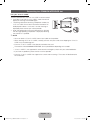
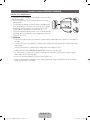
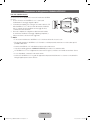
When the TV is initially powered on, a sequence of on-screen prompts will assist in configuring basic settings.
Press the POWERP button. Plug & Play is available only when the Source is set to TV.
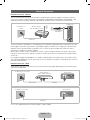
✎✎Before turning on the TV, make sure the antenna cable is connected (p. 6).
✎✎To return to the previous step, press the Red button.
1
2
3
POWER
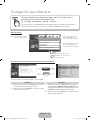
Selecting a language Press the ▲ or ▼ button, then press the ENTERE button.
Select the desired OSD (On Screen Display) language.
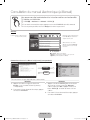
Selecting Store
Press the ◄ or ► button, then press the ENTERE button.
Demo or Home Use Select the Home Use mode. Store Demo mode is for retail
environments.
To return the unit’s settings from Store Demo to Home Use
(standard): Press the volume button on the TV. When you see the
volume OSD, press and hold MENU for 5 sec.
Store Demo is only for shop display. If you select it, several
functions are not able to use. Please select Home Use when you
watch at home.
Selecting a country
Press the ▲ or ▼ button, then press the ENTERE button. Select the
appropriate country. (depending on the Country)
P
✎✎After selecting the country in the Country menu, some models may proceed
with an additional option to setup the pin number.
4
5
6
7
✎✎When you input the PIN number, “0-0-0-0” is not available.
Set the Clock Mode automatically or manually.
Auto: Select the time zone where you are located.
Manual: Allows you to manually set the current date and time.
Selecting an antenna Press the ▲ or ▼ button, then press the ENTERE button. Select the Antenna
source to memorise.
Selecting a channel Press the ▲ or ▼ button, then press the ENTERE button. Select the channel
source to memorise. When setting the antenna source to Cable, a step appears
allowing you to assign numerical values (channel frequencies) to the channels. For
more information, refer to Channel → Auto Tuning.
Enjoy your TV.
Press the ENTERE button.
Setting the Clock
Mode
If You Want to Reset This Feature...
Select System - Plug & Play (Initial Setup). Enter your 4 digit PIN number. The default PIN number is “0-0-0-0”.
If you want to change the PIN number, use the Change PIN function.
You should do Plug & Play (MENU → System) again at home although you did in shop.
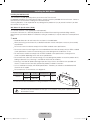
✎✎If you forget the PIN code, press the remote control buttons in the following sequence in Standby mode,
which resets the PIN to “0-0-0-0”: MUTE → 8 → 2 → 4 → POWER (on).
English - 7
[PD550-ZG_ZT]BN68-03449C-01L04.indb 7
2011-03-04 오후 3:41:25