1
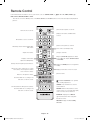
Remote Control
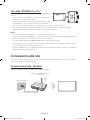
Learn where the function buttons are on your remote, such as: SOURCE, MUTE, Y, < P >, MENU, TOOLS, E,
INFO, CH LIST, RETURN, GUIDE and EXIT.
-- This remote control has Braille points on the Power, Channel, and Volume buttons and can be used by visually impaired
persons.
Turns the Set-top box on and off.
Turns the TV on and off.
Displays and selects available video
sources.
Gives direct access to channels.
Returns to the previous channel.
Alternately selects Teletext ON Double,
Mix or OFF.
Cuts off the sound temporarily.
Adjusts the volume.
Changes channels.
Brings up Smart Hub applications. Refer
to the e-Manual chapter, Smart Features
> Smart Hub.
Displays channel lists.
Opens the OSD (Menu).
Quickly selects frequently used functions.
Displays the EPG (Electronic Programme
Guide).
Moves the cursor, selects the on-screen
menu items, and changes the values
seen on the TV's menu.
Displays information on the TV screen.
Exits the menu.
Returns to the previous menu.
Use these buttons according to the
directions on the TV screen.
: Enable Football Mode for an optimal
sports viewing experience.
SEARCH: Press this button to use the
search window.
Use these buttons with specific features.
Use these buttons according to the
directions on the TV screen.
KEYPAD: With the virtual remote control
on the screen, you can easily enter digits,
control content, and use functions.
E-MANUAL: Displays the e-Manual.
A: Use this button when using data
broadcast service.
AD/SUBT.: Displays the Accessibility
Shortcuts.
English - 10
[UH4500-ZT]BN68-05981A-01L03.indb 10
2014-05-16
2:50:31