1
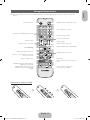
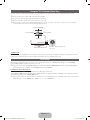
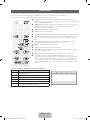
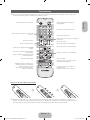
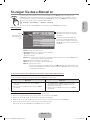
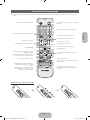
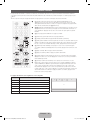
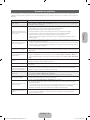
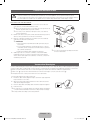
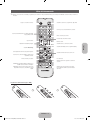
Viewing the Remote Control
buttons.
English
✎✎This is a special remote control for the visually impaired persons and has Braille points on the Power, Channel, and Volume
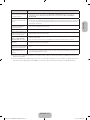
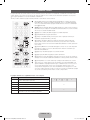
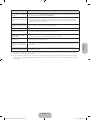
Displays and selects the available video sources.
Turns the TV on and off.
Press to directly access to channels.
Alternately select Teletext ON, Double, Mix or OFF.
Returns to the previous channel.
Cuts off the sound temporarily.
Adjusts the volume.
Changes channels.
Displays the main on-screen menu.
Displays Media Play.
Displays channel lists on the screen.
Displays the EPG (Electronic Programme Guide).
MEDIA.P
Quickly select frequently used functions.
Displays information on the TV screen.
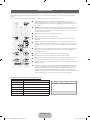
Selects the on-screen menu items and changes the
values seen on the menu.
Exits the menu.
Returns to the previous menu.
A
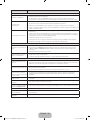
E-MANUAL: Displays the e-Manual guide. (p. 9)
P.SIZE: Selects the picture size.
AD/SUBT.: Audio Description selection. (Not
available in some locations) / Displays digital
subtitles.
B
E-MANUAL P.SIZE
C
D
Use these buttons according to the direction on
screen.
AD/SUBT.
Use these buttons in a specific feature.
For details, refer to the e-Manual.
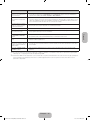
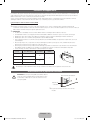
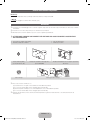
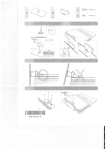
Installing batteries (Battery size: AAA)
English - 5
[UF40005000-ZGZT]BN68-04784B-05L04.indb 5
2013-11-20
5:29:20