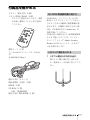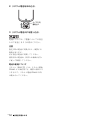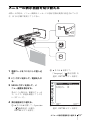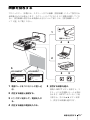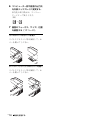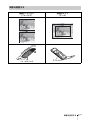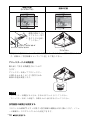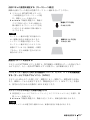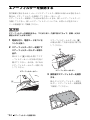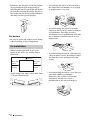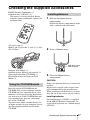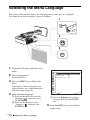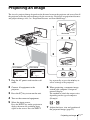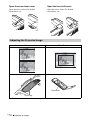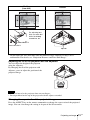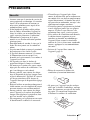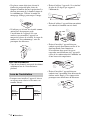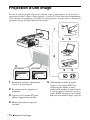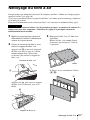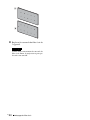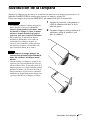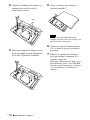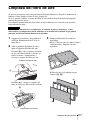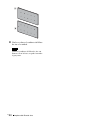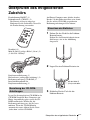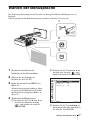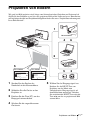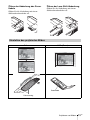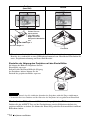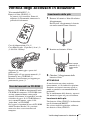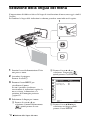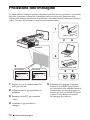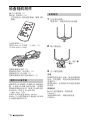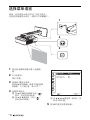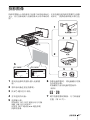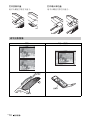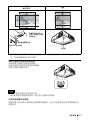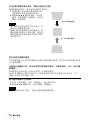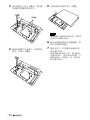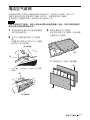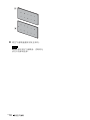
1
4-412-944-01 (1) Data Projector 簡易説明書 _________________ JP Quick Reference Manual __ GB Guide de référence rapide _ FR Manual de referencia rápida __ ES Kurzreferenz _____________ DE Guida rapida all’uso_______ IT ______________ CS VPL-SW535 VPL-SX535 お買い上げいただきありがとうございます。 電気製品は安全のための注意事項を守らないと、 火災や人身事故になることがあります。 この簡易説明書と付属の CD-ROM に入っている取扱説明書をよくお 読みのうえ、製品を安全にお使いください。お読みになったあとは、 いつでも見られるところに必ず保管してください。 © 2011 Sony Corporation 安全のために ソニー製品は安全に充分配慮して設計されています。 しかし、電気製品は、まちがった使いかたをすると、 火災や感電などにより死亡や大けがなど人身事故に つながることがあり、危険です。 事故を防ぐために次のことを必ずお守りください。 安全のための注意事項を守る 注意事項をよくお読みください。 定期点検をする 5 年に 1 度は、内部の点検を、ソニーの相談窓口にご 相談ください(有料)。 故障したら使用を中止する すぐに、ソニーの相談窓口にご連絡ください。 万一、異常が起きたら ・ ・ ・ ・ 煙が出たら 異常な音、においがしたら 内部に水、異物が入ったら 製品を落としたりキャビネットを破損したときは 警告表示の意味 この説明書および製品で は、次のような表示をして います。表示の内容をよく 理解してから本文をお読み ください。 この表示の注意事項を守ら ないと、火災や感電などに より死亡や大けがなど人身 事故につながることがあり ます。 この表示の注意事項を守 らないと、感電やその他 の事故によりけがをした り周辺の物品に損害を与 えることがあります。 注意を促す記号 m 1 電源を切る。 2 電源コードや接続コードを抜く。 3 ソニーの相談窓口に連絡する。 行為を禁止する記号 行為を指示する記号 JP 2 安全のために 警告 下記の注意事項を守らない と、 火災や感電により、 死亡や大けがにつながる ことがあります。 お手入れの際は電源を切って電源プラグを 抜く 電源を接続したままお手入れをす ると、 感電の原因となることがあり ます。 電源コードを傷つけない 電源コードを傷つけると、火災や感 電の原因となることがあります。 設置時に、製品と壁やラック (棚)などの間に、はさみ込ん だりしない。 電源コードを加工したり、傷つ けたりしない。 重いものをのせたり、引っ張っ たりしない。 熱器具に近づけたり、加熱した りしない。 電源コードを抜くときは、必ず プラグを持って抜く。 万一、電源コードが傷んだら、ソ ニーの相談窓口に交換をご相談く ださい。 排気口、吸気口をふさがない 排気口、 吸気口をふさぐと内部に熱 がこもり、 火災や故障の原因となる ことがあります。充分に通気ができ るように以下の項目をお守りくだ さい。 周辺の壁や物から離して設置し てください(8 ページ)。 付属の電源コードを使う 付属の電源コードを使わないと、感 電や故障の原因となることがあり ます。 吸排気口をふさぐような覆いや カバーをしない。 JP 容量の低い電源延長コードを使用しない 容量の低い延長コードを使うと、 ショートしたり火災や感電の原因 となることがあります。 安全アースを接続する アース接続は必ず電源プラグを電 源につなぐ前に行ってください。ま た、アース接続をはずす場合は必ず 電源プラグを電源から切り離して から行ってください。 出荷時に包装されているシー ト、柔らかい布地、書類、毛足 の長いじゅうたん、小さい紙な どの上に設置しない。吸い上げ られて、吸気口がふさがれま す。 電源プラグおよびコネクターは突きあたる まで差し込む まっすぐに突きあたるまで差し込 まないと、 火災や感電の原因となり ます。 電源コードのアース端子からはずした絶縁 キャップなどの小さな部品は、幼児が飲み 込む恐れがあるので、手の届かないところ に保管する 熱感知器や煙感知器のそばに設置しない 熱感知器や煙感知器のそばに設置 すると、 排気の熱などにより、感知 器が誤動作するなど、思わぬ事故の 原因となることがあります。 万一誤って飲みこんだときは、窒息 する恐れがありますのでただちに 医師にご相談ください。 警告 3 JP 床置き及び壁掛け以外の設置をしない それ以外の設置をすると火災や大 けがの原因となることがあります。 壁への取り付け、移動は自分で絶対にやら ない 壁への取り付けは必ずソニーの相 談窓口にご相談ください(有料)。 壁 の強度不足、取り付け方法が不充分 のときは落下し、大けがの原因とな ります。 指定された部品を使用する 指定以外の部品を使用すると、火災 や感電および故障や事故の原因と なります。ランプ、 電池、 フィルター は指定されたものを使用してくだ さい。 プロジェクターの上に水の入った物を置か ない 本機の上に水の入った物を置くと 倒れて感電の恐れがあります。 内部に水や異物を入れない 水や異物が入ると火災や感電の原 因となることがあります。 万一、 水や異物が入ったときは、す ぐに電源を切り、電源コードや接続 ケーブルを抜いて、ソニーの相談窓 口にご相談ください。 ランプ交換はランプが充分に冷えてから行 う 電源を切った直後はランプが高温 になっており、さわるとやけどの原 因となることがあります。ランプ交 換の際は、電源を切ってから1時間 以上たって、 充分にランプが冷えて から行ってください。 ランプ収納部に金属類や燃えやすい異物を 入れない ランプを取りはずした後のランプ の収納部に金属類や燃えやすい物 などの異物を入れないでください。 火災や感電の原因となります。ま た、 やけどの危険がありますので手 を入れないでください。 JP 4 警告 長時間の外出、旅行のときは、電源プラグ を抜く 安全のため、必ず電源プラグをコン セントから抜いてください。 内部を開けない 内部には電圧の高い部分があり、 キャビネットや裏ぶたを開けたり 改造したりすると、火災や感電の原 因となることがあります。内部の調 整や設定、点検、 修理はソニーの相 談窓口にご相談ください。 ガラス部分をのぞかない 投写中にプロジェクターの投写窓 をのぞくと光が目に入り、悪影響を 与えることがあります。 幼児の手の届かない場所に置く 本体の高温部でやけどしたりする 場合があります。お子様がさわらな いようにご注意願います。 心臓ペースメーカーの装着部位から 22cm 以上離して使用する 電波によりペースメーカーの動作 に影響を与える恐れがあります。 本製品にぶら下がらないでください 本機や部品が破壊、落下して、けが の原因となります。また、 重いもの などをぶら下げないでください。 本製品に強い衝撃を与えないでください 本製品に強い衝撃を与えるとガラ スが割れて破片により怪我の恐れ が有ります。 注意 下記の注意を守らないと、 けがをしたり周辺の物品 に損害を与えることがあり ます。 設置の際、本機と設置部分での指挟みに注 意する 設置する際、本機と設置部分で指を 挟まないように慎重に取り扱って ください。 不安定な場所に設置しない ぐらついた台の上、あるいは傾いた ところに設置すると、倒れたり落ち たりしてけがの原因となることが あります。 また、 設置・取り付け場所 の強度を充分にお確かめください。 レンズシフト調整時に指を挟まない レンズシフトに指を挟まないよう に注意してください。けがの原因に なることがあります。 壁掛けを行う際は必ず壁の強度を確認する 壁の強度を確認しないまま設置す ると落下による事故の原因となり ます。 水のある場所に置かない 水が入ったり、濡れたり、 風呂場な どで使うと、 火災や感電の原因とな ります。 雨天や降雪中の窓際でのご 使用や、 海岸、水辺でのご使用は特 にご注意ください。 製品の上にものを載せない 製品の上にものを載せると、故障や 事故の原因となります。特に、 水が 入ったものをおくと内部に水が入 り、火災や感電の原因となることが あります。 アジャスター調整時に指を挟まない アジャスターの調整は慎重に行っ てください。アジャスターに指を挟 み、けがの原因となることがありま す。 盗難防止用バーを運搬や設置目的で使用し ない 盗難防止用バーを使って持ち上げ たり、 吊下げなどの設置に使用した りすると、 落下してけがや故障の原 因となることがあります。 湿気やほこり、油煙、湯気の多い場所や虫 の入りやすい場所、直射日光が当たる場所、 熱器具の近くに置かない 火災や感電の原因となることがあ ります。 スプレー缶などの発火物や燃えやすいもの を排気口やレンズの前に置かない 火災の原因となることがあります。 本機を立てて置かない 電源コード、接続ケーブルに足をひっかけ ない 電源コードや接続ケーブルに足を ひっかけると、プロジェクターが倒 れたり落ちたりしてけがの原因と なることがあります。 ぬれた手で電源プラグにさわらない ぬれた手で電源プラグの抜き差し をすると、 感電の原因となることが あります。 保管や、 一時的に立てておくと倒れ て思わぬ事故の原因になり危険で す。 注意 5 JP 落雷のおそれがあるときは、電源プラグに 触れない 感電の原因となります。 定期的に内部の掃除を依頼する 長い間掃除をしないと内部にほこ りがたまり、火災や感電の原因とな ることがあります。5 年に 1 度は、 内部の掃除をお買い上げ店または ソニーの相談窓口にご依頼くださ い(有料)。 特に、 湿気の多くなる梅雨の前に掃 除をすると、より効果的です。 運搬・移動は慎重に行う 床置きのプロジェクターを移動 させるとき、本体と設置面との 間に指を挟まないようにご注意 ください。 キャビネットのカバーを開けた まま、電源を切らずに移動させ ないでください。感電の原因と なることがあります。 運搬するときは必ず左右側面を両手で持つ 運搬する時は、必ず左右側面のくぼ みを両手で持って下さい。 他の部分を持つとプロジェクター が壊れたり、落としてけがをするこ とがあります。 エアフィルターカバーをつかんで持たない 本機をエアーフィルターカバー部 分をつかんで持ち上げると、不意に エアーフィルターカバーが外れて 本機が落下し、けがや故障の原因と なることがあります。 本機を運搬するときは落下に注意する 本機を持ち運ぶときは落下にご注 意ください。落下するとプロジェク ターが壊れたり、ケガの原因となり ます。 アジャスターを運搬や吊り下げ目的で使用 しない アジャスターを運搬用の取っ手代 わりに使用したり、吊り下げなどの 設置に使用したりすると、本機が落 下してけがや故障の原因となるこ とがあります。 JP 6 注意 定期的にエアーフィルターを掃除する 掃除を怠るとフィルターにごみが たまり、内部に熱がこもって火災の 原因となることがあります。 排気口周辺には触れない 排気口付近に手を近づけたり、変形 しやすいものを置くとやけどや変 形の原因になります。 投写中に投写窓のすぐ前で光を遮らない 遮光した物に熱による変形などの 影響を与えることがあります。 投写を一時的に中断するときには、 リモコンを使ってピクチャー ミューティング機能をお使いくだ さい。 ガラス製投写窓が破損したときはすぐに修 理を依頼する 万一投写窓を破損させてしまうと、 プロジェクター内部にガラス片が 飛散する可能性があります。修理は お買い上げ店またはソニーの相談 窓口にご相談ください。 キャビネットのカバー類はしっかり固定す る 壁掛けの場合、カバー類が固定され ていないと落下して、けがの原因と なることがあります。 排気口をのぞかない 光が目に入り、悪影響を与えること があります。 万一ランプが破裂した場合、ガラス 片が飛散する可能性があり、けがの 原因となることがあります。 ランプが破裂したときはすぐに交換を依頼 する ランプが破裂した際には、プロジェ クター内部やランプハウス内にガ ラス片が飛散している可能性があ ります。 ソニーの相談窓口にランプ の交換と内部の点検を依頼してく ださい。 また、排気口よりガスや粉 じんが出たりすることがあります。 ガスには水銀が含まれていますの で、万が一吸い込んだり、目に入っ たりした場合は、けがの原因となる ことがあります。 ランプを傾けて持たない ランプを傾けて持つと、ランプの破 損時にランプの破片が飛び、けがの 原因となることがありますので、水 平に持ってください。 使用済みランプを破棄する場合 本機のランプの中には水銀が含ま れています。 使用済みランプは、地 域の蛍光管の廃棄ルールに従って 廃棄してください。 壁への取り付けは、細心の注意を払う 壁への取り付け強度が不充分だ と、落下により死亡や大けがに つながることがあります。必ず 本機に同梱の壁付け金具を使用 してください。 取り付けを安全に行うために、 本書、CD-ROM 内の取扱説明書 および壁付け金具の取付説明書 の注意事項をお読みください。 取り付けは、壁付け金具の取付 説明書の手順に従い確実に行っ てください。取り付けが不完全 な場合、落下する可能性があり ます。また、取り付け時には手 をすべらせてプロジェクターを 落下させ、けがをすることのな いようご注意ください。 低い位置に壁掛けしない 頭などをぶつけてけがをすること があります。 調整用工具を内部に入れない 調整中などに、工具を誤って内部に 落とすと火災や感電の原因となる ことがあります。万一、 落とした場 合は、 すぐに電源を切り、電源コー ドを抜いてください。 注意 7 JP 電池についての安全上のご 注意 ここでは、本機のリモートコマンダーで使用可能 な(コイン型)リチウム電池についての注意事項 を記載しています。 使用上のご注意 設置について 図のように、周辺の壁や物から離して設置して ください。 10 cm 以上 乳幼児の手の届かないところに置く。 電池は充電しない。 火の中に入れたり、加熱・分解・改造をしな い。 電池の(+)と(−)を正しく入れる。 電池の液が目に入ったときは、失明の原因とな るので、こすらずにすぐに水道水などのきれい な水で充分に洗ったあと、医師の治療を受け る。 電池の液をなめた場合には、すぐにうがいをし て医師に相談する。 ショートの原因となるので、金属製のネックレ ス、ヘアピンなどと一緒に持ち運んだり、保管 したりしない。 電池に液もれや異臭があるときは、すぐに火気 から遠ざける。 電池に直接はんだ付けをしない。 電池を保管する場合および破棄する場合は、 テープなどで端子(金属部分)を絶縁する。 皮膚に障害を起こすおそれがあるので、テープ などで貼り付けない。 電池を落下させたり、強い衝撃を与えたり、変 形させたりしない。 直射日光の強いところや炎天下の車内などの高 温・多湿の場所で使用、放置、保管しない。 電池を水で濡らさない。 ショートさせないように機器に取り付ける。 30 cm 以上 30 cm 以上 左右に 15 度以上傾けて使用しないでください。 15° 15° 床置きおよび壁掛け以外の設置でお使いになる と、色むらやランプ寿命の劣化などの問題が起 こることがありますので避けてください。 温度や湿度が非常に高い場所や温度が著しく低 い場所での使用は避けてください。 空調の冷暖気が直接当たる場所での使用は避け てください。結露や異常温度上昇により、故障 の原因となることがあります。 熱感知器や煙感知器のそばでの使用は避けてく ださい。感知器が誤動作する原因となることが あります。 JP 8 電池についての安全上のご注意 / 使用上のご注意 ほこりの多い場所、たばこなどの煙が入る場所 での使用は避けてください。この様な場所で使 用するとエアーフィルターがつまりやすくなっ たり、故障や破損の原因となったりします。 海抜 1500m 以上でのご使用に際しては、設置設 定メニューの高地モードを「入」にしてくださ い。誤った設定のままで使用すると、部品の信 頼性などに影響を与える恐れがあります。 設置する角度に応じて設置設定メニューの設定 角度を正しく設定してください。誤った設定の ままで使用すると、部品の信頼性などに影響を 与える恐れがあります。 投写窓、外装のお手入れ 必ず電源コードを抜いてから行ってください。 布にゴミが付着したまま強く拭いた場合、傷が 付くことがあります。 殺虫剤のような揮発性のものをかけたり、ゴム やビニール製品に長時間接触させると、変質し たり、塗装がはげたりすることがあります。 投写窓を素手で触らないでください。 投写窓のお手入れのしかた: メガネ拭きなどの柔らかい布で軽く拭いてくだ さい。汚れがひどいときは、水を少し含ませて 拭きとってください。アルコールやベンジン、 シンナー、酸性洗浄液、アルカリ性洗浄液、研 磨剤入洗浄剤、化学ぞうきんなどは絶対に使用 しないでください。 外装のお手入れのしかた: 柔らかい布で軽く拭いてください。汚れがひど いときは、水で薄めた中性洗剤に柔らかい布を 浸し、固くしぼってから汚れを拭き取り、乾い た布でから拭きしてください。アルコールやベ ンジン、シンナーなどは使用しないでくださ い。 部屋の照明について 液晶プロジェクターについて 液晶プロジェクターは非常に精密度の高い技術で 作られていますが、黒い点が現われたり、赤と青、 緑の点が消えなかったりすることがあります。ま た、すじ状の色むらや明るさのむらが見える場合 もあります。これらは、プロジェクターの構造に よるもので、故障ではありません。また、複数台 の液晶プロジェクターを並べてスクリーンへ投写 する場合、プロジェクターごとに色合いのバラン スが異なるため、同一機種の組み合わせであって もそれぞれ色合いの違いが目立つ場合があります。 スクリーンについて 平坦なスクリーンを使ってください。 ファンの音について プロジェクターの内部には温度上昇を防ぐために ファンが取り付けられており、電源を入れると多 少の音が生じます。これらは、プロジェクターの 構造によるもので、故障ではありません。しかし、 異常音が発生した場合にはお買い上げ店またはソ ニーの相談窓口にご相談ください。 ランプについて プロジェクターの光源には、内部圧力の高い水銀 ランプを使用しています。高圧水銀ランプには、 次のような特性があります。 使用時間の経過によってランプの明るさが低下 します。 衝撃やキズ、使用時間の経過による劣化などに より大きな音をともなって破裂したり、不点灯 状態となって寿命が尽きたりすることがありま す。 個体差や使用条件によって、寿命に大きなバラ ツキがあります。指定の時間内であっても破 裂、または不点灯状態になることがあります。 交換時期を越えると、破裂の可能性が高くなり ます。 ランプ交換のメッセージが表示されたときに は、ランプが正常に点灯している場合でも速や かに新しいランプと交換してください。 美しく見やすい画像にするために、直射日光や室内 灯などで直接スクリーンを照らさないでください。 使用上のご注意 9 JP 持ち運びについて 本機は精密機器です。本機を持ち運びするときは、 衝撃を与えたり、落としたりしないでください。破 損の原因となります。 この装置は、クラス B 情報技術装置です。この 装置は、家庭環境で使用することを目的としてい ますが、この装置がラジオやテレビジョン受信機 に近接して使用されると、受信障害を引き起こす ことがあります。 取扱説明書に従って正しい取り扱いをして下さい。 VCCI-B 本機は「高調波電流規格 JIS C 61000-3-2 適合品」 です。 警告 設置の際には、容易にアクセスできる固定配線内 に専用遮断装置を設けるか、使用中に、容易に抜 き差しできる、機器に近いコンセントに電源プラ グを接続してください。 万一、異常が起きた際には、専用遮断装置を切る か、電源プラグを抜いてください。 注意 ネットワークコネクターの接続について 安全のために、周辺機器を接続する際は、過大電 圧を持つ可能性があるコネクターをこの端子に接 続しないでください。 重要 機器の名称と電気定格は、底面に表示されています。 警告 アースの接続は、必ず電源プラグを電源コンセン トへ接続する前に行ってください。 アースの接続を外す場合は、必ず電源プラグを電 源コンセントから抜いてから行ってください。 注意 付属の電源コードは本機の専用品です。 他の機器には使用できません。 壁掛けの際はソニー相談窓口にご相談ください。 JP 10 使用上のご注意 付属品を確かめる リモコン(RM-PJ7) (1 個) リチウム電池 CR2025(1 個) リモコンに装着されています。使用 する前に透明のフィルムを引き抜い てください。 CD-ROM 取扱説明書の見かた CD-ROM を、コンピューターの CDROM ドライブにセットしてください。 しばらくすると自動的に選択画面が表 示されます。自動的に表示されない場 合は、CD-ROM 内の「index.htm」を 手動で開いてください。 CD-ROM に収録されている取扱説明書 などをご覧いただくには、コンピュー ターにソフトウェア Adobe Acrobat Reader 5.0 以上がインストールされて いる必要があります。 電源コード(1 本) ミニ D-sub 15 ピンケーブル(1.8 m) (1) (1-838-938-11/Sony) リモコンに電池を入れる 1 リチウム電池入れを引き出す。 図のように細い棒を差し込みなが ら、電池カバーを手前に引いてくだ さい。 壁付け金具(1 セット) 簡易説明書(本書)(1 部) 保証書(1 部) CD-ROM(1 枚) 内容:取扱説明書 壁付け金具 取付説明書(1 部) 付属品を確かめる 11 JP 2 リチウム電池をはめ込む。 3(プラス) 面を上に 3 リチウム電池入れを差し込む。 電池については、「電池についての安全 上のご注意」をよくお読みください。 注意 指定以外の電池に交換すると、破裂する 危険があります。 必ず指定の電池に交換してください。 使用済みの電池は、国または地域の法令 に従って処理してください。 電池の使用について リモコン(RM-PJ7)には、リチウム電池 CR2025 が 1 個必要です。破裂の原因とな りますので、リチウム電池 CR2025 以外 は使わないでください。 JP 12 付属品を確かめる メニューの表示言語を切り替える お買い上げ時は、メニュー画面やメッセージの表示言語が英語に設定されていま す。以下の手順で変更してください。 1 2 3 1 電源コードをコンセントに差し込 む。 2 「Language」 ( ?/1 ボタンを押して、電源を入れ る。 3 2 V または v を押して、 表示言語)を 選び、ENTER ボタンを押す。 Operation Language Status Security Lock Panel Key Lock MENU ボタンを押して、メ ニュー画面を表示する。 English OnStatus OnStatus Off Off 見えにくい場合は、画面のフォーカ ス、サイズ、位置を調整してくださ い(17 ページ)。 4 表示言語を切り替える。 1 V または v を押して、Operation ( 操作設定)を選び、 ENTER ボタンを押す。 Sel Set Back 3 V/v/B/b を押して、表示言語を 選び、ENTER ボタンを押す。 メニューの表示言語を切り替える 13 JP 5 MENU ボタンを押し、メニュー 画面を消す。 JP 14 メニューの表示言語を切り替える 映像を投写する プロジェクター(本機)は、スクリーンまでの距離(投写距離)によって投写され る映像の大きさが変わります。スクリーンサイズに合うように本機を設置してくだ さい。投写距離と投写される映像の大きさについて詳しくは、 「投写距離とレンズ シフト量」をご覧ください。 1 電源コンセント 4 6 本体 2 5 ビデオ機器 VPL-SW535 スキップ 選択 3 スキップ 電源コードをコンセントに差し込 む。 2 再生する機器と接続する。 3 ?/1 ボタンを押して、電源を入れ る。 4 5 ビデオ Sビデオ 入力A 入力B ビデオ Sビデオ 入力A 入力B 選択 VPL-SX535 入力端子 入力端子 1 コンピューター 5 投写する映像を選ぶ。 本機の INPUT ボタンを押すと、ス クリーンに入力切換パレットが表示 されます。INPUT ボタンをくり返 し押すか、または V/v ボタンを押 し、投写する映像を選びます。 再生する機器の電源を入れる。 映像を投写する 15 JP 6 コンピューター側で画面の出力先 を外部ディスプレイに変更する。 出力先の切り換えは、コンピュー ターによって異なります。 (例) + 7 画面のフォーカス、サイズ、位置 を調整する(17 ページ) 。 ズームレバーのカバーを開く マイナスドライバー等を使用して、カ バーを開いてください。 レンズシフトダイヤルのカバーを開く マイナスドライバー等を使用して、カ バーを開いてください。 JP 16 映像を投写する 映像を調整する 画面のフォーカス 画面のサイズ (フォーカス) (ズーム) フォーカスリング ズームレバー 映像を投写する 17 JP 画面の位置 (レンズシフト) 画面の位置 調整の際はマイナ スドライバー等で 各ダイヤルを回し てください。 * レンズシフトダイヤル V レンズシフトダイヤル H アジャスター * 指定された量以上に、レンズシフトを調整しないでください。故障の原因となりま す。詳細は、「投写距離とレンズシフト量」をご覧ください。 アジャスターによる微調整 脚を回して高さを微調整することがで きます。 アジャスターを使ってプロジェクター の傾きをかえることにより投写される 画面の位置を調整します。 ご注意 ・ アジャスターを調整するときは、手をはさまないようにしてください。 ・ アジャスターを出した状態で、本機を上から強く押さえないでください。 投写画面の縦横比を変更する リモコンの ASPECT ボタンを押すと投写画面の縦横比が切り換わります。メニュ ーの画面モードのアスペクトからも設定できます。 JP 18 映像を投写する 台形になった画面を補正する(キーストーン補正) 画面が台形になった場合は手動でキーストーン補正を行ってください。 1 リモコンの KEYSTONE ボタンもし くは設置設定の V キーストーンを選 び、調整メニューを表示する。 2 V/v/B/b で数値を調整する。数値が プラス方向に大きくなると画面の上 側の幅が小さくなり、マイナス方向 に大きくなると画面の下側の幅が小 さくなります。 数値をプラス方向 に大きくする ご注意 ・ キーストーン補正は電子的な補正のた め、画像が劣化する場合があります。 ・ レンズシフト調整の位置によっては、 数値をマイナス方向 に大きくする キーストーン補正を行うとオリジナル 画像のアスペクト比(縦横比)が維持 できない、または画像に歪みが生じる 場合があります。 調整用パターンを表示する リモコンの PATTERN ボタンを押すと、投写画面上に調整用パターンを表示するこ とができます。もう一度 PATTERN ボタンを押すと、元の画面に戻ります。 コンピューター信号入力時に投写画面のフェーズ、ピッチ、シフトを自動調整 する(オートピクセルアライメント(APA)) リモコンの APA ボタンを押します。調整中にもう一度押すと、調整が取り消され ます。画面モードからも実行できます。機能設定のスマート APA で「入」を選ぶ と、信号が入力されると自動的に APA を実行します。 スクリーンからはみ出した映像を縮小する 1 設置設定メニューの「スクリーンフィット」の「デジタルシュリンク」を選び、調 整メニューを表示する。 2 V/v/B/b で数値を調整する。数値が大きくなると、画面全体が縮小されます。 ご注意 デジタルシュリンクは電子的な補正のため、画像が劣化する場合があります。 映像を投写する 19 JP 電源を切る 1 本体またはリモコンの ?/1 ボタンを押す。 シャットダウンが開始され、電源がオフされます。10 秒以内に ?/1 ボタンをも う一度押すとすぐに電源がオンの状態に復帰します。 2 電源コードを抜く。 確認メッセージを出さずに電源を切るには 本体の ?/1 ボタンを数秒間押し続けてください。 JP 20 映像を投写する インジケーターの見かた インジケーターの点灯により、本機の状態や異常の発生を確認することができま す。異常が発生している場合は、表に従い対処してください。 ON / STANDBY インジケーター 状況 意味/対処のしかた 赤色に点灯 スタンバイ状態です。 緑色に点滅 本体に電源が入り、操作可能になるまでの間、または電源 を切ったあと、冷却している状態です。 緑色に点灯 電源が入っている状態です。 オレンジ色に点灯 無信号時設定(ランプオフ)状態です。 赤色に点滅 異常な状態です。点滅回数により症状が異なります。以下 の内容に従って対処してください。また、以下の対処を 行っても症状が再発する場合は、ソニーの相談窓口にご相 談ください。 2 回点滅 内部温度が高温になっています。以下を確認してくださ い。 ・ 排気口、吸気口が壁や物などでふさがれていないか。 ・ エアーフィルターがつまっていないか(24 ページ)。 ・ 設置設定メニューの設置角度が正しく設定されている か。 6 回点滅 電源コードを抜き、ON / STANDBY インジケーターが 消えるのを確認してから、もう一度電源コードをコンセン トに差し込み、電源を入れてください。 その他の点滅回数 ソニーの相談窓口にご相談ください。 LAMP/COVER インジケーター 状況 意味/対処のしかた 赤色に点滅 点滅回数により症状が異なります。以下の内容に従って 対処してください。 2 回点滅 ランプカバー、またはエアーフィルターカバーが確実に 取り付けられていません(22 ページ、 24 ページ)。 3 回点滅 ランプが高温になっています。電源を切り、ランプが冷 えてからもう一度電源を入れてください。 症状が再発する場合は、ランプの消耗が考えられます。 新しいランプに交換してください(22 ページ) 。 インジケーターの見かた 21 JP ランプを交換する 投写画面にメッセージが表示された場合、またはインジケーターにランプ交換のお 知らせが表示された場合は、新しいランプに交換してください。(21 ページ) 交換ランプは、プロジェクターランプ LMP-E212(別売)をお使いください。 ・ 電源を切った直後はランプが高温に なっているため、触れるとやけどの 原因となります。ランプを充分に冷 やすため、本機の電源を切ったあと 1 時間以上たってからランプを交換 してください。 ・ ランプをはずしたあとのランプ収納 部に、金属類や燃えやすい物などの 異物を入れないでください。火災や 感電の原因となります。また、やけ どの危険がありますので手を入れな いでください。 ・ ランプが破損している場合は、ご自 分でランプ交換を行わず、ソニーの 相談窓口にご相談ください。 ・ ランプを取り出すときは、必ず指定 された場所を持ち、ランプを傾けず に水平にしたまま取り出してくださ い。指定された場所以外の部分に触 れるとけがややけどの原因となるこ とがあります。また、ランプを傾け ると、万一ランプが破損している場 合に破片が飛び出し、けがの原因と なることがあります。 JP 22 ランプを交換する 1 電源を切り、電源コードを抜く。 2 ランプが十分冷えてから、ランプ カバーのネジ(1 本)をゆるめ、 ランプカバーを開く。 3 ランプのネジ(2 本)をゆるめ、 5 取っ手を持ってランプを取り出 ランプカバーを閉じ、ネジ (1 本)を締める。 す。 取っ手 ご注意 ランプが確実に装着されていないと、 電源が入りません。 6 電源コードを電源コンセントに差 し込み、電源を入れる。 4 新しいランプを確実に奥まで押し 込み、ネジ(2 本)を締める。 7 ランプタイマーの初期化を行う。 次回の交換時期をお知らせするため に、ランプタイマーを初期化しま す。機能設定メニューから「ランプ タイマー初期化」を選び、ENTER ボタンを押すとメッセージが表示さ れます。 「はい」を選ぶとランプタ イマーを初期化します。 ランプを交換する 23 JP エアーフィルターを掃除する 投写画面に表示されるメッセージにエアーフィルター掃除のお知らせが表示された 場合は、エアーフィルターを掃除してください(21 ページ) エアーフィルターを掃除しても汚れが落ちないときは、新しいエアーフィルターに 交換してください。新しいエアーフィルターについては、お買い上げ店またはソ ニーの相談窓口にご依頼ください。 エアーフィルターの掃除を怠ると、ゴミがたまり、内部に熱がこもって、故障・火災の 原因となることがあります。 1 2 電源を切り、電源コードをコンセ エアーフィルターホルダーは、B ントから抜く。 の部分を押して矢印の方向に取り外 してください。 エアーフィルターカバーを開けて B エアーフィルターホルダーを取り 出す。 図のように A の部分を押してエア ーフィルターカバーを矢印の方向に 開けてください。その後、中にある エアーフィルターホルダーを取り外 してください。 エアーフィルターホルダー エアーフィルターカバー 3 掃除機でエアーフィルターを掃除 する。 図のようにエアーフィルターを取り A はずし、エアーフィルターを掃除機 で掃除してください。 つめ JP 24 エアーフィルターを掃除する エアーフィルターは 2 枚重ね(A、 B)です。 A B A B 4 エアーフィルターカバーを元に戻 す。 ご注意 エアーフィルターカバーが確実に装着 されていないと、電源が入りません。 エアーフィルターを掃除する 25 JP To avoid electrical shock, do not open the cabinet. Refer servicing to qualified personnel only. WARNING: THIS WARNING IS APPLICABLE FOR OTHER COUNTRIES. 1 Use the approved Power Cord (3-core mains lead) / Appliance Connector / Plug with earthing-contacts that conforms to the safety regulations of each country if applicable. 2 Use the Power Cord (3-core mains lead) / Appliance Connector / Plug conforming to the proper ratings (Voltage, Ampere). WARNING THIS APPARATUS MUST BE EARTHED. If you have questions on the use of the above Power Cord / Appliance Connector / Plug, please consult a qualified service personnel. WARNING To reduce the risk of fire or electric shock, do not expose this apparatus to rain or moisture. WARNING When installing the unit, incorporate a readily accessible disconnect device in the fixed wiring, or connect the power plug to an easily accessible socket-outlet near the unit. If a fault should occur during operation of the unit, operate the disconnect device to switch the power supply off, or disconnect the power plug. CAUTION About the LAN connector For safety, do not connect the connector for peripheral device wiring that might have excessive voltage to this port. Follow the instructions for this port. WARNING: THIS WARNING IS APPLICABLE FOR USA ONLY. If used in USA, use the UL LISTED power cord specified below. DO NOT USE ANY OTHER POWER CORD. Plug Cap Parallel blade with ground pin (NEMA 5-15P Configuration) Cord Type SJT, three 16 or 18 AWG wires Length Minimum 1.5 m (4 ft. 11 in.), Less than 4.5 m (14 ft. 9 in.) Rating Minimum 10 A, 125 V Using this unit at a voltage other than 120V may require the use of a different line cord or attachment plug, or both. To reduce the risk of fire or electric shock, refer servicing to qualified service personnel. GB 2 WARNING IMPORTANT The nameplate is located on the bottom. For kundene i Norge Dette utstyret kan kobles til et ITstrømfordelingssystem. Consult with Sony qualified personnel for wall mount installation. For the customers in the U.S.A. This equipment has been tested and found to comply with the limits for a Class B digital device, pursuant to Part 15 of the FCC Rules. These limits are designed to provide reasonable protection against harmful interference in a residential installation. This equipment generates, uses, and can radiate radio frequency energy and, if not installed and used in accordance with the instructions, may cause harmful interference to radio communications. However, there is no guarantee that interference will not occur in a particular installation. If this equipment does cause harmful interference to radio or television reception, which can be determined by turning the equipment off and on, the user is encouraged to try to correct the interference by one or more of the following measures: – Reorient or relocate the receiving antenna. – Increase the separation between the equipment and receiver. – Connect the equipment into an outlet on a circuit different from that to which the receiver is connected. – Consult the dealer or an experienced radio/TV technician for help. If you have any questions about this product, you may call; Sony Customer Information Service Center 1-800-222-7669 or http://www.sony.com/ For the customers in Taiwan only Declaration of Conformity Trade Name Model : SONY : VPL-SW535 VPL-SX535 Responsible party : Sony Electronics Inc. Address : 16530 Via Esprillo, San Diego, CA 92127 U.S.A. Telephone Number: 858-942-2230 This device complies with part 15 of the FCC Rules. Operation is subject to the following two conditions: (1) this device may not cause harmful interference, and (2) this device must accept any interference received, including interference that may cause undesired operation. You are cautioned that any changes or modifications not expressly approved in this manual could void your authority to operate this equipment. All interface cables used to connect peripherals must be shielded in order to comply with the limits for a digital device pursuant to Subpart B of Part 15 of FCC Rules. This device complies with Part 15 of the FCC Rules. Operation is subject to the following two conditions: (1) this device may not cause harmful interference, and (2) this device must accept any interference received, including interference that may cause undesired operation. For the customers in Canada This Class B digital apparatus complies with Canadian ICES-003. For the customers in Europe The manufacturer of this product is Sony Corporation, 1-7-1 Konan, Minato-ku, Tokyo, 108-0075 Japan. The Authorized Representative for EMC and product safety is Sony Deutschland GmbH, Hedelfinger Strasse 61, 70327 Stuttgart, Germany. For any service or guarantee matters please refer to the addresses given in separate service or guarantee documents. For the State of California, USA only Perchlorate Material - special handling may apply, See www.dtsc.ca.gov/hazardouswaste/ perchlorate Perchlorate Material : Lithium battery contains perchlorate. For the Customers in Brazil only DESCARTE DE PILHAS E BATERIAS Bateria Primária Atenção: Verifique as instruções de uso do aparelho certificando-se de que as polaridades (+) e (-) estão no sentido indicado. As pilhas poderão vazar ou explodir se as polaridades forem invertidas, expostas ao fogo, desmontadas ou recarregadas. Evite misturar com pilhas de outro tipo ou com pilhas usadas, transportá-las ou armazená-las soltas, pois aumenta o risco de vazamento. Retire as pilhas caso o aparelho não esteja sendo utilizado, para evitar possíveis danos na eventualidade de ocorrer vazamento. As pilhas devem ser armazenadas em local seco e ventilado. No caso de vazamento da pilha, evite o contato com a mesma. Lave qualquer parte do corpo afetado com água abundante. Ocorrendo irritação, procure auxílio médico. Não remova o invólucro da pilha. Mantenha fora do alcance das crianças. Em caso de ingestão procure auxílio médico imediatamente. WARNING 3 GB GB Інформація для споживачів в Україні. Обладнання відповідає вимогам: – Технічного регламенту обмеження використання деяких небезпечних речовин в електричному та електронному обладнанні (постанова КМУ від 03/12/2008 № 1057). GB 4 WARNING Precautions On safety • Check that the operating voltage of your unit is identical with the voltage of your local power supply. If voltage adaptation is required, consult with qualified Sony personnel. • Should any liquid or solid object fall into the cabinet, unplug the unit and have it checked by qualified Sony personnel before operating it further. • Unplug the unit from the wall outlet if it is not to be used for several days. • To disconnect the cord, pull it out by the plug. Never pull the cord itself. • The wall outlet should be near the unit and easily accessible. • The unit is not disconnected from the AC power source (mains) as long as it is connected to the wall outlet, even if the unit itself has been turned off. • Do not look into the projection window while the lamp is on. • Do not place your hand or objects near the ventilation holes — the air coming out is hot. • Be careful not to catch your fingers by the adjuster when you adjust the height of the unit. Do not push hard on the top of the unit with the adjuster out. • Avoid using an extension cord with a low voltage limited since it may cause the short-circuit and physical incidents. • Do not catch your finger between the unit and surface of the floor when moving the projector installed on the floor. • Do not carry the projector with the cabinet on and with its cover open. • Do not install the unit in a location near heat sources such as radiators or air ducts, or in a place subject to direct sunlight, excessive dust or humidity, mechanical vibration or shock. • Never mount the projector on the ceiling or move it by yourself. Be sure to consult with qualified Sony personnel (charged). • If the ventilation holes are blocked, internal heat builds up, and it may cause a fire or damage the unit. To allow adequate air circulation and prevent internal heat build-up, follow the items below: • Leave space around the unit (page 6). • Avoid using something to cover the ventilation holes (exhaust/intake). • Do not place the unit on surfaces such as an original packing sheet, soft cloth, papers, rugs, or scraps of paper. The ventilation holes may take in such materials. • Do not place any object just in front of the projection window that may block the light during projection. Heat from the light may damage the object. Use the picture muting function to cut off the picture. Precautions 5 GB • Do not use the Security bar for the purpose of preventing theft for transporting or installing the unit. If you lift the unit by the Security bar or hang the unit by this bar, it may cause the unit to fall and be damaged, and may result in personal injury. For dealers • Be sure to secure the cabinet cover firmly when installing to the ceiling firmly. • Avoid using the unit in a location where the temperature or humidity is very high, or temperature is very low. • Avoid installing the unit in a location subject to direct cool or warm air from an air-conditioner. Installing in such a location may cause malfunction of the unit due to moisture condensation or rise in temperature. On Installation • When installing the unit, leave space between any walls, etc. and the unit as illustrated. More than 10 cm (4 inches) More than 30 cm More than 30 cm (11 7/8 inches) (11 7/8 inches) • Avoid using if the unit is tilted more than 15 degrees horizontally. 15° 15° GB 6 Precautions • Avoid installing the unit in a location near a heat or smoke sensor. Installing in such a location may cause malfunction of the sensor. • Avoid installing the unit in a very dusty or extremely smoky environment. Otherwise, the air filter will become obstructed, and this may cause a malfunction of the unit or damage it. • When using the unit at an altitude of 1,500 m or higher, set “High Altitude Mode” to “On” in the Installation menu. Failing to set this mode when using the unit at high altitudes could have adverse effects, such as reducing the reliability of certain components. On cleaning the projection window and the cabinet • Be sure to disconnect the AC power cord from the AC outlet before cleaning. • If you rub on the unit with a stained cloth, the cabinet may be scratched. • If the unit is exposed to volatile materials such as insecticide, or the unit is in contact with a rubber or vinyl resin product for a long period of time, the unit may deteriorate or the coating may come off. • Do not touch the projection window with bare hands. • On cleaning the projection window surface: Wipe the projection window gently-with a soft cloth, such as a glass cleaning cloth. Stubborn stains may be removed with a soft cloth lightly dampened with water. Never use solvent such as alcohol, benzene or thinner, or acid, alkaline or abrasive detergent, or a chemical cleaning cloth. • On cleaning the cabinet: Clean the cabinet gently with a soft cloth. Stubborn stains may be removed with a soft cloth lightly dampened with mild detergent solution and wrung, followed by wiping with a soft dry cloth. Never use solvent such as alcohol, benzene or thinner, or acid, alkaline or abrasive detergent, or a chemical cleaning cloth. On Illumination To obtain the best picture, the front of the screen should not be exposed to direct lighting or sunlight. On LCD Projector The LCD projector is manufactured using high-precision technology. You may, however, see tiny black points and/or bright points (red, blue, or green) that continuously appear on the LCD projector. This is a normal result of the manufacturing process and does not indicate a malfunction. Also, when you use multiple LCD projectors to project onto a screen, even if they are of the same model, the color reproduction among projectors may vary, since color balance may be set differently from one projector to the next. On Screen When using a screen with an uneven surface, stripes pattern may rarely appear on the screen depending on the distance between the screen and the unit or the zooming magnifications. This is not a malfunction of the unit. On Fan Since the projector is equipped with a fan inside to prevent internal temperature from rising, there may be some noise. This is a normal result of the manufacturing process and does not indicate a malfunction. If, however, in a case of abnormal noise, consult with qualified Sony personnel. On Lamp The lamp used as a light source contains mercury that has high internal pressure. A high-pressure mercury lamp has the following characteristics: • Brightness of the lamp will be lowered as the elapse of time used. • The lamp may break with a loud noise as a result of shock, damage, or deterioration caused by the elapse of time. The lamp may become unlit and may burn out. • The lamp life varies with individual differences or usage conditions of each lamp. Therefore, it may break or will not Precautions 7 GB light even before the specified replacement time. • It may possibly break after the replacement time has elapsed. Replace the lamp with a new one as soon as possible if a message displayed on the projected image, even if the lamp normally lights. For carrying This unit is precision equipment. When carrying the unit, do not subject the unit to shocks, or fall. It may damage the unit. GB 8 Precautions Checking the Supplied Accessories RM-PJ7 Remote Commander (1) Lithium battery (CR2025) (1) The battery is already installed. Before using the remote commander, remove the insulation film. Installing Batteries 1 Pull out the lithium battery compartment. Pull out the battery compartment with a stick as shown in the illustration. AC power cord (1) Mini D-sub 15 pin cable (1.8 m) (1) (1-838938-11/Sony) 2 Insert a lithium battery. With the 3 (plus) side facing up. Projector Wall Mount (1) Quick Reference Manual (this manual) (1) Operating Instructions (CD-ROM) (1) Installation manual for Projector Wall Mount (1) Using the CD-ROM Manuals Insert the supplied CD-ROM into the CD-ROM drive of your computer, and the CD-ROM will start automatically in a few moments. Select the Operating Instructions you want to read. If the CD-ROM does not start automatically, open the “index.htm” file on the CD-ROM. You must have Adobe Acrobat Reader 5.0 or higher installed in your computer to read the Operating Instructions stored on the CD-ROM. 3 Close the lithium battery compartment. CAUTION Danger of explosion if battery is incorrectly replaced. Replace only with the same or equivalent type recommended by the manufacturer. When you dispose of the battery, you must obey the law in the relative area or country. Installing batteries One lithium battery (CR2025) is supplied for the RM-PJ7 Remote Commander. To avoid risk of explosion, use a lithium battery (CR2025). Checking the Supplied Accessories 9 GB Selecting the Menu Language The factory setting for the language for displaying menus, messages, etc. is English. To change the on-screen language, proceed as follows: 1 2 3 1 2 3 Plug in the AC power cord into a wall outlet. Operation Language Status Security Lock Panel Key Lock Turn on the projector. Press the ?/1 key. English OnStatus OnStatus Off Off Press the MENU key to display the menu. If the display cannot be properly seen, adjust the focus, size, and position of the projected image (page 12). 4 Operation ( ) menu then press the ENTER key. 2 Press the V or v key to select “Language ( )” then press the ENTER key. GB 10 Sel Select the menu language. 1 Press the V or v key to select the Selecting the Menu Language Set Back 3 Press the V/v/B/b key to select a language, then press the ENTER key. 5 Press the MENU key to turn off the menu screen. Projecting an Image The size of a projected image depends on the distance between the projector and screen. Install the projector so that the projected image fits the screen size. For details on projection distances and projected image sizes, see “Projection Distance and Lens Shift Range”. 1 Wall outlet 4 6 Projector 2 5 Computer Video equipment VPL-SW535 VPL-SX535 3 Video S-Video Input-A Input-B Video S-Video Input-A Input-B Sel 5 Input Input Skip Sel Skip 1 Plug the AC power cord into the wall outlet. 2 Connect all equipment to the projector. 3 Press the ?/1 key to turn on the unit. 4 The method to switch the output varies depending on the type of computer. Turn on the connected equipment. (Example) 5 Select the input source. Press the INPUT key on the projector to display the menu for switching input signal on the screen. Press the INPUT key repeatedly, or press the V/v key to select an image to be projected. 6 When projecting a computer image, switch your computer’s output to external display. + 7 Adjust the focus, size and position of the projected image (page 12). Projecting an Image 11 GB Open the zoom lever cover Open the lens shift cover Open the cover with a flat-bladed screwdriver, etc. Open the cover with a flat-bladed screwdriver, etc. Adjusting the Projected image Focus Size (Zoom) Zoom lever Focus ring GB 12 Projecting an Image Position (Lens shift) Position For adjusting lens shift, turn each dial with a flat-bladed screwdriver, etc.* Lens shift dial V Lens shift dial H Adjuster * Do not adjust the lens shift more than the indicated range, otherwise it may cause a malfunction. For details, see “Projection Distance and Lens Shift Range”. Adjusting the tilt of the projector with the adjusters You can adjust the height of the projector using the adjusters. By changing the tilt of the projector with adjusters, you can adjust the position of the projected image. Notes • Be careful not to let the projector down on your fingers. • Do not push hard on the top of the projector with the adjuster extended. Changing the aspect ratio of the projected image Press the ASPECT key on the remote commander to change the aspect ratio of the projected image. You can also change the setting in Aspect of the Screen menu. Projecting an Image 13 GB Correcting trapezoidal distortion of the projected image (Keystone feature) If the image becomes trapezoidal, set the keystone manually. 1 Press the KEYSTONE key on the remote commander or select V Keystone in the Installation menu. 2 Use the V/v/B/b keys to set the value. The higher the value, narrower the top of the projected image. The lower the value, the narrower the bottom. Increase the number towards plus Notes • Since the Keystone adjustment is an electronic correction, the image may be deteriorated. • Depending on the position adjusted with the lens shift feature, the aspect ratio of the image may change from the original or projected image may be distorted with Keystone adjustment. Increase the number towards minus Displaying a pattern for adjusting an image You can display a pattern for adjusting the projected image with the PATTERN key on the remote commander. Press the PATTERN key again to restore the previous image. Automatically adjusts Phase, Pitch and Shift of projected image while a signal is input from a computer (APA (Auto Pixel Alignment)) Press the APA key on the remote commander. Press again to cancel adjusting during the setting. You can also set APA in the Screen Menu. If Smart APA in the Function menu is set to “On”, executes APA automatically when a signal is input. Shrinking an image that exceeds the screen size 1 Select “Digital Shrink” in “Screen Fitting” to display adjusting menu. 2 Adjust the value by the V/v/B/b keys. The higher the value, the smaller the image becomes. Note Since the Digital shrink is an electronic correction, the image may be deteriorated. GB 14 Projecting an Image Turning Off the Power 1 Press the ?/1 key on the unit or the remote commander. The projector starts shutdown and turns off. If you press the ?/1 key within 10 seconds again, shutdown is cancelled. 2 Unplug the AC power cord from the wall outlet. To turn off without displaying confirmation message Press and hold the ?/1 key on the unit for a few seconds. Projecting an Image 15 GB Indicators The indicators allow checking the status and notify you of abnormal operation of the projector. If the projector exhibits abnormal status, address the problem in accordance with the table below. ON/STANDBY indicator Status Meaning/Remedies Lights in red The projector is in Standby mode. Flashes in green • The projector is ready to operate after having been turned on. • The lamp cools after the projector is turned off. Lights in green The projector’s power is on. Lights in orange The projector is in With No Input (Lamp Cutoff). Flashes in red The projector is in abnormal status. Symptoms are indicated by number of flashes. Address the problem in accordance with the following. If the symptom is shown again, consult with qualified Sony personnel. Flashes twice The internal temperature is unusually high. Check the items below. • Check if nothing is blocking the ventilation holes. • Check if the air filter is not clogged. (page 19) • Check if the Installation Attitude in the Installation menu is set correctly. Flashes six times Unplug the AC power cord from a wall outlet. After checking that the ON/STANDBY indicator goes out, plug the power cord to a wall outlet again then turn on the projector. Other number of flashes Consult with qualified Sony personnel. LAMP/COVER indicator Status Meaning/Remedies Flashes in red Symptoms are indicated by number of flashes. Address the problem in accordance with the following. Flashes twice The lamp cover or the air filter cover is not attached securely. (pages 17, 19) Flashes three times The temperature of lamp is unusually high. Turn off the power and wait for lamp to cool then turn on the power again. If the symptom is shown again, the lamp may be burnt out. In this case, replace the lamp with a new one (page 17). GB 16 Indicators Replacing the Lamp Replace the lamp with a new one if a message displayed on the projected image or the LAMP/ COVER indicator notifies you to replace the lamp (pages 16). Use an LMP-E212 projector lamp (not supplied) for replacement. Caution • The lamp remains hot after the projector is turned off. If you touch the lamp, you may burn your finger. When you replace the lamp, wait for at least an hour after turning off the projector for the lamp to cool sufficiently. • Do not allow any metallic or inflammable objects into the lamp replacement slot after removing the lamp, otherwise it may cause electrical shock or fire. Do not put your hands into the slot. 1 Turn off the projector, and disconnect the AC power cord from a wall outlet. 2 When the lamp has cooled sufficiently, open the lamp cover by loosening 1 screw. Notes • If the lamp breaks, contact qualified Sony personnel. Do not replace the lamp yourself. • When removing the lamp, be sure to pull it out straight, by holding the designated location. If you touch a part of the lamp other than the designated location, you may be burned or injured. If you pull out the lamp while the projector is tilted, the pieces may scatter if the lamp breaks any may cause injury. Replacing the Lamp 17 GB 3 Loosen the 2 screws on the lamp then pull out the lamp by its grab. 5 Close the lamp cover and tighten the 1 screw. Grab Note Be sure to install the lamp securely as it was. If not, the projector cannot be turned on. 4 Insert the new lamp all the way in until it is securely in place. Tighten the 2 screws. 6 Connect the AC power cord to a wall outlet and turn on the projector. 7 Reset the lamp timer for notification of the next replacement time. Select “Lamp Timer Reset” on the Function menu then press the ENTER key. When a message appears, select “Yes” to reset the lamp timer. Caution Disposal of the used lamp For the customers in the USA Lamp in this product contains mercury. Disposal of these materials may be regulated due to environmental considerations. For disposal or recycling information, please contact your local authorities or the Telecommunications Industry Association (www.eiae.org). GB 18 Replacing the Lamp Cleaning the Air Filter When a message appears on the projected image indicating time for a filter cleaning, clean the air filter (pages 16). If the dust cannot be removed from the air filter even after cleaning, replace the air filter with a new one. For details on a new air filter, consult with qualified Sony personnel. Caution If you neglect to clean the air filter, dust may accumulate, clogging it. As a result, the temperature may rise inside the unit, leading to a possible malfunction or fire. 1 Turn off the projector, and disconnect the AC power cord from the AC outlet. 2 Open the air filter cover and remove the air filter holder. 3 Clean the air filter with a vacuum cleaner. Remove the air filter as illustrated below then clean with the vacuum cleaner. Press A and open the air filter cover towards the arrow head as illustrated below, and remove the air filter holder. Air filter cover Claws A The air filter consists of 2 filters (A, B). A Push B, and remove the air filter holder in the direction of the arrow. B B Air filter holder Cleaning the Air Filter 19 GB A B 4 Reattach the air filter cover to the unit. Note Be sure to attach the air filter cover firmly. If not, the projector cannot be turned on. GB 20 Cleaning the Air Filter AVERTISSEMENT Afin de réduire les risques d’incendie ou d’électrocution, ne pas exposer cet appareil à la pluie ou à l’humidité. Afin d’écarter tout risque d’électrocution, garder le coffret fermé. Ne confier l’entretien de l’appareil qu’à un personnel qualifié. AVERTISSEMENT CET APPAREIL DOIT ÊTRE RELIÉ À LA TERRE. AVERTISSEMENT Lors de l’installation de l’appareil, incorporer un dispositif de coupure dans le câblage fixe ou brancher la fiche d’alimentation dans une prise murale facilement accessible proche de l’appareil. En cas de problème lors du fonctionnement de l’appareil, enclencher le dispositif de coupure d’alimentation ou débrancher la fiche d’alimentation. ATTENTION À propos du connecteur LAN Par mesure de sécurité, ne raccordez pas le connecteur pour le câblage de périphériques pouvant avoir une tension excessive à ce port. Suivez les instructions pour ce port. AVERTISSEMENT 1 Utilisez un cordon d’alimentation (câble secteur à 3 fils)/fiche femelle/fiche mâle avec des contacts de mise à la terre conformes à la réglementation de sécurité locale applicable. 2 Utilisez un cordon d’alimentation (câble secteur à 3 fils)/fiche femelle/fiche mâle avec des caractéristiques nominales (tension, ampérage) appropriées. Pour toute question sur l’utilisation du cordon d’alimentation/fiche femelle/fiche mâle ci-dessus, consultez un technicien du service après-vente qualifié. IMPORTANT La plaque signalétique se situe sous l’appareil. FR 2 AVERTISSEMENT Pour les clients au Canada Cet appareil numérique de la classe B est conforme à la norme NMB-003 du Canada. Pour les clients en Europe Le fabricant de ce produit est Sony Corporation, 1-7-1 Konan, Minato-ku, Tokyo, 108-0075 Japon. Le représentant autorisé pour EMC et la sécurité des produits est Sony Deutschland GmbH, Hedelfinger Strasse 61, 70327 Stuttgart, Allemagne. Pour toute question concernant le service ou la garantie, veuillez consulter les adresses indiquées dans les documents de service ou de garantie séparés. Consultez un technicien qualifié Sony pour l’installation du système de fixation au mur. Précautions Sécurité • Assurez-vous que la tension de service de votre projecteur est identique à la tension locale. Si un adaptateur de tension est nécessaire, informez-vous auprès d’un technicien Sony agréé. • Si du liquide ou un objet solide pénètre dans le coffret, débranchez l’appareil et faites-le vérifier par un technicien Sony agréé avant de poursuivre l’utilisation. • Débranchez le projecteur de la prise murale en cas de non-utilisation pendant plusieurs jours. • Pour débrancher le cordon, le tirer par la fiche. Ne tirez jamais sur le cordon luimême. • La prise murale doit se trouver à proximité du projecteur et être facile d’accès. • L’appareil demeure connecté à la source d’alimentation secteur tant qu’il est branché sur la prise murale, et ce même si l’appareil est éteint. • Ne regardez pas dans la fenêtre de projection lorsque la lampe est allumée. • Ne mettez pas la main et ne posez aucun objet près des orifices de ventilation ; l’air qui s’en échappe est très chaud. • Prenez garde de vous coincer les doigts dans le dispositif de réglage lorsque vous réglez la hauteur de l’appareil. N’exercez pas de pression forte sur le dessus de l’appareil alors que le dispositif de réglage est sorti. • Évitez d’utiliser un cordon prolongateur à faible tension, car cela risquerait de causer un court-circuit et un accident matériel. • Prenez garde de vous coincer les doigts entre l’appareil et la surface du plancher lorsque vous déplacez le projecteur alors qu’il est installé sur le plancher. • Ne transportez pas le projecteur sans avoir d’abord fermé le cabinet et le couvercle. • N’installez pas l’appareil près d’une source de chaleur telle qu’un radiateur ou un conduit d’air, ou dans un emplacement exposé directement à la lumière du soleil, très poussiéreux ou humide, ou sujet à des vibrations mécaniques ou chocs. • N’installez jamais le projecteur au plafond et ne le déplacez jamais par vos propres moyens. Veillez à vous adresser à un technicien Sony agréé (service payant). • Si les orifices de ventilation sont obstrués, la chaleur interne augmente et peut entraîner un incendie ou endommager l’appareil. Pour assurer la circulation correcte de l’air et éviter toute surchauffe interne, appliquez les recommandations suivantes : • Laissez de l’espace libre autour de l’appareil (page 4). FR • Évitez de recouvrir les orifices de ventilation (évacuation/admission). • Ne posez pas l’appareil sur des surfaces telles que sa feuille d’emballage, un linge doux, des journaux, un tapis ou des bouts de papier. Ces matériaux risqueraient d’obstruer les orifices de ventilation. Précautions 3 FR • Ne placez aucun objet juste devant la fenêtre de projection pour éviter de bloquer la lumière durant la projection. La chaleur provenant de la lumière risque de les endommager. Utilisez la touche de masquage d’image pour couper l’image. • Évitez d’utiliser l’appareil s’il est incliné de plus de 15 degrés par rapport à l’horizontale. 15° 15° • Évitez d’utiliser l’appareil dans un endroit très chaud, très humide ou très froid. • N’utilisez pas la barre de sécurité comme antivol lors du transport ou de l’installation de l’appareil. Si vous soulevez ou accrochez l’appareil au moyen de la barre de sécurité, il risque de tomber et d’être endommagé, voire de provoquer des blessures. • Évitez d’installer l’appareil dans un endroit exposé directement au flux d’air froid ou chaud d’un climatiseur. L’installation dans un tel lieu peut engendrer une défaillance de l’appareil à cause de la condensation de l’humidité ou d’une hausse de température. Pour les revendeurs • Vous devez fermer le couvercle du cabinet solidement lors de l’installation au plafond. Lors de I’installation • Lorsque vous installez l’appareil, laissez un espace entre celui-ci et les murs, etc. comme illustré. 10 cm au minimum (4 pouces) FR 4 30 cm minimum 30 cm minimum (11 7/8 pouces) (11 7/8 pouces) Précautions • Évitez d’installer l’appareil dans un endroit situé à proximité d’un détecteur de chaleur ou de fumée. Cela risquerait de provoquer une défaillance du détecteur. • N’installez pas le projecteur dans un environnement très poussiéreux ou enfumé. Le filtre à air pourrait se colmater avec, pour résultat, un dysfonctionnement ou des dommages du projecteur. • Si l’appareil est utilisé à une altitude de 1 500 m ou plus, réglez l’option « Mode haute altit. » sur « On » dans le menu Installation. Si ce réglage du mode n’est pas effectué alors que l’on utilise l’appareil à haute altitude, des effets négatifs peuvent s’ensuivre, tels qu’une baisse de fiabilité de certains composants. Nettoyage de la fenêtre de projection et du boîtier • Veillez à débrancher le cordon d’alimentation de la prise secteur avant de procéder au nettoyage. • Si vous frottez l’appareil avec un chiffon sale, vous risquez de le rayer. • Si l’appareil est exposé à des substances volatiles telles que des insecticides, ou en cas de contact prolongé avec un produit en caoutchouc ou en résine vinylique, l’appareil risque de se détériorer ou de perdre son revêtement. • Ne touchez pas la fenêtre de projection avec les mains nues. • Nettoyage de la surface de la fenêtre de projection : Essuyez délicatement la fenêtre de projection avec un chiffon doux, notamment un chiffon de nettoyage pour vitres. Les taches tenaces peuvent être éliminées avec un chiffon doux légèrement humide. N’utilisez jamais de solvant tel qu’alcool, benzène, diluant ou détergent acide, alcalin ou abrasif, pas plus qu’une lingette de nettoyage chimique. • Nettoyage du boîtier : Nettoyez délicatement le boîtier avec un chiffon doux. Les taches tenaces peuvent être éliminées avec un chiffon doux légèrement imprégné d’une solution détergente neutre et tordu. Ensuite, essuyez avec un chiffon doux et sec. N’utilisez jamais de solvant tel qu’alcool, benzène, diluant ou détergent acide, alcalin ou abrasif, pas plus qu’une lingette de nettoyage chimique. Éclairage Pour une qualité d’image optimale, la face avant de l’écran ne doit pas être directement exposée à une source d’éclairage ou au rayonnement solaire. Projecteur LCD Le projecteur LCD est fabriqué au moyen d’une technologie de haute précision. Il se peut toutefois que vous constatiez que de petits points noirs et/ou lumineux (rouges, bleus ou verts) apparaissent continuellement sur le projecteur LCD. Ceci est un résultat normal du processus de fabrication et n’est pas le signe d’un dysfonctionnement. Si vous utilisez plusieurs projecteurs LCD pour projeter sur un écran, la reproduction des couleurs peut varier selon les projecteurs, même s’ils sont du même modèle. Ceci est dû au fait que l’équilibre des couleurs peut être réglé différemment sur les projecteurs. Écran Si un écran à surface inégale est utilisé, il se peut, dans de rares cas, que des motifs de lignes apparaissent sur l’écran suivant la distance qui sépare l’écran de l’appareil ou suivant le taux de grossissement du zoom. Il ne s’agit pas d’un dysfonctionnement de l’appareil. Précautions 5 FR Ventilateur Le projecteur renferme un ventilateur qui empêche la température interne d’augmenter et qui peut donc générer du bruit. Ceci est un résultat normal du processus de fabrication et n’est pas le signe d’un dysfonctionnement. Toutefois, en cas de bruit anormal, adressez-vous à un technicien Sony agréé. Lampe La lampe utilisée comme source de lumière contient du mercure dont la pression interne est très élevée. Une lampe au mercure à haute pression présente les caractéristiques suivantes : • La luminosité de la lampe diminue au fil de son utilisation. • La lampe peut cesser de fonctionner avec un bruit violent sous l’effet d’un choc, d’un dégât ou de la détérioration causée par le temps. La lampe peut cesser de briller et sauter. • La longévité est propre à chaque lampe et varie selon ses conditions d’utilisation. Il est donc possible qu’elle cesse de fonctionner ou qu’elle ne brille plus, même avant le terme de la période de remplacement spécifiée. • Elle peut aussi cesser de fonctionner au-delà de la période de remplacement prévue. Remplacez la lampe par une neuve dès que possible si un message apparaît sur l’image projetée, même si la lampe brille toujours normalement. Transport Cet appareil est un équipement de précision. Lors du transport de l’appareil, ne le soumettez pas à des chocs ou ne le laissez tomber. Ceci peut endommager l’appareil. FR 6 Précautions Vérification des accessoires fournis Télécommande RM-PJ7 (1) Pile au lithium (CR2025) (1) La pile est déjà en place. Avant d’utiliser la télécommande, retirez la feuille de plastique isolante. Installation des piles 1 Retirez le compartiment de la pile au lithium. Retirez le compartiment de la pile à l’aide d’une tige, comme illustré sur le schéma. Cordon d’alimentation secteur (1) Câble Mini D-sub à 15 broches (1,8 m) (1) (1-838-938-11/Sony) Support mural du projecteur (1) Guide de référence rapide (ce manuel) (1) Mode d’emploi (CD-ROM) (1) Manuel d’installation du système de fixation au mur du projecteur (1) Utilisation des manuels sur CD-ROM Insérez le CD-ROM fourni dans le lecteur de CD-ROM de votre ordinateur ; le CD-ROM démarre automatiquement après quelques instants. Sélectionnez le Mode d’emploi que vous souhaitez lire. Si le CD-ROM ne démarre pas automatiquement, ouvrez le fichier « index.htm » sur le CD-ROM. Pour lire le Mode d’emploi enregistré sur le CD-ROM, vous devez installer Adobe Acrobat Reader 5.0 ou une version ultérieure sur votre ordinateur. 2 Insérez une pile au lithium. Avec la face 3 (plus) vers le haut. 3 Fermez le compartiment de la pile au lithium. ATTENTION Il y a danger d’explosion s’il y a remplacement incorrect de la batterie. Remplacer uniquement avec une batterie du même type ou d’un type équivalent recommandé par le constructeur. Lorsque vous mettez la batterie au rebut, vous devez respecter la législation en vigueur dans le pays ou la région où vous vous trouvez. Vérification des accessoires fournis 7 FR Installation des piles Une pile au lithium (CR2025) est fournie pour la télécommande RM-PJ7. Pour éviter tour risque d’explosion, utilisez une pile au lithium (CR2025). FR 8 Vérification des accessoires fournis Sélection de la langue de menu L’anglais est défini d’origine comme langue d’affichage des menus, des messages, etc. Pour changer la langue des menus à l’écran, procédez comme suit : 1 2 3 1 2 3 Branchez le cordon d’alimentation secteur à la prise murale. Operation Language Status Security Lock Panel Key Lock Mettez le projecteur sous tension. Appuyez sur la touche ?/1. English OnStatus OnStatus Off Off Appuyez sur la touche MENU pour afficher le menu. Si l’affichage n’est pas net, réglez la mise au point, la taille et la position de l’image projetée (page 12). 4 Sel Sélectionnez la langue des menus. 1 Appuyez sur la touche V ou v pour sélectionner le menu Marche ( ), puis appuyez sur la touche ENTER. 2 Appuyez sur la touche V ou v pour sélectionner « Langage ( ) », puis appuyez sur la touche ENTER. Set Back 3 Appuyez sur la touche V/v/B/b pour sélectionner la langue, puis appuyez sur la touche ENTER. 5 Appuyez sur la touche MENU pour désactiver l’écran de menu. Sélection de la langue de menu 9 FR Projection d’une image La taille de l’image projetée dépend de la distance entre le projecteur et l’écran. Installez le projecteur de façon à adapter l’image projetée à la taille de l’écran. Pour plus d’informations sur les distances de projection et les tailles de l’image projetée, reportez-vous à « Distance de projection et plage de déplacement du bloc optique ». 1 Prise murale 4 6 Projecteur 2 5 Appareil vidéo VPL-SW535 FR Skip Ignorer Sel 3 Ignorer Skip Branchez le cordon d’alimentation secteur à la prise murale. 2 Raccordez tous les appareils au projecteur. 3 Appuyez sur la touche ?/1 pour mettre l’appareil sous tension. 4 Mettez sous tension l’appareil raccordé. 10 5 Video Vidéo S-Video S-Vidéo Input-A Entrée A Input-B Entrée B Video Vidéo S-Video S-Vidéo Input-A Entrée A Input-B Entrée B Sel Sél VPL-SX535 Input Entrée Input Entrée 1 Ordinateur Projection d’une image 5 Sélectionnez la source d’entrée. Appuyez sur la touche INPUT du projecteur pour afficher le menu permettant de modifier le signal d’entrée à l’écran. Appuyez plusieurs fois sur la touche INPUT ou appuyez sur la touche V/v pour sélectionner l’image à projeter. 6 Lorsque vous projetez les images d’un ordinateur, faites basculer la sortie de l’ordinateur vers l’affichage externe. La méthode de basculement de la sortie dépend du type d’ordinateur. (Exemple) + 7 Réglez la mise au point, la taille et la position de l’image projetée (page 12). Projection d’une image 11 FR Ouvrez le couvercle du levier de zoom Ouvrez le couvercle de déplacement de bloc optique Ouvrez le couvercle avec un tournevis à lame plate, etc. Ouvrez le couvercle avec un tournevis à lame plate, etc. Réglage de l’image projetée Mise au point Taille (zoom) Levier de zoom Molette de mise au point FR 12 Projection d’une image Position (déplacement du bloc optique) Position Pour régler le déplacement du bloc optique, faites pivoter chaque molette à l’aide d’un tournevis à lame plate, par exemple.* Molette de déplacement V du bloc optique Molette de déplacement H du bloc optique Supports réglables * Ne réglez pas le déplacement du bloc optique au-delà de la plage indiquée, au risque de provoquer un dysfonctionnement. Pour plus de détails, reportez-vous à la section « Distance de projection et plage de déplacement du bloc optique ». Réglage de l’inclinaison du projecteur à l’aide des supports réglables Vous pouvez régler la hauteur du projecteur à l’aide des supports réglables. En modifiant l’inclinaison du projecteur à l’aide des supports réglables, il vous est possible de régler la position de l’image projetée. Remarques • Veillez à ne pas abaisser le projecteur sur vos doigts. • Évitez d’appuyer fortement sur le dessus de l’appareil lorsque les supports réglables sont déployés. Modification du rapport de format de l’image projetée Appuyez sur la touche ASPECT de la télécommande pour modifier le rapport de format de l’image projetée. Vous pouvez également modifier le réglage dans Aspect du menu Écran. Projection d’une image 13 FR Correction de la distorsion trapézoïdale de l’image projetée (Fonction trapèze) Si l’image devient trapézoïdale, réglez le trapèze manuellement. 1 Appuyez sur la touche KEYSTONE de la télécommande ou sélectionnez Trapèze V dans le menu Installation. 2 Utilisez V/v/B/b pour régler la valeur. Plus la valeur est élevée, plus le haut de l’image projetée est étroit. Plus la valeur est faible, plus le bas de l’image est étroit. Augmenter la valeur vers plus Remarques • Étant donné que le réglage de Trapèze est une correction électronique, l’image peut être altérée. • Selon la position réglée à l’aide de la fonction de déplacement du bloc optique, il est possible que le rapport de format original de l’image ne soit pas maintenu ou que le réglage du trapèze déforme l’image projetée. Diminuer la valeur vers moins Affichage d’une mire pour régler une image Vous pouvez afficher une mire pour régler l’image projetée à l’aide de la touche PATTERN de la télécommande. Appuyez à nouveau sur la touche PATTERN pour rétablir l’image précédente. Permet de régler automatiquement la Phase, le Pas et le Déplacement de l’image projetée lors de la réception d’un signal d’ordinateur (APA (alignement automatique des pixels)) Appuyez sur la touche APA de la télécommande. Appuyez à nouveau sur cette touche pour annuler le réglage en cours de paramétrage. Vous pouvez également régler l’APA dans le menu Écran. Si APA intelligent est réglé sur « On » dans le menu Fonction, vous pouvez lancer automatiquement l’APA en présence d’un signal en entrée. Rétrécissement d’une image qui dépasse la taille de l’écran 1 Sélectionnez « Rétréciss. numérique » sous « Ajustement écran » pour afficher le menu de réglage. 2 Réglez la valeur à l’aide des touches V/v/B/b. Plus la valeur est élevée, plus l’image rétrécit. Remarque Étant donné que le rétrécissement numérique est une correction électronique, l’image peut être altérée. FR 14 Projection d’une image Mise hors tension 1 Appuyez sur la touche ?/1 de l’appareil principal ou de la télécommande. Le projecteur s’arrête et se met hors tension. Si vous rappuyez sur la touche ?/1 dans les 10 secondes qui suivent, l’arrêt est annulé. 2 Débranchez le cordon d’alimentation secteur de la prise murale. Pour mettre hors tension sans afficher de message de confirmation Maintenez enfoncée la touche ?/1 de l’appareil pendant quelques secondes. Projection d’une image 15 FR Témoins Les témoins vous permettent de vérifier l’état du projecteur et vous avertissent d’un éventuel dysfonctionnement. Si le projecteur indique un état anormal, reportez-vous au tableau ci-dessous afin de remédier au problème. Témoin ON/STANDBY État Signification/Solutions S’allume en rouge Le projecteur est en mode de veille. Clignote en vert • Le projecteur est prêt à fonctionner dès qu’il est sous tension. • La lampe refroidit après la mise hors tension du projecteur. S’allume en vert Le projecteur est sous tension. S’allume en orange Le projecteur est en mode Sans entrée (Coupure lampe). Clignote en rouge L’état du projecteur est anormal. Les symptômes sont indiqués par le nombre de clignotements. Conformez-vous aux instructions suivantes afin de remédier au problème. Si le symptôme persiste, consultez un technicien Sony agréé. Clignote à deux reprises La température à l’intérieur du projecteur est anormalement élevée. Vérifiez les éléments ci-dessous. • Assurez-vous que les orifices de ventilation ne sont pas obstrués. • Assurez-vous que le filtre à air n’est pas colmaté. (page 19) • Vérifiez si le réglage Attitude Installation du menu Installation est correct. Clignote à six reprises Débranchez le cordon d’alimentation secteur de la prise murale. Après avoir confirmé l’extinction du témoin ON/STANDBY, rebranchez le cordon d’alimentation secteur à une prise murale, puis mettez le projecteur sous tension. Autre nombre de clignotements Consultez un technicien Sony agréé. Témoin LAMP/COVER FR État Signification/Solutions Clignote en rouge Les symptômes sont indiqués par le nombre de clignotements. Conformez-vous aux instructions suivantes afin de remédier au problème. 16 Clignote à deux reprises Le couvercle de lampe ou celui du filtre à air n’est pas correctement fixé. (pages 17, 19) Clignote à trois reprises La température de la lampe est anormalement élevée. Mettez le projecteur hors tension et attendez que la lampe refroidisse, puis remettez-le sous tension. Si le symptôme réapparaît, la lampe est peut-être grillée. Dans ce cas, remplacez-la par une neuve (page 17). Témoins Remplacement de la lampe Remplacez la lampe par une neuve si un message s’affiche sur l’image projetée ou si le témoin LAMP/COVER vous recommande de remplacer la lampe (page 16). Utilisez une lampe de rechange pour projecteur LMP-E212 (non fournie). Mise en garde • La lampe reste chaude après la mise hors tension du projecteur. Ne la touchez pas, car vous pourriez vous brûler les doigts. Avant de remplacer la lampe, attendez au moins une heure après la mise hors tension du projecteur pour lui permettre de refroidir suffisamment. • Assurez-vous de ne pas introduire des objets métalliques ou inflammables dans la fente de remplacement de la lampe après avoir retiré celle-ci afin d’éviter tout risque d’électrocution ou d’incendie. N’insérez pas les mains dans la fente. 1 Mettez le projecteur hors tension et débranchez le cordon d’alimentation secteur de la prise murale. 2 Lorsque la lampe a suffisamment refroidi, ouvrez le couvercle de lampe en desserrant 1 vis. Remarques • Si la lampe se casse, contactez un technicien Sony agréé. Ne remplacez pas la lampe vous-même. • Quand vous retirez la lampe, veillez à l’extraire en ligne droite, en la tenant par le point désigné. Tout contact avec une partie de la lampe autre que le point désigné peut provoquer des brûlures ou des blessures. Si vous retirez la lampe quand le projecteur est incliné et qu’elle se casse, vous risquez d’être blessé par des projections de verre. Remplacement de la lampe 17 FR 3 Desserrez les 2 vis de la lampe, puis extrayez la lampe par son point de prise. 5 Fermez le couvercle de lampe et serrez la vis 1. Point de prise Remarque Assurez-vous de remettre solidement en place la lampe dans sa position initiale. Sinon, le projecteur ne peut pas être mis sous tension. 4 Introduisez la nouvelle lampe à fond jusqu’à ce qu’elle soit correctement en place. Serrez les vis 2. 6 Branchez le cordon d’alimentation secteur sur une prise murale et mettez le projecteur sous tension. 7 Réinitialisez la durée de lampe pour être informé du nombre d’heures d’utilisation. Sélectionnez « Réinit. durée lampe » dans le menu Fonction, puis appuyez sur la touche ENTER. Quand un message apparaît, sélectionnez « Oui » pour réinitialiser la durée de lampe. Mise en garde Mettre à disposition de la lampe usagée Pour les clients aux États-Unis La lampe dans ce produit contient du mercure. La disposition de ces matériaux peut être réglementée suite à des considérations environnementales. Pour obtenir des informations de disposition ou de recyclage, veuillez communiquer avec vos autorités locales ou la Telecommunications Industry Association (www.eiae.org). FR 18 Remplacement de la lampe Nettoyage du filtre à air Lorsqu’un message indiquant la nécessité de remplacer un filtre s’affiche sur l’image projetée, nettoyez le filtre à air (page 16). S’il n’est pas possible d’enlever la poussière du filtre à air, même après un nettoyage, remplacez ce dernier par un neuf. Pour plus d’informations sur les nouveaux filtres à air, contactez un technicien Sony agréé. Mise en garde Si vous omettez de nettoyer le filtre à air, des poussières peuvent s’accumuler et le colmater. La température peut alors augmenter à l’intérieur de l’appareil et provoquer un mauvais fonctionnement ou un incendie. 1 2 Mettez le projecteur hors tension et débranchez le cordon d’alimentation secteur de la prise murale. Ouvrez le couvercle du filtre à air et retirez le support du filtre à air. 3 Nettoyez le filtre à air à l’aide d’un aspirateur. Retirez le filtre à air comme illustré ci-dessous, puis nettoyez à l’aide de l’aspirateur. Appuyez sur A et ouvrez le couvercle du filtre à air dans le sens de la flèche comme indiqué dans l’illustration ci-dessous, puis retirez le support du filtre à air. Couvercle du filtre à air Griffes Le filtre à air est constitué de 2 filtres (A, B). A A Appuyez sur B, puis retirez le support du filtre à air en suivant le sens de la flèche. B B Support du filtre à air Nettoyage du filtre à air 19 FR A B 4 Replacez le couvercle du filtre à air de l’appareil. Remarque Veillez à fixer correctement le couvercle de filtre à air. Sinon, le projecteur ne peut pas être mis sous tension. FR 20 Nettoyage du filtre à air ADVERTENCIA Para reducir el riesgo de electrocución, no exponga este aparato a la lluvia ni a la humedad. Para evitar descargas eléctricas, no abra el aparato. Solicite asistencia técnica únicamente a personal especializado. ADVERTENCIA ESTE APARATO DEBE CONECTARSE A TIERRA. ADVERTENCIA Al instalar la unidad, incluya un dispositivo de desconexión fácilmente accesible en el cableado fijo, o conecte el enchufe de alimentación a una toma de corriente fácilmente accesible cerca de la unidad. Si se produce una anomalía durante el funcionamiento de la unidad, accione el dispositivo de desconexión para desactivar la alimentación o desconecte el enchufe de alimentación. PRECAUCIÓN Acerca del conector LAN Por razones de seguridad, no enchufe a este puerto un conector de cableado de dispositivo periférico que pueda tener una tensión excesiva. Siga las instrucciones de este puerto de conexión. ADVERTENCIA 1 Utilice un cable de alimentación (cable de alimentación de 3 hilos)/conector/enchufe del aparato recomendado con toma de tierra y que cumpla con la normativa de seguridad de cada país, si procede. 2 Utilice un cable de alimentación (cable de alimentación de 3 hilos)/conector/enchufe del aparato que cumpla con los valores nominales correspondientes en cuanto a tensión e intensidad. Si tiene alguna duda sobre el uso del cable de alimentación/conector/enchufe del aparato, consulte a un técnico de servicio cualificado. ES 2 ADVERTENCIA IMPORTANTE La placa de características está situada en la parte inferior. Para los clientes de Europa El fabricante de este producto es Sony Corporation, con dirección en 1-7-1 Konan, Minato-ku, Tokio, 108-0075 Japón. El Representante autorizado para EMC y seguridad del producto es Sony Deutschland GmbH, Hedelfinger Strasse 61, 70327 Stuttgart, Alemania. Para asuntos relacionados con el servicio y la garantía, consulte las direcciones entregadas por separado para los documentos de servicio o garantía. Consulte con personal autorizado por Sony para realizar una instalación en la pared. Precauciones Seguridad • Compruebe que la tensión de funcionamiento de la unidad sea la misma que la del suministro eléctrico local. Si es necesario adaptar la tensión, consulte con personal especializado de Sony. • Si se introduce algún objeto sólido o líquido en la unidad, desenchúfela y haga que sea revisada por personal especializado de Sony antes de volver a utilizarla. • Desenchufe la unidad de la toma mural cuando no vaya a utilizarla durante varios días. • Para desconectar el cable, tire del enchufe. Nunca tire del propio cable. • La toma mural debe encontrarse cerca de la unidad y ser de fácil acceso. • La unidad no estará desconectada de la fuente de alimentación de CA mientras esté conectada a la toma mural, aunque haya apagado la unidad. • No mire a la ventana de proyección mientras la lámpara esté encendida. • No coloque la mano ni ningún objeto cerca de los orificios de ventilación. El aire que sale está caliente. • Tenga cuidado de no pillarse los dedos con el ajustador cuando ajuste la altura de la unidad. No ejerza una presión excesiva sobre la parte superior de la unidad cuando el ajustador esté fuera. • Evite utilizar un cable prolongador con un bajo límite de tensión, ya que puede producir cortocircuitos e incidentes físicos. • No se atrape los dedos entre la unidad y la superficie del suelo al mover un proyector instalado en el suelo. • No transporte el proyector guardado en su estuche y con la tapa abierta. • No instale la unidad en una ubicación cercana a fuentes de calor tales como radiadores o conducciones de aire, ni en un lugar sujeto a la luz directa del sol, demasiado polvo o humedad, vibraciones mecánicas o golpes. • No monte en ningún caso el proyector en el techo ni lo mueva sin la ayuda de otra persona. Asegúrese de consultar con personal especializado (cualificado) de Sony. • Si se bloquean los orificios de ventilación, el calor interno aumentará y esto podría provocar un incendio o dañar la unidad. Con el fin de facilitar una circulación de aire adecuada y evitar el recalentamiento interno, siga los consejos que se indican a continuación: • Deje espacio alrededor de la unidad (página 4). • Procure no utilizar ningún objeto que cubra los orificios de ventilación (salida/ entrada de aire). ES • No coloque la unidad sobre superficies tales como partes del embalaje original, paños suaves, papeles, cojines o trozos de papel. Dichos materiales podrían pegarse a los orificios de ventilación. Precauciones 3 ES • No coloque ningún objeto justo delante de la ventana de proyección que pueda bloquear la luz durante la proyección. El calor de la luz puede dañar el objeto. Utilice la tecla de función de apagado de la imagen para interrumpir la imagen. • Evite utilizar la unidad si está inclinada más de 15 grados en posición horizontal. 15° 15° • Evite utilizar la unidad en lugares en los que la temperatura o la humedad sean muy elevadas, o en los que la temperatura sea muy baja. • No utilice la barra de seguridad para evitar robos durante el transporte o la instalación de la unidad. Si eleva la unidad o la deja suspendida mediante la barra de seguridad, es posible que la unidad se caiga y se dañe, asimismo, podría provocar daños personales. • Evite instalar la unidad en lugares expuestos a un flujo directo de aire frío o caliente procedente de un aparato de climatización. Si se instala en una ubicación de estas características, la unidad puede averiarse debido a la condensación de humedad o a un aumento de temperatura. Para los distribuidores • Cierre firmemente la tapa de la carcasa cuando lo instale en el techo. Sobre la instalación • Cuando instale la unidad, deje espacio entre cualquier pared o similar y la unidad como se muestra en la ilustración. Más de 10 cm (4 pulgadas) ES Más de 30 cm Más de 30 cm (11 7/8 pulgadas) (11 7/8 pulgadas) 4 Precauciones • Evite instalar la unidad en una ubicación cercana a un sensor de calor o de humo. Si se instala en una ubicación de estas características, podría provocar un fallo de funcionamiento del sensor. • Evite instalar la unidad en un entorno en el que haya un exceso de polvo o humo. Si lo hace, el filtro del aire se obstruirá, y es posible que la unidad se averíe o no funcione correctamente. • Si utiliza el proyector a altitudes de 1.500 m o más, ajuste la opción “Modo gran altitud” del menú Instalación en “Sí”. Si no establece este modo cuando se utiliza la unidad a altitudes elevadas pueden producirse efectos adversos, tales como la reducción de la fiabilidad de determinados componentes. Limpieza de la ventana de proyección y de la carcasa • Asegúrese de desconectar el cable de alimentación de CA de la toma de corriente de CA antes de limpiar la unidad. • Si frota la unidad con un paño sucio, la carcasa podría rayarse. • Si la unidad se expone a materiales volátiles, como insecticidas, o si está en contacto con algún producto de goma o resina de vinilo durante un período de tiempo prolongado, la unidad podría deteriorarse o el recubrimiento podría desprenderse. • No toque la ventana de proyección con las manos desprotegidas. • Acerca de la limpieza de la superficie de la ventana de proyección: Limpie suavemente la ventana de proyección con un paño suave, como una gamuza. Las manchas resistentes pueden eliminarse con un paño suave ligeramente humedecido con agua. No utilice nunca solventes como el alcohol, el benceno o los disolventes, ni detergentes ácidos, alcalinos o abrasivos, ni paños de limpieza con productos químicos. • Acerca de la limpieza de la carcasa: Limpie la carcasa suavemente con un paño suave. Las manchas persistentes pueden eliminarse con un paño suave ligeramente humedecido en una solución detergente neutra previamente escurrido y, a continuación, pasando un paño suave y seco. No utilice nunca solventes como el alcohol, el benceno o los disolventes, ni detergentes ácidos, alcalinos o abrasivos, ni paños de limpieza con productos químicos. Iluminación Con el fin de obtener imágenes con la mejor calidad posible, la parte frontal de la pantalla no debe estar expuesta a la luz solar ni a iluminaciones directas. Proyector LCD El proyector LCD está fabricado con tecnología de alta precisión. No obstante, es posible que se observen pequeños puntos negros o brillantes (rojos, azules o verdes), o ambos, de forma continua en el proyector. Se trata de un resultado normal del proceso de fabricación y no indica un fallo de funcionamiento. Además, si utiliza varios proyectores LCD para proyectar en una pantalla, es posible que la reproducción de colores no sea igual en todos los proyectores, incluso si son del mismo modelo, ya que el balance de color puede estar configurado de manera distinta. Pantalla Cuando utilice una pantalla de superficie irregular, en raras ocasiones aparecerán patrones de bandas en la pantalla, dependiendo de la distancia entre la pantalla y la unidad, o de la ampliación del zoom. Esto no significa una avería de la unidad. Precauciones 5 ES Ventilador Es posible que se produzca ruido, ya que el proyector está equipado con un ventilador en su interior para evitar que la temperatura interna aumente. Se trata de un resultado normal del proceso de fabricación y no indica un fallo de funcionamiento. Si, no obstante, se produce un ruido anómalo, consulte con personal especializado de Sony. Lámpara La lámpara que se utiliza como fuente de luz contiene mercurio a una presión interna elevada. Una lámpara de mercurio a alta presión posee las siguientes características: • El brillo de la lámpara decrecerá según el tiempo de uso transcurrido. • Es posible que la lámpara se rompa emitiendo un sonido fuerte como resultado de un golpe, daños o el deterioro causado por el paso del tiempo. Es posible que la lámpara se apague y se queme. • La vida útil de la lámpara varía en función de las diferencias individuales o de las condiciones de uso de cada lámpara. Por lo tanto, podría romperse o no iluminar incluso antes de la fecha de sustitución especificada. • También es posible que se rompa una vez transcurrida la fecha de sustitución. Sustituya la lámpara por una nueva tan rápido como sea posible si aparece un mensaje en la imagen proyectada, incluso si la lámpara aún se ilumina con normalidad. Transporte Esta unidad es un producto de precisión. Al transportar la unidad, no la someta a impactos ni deje que se caiga, ya que podría estropearse. ES 6 Precauciones Comprobación de los accesorios suministrados Mando a distancia RM-PJ7 (1) Pila de litio (CR2025) (1) La pila ya se suministra instalada. Antes de usar el mando a distancia, retire la película aislante. Para poder leer el manual de instrucciones almacenado en el CD-ROM, debe tener el software Adobe Acrobat Reader5.0 o superior instalado en el ordenador. Instalación de las pilas 1 Extraiga el compartimento de la pila de litio. Extraiga el compartimento de la pila de litio con una varilla, tal y como muestra la ilustración. Cable de alimentación de CA (1) Cable Mini D-sub de 15 contactos (1,8 m) (1) (1-838-938-11/Sony) 2 Soporte de montaje en pared del proyector (1) Manual de referencia rápida (este manual) (1) Manual de instrucciones (CD-ROM) (1) Manual de instalación para montaje del proyector en la pared (1) Con la cara 3 (positivo) mirando hacia arriba. 3 Usar los manuales del CD-ROM Inserte una pila de litio. Cierre el compartimento de la pila de litio. Inserte el CD-ROM suministrado en la unidad de CD-ROM del ordenador y, al cabo de unos momentos, se iniciará automáticamente. Seleccione el manual de instrucciones que desee leer. Si el CD-ROM no se inicia automáticamente, abra el archivo “index.htm” del CD-ROM. Comprobación de los accesorios suministrados 7 ES PRECAUCIÓN Peligro de explosión si se sustituye la batería por una del tipo incorrecto. Reemplace la batería solamente por otra del mismo tipo o de un tipo equivalente recomendado por el fabricante. Cuando deseche la batería, debe cumplir con las leyes de la zona o del país. Instalación de las pilas El mando a distancia RM-PJ7 incluye una pila de litio (CR2025). Para evitar riesgo de explosiones, utilice siempre una pila de litio (CR2025). ES 8 Comprobación de los accesorios suministrados Selección del idioma del menú El idioma predeterminado de fábrica para visualizar los menús, mensajes, etc. es el inglés. Para cambiar el idioma de las indicaciones en pantalla, haga lo siguiente: 1 2 3 1 2 3 Conecte el cable de alimentación de CA a la toma de pared. Operation Language Status Security Lock Panel Key Lock Encienda el proyector. Pulse la tecla ?/1. Pulse la tecla MENU para visualizar el menú. Si la pantalla no se visualiza correctamente, ajuste el enfoque, el tamaño y la posición de la imagen proyectada (página 12). 4 English OnStatus OnStatus Off Off Sel Seleccione el idioma del menú. 1 Pulse la tecla V o v para seleccionar el menú Operación ( ) y, después, pulse la tecla ENTER. 2 Pulse la tecla V o v para seleccionar “Idioma ( )” y, a continuación, pulse la tecla ENTER. Set Back 3 Pulse la tecla V/v/B/b para seleccionar un idioma y, a continuación, pulse la tecla ENTER. 5 Pulse la tecla MENU para desactivar la pantalla de menú. Selección del idioma del menú 9 ES Proyección de una imagen El tamaño de una imagen proyectada depende de la distancia existente entre el proyector y la pantalla. Instale el proyector de modo que la imagen proyectada se ajuste al tamaño de la pantalla. Para obtener más información sobre las distancias de proyección y los tamaños de las imágenes proyectadas, consulte “Distancia de proyección y rango de desplazamiento del objetivo”. 1 Toma de pared 4 6 Proyector 2 Ordenador 5 Equipo de vídeo VPL-SW535 VPL-SX535 1 ES Omitir Sel Omitir Conecte el cable de alimentación de CA a la toma de pared. 2 Conecte todos los equipos al proyector. 3 Pulse la tecla ?/1 para encender la unidad. 4 Encienda el equipo conectado. 10 3 Vídeo S-Vídeo Entrada A Entrada B Vídeo S-Vídeo Entrada A Entrada B Sel 5 Entrada Entrada Proyección de una imagen 5 Seleccione la fuente de entrada. Pulse la tecla INPUT del proyector para ver el menú de cambio de señal de entrada en la pantalla. Pulse la tecla INPUT varias veces o pulse la tecla V/v para seleccionar una imagen para proyectar. 6 Cuando proyecte una imagen de ordenador, cambie la configuración del ordenador para conmutar la salida hacia una pantalla externa. El método de conmutación de la salida varía en función del tipo de ordenador. (Ejemplo) + 7 Ajuste el enfoque, el tamaño y la posición de la imagen proyectada (página 12). Proyección de una imagen 11 ES Abra la tapa de la palanca del zoom Abra la tapa con un destornillador plano o una herramienta similar. Abra la tapa de desplazamiento del objetivo Abra la tapa con un destornillador plano o una herramienta similar. Ajuste de la imagen proyectada Enfoque Tamaño (Zoom) Palanca del zoom Anillo de enfoque ES 12 Proyección de una imagen Posición (Desplazamiento del objetivo) Posición Para ajustar el desplazamiento del objetivo, gire cada control con un destornillador de cabeza plana.* Desplazamiento del objetivo control V Desplazamiento del objetivo control H Ajustador * No ajuste el desplazamiento del objetivo más allá del rango indicado, ya que podría provocar una avería. Para obtener más información, consulte “Distancia de proyección y rango de desplazamiento del objetivo”. Ajuste de la inclinación del proyector con el ajustador Puede ajustar la altura del proyector con la ayuda de los ajustadores. Al cambiar la inclinación del proyector con los ajustadores, puede modificar la posición de la imagen proyectada. Notas • Tenga cuidado de no dejar caer el proyector sobre los dedos. • No ejerza una presión excesiva sobre la parte superior del proyector cuando el ajustador esté extendido. Cambio de la relación de aspecto de la imagen proyectada Pulse la tecla ASPECT en el mando a distancia para cambiar la relación de aspecto de la imagen proyectada. También puede modificar la configuración en la opción Aspecto en el menú Pantalla. Proyección de una imagen 13 ES Corrección de la distorsión trapezoidal de la imagen proyectada (función Trapezoide) Si la imagen adopta un aspecto trapezoidal, ajuste el valor manualmente. 1 Pulse la tecla KEYSTONE en el mando a distancia o seleccione Trapezoide V en el menú Instalación. 2 Ajuste el valor con las teclas V/v/B/b. Cuanto mayor sea el valor, más estrecha será la parte superior de la imagen proyectada. Cuanto menor sea el valor, más estrecha será la parte inferior. Aumente el número hacia el símbolo más Notas • Puesto que el ajuste Trapezoide es una corrección electrónica, es posible que la imagen se deteriore. • En función de la posición ajustada con la función de desplazamiento del objetivo, la relación de aspecto de la imagen puede cambiar con respecto a la original o puede distorsionarse con el ajuste Trapezoide. Aumente el número hacia el símbolo menos Visualización de un patrón para ajustar la imagen Puede visualizar un patrón para ajustar la imagen proyectada con la tecla PATTERN del mando a distancia. Vuelva a pulsar la tecla PATTERN para restablecer la imagen anterior. Ajusta automáticamente la Fase, el Pitch y el Desplazamiento de la imagen proyectada cuando se recibe una señal de un ordenador (APA (Alineación automática de píxeles)) Pulse la tecla APA en el mando a distancia. Púlsela de nuevo para cancelar el ajuste. También es posible ajustar la APA en el menú Pantalla. Si la función APA inteligente del menú Función está ajustada en “Sí”, la APA se ejecuta automáticamente cuando se recibe una señal. Reducción de una imagen que supera los límites del tamaño de la pantalla 1 Seleccione “Reducción digital” en “Ajuste pantalla” para ver el menú de ajuste. 2 Ajuste el valor con V/v/B/b. Cuanto mayor sea el valor, más pequeña será la imagen. Nota Dado que Reducción digital es una corrección electrónica, siempre se suele perder calidad de imagen. ES 14 Proyección de una imagen Apagado de la alimentación 1 Pulse la tecla ?/1 de la unidad principal o del mando a distancia. El proyector inicia el proceso de apagado y se apaga. Si vuelve a pulsar la tecla ?/1 antes de que transcurran 10 segundos, el proceso de apagado se cancelará. 2 Desconecte el cable de alimentación de CA de la toma de pared. Para desactivar sin que aparezca el mensaje de confirmación Mantenga pulsada la tecla ?/1 en la unidad durante unos segundos. Proyección de una imagen 15 ES Indicadores Los indicadores permiten comprobar el estado y le notifican el funcionamiento anómalo del proyector. Si el proyector muestra un estado anómalo, resuelva el problema de acuerdo con la tabla siguiente. Indicador ON/STANDBY Estado Significado/Soluciones Se ilumina en rojo El proyector está en modo Espera. Parpadea en verde • El proyector está preparado para funcionar una vez que se haya encendido. • La lámpara se enfría después de haber apagado el proyector. Se ilumina en verde La alimentación del proyector está encendida. Se ilumina en naranja El proyector está en Sin entrada (Apagado lámp.). Parpadea en rojo El proyector se encuentra en un estado anómalo. Los síntomas se indican mediante un número de parpadeos. Resuelva el problema de acuerdo con las indicaciones siguientes. Si vuelve a mostrar este síntoma, consulte con personal especializado de Sony. Parpadea dos veces La temperatura interna es anormalmente alta. Compruebe los siguientes elementos. • Compruebe visualmente si hay algo que bloquee los orificios de ventilación. • Compruebe visualmente si el filtro de aire no está obstruido. (página 19) • Verifique si Posición instalación en el menú Instalación está bien configurado. Parpadea seis veces Desconecte el cable de alimentación de CA de la toma de pared. Después de comprobar que el indicador ON/STANDBY se apaga, vuelva a conectar el cable de alimentación a una toma de pared y, a continuación, encienda el proyector. Otro número de parpadeos Consulte con personal especializado de Sony. Indicador LAMP/COVER Estado Significado/Soluciones Parpadea en rojo Los síntomas se indican mediante un número de parpadeos. Resuelva el problema de acuerdo con las indicaciones siguientes. Parpadea dos veces La cubierta de la lámpara o la cubierta del filtro de aire no están firmemente sujetas. (páginas 17, 19) Parpadea tres veces ES 16 Indicadores La temperatura de la lámpara es inusualmente elevada. Apague la alimentación y espere a que la lámpara se enfríe y, a continuación, vuelva a encender la alimentación. Si vuelve a mostrar este síntoma, es posible que la lámpara se haya quemado. En este caso, sustituya la lámpara por una nueva (página 17). Sustitución de la lámpara Sustituya la lámpara por una nueva si se muestra un mensaje en la imagen proyectada o si el indicador LAMP/COVER le notifica que sustituya la lámpara (página 16). Utilice una lámpara de proyector LMP-E212 (no suministrada) para la sustitución. Precaución • La lámpara permanece caliente después de haber apagado el proyector. Si toca la lámpara, puede quemarse los dedos. Antes de sustituir la lámpara, espere al menos una hora después de haber apagado el proyector para que se enfríe lo suficiente. • No permita que se introduzcan objetos metálicos o inflamables en la ranura de sustitución de la lámpara después de extraerla, de lo contrario, podría provocar una descarga eléctrica o un incendio. No meta las manos dentro de la ranura. 1 Apague el proyector y desconecte el cable de alimentación de CA de la toma de pared. 2 Cuando la lámpara se haya enfriado lo suficiente, afloje el tornillo 1 para abrir la cubierta. Notas • Si la lámpara se rompe, póngase en contacto con personal especializado de Sony. No sustituya la lámpara usted mismo. • Cuando sustituya la lámpara, asegúrese de sujetarla por el lugar indicado para tirar de ella recto hacia fuera. Si toca una parte de la lámpara que no sea el lugar indicado, podría quemarse o herirse. Si tira hacia fuera de la lámpara mientras el proyector se encuentra inclinado, los fragmentos pueden dispersarse y provocar heridas si la lámpara se rompe. Sustitución de la lámpara 17 ES 3 Afloje los 2 tornillos de la lámpara y, a continuación, tire del asa de la lámpara hacia afuera. 5 Cierre la cubierta de la lámpara y apriete el tornillo 1. Asa Nota Asegúrese de instalar firmemente la lámpara tal como estaba. Si no lo hace, no podrá encender el proyector. 4 Inserte por completo la lámpara nueva hasta que quede encajada firmemente en su sitio. Apriete los 2 tornillos. 6 Conecte el cable de alimentación de CA a la toma de pared y encienda el proyector. 7 Reinicie el contador de la lámpara para que notifique el momento de la siguiente sustitución. Seleccione “Reiniciar cont. lámp.” en el menú Función y pulse la tecla ENTER. Cuando aparezca un mensaje, seleccione “Sí” para reiniciar el contador de la lámpara. ES 18 Sustitución de la lámpara Limpieza del filtro de aire Si aparece un mensaje en la imagen proyectada indicando que ha llegado el momento de limpiar el filtro, limpie el filtro de aire (página 16). Si no es posible eliminar el polvo del filtro de aire incluso después de haberlo limpiado, sustitúyalo por uno nuevo. Para obtener información detallada sobre un nuevo filtro de aire, consulte con personal especializado de Sony. Precaución Si no limpia el filtro de aire, es posible que se acumule el polvo y lo obstruya. Como consecuencia, la temperatura puede aumentar en el interior de la unidad, lo que podría provocar un fallo de funcionamiento o un incendio. 1 2 Apague el proyector y desconecte el cable de alimentación de CA de la toma de ca. Abra la cubierta del filtro de aire y quite el soporte del filtro de aire. 3 Limpie el filtro del aire con una aspiradora. Retire el filtro de aire tal como se indica a continuación y límpielo con una aspiradora. Presione A y abra la cubierta del filtro de aire en la dirección de la flecha, tal como se ilustra a continuación, y extraiga el soporte del filtro de aire. Cubierta del filtro de aire Pinzas A El filtro de aire está compuesto por 2 filtros (A, B). A Presione B y extraiga el soporte del filtro de aire en la dirección de la flecha. B B Soporte del filtro de aire Limpieza del filtro de aire 19 ES A B 4 Vuelva a colocar la cubierta del filtro de aire a la unidad. Nota Conecte la cubierta del filtro de aire con firmeza. Si no lo hace, no podrá encender el proyector. ES 20 Limpieza del filtro de aire WARNUNG Um die Gefahr von Bränden oder elektrischen Schlägen zu verringern, darf dieses Gerät nicht Regen oder Feuchtigkeit ausgesetzt werden. Um einen elektrischen Schlag zu vermeiden, darf das Gehäuse nicht geöffnet werden. Überlassen Sie Wartungsarbeiten stets nur qualifiziertem Fachpersonal. WARNUNG DIESES GERÄT MUSS GEERDET WERDEN. WARNUNG Beim Einbau des Geräts ist daher im Festkabel ein leicht zugänglicher Unterbrecher einzufügen, oder der Netzstecker muss mit einer in der Nähe des Geräts befindlichen, leicht zugänglichen Wandsteckdose verbunden werden. Wenn während des Betriebs eine Funktionsstörung auftritt, ist der Unterbrecher zu betätigen bzw. der Netzstecker abzuziehen, damit die Stromversorgung zum Gerät unterbrochen wird. VORSICHT Hinweis zum LAN-Anschluss Aus Sicherheitsgründen nicht mit einem Peripheriegerät-Anschluss verbinden, der zu starke Spannung für diese Buchse haben könnte. Folgen Sie den Anweisungen für diese Buchse. WARNUNG 1 Verwenden Sie ein geprüftes Netzkabel (3-adriges Stromkabel)/einen geprüften Geräteanschluss/einen geprüften Stecker mit Schutzkontakten entsprechend den Sicherheitsvorschriften, die im betreffenden Land gelten. 2 Verwenden Sie ein Netzkabel (3-adriges Stromkabel)/einen Geräteanschluss/einen Stecker mit den geeigneten Anschlusswerten (Volt, Ampere). DE 2 WARNUNG Wenn Sie Fragen zur Verwendung von Netzkabel/Geräteanschluss/Stecker haben, wenden Sie sich bitte an qualifiziertes Kundendienstpersonal. WICHTIG Das Namensschild befindet sich auf der Unterseite des Gerätes. Für Kunden in Europa Der Hersteller dieses Produkts ist Sony Corporation, 1-7-1 Konan, Minato-ku, Tokyo, 108-0075 Japan. Der autorisierte Repräsentant für EMV und Produktsicherheit ist Sony Deutschland GmbH, Hedelfinger Strasse 61, 70327 Stuttgart, Deutschland. Bei jeglichen Angelegenheiten in Bezug auf Kundendienst oder Garantie wenden Sie sich bitte an die in den separaten Kundendienst- oder Garantiedokumenten aufgeführten Anschriften. Für Kunden in Deutschland Entsorgungshinweis: Bitte werfen Sie nur entladene Batterien in die Sammelboxen beim Handel oder den Kommunen. Entladen sind Batterien in der Regel dann, wenn das Gerät abschaltet und signalisiert „Batterie leer“ oder nach längerer Gebrauchsdauer der Batterien „nicht mehr einwandfrei funktioniert“. Um sicherzugehen, kleben Sie die Batteriepole z.B. mit einem Klebestreifen ab oder geben Sie die Batterien einzeln in einen Plastikbeutel. Wenden Sie sich für die Installation der Wandhalterung an qualifiziertes Fachpersonal von Sony. Vorsichtsmaßnahmen Info zur Sicherheit • Vergewissern Sie sich, dass die Betriebsspannung Ihres Gerätes mit der Spannung Ihrer örtlichen Stromversorgung übereinstimmt. Falls eine Spannungsanpassung erforderlich ist, konsultieren Sie qualifiziertes SonyPersonal. • Sollten Flüssigkeiten oder Fremdkörper in das Gehäuse gelangen, ziehen Sie das Netzkabel ab, und lassen Sie das Gerät von qualifiziertem Sony-Personal überprüfen, bevor Sie es wieder benutzen. • Soll das Gerät einige Tage lang nicht benutzt werden, trennen Sie es von der Netzsteckdose. • Ziehen Sie zum Trennen des Kabels am Stecker. Niemals am Kabel selbst ziehen. • Die Netzsteckdose sollte sich in der Nähe des Gerätes befinden und leicht zugänglich sein. • Das Gerät ist auch im ausgeschalteten Zustand nicht vollständig vom Stromnetz getrennt, solange der Netzstecker noch an die Netzsteckdose angeschlossen ist. • Blicken Sie bei eingeschalteter Lampe nicht in das Projektionsfenster. • Halten Sie Ihre Hände oder Gegenstände von den Lüftungsöffnungen fern – die austretende Luft ist heiß. • Achten Sie beim Einstellen der Höhe des Gerätes darauf, dass Sie sich nicht die Finger an den Einstellfüßen einklemmen. Vermeiden Sie festes Drücken auf die Oberseite des Gerätes bei ausgefahrenem Einstellfuß. • Vermeiden Sie die Benutzung eines Verlängerungskabels mit niedriger Spannungsgrenze, weil es einen Kurzschluss und Sachschäden verursachen kann. • Klemmen Sie sich nicht die Finger zwischen dem Projektor und der Bodenfläche, wenn Sie den auf den Boden gestellten Projektor bewegen. • Transportieren Sie den Projektor nicht mit aufgesetztem Gehäuse und offener Abdeckung. • Installieren Sie den Projektor nicht in der Nähe von Wärmequellen, wie z.B. Heizkörpern oder Warmluftauslässen, oder an Orten, die direktem Sonnenlicht, starkem Staubniederschlag oder Feuchtigkeit, Vibrationen oder Erschütterungen ausgesetzt sind. • Befestigen Sie den Projektor nicht eigenhändig an der Decke bzw. stellen Sie ihn nicht eigenhändig um. Wenden Sie sich an qualifiziertes Fachpersonal von Sony (gegen eine Gebühr). • Wenn die Lüftungsöffnungen blockiert sind, staut sich im Geräteinneren die Wärme und es kann zu einem Brand oder Schäden am Gerät kommen. Befolgen Sie die unten aufgeführten Punkte, um eine angemessene Luftzirkulation zu gewährleisten und einen Wärmestau im Geräteinneren zu vermeiden: • Lassen Sie um das Gerät herum Freiraum (Seite 4). DE • Blockieren Sie die Lüftungsöffnungen (Auslass/Einlass) nicht durch irgendwelche Gegenstände. Vorsichtsmaßnahmen 3 DE • Platzieren Sie das Gerät nicht auf Oberflächen wie dem Originalverpackungsmaterial, einem weichen Tuch, Papier, Teppichen oder Papierresten. Diese Materialien können durch die Lüftungsöffnungen angesaugt werden. Info zur Installation • Halten Sie bei der Installation die Abstände zwischen Wänden usw. und dem Gerät gemäß der Abbildung ein. Mehr als 10 cm Mehr als 30 cm • Stellen Sie keinen Gegenstand, der das Licht während der Projektion blockiert, direkt vor das Projektionsfenster. Die Wärme des Lichts könnte den Gegenstand beschädigen. Mit der Funktionstaste der Bildabschaltung können Sie das Bild abschalten. • Nutzen Sie den Sicherheitsriegel nicht, um den Diebstahl des Geräts beim Transport oder der Montage des Geräts zu vermeiden. Wenn Sie das Gerät am Sicherheitsriegel aufheben oder es an diesem Riegel aufhängen, kann es herunterfallen und beschädigt werden und es kann zu Personenschäden kommen. Für Händler • Sorgen Sie bei Deckenmontage für eine einwandfreie Sicherung der Gehäuseabdeckung. DE 4 Vorsichtsmaßnahmen Mehr als 30 cm • Vermeiden Sie eine Verwendung des Geräts mit einer Neigung von mehr als 15 Grad horizontal. 15° 15° • Vermeiden Sie die Verwendung des Geräts an einem Ort, an dem die Temperatur oder Luftfeuchtigkeit sehr hoch sind oder die Temperatur sehr niedrig ist. • Vermeiden Sie die Aufstellung des Geräts an einem Ort, an dem es kühler oder warmer Luft von einer Klimaanlage ausgesetzt ist. Die Aufstellung an solch einem Ort kann aufgrund der Kondensation von Feuchtigkeit oder einem Temperaturanstieg zu Fehlfunktionen des Geräts führen. • Vermeiden Sie die Aufstellung des Geräts in der Nähe eines Wärme- oder Rauchsensors. Die Aufstellung an solch einem Ort kann zu Fehlfunktionen des Sensors führen. • Vermeiden Sie die Installation des Geräts in sehr staubiger oder extrem rauchiger Umgebung. Anderenfalls setzt sich der Luftfilter zu, was zu einer Funktionsstörung oder Beschädigung des Geräts führen kann. • Wenn Sie den Projektor in Höhenlagen über 1.500 m benutzen, setzen Sie „Höhenlagenmodus“ im Menü Installation auf „Ein“. Wird dieser Modus bei Verwendung des Gerätes in Höhenlagen nicht aktiviert, kann dies negative Folgen haben, wie z. B. die Verschlechterung der Zuverlässigkeit bestimmter Komponenten. Info zum Reinigen von Projektionsfenster und Gehäuse • Achten Sie darauf, das Netzkabel von der Netzsteckdose zu lösen, bevor Sie das Gerät reinigen. • Wenn Sie das Gehäuse mit einem schmutzigen Tuch abwischen, kann das Gehäuse verkratzt werden. • Wenn das Gerät flüchtigen Stoffen, wie z. B. Insektiziden, ausgesetzt ist, oder wenn das Gerät über längere Zeit in Kontakt mit einem Gummi- oder Vinylharzprodukt kommt, kann das Gerät beschädigt werden oder die Beschichtung kann sich lösen. • Berühren Sie das Projektionsfenster nicht mit bloßen Händen. • Info zum Reinigen der Projektionsfensteroberfläche: Wischen Sie das Projektionsfenster vorsichtig mit einem weichen Tuch ab, wie z. B. mit einem Glasreinigungstuch. Hartnäckige Flecken können mit einem weichen Tuch entfernt werden, das leicht mit Wasser befeuchtet wurde. Verwenden Sie niemals Lösungsmittel wie Alkohol, Benzin oder Verdünner und verwenden Sie keine sauren, alkalischen oder aggressiven Reinigungsmittel oder chemische Reinigungstücher. • Hinweise zur Reinigung des Gehäuses: Reinigen Sie das Gehäuse vorsichtig mit einem weichen Tuch. Hartnäckige Flecken können mit einem weichen Tuch entfernt werden, das leicht mit einer milden Reinigungslösung befeuchtet und ausgewrungen wurde. Wischen Sie das Gehäuse danach mit einem weichen, trockenen Tuch ab. Verwenden Sie niemals Lösungsmittel wie Alkohol, Benzin oder Verdünner und verwenden Sie keine sauren, alkalischen oder aggressiven Reinigungsmittel oder chemische Reinigungstücher. Vorsichtsmaßnahmen 5 DE Info zur Beleuchtung Um eine optimale Bildqualität zu erhalten, darf die Vorderseite der Leinwand keiner direkten Beleuchtung oder dem Sonnenlicht ausgesetzt sein. Info zum LCD-Projektor Der LCD-Projektor wurde unter Einsatz von Präzisionstechnologie hergestellt. Es kann jedoch sein, dass im Projektionsbild des LCD-Projektors ständig winzige schwarze und/oder helle Punkte (rote, blaue oder grüne) enthalten sind. Dies ist ein normales Ergebnis des Herstellungsprozesses und ist kein Anzeichen für eine Funktionsstörung. Wenn Sie mehrere LCD-Projektoren für die Projizierung auf einer Leinwand verwenden, kann außerdem selbst bei identischen Modellen die Farbwiedergabe bei den verschiedenen Projektoren variieren, da für jeden Projektor eigene Einstellungen der Farbbalance vorgenommen werden können. Hinweise zur Leinwand Wenn Sie eine Leinwand mit rauer Oberfläche verwenden, können je nach dem Abstand zwischen der Leinwand und dem Gerät oder der Zoomvergrößerung manchmal Streifenmuster auf der Leinwand erscheinen. Dies ist keine Funktionsstörung des Gerätes. Hinweise zum Lüfter Da der Projektor im Inneren mit einem Lüfter ausgestattet ist, der einen Anstieg der internen Temperatur verhindert, kann es zu einer gewissen Geräuschentwicklung kommen. Dies ist ein normales Ergebnis des Herstellungsprozesses und ist kein Anzeichen für eine Funktionsstörung. Sie sollten sich aber an qualifiziertes SonyFachpersonal wenden, wenn es zu ungewöhnlichen Geräuschen kommt. DE 6 Vorsichtsmaßnahmen Hinweise zur Lampe Die als Lichtquelle verwendete Lampe enthält Quecksilber, das einen hohen internen Druck hat. Eine HochdruckQuecksilberdampflampe hat die folgenden Merkmale: • Die Helligkeit der Lampe sinkt, je länger die Lampe benutzt wurde. • Die Lampe kann aufgrund einer Erschütterung, von Schäden oder einer durch die Nutzungsdauer bedingten Abnutzung mit einem lauten Geräusch platzen. Die Lampe kann erlöschen oder durchbrennen. • Die Nutzungsdauer der Lampe variiert mit den jeweiligen Unterschieden und Nutzungsbedingungen der jeweiligen Lampe. Daher kann sie möglicherweise schon vor dem angegebenen Austauschzeitpunkt platzen oder nicht aufleuchten. • Nachdem der Austauschzeitpunkt verstrichen ist, kann die Lampe platzen. Ersetzen Sie die Lampe sobald wie möglich durch eine neue, wenn auf dem Projektionsbild eine Meldung angezeigt wird, auch wenn die Lampe noch normal brennt. Hinweise zum Tragen Bei diesem Gerät handelt es sich um Präzisionstechnik. Wenn Sie das Gerät tragen, setzen Sie es keinen Erschütterungen aus und lassen Sie es nicht fallen. Andernfalls kann das Gerät beschädigt werden. Überprüfen des mitgelieferten Zubehörs Fernbedienung RM-PJ7 (1) Lithiumbatterie (CR2025) (1) Die Batterie ist bereits eingelegt. Entfernen Sie die Isolierfolie, bevor Sie die Fernbedienung verwenden. Auf Ihrem Computer muss Adobe Acrobat Reader 5.0 oder höher installiert sein, damit Sie die auf der CD-ROM gespeicherten Bedienungsanleitungen lesen können. Einsetzen der Batterien 1 Ziehen Sie das Fach für die LithiumBatterie heraus. Ziehen Sie das Batteriefach mit einem Stift heraus, wie in der Abbildung dargestellt. Netzkabel (1) Mini-D-Sub 15-poliges Kabel (1,8 m) (1) (1-838-938-11/Sony) 2 Projektorwandhalterung (1) Kurzreferenz (vorliegende Anleitung) (1) Bedienungsanleitung (CD-ROM) (1) Installationshandbuch für Projektorwandhalterung (1) Benutzung der CD-ROMAnleitungen Legen Sie die mitgelieferte CD-ROM in das CD-ROM-Laufwerk Ihres Computers ein. Einige Augenblicke später startet die CDROM automatisch. Wählen Sie die Bedienungsanleitung aus, die Sie lesen möchten. Wenn die CD-ROM nicht automatisch startet, öffnen Sie die Datei „index.htm“ auf der CD-ROM. Legen Sie eine Lithium-Batterie ein. Mit der Seite 3 (Plus) nach oben. 3 Schließen Sie das Fach für die Lithium-Batterie. Überprüfen des mitgelieferten Zubehörs 7 DE VORSICHT Explosionsgefahr bei Verwendung falscher Batterien. Batterien nur durch den vom Hersteller empfohlenen oder einen gleichwertigen Typ ersetzen. Wenn Sie die Batterie entsorgen, müssen Sie die Gesetze der jeweiligen Region und des jeweiligen Landes befolgen. Einsetzen der Batterien Eine Lithium-Batterie (CR2025) ist für die Fernbedienung RM-PJ7 im Lieferumfang enthalten. Verwenden Sie eine Lithium-Batterie (CR2025), um das Risiko einer Explosion zu vermeiden. DE 8 Überprüfen des mitgelieferten Zubehörs Wählen der Menüsprache Die werkseitige Einstellung für die Sprache zur Anzeige der Menüs, Meldungen usw. ist Englisch. Um die Sprache für die Bildschirmanzeige zu ändern, gehen Sie wie folgt vor: 1 2 3 1 2 3 Stecken Sie den Stecker des Netzkabels in die Netzsteckdose. Schalten Sie den Projektor ein. Drücken Sie die Taste ?/1. 2 Drücken Sie die Taste V oder v zur Auswahl von „Sprache ( )“, und drücken Sie dann die Taste ENTER. Operation Language Status Security Lock Panel Key Lock Rufen Sie mit der Taste MENU das Menü auf. English OnStatus OnStatus Off Off Wenn die Anzeige nicht richtig zu sehen ist, passen Sie die Bildschärfe, die Größe und Position des projizierten Bildes an (Seite 13). 4 Wählen Sie die Menüsprache. 1 Drücken Sie die Taste V oder v zur Auswahl des Menüs Bedienung ( ), und drücken Sie dann die Taste ENTER. Sel Set Back 3 Drücken Sie die Taste V/v/B/b zur Auswahl einer Sprache, und drücken Sie dann die Taste ENTER. Wählen der Menüsprache 9 DE 5 DE 10 Drücken Sie die Taste MENU, um den Menübildschirm auszublenden. Wählen der Menüsprache Projizieren von Bildern Wie groß ein Bild projiziert wird, hängt vom Abstand zwischen Projektor und Leinwand ab. Stellen Sie den Projektor so auf, dass das projizierte Bild auf die Leinwand passt. Einzelheiten zu Projektionsabstand und Projektionsbildgrößen finden Sie unter “Projektionsentfernung und Lens-Shift-Bereich”. 1 Netzsteckdose 4 6 Projektor 2 5 Videogerät VPL-SW535 5 3 Video S-Video Input-A Eingang A Input-B Eingang B Video S-Video Input-A Eingang A Input-B Eingang B Sel VPL-SX535 Input Eingang Input Eingang 1 Computer Überspringen Skip Sel Skip Überspringen Stecken Sie den Stecker des Netzkabels in die Netzsteckdose. 2 Schließen Sie alle Geräte an den Projektor an. 3 Drücken Sie die Taste ?/1, um das Hauptgerät einzuschalten. 4 Schalten Sie die angeschlossenen Geräte ein. 5 Wählen Sie das Eingangssignal aus. Drücken Sie die INPUT-Taste am Projektor, um das Menü zum Umschalten des Eingangssignals auf dem Bildschirm anzuzeigen. Drücken Sie wiederholt die INPUT-Taste oder die Taste V/v, um das zu projizierende Bild auszuwählen. Projizieren von Bildern 11 DE 6 Schalten Sie die Ausgabe des Computers zum externen Anzeigegerät um, wenn Sie ein Computerbild projizieren. Das Verfahren zum Umschalten der Ausgabe variiert abhängig vom Computertyp. (Beispiel) + 7 DE 12 Stellen Sie Fokus, Größe und Position des projizierten Bildes ein (Seite 13). Projizieren von Bildern Öffnen der Abdeckung des ZoomHebels Öffnen Sie die Abdeckung mit einem Schlitzschraubendreher etc. Öffnen der Lens-Shift-Abdeckung Öffnen Sie die Abdeckung mit einem Schlitzschraubendreher etc. Einstellen des projizierten Bildes Fokus Größe (Zoom) Zoomhebel Fokussierring Projizieren von Bildern 13 DE Position (Lens-Shift) Position Drehen Sie zum Anpassen des Lens-Shift jeden Regler mit einem Schlitzschraubendreher usw.* Lens-Shift-Regler V Lens-Shift-Regler H Einstellfuß * Überschreiten Sie bei der Einstellung des Lens-Shift-Bereichs nicht den angegebenen Bereich, da es andernfalls zu einer Fehlfunktion kommen kann. Einzelheiten dazu finden Sie unter „Projektionsentfernung und Lens-Shift-Bereich“. Einstellen der Neigung des Projektors mit den Einstellfüßen Sie können die Höhe des Projektors über die Einstellfüße anpassen. Indem Sie über die Einstellfüße die Neigung des Projektors ändern, können Sie die Position des projizierten Bildes anpassen. Hinweise • Achten Sie darauf, dass Sie sich beim Absenken des Projektors nicht die Finger einklemmen. • Vermeiden Sie festes Drücken auf die Oberseite des Projektors bei ausgefahrenem Einstellfuß. Wechseln des Bildseitenverhältnisses des projizierten Bildes Drücken Sie die ASPECT-Taste auf der Fernbedienung, um das Bildseitenverhältnis des projizierten Bildes zu ändern. Sie können die Einstellung auch über Seitenverhältnis im Menü Bildschirm ändern. DE 14 Projizieren von Bildern Korrigieren der Trapezverzeichnung des projizierten Bildes (Trapezausgleichfunktion) Wenn beim Bild eine Trapezverzeichnung auftritt, stellen Sie den Trapezausgleich manuell ein. 1 Drücken Sie auf der Fernbedienung die KEYSTONE-Taste oder wählen Sie „V Trapez“ im Menü Installation. 2 Stellen Sie den Wert mit den Tasten V/v/B/b ein. Je höher der Wert, desto schmaler die obere Kante des projizierten Bildes. Je niedriger der Wert, desto schmaler die untere Kante. Steigern der Zahl in Richtung plus Hinweise • Da es sich bei der Trapezausgleichsfunktion um eine elektronische Korrektur handelt, verschlechtert sich möglicherweise die Bildqualität. • Abhängig von der über die Lens-ShiftFunktion angepassten Position kann sich das Seitenverhältnis des Bildes gegenüber dem Original ändern oder das projizierte Bild kann durch den Trapezausgleich verzerrt sein. Steigern der Zahl in Richtung minus Anzeigen eines Musters zum Anpassen eines Bildes Sie können ein Muster anzeigen, um das projizierte Bild mit der Taste PATTERN auf der Fernbedienung anzupassen. Durch erneutes Drücken der Taste PATTERN können Sie auch das vorherige Bild wiederherstellen. Automatisches Einstellen von Phase, Teilung und Lage des projizierten Bildes bei Signaleinspeisung von einem Computer (APA (Auto Pixel Alignment)) Drücken Sie die APA-Taste auf der Fernbedienung. Drücken Sie die Taste erneut, um die Anpassung während der Einstellung abzubrechen. Sie können APA auch über das Menü Bildschirm einstellen. Wenn „Intelligente APA“ im Menü Funktion auf „Ein“ gesetzt ist, wird die APA automatisch ausgeführt, wenn ein Signal eingespeist wird. Verkleinern eines Bildes, das die Projektionsfläche übersteigt 1 Wählen Sie die Option „Digital schrumpfen“ unter „Bildschirmanpass.“, um das Menü Anpassen anzuzeigen. 2 Passen Sie den Wert mit den Tasten V/v/B/b an. Je höher der Wert, desto kleiner wird das Bild. Hinweis Da es sich bei „Digital schrumpfen“ um eine elektronische Korrektur handelt, kann sich das Bild verschlechtern. Projizieren von Bildern 15 DE Ausschalten des Projektors 1 Drücken Sie die Taste ?/1 am Hauptgerät bzw. auf der Fernbedienung. Der Projektor wird heruntergefahren und ausgeschaltet. Wenn Sie innerhalb von 10 Sekunden die Taste ?/1 erneut drücken, wird das Herunterfahren abgebrochen. 2 Ziehen Sie den Stecker des Netzkabels aus der Netzsteckdose. So schalten Sie das Gerät ohne Anzeigen einer Bestätigungsmeldung aus Halten Sie die Taste ?/1 am Gerät einige Sekunden lang gedrückt. DE 16 Projizieren von Bildern Anzeigen Die Anzeigen geben Aufschluss über den Status des Projektors und weisen auf Funktionsstörungen hin. Wenn am Projektor Funktionsstörungen auftreten, lesen Sie zur Behebung des Problems in der folgenden Tabelle nach. ON/STANDBY-Anzeige Status Bedeutung/Abhilfemaßnahmen Leuchtet rot Der Projektor befindet sich im Bereitschaftsmodus. Blinkt grün • Wenn der Projektor eingeschaltet ist, ist der Projektor betriebsbereit. • Wenn der Projektor ausgeschaltet ist, kühlt die Lampe ab. Leuchtet grün Der Projektor ist eingeschaltet. Leuchtet orange Der Projektor befindet sich im Modus „Keine Eingabe“ (Lampe aus). Blinkt rot Am Projektor liegt eine Funktionsstörung vor. Die Ursache wird durch die Häufigkeit des Blinkens angegeben. Lesen Sie zur Behebung des Problems die folgenden Hinweise. Sollte die Störung bestehen bleiben, wenden Sie sich an qualifiziertes Sony-Personal. Blinkt zweimal Die Temperatur im Inneren ist ungewöhnlich hoch. Überprüfen Sie Folgendes. • Stellen Sie sicher, dass die Lüftungsöffnungen nicht blockiert sind. • Stellen Sie sicher, dass der Luftfilter nicht verschmutzt ist. (Seite 20) • Überprüfen Sie, ob die Option „Montageposition“ im Menü Installation richtig eingestellt ist. Blinkt sechsmal Ziehen Sie den Stecker des Netzkabels aus der Netzsteckdose. Vergewissern Sie sich, dass die Anzeige ON/STANDBY nicht mehr leuchtet, stecken Sie dann das Netzkabel wieder in eine Netzsteckdose und schalten Sie den Projektor ein. Blinkt eine andere Wenden Sie sich an qualifiziertes Sony-Personal. Anzahl von Malen LAMP/COVER-Anzeige Status Bedeutung/Abhilfemaßnahmen Blinkt rot Die Ursache wird durch die Häufigkeit des Blinkens angegeben. Lesen Sie zur Behebung des Problems die folgenden Hinweise. Blinkt zweimal Die Lampenabdeckung oder die Luftfilterabdeckung ist nicht richtig angebracht. (Seite 18, 20) Blinkt dreimal Die Temperatur der Lampe ist ungewöhnlich hoch. Schalten Sie den Projektor aus, warten Sie, bis die Lampe abgekühlt ist, und schalten Sie den Projektor dann wieder ein. Bleibt das Problem bestehen, ist die Lampe durchgebrannt. Tauschen Sie die Lampe in diesem Fall gegen eine neue aus (Seite 18). Anzeigen 17 DE Austauschen der Lampe Tauschen Sie die Lampe gegen eine neue aus, wenn eine entsprechende Meldung auf dem projizierten Bild angezeigt wird oder wenn die Anzeige LAMP/COVER auf das Austauschen der Lampe hinweist (Seite 17). Verwenden Sie die Projektorlampe LMP-E212 (nicht mitgeliefert) als Ersatz. Vorsicht • Die Lampe bleibt nach dem Ausschalten des Projektors noch heiß. Falls Sie die Lampe berühren, können Sie sich die Finger verbrennen. Lassen Sie die Lampe nach dem Ausschalten des Projektors mindestens eine Stunde lang ausreichend abkühlen, bevor Sie sie austauschen. • Achten Sie darauf, dass nach dem Herausnehmen der Lampe kein metallener oder entzündlicher Gegenstand in den Lampensteckplatz gerät. Andernfalls besteht die Gefahr eines elektrischen Schlags oder Feuergefahr. Greifen Sie nicht mit den Händen in den Steckplatz. Hinweise • Wenn die Lampe zerbricht, wenden Sie sich an qualifiziertes Sony-Personal. Tauschen Sie die Lampe nicht selbst aus. • Achten Sie beim Herausnehmen der Lampe darauf, dass Sie sie gerade herausziehen und dabei an der gekennzeichneten Position halten. Wenn Sie einen anderen Bereich der Lampe außer dem gekennzeichneten Bereich berühren, können Sie sich verbrennen oder verletzen. Wenn Sie die Lampe schräg aus dem Projektor herausziehen und diese dabei bricht, können sich die Bruchstücke verstreuen und Verletzungen verursachen. DE 18 Austauschen der Lampe 1 Schalten Sie den Projektor aus und trennen Sie das Netzkabel von der Netzsteckdose. 2 Wenn die Lampe ausreichend abgekühlt ist, öffnen Sie die Lampenabdeckung, indem Sie die 1 Schraube lösen. 3 Lösen Sie die 2 Schrauben an der Lampe und ziehen Sie die Lampe dann am Griff heraus. 5 Schließen Sie die Lampenabdeckung und ziehen Sie die 1 Schraube fest. Griff Hinweis Bringen Sie die Lampe vorschriftsmäßig wieder an. Andernfalls lässt sich der Projektor nicht einschalten. 4 Setzen Sie die neue Lampe bis zum Anschlag ein, so dass sie richtig sitzt. Ziehen Sie die 2 Schrauben fest. 6 Schließen Sie das Netzkabel an eine Netzsteckdose an und schalten Sie den Projektor ein. 7 Setzen Sie den Lampentimer zurück, damit zum nächsten Lampentausch eine Benachrichtigung angezeigt wird. Wählen Sie „Lampentimer Rück“ im Menü Funktion, und drücken Sie dann die Taste ENTER. Wenn eine Meldung erscheint, wählen Sie „Ja“, um den Lampentimer zurückzusetzen. Austauschen der Lampe 19 DE Reinigen des Luftfilters Reinigen Sie den Luftfilter, wenn auf dem projizierten Bild eine Meldung angezeigt wird, welche die Zeit für eine Filterreinigung angibt (Seite 17). Falls der Luftfilter auch nach dem Reinigen nicht frei von Staub ist, tauschen Sie den Luftfilter gegen einen neuen aus. Um Einzelheiten über den neuen Luftfilter zu erfahren, konsultieren Sie bitte qualifiziertes Sony-Personal. Vorsicht Wenn Sie den Luftfilter nicht regelmäßig reinigen, kann sich Staub ansammeln und den Filter verstopfen. Als Folge davon erhöht sich möglicherweise die Temperatur im Inneren des Geräts und es besteht die Gefahr einer Fehlfunktion oder Feuergefahr. 1 2 Schalten Sie den Projektor aus und trennen Sie das Netzkabel von der Netzsteckdose. Öffnen Sie die Luftfilterabdeckung und entfernen Sie die Luftfilterhalterung. 3 Reinigen Sie den Luftfilter mit einem Staubsauger. Entfernen Sie den Luftfilter wie unten dargestellt, und reinigen Sie ihn dann mit dem Staubsauger. Drücken Sie A, öffnen Sie die Luftfilterabdeckung in Richtung des Pfeils, wie unten dargestellt, und entfernen Sie die Luftfilterhalterung. Luftfilterabdeckung Klemmen Der Luftfilter besteht aus zwei Filtern (A, B). A A Drücken Sie B und entfernen Sie die Luftfilterhalterung in Pfeilrichtung. B B Luftfilterhalterung DE 20 Reinigen des Luftfilters A B 4 Bringen Sie die Luftfilterabdeckung wieder am Gerät an. Hinweis Achten Sie darauf, die Luftfilterabdeckung fest anzubringen. Andernfalls lässt sich der Projektor nicht einschalten. Reinigen des Luftfilters 21 DE AVVERTENZA Per ridurre il rischio di incendi o scosse elettriche, non esporre questo apparato alla pioggia o all’umidità. Per evitare scosse elettriche, non aprire l’involucro. Per l’assistenza rivolgersi unicamente a personale qualificato. AVVERTENZA QUESTO APPARECCHIO DEVE ESSERE COLLEGATO A MASSA. AVVERTENZA Durante l’installazione dell’apparecchio, incorporare un dispositivo di scollegamento prontamente accessibile nel cablaggio fisso, oppure collegare la spina di alimentazione ad una presa di corrente facilmente accessibile vicina all’apparecchio. Qualora si verifichi un guasto durante il funzionamento dell’apparecchio, azionare il dispositivo di scollegamento in modo che interrompa il flusso di corrente oppure scollegare la spina di alimentazione. ATTENZIONE Informazioni sul connettore LAN Per ragioni di sicurezza, non collegare il connettore per il cablaggio del dispositivo periferico che potrebbe avere una tensione eccessiva in questa porta. Seguire le istruzioni per questa porta. AVVERTENZA 1 Utilizzare un cavo di alimentazione (a 3 anime)/connettore per l’apparecchio/ spina con terminali di messa a terra approvati che siano conformi alle normative sulla sicurezza in vigore in ogni paese, se applicabili. 2 Utilizzare un cavo di alimentazione (a 3 anime)/connettore per l’apparecchio/ spina confrmi alla rete elettrica (voltaggio, ampere). IT 2 AVVERTENZA In caso di domande relative all’uso del cavo di alimentazione/connettore per l’apparecchio/spina di cui sopra, rivolgersi al personale qualificato. IMPORTANTE La targhetta di identificazione è situata sul fondo. Per i clienti in Europa Il fabbricante di questo prodotto è la Sony Corporation, 1-7-1 Konan, Minato-ku, Tokyo, 108-0075 Giappone. La rappresentanza autorizzata per EMC e la sicurezza dei prodotti è la Sony Deutschland GmbH, Hedelfinger Strasse 61, 70327 Stoccarda, Germania. Per qualsiasi questione riguardante l’assistenza o la garanzia, si prega di rivolgersi agli indirizzi riportati nei documenti sull’assistenza o sulla garanzia a parte. Rivolgersi al personale qualificato Sony per l’installazione del supporto da parete. Precauzioni Sicurezza • Verificare che la tensione di funzionamento dell’unità corrisponda alla tensione della rete elettrica locale. Se è necessaria una regolazione della tensione, rivolgersi a personale Sony qualificato. • Se dei liquidi o degli oggetti dovessero cadere nel mobile, scollegare l’unità e, prima di utilizzarla nuovamente, farla controllare da personale Sony qualificato. • Se l’unità non sarà utilizzata per diversi giorni, scollegarla dalla presa di rete. • Per scollegare il cavo, tirarlo fuori afferrando la spina. Non tirare mai direttamente il cavo. • La presa di rete dovrebbe essere vicina all’unità e facilmente accessibile. • Finché l’unità è collegata alla presa a muro, non è elettricamente isolata dall’alimentazione CA, anche se l’unità è stata spenta. • Non guardare dentro la finestra di proiezione quando la lampada è accesa. • Non avvicinare mani o oggetti alle prese di ventilazione: l’aria che ne fuoriesce è molto calda. • Nel regolare l’altezza dell’unità, prestare attenzione a non pizzicare le dita nel dispositivo di regolazione. Non premere con forza la parte superiore dell’unità quando il dispositivo di regolazione è allungato. • Non usare un cavo di prolunga di tensione nominale inferiore che potrebbe causare corti circuiti e infortuni. • Nello spostare il proiettore installato sul pavimento, non pizzicare le dita fra l’unità e la superficie del pavimento. • Non trasportare il proiettore con il mobile e il coperchio aperto. • Non installare l’unità in una posizione prossima a sorgenti di calore quali radiatori o condotti di aria, oppure in un luogo esposto alla luce solare diretta, a polvere o umidità eccessiva, vibrazione meccanica o urti. • Non montare mai il proiettore sul soffitto o spostarlo da soli. Rivolgersi a personale qualificato Sony (incaricato). • Se i fori di aerazione sono ostruiti, il calore potrebbe accumularsi all’interno e causare incendi o danni all’unità. Per consentire un’adeguata circolazione dell’aria e impedire l’accumulo di calore all’interno, attenersi alle indicazioni riportate di seguito: • Lasciare dello spazio attorno all’unità (pagina 4). • Evitare di coprire i fori di aerazione (scarico/aspirazione). • Non collocare l’unità sull’imballaggio originale, su tessuti morbidi, carta, tappeti o frammenti di carta. I fori di aerazione potrebbero aspirare tali materiali. Precauzioni 3 IT IT • Non mettere alcun oggetto davanti alla finestra di proiezione affinché non oscuri la luce durante la proiezione. Il calore dovuto alla luce potrebbe danneggiare l’oggetto. Utilizzare il tasto della funzione di disattivazione dell’immagine per escludere l’immagine. • Evitare di utilizzare l’unità se è inclinata di più di 15 gradi in orizzontale. 15° 15° • Evitare di utilizzare l’unità in un ambiente in cui la temperatura o l’umidità è molto elevata o in cui la temperatura è molto bassa. • Non utilizzare la barra di sicurezza, pensata per impedire il furto, al fine di trasportare o installare l’unità. Se l’unità viene sollevata o viene appesa per mezzo della barra di sicurezza, l’unità potrebbe cadere e danneggiarsi, provocando eventualmente infortuni. • Evitare di installare l’unità in un luogo su cui è diretta l’aria fredda o calda di un climatizzatore. L’installazione in una posizione di questo genere potrebbe provocare problemi di funzionamento dell’unità, dovuti alla condensazione dell’umidità o all’aumento della temperatura. Per rivenditori • Fissare saldamente il coperchio dell’unità per una installazione sul soffitto sicura. Informazioni sull’installazione • Durante l’installazione dell’unità, lasciare uno spazio tra qualsiasi parete, ecc. e l’unità come illustrato. Più di 10 cm Più di 30 cm IT 4 Precauzioni Più di 30 cm • Evitare di installare l’unità in prossimità di un sensore di calore o di fumo. L’installazione in tali posizioni può causare problemi di funzionamento del sensore. • Non installare l’unità in un ambiente molto polveroso o estremamente fumoso. Ciò potrebbe intasare il filtro dell’aria, causando un malfunzionamento o guasto dell’unità. • Quando si usa l’unità a una quota di 1.500 m o superiore, impostare “Modo quota el.” su “Inser.” nel menu Installazione. Se non viene impostato questo modo quando l’unità è usata a quote elevate, potrebbero presentarsi effetti negativi, come la riduzione dell’affidabilità di alcuni componenti. Pulizia della finestra di proiezione e del telaio • Scollegare il cavo di alimentazione CA dalla presa CA prima della pulizia. • Non sfregare l’unità con un panno non pulito, onde evitare di graffiarla. • Se l’unità è esposta a materiali volatili, come gli insetticidi, o se rimane in contatto con un prodotto in gomma o resina di vinile per un periodo prolungato, l’unità potrebbe deteriorarsi e il rivestimento potrebbe staccarsi. • Non toccare la finestra di proiezione a mani nude. • Pulizia della superficie della finestra di proiezione e del telaio: Pulire delicatamente la finestra di proiezione con un panno morbido, ad esempio un panno per la pulizia degli occhiali. Rimuovere le macchie persistenti con un panno morbido leggermente inumidito con acqua. Non utilizzare solventi quali alcol, benzina o diluenti, detergenti alcalini, abrasivi o acidi, oppure panni per pulizia contenenti agenti chimici. • Pulizia del telaio: Pulire delicatamente il telaio con un panno morbido. Rimuovere le macchie ostinate utilizzando un panno morbido leggermente inumidito con una soluzione detergente delicata e strizzato, quindi asciugare con un panno morbido asciutto. Non utilizzare solventi quali alcol, benzina o diluenti, detergenti alcalini, abrasivi o acidi, oppure panni per pulizia contenenti agenti chimici. Illuminazione Per ottenere l’immagine migliore, la parte anteriore dello schermo non dovrebbe essere esposta a illuminazione diretta o alla luce del sole. Proiettore LCD Il proiettore LCD è prodotto con una tecnologia di alta precisione. Tuttavia potrebbero essere visibili dei puntini neri e/o luminosi (rossi, blu o verdi) che appaiono in modo permanente sul proiettore LCD. È un risultato normale del processo di fabbricazione e non è indice di problemi di funzionamento. Inoltre, usando più proiettori LCD per proiettare su uno schermo, anche se sono dello stesso modello, la risoluzione dei colori dei vari proiettori può cambiare in quanto il bilanciamento dei colori potrebbe essere impostato diversamente da un proiettore all’altro. Schermo Se si utilizza uno schermo avente una superficie non uniforme, talvolta potrebbero apparire dei motivi a strisce in funzione della distanza fra lo schermo e l’unità o dell’ingrandimento dello zoom. Non si tratta di un malfunzionamento dell’unità. Precauzioni 5 IT Ventola Il proiettore è munito di una ventola interna per impedire l’innalzamento della temperatura interna, pertanto potrebbe produrre qualche rumore. È un risultato normale del processo di fabbricazione e non è indice di problemi di funzionamento. Tuttavia, in caso di rumori anomali è consigliabile rivolgersi a personale Sony qualificato. Lampada La lampada utilizzata come sorgente luminosa contiene mercurio ad alta pressione interna. Una lampada a mercurio ad alta pressione presenta le caratteristiche indicate di seguito: • La luminosità della lampada diminuisce con il trascorrere del tempo. • La lampada potrebbe rompersi, producendo un forte rumore, a seguito di urti, danni o deterioramenti causati dal trascorrere del tempo. La lampada può spegnersi e bruciarsi. • La durata della lampada dipende dalle singole differenze e dalle condizioni di utilizzo di ciascuna lampada. Potrebbe pertanto rompersi o non illuminare correttamente anche prima del tempo di sostituzione specificato. • Potrebbe inoltre rompersi dopo che è trascorso il tempo di sostituzione. Effettuare la sostituzione con una lampada nuova il prima possibile nel caso venga visualizzato un messaggio sull’immagine proiettata, anche se la lampada illumina tuttora normalmente. Per il trasporto Si tratta di apparecchiatura di precisione. Quando si trasporta l’unità, non sottoporla a urti o cadute. Potrebbe danneggiarsi. IT 6 Precauzioni Verifica degli accessori in dotazione Telecomando RM-PJ17 (1) Batteria al litio (CR2025) (1) La batteria è già installata. Prima di utilizzare il telecomando, rimuovere la pellicola di isolamento. Inserimento delle pile 1 Estrarre la batteria a litio dal relativo alloggiamento. Estrarre dall’alloggiamento la batteria con un bastoncino come illustrato. Cavo di alimentazione CA (1) Cavo Mini D-sub a 15 piedini (1,8 m) (1) (1-838-938-11/Sony) 2 Inserire una batteria al litio. Con la parte anteriore 3 (+) rivolta verso l’alto. Supporto per montaggio a parete del proiettore (1) Guida rapida all’uso (questo manuale) (1) Istruzioni d’uso (CD-ROM) (1) Manuale d’installazione per supporto per proiettore da parete (1) Uso dei manuali su CD-ROM Inserire il CD-ROM in dotazionenell’unità CD-ROM del computer; il CD-ROM viene avviato automaticamente entro pochi secondi. Selezionare le istruzioni d’uso che si desidera leggere. Se il CD-ROM non si avvia automaticamente, aprire il file “index.htm” sul CD-ROM. Per leggere le istruzioni d’uso sul CD-ROM Adobe Acrobat Reader 5.0 o versioni successive deve essere installato sul computer. 3 Chiudere l’alloggiamento della batteria al litio. ATTENZIONE Se una batteria non viene sostituita correttamente vi è il rischio di esplosione. Sostituire una batteria con una uguale o simile seguendo le raccomandazioni del produttore. Per lo smaltimento della batteria, attenersi alle norme in vigore nel paese di utilizzo. Inserimento delle pile Una batteria al litio (CR2025) è in dotazione con il telecomando RM-PJ7. Per evitare rischi di esplosione, utilizzare una batteria al litio (CR2025). Verifica degli accessori in dotazione 7 IT Selezione della lingua del menu L’impostazione di fabbrica relativa alla lingua di visualizzazione di menu, messaggi e simili è l’inglese. Per cambiare la lingua delle indicazioni a schermo, procedere come indicato di seguito: 1 2 3 1 2 3 Inserire il cavo di alimentazione CA in una presa a muro. Accendere il proiettore. Premere il tasto ?/1. 2 Premere il tasto V o v per selezionare “Linguaggio ( )”, quindi premere il tasto ENTER. Operation Language Status Security Lock Panel Key Lock Premere il tasto MENU per visualizzare il menu. English OnStatus OnStatus Off Off Se non è possibile visualizzare correttamente le indicazioni, regolare la messa a fuoco, la dimensione e la posizione dell’immagine proiettata (pagina 12). 4 Selezionare la lingua per i menu. 1 Premere il tasto V o v per selezionare il menu Funzionamento ( ), quindi premere il tasto ENTER. IT 8 Selezione della lingua del menu Sel Set 3 Premere il tasto V/v/B/b per selezionare una lingua, quindi premere il tasto ENTER. Back 5 Premere il tasto MENU per chiudere la schermata di menu. Selezione della lingua del menu 9 IT Proiezione dell’immagine Le dimensioni dell’immagine proiettata dipendono dalla distanza tra il proiettore e lo schermo. Installare il proiettore in modo che l’immagine proiettata rientri nelle dimensioni dello schermo. Per i dettagli sulle distanze di proiezione e sulle dimensioni dell’immagine proiettata, vedere “Distanza di proiezione e campo di decentramento ottico”. 1 Presa a muro 4 6 Proiettore 2 5 Apparecchiatura video VPL-SW535 VPL-SX535 IT Salta Skip Sel Selez Salta Skip Inserire il cavo di alimentazione CA nella presa di rete. 2 Collegare tutte le apparecchiature al proiettore. 3 Premere il tasto ?/1 per accendere l’unità. 4 Accendere l’apparecchiatura collegata. 10 3 Video S-Video Input-A Ingresso A Input-B Ingresso B Video S-Video Input-A Ingresso A Input-B Ingresso B Sel Selez 5 Input Ingresso Input Ingresso 1 Computer Proiezione dell’immagine 5 Selezionare la sorgente d’ingresso. Premere il tasto INPUT sul proiettore per visualizzare sullo schermo il menu di commutazione del segnale di ingresso. Premere più volte il tasto INPUT oppure premere il tasto V/v per selezionare un’immagine da proiettare. 6 Per proiettare un’immagine proveniente da un computer, commutare l’uscita del computer sul monitor esterno. Il metodo di commutazione dell’uscita varia in funzione del tipo di computer. (Esempio) + 7 Regolare la messa a fuoco, le dimensioni e la posizione dell’immagine proiettata (pagina 12). Proiezione dell’immagine 11 IT Aprire il coperchio della leva dello zoom Aprire il coperchio di decentramento ottico Aprire il coperchio con un cacciavite a lama piatta o simili. Aprire il coperchio con un cacciavite a lama piatta o simili. Regolazione dell’immagine proiettata Messa a fuoco Dimensioni (Zoom) Leva dello zoom Ghiera della messa a fuoco IT 12 Proiezione dell’immagine Posizione (Decentramento ottico) Posizione Per regolare il decentramento ottico, ruotare le ghiere con un cacciavite a lama piatta o simili.* Ghiera di decentramento ottico V Ghiera di decentramento ottico H Dispositivo di regolazione * Eseguendo la regolazione del decentramento ottico, non impostare valori esterni al campo indicato, altrimenti potrebbero verificarsi anomalie di funzionamento. Per informazioni dettagliate, vedere “Distanza di proiezione e campo di decentramento ottico”. Regolazione dell’inclinazione del proiettore con i dispositivi di regolazione È possibile regolare l’altezza del proiettore utilizzando i dispositivi di regolazione. Modificando l’inclinazione del proiettore con i dispositivi di regolazione, è possibile regolare la posizione dell’immagine proiettata. Note • Prestare attenzione a non pizzicare le dita sotto il proiettore. • Non premere con forza la parte superiore del proiettore quando il dispositivo di regolazione è allungato. Modifica del rapporto di formato dell’immagine proiettata Premere il tasto ASPECT sul telecomando per modificare il rapporto di formato dell’immagine proiettata. È possibile modificare anche l’impostazione in Formato del menu Schermo. Proiezione dell’immagine 13 IT Correzione della distorsione trapezoidale dell’immagine proiettata (funzione Trapezio) Se l’immagine diventa trapezoidale, eseguire manualmente la regolazione Trapezio. 1 Premere il tasto KEYSTONE sul telecomando o selezionare Trapezio V nel menu Installazione. 2 Utilizzare i tasti V/v/B/b per impostare il valore. Maggiore è il valore, più stretta è la parte superiore dell’immagine proiettata. Minore è il valore, più stretta è la parte inferiore. Aumentare il numero verso il simbolo più Note • Poiché la regolazione Trapezio è una correzione elettronica, l’immagine potrebbe risultare deteriorata. • Con la regolazione Trapezio, le proporzioni dell’immagine potrebbero variare rispetto all’originale, oppure l’immagine proiettata potrebbe risultare distorta. Ciò dipende dalla regolazione effettuata con la funzione di decentramento ottico. Aumentare il numero verso il simbolo meno Visualizzazione di un motivo per la regolazione dell’immagine Premendo il tasto PATTERN sul telecomando, è possibile visualizzare un motivo per regolare l’immagine proiettata. Premere nuovamente il tasto PATTERN per ripristinare l’immagine precedente. Consente di regolare automaticamente la Fase, il Passo e lo Spostamento dell’immagine proiettata durante l’ingresso di un segnale da un computer (APA (Allineamento pixel automatico)) Premere il tasto APA sul telecomando. Per annullare la regolazione durante l’impostazione, premerlo una seconda volta. È anche possibile impostare APA nel menu Schermo. Se APA intelligente nel menu Funzione è impostato su “Inser.”, la funzione APA viene eseguita automaticamente quando si riceve un segnale in ingresso. Riduzione di un’immagine di dimensioni maggiori dello schermo 1 Selezionare “Rid. digitale” in “Adatt. schermo” per visualizzare il menu di regolazione. 2 Regolare il valore con i tasti V/v/B/b. Piu il valore alto, piu lfimmagine diventa piccola. IT 14 Proiezione dell’immagine Nota Poiché la regolazione Rid. digitaleè una correzione elettronica, si potrebbe avere un deterioramento della qualità dell’immagine. Spegnimento 1 Premere il tasto ?/1 sull’unità o sul telecomando. Il proiettore si spegne e l’alimentazione viene disattivata. Premendo nuovamente il tasto ?/1 entro 10 secondi, lo spegnimento viene annullato. 2 Scollegare il cavo di alimentazione CA dalla presa a muro. Spegnere senza che venga visualizzato il messaggio di conferma Tenere premuto il tasto ?/1 sull’unità per alcuni secondi. Proiezione dell’immagine 15 IT Spie Le spie consentono di verificare lo stato del proiettore segnalando eventuali anomalie di funzionamento. Se il proiettore mostra uno stato anomalo, cercare di risolvere il problema in base alla seguente tabella. Spia ON/STANDBY Stato Significato/Soluzione Accesa, rossa Il proiettore è nel modo di attesa. Lampeggiante, verde • Dopo l’accensione, il proiettore sarà pronto per essere utilizzato. • Dopo che il proiettore sarà stato spento, la lampada si raffredda. Accesa, verde Il proiettore è acceso. Accesa, arancione Il proiettore è in modalità No s. ingr. (Speg. lampada). Lampeggiante, rossa Il proiettore è in uno stato anomalo. I sintomi sono indicati dal numero di lampeggi. Cercare di risolvere il problema in base alle seguenti indicazioni. Se il problema persiste, rivolgersi a personale Sony qualificato. Due lampeggi La temperatura interna è insolitamente elevata. Controllare le voci sottostanti. • Verificare che le prese di ventilazione non siano ostruite. • Verificare che il filtro dell’aria non sia ostruito. (pagina 19) • Verificare che l’opzione Modo installazione nel menu Installazione sia impostata correttamente. Sei lampeggi Scollegare il cavo di alimentazione CA dalla presa a muro. Dopo aver verificato che la spia ON/STANDBY si sia spenta, ricollegare il cavo di alimentazione a una presa a muro, quindi accendere il proiettore. Altro numero di lampeggi Consultare il personale Sony autorizzato. Spia LAMP/COVER IT Stato Significato/Soluzione Lampeggiante, rossa I sintomi sono indicati dal numero di lampeggi. Cercare di risolvere il problema in base alle seguenti indicazioni. 16 Due lampeggi Il pannello della lampada o il coperchio del filtro dell’aria non è fissato correttamente. (pagine 17, 19) Tre lampeggi La temperatura della lampada è insolitamente elevata. Spegnere il proiettore e attendere che la lampada si raffreddi, quindi accenderlo nuovamente. Se il problema persiste, è possibile che la lampada sia bruciata. In tal caso, sostituire la lampada con una nuova (pagina 17). Spie Sostituzione della lampada Sostituire la lampada con una nuova se viene visualizzato un messaggio sull’immagine proiettata o se la spia LAMP/COVER segnala la necessità di sostituire la lampada (pagine 16). Per la sostituzione, utilizzare una lampada per proiettore LMP-E212 (non in dotazione). Attenzione • La lampada resta calda dopo aver spento il proiettore. Toccando la lampada, ci si potrebbe ustionare le dita. Quando si sostituisce la lampada, aspettare almeno un’ora dopo lo spegnimento del proiettore affinché si raffreddi a sufficienza. • Non consentire la penetrazione di oggetti metallici o infiammabili nell’alloggiamento della lampada dopo la rimozione di quest’ultima, per evitare scosse elettriche o incendi. Non inserire le mani nell’alloggiamento. 1 Spegnere il proiettore e scollegare il cavo di alimentazione CA dalla presa di rete. 2 Quando la lampada si è raffreddata sufficientemente, aprire il pannello della lampada allentando 1 vite. Note • Se la lampada si rompe, rivolgersi a personale Sony qualificato. Non sostituire personalmente la lampada. • Durante la rimozione della lampada, afferrarne il punto di presa e tirarla nella posizione prevista. Se si tocca una parte della lampada diversa dalla posizione prevista, si potrebbero riportare infortuni o ustioni. Se la lampada viene tirata mentre il proiettore è inclinato, in caso di rottura i frammenti potrebbero disperdersi, causando infortuni. Sostituzione della lampada 17 IT 3 Allentare le 2 viti sulla lampada, quindi estrarre la lampada afferrando il punto di presa. 5 Chiudere il pannello della lampada e serrare 1 vite. Punto di presa Nota Montare saldamente la lampada come era in origine. Diversamente non sarà possibile accendere il proiettore. 4 Inserire completamente la nuova lampada finché è saldamente in posizione. Serrare le 2 viti. 6 Collegare il cavo di alimentazione CA a una presa a muro e accendere il proiettore. 7 Azzerare il timer della lampada per la notifica della successiva sostituzione. Selezionare “Reimp. timer lamp.” nel menu Funzione, quindi premere il tasto ENTER. Quando viene visualizzato un messaggio, selezionare “Sì” per azzerare il timer della lampada. IT 18 Sostituzione della lampada Pulizia del filtro dell’aria Se sull’immagine proiettata viene visualizzato un messaggio in cui si richiede di pulire il filtro dell’aria, procedere alla pulizia del filtro (pagina 16). Se non è possibile togliere la polvere dal filtro dell’aria anche dopo la pulizia, sostituirlo con un filtro nuovo. Per i dettagli sul nuovo filtro dell’aria, rivolgersi al personale Sony qualificato. Attenzione Se si trascura la pulizia del filtro dell’aria, la polvere può accumularsi e provocare ostruzioni. Di conseguenza, la temperatura interna dell’unità potrebbe aumentare, comportando problemi di funzionamento o incendi. 1 2 Spegnere il proiettore e scollegare il cavo di alimentazione CA dalla presa CA. Aprire il coperchio del filtro dell’aria e rimuovere il supporto del filtro. 3 Pulire il filtro dell’aria con un aspirapolvere. Rimuovere il filtro dell’aria come mostrato nella figura, quindi pulire con un aspirapolvere. Premere A e aprire il coperchio del filtro dell’aria tirando nella direzione indicata dalla freccia in figura sotto, quindi rimuovere il supporto del filtro dell’aria. Coperchio del filtro dell’aria Linguette Il filtro dell’aria comprende 2 filtri (A, B). A A Premere B, quindi rimuovere il supporto del filtro dell’aria tirando nella direzione indicata dalla freccia. B B Supporto del filtro dell’aria Pulizia del filtro dell’aria 19 IT A B 4 Fissare nuovamente il coperchio del filtro dell’aria sull’apparecchiatura. Note Fissare saldamente il coperchio del filtro dell’aria. Diversamente non sarà possibile accendere il proiettore. IT 20 Pulizia del filtro dell’aria 1 2 CS 2 • • • • • • • • • • • • • • • • • CS • • • 3 CS • • • • • • • • • • • • • • CS 4 • • • • 5 CS 1 2 3 3 CS 6 • • • • • • • • • • • 7 CS 1 2 3 1 Operation Language Status Security Lock Panel Key Lock 2 ? 1 English OnStatus OnStatus Off Off 3 4 1 V v 2 V v Sel 3 5 CS 8 Set V v B b Back 1 4 6 2 5 3 太柵ὅ⍛廷 T!太柵ὅ⍛廷 廷!B 廷!C 太柵ὅ⍛廷 T!太柵ὅ⍛廷 廷!B 廷!C 彭㉍ 5 廷 廷 彭㉍ 嵗弫 1 !嵗弫 6 2 3 ? 1 + 4 7 5 V v 9 CS CS 10 * * • • 11 CS 1 2 V v B b • • 1 2 CS 12 V v B b 1 ? 1 ? 1 2 ? 1 13 CS • • • • • CS 14 1 • 2 • • • 15 CS 3 5 6 4 CS 16 7 1 3 2 A A A B A B B B 17 CS A B 4 CS 18