1
ENGLISH
A temperature alarm condition will be
indicated by Alarm light and buzzer when
the temperature reading is warmer than
-9ºC, then
a)The Alarm icon lights up;
b)T he freezer temperature indicator
displays "H”;
c)T he buzzer beeping 10 times when
t h e a l a r m i s t r i g g e re d a n d s t o p
automatically.
11
Child Lock
Press and hold the “Alarm”
button for 3 seconds to
activate the child lock.
This will disable the display to
prevent accidental changes
to settings. Meanwhile, the “Child Lock”
icon will be illuminated.
• To turn the child lock off, press and
hold the “Alarm” button for 3 seconds.
The “Child Lock” icon will be turned
off.
7. USING YOUR APPLIANCE
Cold water dispenser
The cold water dispenser, located in the
left refrigerator door, is used for storing
drinking water. This feature provides
chilled water easily without opening the
door.
• Cleaning
Please clean the water dispenser
before using it for the first time.
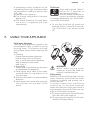
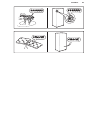
step 1: pull out the water dispenser
step 2: wash with clear water
step 3: dry it
• Assembling
Please refer to the following instruction
to reassemble the dispenser.
1.Hold tightly both sides of the water
container then lift it up and put it out
from the door.
2.Unscrew the head in counterclockwise
direction.
3.Insert them back on the door and push
the container until you hear a click
sound.
Small lid
Head
Large lid
WARNING!
When inserting the water
container, ensure the head sits
correctly into the hole first.
Filling water
Before you fill the drinking water into the
water container, ensure that the water
container is steady and placed into a
correct position.
To prevent water from overflowing
and spilling, fill the water container
below the maximum level mark which is
approximately about 4.0L.There are two
ways to fill the water container:
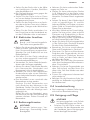
1.By removing the small lid and fill water
from the inlet of the large lid.
2.By removing the large lid of the tank,
and then fill water directly.