1
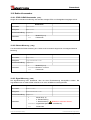
Rotary
Encoders
Linear
Encoders
System
Motion
D
Seite 2 - 48
GB
Page 49 - 96
LLB-60-D (H)
LLB60-00600
LLB60-00601
LLB60-00610
• Software/Support CD: 490-01001
- Soft-No.: LLB Utility
Benutzerhandbuch / User Manual
Laser-Entfernungs-Messgerät / Laser Measuring Device
LLB-60-D
LLB-60-D (H)
TR - ELE - BA - DGB - 0015 - 01 09/25/2007
LLB60-00611
TR-Electronic GmbH
D-78647 Trossingen
Eglishalde 6
Tel.: (0049) 07425/228-0
Fax: (0049) 07425/228-33
E-mail: [email protected]
http://www.tr-electronic.de
Urheberrechtsschutz
Dieses Benutzerhandbuch, einschließlich den darin enthaltenen Abbildungen, ist
urheberrechtlich geschützt. Drittanwendungen dieses Benutzerhandbuchs, welche
von den urheberrechtlichen Bestimmungen abweichen, sind verboten. Die
Reproduktion, Übersetzung sowie die elektronische und fotografische Archivierung
und Veränderung bedarf der schriftlichen Genehmigung durch den Hersteller.
Zuwiderhandlungen verpflichten zu Schadenersatz.
Änderungsvorbehalt
Jegliche Änderungen, die dem technischen Fortschritt dienen, vorbehalten.
Dokumenteninformation
Ausgabe-/Rev.-Datum:
Dokument-/Rev.-Nr.:
Dateiname:
Verfasser:
09/25/2007
TR - ELE - BA - DGB - 0015 - 01
TR-ELE-BA-DGB-0015-01.DOC
MÜJ
Schreibweisen
Kursive oder fette Schreibweise steht für den Titel eines Dokuments oder wird zur
Hervorhebung benutzt.
Courier-Schrift zeigt Text an, der auf dem Display bzw. Bildschirm sichtbar ist und
Menüauswahlen von Software.
″<
> ″ weist auf Tasten der Tastatur Ihres Computers hin (wie etwa
<RETURN>).
© TR-Electronic GmbH 2007, All Rights Reserved
Page 2 of 96
Printed in the Federal Republic of Germany
TR - ELE - BA - DGB - 0015 - 01
09/25/2007
Inhaltsverzeichnis
Inhaltsverzeichnis
Inhaltsverzeichnis ............................................................................................................................3
Änderungs-Index ..............................................................................................................................6
1 Allgemeines ...................................................................................................................................7
1.1 Geltungsbereich ..............................................................................................................7
1.2 Hersteller-Erklärung.........................................................................................................8
1.3 Verwendete Abkürzungen / Begriffe................................................................................8
2 Grundlegende Sicherheitshinweise ............................................................................................9
2.1 Symbol- und Hinweis-Definition ......................................................................................9
2.2 Verpflichtung des Betreibers vor der Inbetriebnahme.....................................................9
2.3 Allgemeine Gefahren bei der Verwendung des Produkts ...............................................10
2.4 Bestimmungsgemäße Verwendung ................................................................................10
2.5 Gewährleistung und Haftung ...........................................................................................11
2.6 Organisatorische Maßnahmen ........................................................................................11
2.7 Personalauswahl und –qualifikation; grundsätzliche Pflichten........................................12
2.8 Sicherheitstechnische Hinweise......................................................................................13
3 Übersicht ........................................................................................................................................15
3.1 Produkt Identifizierung.....................................................................................................16
3.2 Modulkomponenten .........................................................................................................16
3.3 Gültigkeit..........................................................................................................................16
3.4 Messbereich ....................................................................................................................17
3.5 Vermeidung von fehlerhaften Messungen.......................................................................17
3.5.1 Rauhe Oberflächen..........................................................................................17
3.5.2 Durchsichtige Oberflächen ..............................................................................17
3.5.3 Nasse, glatte oder stark glänzende Oberflächen ............................................17
3.5.4 Geneigte, gebogene Oberflächen ...................................................................17
3.5.5 Mehrfach Reflektionen.....................................................................................17
4 Geräte Einstellungen ....................................................................................................................18
4.1 Verbindung ......................................................................................................................18
4.2 Controlled-Mode ..............................................................................................................19
4.2.1 Konfiguration....................................................................................................19
4.2.2 Host Software ..................................................................................................19
4.3 Automatik Mode...............................................................................................................20
4.3.1 Konfiguration....................................................................................................20
4.4 Display Mode ...................................................................................................................21
4.5 Externer Trigger...............................................................................................................22
4.5.1 Konfiguration....................................................................................................22
© TR-Electronic GmbH 2007, All Rights Reserved
Printed in the Federal Republic of Germany
09/25/2007
TR - ELE - BA - DGB - 0015 - 01
Page 3 of 96
Inhaltsverzeichnis
5 Installation......................................................................................................................................23
5.1 Befestigung......................................................................................................................23
5.2 Geräteanschluss..............................................................................................................23
5.2.1 Versorgungsspannung ....................................................................................23
5.2.2 Kabelanschluss................................................................................................23
5.2.3 Abschirmung und Gerätemasse ......................................................................23
5.2.4 Controlled-Mode ..............................................................................................24
5.2.5 Automatic Mode...............................................................................................25
5.3 Ausrichten des Laserstrahls ............................................................................................25
6 Technische Daten..........................................................................................................................26
6.1 Messgenauigkeit..............................................................................................................26
6.2 Technische Daten............................................................................................................27
7 Elektrische Komponenten ............................................................................................................28
7.1 ID Schalter .......................................................................................................................28
7.2 Reset Schalter .................................................................................................................28
7.3 Digitale Ausgänge ...........................................................................................................28
7.4 Digital Eingang.................................................................................................................28
7.5 Analoger Ausgang ...........................................................................................................28
7.6 Anschluss-Stecker...........................................................................................................29
7.6.1 D-SUB Stecker ................................................................................................29
Bezeichnung ................................................................................................29
Beschreibung ...............................................................................................29
7.6.2 Schraubenklemmen.........................................................................................29
8 Geräteabmessungen.....................................................................................................................30
9 Werkseinstellungen ......................................................................................................................31
9.1 Betriebsart .......................................................................................................................31
9.2 Kommunikationsparameter..............................................................................................31
9.3 Analog Ausgang ..............................................................................................................31
9.4 Modul ID ..........................................................................................................................31
9.5 Digital Ausgang 1 (DOUT1).............................................................................................31
9.6 Digital Ausgang 2 (DOUT2).............................................................................................31
9.7 Digital Eingang 1 (DI1) ....................................................................................................31
9.8 Anwender Distanz-Offset.................................................................................................31
10 Kommandosatz............................................................................................................................32
10.1 Allgemeine .....................................................................................................................32
10.1.1 Kommando-Abschluss <trm>.......................................................................32
10.1.2 Modul Identifikation N.....................................................................................32
10.1.3 Parameter Trennsymbol ................................................................................32
10.1.4 Set/Get-Kommandos .....................................................................................32
10.1.5 Start Sequenz ................................................................................................32
© TR-Electronic GmbH 2007, All Rights Reserved
Page 4 of 96
Printed in the Federal Republic of Germany
TR - ELE - BA - DGB - 0015 - 01
09/25/2007
Inhaltsverzeichnis
10.2 Bedien-Kommandos ......................................................................................................33
10.2.1 STOP/CLEAR Kommando (sNc).................................................................33
10.2.2 Distanz Messung (sNg) ...............................................................................33
10.2.3 Signal-Messung (sNm) .................................................................................33
10.2.4 Temperatur-Messung (sNt) ........................................................................34
10.2.5 Laser ON (sNo)............................................................................................34
10.2.6 Laser OFF (sNp)..........................................................................................34
10.2.7 Tracking (Dauermessbetrieb), Einzel-Sensor (sNh) .....................................35
10.2.8 Tracking (Dauermessbetrieb) mit Wertspeicherung – Start (sNf) ................35
10.2.9 Tracking (Dauermessbetrieb) mit Wertspeicherung - Auslesen (sNq)..........36
10.3 Konfigurationskommandos ............................................................................................36
10.3.1 Set/Get-Kommunikationsparameter (sNbr) ..................................................36
10.3.2 Set Automatic Mode (sNA) ............................................................................37
10.3.3 Set/Get minimaler Analogausgangsstrom (sNvm).........................................37
10.3.4 Set/Get Analogausgangswert im Fehlerfall (sNve) .......................................38
10.3.5 Set/Get Distanzbereich (sNv)........................................................................38
10.3.6 Set/Get Signalpegel der digitalen Ausgänge (sNn).......................................39
10.3.7 Konfigurationsparameter speichern (sNs).....................................................40
10.3.8 Set Konfigurationsparameter auf Werkseinstellung (sNd) ............................40
10.3.9 Get Softwareversion (sNsv) ..........................................................................40
10.3.10 Get Seriennummer (sNsn) ..........................................................................41
10.4 Digital Eingang ..............................................................................................................42
10.4.1 Konfiguration des Digital Eingangs (sNDI1) .................................................42
10.4.2 Lese Digital Eingang (sNRI)..........................................................................42
10.5 Benutzerspezifische Kommandos .................................................................................43
10.5.1 Set/Get Benutzer Distanz Offset (sNuof) ...................................................43
10.5.2 Benutzerkonfigurierte Distanzmessung (sNug)...........................................43
10.5.3 Benutzerkonfigurierter Dauermessbetrieb, Einzel-Sensor (sNuh).............44
10.5.4 Benutzerkonfigurierter Dauermessbetrieb mit Wertspeicherung –
Start (sNuf) ..............................................................................................................45
10.5.5 Benutzerkonfigurierter Dauermessbetrieb mit Wertspeicherung Auslesen (sNuq) ........................................................................................................45
10.6 Fehlercodes ...................................................................................................................46
11 Zubehör ........................................................................................................................................47
11.1 Fernrohrsucher ..............................................................................................................47
11.2 Zieltafel ..........................................................................................................................47
11.3 Laser-Brille.....................................................................................................................47
11.4 Anschluss Set................................................................................................................48
11.5 Steckerabdeckung IP-65 ...............................................................................................48
11.6 90°-Winkelstecker IP65 .................................................................................................48
© TR-Electronic GmbH 2007, All Rights Reserved
Printed in the Federal Republic of Germany
09/25/2007
TR - ELE - BA - DGB - 0015 - 01
Page 5 of 96
Änderungs-Index
Änderungs-Index
Änderung
Datum
Index
Erstausgabe
10.05.07
00
25.09.07
01
Verfügbar als Art.-Nr.:
- Zieltafel:
49-500-040
- Winkelstecker: 62-000-1464
© TR-Electronic GmbH 2007, All Rights Reserved
Page 6 of 96
Printed in the Federal Republic of Germany
TR - ELE - BA - DGB - 0015 - 01
09/25/2007
Allgemeines
1 Allgemeines
Das vorliegende Benutzerhandbuch beinhaltet folgende Themen:
•
Grundlegende Sicherheitshinweise
•
Übersicht
•
Geräte Einstellungen
•
Installation
•
Technische Daten
•
Elektrische Komponenten
•
Geräteabmessungen
•
Werkseinstellungen
•
Kommandosatz
•
Zubehör
Da die Dokumentation modular aufgebaut ist, stellt dieses Benutzerhandbuch eine
Ergänzung zu anderen Dokumentationen wie z.B. Produktdatenblätter,
Maßzeichnungen, Prospekte etc. dar.
Das Benutzerhandbuch kann kundenspezifisch im Lieferumfang enthalten sein, oder
kann auch separat angefordert werden.
1.1 Geltungsbereich
Dieses Benutzerhandbuch gilt ausschließlich für folgende Mess-System-Baureihe mit
Analog Schnittstelle:
•
•
•
•
LLB60-00600
LLB60-00601
LLB60-00610
LLB60-00611
Die Produkte sind durch aufgeklebte Typenschilder gekennzeichnet und sind
Bestandteil einer Anlage.
Es gelten somit zusammen folgende Dokumentationen:
•
•
anlagenspezifische Betriebsanleitungen des Betreibers,
dieses Benutzerhandbuch
© TR-Electronic GmbH 2007, All Rights Reserved
Printed in the Federal Republic of Germany
09/25/2007
TR - ELE - BA - DGB - 0015 - 01
Page 7 of 96
Allgemeines
1.2 Hersteller-Erklärung
Die Mess-Systeme der Serie LLB-60-D (H) wurden unter Beachtung geltender
europäischer bzw. internationaler Normen und Richtlinien entwickelt, konstruiert und
gefertigt.
Eine entsprechende Hersteller-Erklärung kann bei der Firma TR-Electronic GmbH
angefordert werden.
Der Hersteller der Produkte, die TR-Electronic GmbH in D-78647 Trossingen, besitzt
ein zertifiziertes Qualitätssicherungssystem gemäß ISO 9001.
1.3 Verwendete Abkürzungen / Begriffe
EG
Europäische Gemeinschaft
EMV
Elektro-Magnetische-Verträglichkeit
ESD
Elektrostatische Entladung (Electro Static Discharge)
IEC
Internationale Elektrotechnische Kommission
LLB
Laser-Entfernungs-Messgerät
VDE
Verein Deutscher Elektrotechniker
© TR-Electronic GmbH 2007, All Rights Reserved
Page 8 of 96
Printed in the Federal Republic of Germany
TR - ELE - BA - DGB - 0015 - 01
09/25/2007
Grundlegende Sicherheitshinweise
2 Grundlegende Sicherheitshinweise
2.1 Symbol- und Hinweis-Definition
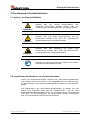
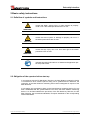
WARNUNG !
VORSICHT !
WARNUNG !
bedeutet, dass Tod, schwere Körperverletzung oder
erheblicher Sachschaden eintreten können, wenn die
entsprechenden Vorsichtsmaßnahmen nicht getroffen werden.
bedeutet, dass eine leichte Körperverletzung oder ein
Sachschaden eintreten kann, wenn die entsprechenden
Vorsichtsmaßnahmen nicht getroffen werden.
bedeutet, dass eine Schädigung des Auges durch
Laserstrahlung eintreten kann, wenn die entsprechenden
Vorsichtsmaßnahmen nicht getroffen werden.
bezeichnet wichtige Informationen bzw. Merkmale und Anwendungstipps des verwendeten Produkts.
2.2 Verpflichtung des Betreibers vor der Inbetriebnahme
Gemäß der EG-Maschinenrichtlinie entspricht das Laser-Entfernungs-Messgerät
einem Maschinenteil für den Einbau in eine Anlage/Maschine. Des weiteren wurde
die Konformität des Laser-Entfernungs-Messgerätes hinsichtlich der EMV-Richtlinie
geprüft.
Die Inbetriebnahme des Laser-Entfernungs-Messgerätes ist deshalb erst dann
erlaubt, wenn festgestellt wurde, dass die Anlage/Maschine in die das LaserEntfernungs-Messgerät eingebaut werden soll, den Bestimmungen der EG-Maschinenrichtlinie, der EG-EMV-Richtlinie, den harmonisierten Normen, Europanormen
oder den entsprechenden nationalen Normen entspricht.
© TR-Electronic GmbH 2007, All Rights Reserved
Printed in the Federal Republic of Germany
09/25/2007
TR - ELE - BA - DGB - 0015 - 01
Page 9 of 96
Grundlegende Sicherheitshinweise
2.3 Allgemeine Gefahren bei der Verwendung des Produkts
Das Produkt, nachfolgend als Mess-System bezeichnet, ist nach dem Stand der
Technik und den anerkannten sicherheitstechnischen Regeln gefertigt. Dennoch
können bei nicht bestimmungsgemäßer Verwendung Gefahren für Leib und
Leben des Benutzers oder Dritter bzw. Beeinträchtigungen des Mess-Systems
und anderer Sachwerte entstehen!
Mess-System nur in technisch einwandfreiem Zustand sowie bestimmungsgemäß,
sicherheits- und gefahrenbewusst unter Beachtung des Benutzerhandbuchs
verwenden! Insbesondere Störungen, die die Sicherheit beeinträchtigen können,
umgehend beseitigen (lassen)!
2.4 Bestimmungsgemäße Verwendung
Das Mess-System wird zur Distanzmessung, sowie der Aufbereitung der Messdaten
für eine nachgeschaltete Steuerung bei industriellen Prozess- und SteuerungsAbläufen verwendet.
Zur bestimmungsgemäßen Verwendung gehört auch:
• das Beachten aller Hinweise aus diesem Benutzerhandbuch,
• das Beachten des Typenschildes und eventuell auf dem Mess-System
angebrachte Verbots- bzw. Hinweisschilder,
• das Beachten der beigefügten Dokumentation wie z.B. Produktbegleitblatt,
Steckerbelegungen etc.,
• das Beachten der Betriebsanleitung des Maschinen- bzw. Anlagen-Herstellers,
• das Betreiben des Mess-Systems innerhalb der in den technischen Daten
angegebenen Grenzwerten.
Insbesondere sind folgende Verwendungen untersagt:
• in Bereichen, in denen eine Unterbrechung des Laserstrahls, zum Beispiel durch
Verdecken der Laser-Linsenöffnung, Schaden entstehen oder jemand verletzt
werden kann,
• in Umgebungen, in denen starker Regen, Schnee, Nebel, Dämpfe oder direkte
Sonneneinstrahlungen etc. die Laser-Intensität negativ beeinflussen kann,
• in Umgebungen mit explosiver Atmosphäre,
• zu medizinischen Zwecken
Gefahr von Körperverletzung und Sachschaden durch Positionssprünge des
Mess-Systems !
WARNUNG !
-
Da das Mess-System kein Sicherheitsbauteil darstellt, muss durch die
nachgeschaltete Steuerung eine Plausibilitätsprüfung der Mess-SystemWerte durchgeführt werden.
-
Das Mess-System ist vom Betreiber zwingend mit in das eigene
Sicherheitskonzept einzubinden.
© TR-Electronic GmbH 2007, All Rights Reserved
Page 10 of 96
Printed in the Federal Republic of Germany
TR - ELE - BA - DGB - 0015 - 01
09/25/2007
Grundlegende Sicherheitshinweise
2.5 Gewährleistung und Haftung
Grundsätzlich gelten die „Allgemeinen Geschäftsbedingungen“ der Firma
TR-Electronic GmbH. Diese stehen dem Betreiber spätestens mit der
Auftragsbestätigung bzw. mit dem Vertragsabschluss zur Verfügung.
Gewährleistungs- und Haftungsansprüche bei Personen- und Sachschäden sind
ausgeschlossen, wenn sie auf eine oder mehrere der folgenden Ursachen
zurückzuführen sind:
•
Nicht bestimmungsgemäße Verwendung des Mess-Systems.
•
Unsachgemäße Montage, Installation, Inbetriebnahme und Programmierung
des Mess-Systems.
•
Unsachgemäß ausgeführte Arbeiten am Mess-System durch unqualifiziertes
Personal.
•
Betreiben des Mess-Systems bei technischen Defekten.
•
Eigenmächtige vorgenommene mechanische oder elektrische Veränderungen
am Mess-System.
•
Eigenmächtige durchgeführte Reparaturen.
•
Katastrophenfälle durch Fremdeinwirkung und höhere Gewalt.
2.6 Organisatorische Maßnahmen
• Das Benutzerhandbuch muss ständig am Einsatzort des Mess-Systems griffbereit
aufbewahrt werden.
• Ergänzend zum Benutzerhandbuch sind allgemeingültige gesetzliche und
sonstige verbindliche Regelungen zur Unfallverhütung und zum Umweltschutz zu
beachten und müssen vermittelt werden.
• Die jeweils gültigen nationalen, örtlichen und anlagenspezifischen Bestimmungen
und Erfordernisse müssen beachtet und vermittelt werden.
• Der Betreiber hat die Verpflichtung, auf betriebliche Besonderheiten und
Anforderungen an das Personal hinzuweisen.
• Das mit Tätigkeiten am Mess-System beauftragte Personal muss vor
Arbeitsbeginn
das
Benutzerhandbuch,
insbesondere
das
Kapitel
„Grundlegende Sicherheitshinweise“, gelesen und verstanden haben.
• Das Typenschild, eventuell aufgeklebte Verbots- bzw. Hinweisschilder auf dem
Mess-System müssen stets in lesbarem Zustand erhalten werden.
• Keine mechanische oder elektrische Veränderungen am Mess-System, außer
den in diesem Benutzerhandbuch ausdrücklich beschriebenen, vornehmen.
• Reparaturen dürfen nur vom Hersteller, oder einer vom Hersteller autorisierten
Stelle bzw. Person vorgenommen werden.
© TR-Electronic GmbH 2007, All Rights Reserved
Printed in the Federal Republic of Germany
09/25/2007
TR - ELE - BA - DGB - 0015 - 01
Page 11 of 96
Grundlegende Sicherheitshinweise
2.7 Personalauswahl und –qualifikation; grundsätzliche Pflichten
• Alle Arbeiten am Mess-System dürfen nur von qualifiziertem Fachpersonal
durchgeführt werden.
Qualifiziertes Personal sind Personen, die auf Grund ihrer Ausbildung, Erfahrung
und Unterweisung sowie ihrer Kenntnisse über einschlägige Normen,
Bestimmungen, Unfallverhütungsvorschriften und Betriebsverhältnisse, von dem
für die Sicherheit der Anlage Verantwortlichen berechtigt worden sind, die jeweils
erforderlichen Tätigkeiten auszuführen, und dabei mögliche Gefahren erkennen
und vermeiden können.
• Zur Definition von „Qualifiziertem Personal“ sind zusätzlich die Normen VDE
0105-100 und IEC 364 einzusehen (Bezugsquellen z.B. Beuth Verlag GmbH,
VDE-Verlag GmbH).
• Klare Regelung der Verantwortlichkeiten für die Montage, Installation,
Inbetriebnahme und Bedienung festlegen. Beaufsichtigungspflicht bei zu
schulendem oder anzulernendem Personal !
© TR-Electronic GmbH 2007, All Rights Reserved
Page 12 of 96
Printed in the Federal Republic of Germany
TR - ELE - BA - DGB - 0015 - 01
09/25/2007
Grundlegende Sicherheitshinweise
2.8 Sicherheitstechnische Hinweise
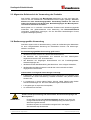
Schädigung des Auges durch Laserstrahlung!
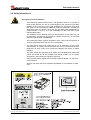
WARNUNG !
-
Das Mess-System arbeitet mit einem Rotlicht-Laser der Klasse 2. Bei Lasereinrichtungen der Klasse 2 ist das Auge bei zufälliger, kurzzeitiger
Einwirkung der Laserstrahlung, d.h. bei Einwirkungsdauer bis 0,25 s nicht
gefährdet. Lasereinrichtungen der Klasse 2 dürfen deshalb ohne weitere
Schutzmaßnahmen eingesetzt werden, wenn sichergestellt ist, dass weder
ein absichtliches Hineinschauen für die Anwendung über längere Zeit als
0,25 s, noch wiederholtes Hineinschauen in die Laserstrahlung bzw.
spiegelnd reflektierte Laserstrahlung erforderlich ist.
Von dem Vorhandensein des Lidschlussreflexes zum Schutz der Augen darf
in der Regel nicht ausgegangen werden.
Daher sollte man bewusst die Augen schließen oder sich sofort abwenden!
-
Das Mess-System ist so zu installieren, dass beim Betrieb nur eine zufällige
Bestrahlung von Personen möglich ist.
-
Die Laserstrahlung darf sich nur so weit erstrecken, wie es für die
Entfernungsmessung nötig ist. Der Strahl ist am Ende der Nutzentfernung
durch eine Zielfläche so zu begrenzen, dass eine Gefährdung durch direkte
oder diffuse Reflexion möglichst gering ist.
-
Soweit möglich sollte der unabgeschirmte Laserstrahl außerhalb des
Arbeits- und Verkehrsbereiches in einem möglichst kleinen, nicht
zugänglichen Bereich verlaufen, insbesondere ober- oder unterhalb der
Augenhöhe.
-
Laserschutzbedingungen gemäß
DIN EN 60825-1 in der neuesten Fassung beachten.
-
Es sind die geltenden gesetzlichen und örtlichen Bestimmungen zum Betrieb
von Laseranlagen zu beachten.
© TR-Electronic GmbH 2007, All Rights Reserved
Printed in the Federal Republic of Germany
09/25/2007
TR - ELE - BA - DGB - 0015 - 01
Page 13 of 96
Grundlegende Sicherheitshinweise
•
Gefahr von Körperverletzung und Sachschaden!
-
Mit dem Fernrohrsucher nicht direkt in die Sonne zielen, das Fernrohr wirkt
wie ein Brennglas und kann somit die Augen oder das innere des
LLB-60-D´s schädigen.
-
Verdrahtungsarbeiten, Öffnen und Schließen von elektrischen Verbindungen
nur im spannungslosen Zustand durchführen.
-
Keine Schweißarbeiten vornehmen, wenn das Mess-System bereits
verdrahtet bzw. eingeschaltet ist.
-
Sicherstellen, dass das Laser-Warnschild auf dem Mess-System jederzeit
gut sichtbar ist.
-
Kein Gebrauch von Fremdzubehör
-
Sicherstellen, dass die Montageumgebung vor aggressiven Medien
(Säuren etc.) geschützt ist.
-
Das Öffnen des Mess-Systems ist untersagt.
WARNUNG !
VORSICHT !
•
Entsorgung
Muss nach der Lebensdauer des Gerätes eine Entsorgung vorgenommen
werden, sind die jeweils geltenden landesspezifischen Vorschriften zu
beachten.
•
Reinigung
Linsenöffnung des Mess-Systems regelmäßig mit einem weichen Tuch
reinigen. Zur Reinigung keine aggressiven Reinigungsmittel wie
Verdünner oder Aceton verwenden!
© TR-Electronic GmbH 2007, All Rights Reserved
Page 14 of 96
Printed in the Federal Republic of Germany
TR - ELE - BA - DGB - 0015 - 01
09/25/2007
Übersicht
3 Übersicht
Das LLB-60-D (LLB-60-D (H mit Heizung optional) ist ein leistungsstarkes Distanzmessgerät für den
Einsatz in industriellen Anwendungen. Es erlaubt genaue und kontaktlose Distanzmessungen über
einen großen Distanzbereich. Durch Auswertung der Reflektion eines Laserstrahles wird die Distanz
bestimmt.
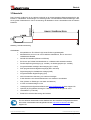
Abbildung 1: Standard Anwendung
Gerätedaten:
• Kompatibel zum TR LLB-30-D (H) Laser-Entfernungs-Messgerät
•
Messbereich 0.05 bis ca. 60 m auf natürliche Oberflächen, bis ca. 500 m auf
reflektierende Zieltafel
•
Serielle Schnittstellen (RS232 und RS422)
•
Es können pro RS422 Schnittstelle bis zu 10 Messmodule adressiert werden
•
Flexible Spannungsversorgung (9...30VDC), mit Heizungsoption (24...30VDC)
•
Programmierbarer analoger Stromausgang (0/4...20mA)
•
Zwei programmierbare digitale Ausgänge (DO1 und DO2)
•
Digital Ausgang für Gerätefehler Anzeige (DOE)
•
Programmierbarer Digital Eingang (DI1)
•
ASCII Protokoll zur Steuerung von externen Anzeigen
•
D-Sub Stecker sowie Anschlussklemmen zum einfachen anschließen
•
IP65 (Schutz vor Eindringen von Staub und Wasser)
•
4 LEDs zur Statusanzeige vor Ort
•
Umfangreiche Konfigurationssoftware auf www.TR-Electronic.de oder Support CD
•
Optional (H): Eingebaute Heizung für Tieftemperaturanwendungen bis -40°C
•
Laserklasse II (<0.95mW)
•
Zubehör für einfache Benutzung des Gerätes
Für eine einfache Inbetriebnahme des Gerätes kann die kostenlose Konfigurationssoftware
auf unseren Internetseiten heruntergeladen werden: http://www.tr-electronic.de/ oder
Support CD
© TR-Electronic GmbH 2007, All Rights Reserved
Printed in the Federal Republic of Germany
09/25/2007
TR - ELE - BA - DGB - 0015 - 01
Page 15 of 96
Übersicht
3.1 Produkt Identifizierung
Das Gerät ist auf dem Produktlabel auf der Oberseite genau spezifiziert:
Version
Typische Genauigkeit
1.5mm
3.0mm
Standardversion
LLB-60-D
Art.-Nr.: LLB60-00600
LLB-60-D
Art.-Nr.: LLB60-00601
Erweiterter Temperaturbereich
LLB-60-D (H)
Art.-Nr.: LLB60-00610
LLB-60-D (H)
Art.-Nr.: LLB60-00611
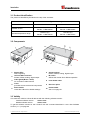
3.2 Modulkomponenten
1
Status LEDs
Statusanzeige
6
Anschlussklemmen
RS422, RS232, analoger, digitaler Ausgang
2
15-Pin D-Sub Stecker
RS422, RS232, analoger, digitaler Ausgang
7
ID Schalter
definiert die Geräteadresse bei Mehrgerätebetrieb an der RS422 Schnittstelle
3
Kabelverschraubung (M16 x 1.5mm)
Einführung des Anschlusskabels
8
Austritt des Laserstrahls
4
Seitendeckel
Zugang zu den Anschlussklemmen und
Komponenten
9
Empfängeroptik
5
Reset Schalter
Setzt das LLB-60-D auf Werkseinstellung
zurück
10
Produkt Bezeichnungslabel
siehe Kapitel 2.8 auf Seite 13
3.3 Gültigkeit
Dieses Benutzerhandbuch ist gültig ab LLB-60-D Module der folgenden Software Versionen:
Interface Software Version:
0100 oder höher
Modul Software Version:
0100 oder höher
Um an die Softwareversion des LLB-60-D zu gelangen, sind die beschriebenen Kommandos zu
verwenden. Siehe 10.3.9 Get Softwareversion (sNsv) auf Seite 40.
© TR-Electronic GmbH 2007, All Rights Reserved
Page 16 of 96
Printed in the Federal Republic of Germany
TR - ELE - BA - DGB - 0015 - 01
09/25/2007
Übersicht
3.4 Messbereich
Das LLB-60-D ist ein optisches Messgerät dessen Grenzen von den Einsatzbedingungen bestimmt
werden. Je nach Einsatz und Anwendung kann der maximale Messbereich variieren. Die folgenden
Bedingungen können den Messbereich beeinflussen:
Einfluss
Erweiterung des Messbereiches
Abnahme des Messbereiches
Zielbeschaffenheit
helle, reflektierende Oberflächen wie
matte und dunkle Oberflächen, grüne
z.B. die Zieltafel, siehe Kapitel 11
und blaue Oberflächen
Zubehör auf Seite 47.
Partikel in der Luft
Saubere Umgebungsluft
Staub, Nebel, starker Regenfall, starker
Schneefall
Sonnenschein
Dunkelheit
Heller Sonnenschein auf Messziel
Das LLB-60-D kompensiert keine Umgebungseinflüsse, welche bei Messungen von größeren
Distanzen relevant sein können (z.B. > 150 m). Diese Effekte sind beschrieben in:
B.Edlen: “The Refractive Index of Air, Metrologia 2”, 71-80 (1966)
3.5 Vermeidung von fehlerhaften Messungen
3.5.1 Rauhe Oberflächen
Auf rauen Oberflächen (z.B. grober Mörtel), muss auf das Zentrum der beleuchteten Fläche
gemessen werden. Um Messungen auf Risse, Vertiefungen etc. in der Oberfläche zu vermeiden, ist
eine Zieltafel (siehe Kapitel 11 Zubehör auf Seite 47) oder Platte zu verwenden.
3.5.2 Durchsichtige Oberflächen
Um fehlerhaften Messungen entgegenzuwirken sollte nicht auf transparente Oberflächen gemessen
werden. Dies gilt insbesondere für farblose Flüssigkeiten (wie Wasser) oder (sauberes) Glas. Auf
unbekannte Materialien und Flüssigkeiten sollten immer Testmessungen durchgeführt werden.
Fehlerbehaftete Messungen können entstehen, wenn durch Glasscheiben gemessen wird, oder
wenn sich Objekte im Sichtbereich des Laserstrahles befinden.
3.5.3 Nasse, glatte oder stark glänzende Oberflächen
1 Wird in einem zu spitzen Winkel auf das Ziel gemessen, kann der Laserstrahl abgelenkt werden.
Das LLB-60-D könnte so ein zu schwaches Signal detektieren (Fehlernummer 255) oder es könnte
das Objekt gemessen werden wo der abgelenkte Laserstrahl auftrifft.
2 Wenn im rechten Winkel gemessen wird kann das LLB-60-D möglicherweise ein zu starkes Signal
empfangen (Fehlermeldung 256).
3.5.4 Geneigte, gebogene Oberflächen
Messungen sind möglich solange genügend Zielfläche für den Laserspot vorhanden ist.
3.5.5 Mehrfach Reflektionen
Fehlerhafte Messungen können auch dadurch entstehen, dass der Laserstrahl von anderen Objekten
entlang der Messstrecke reflektiert wird. Vermeiden sie reflektierende Objekte entlang der Messstrecke.
© TR-Electronic GmbH 2007, All Rights Reserved
Printed in the Federal Republic of Germany
09/25/2007
TR - ELE - BA - DGB - 0015 - 01
Page 17 of 96
Geräte Einstellungen
4 Geräte Einstellungen
Wir empfehlen, dass die Konfigurationsschritte zuerst im Labor durchgeführt werden, bevor das Gerät
montiert wird. Dies speziell, wenn noch keine Erfahrung mit dem LLB-60-D gesammelt wurde.
Das LLB-60-D unterstützt zwei Betriebsarten:
•
Controlled Mode
•
Automatic Mode (Stand-Alone-Betrieb)
Die erste Entscheidung die gemacht werden muss, ist die Auswahl der Betriebsart. Während der
Controlled Mode maximale Flexibilität und Genauigkeit bereitstellt, ist es oft nicht möglich diesen in
bestehende SPS oder andere Steuerungseinrichtungen zu integrieren. In solchen Fällen wird der
Automatic Mode möglicherweise bevorzugt.
Automatic Mode
(mit analogem Ausgang und / oder
digitalen Ausgängen)
Einfluss
Controlled Mode
Genauigkeit
Maximale Messgenauigkeit
Flexibilität
Zugriff auf gesamten Kommando Satz Limitiert
Integration
Benötigt Protokoll-Implementation
Verbindung
Bis zu 10 LLB-60-D an einer einzigen
Punkt zu Punkt Verbindung
RS-422 Schnittstelle.
Genauigkeit abhängig von der Skalierung
(siehe 10.3.5 Set/Get Distanzbereich (sNv) Seite 38)
Verdrahten von Analog- und/oder
Digital-Signalen
Die folgenden zwei Abschnitte beschreiben die Konfiguration des LLB-60-D für den Controlled und
Automatic Mode.
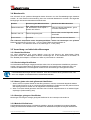
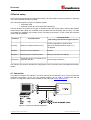
4.1 Verbindung
Um das LLB-60-D zu konfigurieren, muss das Modul mit Spannung versorgt und mit einem PC
verbunden sein. Abbildung 2 zeigt die notwendigen Verbindungen. Auf dem PC kann ein beliebiges
Terminalprogramm benutzt werden um mit dem Modul zu kommunizieren. Zudem kann ein
Konfigurationsprogramm benutzt werden: www.TR-Electronic.de.
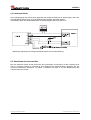
Abbildung 2: Verbindung für die LLB-60-D Konfiguration
© TR-Electronic GmbH 2007, All Rights Reserved
Page 18 of 96
Printed in the Federal Republic of Germany
TR - ELE - BA - DGB - 0015 - 01
09/25/2007
Geräte Einstellungen
4.2 Controlled-Mode
Im Controlled-Mode, wird jede Operation eines LLB-60-D durch ein Kommando ausgelöst. Dieses
wird vom Host System über die serielle Schnittstelle gesendet. Ein einzelnes Gerät kann über die
RS232 Schnittstelle direkt mit dem Host System verbunden werden. Alternativ dazu können aber auch
bis zu 10 Geräte über eine einzige serielle RS422 Schnittstelle angeschlossen werden. Der benötigte
Kommandosatz ist in Kapitel 10 Kommandosatz auf Seite 32 beschrieben.
4.2.1 Konfiguration
Nach dem Anschließen des/der Module(s) sind die folgenden Schritte notwendig, um das LLB-60-D
für den Controlled Mode zu konfigurieren.
Nr.
Vorgang
Kommentar
1
Einstellen des ID
Schalters
Wechsel der Modul ID sind nach
einem Aus-Einschaltvorgang aktiviert. Setze ID Schalter auf Position 0
Gerät ausschalten;10s warten;
Beispiel Modul 0:
Gerät einschalten
Wechsle den ID Drehschalter auf
Position 0.
2
Setzen des LLB-60-D in den
Controlled Mode, falls sich dieses
Setzen des Controlled noch nicht darin befindet.
Mode
Beispiel für Modul 0:
Setze in Controlled Mode mit dem
Stop Kommando.
Setzen der
Kommunikationsparameter
3
Kommando
s0c<trm>1)
Falls notwendig, müssen die
1)
Einstellungen für das serielle Interface s0br+2<trm>
angepasst werden.
Gerät ausschalten;10s warten;
Wechsle die Einstellungen am
Beispiel für Modul 0:
Host; Gerät einschalten
Setze das serielle Interface auf 19200
Baud, 8 Bit, kein Parity
1) Kommandos sind in Kapitel 10 Kommandosatz auf Seite 32 beschrieben.
Wenn die Kommunikationsparameter des Moduls verloren gegangen sind, sollte das Gerät auf die
Werkseinstellungen (siehe 9 Werkseinstellungen auf Seite 31) zurückgesetzt werden. Dies erfolgt
mit dem Reset Schalter (7.2 Reset Schalter auf Seite 28). Es muss beachtet werden, dass der ID
Drehschalter manuell zurückgesetzt werden muss.
4.2.2 Host Software
Für den Controlled Mode wird immer eine Host Software benötigt. Wenn mehrere Geräte über eine
RS422 Interfaceleitung angesteuert werden, muss eine strikte Master-Slave Kommunikation
Implementiert werden (LLB-60-D arbeitet als Slave).
•
Gefahr von Körperverletzung und Sachschaden durch unbeabsichtigte Kommandos !
-
WARNING !
Das Austesten der Host Software zusammen mit dem Messmodul ist vor der
Geräteinstallation zwingend durchzuführen.
© TR-Electronic GmbH 2007, All Rights Reserved
Printed in the Federal Republic of Germany
09/25/2007
TR - ELE - BA - DGB - 0015 - 01
Page 19 of 96
Geräte Einstellungen
4.3 Automatik Mode
Der Automatik Mode wird für den Betrieb des LLB-60-D ohne Host bereitgestellt. Die Konfiguration für
den analogen und die digitalen Ausgänge werden aktiv sobald die folgend beschriebene Konfiguration
durchgeführt wurde und das Gerät aus- und wieder eingeschaltet wurde.
Analoger Ausgang
Der analoge Ausgang ist Konfigurierbar und arbeitet mit zwei wählbaren Bereichen:
– 0..20mA
– 4..20mA
Digitale Ausgänge
Drei digitale Ausgänge wurden ins LLB-60-D integriert. Zwei sind programmierbar, während der
dritte zur Signalisierung von Gerätefehlern verwendet wird.
4.3.1 Konfiguration
Nach dem Verbinden des Moduls sind die folgend beschriebenen Schritte notwendig um das
LLB-60-D in den Automatic Mode zu schalten:
Nr.
1
2
Vorgang
Setze StromAusgangsbereich
Setze Distanzbereich
Kommentar
Definiert den Strom-Ausgangsbereich.
0 bis 20mA, oder 4 bis 20mA sind
möglich.
Beispiel für Modul 0:
Setze Ausgangsbereich von 4mA bis
20mA.
Definiert die minimale Distanz (Dmin)
und die maximale Distanz (Dmax) für
den Signalbereich des
Analogausgangs.
Kommando
s0vm+1<trm>1)
s0v+00000000+00100000<trm>1)
Beispiel für Modul 0:
Setze Distanzbereich von 0m bis 10m
3
Setzt den Stromwert der im Fehlerfall
Setze Analogausgang am Ausgang anliegen soll.
bei Fehlerbetrieb
Beispiel für Modul 0:
s0ve+000<trm>1)
Setze Strom im Fehlerfall auf 0mA.
4
Konfiguriere die
digitalen Ausgänge
Setzt die Ein- und Ausschaltschwellen
der digitalen Ausgänge.
Beispiel für Modul 0:
DO 1: Aus=2000mm Ein=2005mm
DO 2: Aus=4000mm Ein=4005mm
© TR-Electronic GmbH 2007, All Rights Reserved
Page 20 of 96
s01+00020000+00020050<trm>1)
s02+00040000+00040050<trm>1)
Printed in the Federal Republic of Germany
TR - ELE - BA - DGB - 0015 - 01
09/25/2007
Geräte Einstellungen
Nr.
5
Vorgang
Speichere die
Einstellungen
Kommentar
Kommando
Die geänderte Konfiguration muss
gespeichert werden, damit diese
erhalten bleibt.
s0s<trm>1)
Beispiel für Modul 0:
Speichere die Einstellungen für Modul 0
LLB-60-D in den Automatic Mode mit
der gewünschten Abtastrate setzen.
6
Setze Automatic Mode Beispiel für Modul 0:
Setze Messwert Abtastrate auf die
maximal mögliche Geschwindigkeit.
s0A+0<trm>1)
1) Die Kommandos sind beschrieben in 10 Kommandosatz auf Seite 32
Wenn die Kommunikationsparameter des Moduls verloren gegangen sind, sollte das Gerät auf die
Werkseinstellungen (9 Werkseinstellungen auf Seite 31) zurückgesetzt werden. Dies erfolgt mit
dem Reset Schalter (7.2 Reset Schalter auf Seite 28). Es muss beachtet werden, dass der ID
Drehschalter manuell zurückgesetzt werden muss.
4.4 Display Mode
Wenn der Display Mode aktiviert ist, formatiert das LLB-60-D die gemessene Distanz als ASCII-String,
welcher über ein externes Display mit serieller Schnittstelle angezeigt werden kann. Dies ist möglich,
da die LLB-60-D diesen formatierten String automatisch nach Beendigung einer Messung auf der
seriellen Schnittstelle ausgibt. Messergebnisse können ohne zusätzlichen Controller auf dem
externen Display angezeigt werden. Nähere Hinweise zu diesem Mode können bei TR-Electronic
erfragt werden.
© TR-Electronic GmbH 2007, All Rights Reserved
Printed in the Federal Republic of Germany
09/25/2007
TR - ELE - BA - DGB - 0015 - 01
Page 21 of 96
Geräte Einstellungen
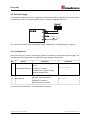
4.5 Externer Trigger
Das LLB-60-D bietet die Möglichkeit getriggerte Messungen mit einem externen Schalter oder
Tastschalter am Digital-Eingang 1 (DI 1) vorzunehmen. Die Benutzung des Digital-Eingangs DI 1
deaktiviert Digital-Ausgang DO 1.
Das Kommando zur Aktivierung der externen Trigger-Funktion wird in Kapitel 10.4 Digital Eingang auf
Seite 42 beschrieben.
4.5.1 Konfiguration
Um den externen Trigger zu aktivieren, sind nach dem Anschluss der LLB-60-D folgende Schritte
notwendig. Das Beispiel zeigt die Konfiguration für die Triggerung einer Einzel-Distanz-Messung.
Nr.
1
5
Vorgang
Aktivierung des
Digital-Eingangs DI 1
Speichere die
Einstellungen
Kommentar
Kommando
Definiert die Auslösung für ein
Trigger-Ereignis an DI 1.
Beispiel für Modul 0:
Konfiguriere DI 1 für die Triggerung
einer Einzel-Distanz-Messung
Die geänderte Konfiguration muss
gespeichert werden, damit diese
erhalten bleibt.
s0DI1+2<trm>1)
s0s<trm>1)
Beispiel für Modul 0:
Speichere die Einstellungen für Modul 0
1) Die Kommandos werden in Kapitel 10 Kommandosatz auf Seite 32 beschrieben.
© TR-Electronic GmbH 2007, All Rights Reserved
Page 22 of 96
Printed in the Federal Republic of Germany
TR - ELE - BA - DGB - 0015 - 01
09/25/2007
Installation
5 Installation
5.1 Befestigung
Auf der Unterseite des Gerätes befinden sich drei M4 Gewindebohrungen für die einfache Montage
des LLB-60-D.
5.2 Geräteanschluss
5.2.1 Versorgungsspannung
Um einen störungsfreien Betrieb zu gewährleisten, ist eine separate Versorgungsspannung für das
LLB-60-D zu benutzen.
●
●
LLB-60-D: 9…30 VDC, 0.5 A
LLB-60-D (H): 24…30 VDC, 2.5 A
5.2.2 Kabelanschluss
Es muss ein Ferritkern am Anschlusskabel montiert werden. Benötigt wird ein Ferritkern mit einer
Impedanz von 150 Ω bis 260 Ω bei 25MHz und 640 Ω bis 730 Ω bei 100MHz. Als Beispiel kann
folgender Ferrit verwendet werden: KCF-65 von KE Kitagawa.
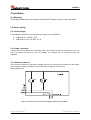
5.2.3 Abschirmung und Gerätemasse
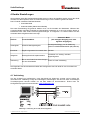
Das LLB-60-D besitzt zwei elektrisch isolierte Massepunkte, den generellen Massepunkt (GND) und
den Massepunkt für den Analogausgang (AGND). GND und AGND sind über ein RC-Glied mit dem
Gehäuse verbunden, siehe Abbildung 3.
Abbildung 3: Verbindung zwischen Abschirmung, Masse (GND) und Analog-Masse (AGND)
© TR-Electronic GmbH 2007, All Rights Reserved
Printed in the Federal Republic of Germany
09/25/2007
TR - ELE - BA - DGB - 0015 - 01
Page 23 of 96
Installation
5.2.4 Controlled-Mode
RS232
•
Gefahr von Körperverletzung und Sachschaden durch undefinierte
Schnittstellenzustände!
-
WARNUNG !
Verbinde nie mehrere LLB-60-D´s mit einer seriellen RS232 Schnittstelle
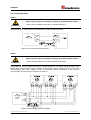
Bei Verwendung der RS232 Schnittstelle ist nur Punkt-zu-Punkt Kommunikation möglich.
Abbildung 4: Punkt-zu-Punkt Verbindung mit RS 232
RS422
•
WARNUNG !
Gefahr von Körperverletzung und Sachschaden durch undefinierte
Schnittstellenzustände!
-
Alle LLB-60-D´s müssen unterschiedliche ID Nummern aufweisen
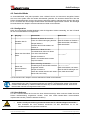
Es ist möglich, mehrere Messgeräte an eine RS422 Schnittstelle anzuschließen. Um einen
problemlosen Betrieb zu gewährleisten, muss eine strikte Master-Slave Kommunikation implementiert
werden. Es ist wichtig, dass der Master volle Kontrolle über die Kommunikation hat und dieser keine
neue Kommunikation einleitet, bevor das vorhergehende Kommando abgeschlossen wurde (Antwort
vom LLB-60-D oder Timeout).
Abbildung 5: Verbindung zu mehreren Geräten mit RS422
© TR-Electronic GmbH 2007, All Rights Reserved
Page 24 of 96
Printed in the Federal Republic of Germany
TR - ELE - BA - DGB - 0015 - 01
09/25/2007
Installation
5.2.5 Automatic Mode
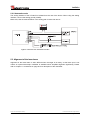
Der Analogausgang des LLB-60-D ist gegenüber der restlichen Elektronik im Gerät isoliert. Wenn der
Analogausgang benutzt wird, muss die Analogmasse (AGND) verwendet werden.
Sicherstellen, dass der Gesamtwiderstand am Analogausgang kleiner als 500 Ω ist.
Abbildung 6: Verbindung eines analogen Anzeigeinstrumentes und einer SPS Steuerung
5.3 Ausrichten des Laserstrahls
Bei weit entfernten Zielen ist das Ausrichten des Laserstrahls oft schwierig, da der Laserspot nicht
oder nur schlecht sichtbar ist. Optional ist eine teleskopische Visiereinrichtung verfügbar, die das
Ausrichten bedeutend vereinfacht. Im Kapitel 11 Zubehör auf Seite 47 ist eine Beschreibung der
Visiereinrichtung zu finden.
© TR-Electronic GmbH 2007, All Rights Reserved
Printed in the Federal Republic of Germany
09/25/2007
TR - ELE - BA - DGB - 0015 - 01
Page 25 of 96
Technische Daten
6 Technische Daten
6.1 Messgenauigkeit
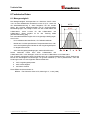
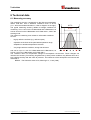
Die Messgenauigkeit korrespondiert zur ISO-Norm ISO/R 19381971 mit einer Statistischen Sicherheit von 95.4% (d.h. ± zwei mal
die Standardabweichung σ, siehe Diagramm auf der rechten
Seite). Die typische Messgenauigkeit gilt für durchschnittliche
Messbedingungen und beträgt ±1.5mm für das LLB60-00600 und
LLB60-00610, sowie ±3.0mm für das LLB60-00601 und
LLB60-00611. Diese Angabe ist für den Tracking Mode
(Dauermessbetrieb) gültig.
Der maximale Messfehler ergibt sich bei ungünstigen Bedingungen
wie z.B. bei:
-
Hoch reflektierende Oberflächen, z.B. Reflektionsbänder
-
Betrieb am Limit des spezifizierten Temperaturbereiches, oder
wenn die Anpassung des Gerätes an die Umgebungstemperatur abgebrochen wurde
-
Sehr helle Umgebungsbedingungen, starkes Hitzeflimmern
99.7%
95.4%
Dieser maximaler Fehler kann beim LLB60-00600 und
LLB60-00610 bis ± 2 mm betragen, sowie ± 5 mm beim LLB60-00601 und LLB60-00611.
Das LLB-60-D kompensiert keine Veränderungen der Umgebungsbedingungen. Diese Änderungen
können die Genauigkeit bei Messungen von großen Distanzen (> 150 m) beeinflussen, wenn die
Änderungen stark von den folgenden Werten abweichen:
●
●
●
20°C Umgebungstemperatur
60% Luftfeuchtigkeit
953 mbar Luftdruck
Diese Effekte sind beschrieben in:
B.Edlen: “The Refractive Index of Air, Metrologia 2”, 71-80 (1966)
© TR-Electronic GmbH 2007, All Rights Reserved
Page 26 of 96
Printed in the Federal Republic of Germany
TR - ELE - BA - DGB - 0015 - 01
09/25/2007
Technische Daten
6.2 Technische Daten
Typische Messgenauigkeit für:
LLB60-00600, LLB60-00610 1)
LLB60-00601, LLB60-00611 1)
± 1.5 mm bei 2σ
± 3.0 mm bei 2σ
Messauflösung
0.1 mm
Messbereich auf natürliche Oberflächen
0.05 bis ca. 65 m
Messbereich auf orange (reflektierende) Zieltafel,
siehe Kapitel Zubehör auf Seite 47.
0.05 bis ca. 500 m
Messreferenz
vom Frontende, siehe Kap. 8, Geräteabmessungen
Durchmesser des Laserspots am Zielobjekt bei
einer Distanz von:
4mm bei 5 m
8mm bei 10 m
ca. 28mm*14mm bei 50m
ca. 40mm*25mm bei 100m
Messzeit
Einzelmessung
Tracking Mode (Dauermessbetrieb)
Lichtquelle
Laserdiode 620-690 nm (rot)
IEC 60825-1: 2001; Klasse 2
FDA 21CFR 1040.10 und 1040.11
Strahlabweichung: 0.16 x 0.6 mrad
Pulsdauer: 0.45x10⁻⁹ s
Maximale Strahlungsleistung: 0.95 mW
Lebensdauer des Lasers
>50'000h bei 20°C
ESD
IEC 61000-4-2 : 1995 +A1 +A2
EMC
EN 61000-6-4
EN 61000-6-2
9 ... 30V DC 0.5A für LLB-60-D
Betriebsspannung
24... 30V DC 2.5A für LLB-60-D (H) Heizung optional
Abmessungen
Betriebstemperatur im Betrieb 2)
1
2
0.15 bis ca. 4 sek.
0.15 bis ca. 4 sek.
150 x 80 x 55 mm
LLB-60-D
LLB-60-D (H)
-10 °C bis +50 °C
-40 °C bis +50 °C
Lagertemperatur
-40 °C bis +70 °C
Schutzart
IP65; IEC60529
(Schutz gegen eindringen von Staub und Wasser)
Gewicht
LLB-60-D:
665 g
LLB-60-D (H): 690 g
Schnittstellen
1 RS232/RS422 - Schnittstelle
1 programmierbarer Analogausgang 0/4 .. 20mA
2 programmierbare Digitalausgänge
1 programmierbarer Digitaleingang
1 digitaler Ausgang zur Fehleranzeige
) Siehe 6.1 Messgenauigkeit auf Seite 26.
) Bei Dauermessbetrieb Tracking Mode ist die max. Temperatur auf 45°C reduziert.
© TR-Electronic GmbH 2007, All Rights Reserved
Printed in the Federal Republic of Germany
09/25/2007
TR - ELE - BA - DGB - 0015 - 01
Page 27 of 96
Elektrische Komponenten
7 Elektrische Komponenten
7.1 ID Schalter
Dieser Drehschalter wird benutzt um die Modul ID von 0 bis 9 einzustellen. Standardeinstellung = 0.
7.2 Reset Schalter
Mit folgendem Vorgehen kann das Modul auf die Werkseinstellung zurückgesetzt werden:
• Gerät ausschalten (Spannung Ausschalten)
• Den Resetknopf drücken und gedrückt halten
• Gerät (mit gedrücktem Knopf) Einschalten
• Resetknopf gedrückt halten, bis alle LED's leuchten
• Den Resetknopf loslassen
• Spannungsversorgung ausschalten und 5s warten
• Spannungsversorgung einschalten und warten, bis die grüne Power-LED leuchtet
7.3 Digitale Ausgänge
DOUT
On
Das LLB-60-D wird mit zwei digitalen Ausgängen für Füllstandsüberwachung
ausgeliefert (DO 1 und DO 2). Ein dritter digitaler Ausgang (DO E) ist fest
zugewiesen, um mögliche Gerätefehler zu signalisieren. Es handelt sich
dabei um Open Dran Ausgänge, wie in Abbildung 7 ersichtlich. Diese können
Lasten bis 200mA treiben. Die max. Schaltspannung beträgt 30 V DC. Im
'Ein'-Zustand ist der FET Transistor leitend.
Abbildung 7: Open Drain Ausgang
7.4 Digital Eingang
Der Digital Ausgang (DO 1) kann als Digital Eingang (DI 1) konfiguriert werden. Dies ist hilfreich für
die Auslösung von Messungen über einen externen Schalter oder Taster, siehe Kapitel Digital
Eingang auf Seite 42.
Low-Pegel: UDI1 < 2 V DC
High-Pegel: UDI1 > 9 V DC und UDI1 < 30 V DC
7.5 Analoger Ausgang
Der analoge Ausgang des LLB-60-D ist als Stromquelle (0..20mA oder 4..20mA) ausgelegt. Es
können Lasten bis maximal 500Ω getrieben werden.
Die Genauigkeit des analogen Ausgangs beträgt +/- 1% auf den Messbereich.
uMax =
Range (ConfMaxDist − ConfMinDist )
=
100
100
uMax = max. Unsicherheit
ConfMaxDist = program. Distanz für den max. Ausgangsstrom
ConfMinDist = program. Distanz für den min. Ausgangsstrom
Beispiel:
Der konfigurierte Messbereich beträgt 0-20m und die aktuelle gemessene Distanz 14m. Dies ergibt
eine Messunsicherheit von ±0.2m (1% von 20m), welche alle Parameter beinhaltet (Temperaturdrift,
Sensorgenauigkeit, Linearität, Zielfarbe etc.). Die Unsicherheit verringert sich, wenn die
Umgebungstemperatur stabil ist.
© TR-Electronic GmbH 2007, All Rights Reserved
Page 28 of 96
Printed in the Federal Republic of Germany
TR - ELE - BA - DGB - 0015 - 01
09/25/2007
Elektrische Komponenten
7.6 Anschluss-Stecker
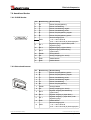
7.6.1 D-SUB Stecker
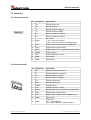
Pin Bezeichnung Beschreibung
15
8
9
1
1
Rx
RS232, Empfangsleitung
2
Tx
RS232, Sendeleitung
3
T-
RS422, Sendeleitung negativ
4
T+
RS422, Sendeleitung positiv
5
R-
RS422, Empfangsleitung negativ
6
R+
RS422, Empfangsleitung positiv
PWR
Stromversorgung DC
+ 9V...+30V LLB-60-D
+24V...+30V LLB-60-D (H) Heizungsoption
9
DO 1
Digital Ausgang 1 (Open Drain) oder
Digital Eingang 1
10
DO 2
Digital Ausgang 2 (Open Drain)
11
DO E
Digital Ausgang Gerätestörung
(Open Drain)
12
AGND
Analog Masse
13
AO
Analog Ausgang (0/4..20mA)
14
GND
Geräte Masse
15
GND
Geräte Masse
Pin
Bezeichnung Beschreibung
7
8
7.6.2 Schraubenklemmen
No .1
1
R+
RS422, Empfangsleitung positiv
2
R-
RS422, Empfangsleitung negativ
3
T+
RS422, Sendeleitung positiv
4
T-
RS422, Sendeleitung negativ
5
Tx
RS232, Sendeleitung
6
Rx
RS232, Empfangsleitung
7
AGND
Analoge Masse
8
AO
Analog Ausgang (0/4..20mA)
9
DO E
Digitaler Ausgang Gerätestörung
(Open Drain)
10
DO 2
Digitaler Ausgang 2 (Open Drain)
11
DO 1
Digitaler Ausgang 1 (Open Drain) oder
Digital Eingang 1
12
GND
Geräte Masse
13
PWR
Stromversorgung DC
+ 9V...+30V LLB-60-D
+24V...+30V LLB-60-D (H) Heizungsoption
© TR-Electronic GmbH 2007, All Rights Reserved
Printed in the Federal Republic of Germany
09/25/2007
TR - ELE - BA - DGB - 0015 - 01
Page 29 of 96
Geräteabmessungen
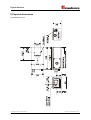
8 Geräteabmessungen
Alle Abmessungen in mm
© TR-Electronic GmbH 2007, All Rights Reserved
Page 30 of 96
Printed in the Federal Republic of Germany
TR - ELE - BA - DGB - 0015 - 01
09/25/2007
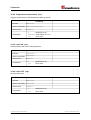
Werkseinstellungen
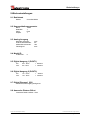
9 Werkseinstellungen
9.1 Betriebsart
Modus:
Controlled Mode
9.2 Kommunikationsparameter
Baud:
Datenbits:
Parity:
Stopbit:
19200
7
Even
1
9.3 Analog Ausgang
Minimaler Ausgang:
Unteres Bereichsende:
Oberes Bereichsende:
Fehlersignal:
4mA
0m
10m
0mA
9.4 Modul ID
ID Nummer:
0
9.5 Digital Ausgang 1 (DOUT1)
Ein:
Aus:
2m + 5mm
2m - 5mm
= 2005mm
= 1995mm
9.6 Digital Ausgang 2 (DOUT2)
Ein:
Aus:
1m – 5mm
1m + 5mm
= 995mm
= 1005mm
9.7 Digital Eingang 1 (DI1)
Deaktiviert, als Ausgang konfiguriert
9.8 Anwender Distanz-Offset
Anwender Distanz-Offset = 0mm
© TR-Electronic GmbH 2007, All Rights Reserved
Printed in the Federal Republic of Germany
09/25/2007
TR - ELE - BA - DGB - 0015 - 01
Page 31 of 96
Kommandosatz
10 Kommandosatz
10.1 Allgemeine
10.1.1 Kommando-Abschluss <trm>
Alle Kommandos für das LLB-60-D sind ASCII basiert und werden abgeschlossen <trm> mit
<cr><lf>.
10.1.2 Modul Identifikation N
Die Module können mit dem ID Schalter adressiert werden. Diese Adresse ist in den Kommandos
mit N gekennzeichnet. Anstelle des Platzhalters N muss die Modul ID eingegeben werden.
10.1.3 Parameter Trennsymbol
Die Kommandosyntax benutzt das '+' Zeichen als Parametertrennung. Das '+' Zeichen kann durch
das '-' Zeichen ersetzt werden, wenn dies bei dem entsprechenden Kommando verwendbar sein
sollte.
10.1.4 Set/Get-Kommandos
Alle Konfigurations-Kommandos, die zum Setzen von Konfigurationswerten benutzt werden, können
auch zum Lesen der aktuellen konfigurierten Werte benutzt werden, indem der Parameter
ausgelassen wird. Die Kommandosyntax wird nachfolgend beschrieben:
Set Kommando
Get Kommando
sNuof+xxxxxxxx<trm>
sNuof<trm>
Erfolgreich
gNof?<trm>
gNuof+xxxxxxxx<trm>
Fehlerrückmeldung
gN@Ezzz
gN@Ezzz
Kommando
Parameter
N
Modul ID (0..9)
xxxxxxxx Offset in 1/10 mm; + positiv / - negativ
zzz
Fehlercode
10.1.5 Start Sequenz
Nach dem einschalten des LLB-60-D Gerätes führt dieses die Initialisierung durch und gibt die
Startsequenz gN? aus. Dabei zeigt N die am LLB-60-D eingestellte Modul ID an. Nach der Ausgabe
dieser Startsequenz ist das LLB-60-D Gerät betriebsbereit.
© TR-Electronic GmbH 2007, All Rights Reserved
Page 32 of 96
Printed in the Federal Republic of Germany
TR - ELE - BA - DGB - 0015 - 01
09/25/2007
Kommandosatz
10.2 Bedien-Kommandos
10.2.1 STOP/CLEAR Kommando (sNc)
Stoppt die momentane Ausführung und setzt die Anzeige LED's und die digitalen Ausgänge zurück.
Kommando
Kommando
sNc<trm>
Erfolgreich
gN?<trm>
Fehlerrückmeldung
gN@Ezzz
Parameter
Modul ID (0..9)
Fehlercode
N
zzz
10.2.2 Distanz Messung (sNg)
Löst eine einfache Distanzmessung aus. Jedes neue Kommando stoppt eine nicht abgeschlossene
Messung.
Kommando
Kommando
sNg<trm>
Erfolgreich
gNg+xxxxxxxx<trm>
Fehlerrückmeldung
gN@Ezzz
Parameter
N
Modul ID (0..9)
xxxxxxxx Distanz in 1/10 mm
zzz
Fehlercode
10.2.3 Signal-Messung (sNm)
Die Signal-Messung kann fortlaufend, oder mit einer Einzelmessung durchgeführt werden. Die
Signalstärke wird als relative Zahl im Bereich von 0 bis 25 Millionen zurückgemeldet.
Kommando
Kommando
sNm+c<trm>
Erfolgreich
gNm+xxxxxxxx<trm>
Fehlerrückmeldung
gN@Ezzz
N
c
Parameter
Modul ID (0..9)
0: Einzelmessung
Betrieb nur mit einem Sensor!
1: Dauermessung
xxxxxxxx Signalstärke (Bereich 0.. 25 Millionen)
zzz
Fehlercode
© TR-Electronic GmbH 2007, All Rights Reserved
Printed in the Federal Republic of Germany
09/25/2007
TR - ELE - BA - DGB - 0015 - 01
Page 33 of 96
Kommandosatz
10.2.4 Temperatur-Messung (sNt)
Löst die Messung der Temperatur im inneren des Sensors aus.
Kommando
Kommando
sNt<trm>
Erfolgreich
gNt+xxxxxxxx<trm>
Fehlerrückmeldung
gN@Ezzz
N
Modul ID (0..9)
xxxxxxxx Temperatur in 0.1°C
zzz
Fehlercode
Parameter
10.2.5 Laser ON (sNo)
Schaltet den Laserstrahl ein, um leichter Einstellungen vornehmen zu können.
Kommando
Kommando
sNo<trm>
Erfolgreich
gN?<trm>
Fehlerrückmeldung
gN@Ezzz
N
zzz
Parameter
Modul ID (0..9)
Fehlercode
10.2.6 Laser OFF (sNp)
Schaltet den Laserstrahl aus.
Kommando
Kommando
sNp<trm>
Erfolgreich
gN?<trm>
Fehlerrückmeldung
gN@Ezzz
Parameter
N
zzz
Modul ID (0..9)
Fehlercode
© TR-Electronic GmbH 2007, All Rights Reserved
Page 34 of 96
Printed in the Federal Republic of Germany
TR - ELE - BA - DGB - 0015 - 01
09/25/2007
Kommandosatz
10.2.7 Tracking (Dauermessbetrieb), Einzel-Sensor (sNh)
•
WARNUNG !
Gefahr von Körperverletzung und Sachschaden durch undefinierte
Schnittstellenzustände!
-
Es darf nur ein Modul an der RS232/RS422 Schnittstelle angeschlossen sein
Startet den Dauerbetrieb für die Distanzmessung. Dieses Kommando darf nicht benutzt werden, wenn
mehr als nur ein LLB-60-D an der RS232/RS422 Schnittstelle angeschlossen ist. Die Messungen
werden fortgesetzt, bis das STOP/CLEAR Kommando (sNc) ausgeführt wird. Entsprechend zu der
neu gemessenen Distanz, werden die Status LED´s und die Digital Ausgänge aktualisiert.
Kommando
Kommando
sNh<trm>
Erfolgreich
gNh+xxxxxxxx<trm>
Fehlerrückmeldung
gN@Ezzz
Parameter
N
Modul ID (0..9)
xxxxxxxx Distanz in 0.1mm
zzz
Fehlercode
10.2.8 Tracking (Dauermessbetrieb) mit Wertspeicherung – Start (sNf)
Startet den Distanz-Dauermessbetrieb. Die Messwerte werden intern im Modul gespeichert (Speicher
für einen Messwert). Die Anzahl der Messungen wird über die Abtastrate vorgegeben. Wird diese auf
NULL gesetzt, erfolgt die Messung in der schnellstmöglichen Abtastrate. Der letzte gemessene Wert
kann mit dem Befehl sNq aus dem Modul ausgelesen werden. Die Messungen werden fortgesetzt, bis
das Kommando 'sNc' ausgeführt wird.
Set Kommando
Get Kommando
sNf+xxxxxxxx<trm>
sNf<trm>
Erfolgreich
gNf?<trm>
gNf+xxxxxxxx<trm>
Fehlerrückmeldung
gN@Ezzz<trm>
gN@Ezzz<trm>
Kommando
Parameter
N
Modul ID (0..9)
xxxxxxxx Abtastrate in 10ms (0 = max. Abtastrate)
zzz
Fehlercode
© TR-Electronic GmbH 2007, All Rights Reserved
Printed in the Federal Republic of Germany
09/25/2007
TR - ELE - BA - DGB - 0015 - 01
Page 35 of 96
Kommandosatz
10.2.9 Tracking (Dauermessbetrieb) mit Wertspeicherung - Auslesen (sNq)
Wenn das Modul mit dem Kommando sNf in den Dauermessbetrieb versetzt wurde, kann der letzte
Messwert mit dem Befehl sNq ausgelesen werden.
Kommando
Kommando
sNq<trm>
Erfolgreich
gNq+xxxxxxxx+c<trm>
Fehlerrückmeldung
gN@Ezzz+c<trm>
N
Modul ID (0..9)
xxxxxxxx Distanz in 0.1mm
c
0 = keine neue Messung seit letztem sNq Kommando
1 = 1 neue Messung seit letztem sNq Kommando, nicht überschrieben
2 = mehr als 1 Messung seit dem letztem sNq Kommando, überschrieben
zzz
Fehlercode
Parameter
10.3 Konfigurationskommandos
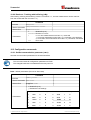
10.3.1 Set/Get-Kommunikationsparameter (sNbr)
Setzt die Kommunikationsparameter für die serielle Schnittstelle.
Dieses Kommando speichert alle Konfigurationsparameter in das Flash.
Die geänderte Baudrate wird nach dem nächsten Einschalten aktiviert.
Fettdruck = Grundeinstellung (beim erstmaligen Gebrauch oder nach erfolgtem Reset)
Kommando
Kommando
sNbr+y<trm>
Erfolgreich
gN?<trm>
Fehlerrückmeldung
gN@Ezzz<trm>
N Modul ID (0..9)
y Definiert die neuen Einstellungen
%
Parameter
Baudrate Datenbit Parity
%
0
1200
8
N
5
4800
7
E
1
9600
8
N
6
9600
7
E
2
19200
8
N
7
19200
7
E
3
1200
7
E
8
38400
8
N
4
2400
7
E
9
38400
7
E
© TR-Electronic GmbH 2007, All Rights Reserved
Page 36 of 96
Baudrate Datenbit Parity
Printed in the Federal Republic of Germany
TR - ELE - BA - DGB - 0015 - 01
09/25/2007
Kommandosatz
10.3.2 Set Automatic Mode (sNA)
Dieses Kommando aktiviert den Automatic Mode des LLB-60-D und startet den DauerDistanzmessbetrieb. Im Automatic Mode wird der Analog-Ausgang sowie die digitalen Ausgänge
entsprechend der gemessenen Distanz aktualisiert. Die Menge der Messungen hängt von der
eingestellten Abtastrate ab. Ist diese auf NULL gesetzt, wird so schnell wie möglich gemessen.
Der Automatic Mode ist aktiv bis zur Übertragung des 'sNc' Kommandos.
●
Die Betriebsart wird sofort im LLB-60-D gespeichert und aktiviert. Die Betriebsart bleibt
auch bei einem Aus- Einschaltvorgang erhalten.
●
“Tracking (Dauermessbetrieb) mit Wertspeicherung” ist gestartet (Kommando sNf). Daher
kann der letzte Messwert auch mit dem Kommando sNq ausgelesen werden.
Kommando
Kommando
sNA+xxxxxxxx<trm>
Erfolgreich
gNA?<trm>
Fehlerrückmeldung
gN@Ezzz
Parameter
N
Modul ID (0..9)
xxxxxxxx Abtastrate in 10 ms (0 = max. Abtastrate)
zzz
Fehlercode
10.3.3 Set/Get minimaler Analogausgangsstrom (sNvm)
Dieses Kommando setzt den minimalen Stromwert des Analogausgangs (0 oder 4 mA).
Set Kommando
Get Kommando
sNvm+x<trm>
sNvm<trm>
Erfolgreich
gNvm?<trm>
gNvm+x<trm>
Fehlerrückmeldung
gN@Ezzz
gN@Ezzz
Kommando
N
x
Parameter
zzz
Modul ID (0..9)
Min. Analog-Ausgangsstrom
0: 0 mA
1: 4 mA
Fehlercode
© TR-Electronic GmbH 2007, All Rights Reserved
Printed in the Federal Republic of Germany
09/25/2007
TR - ELE - BA - DGB - 0015 - 01
Page 37 of 96
Kommandosatz
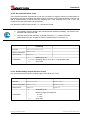
10.3.4 Set/Get Analogausgangswert im Fehlerfall (sNve)
Dieses Kommando setzt den Analogausgangsstrompegel (mA) im Fehlerfall. Dieser Wert kann kleiner
sein, als der konfigurierte min. Analogausgangsstrom,
siehe 10.3.3 Set/Get minimaler Analogausgangsstrom (sNvm)).
Set Kommando
Get Kommando
sNve+xxx<trm>
sNve<trm>
Erfolgreich
gNve?<trm>
sNve+xxx<<trm>
Fehlerrückmeldung
gN@Ezzz
gN@Ezzz
Kommando
Modul ID (0..9)
Wert im Fehlerfall in 0.1mA
Fehlercode
N
xxx
zzz
Parameter
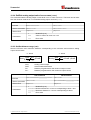
10.3.5 Set/Get Distanzbereich (sNv)
Setzt die Minimum und Maximum Distanz in Abhängigkeit des minimalen und maximalen
Ausgangsstromwertes des Analogausganges.
0...20mA
Aout
4...20mA
DIST Dmin
20 mA
D max Dmin
Aout
DIST
D
DIST Dmin
16 mA 4 mA
D max Dmin
Aout
Analoger Stromausgabewert
Aktuell gemessene Distanz
Programmierte Distanz für den minimalen Ausgangsstromwert
min
Programmierte Distanz für den maximalen Ausgangsstromwert
D
max
Set Kommando
Kommando
Get Kommando
sNv+xxxxxxxx+yyyyyyyy<trm> sNv<trm>
Erfolgreich
gNv?<trm>
gNv+xxxxxxxx+yyyyyyyy<trm>
Fehlerrückmeldung
gN@Ezzz
gN@Ezzz
Parameter
N
Modul ID (0..9)
xxxxxxxx Min. Distanz in 1/10 mm entsprechend zu 0mA / 4mA
yyyyyyyy Max. Distanz in 1/10 mm entsprechend zu 20mA
zzz
Fehlercode
© TR-Electronic GmbH 2007, All Rights Reserved
Page 38 of 96
Printed in the Federal Republic of Germany
TR - ELE - BA - DGB - 0015 - 01
09/25/2007
Kommandosatz
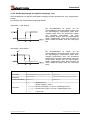
10.3.6 Set/Get Signalpegel der digitalen Ausgänge (sNn)
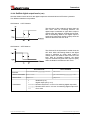
Setzt die Distanzen, bei welchen die digitalen Ausgänge mit einer Hysterese ein- bzw. ausgeschaltet
werden.
Es bestehen zwei verschiedene Schaltmöglichkeiten:
ON Distanz > OFF Distanz
Die Einschaltdistanz ist größer als die
Ausschaltdistanz. Mit zunehmender Distanz wird
der Signalausgang eingeschaltet (Open Drain
Ausgang leitet) wenn die gemessene Distanz
den
ON-Pegel
überschreitet.
Mit
einer
abnehmenden Distanz wird der Signalausgang
wieder ausgeschaltet (Open Drain Ausgang ist
Offen) sobald die Distanz unter den OFF-Pegel
fällt.
ON Distanz < OFF Distanz
Die Einschaltdistanz ist kleiner als die
Ausschaltdistanz. Mit abnehmender Distanz wird
der Signalausgang eingeschaltet (Open Drain
Ausgang geschlossen) wenn die gemessene
Distanz den ON-Pegel unterschreitet. Mit einer
zunehmenden Distanz wird der Signalausgang
wieder ausgeschaltet (Open Drain Ausgang ist
Offen) sobald die Distanz über den OFF-Pegel
steigt.
Set Kommando
Get Kommando
sNn+xxxxxxxx+yyyyyyyy<trm>
sNn<trm>
Erfolgreich
gNn?<trm>
gNn+xxxxxxxx+yyyyyyyy<trm>
Fehlerrückmeldung
gN@Ezzz
gN@Ezzz
Kommando
Parameter
N
Modul ID (0..9)
n
Digital Ausgang 1 oder 2
xxxxxxxx Distanz ON-Pegel in 1/10 mm, Schaltausgang ON
yyyyyyyy Distanz OFF-Pegel in 1/10 mm, Schaltausgang OFF
zzz
Fehlercode
© TR-Electronic GmbH 2007, All Rights Reserved
Printed in the Federal Republic of Germany
09/25/2007
TR - ELE - BA - DGB - 0015 - 01
Page 39 of 96
Kommandosatz
10.3.7 Konfigurationsparameter speichern (sNs)
Dieses Kommando speichert alle Konfigurationsparameter, welche durch die vorherigen Kommandos
konfiguriert wurden. Die Parameter werden in den Flash-Speicher geschrieben.
Kommando
Kommando
sNs<trm>
Erfolgreich
gNs?<trm>
Fehlerrückmeldung
gN@Ezzz
N
zzz
Parameter
Modul ID (0..9)
Fehlercode
10.3.8 Set Konfigurationsparameter auf Werkseinstellung (sNd)
Dieses Kommando setzt alle Konfigurationsparameter auf die Werkseinstellung zurück. Die
Parameter werden in den Flash-Speicher geschrieben.
Die Kommunikationsparameter werden auch auf Werkseinstellung zurückgesetzt.
Kommando
Kommando
sNd<trm>
Erfolgreich
gN?<trm>
Fehlerrückmeldung
gN@Ezzz
N
zzz
Parameter
Modul ID (0..9)
Fehlercode
10.3.9 Get Softwareversion (sNsv)
Zeigt die Softwareversion des LLB-60-D an.
Kommando
Kommando
sNsv<trm>
Erfolgreich
gNsv+xxxxyyyy<trm>
Fehlerrückmeldung
gN@Ezzz
Parameter
N
xxxx
yyyy
zzz
Modul ID (0..9)
Modul Softwareversion
Schnittstellen Softwareversion
Fehlercode
© TR-Electronic GmbH 2007, All Rights Reserved
Page 40 of 96
Printed in the Federal Republic of Germany
TR - ELE - BA - DGB - 0015 - 01
09/25/2007
Kommandosatz
10.3.10 Get Seriennummer (sNsn)
Abfrage der Seriennummer.
Kommando
Kommando
sNsn<trm>
Erfolgreich
gNsn+xxxxxxxx<trm>
Fehlerrückmeldung
gN@Ezzz
Parameter
N
Modul ID (0..9)
xxxxxxxx Geräte-Seriennummer
zzz
Fehlercode
© TR-Electronic GmbH 2007, All Rights Reserved
Printed in the Federal Republic of Germany
09/25/2007
TR - ELE - BA - DGB - 0015 - 01
Page 41 of 96
Kommandosatz
10.4 Digital Eingang
Die folgenden Kommandos konfigurieren den
Anschluss DO1. Dieser Port kann aber auch
ebenso als Digital Eingang benutzt werden. Aus
Sicherheitsgründen muss zum Schutz des
Anschlusses immer ein Widerstand eingesetzt
werden.
10.4.1 Konfiguration des Digital Eingangs (sNDI1)
Der Digital Ausgang DO1 des LLB-60-D kann auch als Digital Eingang benutzt werden. Der Status
kann gelesen werden, oder es wird eine Konfiguration ausgelöst. Um das Verhalten des Digital
Eingangs zu konfigurieren, sind die folgenden Kommandos zu benutzen.
Ist der Digital Eingang aktiv, wird automatisch die digitale Ausgangsfunktion DO1 deaktiviert.
Set Kommando
Get Kommando
sNDI1+xxxxxxxx<trm>
sNDI1<trm>
Erfolgreich
gNDI1?<trm>
sNDI1+xxxxxxxx<trm>
Fehlerrückmeldung
gN@Ezzz<trm>
gN@Ezzz<trm>
Kommando
N
Modul ID (0..9)
xxxxxxxx 0: Digital Eingang inaktiv (DO1 aktiv)
1:
aktiviere Digital Eingang, der Signal-Status ist auslesbar
10.4.2 Lese Digital Eingang (sNRI).
2:
Starte Distanz Messung (sNg)
3:
Start/Stopp Einzel-Sensor Dauermessung (sNh)
4:
Start/Stopp Dauermessung mit Wertspeicherung (sNf)
zzz
Fehlercode
Parameter
10.4.2 Lese Digital Eingang (sNRI)
Zeigt den Status des Digital Eingangs an, wenn dieser nicht inaktiv geschaltet wurde.
Kommando
Kommando
sNRI<trm>
Erfolgreich
gNRI+x<trm>
Fehlerrückmeldung
gN@Ezzz<trm>
Parameter
N
x
zzz
Modul ID (0..9)
0: Eingang Off (Signal Low)
1: Eingang On (Signal High)
Fehlercode
© TR-Electronic GmbH 2007, All Rights Reserved
Page 42 of 96
Printed in the Federal Republic of Germany
TR - ELE - BA - DGB - 0015 - 01
09/25/2007
Kommandosatz
10.5 Benutzerspezifische Kommandos
Diese speziellen Kommandos können durch den Benutzer konfiguriert werden und stellen eine
Erweiterung der Standard-Kommandos dar. Aus diesem Grund ist die Benutzung dieser Kommandos
sorgfältig zu überprüfen.
10.5.1 Set/Get Benutzer Distanz Offset (sNuof)
Der Benutzer kann eine Gesamt-Offset-Korrektur für alle Distanz-Mess-Kommandos unter diesem
Abschnitt einstellen. Die Standard-Mess-Kommandos sind nicht mit eingebunden.
Set Kommando
Get Kommando
sNuof+xxxxxxxx<trm>
sNuof<trm>
Erfolgreich
gNof?<trm>
gNuof+xxxxxxxx<trm>
Fehlerrückmeldung
gN@Ezzz
gN@Ezzz
Kommando
Parameter
N
Modul ID (0..9)
xxxxxxxx Offset in 1/10 mm; + positiv / - negativ
zzz
Fehlercode
10.5.2 Benutzerkonfigurierte Distanzmessung (sNug)
Löst eine einfache Distanzmessung aus, ähnlich wie die Distanz Messung (sNg) auf Seite 33. Dieses
Kommando meldet die mit dem Benutzeroffset (eingestellt mit dem Kommando Set/Get Benutzer
Distanz Offset (sNuof)) korrigierte Distanz zurück. Jedes neue Kommando unterbricht eine aktive
Messung.
Dieses Kommando verrechnet den eingestellten Benutzer Distanz Offset (sNuof)
Kommando
Kommando
sNug<trm>
Erfolgreich
gNug+xxxxxxxx<trm>
Fehlerrückmeldung
gN@Ezzz<trm>
Parameter
N
Modul ID (0..9)
xxxxxxxx Distanz in 0.1mm
zzz
Fehlercode
© TR-Electronic GmbH 2007, All Rights Reserved
Printed in the Federal Republic of Germany
09/25/2007
TR - ELE - BA - DGB - 0015 - 01
Page 43 of 96
Kommandosatz
10.5.3 Benutzerkonfigurierter Dauermessbetrieb, Einzel-Sensor (sNuh)
•
WARNUNG !
Gefahr von Körperverletzung und Sachschaden durch undefinierte
Schnittstellenzustände!
-
Es darf nur ein Modul an der RS232/RS422 Schnittstelle angeschlossen sein
Startet den Dauerbetrieb für die Distanzmessung und gibt das Ergebnis auf der seriellen Schnittstelle
aus. Dieses Kommando meldet die mit dem Benutzeroffset (eingestellt mit dem Kommando 10.5.1
Set/Get Benutzer Distanz Offset (sNuof)) korrigierte Distanz zurück. Da das LLB-60-D das Ergebnis
direkt nach einer abgeschlossenen Messung zurückmeldet, darf dieses Kommando nicht benutzt
werden wenn mehr als nur ein LLB-60-D an der RS232/RS422 Schnittstelle angeschlossen ist. Die
Messungen werden fortgesetzt, bis das STOP/CLEAR Kommando (sNc) ausgeführt wird.
Entsprechend zu der neu gemessenen Distanz, werden die Status LED´s und die Digital Ausgänge
aktualisiert.
Dieses Kommando verrechnet den eingestellten Benutzer Distanz Offset (sNuof)
Kommando
Kommando
sNuh<trm>
Erfolgreich
gNuh+xxxxxxxx<trm>
Fehlerrückmeldung
gN@Ezzz<trm>
Parameter
N
Modul ID (0..9)
xxxxxxxx Distanz in 0.1mm
zzz
Fehlercode
© TR-Electronic GmbH 2007, All Rights Reserved
Page 44 of 96
Printed in the Federal Republic of Germany
TR - ELE - BA - DGB - 0015 - 01
09/25/2007
Kommandosatz
10.5.4 Benutzerkonfigurierter Dauermessbetrieb mit Wertspeicherung – Start (sNuf)
Startet den Distanz-Dauermessbetrieb. Die Messwerte werden intern im Modul gespeichert (Speicher
für einen Messwert). Dieses Kommando meldet die mit dem Benutzeroffset (eingestellt mit dem
Kommando 10.5.1 Set/Get Benutzer Distanz Offset (sNuof)) korrigierte Distanz zurück. Die Anzahl
der Messungen wird über die Abtastrate vorgegeben. Wird diese auf NULL gesetzt, erfolgt die
Messung in der schnellstmöglichen Abtastrate. Der letzte gemessene Wert kann mit dem Befehl sNuq
aus dem Modul ausgelesen werden. Die Messungen werden fortgesetzt, bis das STOP/CLEAR
Kommando (sNc) ausgeführt wird.
Dieses Kommando verrechnet den eingestellten Benutzer Distanz Offset (sNuof)
Set Kommando
Get Kommando
sNuf+xxxxxxxx<trm>
sNuf<trm>
Erfolgreich
gNuf<trm>
gNuf+xxxxxxxx<trm>
Fehlerrückmeldung
gN@Ezzz<trm>
gN@Ezzz<trm>
Kommando
Parameter
N
Module ID (0..9)
xxxxxxxx Abtastrate in 10ms (0 = max. Abtastrate)
zzz
Fehlercode
10.5.5 Benutzerkonfigurierter Dauermessbetrieb mit Wertspeicherung - Auslesen (sNuq)
Wenn das Modul mit dem Kommando sNuf in den Dauermessbetrieb versetzt wurde, kann der letzte
Messwert mit dem Befehl sNuq ausgelesen werden.
Dieses Kommando verrechnet den eingestellten Benutzer Distanz Offset (sNuof)
Kommando
Kommando
sNuq<trm>
Erfolgreich
gNuq+xxxxxxxx+c<trm>
Fehlerrückmeldung
gN@Ezzz+c<trm>
Parameter
N
Modul ID (0..9)
xxxxxxxx Abtastrate in 10ms (0 = max. Abtastrate)
c
0 = keine neue Messung seit letztem sNuq Kommando
1 = 1 neue Messung seit letztem sNuq Kommando, nicht überschrieben
2 = mehr als 1 Messung seit dem letztem sNuq Kommando, überschrieben
zzz
Fehlercode
© TR-Electronic GmbH 2007, All Rights Reserved
Printed in the Federal Republic of Germany
09/25/2007
TR - ELE - BA - DGB - 0015 - 01
Page 45 of 96
Kommandosatz
10.6 Fehlercodes
Nr.
Format
Bedeutung
203
@E203
Falscher Syntax im Kommando, verbotener Parameter im Kommando oder
ungültiges Resultat
210
@E210
Nicht im Dauermessbetrieb, zuerst Dauermessbetrieb starten.
211
@E211
Zu schnelle Abtastrate; Abtastrate auf höheren Wert einstellen.
212
@E212
Kommando kann im Dauermessbetrieb nicht ausgeführt werden. Beenden
sie zuerst den Dauermessbetrieb mit sNc.
220
@E220
Kommunikationsfehler
230
@E230
Messwertüberlauf, verursacht durch falsche Konfiguration. Benutzeroffset
ändern.
231
@E231
Falscher Mode für Digital Eingang, Status lesen
232
@E232
Digital Ausgang kann nicht eingestellt werden, wenn dieser als Digital
Eingang konfiguriert wurde.
233
@E233
Messwert kann nicht angezeigt werden, Ausgabeformat überprüfen.
234
@E234
Distanz außerhalb Bereich.
235
@E235
Ausgewählte Konfigurationsparameter sind in einem zu engen Bereich.
252
@E252
Temperatur zu hoch
(Kontaktieren sie TR-Electronic falls Fehler bei Raumtemperatur ansteht)
253
@E253
Temperatur zu tief
(Kontaktieren sie TR-Electronic falls Fehler bei Raumtemperatur ansteht)
254
@E254
Messung abgebrochen durch Benutzereingang auf der seriellen
Schnittstelle.
255
@E255
Empfangenes Signal zu schwach, Distanz
(Benutzen sie verschiedene Distanzen und Ziele,
bevor sie mit TR-Electronic Kontakt aufnehmen)
256
@E256
Empfangenes Signal zu stark.
(Benutzen sie verschiedene Distanzen und Ziele,
bevor sie mit TR-Electronic Kontakt aufnehmen)
257
@E257
Zu viel Hintergrundlicht.
(Benutzen sie verschiedene Distanzen und Ziele,
bevor sie mit TR-Electronic Kontakt aufnehmen)
260
@E260
Distanz kann nicht berechnet werden, da das Ziel nicht eindeutig ist. Es
sind klar definierte Ziele für die Distanzmessung zu benutzen.
nicht aufgeführt
Hardwarefehler (Kontaktieren sie TR-Electronic)
Bevor sie TR-Electronic kontaktieren, sollten sie möglichst viele Informationen sammeln.
© TR-Electronic GmbH 2007, All Rights Reserved
Page 46 of 96
Printed in the Federal Republic of Germany
TR - ELE - BA - DGB - 0015 - 01
09/25/2007
Zubehör
11 Zubehör
11.1 Fernrohrsucher
Der Teleskop-Fernrohrsucher wird zur einfachen Ausrichtung des LLB-60-D´s auf ein entferntes Ziel
verwendet. Der Fernrohrsucher wird auf das Gehäuse des LLB-60-D´s aufgesteckt.
Bestellnummer
Beschreibung
Auf Anfrage
Teleskop Fernrohrsucher
11.2 Zieltafel
Die Zieltafel definiert ein genaues Messziel. Die Zieltafel ist orange-reflektierend und für Messungen
größerer Entfernungen ab ca. 30m einsetzbar. Die reflektierende Oberfläche wirft mehr Licht auf das
LLB-60-D zurück und kann für Entfernungen von 0.05 bis 500m eingesetzt werden.
Bestellnummer
49.500.040
Beschreibung
Aluminium Zieltafel, orangereflektierend, 210 x 297 mm
11.3 Laser-Brille
Die roten Gläser heben den Laserpunkt in heller Umgebung hervor. Die Brille kann für Entfernungen
zwischen 10-20m eingesetzt werden.
Bestellnummer
Beschreibung
Auf Anfrage
Laser-Brille
© TR-Electronic GmbH 2007, All Rights Reserved
Printed in the Federal Republic of Germany
09/25/2007
TR - ELE - BA - DGB - 0015 - 01
Page 47 of 96
Zubehör
11.4 Anschluss Set
Bestellnummer
Beschreibung
62.205.009
Anschluss Set
11.5 Steckerabdeckung IP-65
Wird das LLB-60-D über die Kabelverschraubungen angeschlossen und der 15-pol. SUB-D Stecker
nicht benötigt, schützt diese Abdeckung den 15-pol. SUB-D Stecker vor Verschmutzungen.
Bestellnummer
Beschreibung
49.500.041
Steckerabdeckung IP65
11.6 90°-Winkelstecker IP65
Unter Einhaltung des IP65-Schutzes kann mit diesem Winkelstecker ein LLB-60-D angeschlossen
werden.
Bestellnummer
Beschreibung
620.001.464
90°-Winkelstecker IP65
© TR-Electronic GmbH 2007, All Rights Reserved
Page 48 of 96
Printed in the Federal Republic of Germany
TR - ELE - BA - DGB - 0015 - 01
09/25/2007
User Manual
Laser Measuring Device
LLB-60-D (H)
© TR-Electronic GmbH 2007, All Rights Reserved
Printed in the Federal Republic of Germany
09/25/2007
TR - ELE - BA - DGB - 0015 - 01
Page 49 of 96
TR-Electronic GmbH
D-78647 Trossingen
Eglishalde 6
Tel.: (0049) 07425/228-0
Fax: (0049) 07425/228-33
E-mail: [email protected]
http://www.tr-electronic.de
Copyright protection
This Manual, including the illustrations contained therein, is subject to copyright
protection. Use of this Manual by third parties in contravention of copyright
regulations is forbidden. Reproduction, translation as well as electronic and
photographic archiving and modification require the written content of the
manufacturer. Offenders will be liable for damages.
Subject to amendments
Any technical changes that serve the purpose of technical progress, reserved.
Document information
Release date/Rev. date:
Document rev. no.:
File name:
Author:
09/25/2007
TR - ELE - BA - DGB - 0015 - 01
TR-ELE-BA-DGB-0015-00.DOC
MÜJ
Font styles
Italic or bold font styles are used for the title of a document or are used for
highlighting.
Courier font displays text, which is visible on the display or screen and software
menu selections.
″<
> ″ indicates keys on your computer keyboard (such as <RETURN>).
© TR-Electronic GmbH 2007, All Rights Reserved
Page 50 of 96
Printed in the Federal Republic of Germany
TR - ELE - BA - DGB - 0015 - 01
09/25/2007
Contents
Contents
Contents ............................................................................................................................................51
Revision index ..................................................................................................................................54
1 General information ......................................................................................................................55
1.1 Applicability......................................................................................................................55
1.2 Declaration of manufacturer ............................................................................................56
1.3 Abbreviations and definitions...........................................................................................56
2 Basic safety instructions..............................................................................................................57
2.1 Definition of symbols and instructions .............................................................................57
2.2 Obligation of the operator before start-up .......................................................................57
2.3 General risks when using the product .............................................................................58
2.4 Proper use .......................................................................................................................58
2.5 Warranty and liability .......................................................................................................59
2.6 Organizational measures.................................................................................................59
2.7 Personnel qualification; obligations .................................................................................60
2.8 Safety information's .........................................................................................................61
3 Introduction....................................................................................................................................63
3.1 Product identification .......................................................................................................64
3.2 Components ....................................................................................................................64
3.3 Validity .............................................................................................................................64
3.4 Measurement range ........................................................................................................65
3.5 Prevention of erroneous measurements .........................................................................65
3.5.1 Rough surfaces................................................................................................65
3.5.2 Transparent surfaces.......................................................................................65
3.5.3 Wet, smooth, or high-gloss surfaces ...............................................................65
3.5.4 Inclined, round surfaces ..................................................................................65
3.5.5 Multiple reflections ...........................................................................................65
4 Device setup ..................................................................................................................................66
4.1 Connection.......................................................................................................................66
4.2 Controlled mode ..............................................................................................................67
4.2.1 Configuration ...................................................................................................67
4.2.2 Host software...................................................................................................67
4.3 Automatic mode...............................................................................................................68
4.3.1 Configuration ...................................................................................................68
4.4 Display Mode ...................................................................................................................69
4.5 External Trigger ...............................................................................................................70
4.5.1 Configuration ...................................................................................................70
© TR-Electronic GmbH 2007, All Rights Reserved
Printed in the Federal Republic of Germany
09/25/2007
TR - ELE - BA - DGB - 0015 - 01
Page 51 of 96
Contents
5 Installation......................................................................................................................................71
5.1 Mounting ..........................................................................................................................71
5.2 Device wiring ...................................................................................................................71
5.2.1 Power Supply...................................................................................................71
5.2.2 Cable connection .............................................................................................71
5.2.3 Shield and Ground...........................................................................................71
5.2.4 Controlled mode ..............................................................................................72
5.2.5 Automatic mode...............................................................................................73
5.3 Alignment of the laser beam............................................................................................73
6 Technical data................................................................................................................................74
6.1 Measuring accuracy ........................................................................................................74
6.2 Specifications...................................................................................................................75
7 Electrical components ..................................................................................................................76
7.1 ID switch ..........................................................................................................................76
7.2 Reset switch ....................................................................................................................76
7.3 Digital output....................................................................................................................76
7.4 Digital Input......................................................................................................................76
7.5 Analog output...................................................................................................................76
7.6 Connector ........................................................................................................................77
7.6.1 D-Sub connector..............................................................................................77
7.6.2 Screw terminal .................................................................................................77
8 Physical dimensions .....................................................................................................................78
9 Factory settings.............................................................................................................................79
9.1 Operation .........................................................................................................................79
9.2 Communication parameters ............................................................................................79
9.3 Analog outputs.................................................................................................................79
9.4 Module ID ........................................................................................................................79
9.5 Digital output 1 (DOUT1) .................................................................................................79
9.6 Digital output 2 (DOUT2) .................................................................................................79
9.7 Digital input 1 (DI1)..........................................................................................................79
9.8 User distance offset.........................................................................................................79
10 Command set...............................................................................................................................80
10.1 General ..........................................................................................................................80
10.1.1 Command termination <trm> .......................................................................80
10.1.2 Module identification N...................................................................................80
10.1.3 Parameter separator......................................................................................80
10.1.4 Set/Get Commands .......................................................................................80
10.1.5 Startup sequence...........................................................................................80
© TR-Electronic GmbH 2007, All Rights Reserved
Page 52 of 96
Printed in the Federal Republic of Germany
TR - ELE - BA - DGB - 0015 - 01
09/25/2007
Contents
10.2 Operation commands ....................................................................................................81
10.2.1 STOP/CLEAR command (sNc) ...................................................................81
10.2.2 Distance measurement (sNg)......................................................................81
10.2.3 Signal measurement (sNm)..........................................................................81
10.2.4 Temperature measurement (sNt) ...............................................................82
10.2.5 Laser ON (sNo)............................................................................................82
10.2.6 Laser OFF (sNp)..........................................................................................82
10.2.7 Single sensor, Tracking (sNh) .......................................................................83
10.2.8 Tracking with buffering – Start (sNf).............................................................83
10.2.9 Read out - Tracking with buffering (sNq).......................................................84
10.3 Configuration commands...............................................................................................84
10.3.1 Set/Get communication parameter (sNbr)....................................................84
10.3.2 Set automatic mode (sNA).............................................................................85
10.3.3 Set/Get analog output min level (sNvm) ........................................................85
10.3.4 Set/Get analog output value in error case (sNve).........................................86
10.3.5 Set/Get distance range (sNv) ........................................................................86
10.3.6 Set/Get digital output levels (sNn) .................................................................87
10.3.7 Save configuration parameters (sNs)............................................................88
10.3.8 Set configuration parameters to factory default (sNd)...................................88
10.3.9 Get Software Version (sNsv) ........................................................................88
10.3.10 Get Serial Number (sNsn)...........................................................................89
10.4 Digital Input....................................................................................................................90
10.4.1 Configure digital input (sNDI1)......................................................................90
10.4.2 Read digital input (sNRI)...............................................................................90
10.5 Special User Commands...............................................................................................91
10.5.1 Set/Get user distance offset (sNuof) ..........................................................91
10.5.2 User configured distance measurement (sNug)..........................................91
10.5.3 User-configured single sensor tracking (sNuh)..........................................92
10.5.4 User-configured tracking with buffering – Start (sNuf) .................................93
10.5.5 Read out – User-configured tracking with buffering (sNuq) ..........................93
10.6 Error codes ....................................................................................................................94
11 Accessories .................................................................................................................................95
11.1 Viewfinder ......................................................................................................................95
11.2 Target plates..................................................................................................................95
11.3 Laser glasses ................................................................................................................95
11.4 Connection set...............................................................................................................96
11.5 Connector cover IP65....................................................................................................96
11.6 Connector with 90° cable exit IP65 ...............................................................................96
© TR-Electronic GmbH 2007, All Rights Reserved
Printed in the Federal Republic of Germany
09/25/2007
TR - ELE - BA - DGB - 0015 - 01
Page 53 of 96
Revision index
Revision index
Revision
Date
Index
First release
05/10/07
00
Available as Order-No.:
- Target plate:
49-500-040
- Connector with 90°: 62-000-1464
09/25/07
01
© TR-Electronic GmbH 2007, All Rights Reserved
Page 54 of 96
Printed in the Federal Republic of Germany
TR - ELE - BA - DGB - 0015 - 01
09/25/2007
General information
1 General information
The User Manual includes the following topics:
•
Basic safety instructions
•
Introduction
•
Device setup
•
Installation
•
Technical data
•
Electrical components
•
Physical dimensions
•
Factory settings
•
Command set
•
Accessories
As the documentation is arranged in a modular structure, this User Manual is
supplementary to other documentation, such as product datasheets, dimensional
drawings, leaflets etc.
The User Manual may be included in the customer's specific delivery package or it
may be requested separately.
1.1 Applicability
This User Manual applies exclusively to the following measuring system series with
Analog interface:
•
•
•
•
LLB60-00600
LLB60-00601
LLB60-00610
LLB60-00611
The products are labelled with affixed nameplates and are components of a system.
The following documentation therefore also applies:
•
•
the operator's operating instructions specific to the system,
this User Manual
© TR-Electronic GmbH 2007, All Rights Reserved
Printed in the Federal Republic of Germany
09/25/2007
TR - ELE - BA - DGB - 0015 - 01
Page 55 of 96
General information
1.2 Declaration of manufacturer
The series LLB-60-D (H) measuring systems have been developed, designed and
manufactured under observation of the applicable international and European
standards and directives.
A corresponding manufacturer’s
TR-Electronic GmbH.
declaration
can
be
requested
from
The
manufacturer
of
the
product,
TR-Electronic
GmbH
in
D-78647 Trossingen, operates a certified quality assurance system in accordance
with ISO 9001.
1.3 Abbreviations and definitions
EC
European Community
EMC
Electro Magnetic Compatibility
ESD
Electro Static Discharge
IEC
International Electrotechnical Commission
LLB
Laser Measuring Device
VDE
German Electrotechnicians Association
© TR-Electronic GmbH 2007, All Rights Reserved
Page 56 of 96
Printed in the Federal Republic of Germany
TR - ELE - BA - DGB - 0015 - 01
09/25/2007
Basic safety instructions
2 Basic safety instructions
2.1 Definition of symbols and instructions
means that death, serious injury or major damage to property
could occur if the stated precautions are not met.
WARNING !
means that minor injuries or damage to property can occur if
the stated precautions are not met.
CAUTION !
means that eye injury can occur from laser light if the stated
precautions are not met.
WARNING !
indicates important information's or features and application tips
for the product used.
2.2 Obligation of the operator before start-up
In accordance with the EC Machinery Directive, the laser distance measuring device
is considered to be a machine part for fitting into a system/machine. Moreover, the
conformity of the laser distance measuring device was investigated in respect of the
EMC Directive.
It is therefore only permitted to start up the laser distance measuring device if it has
been established that the system/machine into which the laser distance measuring
device is to be fitted satisfies the provisions of the EC Machinery Directive, the EC
EMC Directive, the harmonized standards, European standards or the corresponding
national standards.
© TR-Electronic GmbH 2007, All Rights Reserved
Printed in the Federal Republic of Germany
09/25/2007
TR - ELE - BA - DGB - 0015 - 01
Page 57 of 96
Basic safety instructions
2.3 General risks when using the product
The product, hereinafter referred to as "the measuring system", is manufactured
according to state-of-the-art technology and accepted safety rules. Nevertheless,
improper use can pose a danger to life and limb of the user or third parties, or
lead to impairment of the measuring system or other property!
Only use the measuring system in a technically faultless state, and only for its
designated use, taking safety and hazard aspects into consideration, and observing
this User Manual! Faults which could threaten safety should be eliminated without
delay!
2.4 Proper use
The measuring system is used to measure distances and to condition the
measurement data for the subsequent control of industrial control processes.
Proper use also includes:
• observing all instructions in this User Manual,
• observing the nameplate and any prohibition or instruction symbols on the
measuring system,
• observing the enclosed
configurations etc.,
documentation,
e.g.
product
insert,
connector
• observing the operating instructions from the machine or system manufacturer,
• operating the measuring system within the limit values specified in the technical
data.
The following areas of use are especially forbidden:
• in areas in which interruption of the laser beam can cause damage or personal
injury, for example by covering the laser lens opening,
• in environments where heavy rain, snow, fog, vapors or direct sunlight etc. can
impair the laser intensity,
• in environments where there is an explosive atmosphere,
• for medical purposes
Where there is a danger of physical injury and damage to property arising
from jumps in the position of the measuring system!
WARNING !
-
As the measuring system does not constitute a safety component, a
plausibility check of the measuring system values must be performed
through the subsequent control system.
-
It is mandatory for the operator to integrate the measuring system into his
own safety concept.
© TR-Electronic GmbH 2007, All Rights Reserved
Page 58 of 96
Printed in the Federal Republic of Germany
TR - ELE - BA - DGB - 0015 - 01
09/25/2007
Basic safety instructions
2.5 Warranty and liability
The General Terms and Conditions ("Allgemeine Geschäftsbedingungen") of TRElectronic GmbH always apply. These are available to the operator with the Order
Confirmation or when the contract is concluded at the latest. Warranty and liability
claims in the case of personal injury or damage to property are excluded if they
result from one or more of the following causes:
•
Non-designated use of the measuring system.
•
Improper assembly, installation, start-up and programming of the measuring
system.
•
Incorrectly undertaken work on the measuring system by unqualified
personnel.
•
Operation of the measuring system with technical defects.
•
Mechanical or electrical modifications to the measuring systems undertaken
autonomously.
•
Repairs carried out autonomously.
•
Third party interference and Acts of God.
2.6 Organizational measures
• The User Manual must always be kept accessible at the place of use of the
measuring system.
• In addition to the User Manual, generally applicable legal and other binding
accident prevention and environmental protection regulations are to be observed
and must be mediated.
• The respective applicable national, local and system-specific provisions and
requirements must be observed and mediated.
• The operator is obliged to inform personnel on special operating features and
requirements.
• The personnel instructed to work with the measuring system must have read and
understood the User Manual, especially the chapter “Basic safety instructions”
prior to commencing work.
• The nameplate and any prohibition or instruction symbols applied on the
measuring system must always be maintained in a legible state.
• Do not undertake any mechanical or electrical modifications on the measuring
system, apart from those explicitly described in this User Manual.
• Repairs may only be undertaken by the manufacturer or a facility or person
authorized by the manufacturer.
© TR-Electronic GmbH 2007, All Rights Reserved
Printed in the Federal Republic of Germany
09/25/2007
TR - ELE - BA - DGB - 0015 - 01
Page 59 of 96
Basic safety instructions
2.7 Personnel qualification; obligations
• All work on the measuring system must only be carried out by qualified personnel.
Qualified personnel includes persons, who, through their training, experience and
instruction, as well as their knowledge of the relevant standards, provisions,
accident prevention regulations and operating conditions, have been authorized
by the persons responsible for the system to carry out the required work and are
able to recognize and avoid potential hazards.
• The definition of “Qualified Personnel” also includes an understanding of the
standards VDE 0105-100 and IEC 364 (source: e.g. Beuth Verlag GmbH, VDEVerlag GmbH).
• Define clear rules of responsibilities for the assembly, installation, start-up and
operation. The obligation exists to provide supervision for trainee personnel !
© TR-Electronic GmbH 2007, All Rights Reserved
Page 60 of 96
Printed in the Federal Republic of Germany
TR - ELE - BA - DGB - 0015 - 01
09/25/2007
Basic safety instructions
2.8 Safety information's
Eye injury from laser radiation!
WARNING !
-
The measuring system functions with a red light laser Class 2. In the case of
Class 2 laser devices, the eye is not endangered if the exposure to the laser
radiation is very brief (up to 0.25 s) and accidental. For this reason, devices of
this class can be used without additional protective measures, provided the
application does not require one to look into the laser beam deliberately for
longer periods, i.e. 0.25 s, or to look repeatedly into the laser beam or the
reflected laser beam.
The existence of the blinking reflex for the protection of the eyes may not
be assumed. Therefore eyes should be closed consciously, or the head
should be turned away immediately!
-
The measuring system must be installed in such a way that the exposure of
persons to the laser beam can only occur accidentally.
-
The laser beam must only extend as far as is necessary for the range
measurement. The beam must be limited at the end of the useful range by a
target area in such a way as to minimize the danger from direct or diffuse
reflection.
-
The area outside the operating range where the unshielded laser beam falls
should be limited as far as possible and should remain out of bounds,
particularly in the area above and below eye level.
-
Heed the laser safety regulations according to DIN EN 60825-1 in their most
current version.
-
Observe the legal and local regulations applicable to the operation of laser
units.
© TR-Electronic GmbH 2007, All Rights Reserved
Printed in the Federal Republic of Germany
09/25/2007
TR - ELE - BA - DGB - 0015 - 01
Page 61 of 96
Basic safety instructions
•
Danger of physical injury and damage to property !
-
Do not point the viewfinder directly at the sun, the viewfinder functions as a
magnifying glass and can injure eyes and/or cause damage inside the
LLB-60-D.
-
De-energize the system before carrying out wiring work or opening and
closing electrical connections.
-
Do not carry out welding if the measuring system has already been wired up
or is switched on.
-
Ensure that the laser warning symbol on the measuring system is well visible
anytime.
-
No use of accessories from other manufacturers.
-
Ensure that the area around the assembly site is protected from corrosive
media (acid, etc.).
-
Do not open the measuring system.
WARNING !
CAUTION !
•
Disposal
If disposal has to be undertaken after the life span of the device, the respective
applicable country-specific regulations are to be observed.
•
Cleaning
Clean the lens opening of the measuring system regularly with a damp cloth.
Do not use any aggressive detergents, such as thinners or acetone!
© TR-Electronic GmbH 2007, All Rights Reserved
Page 62 of 96
Printed in the Federal Republic of Germany
TR - ELE - BA - DGB - 0015 - 01
09/25/2007
Introduction
3 Introduction
The LLB-60-D (optional LLB-60-D (H = with heating) is a powerful distance-measuring instrument for
integration into industrial applications. It allows accurate and contactless distance measurement over
a wide range using the reflection of a laser beam:
Figure 1: Standard application
Key features:
● Compatible with TR LLB-30-D (H) Laser Distance Sensor
●
Measurement range 0.05 up to approx. 65 m on natural surfaces and up to approx. 500 m on
reflective target plate.
●
Serial interface (RS232 and RS422)
●
Connection of up to 10 modules on a single RS422 line
●
Wide range power supply (9...30VDC), heating option (24...30VDC)
●
Programmable analog output (0/4...20mA)
●
Two programmable digital outputs (DO1 and DO2)
●
Digital output for error signalization (DOE)
●
One programmable digital input (DI1)
●
ASCII protocol to control external displays
●
D-Sub connector and screw terminal joint for easy connection
●
IP65 (protected against ingress of dust and water)
●
4 LEDs for status signaling
●
Complementary configuration software available at web site www.tr-electronic.de or Support CD
●
Optional: Internal heater for module operation down to -40°C
●
Laser class II (<0.95mW)
●
Accessories for easy use of the sensor
For easy startup with the device, please use the free configuration software from our
web-page: http://www.tr-electronic.de/ or Support CD
© TR-Electronic GmbH 2007, All Rights Reserved
Printed in the Federal Republic of Germany
09/25/2007
TR - ELE - BA - DGB - 0015 - 01
Page 63 of 96
Introduction
3.1 Product identification
The product is identified by the label on the top of the enclosure:
Version
Typical Accuracy
1.5mm
3.0mm
Standard version
LLB-60-D
Part No.: LLB60-00600
LLB-60-D
Part No.: LLB60-00601
Extended temperature range
LLB-60-D (H)
Part No.: LLB60-00610
LLB-60-D (H)
Part No.: LLB60-00611
3.2 Components
1
Status LEDs
status signaling
6
Screw terminal
RS422, RS232, analog, digital output
2
15-Pin D-Sub connector
RS422, RS232, analog, digital output
7
ID switch
defines the module ID for RS422 operation
3
Cable gland (M16 x 1.5mm)
for connection cable insertion
8
Laser beam outlet
4
Cover
provides access to electrical components
9
Receiver optics
5
Reset switch
resets the LLB-60-D to default settings
10
Product label
see 2.8 on page 61.
3.3 Validity
This manual is valid for LLB-60-D devices with the following software version:
Interface software version:
Module software version:
0100 or later
0100 or later
To get the software version for the LLB-60-D use the command described in 10.3.9 Get Software
Version (sNsv) on page 88
© TR-Electronic GmbH 2007, All Rights Reserved
Page 64 of 96
Printed in the Federal Republic of Germany
TR - ELE - BA - DGB - 0015 - 01
09/25/2007
Introduction
3.4 Measurement range
The LLB-60-D is an optical instrument, whose operation is influenced by environmental conditions.
Therefore, the measurement range achieved in use may vary. The following conditions may influence
the measurement range:
Influence
Factors increasing range
Factors reducing range
Target surface
Bright and reflective surfaces such as the target Matt and dark surfaces
plates, see 11 Accessories on page 95.
green and blue surfaces
Airborne particles
Clean air
Dust, fog, heavy rainfall,
heavy snowfall
Sunshine
Darkness
Bright sunshine on the target
The LLB-60-D does not compensate for the influence of the atmospheric environment, which may be
relevant when measuring long distances (e.g. > 150m). These effects are described in:
B.Edlen: “The Refractive Index of Air, Metrologia 2”, 71-80 (1966)
3.5 Prevention of erroneous measurements
3.5.1 Rough surfaces
On a rough surface (e.g. coarse plaster), measure against the center of the illuminated area. To avoid
measuring to the bottom of gaps in the surface use a target plate, see 11 Accessories on page 95 or
board.
3.5.2 Transparent surfaces
To avoid measuring errors, do not measure against transparent surfaces such as colorless liquids
(such as water) or (dust-free) glass. In case of unfamiliar materials and liquids, always carry out a trial
measurement.
Erroneous measurements can occur when aiming through panes of glass,
or if there are several objects in the line of sight.
3.5.3 Wet, smooth, or high-gloss surfaces
1 Aiming at an “acute“ angle deflects the laser beam. The LLB-60-D may receive a signal that is too
weak (error message 255) or it may measure the distance targeted by the deflected laser beam.
2 If aiming at a right angle, the LLB-60-D may receive a signal that is too strong (error message 256).
3.5.4 Inclined, round surfaces
Measurement is possible as long as there is enough target surface area for the laser spot.
3.5.5 Multiple reflections
Erroneous measurements can occur in the case that the laser beam is reflected from other objects
than the target. Avoid any reflecting object along the measurement path.
© TR-Electronic GmbH 2007, All Rights Reserved
Printed in the Federal Republic of Germany
09/25/2007
TR - ELE - BA - DGB - 0015 - 01
Page 65 of 96
Device setup
4 Device setup
We recommend performing the configuration steps in an office before mounting the device, especially
if you are not familiar with the LLB-60-D.
The LLB-60-D supports two types of operation modes:
• Controlled mode
•
Automatic mode (for use in stand-alone operation)
The first decision to be taken is the type of operation mode that will be used to transmit the distance
measurement data. While the controlled mode provides maximum flexibility and accuracy, it is often
not suitable for integration into existing PLCs or analog environments. In such cases the automatic
mode might be preferred.
Influence
controlled mode
automatic mode
(with analog output and/or digital outputs)
Accuracy
Maximum measurement accuracy
Accuracy depends on signal scaling
(see 10.3.5 Set/Get distance range (sNv)
on page 86)
Flexibility
Access to full command set
Limited
Integration
Requires protocol implementation
Wiring of AO and/or DO signals
Connection
Connection of up to 10 LLB-60-D to a
single RS-422 line.
Point-to-point connection
The following two sections describe the configuration of the LLB-60-D for the controlled and automatic
modes.
4.1 Connection
To be able to configure the LLB-60-D, it must be powered and connected to a PC. Figure 2 shows the
necessary connections. On the PC, any terminal program can be used to communicate with the
module. A configuration utility is also available on the web page www.tr-electronic.de.
Figure 2: Connection for LLB-60-D configuration
© TR-Electronic GmbH 2007, All Rights Reserved
Page 66 of 96
Printed in the Federal Republic of Germany
TR - ELE - BA - DGB - 0015 - 01
09/25/2007
Device setup
4.2 Controlled mode
In controlled mode, each operation of a LLB-60-D is triggered by a command sent from a host system
over a serial line. While a single device can be connected to the host system using the RS232
interface, up to 10 devices can be connected to a single serial RS422 line. The related command set
is described in Chapter 10 on page 80.
4.2.1 Configuration
After connecting the module, the steps below are necessary to configure the LLB-60-D for the
controlled interface mode.
No.
Action
Comment
1
Changes of the module ID are
activated after a power cycle.
Set ID switch
2
3
Example for module 0:
Change the ID Switch to position 0
Set controlled mode
Set communication
parameters
Set the LLB-60-D to the controlled
mode, if not already in controlled
mode.
Example for module 0:
Set to controlled mode by means of
the stop command.
If necessary, change the settings for
the serial interface.
Example for module 0:
Set serial interface to 19200 Baud,
8 Bit, no Parity
Command
Set ID switch to position 0
Power OFF; Wait 10s;
Power ON
s0c<trm>1)
s0br+2<trm>1)
Power OFF; Wait 10s; Change
settings on the host;
Power ON
1) Commands are described in chapter 10 Command set on page 80
If the communication parameters of the module are lost, please reset the configuration to the factory
settings (9 Factory settings on page 79) using the reset button (see 7.2 Reset switch on page 76).
Please note that the ID switch must be reset manually.
4.2.2 Host software
Host software is required for operation of the LLB-60-D in controlled mode. When connecting multiple
devices to a single serial line (RS422), strict Master-Slave communication must be implemented
(LLB-60-D operates as slave).
•
WARNING !
Danger of physical injury and damage to property by accidentally
commands !
-
Careful testing of the host software together with the devices prior to
installation is strongly recommended.
© TR-Electronic GmbH 2007, All Rights Reserved
Printed in the Federal Republic of Germany
09/25/2007
TR - ELE - BA - DGB - 0015 - 01
Page 67 of 96
Device setup
4.3 Automatic mode
The automatic mode is provided for host-less operation of the LLB-60-D. The analog and digital
outputs are updated according the configuration described below as soon as the unit is powered up.
Analog Output
The analog output is configurable and works with two ranges:
– 0..20mA
–
4..20mA
Digital Outputs
Three digital outputs are included in the LLB-60-D. Two are programmable, while the third is
used to signal an error state of the device.
4.3.1 Configuration
After connecting the module, the following steps are necessary to configure the LLB-60-D for
automatic mode.
No.
1
2
Action
Set current output
range
Set distance range
Comment
Command
Defines if the current output range
from 0 to 20mA or from 4 to 20mA.
s0vm+1<trm>1)
Example for module 0:
Set current output range from 4mA
to 20mA.
Defines minimum distance (Dmin)
and the maximum distance (Dmax)
for the distance range of the analog
s0v+00000000+00100000<trm>1)
output.
Example for module 0:
Set distance range from 0m to 10m
3
4
Set analog output in
case of an error
Configure digital
output
Sets the current, that should be
applied in case of an error.
Example for module 0:
Set current to 0mA in case of an
error.
Set the ON and OFF level for the
digital outputs.
Example for module 0:
DO 1: off=2000mm on=2005mm
DO 2: off=4000mm on=4005mm
© TR-Electronic GmbH 2007, All Rights Reserved
Page 68 of 96
s0ve+000<trm>1)
s01+00020000+00020050<trm>1)
s02+00040000+00040050<trm>1)
Printed in the Federal Republic of Germany
TR - ELE - BA - DGB - 0015 - 01
09/25/2007
Device setup
No.
5
Action
Save settings
Comment
The changed configuration must be
saved to make it permanent.
Example for module 0:
Save settings for module 0
Command
s0s<trm>1)
Set the LLB-60-D to the automatic
mode with the desired update rate.
6
Set automatic mode
Example for module 0:
Set measurement rate to fastest
possible speed.
s0A+0<trm>1)
1) Commands are described in chapter 10 Command set on page 80.
If the communication parameters of the module have been lost, please reset the configuration to the
factory settings (9 Factory settings on page 79) using the reset button (see 7.2 Reset switch on page
76). Please note that the ID switch must be reset manually.
4.4 Display Mode
If Display Mode is enabled, the LLB-60-D formats the measured distance as ASCII string, which is
understood by External Displays with a serial interface. Since the LLB-60-D outputs this formatted
string automatically on the serial interface after completing a measurement. Measurement results can
be displayed on an external display without an additional controller.
For a detailed description of this mode, please contact TR-Electronic.
© TR-Electronic GmbH 2007, All Rights Reserved
Printed in the Federal Republic of Germany
09/25/2007
TR - ELE - BA - DGB - 0015 - 01
Page 69 of 96
Device setup
4.5 External Trigger
The LLB-60-D includes the option of triggering measurements with an external switch or push button
on Digital Input 1 (DI 1). Using the Digital Input DI 1 disables the Digital Output DO 1.
The command to activate the external trigger option is described in 10.4 Digital Input on page 90.
4.5.1 Configuration
After connecting the LLB-60-D, the following steps are necessary to activate the external trigger. The
example shows the configuration for triggering a single distance measurement.
No.
Action
Comment
Command
Defines the action for a trigger event
on DI1.
1
5
Activate digital input DI1 Example for module 0:
Configure DI1 to trigger a single
distance measurement.
Save settings
The changed configuration must be
saved to make it permanent.
s0DI1+2<trm>1)
s0s<trm>1)
Example for module 0:
Save settings for module 0
1) Commands are described in 10 Command set on page 80
© TR-Electronic GmbH 2007, All Rights Reserved
Page 70 of 96
Printed in the Federal Republic of Germany
TR - ELE - BA - DGB - 0015 - 01
09/25/2007
Installation
5 Installation
5.1 Mounting
Three M4 threaded holes in the bottom of the LLB-60-D make it easy to mount the device.
5.2 Device wiring
5.2.1 Power Supply
For trouble-free operation use a separate power supply for the LLB-60-D.
●
●
LLB-60-D: 9…30 VDC, 0.5 A
LLB-60-D (H): 24…30 VDC, 2.5 A
5.2.2 Cable connection
A ferrite core must be fitted to the connecting cable. Use a ferrite core with an impedance of 150 Ω to
260 Ω at 25MHz and 640 Ω to 730 Ω at 100MHz. For example you can use KCF-65 from KE
Kitagawa.
5.2.3 Shield and Ground
The LLB-60-D contains two electrically isolated grounds, the general ground (GND) and the analog
ground (AGND). GND and AGND are connected to the housing by a RC element.
Please see Figure 3.
Figure 3: Connection between shield, Ground (GND) and Analog Ground (AGND)
© TR-Electronic GmbH 2007, All Rights Reserved
Printed in the Federal Republic of Germany
09/25/2007
TR - ELE - BA - DGB - 0015 - 01
Page 71 of 96
Installation
5.2.4 Controlled mode
RS232
•
Danger of physical injury and damage to property by undefined interface states !
-
WARNING !
Never connect multiple LLB-60-D´s on a RS232 serial line
Only point-to-point communication is possible when using the RS232 interface.
Figure 4: Point-to-point connection with RS 232
RS422
•
Danger of physical injury and damage to property by undefined interface states !
-
WARNING !
Ensure, that all LLB-60-D´s are set to different ID numbers
It is possible to connect multiple devices on a single RS422 line. To ensure proper operation, strict
Master-Slave communication must be applied. It is important, that the Master has full control of the
communication and never initiates a new communication before termination of the previous
communication (answer from the LLB-60-D or timeout).
Figure 5: Connecting multiple devices with RS422
© TR-Electronic GmbH 2007, All Rights Reserved
Page 72 of 96
Printed in the Federal Republic of Germany
TR - ELE - BA - DGB - 0015 - 01
09/25/2007
Installation
5.2.5 Automatic mode
The analog interface of the LLB-60-D is isolated from the rest of the device. When using the analog
interface, connect the analog ground (AGND).
Make sure, that the total resistance in the analog path is lower than 500 Ω.
Figure 6: Connection of an instrument and a PLC
5.3 Alignment of the laser beam
Alignment of the laser beam is often difficult when the target is far away, as the laser spot is not
visible. An optional telescopic viewfinder is available which simplifies alignment significantly. Please
refer to chapter 11 Accessories on page 95 for a description of the viewfinder.
© TR-Electronic GmbH 2007, All Rights Reserved
Printed in the Federal Republic of Germany
09/25/2007
TR - ELE - BA - DGB - 0015 - 01
Page 73 of 96
Technical data
6 Technical data
6.1 Measuring accuracy
The measuring accuracy corresponds to the ISO-recommendation
ISO/R 1938-1971 with a statistical confidence level of 95.4%
(i.e. ± twice the standard deviation σ, refer to diagram on the right).
The typical measuring accuracy relates to average conditions for
measuring. It is ±1.5mm for the LLB60-00600 and LLB60-00610, as
well as ±3.0mm for the LLB60-00601 and LLB60-00611, valid in the
tracking mode.
The maximum measuring error relates to unfavorable conditions
such as:
-
Highly reflective surfaces (e.g. reflector tapes)
-
Operation at the limits of the permitted temperature range,
adaptation to ambient temperature canceled
-
Very bright ambient conditions, strong heat shimmer
99.7%
95.4%
and can be up to ± 2 mm for LLB60-00600 and LLB60-00610, as
well as ± 5 mm for LLB60-00601 and LLB60-00611.
The LLB-60-D does not compensate changes of atmospheric environment. These changes can
influence the accuracy if measuring long distances (>150m) under conditions very different from 20°C,
60% relative humidity and 953 mbar air pressure. The influences of the atmospheric environment are
described in
B.Edlen: “The Refractive Index of Air, Metrologia 2”, 71-80 (1966)
© TR-Electronic GmbH 2007, All Rights Reserved
Page 74 of 96
Printed in the Federal Republic of Germany
TR - ELE - BA - DGB - 0015 - 01
09/25/2007
Technical data
6.2 Specifications
Typical measuring accuracy for:
LLB60-00600, LLB60-00610 1)
LLB60-00601, LLB60-00611 1)
± 1.5 mm at 2σ
± 3.0 mm at 2σ
Smallest unit displayed
0.1 mm
Measuring range on natural surfaces
0.05 to approx. 65 m
Measuring range on orange (reflective) target plate,
0.05 to 500 m
see chapter 11 Accessories on page 95.
Measuring reference
from front edge, see 8 Physical dimensions
Diameter of laser spot at target with a distance of
4 mm at 5 m
8 mm at 10 m
approx. 28mm*14mm at 50m
approx. 40mm*25mm at 100m
Time for a measurement
Single measurement
Tracking
Light source
Laser diode 620-690 nm (red)
IEC 60825-1:2001; Class 2
FDA 21CFR 1040.10 and 1040.11
Beam divergence: 0.16 x 0.6 mrad
Pulse duration: 0.45x10⁻⁹ s
Maximum radiant power: 0.95 mW
Laser Life Time
>50'000h at 20°C
ESD
IEC 61000-4-2: 1995 +A1 +A2
EMC
EN 61000-6-4
EN 61000-6-2
Power supply
9 ... 30V DC 0.5A for LLB-60-D
24 ... 30V DC 2.5A for LLB-60-D (Heating option)
Dimensions
150 x 80 x 55 mm
Operation temperature 2)
1
2
0.15 to approx. 4 sec
0.15 to approx. 4 sec
LLB-60-D
LLB-60-D (H)
-10 °C to +50 °C
-40 °C to +50 °C
Storage temperature
-40 °C to +70 °C
Degree of Protection
IP65; IEC60529 (protected against ingress of dust
and water)
Weight
LLB-60-D:
665 g
LLB-60-D (H): 690 g
Interfaces
1 RS232/RS422 interface
1 programmable analog output 0/4 .. 20mA
2 programmable digital outputs
1 programmable digital input
1 digital output for error status
) See 6.1 Measuring accuracy on page 74.
) In case of permanent continuous measurement (tracking mode) the max. temperature is reduced to 45°C
© TR-Electronic GmbH 2007, All Rights Reserved
Printed in the Federal Republic of Germany
09/25/2007
TR - ELE - BA - DGB - 0015 - 01
Page 75 of 96
Electrical components
7 Electrical components
7.1 ID switch
This switch is used to set the module ID and can be set from 0 to 9. Default setting is 0.
7.2 Reset switch
To reset the module to factory settings do the following:
● Switch OFF the power for the module
● Press the reset button and keep it pressed
● Switch on the power for the module with pressed reset button
● Keep the reset button pressed until all LEDs on the module are illuminated
● Release the reset button.
● Switch the power OFF and wait 5 seconds.
● Switch on the power and wait until the green power LED is on.
7.3 Digital output
DOUT
On
The LLB-60-D contains two digital outputs for level monitoring (DO 1 and DO 2)
and one digital output for error signalization (DO E). These outputs are open drain
outputs as shown in Figure 7 and can drive up to 200mA. Maximum switching
voltage is 30V DC. In the ON state, the FET transistor is electro conductive.
Figure 7: Open drain output
7.4 Digital Input
The Digital Output (DO 1) can be configured as a Digital Input (DI 1). This is useful for triggering
measurements by means of an external switch or push button. Please refer to chapter 10.4 Digital
Input on page 90.
Low Level is: U DI1 < 2VDC
High Level is: U DI1 > 9VDC and U DI1 < 30VDC
7.5 Analog output
The analog output of the LLB-60-D is a current source (0..20mA or 4..20mA). It is capable of driving
loads up to 500Ω. The analog output has an accuracy of +/- 1% Full scale.
uMax =
Range (ConfMaxDist − ConfMinDist )
=
100
100
uMax = max. uncertainty
ConfMaxDist = Distance programmed for the max. output current
ConfMinDist = Distance programmed for the min. output current
Example:
The configured measurement range is 0...20m and the actual measured distance is 14m. This results
in a measurement uncertainty of ± 0.2m (1% of 20m), which includes all parameters (temperature drift,
sensor accuracy, linearity, target color etc.). The uncertainty decreases, if the ambient temperature is
stable.
© TR-Electronic GmbH 2007, All Rights Reserved
Page 76 of 96
Printed in the Federal Republic of Germany
TR - ELE - BA - DGB - 0015 - 01
09/25/2007
Electrical components
7.6 Connector
7.6.1 D-Sub connector
15
8
9
1
Pin
Designator
Description
1
Rx
RS232 receive line
2
Tx
RS232 send line
3
T-
RS422 send line negative
4
T+
RS422 send line positive
5
R-
RS422 receive line negative
6
R+
RS422 receive line positive
PWR
DC Power
+ 9V…+30V for LLB-60-D
+24V…+30V for LLB-60-D H (Heating option)
9
DO 1
Digital output 1 (Open Drain) or Digital input 1
10
DO 2
Digital output 2 (Open Drain)
11
DO E
Digital output for error signalization (Open Drain)
12
AGND
Analog ground
13
AO
Analog output (0/4..20mA)
14
GND
Ground line
15
GND
Ground line
Designator
Description
1
R+
RS422 Receive line positive
2
R-
RS422 Receive line negative
3
T+
RS422 Send line positive
4
T-
RS422 Send line negative
5
Tx
RS232 Transmit line
6
Rx
RS232 Receive line
7
AGND
Analog ground
8
AO
Analog output (0/4..20mA)
9
DO E
Digital output for error signalization (Open Drain)
10
DO 2
Digital output 2 (Open Drain)
11
DO 1
Digital output 1 (Open Drain) or Digital input 1
12
GND
Ground line
13
PWR
Power DC
+9V...+30V LLB-60-D
+24...+30V LLB-60-D H (Heating option)
7
8
7.6.2 Screw terminal
Pin
No.1
© TR-Electronic GmbH 2007, All Rights Reserved
Printed in the Federal Republic of Germany
09/25/2007
TR - ELE - BA - DGB - 0015 - 01
Page 77 of 96
Physical dimensions
8 Physical dimensions
All dimensions in mm
© TR-Electronic GmbH 2007, All Rights Reserved
Page 78 of 96
Printed in the Federal Republic of Germany
TR - ELE - BA - DGB - 0015 - 01
09/25/2007
Factory settings
9 Factory settings
9.1 Operation
Mode:
Controlled Mode
9.2 Communication parameters
Baud:
Data bit:
Parity:
Stop bit:
19200
7
Even
1
9.3 Analog outputs
Min output:
Range min:
Range max:
Error output:
4mA
0m
10m
0mA
9.4 Module ID
ID Number:
0
9.5 Digital output 1 (DOUT1)
ON:
OFF:
2m + 5mm = 2005mm
2m - 5mm = 1995mm
9.6 Digital output 2 (DOUT2)
ON:
OFF:
1m – 5mm = 995mm
1m + 5mm = 1005mm
9.7 Digital input 1 (DI1)
Inactive, configured as output
9.8 User distance offset
User distance offset = 0mm
© TR-Electronic GmbH 2007, All Rights Reserved
Printed in the Federal Republic of Germany
09/25/2007
TR - ELE - BA - DGB - 0015 - 01
Page 79 of 96
Command set
10 Command set
10.1 General
10.1.1 Command termination <trm>
All commands for the LLB-60-D are ASCII based and terminated <trm> with <cr><lf>.
10.1.2 Module identification N
Since the module can be addressed with the ID switch, the ID is represented in the commands by N.
At the location of the N insert the Module ID.
10.1.3 Parameter separator
The command syntax uses the '+' sign as parameter separator. The '+' sign can be replaced by the
minus '-' sign if applicable by the command.
10.1.4 Set/Get Commands
All configuration commands that are used to set configuration values can also be used to read the
currently set value by omitting the parameter. The command syntax is described as follows:
Set Command
Get Command
sNuof+xxxxxxxx<trm>
sNuof<trm>
Return successful
gNof?<trm>
gNuof+xxxxxxxx<trm>
Return Error
gN@Ezzz
gN@Ezzz
Parameters
N
xxxxxxxx
zzz
Command
Module ID (0..9)
Offset in 1/10 mm; + positive / - negative
Error code
10.1.5 Startup sequence
After power on the LLB-60-D does all the initializations and sends a start sequence gN?. On this
sequence, the N stands for the Module ID. After sending this start sequence, the LLB-60-D is ready to
use.
© TR-Electronic GmbH 2007, All Rights Reserved
Page 80 of 96
Printed in the Federal Republic of Germany
TR - ELE - BA - DGB - 0015 - 01
09/25/2007
Command set
10.2 Operation commands
10.2.1 STOP/CLEAR command (sNc)
Stops the current execution and resets the status LEDs as well as the digital outputs.
Command
Command
sNc<trm>
Return successful
gN?<trm>
Return Error
gN@Ezzz
Parameters
N
zzz
Module ID (0..9)
Error code
10.2.2 Distance measurement (sNg)
Triggers simple measurement of distance. Each new command cancels an active measurement.
Command
Command
sNg<trm>
Return successful
gNg+xxxxxxxx<trm>
Return Error
gN@Ezzz
Parameters
N
Module ID (0..9)
xxxxxxxx Distance in 1/10 mm
zzz
Error code
10.2.3 Signal measurement (sNm)
Signal measurement can be done continuously or with a single measurement. The signal strength is
returned as a relative number in the range of 0 to 25 million.
Command
Command
sNm+c<trm>
Return successful
gNm+xxxxxxxx<trm>
Return Error
gN@Ezzz
N
c
Parameters
Module ID (0..9)
0: single measurement
Use only with one sensor!
1: repetitive measurement
xxxxxxxx Signal strength (range 0.. 25 millions)
zzz
Error code
© TR-Electronic GmbH 2007, All Rights Reserved
Printed in the Federal Republic of Germany
09/25/2007
TR - ELE - BA - DGB - 0015 - 01
Page 81 of 96
Command set
10.2.4 Temperature measurement (sNt)
Triggers measurement of the temperature inside the sensor.
Command
Command
sNt<trm>
Return successful
gNt+xxxxxxxx<trm>
Return Error
gN@Ezzz
N
Module ID (0..9)
xxxxxxxx Temperature in 0.1°C
zzz
Error code
Parameters
10.2.5 Laser ON (sNo)
Switches laser beam ON for easy adjustment.
Command
Command
sNo<trm>
Return successful
gN?<trm>
Return Error
gN@Ezzz
Parameters
N
zzz
Module ID (0..9)
Error code
10.2.6 Laser OFF (sNp)
Switches laser OFF.
Command
Command
sNp<trm>
Return successful
gN?<trm>
Return Error
gN@Ezzz
Parameters
N
zzz
Module ID (0..9)
Error code
© TR-Electronic GmbH 2007, All Rights Reserved
Page 82 of 96
Printed in the Federal Republic of Germany
TR - ELE - BA - DGB - 0015 - 01
09/25/2007
Command set
10.2.7 Single sensor, Tracking (sNh)
•
Danger of physical injury and damage to property by undefined interface states !
-
WARNING !
Never use this command if more than one module is connected to the
RS232/RS422 line
Triggers continuous measurement of the distance. This command is not to be used with more than
one LLB-60-D on the RS-232/RS-422 line. The measurements are continued until the STOP/CLEAR
command (sNc) is issued. The status LEDs and the digital outputs are updated corresponding to the
new measured distance.
Command
Command
sNh<trm>
Return successful
gNh+xxxxxxxx<trm>
Return Error
gN@Ezzz
Parameters
N
Module ID (0..9)
xxxxxxxx Distance in 0.1mm
zzz
Error code
10.2.8 Tracking with buffering – Start (sNf)
Triggers continuous measurement of the distance with internal buffering in the module (buffer for one
measurement). The rate of measurements is defined with the sampling time. If the sampling time is
set to zero, the measurements are executed as fast as possible. The last measurement can be read
out from the module with the command sNq. The measurements are continued until the 'sNc'
command is issued.
Set Command
Get Command
sNf+xxxxxxxx<trm>
sNf<trm>
Return successful
gNf?<trm>
gNf+xxxxxxxx<trm>
Return Error
gN@Ezzz<trm>
gN@Ezzz<trm>
Command
Parameters
N
Module ID (0..9)
xxxxxxxx Sampling rate in 10ms (if 0 -> max possible rate)
zzz
Error code
© TR-Electronic GmbH 2007, All Rights Reserved
Printed in the Federal Republic of Germany
09/25/2007
TR - ELE - BA - DGB - 0015 - 01
Page 83 of 96
Command set
10.2.9 Read out - Tracking with buffering (sNq)
After starting “tracking with buffering” with the command sNf, the last measurement can be read out
from the module with the command sNq.
Command
Command
sNq<trm>
Return successful
gNq+xxxxxxxx+c<trm>
Return Error
gN@Ezzz+c<trm>
N
Module ID (0..9)
xxxxxxxx Distance in 0.1mm
c
0 = no new measurement since last sNq command
1 = one new measurement since last sNq command, not overwritten
2 = more than one measurement since last sNq command, overwritten
zzz
Error code
Parameters
10.3 Configuration commands
10.3.1 Set/Get communication parameter (sNbr)
Sets the communication parameters for the serial interface.
This command saves all configuration parameters to Flash.
The changed baud rate is activated after the next power on.
Bold = default parameters (first use or after reset)
Command
Command
sNbr+y<trm>
Return successful
gN?<trm>
Return Error
gN@Ezzz<trm>
N Module ID (0..9)
y Defines the new settings
%
Parameters
Baud rate Data bit Parity
%
0
1200
8
N
5
4800
7
E
1
9600
8
N
6
9600
7
E
2
19200
8
N
7
19200
7
E
3
1200
7
E
8
38400
8
N
4
2400
7
E
9
38400
7
E
© TR-Electronic GmbH 2007, All Rights Reserved
Page 84 of 96
Baud rate Data bit Parity
Printed in the Federal Republic of Germany
TR - ELE - BA - DGB - 0015 - 01
09/25/2007
Command set
10.3.2 Set automatic mode (sNA)
This command activates the automatic mode of the LLB-60-D. It triggers continuous measurement of
the distance and sets the analog and digital outputs according to the measured distance values. The
rate of measurements is defined with the sampling time. If the sampling time is set to zero, the
measurements are executed as fast as possible.
The automatic mode is active until the 'sNc' command is issued.
●
The operating mode is stored in the LLB-60-D and activated immediately. This mode is also
activated after next power ON.
●
Internally “tracking with buffering” is started (command sNf). Therefore the last
measurement can also be read out from the module with the command sNq.
Command
Command
sNA+xxxxxxxx<trm>
Return successful
gNA?<trm>
Return Error
gN@Ezzz
Parameters
N
Module ID (0..9)
xxxxxxxx Sampling time in 10 ms (if 0 -> max possible rate)
zzz
Error code
10.3.3 Set/Get analog output min level (sNvm)
This command sets the minimum analog output current level (0 or 4 mA).
Set Command
Get Command
sNvm+x<trm>
sNvm<trm>
Return successful
gNvm?<trm>
gNvm+x<trm>
Return Error
gN@Ezzz
gN@Ezzz
Command
N
x
Parameters
zzz
Module ID (0..9)
Minimum output for analog out
0: 0 mA
1: 4 mA
Error code
© TR-Electronic GmbH 2007, All Rights Reserved
Printed in the Federal Republic of Germany
09/25/2007
TR - ELE - BA - DGB - 0015 - 01
Page 85 of 96
Command set
10.3.4 Set/Get analog output value in error case (sNve)
This command sets the analog output current level in mA in case of an error. This level can be lower
than the minimum level set in 10.3.3 Set/Get analog output min level (sNvm).
Set Command
Get Command
sNve+xxx<trm>
sNve<trm>
Return successful
gNve?<trm>
sNve+xxx<<trm>
Return Error
gN@Ezzz
gN@Ezzz
Parameters
N
xxx
zzz
Command
Module ID (0..9)
Value in case of an error in 0.1mA
Error code
10.3.5 Set/Get distance range (sNv)
Sets the minimum and maximum distances corresponding to the minimum and maximum analog
output current levels.
0...20mA
Aout
4...20mA
DIST Dmin
20 mA
D max Dmin
Aout
DIST
Dmin
Dmax
Aout
DIST Dmin
16 mA 4 mA
D max Dmin
Analog current output
Actual measured distance
Distance programmed for the minimum output current
Distance programmed for the maximum output current
Set Command
Command
Get Command
sNv+xxxxxxxx+yyyyyyyy<trm> sNv<trm>
Return successful
gNv?<trm>
gNv+xxxxxxxx+yyyyyyyy<trm>
Return Error
gN@Ezzz
gN@Ezzz
Parameters
N
Module ID (0..9)
xxxxxxxx Minimum distance in 1/10 mm corresponding to 0mA / 4mA
yyyyyyyy Maximum distance in 1/10 mm corresponding to 20mA
zzz
Error code
© TR-Electronic GmbH 2007, All Rights Reserved
Page 86 of 96
Printed in the Federal Republic of Germany
TR - ELE - BA - DGB - 0015 - 01
09/25/2007
Command set
10.3.6 Set/Get digital output levels (sNn)
Sets the distance levels at which the digital outputs are switched ON and OFF with a hysteresis.
Two different situations are possible:
ON Distance > OFF Distance
The ON level of the hysteresis is larger than the
OFF level. With an increasing distance, the
digital output is switched on (open drain output is
closed) when the distance exceeds the ON level.
With a decreasing distance, the digital output is
switched off (open drain output is open) when the
distance falls below the OFF level.
ON Distance < OFF Distance
The ON level of the hysteresis is smaller than the
OFF level. With a decreasing distance, the digital
output is switched on (open drain output is
closed) when the distance falls below the ON
level. With an increasing distance, the digital
output is switched off (open drain output is open)
when the distance exceeds the OFF level.
Set Command
Get Command
sNn+xxxxxxxx+yyyyyyyy<trm>
sNn<trm>
Return successful
gNn?<trm>
gNn+xxxxxxxx+yyyyyyyy<trm>
Return Error
gN@Ezzz
gN@Ezzz
Command
Parameters
N
Module ID (0..9)
n
Digital output port (1 or 2)
xxxxxxxx Distance ON level in 1/10 mm for switching digital output ON
yyyyyyyy Distance OFF level in 1/10 mm for switching digital output OFF
zzz
Error code
© TR-Electronic GmbH 2007, All Rights Reserved
Printed in the Federal Republic of Germany
09/25/2007
TR - ELE - BA - DGB - 0015 - 01
Page 87 of 96
Command set
10.3.7 Save configuration parameters (sNs)
This command saves all configuration parameters, which are set by the commands above. The
parameters are written to the Flash Memory.
Command
Command
sNs<trm>
Return successful
gNs?<trm>
Return Error
gN@Ezzz
Parameters
N
zzz
Module ID (0..9)
Error code
10.3.8 Set configuration parameters to factory default (sNd)
This command restores all configuration parameters to their factory default values. The parameters
are written to the Flash Memory.
The communication parameters are also reset to factory settings.
Command
Command
sNd<trm>
Return successful
gN?<trm>
Return Error
gN@Ezzz
Parameters
N
zzz
Module ID (0..9)
Error code
10.3.9 Get Software Version (sNsv)
Retrieves the software version of the LLB-60-D.
Command
Command
sNsv<trm>
Return successful
gNsv+xxxxyyyy<trm>
Return Error
gN@Ezzz
Parameters
N
xxxx
yyyy
zzz
Module ID (0..9)
Module software version
Interface software version
Error code
© TR-Electronic GmbH 2007, All Rights Reserved
Page 88 of 96
Printed in the Federal Republic of Germany
TR - ELE - BA - DGB - 0015 - 01
09/25/2007
Command set
10.3.10 Get Serial Number (sNsn)
Retrieves the serial number.
Command
Command
sNsn<trm>
Return successful
gNsn+xxxxxxxx<trm>
Return Error
gN@Ezzz
Parameters
N
Module ID (0..9)
xxxxxxxx Serial number of the device
zzz
Error code
© TR-Electronic GmbH 2007, All Rights Reserved
Printed in the Federal Republic of Germany
09/25/2007
TR - ELE - BA - DGB - 0015 - 01
Page 89 of 96
Command set
10.4 Digital Input
The following commands configure the terminal
DO1. This port can also be used as digital input.
For safety reasons, always use a resistor to
protect the connection terminal.
10.4.1 Configure digital input (sNDI1)
The digital output 1 of the LLB-60-D can also be used as digital input. Its state can be read or trigger a
configurable action. Use the following command to configure the behavior of the digital input.
On active digital input, the digital output function of DO1 is deactivated.
Set Command
Get Command
sNDI1+xxxxxxxx<trm>
sNDI1<trm>
Return successful
gNDI1?<trm>
sNDI1+xxxxxxxx<trm>
Return Error
gN@Ezzz<trm>
gN@Ezzz<trm>
Command
N
Module ID (0..9)
xxxxxxxx 0: Digital input inactive (DO1 active)
1:
activate the digital input to read out its state with the command
10.4.2 Read digital input (sNRI).
2:
Trigger Distance measurement (sNg)
3:
Start/Stop Single sensor Tracking (sNh)
4:
Start/Stop Tracking with buffering (sNf)
zzz
Error code
Parameters
10.4.2 Read digital input (sNRI)
Displays the state of the digital input, if the input is not inactive.
Command
Command
sNRI<trm>
Return successful
gNRI+x<trm>
Return Error
gN@Ezzz<trm>
Parameters
N
x
zzz
Module ID (0..9)
0: Input Off (Signal Low)
1: Input On (Signal High)
Error code
© TR-Electronic GmbH 2007, All Rights Reserved
Page 90 of 96
Printed in the Federal Republic of Germany
TR - ELE - BA - DGB - 0015 - 01
09/25/2007
Command set
10.5 Special User Commands
The special user commands can be configured by the user and are an extension to the standard
commands. Use these commands carefully and only if you really understand what they do.
10.5.1 Set/Get user distance offset (sNuof)
The user can set an individual overall offset correction for all distance measurement commands in this
'Special User Command' section. The standard distances measurement commands are not involved.
Set Command
Get Command
sNuof+xxxxxxxx<trm>
sNuof<trm>
Return successful
gNof?<trm>
gNuof+xxxxxxxx<trm>
Return Error
gN@Ezzz
gN@Ezzz
Command
Parameters
N
Module ID (0..9)
xxxxxxxx Offset in 1/10 mm; + positive / - negative
zzz
Error code
10.5.2 User configured distance measurement (sNug)
Triggers simple distance measurement, similar to the command 10.2.2 Distance measurement (sNg)
on page 81. This command returns the distance corrected with the user offset (and user gain) as set
with the command 10.5.1 Set/Get user distance offset (sNuof). Each new command cancels an
active measurement.
This command takes the user distance offset into account (sNuof).
Command
Command
sNug<trm>
Return successful
gNug+xxxxxxxx<trm>
Return Error
gN@Ezzz<trm>
Parameters
N
Module ID (0..9)
xxxxxxxx Distance in 0.1mm
zzz
Error code
© TR-Electronic GmbH 2007, All Rights Reserved
Printed in the Federal Republic of Germany
09/25/2007
TR - ELE - BA - DGB - 0015 - 01
Page 91 of 96
Command set
10.5.3 User-configured single sensor tracking (sNuh)
•
Danger of physical injury and damage to property by undefined interface states !
-
WARNING !
Never use these commands if more than one module is connected to the
RS232/RS422 line
Triggers continuous measurement of the distance and outputs the result immediately to the serial
interface. The measured distance is corrected with the user offset (and user gain) as set with the
command 10.5.1 Set/Get user distance offset (sNuof). Since the LLB-60-D returns the result directly
after completing a measurement, never use this command if more than one device is connected to the
serial line. The measurements are continued until the stop/clear command (sNc) is issued. Each
measurement updates the status LED's and the digital outputs.
This command takes the user distance offset into account (sNuof).
Command
Command
sNuh<trm>
Return successful
gNuh+xxxxxxxx<trm>
Return Error
gN@Ezzz<trm>
Parameters
N
Module ID (0..9)
xxxxxxxx Distance in 0.1mm
zzz
Error code
© TR-Electronic GmbH 2007, All Rights Reserved
Page 92 of 96
Printed in the Federal Republic of Germany
TR - ELE - BA - DGB - 0015 - 01
09/25/2007
Command set
10.5.4 User-configured tracking with buffering – Start (sNuf)
Triggers continuous measurement of the distance with internal buffering in the module (buffer for one
measurement). The measured distance is corrected with the user offset (and user gain) as set with
the command 10.5.1 Set/Get user distance offset (sNuof). Define the rate of measurements with the
sampling time. If the sampling time is set to zero, the measurements are executed as fast as possible.
The last measurement can be read out from the module with the command sNuq. The measurements
are continued until the STOP/CLEAR command (sNc) is issued.
This command takes the user distance offset into account (sNuof).
Set Command
Get Command
sNuf+xxxxxxxx<trm>
sNuf<trm>
Return successful
gNuf<trm>
gNuf+xxxxxxxx<trm>
Return Error
gN@Ezzz<trm>
gN@Ezzz<trm>
Command
Parameters
N
Module ID (0..9)
xxxxxxxx Sampling time in 10ms (if 0 -> use max. possible sample rate)
zzz
Error code
10.5.5 Read out – User-configured tracking with buffering (sNuq)
After starting “User-configured tracking with buffering” with the command sNuf, the last measurement
can be read out from the LLB-60-D with the command sNuq.
This command takes the user distance offset into account (sNuof).
Command
Command
sNuq<trm>
Return successful
gNuq+xxxxxxxx+c<trm>
Return Error
gN@Ezzz+c<trm>
Parameters
N
Module ID (0..9)
xxxxxxxx Sampling time in 10ms (if 0 -> use max. possible sample rate)
c
0 = no new measurement since last sNuq command
1 = one new measurement since last sNuq command, not overwritten
2 = more than one measurement since last sNuq command, overwritten
zzz
Error code
© TR-Electronic GmbH 2007, All Rights Reserved
Printed in the Federal Republic of Germany
09/25/2007
TR - ELE - BA - DGB - 0015 - 01
Page 93 of 96
Command set
10.6 Error codes
No.
Format
Meaning
203
@E203
Wrong syntax in command, prohibited parameter in command entry or nonvalid result
210
@E210
Not in tracking mode, start tracking mode first.
211
@E211
Sampling too fast, set the sampling time to a larger value.
212
@E212
Command cannot be executed, because tracking mode is active, first use
command sNc to stop tracking mode.
220
@E220
Communication error
230
@E230
Distance value overflow caused by wrong user configuration.
Change user offset (and/or user gain)
231
@E231
Wrong mode for digital input status read.
232
@E232
Digital output cannot be set if configured as digital input
233
@E233
Number cannot be displayed, check output format.
234
@E234
Distance out of range
235
@E235
Selected configuration parameters result in too narrow range
252
@E252
Temperature too high
(contact TR-Electronic if error occurs at room temperature)
253
@E253
Temperature too low
(contact TR-Electronic if error occurs at room temperature)
254
@E254
Measurement canceled by user input on serial interface
255
@E255
Received signal too weak, distance
(Use different target and distances, if the problem persists,
please contact TR-Electronic)
256
@E256
Received signal too strong
(Use different targets and distances, if the problem persists,
please contact TR-Electronic)
257
@E257
Too much background light
(Use different target and distances, if the problem persists,
please contact TR-Electronic)
260
@E260
Distance cannot be calculated because ambiguous targets. Use clear
defined targets to measure the distance.
not listed
Hardware failure (Contact TR-Electronic)
Before contacting TR-Electronic, please collect as much information as possible.
© TR-Electronic GmbH 2007, All Rights Reserved
Page 94 of 96
Printed in the Federal Republic of Germany
TR - ELE - BA - DGB - 0015 - 01
09/25/2007
Accessories
11 Accessories
11.1 Viewfinder
The telescopic viewfinder can be used for easy alignment of the LLB-60-D for long distances. Clip the
support onto the case of the LLB-60-D.
Part Number
Description
On request
Telescopic viewfinder
11.2 Target plates
The target plates provide a defined measuring target. Color orange reflective, for measuring longer
distances from about 30m. The reflective surface sends more light back to the LLB-60-D. These target
plates work over distances from 0.05 to 500m.
Part Number
Description
49.500.040
Aluminium target plate orange
reflective, 210 x 297 mm
11.3 Laser glasses
The red lens glasses improve visibility of the laser dot under bright environment conditions. They can
be used for distances up to 10-20m.
Part Number
Description
On request
Laser glasses
© TR-Electronic GmbH 2007, All Rights Reserved
Printed in the Federal Republic of Germany
09/25/2007
TR - ELE - BA - DGB - 0015 - 01
Page 95 of 96
Accessories
11.4 Connection set
Part Number
Description
62.205.009
Connection set
11.5 Connector cover IP65
If the LLB-60-D is connected via the cable gland and the 15 pin D-Sub connector is not used, this
cover protects the 15 pin D-Sub connector.
Part Number
Description
49.500.041
Connector cover IP65
11.6 Connector with 90° cable exit IP65
The connector allows the connection of the LLB-60-D with IP65 protection.
Part Number
Description
620.001.464
Connector 90° IP65
© TR-Electronic GmbH 2007, All Rights Reserved
Page 96 of 96
Printed in the Federal Republic of Germany
TR - ELE - BA - DGB - 0015 - 01
09/25/2007