1
User’s Manual
Setup
2. Attaching the Base
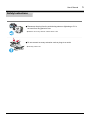
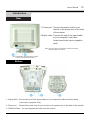
If your monitor was supplied with the base detached, attach the base as follows.
Remove the twist-tie before attaching the base to the monitor.
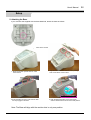
1. Place the monitor upside-down on a flat
work surface.
2. Align the tabs on the base with the corresponding
slots on the bottom of the monitor.
Do not bend the snap.
3. Press the base onto the monitor until the tabs
are fully engaged in the slots.
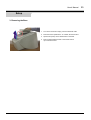
4. Push the base toward the front of the monitor
until the release latch clicks into the locked position.
Note: The Base will align with the monitor slots in only one position.
24