1
GT-E1085/GT-E1085L
safety and usage information
Safety warnings
Mobile Phone
user manual
Keep your phone away from small children and
pets
Keepyourphoneandallaccessoriesoutofthereach
ofsmallchildrenoranimals.Smallpartsmaycause
chokingorseriousinjuryifswallowed.
Protect your hearing
Listeningtoaheadsetathighvolumescan
damageyourhearing.Useonlytheminimum
volumesettingnecessarytohearyour
conversationormusic.
Install mobile phones and equipment with
caution
Someofthecontentsinthismanualmaydifferfromyour
phonedependingonthesoftwareofthephoneoryourservice
provider.
www.samsungmobile.com
Ensurethatanymobilephonesorrelatedequipment
installedinyourvehiclearesecurelymounted.Avoid
placingyourphoneandaccessoriesnearorinanair
bagdeploymentarea.Improperlyinstalledwireless
equipmentcancauseseriousinjurywhenairbagsinflate
rapidly.
Comply with the following precautions to avoid dangerous or illegal situations and ensure peak
performance of your mobile phone.
Handle and dispose of batteries and chargers
with care
Turn off the phone in potentially explosive
environments
• UseonlySamsung-approvedbatteriesandchargers
specificallydesignedforyourphone.
Incompatiblebatteriesandchargerscancauseserious
injuriesordamagetoyourphone.
• Neverdisposeofbatteriesorphonesinafire.Follow
alllocalregulationswhendisposingofusedbatteries
orphones.
• Neverplacebatteriesorphonesonorinheating
devices,suchasmicrowaveovens,stoves,or
radiators.Batteriesmayexplodewhenoverheated.
• Nevercrushorpuncturethebattery.Avoidexposing
thebatterytohighexternalpressure,whichcanleadto
aninternalshortcircuitandoverheating.
Donotuseyourphoneatrefuelingpoints(service
stations)ornearfuelsorchemicals.Turnoffyourphone
wheneverdirectedbywarningsignsorinstructions.
Yourphonecouldcauseexplosionsorfireinand
aroundfuelorchemicalstorageandtransferareasor
blastingareas.Donotstoreorcarryflammableliquids,
gases,orexplosivematerialsinthesamecompartment
asthephone,itsparts,oraccessories.
Avoid interference with pacemakers
Reduce the risk of repetitive motion injuries
Whileusingyourphone,holdthephonewitharelaxed
grip,pressthekeyslightly,usespecialfeaturesthat
reducethenumberofkeysyouhavetopress(such
astemplatesandpredictivetext),andtakefrequent
breaks.
Maintainaminimumof15cm(6inches)betweenmobile
phonesandpacemakerstoavoidpotentialinterference,
asrecommendedbymanufacturersandtheindependent
researchgroup,WirelessTechnologyResearch.Ifyou
haveanyreasontosuspectthatyourphoneisinterfering
withapacemakerorothermedicaldevice,turnoffthe
phoneimmediatelyandcontactthemanufacturerofthe
pacemakerormedicaldeviceforguidance.
PrintedinKorea
CodeNo.:GH68-24706A
English(LTN).11/2009.Rev.1.1
Safety precautions
Drive safely at all times
Avoidusingyourphonewhiledrivingandobeyall
regulationsthatrestricttheuseofmobilephoneswhile
driving.Usehands-freeaccessoriestoincreaseyour
safetywhenpossible.
Turn off the phone or disable the wireless
functions when in an aircraft
Yourphonecancauseinterferencewithaircraft
equipment.Followallairlineregulationsandturnoffyour
phoneorswitchtoamodethatdisablesthewireless
functionswhendirectedbyairlinepersonnel.
Protect batteries and chargers from damage
Usingincompatibleaccessoriesmaydamageyour
phoneorcauseinjury.
• Avoidexposingbatteriestoverycoldorveryhot
temperatures(below0°C/32°Forabove45°C/
113°F).Extremetemperaturescanreducethe
chargingcapacityandlifeofyourbatteries.
• Preventbatteriesfromcontactingmetalobjects,asthis
cancreateaconnectionbetweenthe+and–terminals
ofyourbatteriesandleadtotemporaryorpermanent
batterydamage.
• Neveruseadamagedchargerorbattery.
Turn off the phone near medical equipment
Handle your phone carefully and sensibly
Follow all safety warnings and regulations
Complywithanyregulationsthatrestricttheuseofa
mobilephoneinacertainarea.
Use only Samsung-approved accessories
Yourphonecaninterferewithmedicalequipmentin
hospitalsorhealthcarefacilities.Followallregulations,
postedwarnings,anddirectionsfrommedical
personnel.
• Donotdisassembleyourphoneduetoariskofelectric
shock.
• Donotallowyourphonetogetwet—liquidscancause
seriousdamage.Donothandleyourphonewithwet
hands.Waterdamagetoyourphonecanvoidyour
manufacturer'swarranty.
Ensure maximum battery and charger life
SAR information
• Avoidchargingbatteriesformorethanaweek,as
overchargingmayshortenbatterylife.
• Overtime,unusedbatterieswilldischargeandmust
berechargedbeforeuse.
• Disconnectchargersfrompowersourceswhennot
inuse.
• Usebatteriesonlyfortheirintendedpurpose.
YourphoneconformstoU.S.FederalCommunications
Commission(FCC)standardsthatlimithuman
exposuretoradiofrequency(RF)energyemittedby
radioandtelecommunicationsequipment.These
standardspreventthesaleofmobilephonethatexceed
amaximumexposurelevel(knownastheSpecific
AbsorptionRate,orSAR)of1.6wattsperkilogram.
Duringtesting,themaximumSARvaluesrecordedfor
thismodelwere:
Handle SIM cards with care
• Donotremoveacardwhilethephoneistransferring
oraccessinginformation,asthiscouldresultinlossof
dataand/ordamagetothecardorphone.
• Protectcardsfromstrongshocks,staticelectricity,
andelectricalnoisefromotherdevices.
• Frequentwritinganderasingwillshortenthelifespan
ofmemorycards.
• Donottouchgold-coloredcontactsorterminalswith
yourfingersormetalobjects.Ifdirty,wipethecard
withasoftcloth.
Ensure access to emergency services
Emergencycallsfromyourphonemaynotbepossible
insomeareasorcircumstances.Beforetravellingin
remoteorundevelopedareas,plananalternatemethod
ofcontactingemergencyservicespersonnel.
Network
Frequency
Specific Absorption Rate
Held to ear
Worn on body1
GSM850(1g)
1.18
0.471
GSM900(10g) 0.639
-
GSM1800(10g) 0.469
-
GSM1900(1g) 0.916
0.259
1.Whenusedwithaccessoriesthatcontainnometalandprovide
atleast1.5cmseparationbetweenthephone(includingthe
antenna,whetherextendedorretracted)andthewearer’s
body.
• Avoidusingorstoringyourphoneindusty,dirtyareas
topreventdamagetomovingparts.
• Yourphoneisacomplexelectronicdevice—protect
itfromimpactsandroughhandlingtoavoidserious
damage.
• Donotpaintyourphone,aspaintcanclogmoving
partsandpreventproperoperation.
• Ifyourphonehasacameraflashorlight,avoidusingit
closetotheeyesofchildrenoranimals.
• Yourphonemaybedamagedbyexposuretomagnetic
fields.Donotusecarryingcasesoraccessorieswith
magneticclosuresorallowyourphonetocomein
contactwithmagneticfieldsforextendedperiodsof
time.
Avoid interference with other electronic devices
Yourphoneemitsradiofrequency(RF)signalsthat
mayinterferewithunshieldedorimproperlyshielded
electronicequipment,suchaspacemakers,hearing
aids,medicaldevices,andotherelectronicdevicesin
homesorvehicles.Consultthemanufacturersofyour
electronicdevicestosolveanyinterferenceproblems
youexperience.
Innormaluse,theactualSARislikelytobemuchlower,
asthephonehasbeendesignedtoemitonlytheRF
energynecessarytotransmitasignaltothenearest
basestation.Byautomaticallyemittinglowerlevelswhen
possible,yourphonereducesyouroverallexposureto
RFenergy.
TheFCChasgrantedanEquipmentAuthorization
forthismodelphonebasedonthecomplianceof
allreportedSARlevelswiththeFCCRFexposure
guidelines.TheauthorizationcanbefoundontheFCC
OfficeofEngineeringandTechnologywebsiteathttp://
www.fcc.gov/oet/ea(searchforgranteecodeA3Land
productcodeE1085/E1085L).
Important usage information
Use your phone in the normal position
Avoidcontactwithyourphone'sinternalantenna.
Internalantenna
Allow only qualified personnel to service your
phone
Allowingunqualifiedpersonneltoserviceyourphone
mayresultindamagetoyourphoneandwillvoidyour
warranty.
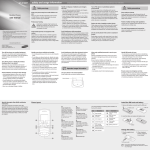
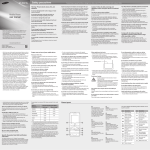
Phone layout
Install the SIM card and battery
1.Remove the battery cover and insert the SIM card.
1
5
1
5
4-way navigation key
In ldle mode, access userdefined menus (depending
on your service provider,
pre-defined menus may differ),
activate the torch light (up),
and make a fake call (down);
In Menu mode, scroll through
menu options
► Activate the torch light
► Make fake calls
Softkeys
Perform actions indicated at
the bottom of the display
2
2
3
4
Dial key
Make or answer a call; In Idle
mode, retrieve recently dialed,
missed, or received numbers;
Send an SOS message
► Activate and send an SOS
message
6
7
8
3
Voice mail service key
In Idle mode, access voice
mails (press and hold)
9
4
Your phone displays the following status indicators on
the top of the screen:
Icon
Description
6
Signal strength
Power/Menu exit key
Turn the phone on and off
(press and hold); End a call;
In Menu mode, cancel input
and return to Idle mode
Call in progress
7
Roaming (outside of normal service area)
Confirm key
In Idle mode, access Menu
mode; In Menu mode, select
the highlighted menu option or
confirm an input
8
Silent profile key
In ldle mode, activate or
deactivate the silent profile
(press and hold)
9
Alphanumeric keys
3.Press <Select>, <OK>, or the Confirm key to confirm
the highlighted option.
4.Press <Back> to move up one level; Press [
] to
return to Idle mode.
Note: notes, usage tips, or additional information
→
Followed by: the order of options or menus you
must select to perform a step; for example: In Menu
mode, select Messages → Create new message
(represents Messages, followed by Create new
message)
[
]
Square brackets: phone keys; for example: [
(represents the Power/Menu exit key)
<
>
Angled brackets: softkeys that control different
functions at each screen; for example: <OK>
(represents the OK softkey)
]
Turn your phone on or off
To turn your phone on,
1.Press and hold [
].
2.Enter your PIN and press <OK> (if necessary).
If you remove the battery after setting Time and date,
it will be reset.
To turn your phone off, repeat step 1 above.
Access menus
To access your phone's menus,
1.In Idle mode, press <Menu> to access Menu mode.
You may need to press the Confirm key to access
Menu mode depending on your region or service
provider.
2.Use the Navigation key to scroll to a menu or option.
• To move the cursor, press the Navigation key.
• To delete characters one by one, press <Clear>. To
delete the characters on the left side of the cursor,
press and hold <Clear>.
• To insert a space between characters, press [0].
• To enter punctuation marks, press [1].
Add a new contact
Your phone is preset to save contact to the SIM memory.
To change the memory location, in Menu mode, select
Phonebook → Management → Save new contact to
→ a memory location.
1.In Idle mode, enter a phone number and press
<Options>.
2.Select Create contact.
3.Select a number type (if necessary).
4.Enter contact information.
5.Press the Confirm key to add the contact to memory.
Send and view messages
To send a text message
1.In Menu mode, select Messages → Create new message.
2.Enter a recipient number and scroll down.
3.Enter your message text. ► Enter text
4.Press the Confirm key to send the message.
• When you access a menu requiring the PIN2, you must
enter the PIN2 supplied by the SIM card. For details,
contact your service provider.
• Samsung is not responsible for any loss of passwords
or private information or other damages caused by
illegal software.
Make a call
1.In Idle mode, enter an area code and a phone
number.
2.Press [
] to dial the number.
3.To end the call, press [
].
The volume through mono earphones is very low or
virtually inaudible. Use stereo earphones only.
Answer a call
1.When a call comes in, press [
2.To end the call, press [
].
].
Adjust the volume
To adjust the volume of the ringtone
1.In Menu mode, select Settings → Profiles.
2.Scroll to the phone profile you are using.
If you are using the silent or offline profile, you are not
allowed to adjust the volume of the ringtone.
To view text messages
1.In Menu mode, select Messages → Inbox.
2.Select a text message.
Make fake calls
You can simulate an incoming call when you want to get
out of meetings or unwanted conversations.
To make a fake call,
• Press and hold the Navigation key down in Idle
mode.
• Press the Navigation key down four times when the
keys are locked.
Activate the mobile tracker
When someone inserts a new SIM or USIM card in your
phone, the mobile tracker feature will automatically send
the contact number to two recipients to help you locate
and recover your phone. To activate the mobile tracker,
1.In Menu mode, select Settings → Security →
Mobile tracker.
2.Enter your password and press <OK>.
The first time you access Mobile tracker, you will be
prompted to create and confirm a password.
3.Scroll left or right to On.
4.Scroll down and press the Confirm key to open the
recipient list.
2.Insert the battery and replace the battery cover.
Call diverting active
SOS message feature activated
Alarm activated
New text message
New voice mail message
FM radio on
Battery
Charge the battery
1.Plug the supplied travel
adapter.
2.When charging is
finished, unplug the
travel adapter.
Normal profile activated
Silent profile activated
Battery power level
Lock key
In Idle mode, lock or unlock
the keypad (press and hold)
Instructional icons
SIM card
Battery cover
3.Press <Options> → Edit.
4.Select Volume → Call alert.
5.Scroll left or right to adjust the volume level.
6.Press <Save>.
To adjust the volume of voice during a call
While a call is in progress, press the Navigation key up
or down to adjust the volume.
In noisy environments, you may have difficulty hearing
the calls while using the speakerphone feature. For better
audio performance, use the normal phone mode.
Change your ringtone
1.In Menu mode, select Settings → Profiles.
2.Scroll to the profile you are using.
If you are using the silent or offline profile, you are not
allowed to change the ringtone.
3.Press <Options> → Edit.
4.Select Call ringtone.
5.Select a ringtone.
To switch to another profile, select it from the list.
Call a recently dialed number
1.In Idle mode, press [
].
2.Scroll left or right to a call type.
3.Scroll up or down to a number or name.
4.Press the Confirm key to view details of the call or [
] to dial the number.
To AC power outlet
o not remove the battery from the phone before
D
unplugging the travel adapter first. Otherwise, the phone
may be damaged.
Enter text
To change the text input mode
• Press and hold [ ] to switch between T9 and ABC
modes.
• Press [ ] to change case or switch to Number
mode.
• Press [ ] to switch to Symbol mode.
• Press and hold [ ] to select an input mode or
change the input language.
T9 mode
1.Press the appropriate alphanumeric keys to enter an
entire word.
2.When the word displays correctly, press [0] to insert
a space. If the correct word does not display, press
the Navigation key up or down to select an alternate
word.
ABC mode
Press an appropriate alphanumeric key until the
character you want appears on the display.
Number mode
Press an appropriate alphanumeric key to enter a
number.
Symbol mode
Press an appropriate alphanumeric key to enter a
symbol.
5.Press the Confirm key to open your contact list.
6.Select a contact.
7.Select a number (if necessary).
8.Press the Confirm key to save the recipients.
9.Scroll down and enter the sender's name.
10.Press the Confirm key → <Accept>.
To send an SOS message
1.With the keys locked, press [
] four times to send
an SOS message to preset numbers.
The phone switches to SOS mode and sends the
preset SOS message.
].
2.To exit SOS mode, press [
Activate and send an SOS message
Listen to the FM radio
In an emergency, you can send SOS messages to your
family or friends for help.
1.Plug the supplied headset into the phone.
2.In Menu mode, select FM radio.
3.Press the Confirm key to start the FM radio.
4.Press <Yes> to start automatic tuning.
The radio scans and saves available stations
automatically.
To activate the SOS message
1.In Menu mode, select Messages → Settings →
SOS messages → Sending options.
2.Scroll left or right to On.
3.Scroll down and press the Confirm key to open the
recipient list.
4.Press the Confirm key to open your contact list.
5.Select a contact.
6.Select a number (if necessary).
7.When you are finished selecting contacts, press the
Confirm key to save the recipients.
8.Scroll down and set the number of times to repeat the
SOS message.
9.Press <Save> → <Yes>.
The first time you turn on the FM radio, you will be
prompted to start automatic tuning.
5.Press and hold the Navigation key left or right to a
saved radio station. Press the Navigation key left or
right to tune a radio station.
6.To turn off the FM radio, press the Confirm key.
Activate the torch light
The torch light feature helps you see in dark places by
making the display and backlight as bright as possible.
To activate the torch light, press and hold the Navigation
key up in Idle mode.
To deactivate the torch light, press <Back> or [
].