1
GT-E1085T
safety and usage information
Safety warnings
Mobile Phone
user manual
Keep your phone away from small children and
pets
Keep your phone and all accessories out of the reach
of small children or animals. Small parts may cause
chokingorseriousinjuryifswallowed.
Protect your hearing
Listening to a headset at high volumes can
damage your hearing. Use only the minimum
volume setting necessary to hear your
conversation or music.
• Please read this manual carefully before using your phone
to ensure safe and correct use.
• The descriptions in this manual are based on the default
settings of your phone.
• Some of the contents in this manual may differ from your
phone depending on the software of the phone or your
service provider.
Install mobile phones and equipment with
caution
Comply with the following precautions to avoid dangerous or illegal situations and ensure peak performance of your mobile phone.
Handle and dispose of batteries and chargers
with care
Turn off the phone in potentially explosive
environments
• Use only Samsung-approved batteries and chargers
specificallydesignedforyourphone.
Incompatiblebatteriesandchargerscancauseserious
injuriesordamagetoyourphone.
• Neverdisposeofbatteriesorphonesinafire.Follow
all local regulations when disposing of used batteries
or phones.
• Never place batteries or phones on or in heating
devices, such as microwave ovens, stoves, or
radiators. Batteries may explode when overheated.
• Never crush or puncture the battery. Avoid exposing
the battery to high external pressure, which can lead to
an internal short circuit and overheating.
Do not use your phone at refuelling points (service
stations) or near fuels or chemicals. Turn off your phone
whenever directed by warning signs or instructions.
Yourphonecouldcauseexplosionsorfireinandaround
fuel or chemical storage and transfer areas or blasting
areas.Donotstoreorcarryflammableliquids,gases,
or explosive materials in the same compartment as the
phone, its parts, or accessories.
Avoid interference with pacemakers
Reduce the risk of repetitive motion injuries
While using your phone, hold the phone with a relaxed
grip, press the keys lightly, use special features that
reduce the number of keys you have to press (such as
templates and predictive text), and take frequent breaks.
Ensure that any mobile phones or related equipment
installed in your vehicle are securely mounted. Avoid
placing your phone and accessories near or in an air
bagdeploymentarea.Improperlyinstalledwireless
equipmentcancauseseriousinjurywhenairbagsinflate
rapidly.
Maintain a minimum of 15 cm (6 inches) between mobile
phones and pacemakers to avoid potential interference,
as recommended by manufacturers and the independent
researchgroup,WirelessTechnologyResearch.Ifyou
have any reason to suspect that your phone is interfering
with a pacemaker or other medical device, turn off the
phone immediately and contact the manufacturer of the
pacemaker or medical device for guidance.
Do not use the phone if the screen is cracked or
broken
Turn off the phone near medical equipment
Handle your phone carefully and sensibly
Avoid interference with other electronic devices
Your phone can interfere with medical equipment in
hospitals or health care facilities. Follow all regulations,
posted warnings, and directions from medical
personnel.
• Do not disassemble your phone due to a risk of electric
shock.
• Do not allow your phone to get wet—liquids can cause
serious damage and will change the colour of the label
that indicates water damage inside the phone. Do not
handle your phone with wet hands. Water damage to
your phone can void your manufacturer's warranty.
• Avoid using or storing your phone in dusty, dirty areas
to prevent damage to moving parts.
• Your phone is a complex electronic device—protect
it from impacts and rough handling to avoid serious
damage.
• Do not paint your phone, as paint can clog moving
parts and prevent proper operation.
• Ifyourphonehasacameraflashorlight,avoidusingit
close to the eyes of children or animals.
• Your phone may be damaged by exposure to magnetic
fields.Donotusecarryingcasesoraccessorieswith
magnetic closures or allow your phone to come in
contactwithmagneticfieldsforextendedperiodsof
time.
Your phone emits radio frequency (RF) signals that
may interfere with unshielded or improperly shielded
electronic equipment, such as pacemakers, hearing
aids, medical devices, and other electronic devices in
homes or vehicles. Consult the manufacturers of your
electronic devices to solve any interference problems
you experience.
Allow only qualified personnel to service your
phone
www.samsungmobile.com
Safety precautions
Drive safely at all times
Avoid using your phone while driving and obey all
regulations that restrict the use of mobile phones while
driving. Use hands-free accessories to increase your
safety when possible.
Follow all safety warnings and regulations
Comply with any regulations that restrict the use of a
mobile phone in a certain area.
Use only Samsung-approved accessories
Using incompatible accessories may damage your
phoneorcauseinjury.
Brokenglassoracryliccouldcauseinjurytoyourhand
and face. Bring the phone to a Samsung service centre
to replace the screen. Damage caused by careless
handling will void your manufacturer’s warranty.
Printed in Korea
Code No.:GH68-25477A
English (HK). 08/2009. Rev. 1.0
Turn off the phone or disable the wireless
functions when in an aircraft
Your phone can cause interference with aircraft
equipment. Follow all airline regulations and turn off
your phone or switch to a mode that disables the
wireless functions when directed by airline personnel.
Protect batteries and chargers from damage
• Avoid exposing batteries to very cold or very hot
temperatures (below 0° C/32° F or above 45° C/
113° F). Extreme temperatures can reduce the
charging capacity and life of your batteries.
• Preventbatteriesfromcontactingmetalobjects,
as this can create a connection between the + and
– terminals of your batteries and lead to temporary or
permanent battery damage.
• Never use a damaged charger or battery.
Specific Absorption Rate (SAR) certification
information
Important usage information
Allowingunqualifiedpersonneltoserviceyourphone
may result in damage to your phone and will void your
warranty.
Ensure maximum battery and charger life
• Avoid charging batteries for more than a week, as
overcharging may shorten battery life.
• Over time, unused batteries will discharge and must be
recharged before use.
• Disconnect chargers from power sources when not
in use.
• Use batteries only for their intended purpose.
Use your phone in the normal position
• Do not remove a card while the phone is transferring
or accessing information, as this could result in loss of
data and/or damage to the card or phone.
• Protect cards from strong shocks, static electricity,
and electrical noise from other devices.
• Frequent writing and erasing will shorten the life span
of memory cards.
• Do not touch gold-coloured contacts or terminals with
yourfingersormetalobjects.Ifdirty,wipethecard
with a soft cloth.
Ensure access to emergency services
Emergency calls from your phone may not be possible
in some areas or circumstances. Before travelling in
remote or undeveloped areas, plan an alternate method
of contacting emergency services personnel.
Avoid contact with your phone's internal antenna.
Internalantenna
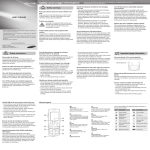
Phone layout
Install the SIM card and battery
Your phone conforms to European Union (EU)
standards that limit human exposure to radio frequency
(RF) energy emitted by radio and telecommunications
equipment. These standards prevent the sale of mobile
phones that exceed a maximum exposure level (known
astheSpecificAbsorptionRate,orSAR)of2.0watts
per kilogram.
1
4-way navigation key
Inldlemode,accessuserdefinedmenus,activatethe
torch light (up), and make
afakecall(down);InMenu
mode, scroll through menu
options
► Activate the torch light
► Make fake calls
1
5
2
3
6
7
2
Dial key
Makeoransweracall;InIdle
mode, retrieve recently dialled,
missed, or received numbers;
Send an SOS message
► Activate and send an SOS
message
3
4
Handle SIM cards with care
8
Voice mail service key
InIdlemode,accessvoice
mails (press and hold)
9
Keypad lock key
InIdlemode,lockorunlock
the keypad (press and hold)
4
5
Softkeys
Perform actions indicated at
the bottom of the display
6
Power/Menu exit key
Turn the phone on and off
(press and hold); End a call;
InMenumode,cancelinput
andreturntoIdlemode
7
Confirm key
InIdlemode,accessMenu
mode;InMenumode,select
the highlighted menu option or
confirmaninput
8
Silent profile key
Inldlemode,activateor
deactivatethesilentprofile
(press and hold)
9
Your phone displays the following status indicators on
the top of the screen:
Icon
Description
Icon
Signal strength
GSM network
connected
New voice mail
message
Call in progress
Normalprofile
activated
Call diverting active
Silentprofile
activated
SOS message
feature activated
Battery power level
Alarm activated
Battery cover
SIMcard
Description
New text message
(SMS)
Roaming (outside of
normal service area)
1.RemovethebatterycoverandinserttheSIMcard.
2.Insertthebatteryandreplacethebatterycover.
Battery
Charge the battery
1. Plug the supplied travel
adapter.
Alphanumeric keys
2. When charging is
finished,unplugthe
travel adapter.
To AC power outlet
Do not remove the battery from the phone before
unpluggingthetraveladapterfirst.Otherwise,thephone
may be damaged.
Access menus
Instructional icons
Note: notes, usage tips, or additional information
Followed by: the order of options or menus you
must select to perform a step; for example: In Menu
mode, select Messages → Create new message
(represents Messages, followed by Create new
message)
→
[
]
Square brackets: phone keys; for example: [
(represents the Power/Menu exit key)
<
>
Angled brackets: softkeys that control different
functions at each screen; for example: <OK>
(represents the OK softkey)
]
Turn your phone on or off
To turn your phone on,
1.Press and hold [
].
2.Enter your PIN and press <OK> (if necessary).
To turn your phone off, repeat step 1 above.
Answer a call
To access your phone's menus,
1.When a call comes in, press [
1.In Idle mode, press <Menu> to access Menu mode.
2.To end the call, press [
S Stroke mode
3.Press <Select>, <Save>, or the Confirm key to
confirm the highlighted option.
4.Press <Back> to move up one level; Press [
return to Idle mode.
Adjust the volume
] to
• When you access a menu requiring the PIN2, you must
enter the PIN2 supplied with the SIM card. For details,
contact your service provider.
• Samsung is not responsible for any loss of passwords
or private information or other damages caused by
illegal software.
3.Scroll up or down to a character.
4.Press an alphanumeric key to enter the
corresponding character.
5.When you are finished, press <Back> to return to
your message.
T Stroke mode
1.Press [1] through [5] to enter strokes. Press [6] when
you are unsure which stroke to enter. This will insert
a placeholder.
2.Press the Confirm key. A number appears by each
character.
3.Scroll up or down to a character.
4.Press an alphanumeric key to enter the
corresponding character.
5.When you are finished, press <Back> to return to
your message.
Make a call
1.In Idle mode, enter an area code and a phone
number.
2.Press [
] to dial the number.
3.To end the call, press [
].
Symbol mode
Press an appropriate alphanumeric key to enter a
symbol.
English word mode
1.Press appropriate alphanumeric keys to enter an
entire word.
2.When the word displays correctly, press [0] to insert
a space. If the correct word does not display, press
the Navigation key up or down to select an alternate
word.
2.In Menu mode, select FM radio.
4.Press the Confirm key to open your contact list.
4.Press <Yes> to start automatic tuning.
The radio scans and saves available stations
automatically.
• The first time you turn on the FM radio, you will be
prompted to start automatic tuning.
• Automatic tuning will only locate stations with an
adequate signal.
5.Control the FM radio using the following keys:
5.Select a contact.
6.Select a number (if necessary).
Key
Function
7.Press <Options> → <Save> to save the recipients.
Confirm
Turn the FM radio on or off
8.Scroll down and set the number of times to repeat
the SOS message.
Navigation
• Left/Right: Tune a radio station; Select a
saved radio station (press and hold)
• Up/Down: Adjust the volume
9.Press <Save> → <Yes>.
6.To turn off the FM radio, press the Confirm key.
To send an SOS message
1.With the keypad locked, press [
] four times to
send an SOS message to preset numbers.
The phone switches to SOS mode and sends the
preset SOS message.
2.To exit SOS mode, press [
].
2.Scroll to the profile you are using.
If you are using the silent or offline profile, you are not
allowed to change the ringtone.
3.Press <Options> → Edit → Call ringtone.
4.Select a ringtone.
To switch to another profile, select it from the list.
To adjust the volume of voice during a call
Enter text
To change the text input mode
• Press [ ] to switch to an input mode; Press and
hold [ ] to select an input mode.
• Press [ ] to change case in English input modes.
• Press and hold [ ] to switch to Symbol mode.
Pinyin mode
1.Press appropriate alphanumeric keys to enter
pinyins.
Call a recently dialled number
2.Scroll left or right to a pinyin.
1.In Idle mode, press [
3.Press the Confirm key. A number appears by each
character.
].
2.Scroll left or right to a call type.
3.Scroll up or down to a number or name.
4.Press the Confirm key to view details of the call or
[
] to dial the number.
While a call is in progress, press the Navigation key up
or down to adjust the volume.
4.Scroll up or down to a character.
5.Press an alphanumeric key to enter the
corresponding character.
6.When you are finished, press <Back> to return to
your message.
In noisy environments, you may have difficulty hearing
the calls while using the speakerphone feature. For better
audio performance, use the normal phone mode.
Your phone is preset to save contacts to the phone
memory. To change the memory location, in Menu mode,
select Phonebook → Management → Save new
contact to → a memory location.
Send and view messages
To send a text message
1.In Menu mode, select Messages →
Create new message.
Activate the mobile tracker
When someone inserts a new SIM card in your phone,
the mobile tracker feature will automatically send the
contact number to two recipients to help you locate and
recover your phone. To activate the mobile tracker,
1.In Idle mode, enter a phone number and press
<Options>.
2.Enter a recipient number and scroll down.
3.Enter your message text. ► Enter text
1.In Menu mode, select Settings → Security →
Mobile tracker.
2.Select Create contact.
4.Press the Confirm key to send the message.
2.Enter your phone password and press <OK>.
3.Select a number type (if necessary).
4.Enter contact information.
5.Press the Confirm key to add the contact to memory.
To view text messages
1.In Menu mode, select Messages → Inbox.
3.Scroll left or right to On.
4.Scroll down and press the Confirm key to open the
recipient list.
You can simulate an incoming call when you want to get
out of meetings or unwanted conversations.
To make a fake call,
• In Idle mode, press and hold the Navigation key
down.
• When the keypad is locked, press the Navigation key
down four times.
Set and use alarms
To set a new alarm
1.In Menu mode, select Alarms.
2.Select an empty alarm location.
3.Set alarm details.
4.Press <Save>, or press <Options> → Save.
To stop an alarm
When the alarm sounds,
• Press <OK> or the Confirm key to stop the alarm
without snooze.
• Press <OK> or the Confirm key to stop the alarm with
snooze, or press <Snooze> to silence the alarm for
the snooze period.
To deactivate an alarm
1.In Menu mode, select Alarms.
2.Select the alarm you want to deactivate.
3.Scroll left or right to Off.
4.Press <Save>.
If you remove the battery, scheduled alarms will be
reset.
The first time you access Mobile tracker, you will be
prompted to create and confirm a password.
2.Select a text message.
Make fake calls
• To move the cursor, press the Navigation key.
• To delete characters one by one, press <Clear>. To
delete all of the characters, press and hold <Clear>.
• To insert a space between characters, press [0].
• To enter punctuation marks in English input modes,
press [1].
3.Press the Confirm key to start the FM radio.
3.Scroll down and press the Confirm key to open the
recipient list.
3.Press <Options> → Edit → Volume → Call alert.
Press an appropriate alphanumeric key until the
character you want appears on the display.
1.Plug the supplied headset into the phone.
2.Scroll left or right to On.
If you are using the silent or offline profile, you are not
allowed to adjust the volume of the ringtone.
ABC mode
In an emergency, you can send SOS messages to your
family or friends for help
1.In Menu mode, select Settings → Profiles.
2.Scroll to the phone profile you are using.
Add a new contact
Press an appropriate alphanumeric key to enter a
number.
Listen to the FM radio
1.In Menu mode, select Messages → Settings →
SOS messages → Sending options.
1.In Menu mode, select Settings → Profiles.
5.Press <Save>.
Activate and send an SOS message
To activate the SOS message
To adjust the volume of the ringtone
4.Scroll left or right to adjust the volume level.
123 mode
2.Press the Confirm key. A number appears by each
character.
].
].
2.Use the Navigation key to scroll to a menu or option.
The volume through mono earphones is very low or
virtually inaudible. Use stereo earphones only.
1.Press [1] through [5] to enter strokes. Press [6] when
you are unsure which stroke to enter. This will insert
a placeholder.
Change your ringtone
Activate the torch light
The torch light feature helps you see in dark places.
To activate the torch light, press and hold the Navigation
key up in Idle mode.
To deactivate the torch light, press and hold the
Navigation key up in Idle mode.
5.Press the Confirm key to open your contact list.
6.Select a contact.
7.Select a number (if necessary).
8.Press <Options> → Save to save the recipients.
9.Scroll down and enter the sender's name.
10.Press the Confirm key → <Accept>.